Leaderboard




Popular Content
Showing content with the highest reputation on 08/14/22 in all areas
-
Just watched the movie Prey. I would say it may even be better than the first Predator movie. Oh, and if you've seen all the rest of the movies there are nods to all of them. I liked the one of the pistol from Predator 2.4 points
-
The first hotfix for SE 9.1 (33.2.0.140) was released today. There are a couple fixes for Dolby processing which has come up before. Resolves issue where Simplified wake buttons would not power on IR controlled TV Resolves issues where display would briefly show up in low resolution for a split second Fixes bug where files were not detected properly on connected removable storage Fixes bug where user had to select a home app when setting up SHIELD after factory reset Adds power control option to wake SHIELD when TV input changes to SHIELD [2015/2017 SHIELD] Resolves MxMaster 3 BT mouse pairing issue [SHIELD 2019 models] Resolves issue where audio would not be present until reboot when Dolby Audio Processing is enabled [SHIELD 2019 models] Resolves issue where audio would play at an accelerated rate when Dolby Audio Processing is enabled Resolves issue where TV remote would not control SHIELD 30 seconds after waking SHIELD Resolves some issues where CEC volume control was not functioning properly on AV receivers or soundbars Fixes bug when mounting NAS using IP addresses for accounts with empty passwords Fixes color accuracy bug when “Default to Rec .709 for HD videos” developer option is enabled General cleanup and re-organization of developer options Sign-up and details on the following link: SHIELD Experience Upgrade 9.1+ HotFi | NVIDIA GeForce Forums3 points
-
Hey All, Firstly, excellent work! secondly, I noticed that this has stopped working in Emby 4.6.4.0, I have forked the repo and fixed if anyone is interested. (Have PR out for main repo) https://github.com/ShanePe/Emby.SmartPlaylist.Plugin/ Sorry also, I have made an update, if the playlist has NOT yet been generated, it will generate it, regardless of the playlist schedule trigger. So one no longer need to 'manually' run first to initialize the playlist if it falls outside of playlist generation schedule. (Make sense !?!?!?!) Version 2.4.0.3 Feature Create a copy of a playlist. (Duplicate) Decluttered UI by adding a pop up menu to playlists New Criteria: Added Audio Stream Codec Criteria (Stream: Audio Codec) Added Audio Stream Language Criteria (Stream: Audio Language) Added Audio Stream Display title Criteria (Stream: Audio Display Title) Added Subtitle Stream Language Criteria (Stream: Subtitle Language) Added Video Stream Codec Criteria (Stream: Video Codec) Added Video Stream Display title Criteria (Stream: Video Display Title) Updated Criteria: Parental Rating: Now uses official rating under the hood Resolution Height: Now uses video streams to determine the available video heights rather than the metadata. Resolution Width: Now uses video streams to determine the available video widths rather than the metadata. Added Monitor Mode to shuffle playlist type. Meaning that the playlist will be destroyed and recreated on a schedule, but between scheduled executions, media item changes will be batched and monitored for inclusion/exclusion. (So .... combination of live and shuffle modes but could have a perf hit on larger playlists, experimental) Collapsible sections in the playlist editor that keeps state, for more UI real estate. Added the ability to add notes to a playlist (limited to 256 chars). If there are notes assigned a pop up is displayed when hovering over a playlist (2 second delay). Order all selection lists on criteria with dropdowns alphabetically. ------------------------------------------------------- Releases Here -> (See change logs in this thread .... way down) Plugin for Emby Server 4.8: SmartPlaylist-2.5.0.4810.zip2 points
-
I figured it out. It was a firewall issue. Thanks2 points
-
I can only please some of the people some of the time. Everyone else seems really happy with it in the testing thread2 points
-
@FrostByte I fixed the images.2 points
-
What provision have you made to keep the certificate updated (it has a max life of three months)? There are ways to do this, using a program called CertBot - but I don't know how that would tie in with what you've done to create it in the first instance. For my money, the very easiest way to create and update certificates with zero ongoing effort is to use Caddy as a reverse proxy. It does everything necessary by default, and only requires a single line (apart from the domain name and a couple of brackets) to get a working reverse proxy for Emby (which then has no certificate installed). I've written about this before in this forum, but if you want an updated version, I could do one in a couple of days (travelling right now) Paul1 point
-
Yes, I can confirm that downgrading fixed the issue mentioned here. And I just tested 4.7.6.0-2, works like a charm. Thank you for your hard work!1 point
-
Pretty happy with it now. You can get it in the catalogue
 1 point
 -
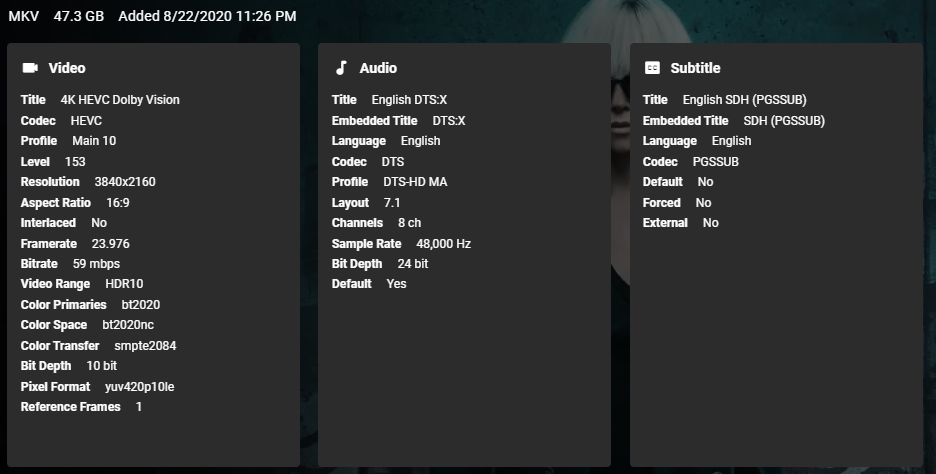
Stats For Nerds1 point
-
No , Thanks for insisting on the intro (pre-roll), but no that's not what I mean. I do know that there is a feature for this in the form of a 'cinema mod'. I mean something completely different, I'll make a video of how it's done on a full Blu-ray movie soon1 point
-
I understood this request to mean he wants to actually modify the "loading spinner" to be something else. @CAPRICORNX10X please clarify. If I'm correct, I'll leave this request but it would be rather difficult to accomplish across all systems and would have a very limited audience I'm afraid.1 point
-
OK I can live it it the way it is for now then, cause first I don't know how to roll something back, and second like I said above I don't want to rollback for fear of breaking something that relies on the newer version. Thanks guys for the help and input.1 point
-
PM @Abobader.1 point
-
Hi, I have to delete old EPG. Now I see channel. Regards.1 point
-
Did ya catch the pistol throw back to Predator 2? Also, if you watch the end credits, they re-tells the story of the movie, but at the end... More Predator ships appear in the sky! Loved that movie!1 point
-
Many many many thanks @cayars!!!!!!! I´ll try... Have a nice day and stay well!!1 point
-
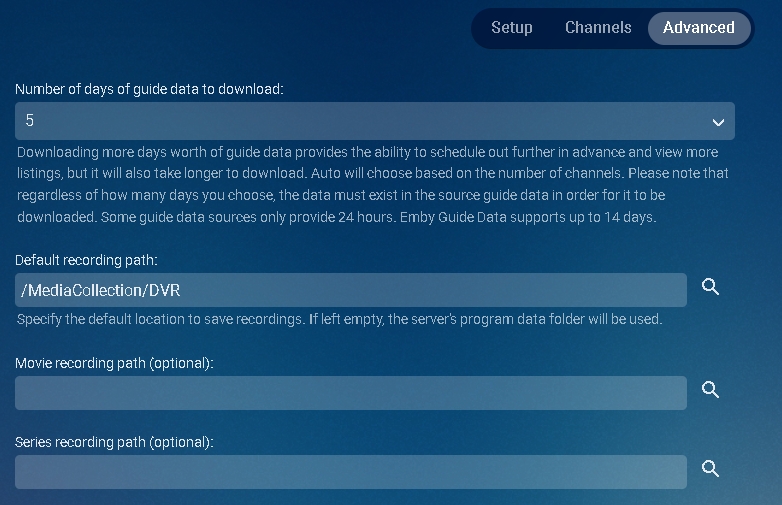
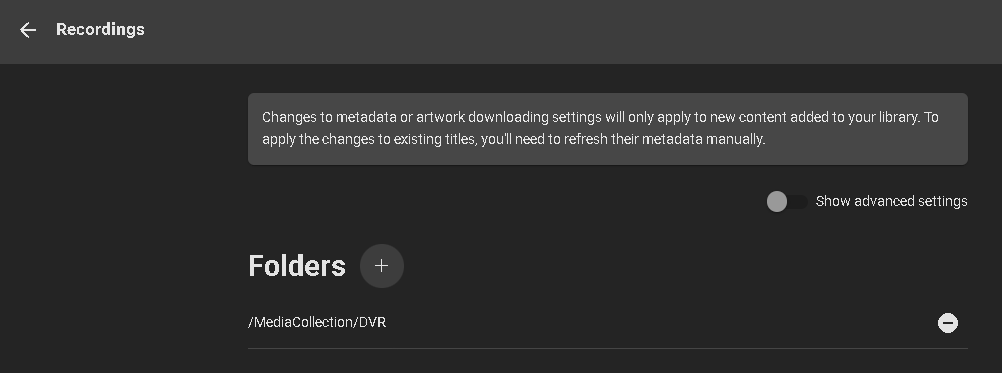
What you can do is go into Live TV and pick any channel and record something. You can cancel the recording in 5 to 10 seconds. Now go to the logs menu and open the embyserver.txt log file at the top. Scroll to the bottom of the file and you should fine your recording. You can also do a search (ctrl-F) for "Saving Recording". You will have a line similar to this which will show the folder you're storing recordings in. For me it's /MediaCollection/DVR as I've moved the location. 2022-08-13 22:21:57.132 Info LiveTV: Saving recording image to /MediaCollection/DVR/48 Hours (1987)/poster.jpg You can create a new directory somewhere else if you like and copy/move your recordings to the new location. Make sure you grant the internal system emby user read/write access to this new location. Now go to the Live TV menu and click the Advanced tab at the top. You can configure the new default recording path here. Because I left the movie and series paths blank, Emby Server will create a movie and series folder under the DVR path I set automatically. I myself don't use those two fields unless I'm using different locations such as Drive 1 for movies and Drive 2 for Series. So leave those two blank if storing to the same location. Optionally you could leave current recordings where they are and just set the location to be used moving forward. One last thing to change is your Recording Library. You will either add a 2nd path keeping the first where it is or replace it like I did: Instead of doing a recording and looking at the log you can of course check to see if you have the "Default recording path:" already filled in and/or you can check the Recording Library entry which should be pointing to the current location. You have 3 ways of possibly finding the path but the first while more work is full proof. If you need help with a copy or move command to transfer the recordings to a new location let us know the current location as found above as well as the new location you created for recordings. Someone will be able to give you the commands to use from the command line using SSH. Carlo
 1 point
 -
We've seen some issues reported with 2.88.0 so the plan right now is to wait for a 2.88.1 maintenance release and then we may do that.1 point
-
To my view, still the first one stand out, and yes, good idea that flower that cool the blood down.1 point
-
Actually since the is ArchLinux it is do to the system Skia update beyond Emby build version. The version of the native libSkiaSharp library (88.0) is incompatible with this version of SkiaSharp. Supported versions of the native libSkiaSharp library are in the range [80.2, 81.0).1 point
-
Hi, try using the image editor to delete the existing images, then run a scan of all libraries and see if that helps. Thanks.1 point
-
Thanks for following up.1 point
-
We'll look at improving it. Thanks for the feedback.1 point
-
Correct, here are some others: long press BACK ◁ from anywhere to return to the ATV home screen single press BACK ◁ to jump to the beginning of a list long press SELECT to toggle SFN during playback1 point
-
Think on a Shield you long press the Back (<) key and it goes to top of the Home page. Something similar on Fire TVs. Can't check to make sure at the moment and thats for the AndroidTV Emby app.1 point
-
That appears to be the Apple TV app. Roku and Android TV are calculating properly.1 point
-
@sundevil67 @greengo @Heydrich @EyeShore Apologies for the delay. I've published Emby Server 4.7.6 for macOS 10.13+ on our website: https://emby.media/download Thanks.1 point