Leaderboard




Popular Content
Showing content with the highest reputation on 07/22/22 in all areas
-
I just tried it and it wasn't that great. Without enhanced home screen and no sound effects like in the android tv app it's too quiet. Also the movement pressing the up and down buttons are messed up and jerky. Not smooth like the TV app. I'll give it another shot tomorrow maybe.5 points
-
Yes this URI worked!! http://localhost:8096/emby/Artists?searchterm=Adele&recursive=true&api_key=2cb36c16427b46659856d40029250e79 Thanks @luke -Mike Mac2 points
-
I think we all came to the same agreement that this is down the Core to decide. Locking 'chapters' seems a good way forward in keeping with how the rest of the metadata is edited/locked. If/when the Core delivers an editor - then this makes even more sense. View is to store it all in the Core/chapters table - locking maintains chapters after an item refresh. The jury is out on NFO files - but if they are used as a metadata source by the user, then chapters should, imho, be written back - but again, as part of the core NFO process.2 points
-
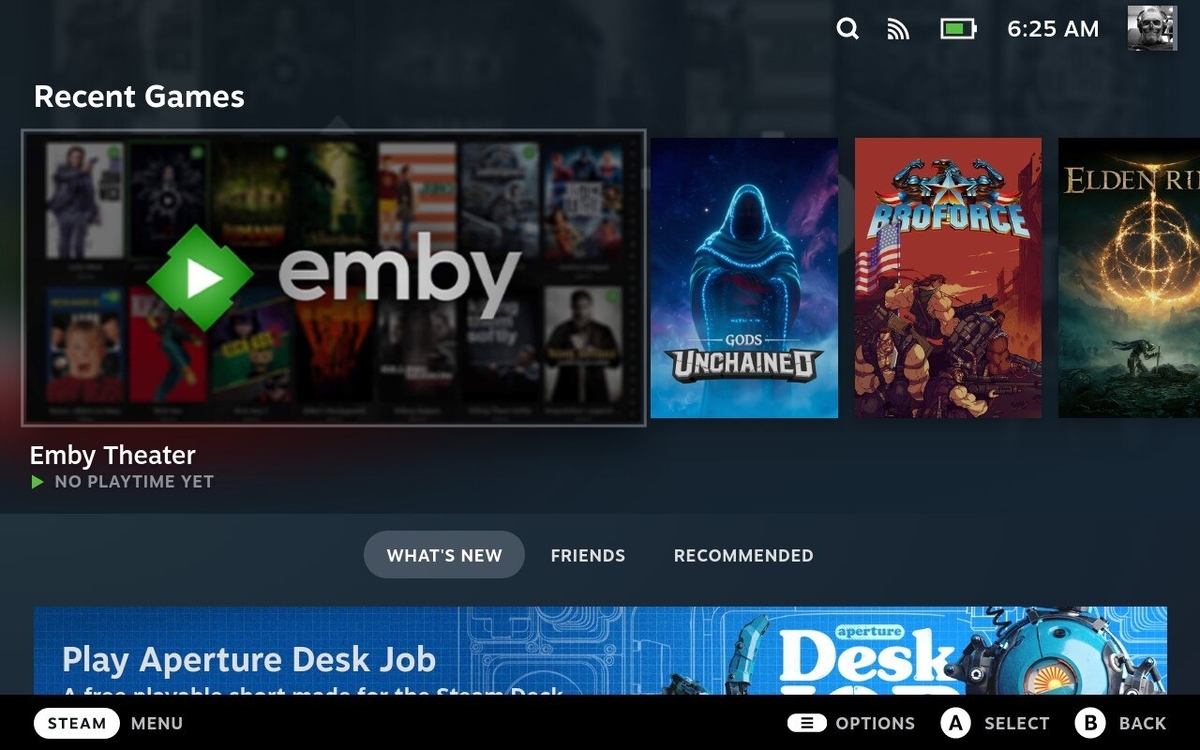
Looks good on the Deck. Probably needs a custom Controller Settings Layout, but still works pretty darn well.
 2 points
 -
@gillmacca01 Sorry, I have a fix. Emby.AutoOrganize_preprocessing.zip Remove the fileorganizer.db please.2 points
-
pretty much summarises the feedback i meant to give a few months ago. nothing wrong with the goal of merging the 2 apps but the standard app is objectively bad for tv use at present2 points
-
All I can say is WOW. I just got a chance to check out the plugin. Kudos for all the hard work on this. I used it mainly to remove some intro skips that werent correct and it worked beautifully Mook2 points
-
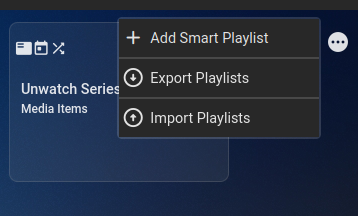
Version 2.4.0.1 Feature Added Import/Export functionality allowing you to backup and restore playlists. Added Regular Expression (Match and No Match) Operators for string values Added 'Overview' Criteria Added Readable to rules tree Added playlist load failure reason to main Emby Log. Added 'Smart Playlist (Execute)' Source item. This will first execute the playlist before reading the items from it. Added More logging around errors and error handling. Bug Changed the way log files are transferred. Thanks for testing! Import/Export. Remove single 'Add' button and created a hover over menu on the right hand side . Regular expressions for string values. Uses underling C# Regex engine, so ensure regex is C# standard. Also popup menu with Regex options. Readable rules tree, gives you a (hopefully) clearer view of your rules tree. Playlist does not need to be saved to view. New "Source Type" Smart Playlist (Execute). This will show a list of smart playlists that are NOT live mode. The idea is that if the 'Source type' is used, that the underlying Smart Playlist will execute before the referencing playlist and then get the items from that source, so they are up-to-date. (This will appear in the logs as triggered by 'LinkedAsSource') SmartPlaylist-2.4.0.1.zip
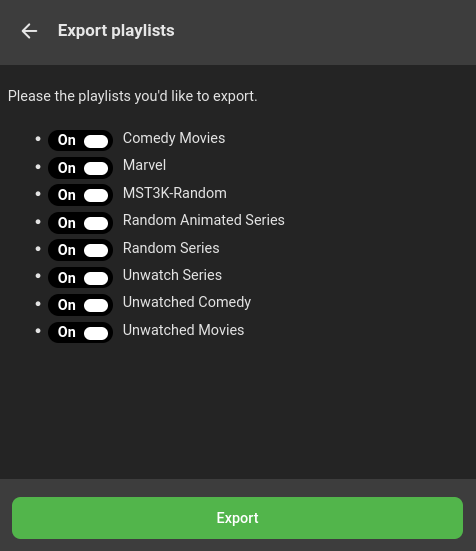
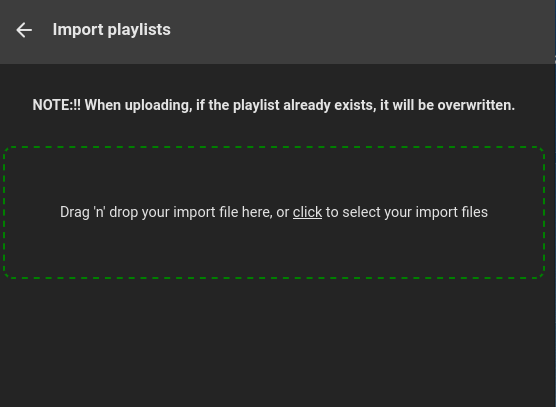

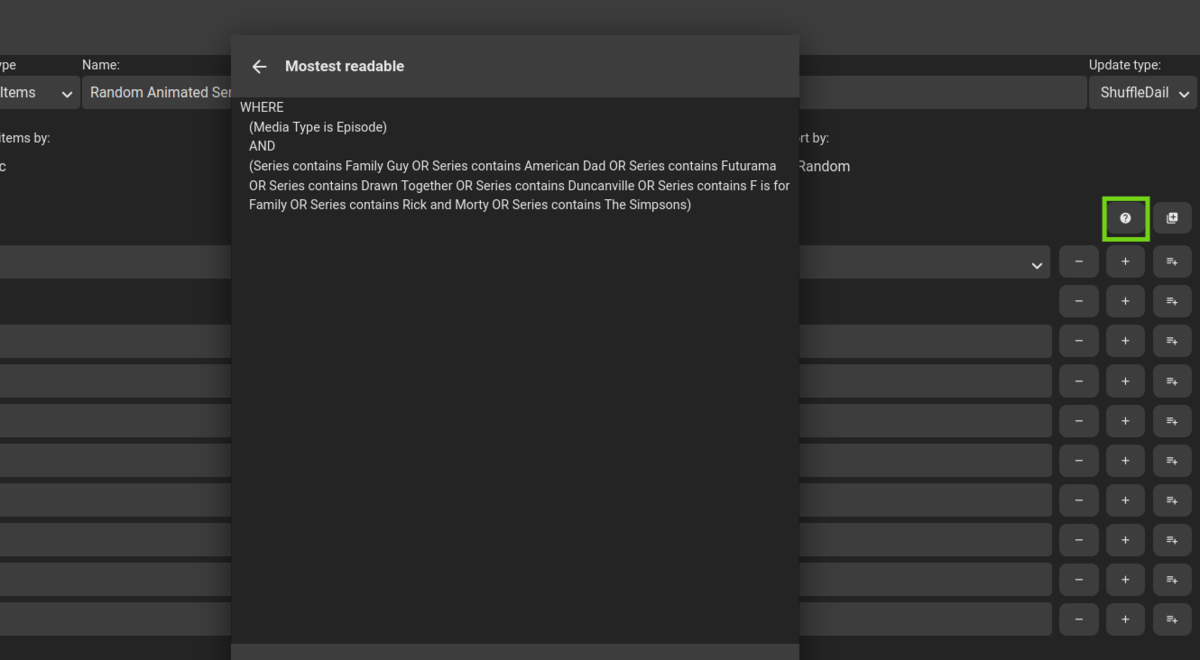 2 points
 -
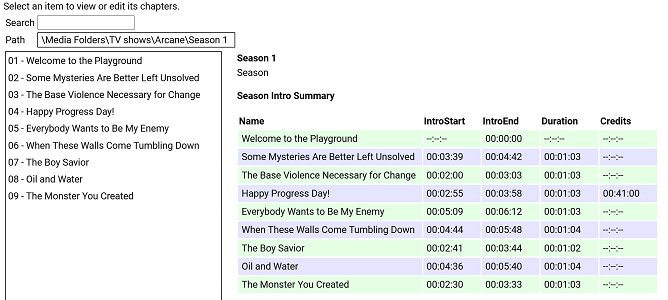
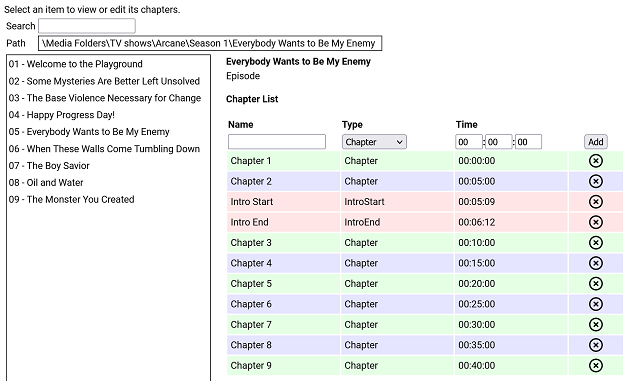
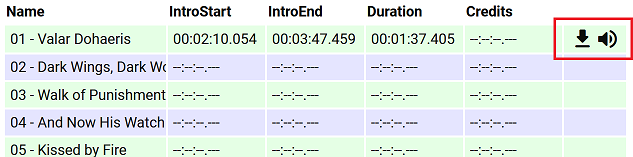
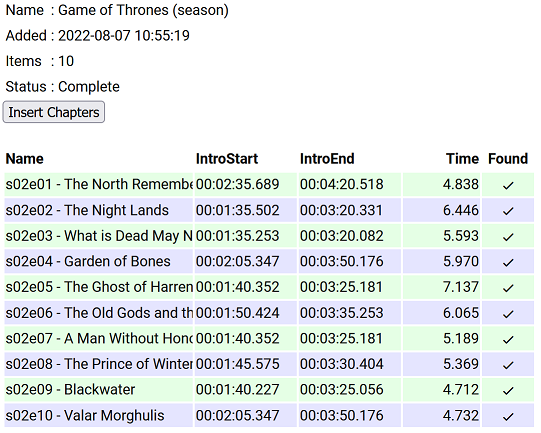
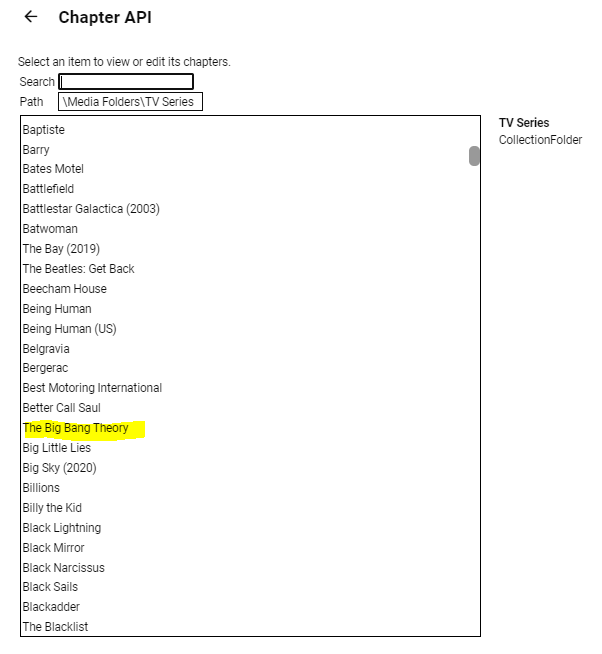
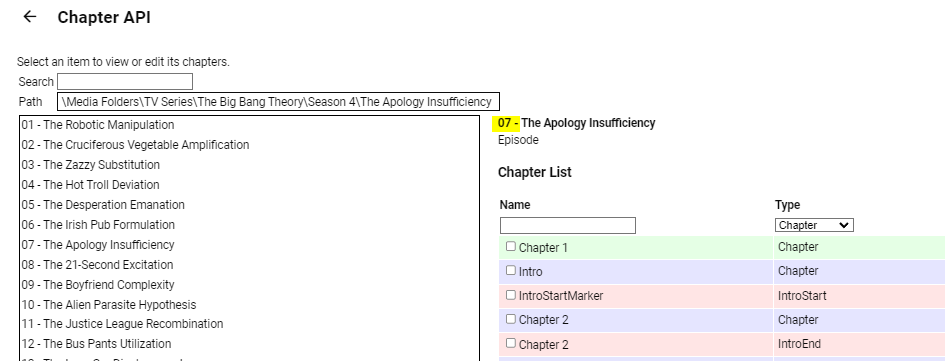
I have put together a simple chapter viewer and editor plugin. The plugin is now in the plugin catalogue. As always, here is the source: https://github.com/faush01/ChapterApi/tree/main/ChapterApi It is very simple and allows you to view chapters for an item (Movie, Season or Episode), remove chapters and add them. It supports all the different chapter marker types. It also has a season Intro summary page, select a season to see if it has intros detected for each episode. Note: All chapters are wiped and reset when you do a metadata refresh on an item. If you spend any time setting up or editing your chapters, keep this in mind. There is no current way of locking chapters. Chapter List Season Intro summary Intro Detection (CTRL-F for Intros) I have added a new way of detecting intros based on theme audio, this is using a very different approach than the core approach, it is using some of the ideas I posted over there: https://emby.media/community/index.php?/topic/107878-audio-fringerprinting-chromaprint-segment-detection/ With this approach, you need the Into Chromaprint info, this is a simple audio fingerprint of the theme song/music/audio. The plugin looks for this and can create chapters based on the results of the search. So where do you get the Chromaprint Intro info file, you can create one yourself for a series, season or episode by adding chapter info for one episode and then extracting that as a Chromaprint Info file. The new icons on the season summary page lets you extract the info file, if you just want to check you have the chapter offsets correct you can extract the audio of the chapter to play back and confirm it. A Chormaprint info file looks like this: { "series":"Game of Thrones", "season":2, "tvdb":"121361", "imdb":"tt0944947", "tmdb":"1399", "duration":107, "extract":10, "cp_data":"ThXy/E4hsdxOIZDdziWA3c9lgNnd/YDI3NyAyNyYwMzcuFHc1L0V3dS1F1/E8xJexOISXsfyMl72UzZe5lM13uZlNN/m7FDddvyT3Hack9xWjJDdR52Q3USWkN0EkvHfFJJz3zT2d98s53ffJO1n/yR8Z/4lTCf+Hgwn/k40N/pOJHH63iBR+/4xUfnuEdP47hXDeH1XgXgcd4B4DP/AeAzf0FkM/VBZDO0QWTzkEFkt9BN7bdASet3RUnqP0UJaj9dFe57WRH2u/kR977pEfO++RXw/vlb8D5Ze/Q+GfvcNgn32TdI99m/iPfbvYjj37jUZ/+4FX73uBN+9fhSfvV40vf1eELT9XjCU3V4hlN1fIZfcfzHW3C0FU9w9DRPYHTkTWA0pElgMLVNYBDVBWARRQBgUcUEYNHFRGCR3ARhk7gAY5e4BGdd+AxqGU0IahkHCCo5AwwreUMEKblDACipwwAsrbIMIGemCCAjKgggIipIYCI7QGBiWUBg4kjAbGIIxGvmDEhqrsQFequAAXq4gAF6uIABevjBDTq8Qwk2vEYLM/wKCxA8Og8QPHpDEH36QxDfe8MQ213HEFtUxxAfFdsTX0XbEt/H2xKPzdcSS0zXAgsI3wYLCJ8KSwyXCprXlwqakpcLnrLTC5ay0wlW09MMFsDXDBZE1wwXTJ8FV0ibB5eJm0e1v9lOta/dTrXn1Up0ZdVKNGXdSjwV1Up8BdFLvEGRS7yBgUusgYFLvIPAS72XwEt1d8wLF2fIDxNlyA8TbcgJ0/3ECZK9wAmSncQJEvyJCBZ4iQweOJwE3iiEAJpphACa74xE2qaMTNryjEia8oBInrGASJ6wgM0W4IjHFmCIwxIgmMJTIJjC0SCcwpVw3MeVtNTHnb3QxY270MXJWtTECRrEwAtKhMALjs3QS47N0I+XxdCPv0Hwh+1B8EfsRfAH7EnwB6xJ9EO9Tf3D1U37wxcN+8cXDfpXFQX6V90F/l+ZAfbfuQX337kN959dDf+dVwH7vVcB+//XQds3103fN91J1Tf5SfV3OUn0vz3N9L93wfy/00H4/5NB+H+RQfg/0En4P9BZ+P0U2f29Hdn/vRvd/nxL3dZ4S9XWOMvV0nzL1fJ8iVVyeIlVcvgLzXO4G8VxvFrFcPy6wXA0ukFgNKpAYDWqQCAz+0AgM11AIHPdRCDXzEQg18wMIVdMCCPfHAgm39wMKsuNBCpLzQwqCUUMKkkFBCqZQwAqmIMAJ5myBCGZogggH+YIIBdmCCASP0ggEh1AINIMwCSSzEAoksxEKZKcTSuWnAUqjYwBKkjEASpIwAU6yEMPOphCCz+YQgs1WAYLFFgWRxTZ1kIUn/dCFN8UwhRfHN4QPxzaEHeZ2xF3m1sTd5pXE3fbUxP1GFMT1RjXExQc2xMUXNkTXNRdEZyXVRGct1EQzLdREAz1VRANVNkQDQTYEA8FnAFPBbwDy8e0BoqHvAaKtbwOzuW8Ck4lvApOJZQKTjWUCkZFlArGxZQKhoWVCoaF0QqGldALhrXACxflzAcTbMgDE2yMA9P8lEOTtIRDk5WFR5fVjUXXfZ1FXjmVRFo5gUBaOYFA2nmBRNq3hUybso1Im7KNSJ/yhUmVc8FLVWHNShBgyE4QZMhCECyYQlA4nELQCZxDlM+cQZSOlEDUjpBAXIqQAFxLkABZO5AQWWuEEFtqmBAb6pgwG6rcMF+6wCBfnUAgF0xcLBcMXCjTTBRrl4QQbpeEEG6XlRBmt/UUZv/1FGZd/RRuOf0cbzlVHGV5VRxkuRMEbL1TBGz9lwRofdcMaD/XDGh3Twxp100Aa5fFAGuXhABmlsUEYrbFDGKe/wxinv8Bct7rAXIa+Q1yGn0Jcx5VCXNeF0l1nhfFfJYXwXzWn8F4Vo/NeBfNyXgfzMl4XUTJeJ0ExX2YcMFzmOFBctinRXIYpw1yGL8NdjhfCXY4Dw1+vA9Nf50HRX2Xhkd014bBdNaGwXTSl8F00n/BdFJ9xWRTtcls1bTJaNTUyWjURMlv1ARJb9QNTWbVTQFi1Y0BYteFAWLXhQFj39UNYV7XCWUadwllGmdJbRtnTW1bZ01pW3VNaXtVRWl7QVV5/QFde/0F2X/9Tdl/3ZnZdpiZU3aYmVN2mZ8TfpuHE3+bwgd/WsILXVoSS1zeFkJc3hZCXNYfQhhfXV4YX0TaHF3E2hSYRMoRmYXecZmXXnOZt15z3XZWUx93UlMffVcXF31fFRY82x1WPftV1/3/VZe181WX1dNUx8XXVEdF21AHBftRBQX7U0BN91OAnfNSgL33QoWt/1aFb/9aTS//Wg0v30oLF5VLCwORS86DkUmOgZFJl4GRSZfQ1cnX8NXIk/DZzNH12cVVpdnBVL3xw/y98cO8vfHHvHn9z7w5fU/9O3VNfztxTXc6UU02+lNMNr5XTDa230xettdNnrbXTZ53d02fLH9Imyx7SZkk+0nY5PtJXLH/SxyTvUscg71LXEH9R1wM+VNcCNlRXAnZUTRJ1VB029BQdavQcPOrwHDzq8Bwc6lAcDO8RGQz1EhsM0RYZHUEXGS1AVRgtZVQYb2XXGG/n1xnO8scbztLHGs7Sxxqew8EbrpVBWa+9QFnvqUBY/7lBWc+9Q1vNlUZbTdFGWg3BV1s9wFZZLdB3WS1hdVgv53dYL+bXWR521ltOUtdaztLFWt/CwFvv1cBb79zA2e/8wNnf/MPZzvzD3c7wQ9/O0EPf3sFT33/BVt1391bd9W/23fVp99/1OXXflT913pUzE96FE1Pe3wNTXu8T0V4vM9BeKyOQXzkjkF85dtBfKUbQXyhXUF84N1B/GCUQewh1ET8JXBM92dwDPbnYQTSZ2EA0iZhANImMRDCJhEUxmYDHM7nQ1jL54dYy6ePWMuuj1nLvo3dy54d0c+WPdHHVjVRxhY1Xc4WPVnPVz1Zz519Xc2YvV3NmL3ZzJiVncSYkY3cuFOF3PkDxdw5QsH8P4PB/DeDQPwz1UzkMrRI5DO0SORztAjk8/QE5PVVBON1TQziPU0IYj1LCGI8Cwxi9AkBYrCZAWKwmwVjcP8JYzF+CSExNg0kNRZBPDdWUT17XtU/+t/VN7pf0TK6XdEyut1VFnvVWx47xUsaG0VLGh0FTVrcBUVbvMVBWbSNQVikj8VYpI/FWKDfwUzge8FMYHnBTCFcwVwjXMVcI1TFXCIVwV9mFYXW5jXF1mZ1zdJi9c3SIvXF1mLRwd7iQMHb4sDP2eLAy9jigMvYsoTL2JeMm9yZiZvQmMmb0Igbv9CIN7PwiCOz8Yhjs/MI4/v2CPP5fghT+XoIRf16GE3delhJ3X7cy912vIrVc7SaUWG0ukEhpaoBIGGqASAjqgEhN/tFITddSSF1DM0hdQzNM/UFxTO9lU0znbdNM9m3ST4Zl0k6GwVJOhsETTpaBEU7ns1BO56PQT2WjwE0lp8BNJK/QTRT/Uk0E9xJNBdcSTRVDE0hlUVBIZWVQSHVt0UhVfdFJ1X3VSdd3VUvXU1dL19NWS9fDd0v3wXdLd+XVSTft1Ek3rVRJN7lXWVe9Fl1G3RdfRsUxX9bFM16mUVNetjFTXrYxU162MUFepjHBXuchgV7lIYFePTGRXz0TkF8sU5BdKFfQGSjfUBkY31AZGP8TGxjtExsZbQEZWfVDGZnVRxiZlUcYmZ1FHbi/RB24v0RfuK9Ed5y3R3ack0Z2nJJGcryy1nK14t5y5/L/cubWfXLmxmxy5sds8ubFbPNW1W3zRtVv8QbVbXEW/W1wFnltcDZ5ZXEmeGdxJmhmdzZs5lYWcOZWBtDiXgfQ814FkHMeBbBSGgWkAhsMrAIZTLwCGdzdAhndzUYZvVUHGb0RBRmfEwUY3xNFGP8yRVh9ModYLRaHWD0GhVg9NpRMXW6UTE3ulEzPntVMzofXTZ6F1U+uldVOrpVVTv7BVU7+0XdO/mFyTv5hc15vMXFeaTNxXigj0V44I9FeODZBXigWQF44FkBeGBdAHwhFUB8IwREdGYAQPXmAMD3ZhTQ9m4V0PbuPd327nnJ9m75yfZmuU3+ZrhF+uLc3/rixNv7o8Tb+6OE2/mkhdvZtIXbXLyF+1DYxftQ2Af/UJgy91HYYrcTWKK3ExiivxIY5r8SGT6XFhsPkx7bC5Me28vTHpuN1xebjNcTm8xDMZ+cQzFXvEEwV71BNBfVTTQRxVk8EUVZPFEF2TxRFd09VXfdNfXn1T+1t1E//ZVVOz3FXTk/BU05/wVBfL5HQXy+l0F8trdBfPanBXg25Q14Nt0JeDZICXk3CAl/dQgZc7QYHXK0vRVSvK8RUrivFVJ4vh9WONcfXhgDH1rYAwda+ENFGniDTQr4hkEOuFZBDrh2QQ68tsEKtZbBCvOXjQtjxYULYsSBD+LEgU1ixIFMYsyFTGbIjVRmyI3U5siF1ObZjdTi+Y3QY/mJ0GF5ifBhfY3wYTWN8WA1jfFgFY3lZRXF7GXX1ehvh93ob4fd6", "cp_data_length":3372, "cp_data_md5":"DDF936E4FD29A02CDA178EBFF37AD2E8" } It's just a JSON file with some info and the Chromaprint data. This can then be used in the Intro Detection tab to create a job against a series/season/episode list. Once complete, you can import the job results into your items. This is a semi auto way of detecting chapters for series that are having issues, because you are supply a good well-known chromaprint of the audio you want to target your results are much more predictable. Sharing intro theme cp data The sharded intro theme cp data is now hosted on GitHub https://github.com/faush01/ThemeCpData To use the hosted data in auto detection in the ChapterApi plugin, you can use the following URL in the "Intro Data External Url" on the options tab of the plugin: https://github.com/faush01/ThemeCpData/archive/refs/heads/main.zip Add the URL, hit download intro data, hit reload intro data and the intro cp data will be loaded for all the series you have that there is cp data for in the shared repository. If you want to add more the to the shared repo, clone it, add your new into cp json items and do a pull request to have your new items merged in and available to others.
 1 point
 -
Hello this request is basically for one problem, but for sure it would be helpful in general: I'd like to see the abilty to check for two genres, e.g. Animation, Anime and map them to one genre Anime as I don't find another way seperating Anime from Animation. Best regards1 point
-
Thanks. I've posted a 1.3.1 update with this fix.1 point
-
Possible bug, using v 7.6.0 on native mode. I added a multiversion movie that appears as a single item in my emby server. On Kodi it appeared as 2 separate items. The only fix was to do a complete database reset. (update and repair libraries was not working)1 point
-
Thanks for the rapid response. I'll go look for a server log and upload it here.1 point
-
Do you have a backup of critical Emby Server files? If not and you have Premiere install and setup the Backup Configuration Plugin from the catalog. Among other things this backs up all the databases. You can shutdown Emby Server and make a backup copy of the data directory as well before doing the next thing. with a backup of databases done. Try turning on the vacuum option again and restart the server. Let's see how long it takes to complete. The only time I've ever seen this not complete in under 6 minutes was when there was an issue in the library.db file that needed fixing. I'd like to make sure you don't have a problem with the memory upgrade or vacuum. I tend to run it once a month or when ever I made drastic changes to media. Now with over 25K movies, 150K+ shows plus home movies, sports, music, etc it's less than 2 minutes. But first time running a vacuum I'd be patient and give it time. Try this again and set a timer for 30 minutes. If it's not finished by then let us know as it's something we should check on and I can remote in and give you a hand with it. Please make sure you have a backup of the data folder either by hand or via the backup config plugin first.1 point
-
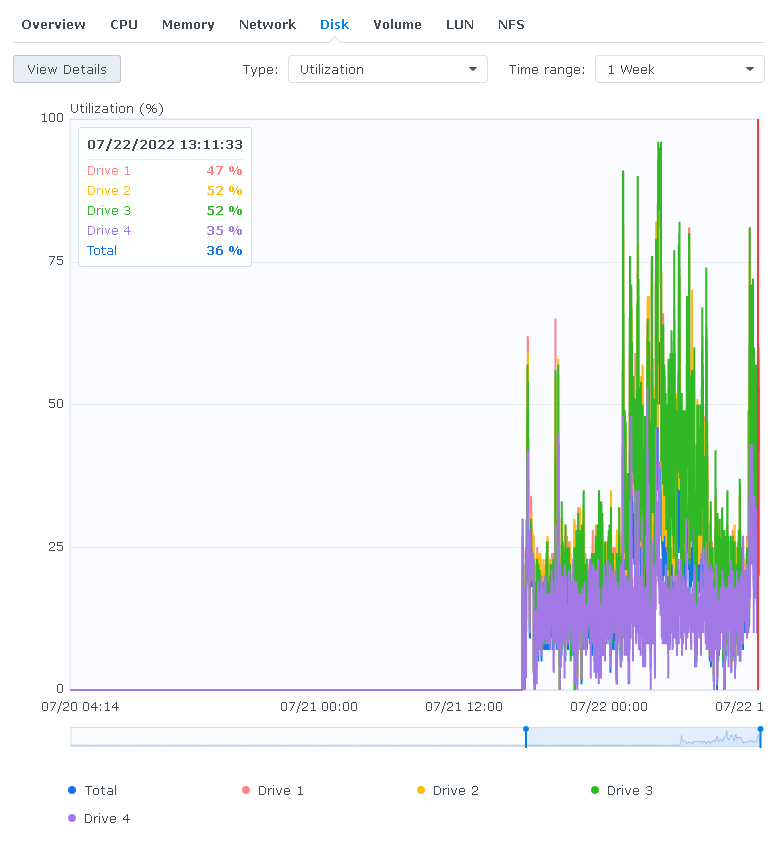
I hope you mean you got WD RED PLUS or RED PRO and not just RED drives. WD renamed their drives a couple years go to make it clear which drives use shingled vs convention recording. "WD Red" will exclusively mean disks using Shingled Magnetic Recording technology "WD Red Plus" will mean disks using Conventional Magnetic Recording with 5400RPM performance "WD Red Pro" will mean disks using Conventional Magnetic Recording with 7200RPM performance I wish I had logging turned on longer on my NAS as this will give you a unique view of performance across a few drives. This is a 4 drive btrfs volume so each of the drives is handling the same amount of data. Drive 1 is a 14TB WD Red Pro drive Drive 2 is a 14TB WD Red Plus drive Drive 3 is a 14TB WD white label "Red Plus" drive Drive 4 is revealed below. The white label Red Plus drives are also used in USB3 External enclosures that everyone shucks thinking they are getting "Red Plus" drives. These drives are the slowest of the bunch and do not include the same firmware as true NAS drives. They also can't be firmware updated to NAS firmware. BTW, I think I've got every version of the Reds as well as Seagate from 4TB to 18TB. I typically pick up a couple to test with as I always need more drives for backup so I get to test different drives this way. In general my advise is do NOT purchase WD drives with "Red" in the name. Do not purchase Seagate drives with "IronWolf" in the name. Neither are worth the money and better drives can be had cheaper. While you can run tests on individual drives and compare it's sometimes neat to combine different drives as part of the same RAID array so it's handling the exact same data as it's neighbor and comparing things this way. There is one stand-out drive of the 4 that is much faster and it's pretty clear. Drive 4 is a WD drive but from their Data Center collection of drives. It's still a SATA drive and actually cheaper then the NAS drive lineup!!! These go by the name UltraStore. These are all Helium filled drives with 512MB cache vs 64MB and up for Irons and Reds. 14TB Red Plus $285 https://www.amazon.com/Western-Digital-14TB-Internal-Drive/dp/B08V13TGP4 14TB Red Pro $368 https://www.amazon.com/Red-Pro-14TB-Hard-Drive/dp/B07YFGW736 14TB WD Elements Desktop Hard Drive HDD, USB 3.0 $259 https://www.amazon.com/14TB-Elements-Desktop-Drive-WDBWLG0140HBK-NESN/dp/B07YD3G568 14TB Ironwolf Pro NAS $329https://www.amazon.com/Seagate-IronWolf-7200RPM-256MB-3-5-Inch/dp/B07H57WY2Z 14TB Ironwolf NAS $308 https://www.amazon.com/Seagate-IronWolf-RAID-Internal-Drive/dp/B07H7CKYGT 14TB Ultrastar $259 https://www.amazon.com/Western-Digital-14TB-Ultrastar-HC530/dp/B07KPL474H
 1 point
 -
Hello Gillmacca01... No, you are not doing anything wrong. The problem is with me. I just didn't think anyone would be interested in bulk changing Parental Ratings. I will fix the problem. Thanks for bringing it to my notice. Vic1 point
-
Agreed and thanks @Luke Apologies, I rebuilt my server recently, and I /was/ on the official container under OMV All fixed up now using the official. Will observe any further issues and watch out for the maint. rel. Cheers1 point
-
1 point
-
Same Problem here. 4k HDR does not work..irrelevant of the audio 4k without HDR works fine. App Version: 1.6.1 de Server Version: 4.7.5.0 when will this be fixed?1 point
-
I try to play a video file (series episode) which should play, but currently doesnt because of linux file permission problems which i wont get into here. It is then marked as played, so when i want to try again later i have to look up the file in the media section, because it has disappeared from "latest" etc. sometimes i forget to uncheck played and have missed episodes because of this. i dont think logfiles will be useful in this case, it is just a question of how the software should behave when faced with a playback error. I think it should only mark files as played when they have been played 9x%, not after a playback error (no compatible streams found)1 point
-
Thank you. I will look into it and see what I can find and how to do it. I'll keep you posted. Appreciate your help.1 point
-
Those SmartMatches are unstable. I dont know exactly why. Also kingy has some UI changes coming. It uses a grid layout instead of flex. As for the smart matches, I'll continue to look at the code and see where things go wrong. In the meantime, there are so e new options there if you are going to point watched folders directly to a folder which contains compressed recording. In that case, switching the toggle will allow you to choose a preprocessing folder, which will handle your recordings automatically. If you don't toggle this option on, then you'd most likely have another application preprocessing your recording. Cool!1 point
-
New version available 7.6.1: delta changelog: add additional logs fix invalid people (cast) issue fix invalid aspect ratio issue fix alternative device name add custom composer node improve artwork cache, currently supported format are jpg, png fix videoplayer window focus on multiselection Comment: Artwork cache completely rewritten Also artwork caching possible for photoalums and photos Artwork cache NOT tested on Windows. Let me know if there are any issues. Maybe somebody send me the Textures13.db from a Windows system for review? Thanks1 point
-
Hi, as a Plex user i highly appreciate his Traschcan feature, that, if a hdd video repo goes offline, it will be marked as unavailable but still in library. Looking around for a solution i found out this software: Safely Remove Hardware better alternative | USB Safely Remove set it up in this exact way(obviously you can place this .bat wherever you want) the .bat DO this: TASKKILL /IM EmbyServer.exe* /T /F when you disconnect any usb,it will kill embyserver so you'll never run into a situation where you have to rebuild your library, totally or partially. i tested it either with standard and portable emby version. it works fine both situation. The only downside is this program is not free. there is a 30 day trial. it worth it IMHO. you can also try out a free option, working around this thread windows - Starting scheduled task by detecting connection of USB device - Super User you can launch a scheduled task action based on an event viewer EVENT. but i prefer using this simple program, altrough NOT FREE. Hope this help Have a nice day embykill.bat
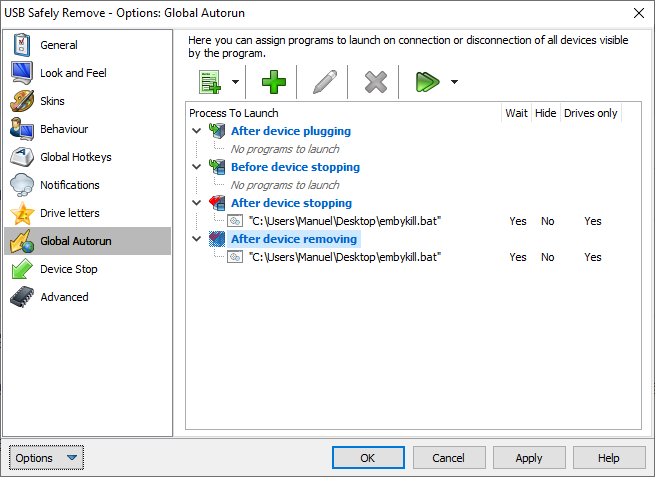
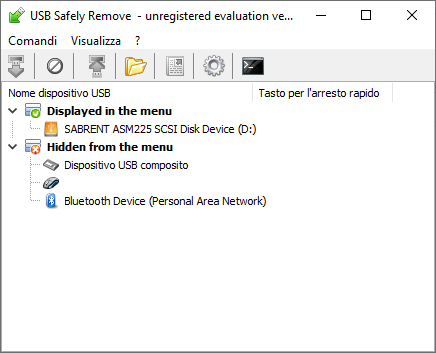 1 point
 -
shield tv pro 2019 i had windows, android-tv-box, build-in android tv, chromecast, chromecast with build-in android tv. nothing comes close to the features and stability of a shield pro. i didnt regred one single € i paid for that (and recomended it to several friends). ofc this device is so powerfull you could do much more with it. thats why it never gets overwhelmed. its the only device that was able to playback hdr uhd 60fps movie without any issues.1 point
-
Thanks @Luke and team for considering my ramblings. It really is awesome to be able to talk to the people writing the code for the product, and have an explanation for design decisions. Thank you. ~Spritz1 point
-
I would post a log but it happens sporadically. The next time it happens i will.1 point
-
Confirming that the issue is fixed in 3.2.57. Thank you!1 point
-
I figured this out. All I needed to do is increase the LiveTV buffer in WinTV from zero to 1 minute, and that fixed it. I guess Emby needs to read the buffer in order to record with the Colossus 2.1 point
-
From, I've watched 7 episodes and it's one of them shows the gets you hooked. It's directed by the same guy that did Lost so hopefully it doesn't get lost like that series. Worth a go I think if you like small town Stephen King type horror stuff. It's been given a green light for a second season on Epix Studios. So it will be interesting to see where it goes.1 point
-
When creating the this file, i forgot to remove the last" from his example "yourdomain.net"1 point
-
@vdrover Maybe you should (or not) post this on the comskip forum http://www.kaashoek.com/comskip/viewforum.php?f=6 There is not a lot of activity over there but just maybe... ...the posts do get read ( but inot necessarily responded too ) Although it does look like there is an upcoming performance enhancement update in the works ( upgrade to ffmpeg v5+ with better codec support and possibly multi-threading for 10bit HEVC etc. ) And the NFL (US football) does this too and you don't miss any real action.1 point
-
https://youtu.be/I2M2JQDPNKw1 point
-
Hi, easiest thing to do is uninstall the plugin temporarily.1 point
-
I have a Zidoo Z9X and it works fantastic by itself with It's Home Theater app, but it is not meant for emby. Honestly I find the shield is the best with Emby, but I use Emby exclusively for Anime because of the Shields AI upscaling. It makes anime look better then on any other device I've tried. I use my Zidoo Z9X for everything else like all my Dolby vision content, TV Shows and Movies. Dolby Vision support on the Z9X is miles ahead of any other Android box, cause it supports every Dolby Vision format. Even Dolby Vision Profile 8 Which is used when A Blu-ray release has no Dolby Vision, Instead they take the Dolby Vision RPU metadata from a Web release and add it to the 4k hdr Blu-ray release making Blu-ray quality with Dolby Vision.1 point
-
@Spritzup our audio options are currently centered on the user's language preference, rather than trying to avoid transcoding or picking the highest quality audio track. But more options can certainly be added in future updates to provide other kinds of control. Thanks.1 point
-
@rbjtech Thank you for that. I had completely forgot about this option, but I have set it up in the past for a similar issue. Thank you!1 point
-
Hi there, please attach the complete emby server log file. Thanks.1 point
-
Suspected known bug Chrome on Mac. See: https://stackoverflow.com/questions/59336762/chrome-drop-down-menu-bug-closing-automatically Possible steps to fix based on similar FB issue: https://techwiser.com/facebook-not-loading-chrome/ I would not test with Chrome on Mac. It's generally not supported browser combination. The Web dev industry typically does not test with this. If you want to use Chrome, use the Windows version. I would expect you to run into constant issues using that browser OS combination. Safari & Mac is not much better for odd bugs but it is supported more for web testing online. Hope that helps.1 point
-
Nothing new to report at this time.1 point
-
Anything new to this four year old question? @Lukesaid four years ago that this is a feature for the future. The Future is now.. but nothing new1 point
-
This will be resolved in Emby for Android 3.2.57+. Thanks.1 point
-
Fantastic - thanks for the updates !
 1 point
 -
latest version in the first post now has a play button for the chapters so you can check the chapter start point against the video. if there are no bug reports in the next few days I might put this up in the plugin catalogue.1 point
-
Great, I'll look forward to it.1 point
-
is this already fixed? Because I have exactly the same problem. 2 Library. One for Flac. One for mp3. The mp3 is converted from flac file, so tag, and folder structure are exactly the same, except the parent folder. Flac Library contain only Flac Folders MP3 library contain only MP3 Folders. both albums have duplicated tracks. so inside mp3 album, there are also flac tracks. so do the flacs album.1 point
-
Emby Server is now a TrueNAS Scale Official Application. Very few applications ever get to have that privilege! Emby Server has been available in the community catalog. Emby is now forefront on the first screen when entering the Applications Menu. This is where Official Apps are shown. https://emby.media/truenas-scale-server.html To learn more about TrueNAS Scale: https://www.truenas.com/truenas-scale/ Overview of Hardware Packages: https://www.truenas.com/systems-overview/ Customer Support : https://www.ixsystems.com/support/ View the full article1 point
-
I have the same problem One library is FLAC from vinyl rips, the other is MP3. On artist list they are mixed without chance to recognise them. They should be separated (or at least with a tag that show if they are FLAC or MP3)1 point
-
In short: What is the official font for the Emby logo words? Thanks a lot!1 point
-
HI, first of all I want to say thanks! I just buyed Emby Premium recently because I think is great and very powerfull. I have created Media servery Emby for my company where we share videotutorials, movies, wallpapers, music and more. It will be nice to see in the future, an option to create a folder for utilities, that means software we use or maybe a manual pdf, or even a .zip or .rar. Also another feature nice to see is on folder customization option to allow download. (not by user) by folder. So this way I can allow only some folder to download and other don't. Regards, Spirit1 point