Leaderboard




Popular Content
Showing content with the highest reputation on 07/16/22 in all areas
-
@Luke What's the deal. Apple has basically phased out Intel Macs - what's the delay in fixing issues with emby on M1 AND M2 macs? I've read countless delays and excuses. Proof is in the pudding and a release with the fix. We want the TRUTH not being led to believe this is going to be addressed any time soon. IS A DEVELOPER ACTIVELY WORKING ON THIS ISSUE???3 points
-
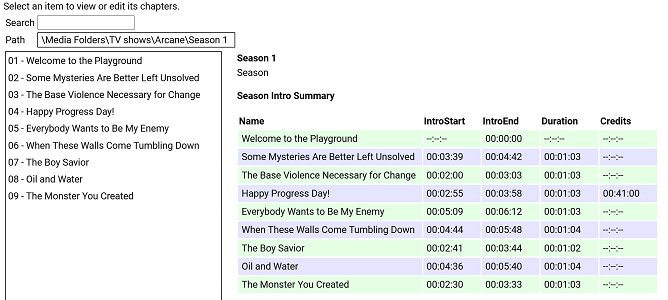
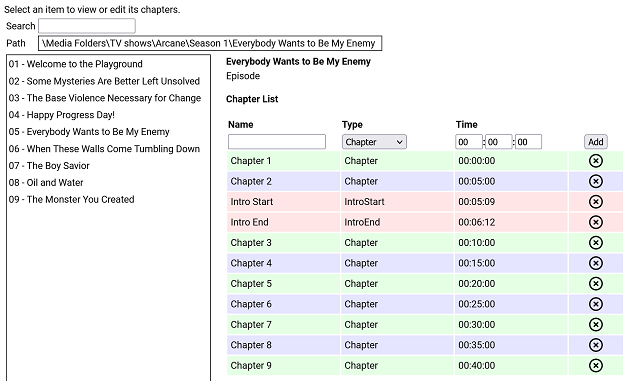
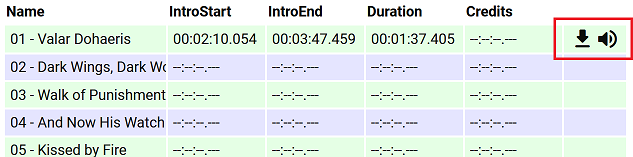
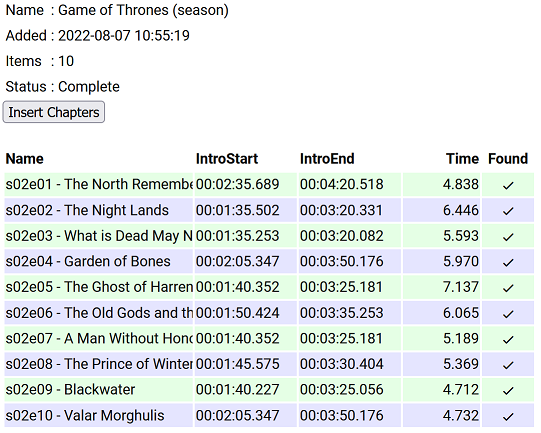
I have put together a simple chapter viewer and editor plugin. The plugin is now in the plugin catalogue. As always, here is the source: https://github.com/faush01/ChapterApi/tree/main/ChapterApi It is very simple and allows you to view chapters for an item (Movie, Season or Episode), remove chapters and add them. It supports all the different chapter marker types. It also has a season Intro summary page, select a season to see if it has intros detected for each episode. Note: All chapters are wiped and reset when you do a metadata refresh on an item. If you spend any time setting up or editing your chapters, keep this in mind. There is no current way of locking chapters. Chapter List Season Intro summary Intro Detection (CTRL-F for Intros) I have added a new way of detecting intros based on theme audio, this is using a very different approach than the core approach, it is using some of the ideas I posted over there: https://emby.media/community/index.php?/topic/107878-audio-fringerprinting-chromaprint-segment-detection/ With this approach, you need the Into Chromaprint info, this is a simple audio fingerprint of the theme song/music/audio. The plugin looks for this and can create chapters based on the results of the search. So where do you get the Chromaprint Intro info file, you can create one yourself for a series, season or episode by adding chapter info for one episode and then extracting that as a Chromaprint Info file. The new icons on the season summary page lets you extract the info file, if you just want to check you have the chapter offsets correct you can extract the audio of the chapter to play back and confirm it. A Chormaprint info file looks like this: { "series":"Game of Thrones", "season":2, "tvdb":"121361", "imdb":"tt0944947", "tmdb":"1399", "duration":107, "extract":10, "cp_data":"ThXy/E4hsdxOIZDdziWA3c9lgNnd/YDI3NyAyNyYwMzcuFHc1L0V3dS1F1/E8xJexOISXsfyMl72UzZe5lM13uZlNN/m7FDddvyT3Hack9xWjJDdR52Q3USWkN0EkvHfFJJz3zT2d98s53ffJO1n/yR8Z/4lTCf+Hgwn/k40N/pOJHH63iBR+/4xUfnuEdP47hXDeH1XgXgcd4B4DP/AeAzf0FkM/VBZDO0QWTzkEFkt9BN7bdASet3RUnqP0UJaj9dFe57WRH2u/kR977pEfO++RXw/vlb8D5Ze/Q+GfvcNgn32TdI99m/iPfbvYjj37jUZ/+4FX73uBN+9fhSfvV40vf1eELT9XjCU3V4hlN1fIZfcfzHW3C0FU9w9DRPYHTkTWA0pElgMLVNYBDVBWARRQBgUcUEYNHFRGCR3ARhk7gAY5e4BGdd+AxqGU0IahkHCCo5AwwreUMEKblDACipwwAsrbIMIGemCCAjKgggIipIYCI7QGBiWUBg4kjAbGIIxGvmDEhqrsQFequAAXq4gAF6uIABevjBDTq8Qwk2vEYLM/wKCxA8Og8QPHpDEH36QxDfe8MQ213HEFtUxxAfFdsTX0XbEt/H2xKPzdcSS0zXAgsI3wYLCJ8KSwyXCprXlwqakpcLnrLTC5ay0wlW09MMFsDXDBZE1wwXTJ8FV0ibB5eJm0e1v9lOta/dTrXn1Up0ZdVKNGXdSjwV1Up8BdFLvEGRS7yBgUusgYFLvIPAS72XwEt1d8wLF2fIDxNlyA8TbcgJ0/3ECZK9wAmSncQJEvyJCBZ4iQweOJwE3iiEAJpphACa74xE2qaMTNryjEia8oBInrGASJ6wgM0W4IjHFmCIwxIgmMJTIJjC0SCcwpVw3MeVtNTHnb3QxY270MXJWtTECRrEwAtKhMALjs3QS47N0I+XxdCPv0Hwh+1B8EfsRfAH7EnwB6xJ9EO9Tf3D1U37wxcN+8cXDfpXFQX6V90F/l+ZAfbfuQX337kN959dDf+dVwH7vVcB+//XQds3103fN91J1Tf5SfV3OUn0vz3N9L93wfy/00H4/5NB+H+RQfg/0En4P9BZ+P0U2f29Hdn/vRvd/nxL3dZ4S9XWOMvV0nzL1fJ8iVVyeIlVcvgLzXO4G8VxvFrFcPy6wXA0ukFgNKpAYDWqQCAz+0AgM11AIHPdRCDXzEQg18wMIVdMCCPfHAgm39wMKsuNBCpLzQwqCUUMKkkFBCqZQwAqmIMAJ5myBCGZogggH+YIIBdmCCASP0ggEh1AINIMwCSSzEAoksxEKZKcTSuWnAUqjYwBKkjEASpIwAU6yEMPOphCCz+YQgs1WAYLFFgWRxTZ1kIUn/dCFN8UwhRfHN4QPxzaEHeZ2xF3m1sTd5pXE3fbUxP1GFMT1RjXExQc2xMUXNkTXNRdEZyXVRGct1EQzLdREAz1VRANVNkQDQTYEA8FnAFPBbwDy8e0BoqHvAaKtbwOzuW8Ck4lvApOJZQKTjWUCkZFlArGxZQKhoWVCoaF0QqGldALhrXACxflzAcTbMgDE2yMA9P8lEOTtIRDk5WFR5fVjUXXfZ1FXjmVRFo5gUBaOYFA2nmBRNq3hUybso1Im7KNSJ/yhUmVc8FLVWHNShBgyE4QZMhCECyYQlA4nELQCZxDlM+cQZSOlEDUjpBAXIqQAFxLkABZO5AQWWuEEFtqmBAb6pgwG6rcMF+6wCBfnUAgF0xcLBcMXCjTTBRrl4QQbpeEEG6XlRBmt/UUZv/1FGZd/RRuOf0cbzlVHGV5VRxkuRMEbL1TBGz9lwRofdcMaD/XDGh3Twxp100Aa5fFAGuXhABmlsUEYrbFDGKe/wxinv8Bct7rAXIa+Q1yGn0Jcx5VCXNeF0l1nhfFfJYXwXzWn8F4Vo/NeBfNyXgfzMl4XUTJeJ0ExX2YcMFzmOFBctinRXIYpw1yGL8NdjhfCXY4Dw1+vA9Nf50HRX2Xhkd014bBdNaGwXTSl8F00n/BdFJ9xWRTtcls1bTJaNTUyWjURMlv1ARJb9QNTWbVTQFi1Y0BYteFAWLXhQFj39UNYV7XCWUadwllGmdJbRtnTW1bZ01pW3VNaXtVRWl7QVV5/QFde/0F2X/9Tdl/3ZnZdpiZU3aYmVN2mZ8TfpuHE3+bwgd/WsILXVoSS1zeFkJc3hZCXNYfQhhfXV4YX0TaHF3E2hSYRMoRmYXecZmXXnOZt15z3XZWUx93UlMffVcXF31fFRY82x1WPftV1/3/VZe181WX1dNUx8XXVEdF21AHBftRBQX7U0BN91OAnfNSgL33QoWt/1aFb/9aTS//Wg0v30oLF5VLCwORS86DkUmOgZFJl4GRSZfQ1cnX8NXIk/DZzNH12cVVpdnBVL3xw/y98cO8vfHHvHn9z7w5fU/9O3VNfztxTXc6UU02+lNMNr5XTDa230xettdNnrbXTZ53d02fLH9Imyx7SZkk+0nY5PtJXLH/SxyTvUscg71LXEH9R1wM+VNcCNlRXAnZUTRJ1VB029BQdavQcPOrwHDzq8Bwc6lAcDO8RGQz1EhsM0RYZHUEXGS1AVRgtZVQYb2XXGG/n1xnO8scbztLHGs7Sxxqew8EbrpVBWa+9QFnvqUBY/7lBWc+9Q1vNlUZbTdFGWg3BV1s9wFZZLdB3WS1hdVgv53dYL+bXWR521ltOUtdaztLFWt/CwFvv1cBb79zA2e/8wNnf/MPZzvzD3c7wQ9/O0EPf3sFT33/BVt1391bd9W/23fVp99/1OXXflT913pUzE96FE1Pe3wNTXu8T0V4vM9BeKyOQXzkjkF85dtBfKUbQXyhXUF84N1B/GCUQewh1ET8JXBM92dwDPbnYQTSZ2EA0iZhANImMRDCJhEUxmYDHM7nQ1jL54dYy6ePWMuuj1nLvo3dy54d0c+WPdHHVjVRxhY1Xc4WPVnPVz1Zz519Xc2YvV3NmL3ZzJiVncSYkY3cuFOF3PkDxdw5QsH8P4PB/DeDQPwz1UzkMrRI5DO0SORztAjk8/QE5PVVBON1TQziPU0IYj1LCGI8Cwxi9AkBYrCZAWKwmwVjcP8JYzF+CSExNg0kNRZBPDdWUT17XtU/+t/VN7pf0TK6XdEyut1VFnvVWx47xUsaG0VLGh0FTVrcBUVbvMVBWbSNQVikj8VYpI/FWKDfwUzge8FMYHnBTCFcwVwjXMVcI1TFXCIVwV9mFYXW5jXF1mZ1zdJi9c3SIvXF1mLRwd7iQMHb4sDP2eLAy9jigMvYsoTL2JeMm9yZiZvQmMmb0Igbv9CIN7PwiCOz8Yhjs/MI4/v2CPP5fghT+XoIRf16GE3delhJ3X7cy912vIrVc7SaUWG0ukEhpaoBIGGqASAjqgEhN/tFITddSSF1DM0hdQzNM/UFxTO9lU0znbdNM9m3ST4Zl0k6GwVJOhsETTpaBEU7ns1BO56PQT2WjwE0lp8BNJK/QTRT/Uk0E9xJNBdcSTRVDE0hlUVBIZWVQSHVt0UhVfdFJ1X3VSdd3VUvXU1dL19NWS9fDd0v3wXdLd+XVSTft1Ek3rVRJN7lXWVe9Fl1G3RdfRsUxX9bFM16mUVNetjFTXrYxU162MUFepjHBXuchgV7lIYFePTGRXz0TkF8sU5BdKFfQGSjfUBkY31AZGP8TGxjtExsZbQEZWfVDGZnVRxiZlUcYmZ1FHbi/RB24v0RfuK9Ed5y3R3ack0Z2nJJGcryy1nK14t5y5/L/cubWfXLmxmxy5sds8ubFbPNW1W3zRtVv8QbVbXEW/W1wFnltcDZ5ZXEmeGdxJmhmdzZs5lYWcOZWBtDiXgfQ814FkHMeBbBSGgWkAhsMrAIZTLwCGdzdAhndzUYZvVUHGb0RBRmfEwUY3xNFGP8yRVh9ModYLRaHWD0GhVg9NpRMXW6UTE3ulEzPntVMzofXTZ6F1U+uldVOrpVVTv7BVU7+0XdO/mFyTv5hc15vMXFeaTNxXigj0V44I9FeODZBXigWQF44FkBeGBdAHwhFUB8IwREdGYAQPXmAMD3ZhTQ9m4V0PbuPd327nnJ9m75yfZmuU3+ZrhF+uLc3/rixNv7o8Tb+6OE2/mkhdvZtIXbXLyF+1DYxftQ2Af/UJgy91HYYrcTWKK3ExiivxIY5r8SGT6XFhsPkx7bC5Me28vTHpuN1xebjNcTm8xDMZ+cQzFXvEEwV71BNBfVTTQRxVk8EUVZPFEF2TxRFd09VXfdNfXn1T+1t1E//ZVVOz3FXTk/BU05/wVBfL5HQXy+l0F8trdBfPanBXg25Q14Nt0JeDZICXk3CAl/dQgZc7QYHXK0vRVSvK8RUrivFVJ4vh9WONcfXhgDH1rYAwda+ENFGniDTQr4hkEOuFZBDrh2QQ68tsEKtZbBCvOXjQtjxYULYsSBD+LEgU1ixIFMYsyFTGbIjVRmyI3U5siF1ObZjdTi+Y3QY/mJ0GF5ifBhfY3wYTWN8WA1jfFgFY3lZRXF7GXX1ehvh93ob4fd6", "cp_data_length":3372, "cp_data_md5":"DDF936E4FD29A02CDA178EBFF37AD2E8" } It's just a JSON file with some info and the Chromaprint data. This can then be used in the Intro Detection tab to create a job against a series/season/episode list. Once complete, you can import the job results into your items. This is a semi auto way of detecting chapters for series that are having issues, because you are supply a good well-known chromaprint of the audio you want to target your results are much more predictable. Sharing intro theme cp data The sharded intro theme cp data is now hosted on GitHub https://github.com/faush01/ThemeCpData To use the hosted data in auto detection in the ChapterApi plugin, you can use the following URL in the "Intro Data External Url" on the options tab of the plugin: https://github.com/faush01/ThemeCpData/archive/refs/heads/main.zip Add the URL, hit download intro data, hit reload intro data and the intro cp data will be loaded for all the series you have that there is cp data for in the shared repository. If you want to add more the to the shared repo, clone it, add your new into cp json items and do a pull request to have your new items merged in and available to others.
 2 points
 -
Hi there, In browsing my collection of movies on my Apple TV, I noticed that if movies are grouped into collections I can’t tell if I’ve watched them without diving in deeper. Would it be possible to have it display the tick in the corner if all movies in the collection are marked as watched? Cheers, Brad2 points
-
It's always the most generic looking garbage not even fit for a grade schoolers trapper keeper! The original posters (which let us all just admit are way cooler) are always buried further in when you look for other images. Just wish it automatically put THOSE into place instead of the ones that look like someone just downloaded Adobe Photoshop for the first time2 points
-
New version in first post with a cool Season level Intro summary2 points
-
@Luke any update on this for those of us waiting?2 points
-
I'm not sure that a problem with transmission not deleting directories is anything to do with Emby and Synology.2 points
-
Guys, The ebook side of Emby/MediaBrowser has been long stalled or rather stagnated. I would like to offer up a couple of suggestions. Many people use calibre as an ebook/comic book tool for scraping data and general management of their collection already. This program is absolutely astonishing in its ability to pull metadata from post calibre scans, as well as draw in metadata from the file source and/or directory structure. http://vaemendis.net/ubooquity/ Its a self contained .jar server/reader combination. And honestly I am very impressed by it's small footprint and wide range of abilities. The other option is COPS , which was written specifically with calibre in mind. It is open source, so making it work with emby I would think would be fairly easy. https://blog.slucas.fr/projects/calibre-opds-php-server/ Ever since the original release of MediaBrowser's bookshelf I have always wanted something that would allow me to 'read' my collection, rather than being basically nothing more than a place-set for images of books I own. I am sure that those who mainly have audiobooks are thrilled with bookshelf , but it's nothing more than an extension of the music library IMHO, not new features. We can have both right? Here I give you two suggestions free of charge.. Just because I love you, and Emby Personally I plan on running the Ubooquity Server along side of Emby from now on, just because of it's massive functionality and tiny footprint. But I sure hope that someone decides -- "yeah, ebook support should be in here too" and do something about it - rather than allow this now very very ancient issue to continue to remain an issue. And so I don't have to have 20 different ports open, some with SSL support - some not, because Emby isn't delivering the 'complete package'. (Please take some of this with humor, I know you have your hands full with improvements/bugs/suggestions/requests)1 point
-
Hey Everyone, My journey from Plex to Emby has been pretty smooth with the exception of setting up SSL encryption. There are lots of great posts on this forum and elsewhere on how to do this, and I consider myself pretty computer literate. But I'll be honest, this was a bit overwhelming for me as I have no experience at all in hosting web servers, DNS, or encryption certificates. After many hours, I've got it all working, so I thought I'd share what I've learned. I'm going to try to write this for the newbie, so don't be offended if it seems like I'm explaining lots of simple stuff. That's really what I needed a week ago, so maybe it'll help someone else in my shoes. Also, this is for Windows, although most of it applies to any OS. There's lots of text, but it's really very easy. Let me also say, I understand that a reverse proxy gives you lots of benefits and flexibility for securing your server. But that was a step too far for me. If you want a reverse proxy this post is not for you, but there are many posts in this forum to help you. If you want to access your Emby server from outside your home network you will want to require secure connection mode for all remote connections (see "Network" tab in Emby server configuration). To do this you need an SSL certificate. To get an SSL certificate you must have your own registered domain name. Here's a step-by-step. Domain Name Registration A domain name is the readable text part of a web address. So emby.media, or google.com, or media.yourdomain.net. Most home users don't have one, but you need one to get an encryption certificate. While (Edit:)There are many options for purchasing a domain (godaddy.com being very popular), I chose to buy my domain from domains.google. It cost me $12/year, and this is the only cost to getting your Emby server working with encryption. Go to https://domains.google, pick a domain, pay your money, and you're ready to go. For the rest of this discussion let's say you registered the domain name yourdomain.net. Now you need to associate your new domain with your home IP address. Most home users get their IP address assigned to them by their internet provider and it is "dynamic," meaning it can change. So you need to be able to tell your domain provider what your address is and update it when it changes. This can be done automatically, and is called dynamic DNS (DDNS). (Edit:) Before obtaining a domain, ensure the provider supports Dynamic DNS. Google domains supports this easily, here is the help page explaining how to set it up. Fortunately, my ASUS router has this capability built in so it was easy, but it's easy even if your router doesn't (follow google's directions). (Edit:) In case you have a static IP (obtained from your ISP), DDNS support is not mandatory. That's it for domain name registration. Now yourdomain.net points to your home network IP address. SSL Certificate Now you need to get an SSL certificate. This has the encryption keys you need, and must be issued by a recognized certificate authority or it gets blocked by your browser. Lets Encrypt will give you a free SSL certificate but it has to be renewed every 90 days. This was the part I was most confused by, but it's actually really easy. The part to understand is that Lets Encrypt must have some way of proving you own your domain name before they can issue you a certificate. There are two options, 1) they give you a little text file to place on your web server in a certain location. I don't have a web server so this is a no-go. 2) They give you a text string to add to your DNS registration in what is called a "TXT Record." You do this with google domains, it's very easy. To get a certificate you need an ACME client program that knows how to talk to the lets encrypt server. They recommend certbot, but it doesn't work in windows. Dig enough and you'll find ZeroSSL, they have a nice downloadable program that does it all and is really easy. Download here. Make a directory on your computer (I used c:\ZeroSSL). Put the le64 (or 32) exe in this directory. A single command will create your certificate. I think the easiest way to do this is create a text file in the same folder as the program, call it "get_cert.bat" and put the following three lines of text in the file. Edit the second line to have your actual domain name (instead of "yourdomain.net"), and to have your actual password for your PFX file (whatever you want it to be, just replace "yourpasswordhere" in the code below. @[member="Echo"] off le64 --key account.key --csr domain.csr --csr-key domain.key --crt certificate.csr --domains "yourdomain.net" --generate-missing --handle-as dns --export-pfx “yourpasswordhere” --live pause Save the text file as get_cert.BAT and then double click it to run. This runs the le64 program, creates the public/private key pair, asks lets encrypt to generate a certificate, saves that certificate, and converts it to a PFX file format that Emby requires. All in one command! When you run this, a command window will appear and you can see what it's doing. After a few seconds it'll pause and ask you to place the TXT record in your domain. It gives you a name and value, the name will be something like _acme-challenge.yourdomain.net, and the value will be a bunch of random letters and numbers. The program pauses here for you to put this into your domain. So now you just log in to your google domain again, go to "DNS" on the left menu, scroll all the way down and enter a "Custom Resource Record." The type is TXT, the name and value are what le64 gave you. Put them in, wait a few minutes for the change to take effect (took just a couple of minutes for me). Then go back to the command window where le64 is running and press enter to continue. It'll then verify your TXT record is there and issue your certificate. You'll find a file certificate.pfx in the le64 directory, that's it! Emby Setup Now log in to your Emby server setup. Go to "Network," in the field "External Domain" you put your domain name, so yourdomain.net or whatever you chose. For "Custom SSL certificate path," browse to the .pfx file that was created by the le64 program. In the "Certificate Password" field put whatever password you used in the .BAT file above when you created your certificate. Then for "Secure Connection Mode" I recommend you choose "Required for all remote connections." You also have to log in to your home router and forward port 8920 to the computer running your Emby server. I'm not going to give directions on how to do this, it depends on your router, but it's super easy. That's it. You need to restart your Emby Server, and then you're done! You can now access your server remotely and securely at https://yourdomain.net:8920. Certificate Renewal Now, I mentioned before that the Lets Encrypt certificates are only good for 90 days. So every 90 days you have to renew the certificate. Take that "get_cert.bat" file you made earlier and make a copy of it called renew_cert.bat. At the end of the second line, just add the text "--renew 20" (without the double quotes). When you are within 20 days of your expiration date run this file, it'll renew your certificate. I believe it'll ask you to place a new TXT record in your domain, so certificate renewal cannot be made fully automatic. You'll have to run it manually and add this TXT record into your google domain just like when you created the certificate in the first place. But it takes just a few minutes and then your certificate is renewed. You'll have to restart your Emby server for it to take. The file locations all stay the same, so you don't have to update anything in the Emby setup, just restart Emby. That's it! Well, I hope this helps someone. Sorry for the long post. I would have benefited from this level of detail a week ago, so maybe it'll be good for someone. If anyone sees something wrong here, feel free to correct me.1 point
-
it would be very nice, if there can be a possibility to get users the access to edit metadata and image so the user can manage a the libraries. I would like to use it as a "content manager"-user which is like a technical engineer caring about the media content and nothing else. btw. emby is very very nice, thanks for all of your work!1 point
-
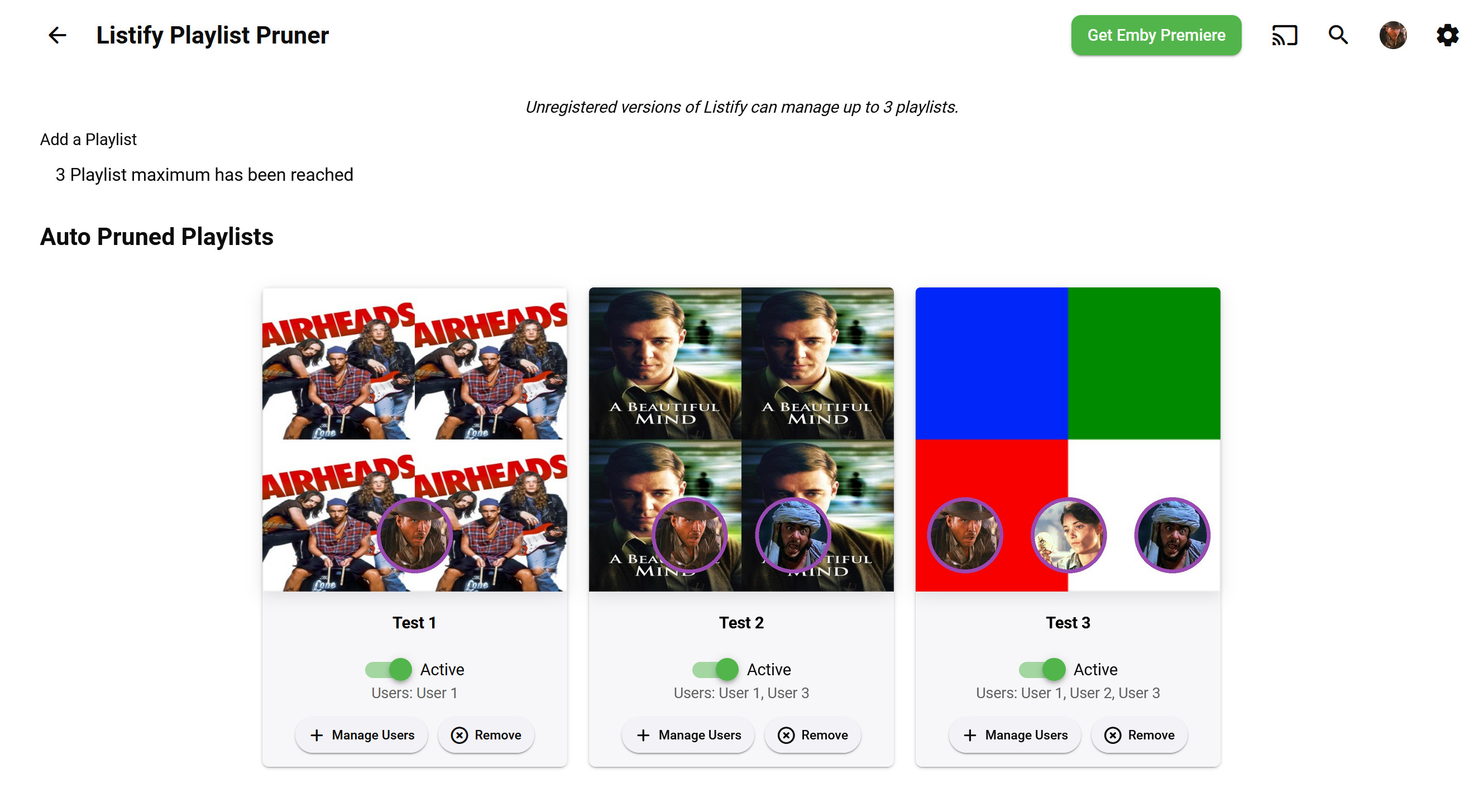
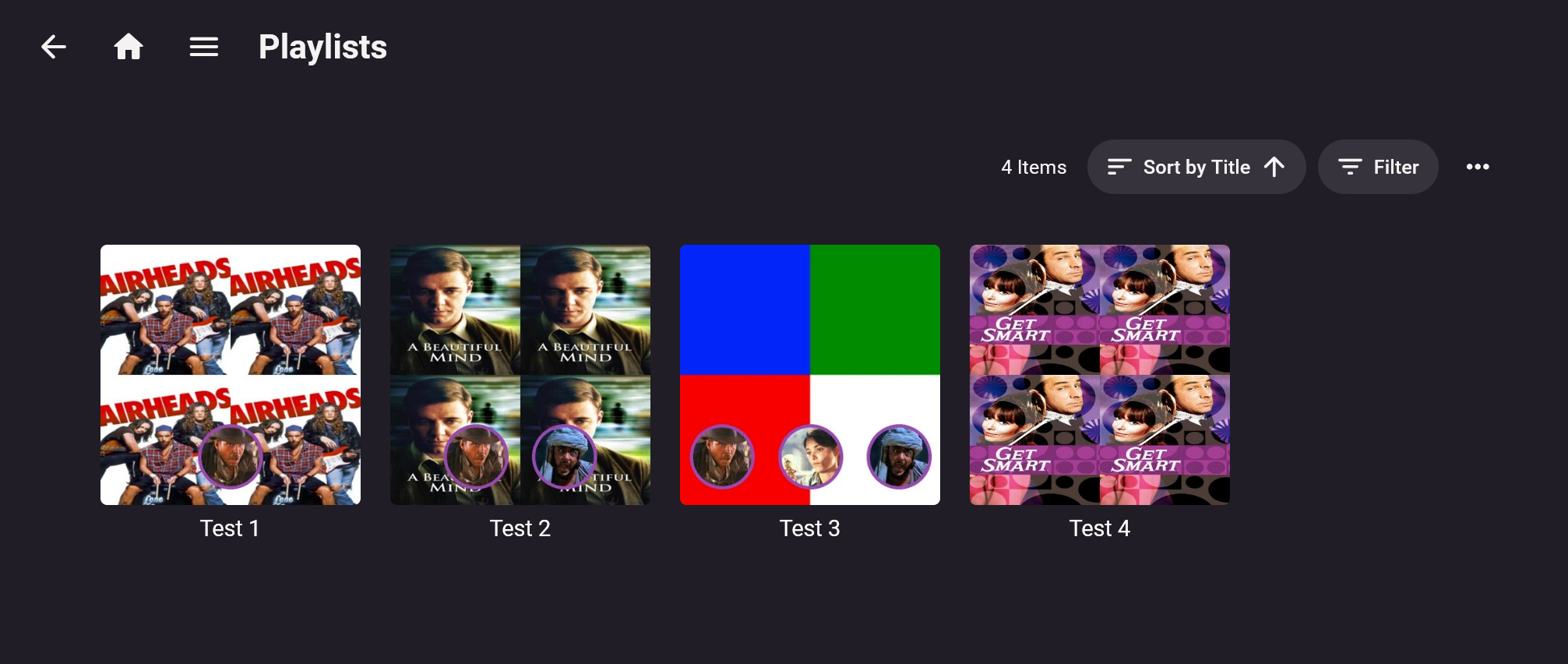
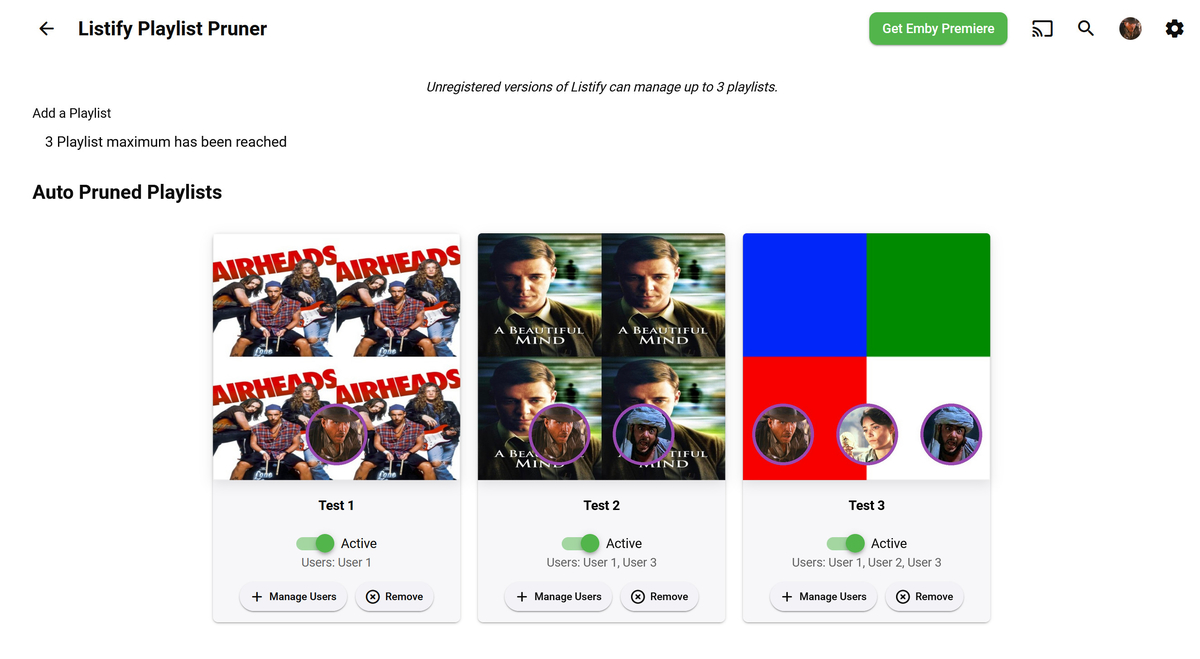
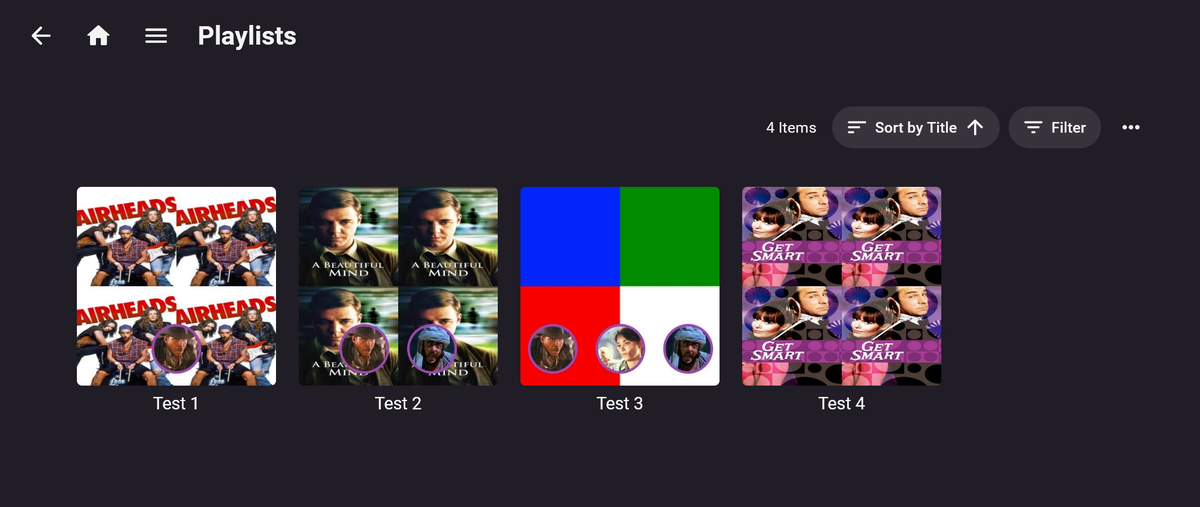
Hi everyone. I've got a new playlist management plugin that's ready for beta testing. I think it will come in handy for anyone who's tired of manually removing watched items from their 'watchlist' playlists. This is where Listify comes in. Listify will automatically prune watched items from your playlists when configured users watch an item to completion or manually mark it as watched. The profile pictures of the configured users are dynamically added to the managed playlists so users can tell at a glance how the playlists are being managed by Listify. I'm finding it useful, and I hope others will too. A beta build is attached to the next post. Please give it a try.
 1 point
 -
Hi there, when I choose collections or series in the emby frontend, there is a count symbol in each collection item (or series item) showing how many films belong to the collection. It would be great to have this count on the characters in the film details, too, showing in how many films the character has a role. Thank you! gnu1 point
-
Three-dot menu -> Identify brings up a dialog with fields for Title, Year, IMDB ID, TMDB ID, and TVDB ID. But by default, none have focus, so I have to then click on the Title field instead of being able to just start typing. This is an annoyance, as my expectation is for the Title field to get focus, so I often type several characters before realising it's not doing anything. Even if I didn't want to search by title, I could then tab down to where I did want to search from, rather than having to click there.1 point
-
It is about the last episode date added not the Show/Series itself.1 point
-
I just had the exact same problem but it went away after I reloaded the web page.1 point
-
Does it work in another browser? But had this discussion here as it should be something specific to your setup. Drop Down Menus No Longer Working - General/Windows - Emby Community1 point
-
Oh, just found my solution - The Roku allows you to select the 'Default Tab'. I changed it on everything and it's fine now.1 point
-
Not sure are you trying to get a badge on that item as "non-German", but if so, your rule syntax is wrong, you're missing NOT for [DE and DE]. Try with: ![GERMAN]|![DE|!DE]1 point
-
Why do you want to do that to your family?1 point
-
I agree with you but isn't they working on implementing the new .Net core? That can take a while, but we should have a beta at least to test.1 point
-
Looks like everything seems to be fine. Ran through a season of anime and all is good. Thank you.1 point
-
You are right, because I was having issues with 7.xx, so I revert to 6.2.20 for some reason it wont load so I have to reset kodi to factory then load 6.2.20 everything was fine. Apology for the trouble.1 point
-
The problem at the moment is that any metadata refresh of an item will wipe all chapter changes, we really need to have some sort of way to retain manually edited chapters. Or at least be able to lock chapters from metadata refresh actions.1 point
-
Hi, yes we are continuing to work on improving the user interface performance of the standard app. Thanks.1 point
-
You should be fine. I'm grad you didn't buy the newer Hynix P41 NVMe as it's the fastest NVMe you can purchase right now and would be a waste in the Synology since it wouldn't be able to take advantage of it. As a matter of fact if you have a 1TB NVMe in another computer you might want to test the speed of the Hynix vs what's in the other computer and trade them out. That would provider a 2 for 1 upgrade. But the Hynix Gold will be fine in the Synology as well. I typically use my slowest in the Synology as it tops out on throughput. If you haven't done the upgrades yet, I'd update memory and verify that's working as it should be the easiest. Go into Emby Server database menu and set Database cache size (MB) to 1024 as you'll have the memory for it now. It will only use a fraction of that but you've raised the limit so if more memory can be used for faster database access it can now use it vs the standard 96 setting. Check the optimize on startup box as well so it will reorganize the database on next startup (will be a delayed start as it does this one-time). Then install the the NVMe and follow the directions in the PDF in that thread. Feel free to PM me if you have any questions or get stuck. Carlo Let us know what you think of the difference after getting things setup and running.1 point
-
HI, yes I'd probably start with that topic. Thanks.1 point
-
Sorry about that. I forgot to remove my own special modifications that I usually remove here. I've updated the main post!1 point
-
I fixed the EPG in the Simple Web Client, and fixed several cosmetic problems with the Dashboard. I am using these two projects to explore the power of the Emby API. This API sets Emby apart from all other Video servers. Vic emby_new_tool_33.html1 point
-
Hi, yes it is.1 point
-
I think I solved it. In File Station, I had to give user "emby" read access to /volume1/Photos. It seems to be indexing now but photo and video browsing/viewing doesn't work yet. -Al1 point
-
Requires Emby Server 4.7 or greater Version History 0.9.1.1 Compatibility with the final Emby 4.8 release. Experimental support for the netvips image processing library. 0.9.0.0 Features: - Initial Release Known Issues: - Playlist Image Enhancement is currently only available for Skia based Emby builds - A page refresh is currently required to see updated Playlist Images after configuration changes Listify.dll1 point