Leaderboard




Popular Content
Showing content with the highest reputation on 07/15/22 in all areas
-
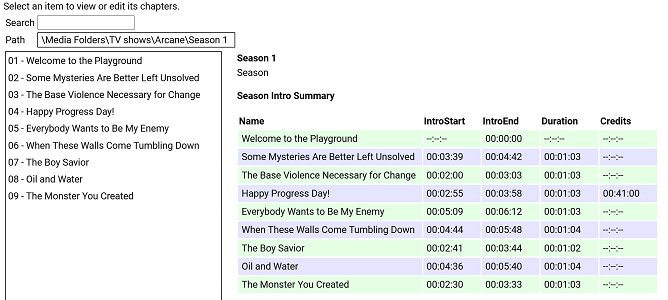
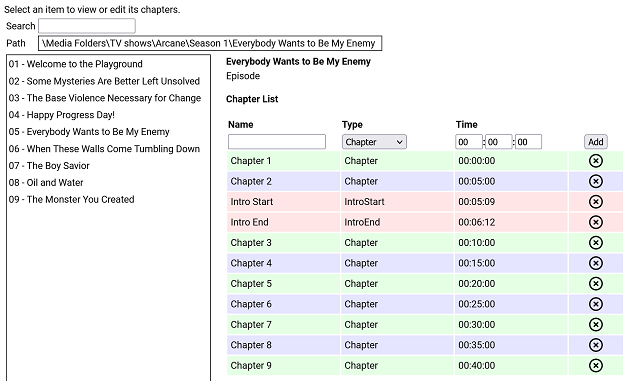
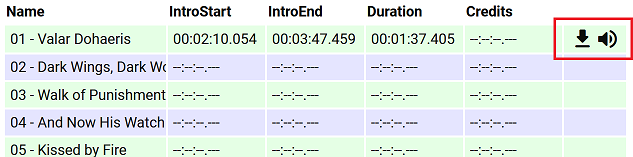
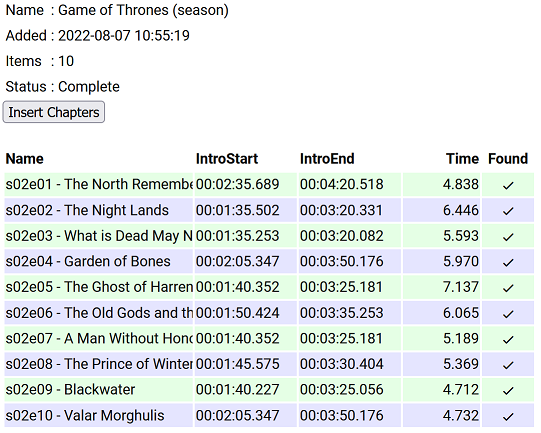
I have put together a simple chapter viewer and editor plugin. The plugin is now in the plugin catalogue. As always, here is the source: https://github.com/faush01/ChapterApi/tree/main/ChapterApi It is very simple and allows you to view chapters for an item (Movie, Season or Episode), remove chapters and add them. It supports all the different chapter marker types. It also has a season Intro summary page, select a season to see if it has intros detected for each episode. Note: All chapters are wiped and reset when you do a metadata refresh on an item. If you spend any time setting up or editing your chapters, keep this in mind. There is no current way of locking chapters. Chapter List Season Intro summary Intro Detection (CTRL-F for Intros) I have added a new way of detecting intros based on theme audio, this is using a very different approach than the core approach, it is using some of the ideas I posted over there: https://emby.media/community/index.php?/topic/107878-audio-fringerprinting-chromaprint-segment-detection/ With this approach, you need the Into Chromaprint info, this is a simple audio fingerprint of the theme song/music/audio. The plugin looks for this and can create chapters based on the results of the search. So where do you get the Chromaprint Intro info file, you can create one yourself for a series, season or episode by adding chapter info for one episode and then extracting that as a Chromaprint Info file. The new icons on the season summary page lets you extract the info file, if you just want to check you have the chapter offsets correct you can extract the audio of the chapter to play back and confirm it. A Chormaprint info file looks like this: { "series":"Game of Thrones", "season":2, "tvdb":"121361", "imdb":"tt0944947", "tmdb":"1399", "duration":107, "extract":10, "cp_data":"ThXy/E4hsdxOIZDdziWA3c9lgNnd/YDI3NyAyNyYwMzcuFHc1L0V3dS1F1/E8xJexOISXsfyMl72UzZe5lM13uZlNN/m7FDddvyT3Hack9xWjJDdR52Q3USWkN0EkvHfFJJz3zT2d98s53ffJO1n/yR8Z/4lTCf+Hgwn/k40N/pOJHH63iBR+/4xUfnuEdP47hXDeH1XgXgcd4B4DP/AeAzf0FkM/VBZDO0QWTzkEFkt9BN7bdASet3RUnqP0UJaj9dFe57WRH2u/kR977pEfO++RXw/vlb8D5Ze/Q+GfvcNgn32TdI99m/iPfbvYjj37jUZ/+4FX73uBN+9fhSfvV40vf1eELT9XjCU3V4hlN1fIZfcfzHW3C0FU9w9DRPYHTkTWA0pElgMLVNYBDVBWARRQBgUcUEYNHFRGCR3ARhk7gAY5e4BGdd+AxqGU0IahkHCCo5AwwreUMEKblDACipwwAsrbIMIGemCCAjKgggIipIYCI7QGBiWUBg4kjAbGIIxGvmDEhqrsQFequAAXq4gAF6uIABevjBDTq8Qwk2vEYLM/wKCxA8Og8QPHpDEH36QxDfe8MQ213HEFtUxxAfFdsTX0XbEt/H2xKPzdcSS0zXAgsI3wYLCJ8KSwyXCprXlwqakpcLnrLTC5ay0wlW09MMFsDXDBZE1wwXTJ8FV0ibB5eJm0e1v9lOta/dTrXn1Up0ZdVKNGXdSjwV1Up8BdFLvEGRS7yBgUusgYFLvIPAS72XwEt1d8wLF2fIDxNlyA8TbcgJ0/3ECZK9wAmSncQJEvyJCBZ4iQweOJwE3iiEAJpphACa74xE2qaMTNryjEia8oBInrGASJ6wgM0W4IjHFmCIwxIgmMJTIJjC0SCcwpVw3MeVtNTHnb3QxY270MXJWtTECRrEwAtKhMALjs3QS47N0I+XxdCPv0Hwh+1B8EfsRfAH7EnwB6xJ9EO9Tf3D1U37wxcN+8cXDfpXFQX6V90F/l+ZAfbfuQX337kN959dDf+dVwH7vVcB+//XQds3103fN91J1Tf5SfV3OUn0vz3N9L93wfy/00H4/5NB+H+RQfg/0En4P9BZ+P0U2f29Hdn/vRvd/nxL3dZ4S9XWOMvV0nzL1fJ8iVVyeIlVcvgLzXO4G8VxvFrFcPy6wXA0ukFgNKpAYDWqQCAz+0AgM11AIHPdRCDXzEQg18wMIVdMCCPfHAgm39wMKsuNBCpLzQwqCUUMKkkFBCqZQwAqmIMAJ5myBCGZogggH+YIIBdmCCASP0ggEh1AINIMwCSSzEAoksxEKZKcTSuWnAUqjYwBKkjEASpIwAU6yEMPOphCCz+YQgs1WAYLFFgWRxTZ1kIUn/dCFN8UwhRfHN4QPxzaEHeZ2xF3m1sTd5pXE3fbUxP1GFMT1RjXExQc2xMUXNkTXNRdEZyXVRGct1EQzLdREAz1VRANVNkQDQTYEA8FnAFPBbwDy8e0BoqHvAaKtbwOzuW8Ck4lvApOJZQKTjWUCkZFlArGxZQKhoWVCoaF0QqGldALhrXACxflzAcTbMgDE2yMA9P8lEOTtIRDk5WFR5fVjUXXfZ1FXjmVRFo5gUBaOYFA2nmBRNq3hUybso1Im7KNSJ/yhUmVc8FLVWHNShBgyE4QZMhCECyYQlA4nELQCZxDlM+cQZSOlEDUjpBAXIqQAFxLkABZO5AQWWuEEFtqmBAb6pgwG6rcMF+6wCBfnUAgF0xcLBcMXCjTTBRrl4QQbpeEEG6XlRBmt/UUZv/1FGZd/RRuOf0cbzlVHGV5VRxkuRMEbL1TBGz9lwRofdcMaD/XDGh3Twxp100Aa5fFAGuXhABmlsUEYrbFDGKe/wxinv8Bct7rAXIa+Q1yGn0Jcx5VCXNeF0l1nhfFfJYXwXzWn8F4Vo/NeBfNyXgfzMl4XUTJeJ0ExX2YcMFzmOFBctinRXIYpw1yGL8NdjhfCXY4Dw1+vA9Nf50HRX2Xhkd014bBdNaGwXTSl8F00n/BdFJ9xWRTtcls1bTJaNTUyWjURMlv1ARJb9QNTWbVTQFi1Y0BYteFAWLXhQFj39UNYV7XCWUadwllGmdJbRtnTW1bZ01pW3VNaXtVRWl7QVV5/QFde/0F2X/9Tdl/3ZnZdpiZU3aYmVN2mZ8TfpuHE3+bwgd/WsILXVoSS1zeFkJc3hZCXNYfQhhfXV4YX0TaHF3E2hSYRMoRmYXecZmXXnOZt15z3XZWUx93UlMffVcXF31fFRY82x1WPftV1/3/VZe181WX1dNUx8XXVEdF21AHBftRBQX7U0BN91OAnfNSgL33QoWt/1aFb/9aTS//Wg0v30oLF5VLCwORS86DkUmOgZFJl4GRSZfQ1cnX8NXIk/DZzNH12cVVpdnBVL3xw/y98cO8vfHHvHn9z7w5fU/9O3VNfztxTXc6UU02+lNMNr5XTDa230xettdNnrbXTZ53d02fLH9Imyx7SZkk+0nY5PtJXLH/SxyTvUscg71LXEH9R1wM+VNcCNlRXAnZUTRJ1VB029BQdavQcPOrwHDzq8Bwc6lAcDO8RGQz1EhsM0RYZHUEXGS1AVRgtZVQYb2XXGG/n1xnO8scbztLHGs7Sxxqew8EbrpVBWa+9QFnvqUBY/7lBWc+9Q1vNlUZbTdFGWg3BV1s9wFZZLdB3WS1hdVgv53dYL+bXWR521ltOUtdaztLFWt/CwFvv1cBb79zA2e/8wNnf/MPZzvzD3c7wQ9/O0EPf3sFT33/BVt1391bd9W/23fVp99/1OXXflT913pUzE96FE1Pe3wNTXu8T0V4vM9BeKyOQXzkjkF85dtBfKUbQXyhXUF84N1B/GCUQewh1ET8JXBM92dwDPbnYQTSZ2EA0iZhANImMRDCJhEUxmYDHM7nQ1jL54dYy6ePWMuuj1nLvo3dy54d0c+WPdHHVjVRxhY1Xc4WPVnPVz1Zz519Xc2YvV3NmL3ZzJiVncSYkY3cuFOF3PkDxdw5QsH8P4PB/DeDQPwz1UzkMrRI5DO0SORztAjk8/QE5PVVBON1TQziPU0IYj1LCGI8Cwxi9AkBYrCZAWKwmwVjcP8JYzF+CSExNg0kNRZBPDdWUT17XtU/+t/VN7pf0TK6XdEyut1VFnvVWx47xUsaG0VLGh0FTVrcBUVbvMVBWbSNQVikj8VYpI/FWKDfwUzge8FMYHnBTCFcwVwjXMVcI1TFXCIVwV9mFYXW5jXF1mZ1zdJi9c3SIvXF1mLRwd7iQMHb4sDP2eLAy9jigMvYsoTL2JeMm9yZiZvQmMmb0Igbv9CIN7PwiCOz8Yhjs/MI4/v2CPP5fghT+XoIRf16GE3delhJ3X7cy912vIrVc7SaUWG0ukEhpaoBIGGqASAjqgEhN/tFITddSSF1DM0hdQzNM/UFxTO9lU0znbdNM9m3ST4Zl0k6GwVJOhsETTpaBEU7ns1BO56PQT2WjwE0lp8BNJK/QTRT/Uk0E9xJNBdcSTRVDE0hlUVBIZWVQSHVt0UhVfdFJ1X3VSdd3VUvXU1dL19NWS9fDd0v3wXdLd+XVSTft1Ek3rVRJN7lXWVe9Fl1G3RdfRsUxX9bFM16mUVNetjFTXrYxU162MUFepjHBXuchgV7lIYFePTGRXz0TkF8sU5BdKFfQGSjfUBkY31AZGP8TGxjtExsZbQEZWfVDGZnVRxiZlUcYmZ1FHbi/RB24v0RfuK9Ed5y3R3ack0Z2nJJGcryy1nK14t5y5/L/cubWfXLmxmxy5sds8ubFbPNW1W3zRtVv8QbVbXEW/W1wFnltcDZ5ZXEmeGdxJmhmdzZs5lYWcOZWBtDiXgfQ814FkHMeBbBSGgWkAhsMrAIZTLwCGdzdAhndzUYZvVUHGb0RBRmfEwUY3xNFGP8yRVh9ModYLRaHWD0GhVg9NpRMXW6UTE3ulEzPntVMzofXTZ6F1U+uldVOrpVVTv7BVU7+0XdO/mFyTv5hc15vMXFeaTNxXigj0V44I9FeODZBXigWQF44FkBeGBdAHwhFUB8IwREdGYAQPXmAMD3ZhTQ9m4V0PbuPd327nnJ9m75yfZmuU3+ZrhF+uLc3/rixNv7o8Tb+6OE2/mkhdvZtIXbXLyF+1DYxftQ2Af/UJgy91HYYrcTWKK3ExiivxIY5r8SGT6XFhsPkx7bC5Me28vTHpuN1xebjNcTm8xDMZ+cQzFXvEEwV71BNBfVTTQRxVk8EUVZPFEF2TxRFd09VXfdNfXn1T+1t1E//ZVVOz3FXTk/BU05/wVBfL5HQXy+l0F8trdBfPanBXg25Q14Nt0JeDZICXk3CAl/dQgZc7QYHXK0vRVSvK8RUrivFVJ4vh9WONcfXhgDH1rYAwda+ENFGniDTQr4hkEOuFZBDrh2QQ68tsEKtZbBCvOXjQtjxYULYsSBD+LEgU1ixIFMYsyFTGbIjVRmyI3U5siF1ObZjdTi+Y3QY/mJ0GF5ifBhfY3wYTWN8WA1jfFgFY3lZRXF7GXX1ehvh93ob4fd6", "cp_data_length":3372, "cp_data_md5":"DDF936E4FD29A02CDA178EBFF37AD2E8" } It's just a JSON file with some info and the Chromaprint data. This can then be used in the Intro Detection tab to create a job against a series/season/episode list. Once complete, you can import the job results into your items. This is a semi auto way of detecting chapters for series that are having issues, because you are supply a good well-known chromaprint of the audio you want to target your results are much more predictable. Sharing intro theme cp data The sharded intro theme cp data is now hosted on GitHub https://github.com/faush01/ThemeCpData To use the hosted data in auto detection in the ChapterApi plugin, you can use the following URL in the "Intro Data External Url" on the options tab of the plugin: https://github.com/faush01/ThemeCpData/archive/refs/heads/main.zip Add the URL, hit download intro data, hit reload intro data and the intro cp data will be loaded for all the series you have that there is cp data for in the shared repository. If you want to add more the to the shared repo, clone it, add your new into cp json items and do a pull request to have your new items merged in and available to others.
 5 points
 -
We'll be getting a fix out for this. Thanks.2 points
-
I moved from Plex to Emby and even though I think Emby is superior in its flexibility there are some things I like better with Plex, especially in terms of its looks. This theme is trying to fix that by making it a bit more similar to Plex but with some, in my opinion, improvements. The CSS is attached to this post for anyone interested and below are some screens to show it off Good to know I only use Chrome so I can't guarantee this CSS works as expected in other browsers. If you want the sidebar menu to look like in the screens, make sure to pin the sidebar. Watched badge/banderoll is inverted which means that the badge will not be shown if media have been watched, like in Plex. For desired look, please use the "Dark" theme for both Theme & Settings theme in the display settings. Emby-Stable-style-v3.6.txt





 1 point
 -
Hi, When watching a video that is wide enough to use up the full iPhone X screen the "notch" blocks out a portion of the picture on the left or right hand side (depending on which way you hold your phone) Could I suggest that during video playback that the maximum width of the video area be defined to exclude the left most 90 pixels (the depth of the notch). You might want to do the same on the opposite side (for symmetry). Thanks1 point
-
OK yes looks like it's currently not checking IsFavorite, so for now I would use the dedicated endpoint for that.1 point
-
Better than using transcoding is to convert all the media files to a format that direct plays on all devices in your universe. I did that quite a while ago and I do not seem to ever have much in the way of playback problems.1 point
-
New build is up.1 point
-
@cwills75 There are several topics on this as FF 102 created this issue. It does not exist in v101/103/104. Temporary fix or just right click to open menu.1 point
-
You'd have to be either on https or localhost.1 point
-
Weird - ok I rebooted the windows machine it's running on and now it's fine. Nevermind? but thank you for responding, I was a bit panicked there as I had wasted 40 mins or so trying to troubleshoot, but I should have known better - reboot windows first! Cheers1 point
-
yea right i forget about it, but long time enable it, seems now it is working.1 point
-
Intel's arc-series GPUs will do AV1 encoding, this will become interesting I think.1 point
-
Sorry, I havent had the time to look further into it, but I did not encounter it until yet. I guess this can be closed then1 point
-
I can see this isn't your problem, it's mine. A few files in that season are showing some bad display... not those two oddly, but others are showing wrong aspect on playback. So I'll need to remux them all.... But from a functionality perspective, I'd rather the app not spaz and just catalog whatever I got. I can always force aspect ratio in playback if I have to correct a crappy encode.1 point
-
You'd have to use the non-static view of swagger by clicking the api link at the bottom of your server dashboard.1 point
-
Hi,yes it will be coming. Thanks for the feedback.1 point
-
No worries mate. experimental /ɪkˌspɛrɪˈmɛnt(ə)l,ɛkˌspɛrɪˈmɛnt(ə)l/ adjective 1. (of a new invention or product) based on untested ideas or techniques and not yet established or finalized.1 point
-
It's coming.1 point
-
Alright, that didn't take long... I got to 85% sync of TV and snap. Here's what I think is the relevant log section... if you want the whole thing, lmk. 2022-07-15 08:30:23.091 T:7424 INFO <general>: EMBY.core.tvshows: ADD episode [3368/5845/59034/295166] 1306230: Standing Stone 2022-07-15 08:30:23.096 T:7424 INFO <general>: EMBY.core.tvshows: ADD episode [961/6912/59035/295171] 145703: The Standing Stones 2022-07-15 08:30:23.101 T:7424 INFO <general>: EMBY.core.tvshows: ADD episode [1327/1324/59036/295176] 153067: Standing Tall 2022-07-15 08:30:23.105 T:7424 INFO <general>: EMBY.core.tvshows: ADD episode [2978/6563/59037/295181] 204852: Standish, Gloucestershire - Going Upmarket With The Romans 2022-07-15 08:30:23.108 T:7424 INFO <general>: EMBY.core.tvshows: ADD episode [1361/6147/59038/295186] 153324: Standoff 2022-07-15 08:30:23.114 T:7424 INFO <general>: EMBY.core.tvshows: ADD episode [1827/894/59039/295191] 162892: Standoff 2022-07-15 08:30:23.118 T:7424 INFO <general>: EMBY.core.tvshows: ADD episode [2573/1808/59040/295196] 240052: Standoff 2022-07-15 08:30:23.121 T:7424 INFO <general>: EMBY.core.tvshows: ADD episode [3311/4057/59041/295201] 210442: A Standup Kind of Guy 2022-07-15 08:30:23.125 T:7424 INFO <general>: EMBY.core.tvshows: ADD episode [590/4167/59042/295206] 138540: Stanley Caron 2022-07-15 08:30:23.130 T:7424 INFO <general>: EMBY.core.tvshows: ADD episode [705/1805/59043/295211] 141449: The Stans 2022-07-15 08:30:23.137 T:7424 INFO <general>: EMBY.core.tvshows: ADD episode [2978/4861/59044/295216] 1331192: Stanton Harcourt, Oxon - Hunting for Mammoth 2022-07-15 08:30:23.142 T:7424 INFO <general>: EMBY.core.tvshows: ADD episode [2444/693/59045/295221] 178995: Staple Holes 2022-07-15 08:30:23.147 T:7424 INFO <general>: EMBY.core.tvshows: ADD episode [1182/3956/59046/295226] 1286654: Stapler 2022-07-15 08:30:23.151 T:7424 INFO <general>: EMBY.core.tvshows: ADD episode [2628/5073/59047/295231] 182198: Staples, Guns and Roses 2022-07-15 08:30:23.153 T:7424 INFO <general>: EMBY.core.tvshows: ADD episode [1361/4485/59048/295236] 153368: The Star 2022-07-15 08:30:23.157 T:7424 INFO <general>: EMBY.core.tvshows: ADD episode [1908/5375/59049/295241] 165841: The Star 2022-07-15 08:30:23.161 T:7424 INFO <general>: EMBY.core.tvshows: ADD episode [2591/4076/59050/295246] 1300627: Star 80 Proof 2022-07-15 08:30:23.225 T:7424 ERROR <general>: Exception ignored in thread started by 2022-07-15 08:30:23.225 T:7424 ERROR <general>: : 2022-07-15 08:30:23.226 T:7424 ERROR <general>: <bound method Library.KodiStartSync of <database.library.Library object at 0x0000029930EDFAC0>> 2022-07-15 08:30:23.226 T:7424 ERROR <general>: 2022-07-15 08:30:23.226 T:7424 ERROR <general>: Traceback (most recent call last): 2022-07-15 08:30:23.226 T:7424 ERROR <general>: File "C:\Users\Ben\AppData\Roaming\Kodi\addons\plugin.video.emby-next-gen\database\library.py", line 118, in KodiStartSync 2022-07-15 08:30:23.226 T:7424 ERROR <general>: 2022-07-15 08:30:23.226 T:7424 ERROR <general>: self.select_libraries("AddLibrarySelection") 2022-07-15 08:30:23.226 T:7424 ERROR <general>: 2022-07-15 08:30:23.226 T:7424 ERROR <general>: File "C:\Users\Ben\AppData\Roaming\Kodi\addons\plugin.video.emby-next-gen\database\library.py", line 690, in select_libraries 2022-07-15 08:30:23.227 T:7424 ERROR <general>: 2022-07-15 08:30:23.227 T:7424 ERROR <general>: self.worker_library() 2022-07-15 08:30:23.227 T:7424 ERROR <general>: 2022-07-15 08:30:23.227 T:7424 ERROR <general>: File "C:\Users\Ben\AppData\Roaming\Kodi\addons\plugin.video.emby-next-gen\database\library.py", line 435, in worker_library 2022-07-15 08:30:23.227 T:7424 ERROR <general>: 2022-07-15 08:30:23.227 T:7424 ERROR <general>: Continue, embydb, kodidb = self.ItemOps(index, TotalRecords, Item, embydb, kodidb, SyncItem[4], "add/update") 2022-07-15 08:30:23.227 T:7424 ERROR <general>: 2022-07-15 08:30:23.227 T:7424 ERROR <general>: File "C:\Users\Ben\AppData\Roaming\Kodi\addons\plugin.video.emby-next-gen\database\library.py", line 486, in ItemOps 2022-07-15 08:30:23.228 T:7424 ERROR <general>: 2022-07-15 08:30:23.228 T:7424 ERROR <general>: Ret = self.ContentObject.episode(Item) 2022-07-15 08:30:23.228 T:7424 ERROR <general>: 2022-07-15 08:30:23.228 T:7424 ERROR <general>: File "C:\Users\Ben\AppData\Roaming\Kodi\addons\plugin.video.emby-next-gen\core\tvshows.py", line 197, in episode 2022-07-15 08:30:23.228 T:7424 ERROR <general>: 2022-07-15 08:30:23.228 T:7424 ERROR <general>: common.set_ContentItem(item, self.video_db, self.emby_db, self.EmbyServer, "episode", "e", ItemIndex) 2022-07-15 08:30:23.228 T:7424 ERROR <general>: 2022-07-15 08:30:23.228 T:7424 ERROR <general>: File "C:\Users\Ben\AppData\Roaming\Kodi\addons\plugin.video.emby-next-gen\core\common.py", line 685, in set_ContentItem 2022-07-15 08:30:23.229 T:7424 ERROR <general>: 2022-07-15 08:30:23.229 T:7424 ERROR <general>: get_streams(item) 2022-07-15 08:30:23.229 T:7424 ERROR <general>: 2022-07-15 08:30:23.229 T:7424 ERROR <general>: File "C:\Users\Ben\AppData\Roaming\Kodi\addons\plugin.video.emby-next-gen\core\common.py", line 392, in get_streams 2022-07-15 08:30:23.229 T:7424 ERROR <general>: 2022-07-15 08:30:23.229 T:7424 ERROR <general>: width, height = Stream['AspectRatio'].split(':') 2022-07-15 08:30:23.229 T:7424 ERROR <general>: 2022-07-15 08:30:23.229 T:7424 ERROR <general>: ValueError 2022-07-15 08:30:23.229 T:7424 ERROR <general>: : 2022-07-15 08:30:23.229 T:7424 ERROR <general>: not enough values to unpack (expected 2, got 1) 2022-07-15 08:30:23.229 T:7424 ERROR <general>: 2022-07-15 08:42:05.223 T:5728 INFO <general>: Loading skin file: MyVideoNav.xml, load type: KEEP_IN_MEMORY 2022-07-15 08:42:05.463 T:1056 INFO <general>: initializing python engine. 2022-07-15 08:42:06.763 T:1272 INFO <general>: Skipped 2 duplicate messages.. 2022-07-15 08:42:06.763 T:1272 INFO <general>: CPythonInvoker(14, C:\Users\Ben\AppData\Roaming\Kodi\addons\script.embuary.helper\plugin.py): script successfully run 2022-07-15 08:42:06.995 T:1272 INFO <general>: Python interpreter stopped 2022-07-15 08:42:07.008 T:1056 INFO <general>: CPythonInvoker(13, C:\Users\Ben\AppData\Roaming\Kodi\addons\script.embuary.helper\plugin.py): script successfully run 2022-07-15 08:42:07.226 T:1056 INFO <general>: Python interpreter stopped 2022-07-15 08:42:07.231 T:3888 INFO <general>: CPythonInvoker(15, C:\Users\Ben\AppData\Roaming\Kodi\addons\script.embuary.helper\plugin.py): script successfully run 2022-07-15 08:42:07.415 T:3888 INFO <general>: Python interpreter stopped 2022-07-15 08:42:08.423 T:5804 INFO <general>: initializing python engine. 2022-07-15 08:42:09.080 T:5804 INFO <general>: CPythonInvoker(16, C:\Users\Ben\AppData\Roaming\Kodi\addons\script.skinshortcuts\resources\lib\entry_point.py): script successfully run 2022-07-15 08:42:09.332 T:5804 INFO <general>: Python interpreter stopped1 point
-
cheers. and thx again for all your work on this, my nightly vegetative state would not be the same without you!1 point
-
Thanks for the quick response. I found the culprit and that fixed it.1 point
-
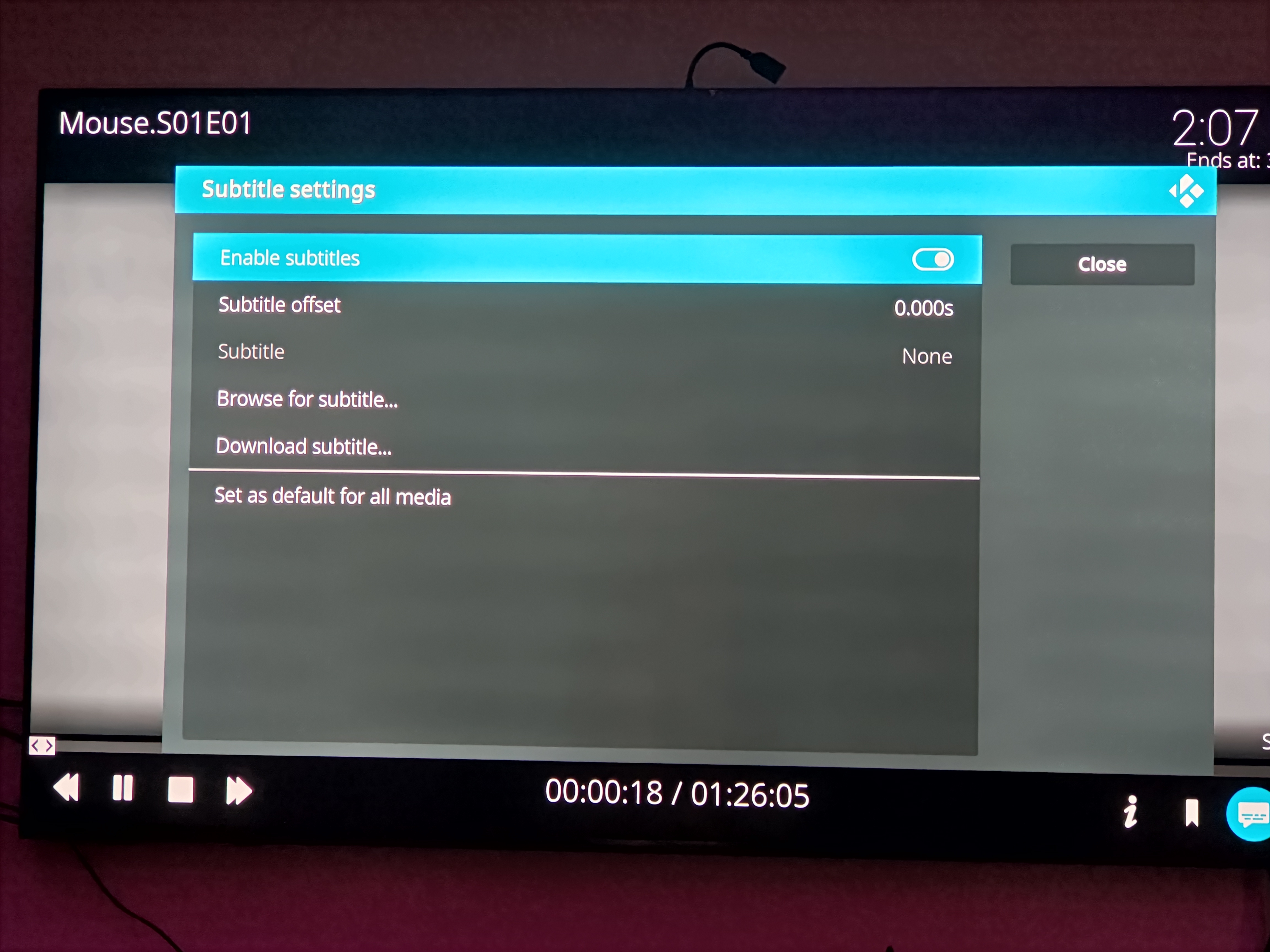
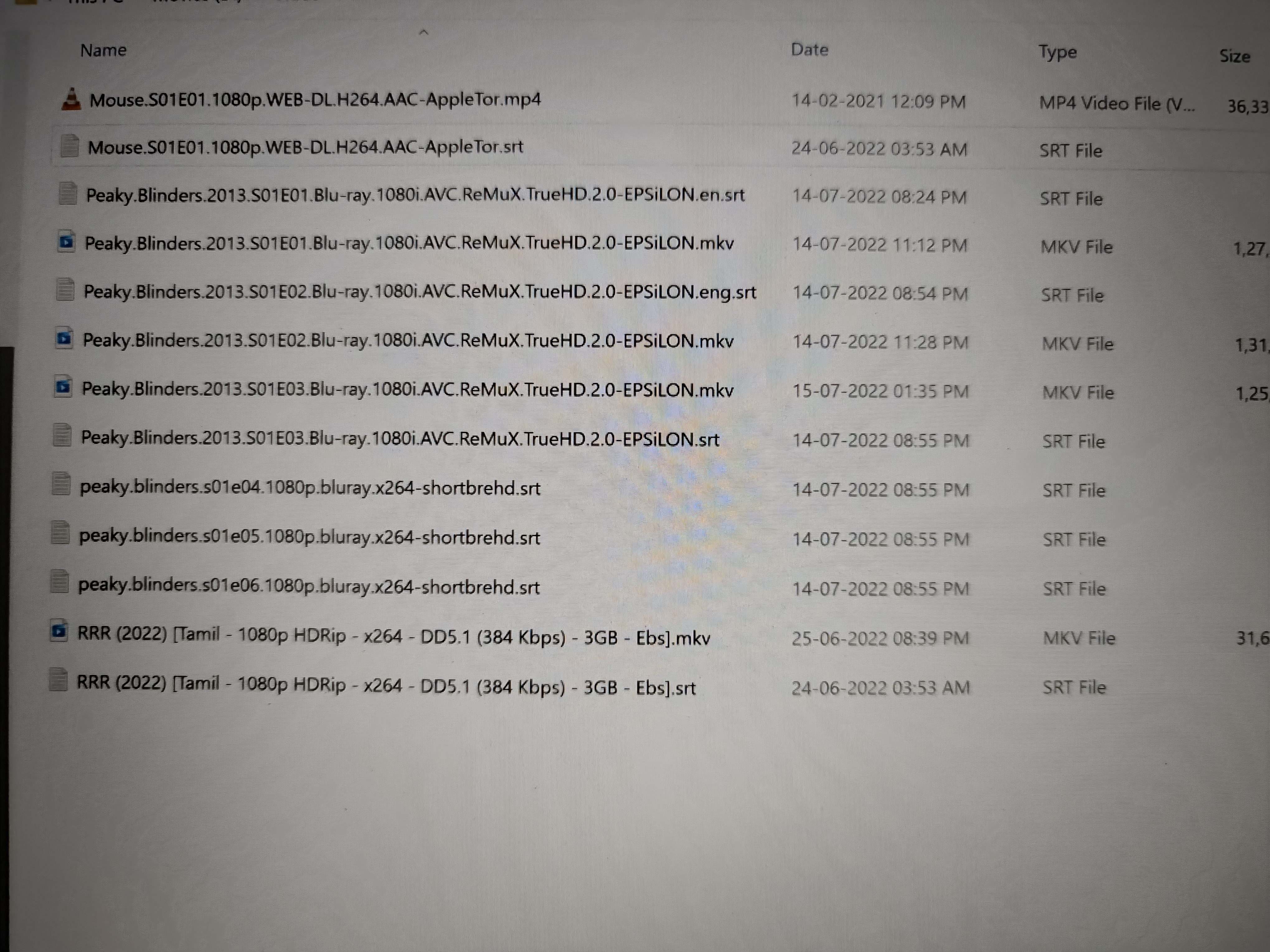
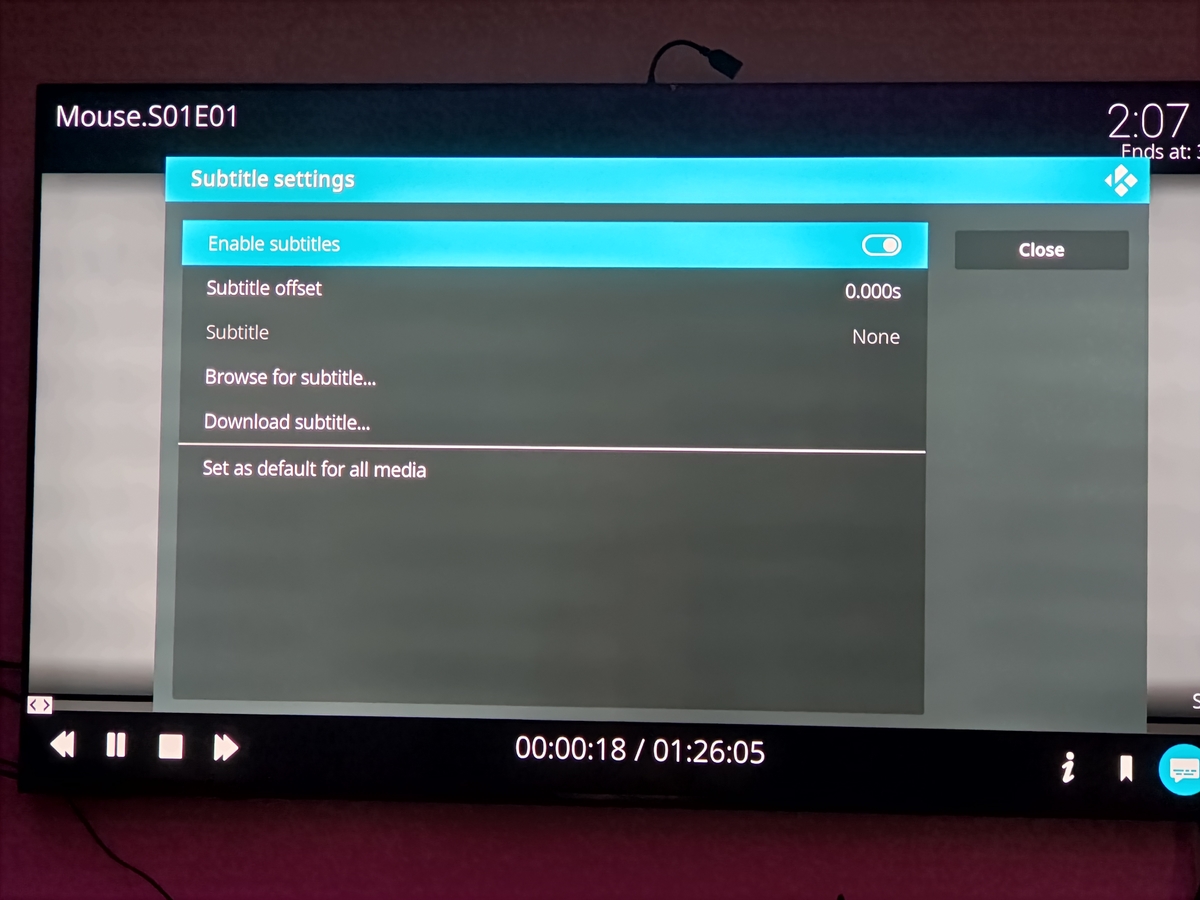
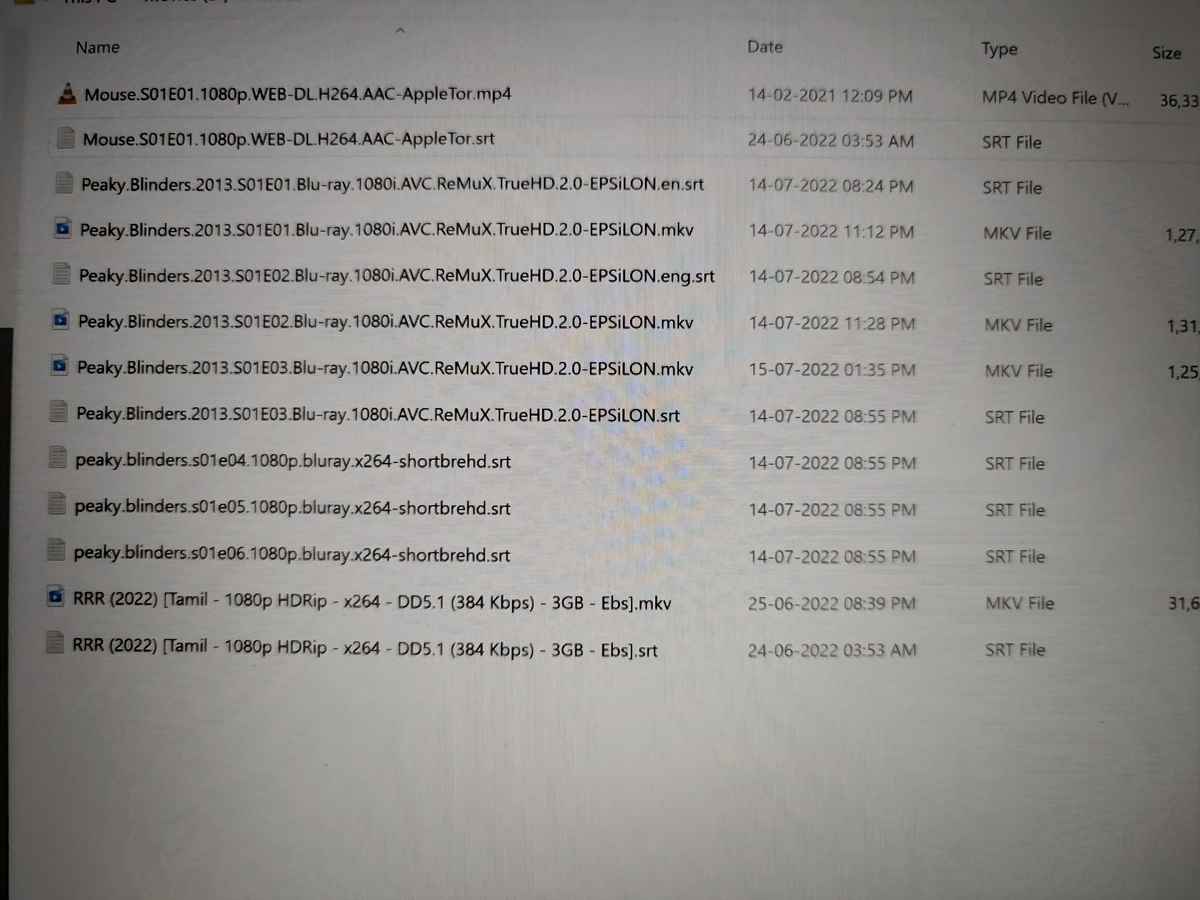
Thank You So Much for Your Support Sir . I did everything as Per Your Video and I got the result also everything as Per Video Only Except The Mouse Frst 2 Episodes( Rename also Tried But Frst 2 Episode I cant get SRT) . Other Episodes 3-20 SRT Working Fine and Peaky Blinders also Working Fine . Regarding that Can't Play Issue . I faced in Both 19 and 20 . In fact I installed 20 due to that Issue Only. Specifically Whenever We Rename the Video file and Refresh the Emby Server that Time only We face that Issue, Other Videos Playing Normally. And After Sometimes It ll corrected after Library Update.(In Kodi 19) But in 20 ,I found that Whenever We alter the files like cut /copy/Move/rename . After that we ll do Emby server update. But in Kodi it mentioned as Library update, But it didn't update Properly. So only whenever we play modified file it shows that error. After every Modification we should do Database Reset In Kodi 20 . After The New Update 7.6.0 This issue also Cleared. Just Now I Checked. Working fine in Kodi 20.1 point
-
I frequently Received an error as One or More Items Failed to Play . Kindly Check this also . kodi_3.log1 point
-
Give me a view minutes.. I'll perform some tests.1 point
-
Now SRT External Working in Peaky Blinders But Not Working in Mouse Series. I can't Understand why it occurs differently kodi.log
 1 point
 -
Uninstalled. I will report back if behavior repeats.1 point
-
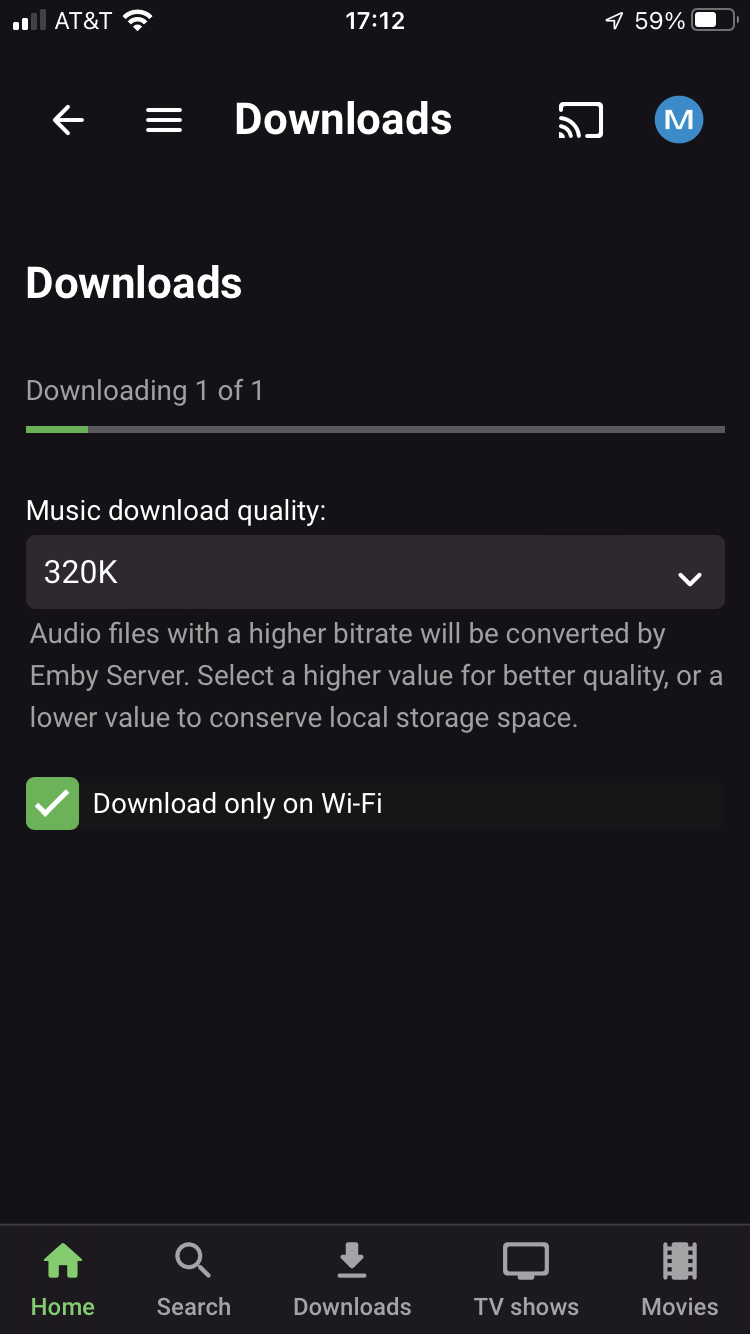
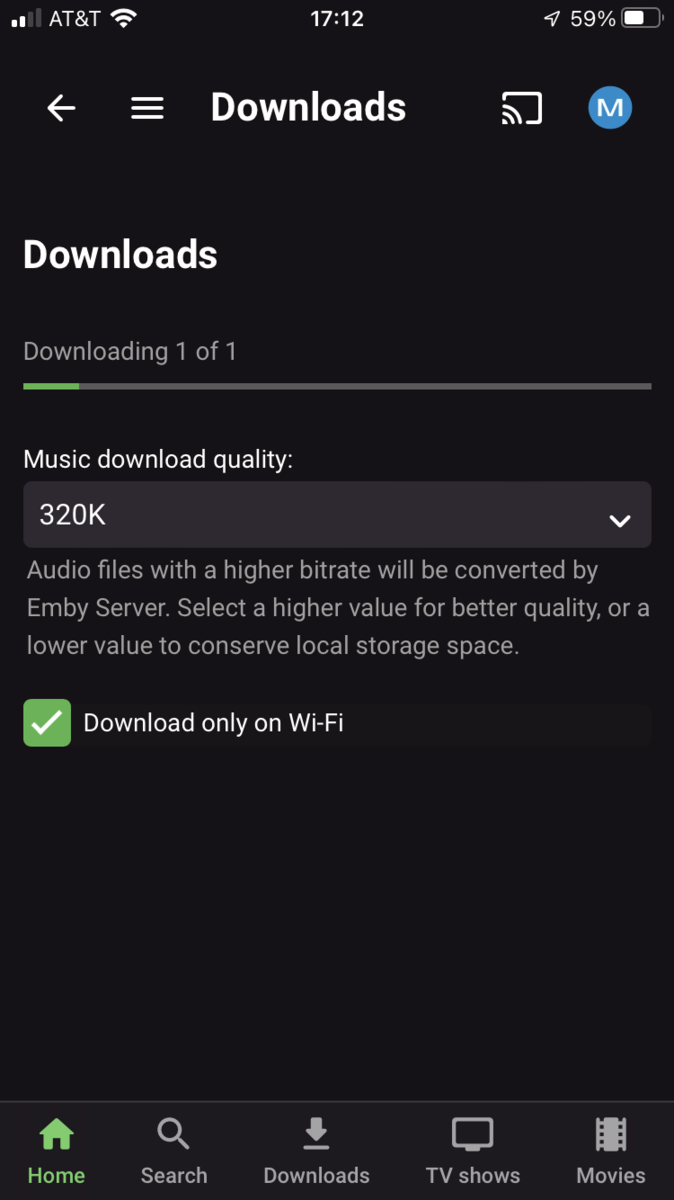
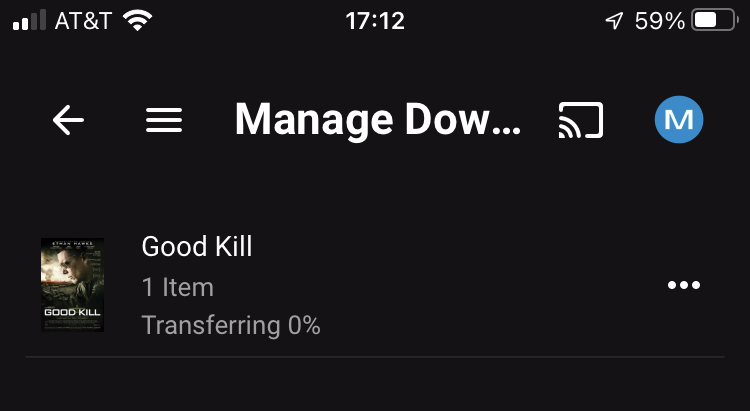
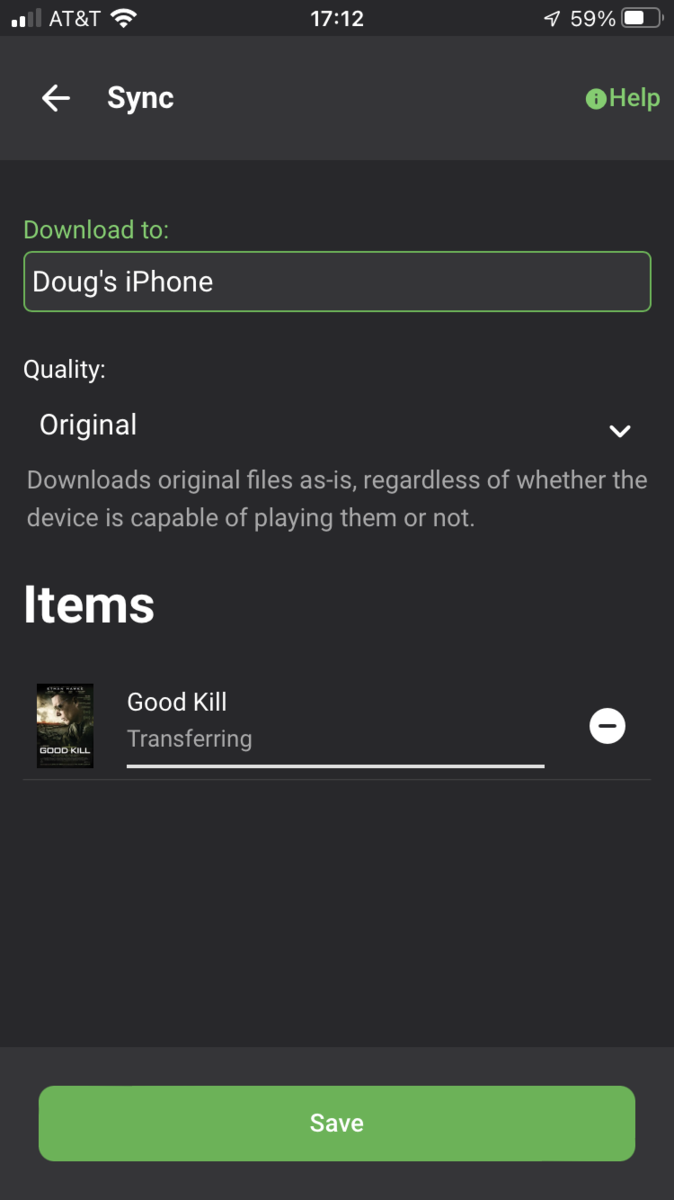
@Luke Thank you for the update. Sadly the same issue persists. I opened Emby on my iOS version 2.1.8, went to my TV Shows and downloaded one episode (Original Quality). I gave it 10 minutes, nothing happened, then I opened up my Emby server on my NAS from Windows and saw that the video file is ready to transfer but not progressing at all. Then I closed up my Emby app on my iPhone and opened it up again and then on my PC the status changed to Transferring. In addition the transfer never completes and it goes back to "Ready to transfer" after a few minutes. The only solution is to choose the download from my Windows PC while my iOS mobile app is opened, which is really bad behavior and unusable option.1 point
-
Poster selection will always be highly subjective matter - I, for one, under no circumstances ever want to see original theater posters with credits and all that text - as, I guess, majority of users do not prefer those either, else they'll be higher rated/voted. As some criteria needs to exist for poster selection, that one seems like a most sensible one. Paid alternative/solution for your issue might be RPDB (either as a standalone app or Emby plugin) with IMDB posters selected, as vast majority of those are pulled as original theater posters (something I had a BIG isssue with until it was developed further and TMDB posters were introduced). There are several tiers available, you might wanna check it out. Wrote a longhish post about it back in the day:1 point
-
Not entire sure how the (Premium) TimeLord plugins do it but this is exactly what they do (plugins catalog).1 point
-
@Lukehere is the progress issue. Only Downloads show progress where manage goes from 0% to Downloaded.
 1 point
 -
logApology for many logs Windows 10 Kodi 19 E4K 7.15 Titan Skin Log1 point
-
@mrdrew I just noticed the app store shows 2.1.7 but download 2.1.8. I would uninstall then reinstall.1 point
-
Installed on LE Kodi 19 played few files , below are logs few errors, I will post more logs if I noticed any that is usual log1 log21 point
-
Hi, please try the new Emby for iOS 2.1.8 update and let us know if this helps with this issue. You want want to cancel existing download jobs on the server and recreate them. Let us know how you get on. Thanks.1 point
-
It should match the remote address, which is on the line below the local address on the dashboard. If you have specified a domain, that is what will appear on that line, though. Paul1 point
-
Seems this is down again? I had mine set up this way before. (dug around and found the cached version with no photos but it still works. Got it setup and working again) http://web.archive.org/web/20210311090024/https://blog.awelswynol.co.uk/2018-01-setting-up-cloudflare-with-emby/ the only difference was that i had to use a different ssl converter site as the one listed wasn't working for me. i used https://www.httpcs.com/en/ssl-converter1 point
-
Save Time With Emby's Intro Skip Requires: Emby Server 4.7 or later One of the new features in Emby Server 4.7 is the ability to skip TV Show Episode Introductions segments. This allows you to jump right to the start of the action saving you a great deal of time allowing you to quickly get to the good stuff! Combine Into Skip with Automatic Play Next Episode for a superior binge-watching experience!. This guide will cover the following: Configure a TV Library in Emby Server Configure Emby Client for Automatic or Manual Intro Skip How to use Configure a TV Library in Emby Server In order to use Intro Skip a TV Show library needs to be configured. Edit a TV Library on the Emby Server console. Scroll down to the Markers section in the library and change the option from NEVER to either "as a scheduled task" or "as a scheduled task and when media is added" depending on your particular needs. Once setup go to Scheduled Tasks and you'll see a new option has been added: By default this task is set to run every 24 hours. You can adjust it to run at specific time if you like. To add a new Task click the + sign above. This shows a new schedule that starts at 3 AM and is allowed to run for 4 hours. After clicking Add: We can now click the trashcan icon on the 24 hours schedule ending with: From our Scheduled Tasks menu we can manually run this job clicking the arrow icon. You will then see a status bar showing the percentage complete. There is nothing more needed on the server to use Intro Skip except to give it time to analyze all episodes and build the Intro Skip indexes. This process may take a while depending on the number of episodes you have. Configure Emby Client for Automatic or Manual Intro Skip Each client can be set to ignore TV Show Intros, automatically use Intros, or to prompt use showing a button. You can set this option in the client option's Playback Menu. Using Intro Skip With the Skip Intro button selected you can clearly see the button on the OSD immediately at the start of playback. The timeline is still at 0:00 before the show has started to play and we can already skip the introduction of the show. Clicking the Skip Intro button immediately jumps right to the start of the Episode. With the client option set to Automatically skip intros our TV show intros have been put on auto pilot. Right at the start of playback it jumps to the end of the intro right at the point of the fade in. View the full article1 point
-
To throw my 2c: While Delete item dialog is self-explanatory, Delete Playlist is really in need of re-wording, in particular when filesystem is mentioned, which IMHO should be completely removed from that dialog: Users in general have no idea where playlist information is stored, as far as majority is concerned it might just as well be database info only, so that dreaded "will be removed from filesystem" can be skipped altogether and noone would be the wiser - those that do know what it refers to will anyhow know that xml will be removed, those that don't know it wouldn't care about it anyway.1 point
-
I think that the general take away from this thread should be that the whole user GUI interaction around playlist isnt working. When users who are of a level that post in tech forums dont "just get it" you can safely assume those less tech savvy have no hope. Since this includes the potential of data loss a review should be prioritised.1 point
-
glad to hear it works on qnap. i wont get time to develop for genres and studios in near future. Are you tempted to give it a go yourself? happy to offer advice. this is not tested , but gives an idea on how the code could be tweaked, the apis calls need to retrieve the genredata, but the required logic is going to be very similar just working on the genredata. From what i can tell the api used fields=genres to return genres, and the resultant datastructure has genres under .genreitems. i wouldnt run on a live system without some testing but its not going to be too far off from complete. just need a windows pc and visual studio code to give it a go. although the case for removing genres on episodes when present on series is not entirely clear to me. <# v0.0.0.1 Removes Genres from Episodes if they are present on series object #> $Config = (Import-PowerShellDataFile -Path "$PSScriptRoot\Config.psd1") $EmbyURL = $Config.Emby.URL $EmbyApiKey = $Config.Emby.ApiKey #Wipe the Duplciate logging file if (Test-Path $PSScriptRoot\$($Config.Files.Duplicates)) { Clear-Content $PSScriptRoot\$($Config.Files.Duplicates) } #Retrieve all series from all librarys $ApiURL = $EmbyURL + "/emby/Users/$EmbyApiKey/Items?Fields=Genres&IncludeItemTypes=Series&Recursive=true&SortBy=Name&api_key=$EmbyApiKey" $serieslist = Invoke-WebRequest -Uri $ApiUrl -Method get -ContentType "application/json" -SessionVariable 'Session' $serieslist = $serieslist.content | ConvertFrom-Json $serieslist.items.foreach{ Write-Host "Series "$_.name #Read-Host "pause for each series in loop" $series = $_.Name $seriesgenres = $_.genreitems #Get Episodes for Series $ApiURL = $EmbyURL + "/emby/Items?Recursive=true&Fields=Genres&ParentId=$($_.id)&IncludeItemTypes=Episode&api_key=$EmbyApiKey" $episodes = Invoke-WebRequest -Uri $ApiUrl -Method get -ContentType "application/json" -WebSession $Session $episodes = $episodes.content | ConvertFrom-Json #Loop through the episodes for the series $episodes.items.foreach{ #$episode = $_ $precount = $_.genreitems.count $pre = $_.genreitems $_.genreitems = $_.genreitems.where{ $_.id -notin $seriesgenres.id } $postcount = $_.genreitems.count $post = $_.genreitems $Removed = $pre.where{ $_.name -notin $post.name } $removed = $removed | Select-Object -Property Name, Id $pre = $_.genreitems.name -join "," $post = $_.genreitems.Name -join "," $seriesg = $seriesgenres.name -join "," #If duplicates are found if ($precount -ne $postcount) { Write-Host "Duplicate Found" $Series $($_.id) $($_.Name) $($_.ParentIndexNumber) $($_.IndexNumber) $precount $postcount #Add-Content $PSScriptRoot\$($Config.Files.Duplicates) "`n$Series Season $($_.ParentIndexNumber) Episode $($_.IndexNumber)`nSeriesPeople $seriesp `nEpisodeAsis $pre`nEpisodeTobe $post" Add-Content $PSScriptRoot\$($Config.Files.Duplicates) "$Series Season $($_.ParentIndexNumber) Episode $($_.IndexNumber)" Add-Content $PSScriptRoot\$($Config.Files.Duplicates) "SeriesGenre $seriesg" $removed.foreach{ Add-Content $PSScriptRoot\$($Config.Files.Duplicates) "Remove $($_.name) $($_.id)" } #if testmode is false removed duplicates if (!$Config.Testmode) { Write-Host "Cleaning " $Series Season $($_.ParentIndexNumber) Episode $($_.IndexNumber) $ApiURL = $EmbyURL + "/emby/Users/$EmbyApiKey/Items/$($_.id)?api_key=$EmbyApiKey" $fullmetadata = Invoke-WebRequest -Uri $ApiUrl -Method get -ContentType "application/json" -WebSession $Session $fullmetadata = $fullmetadata.Content | ConvertFrom-Json $fullmetadata.genreitems = $_.genreitems $body = $fullmetadata | ConvertTo-Json $ApiURL = $EmbyURL + "/emby/Items/$($_.id)?api_key=$EmbyApiKey" $response = Invoke-WebRequest -Uri $ApiUrl -Method Post -Body $Body -ContentType "application/json" -WebSession $Session } } } }1 point
-
Hi, yes, it's probably a good idea that we do that. Thanks.1 point
-
Any chance we could also get it to survive Emby Server being behind a reverse proxy, same as the web client does?0 points
-
HI, we'll take another look at it. Thanks.0 points