Leaderboard




Popular Content
Showing content with the highest reputation on 07/09/22 in all areas
-
I know, i'm going to rewrite it very soon, to allow for the user to make their own journey. hahaha3 points
-
SE= Shield Experience. nVidia just released SE 9.1 last week I think.2 points
-
Could the way User Settings are handled be changed so that: 1 - Every setting that is changed via the Admin/Server - Users settings page becomes the new default for that particular user (instead of the Emby supplied default). 2 - Any setting that is changed appropriate for an end user to change from within that particular user account being signed in is saved at the local device level, and would be used instead of Server specified defaults. This wouild: A - Allow us to adjust the default behavior when NO local settings exist. B - Still have local device specific settings override what have been set as Server defaults. (Allowing the same User to have different settings per Device - as it is now.) It doesn't seem like the logic would be that much different than it is now. Assuming if no local settings already exist today, the Server has to pass along what it has them as for a starting point. The change wouild just be allowing us to alter what any of those base default settings are.1 point
-
I am switching over from a Win7 box running MBC to Chromecast dongles. With the Win7 box I had a HDMI to Cat6 setup that allowed me to stream to up to 4 displays/TVs simultaneously. It was great while it lasted, but involved stapling cables to the ceiling to run it from room to room - plus it has borked Can there be an option to multi-cast to several receivers at once? i.e. simultaneously play to Chromecast dongles in my office and living room and kitchen simultaneously so i can walk from room to room without stopping and restarting the movie or show all the time? I realize that bandwidth could POTENTIALLY be an issue, but i have a fill gigabit network and a multi-port NAS so that really is the least of my worries... Thank you!1 point
-
Emby Kill Streams Plugin This plugin offers a couple options to kill transcoding 4k streams, streams that have been paused for xx min (set in config), and a fun nag warning to tell users not to transcode if set. Screen shots and dll on github. https://github.com/bakes82/Emby_KillStreams https://github.com/bakes82/Emby_KillStreams/releases1 point
-
If this is available now please point me to it! It would be great if we could get keyword or wishlist recording. Something similar to what is in WMC. I use it quite frequently in WMC when I am scheduling things to record. If WMC doesn't find a particular series or movie I will then choose "wishlist or keyword" and then choose from Actor Name, Director Name, Movie Title, Program Title or Generic Keyword. I can then choose from several options including channel, new/repeat etc. Very handy for when I see or hear about future series or specials I can set it up and WMC will record it when it shows up. I don't know if this is possible and/or planned for Emby but it would be huge. Thanks for reading and considering!1 point
-
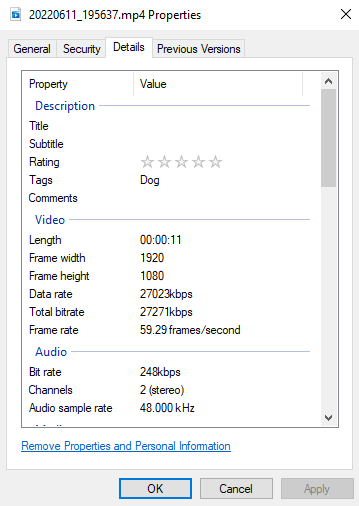
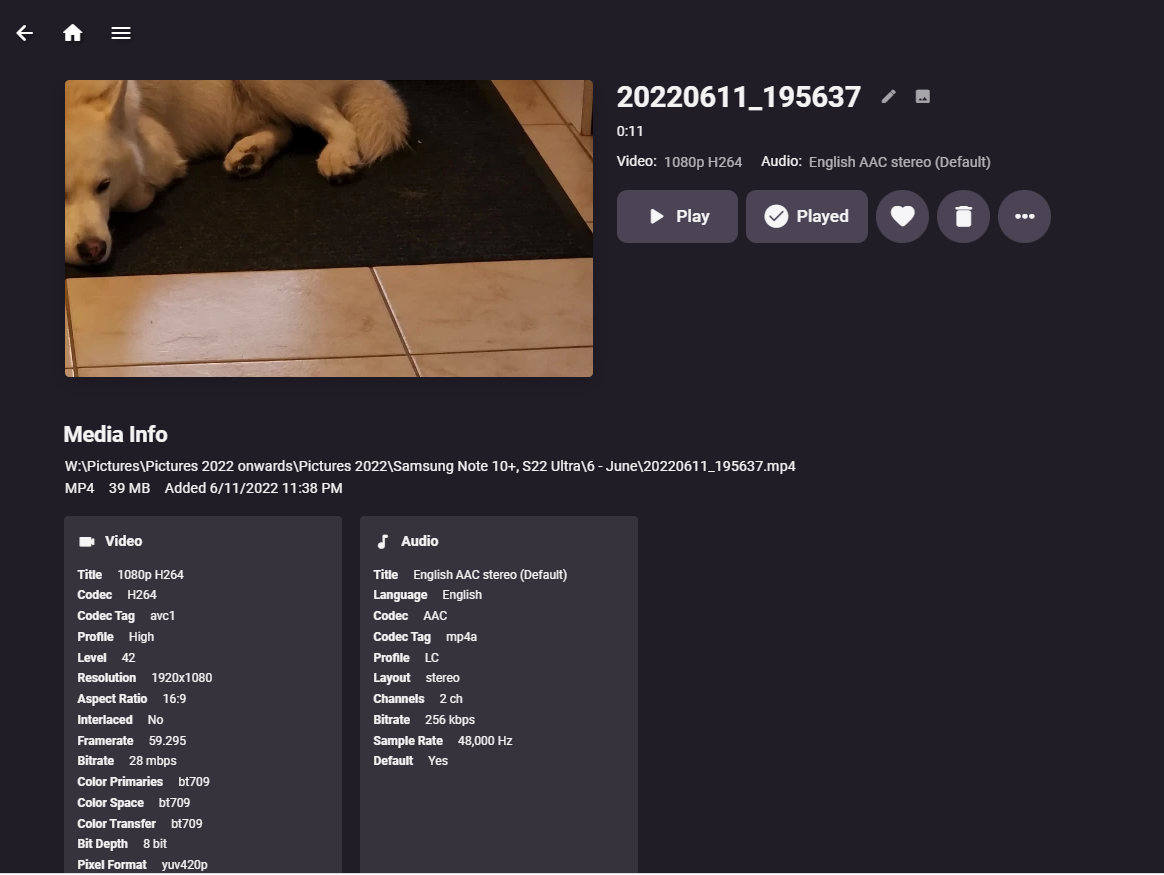
Here above screenshot, there is a Tag written into the video in Windows 10. But on Emby Media server, the tag "Dog" is no where to be found. It seems it needs to be added manually. Can we add a feature request to get the media server to scan media to detect tags in the video?
 1 point
 -
I think this is always a problem. You don't need to share anything, if I know your server URL, I can probably see you photos if I try sone IDs. In my opinion, I don't know if sharing media to anyone who has no account on the server is necessary. If possible, I would love to disable the complete "share" function if it comes with a security issue.1 point
-
Hi, it's your IPTV provider that will give you the m3u that you can import into emby server.1 point
-
That fixed it! Thanks! Before uninstalling the uncooperative version I noted down which one it was. "Emby for Android TV, v4.0" Sideloading the same version (from the play store) I have on my phone, fixed it.1 point
-
You can adjust the subtitles for all media by adding custom css in settings. This change would apply for all media. Be aware that some people's hardware has a fixed Aspect Ratio, if they are watching landscape wide on a phone. You can possible push the subtitles so far down that it looks fine on a computer monitor but gets lost of a phone. You need to test your changes on wide phone playback with different Aspect Ratio media. Am I missing something? What else did you want to do with the subtitles? Unfortunately, there is really no way to change the titles differently, for different media. This custom adjustment changes all subtitles coming from .srt files, but does nothing for embedding subtitles. .videoPlayerContainer > div > div > div { margin-top: 44px; /* positive goes down, negative goes up */ line-height: 1em; /* usually line-height is about 1.5em, so 1em would be tighter */ text-shadow: 5px 5px 7px #999; /* right, bottom, blur, color - use negative to go left or up, smaller number for less blur */ opacity: 0.9; /* 0.5 makes the text 50% transparent. Normally opacity is not used. 1 would be solid */ font-size: 34px; /* Starting font-size is around 48px */ color: #FFFF00; /* some subtitle color other than white, this is yellow */ background-color: #25356e; padding: 12px 24px; /* This makes top and bottom 12px, left and right 24px see CSS info for more options */ border: 2px solid #234356; }1 point
-
I don't disagree with that. For me it's more complex since I've added additional hypervisor layers. But in TrueNAS Scale you ideally create a pool specific for app use. When setting up this pool you can add users or groups to that storage area and set permissions. Once you've done that Emby shouldn't have a problem accessing the data or needing any special permissions set. That's kind of the key of using Scale correctly. Keep in mind it's designed to run as a cluster so you could have 3 or 4 TrueNAS machines. You would not want to have to manually adjust apps on each member of the cluster as that defeats the purpose. Instead you setup the shared stored and set users and permissions on it so any app or node in the cluster has proper access. If you're not doing that you're using it more like docker and will need to make adjustments for every app which isn't ideal.1 point
-
Emby for iOS 2.1.7 Released: Features Intro Skip & Table View Requires: Emby Server 4.7 or later Emby for iOS Version Changes: • Intro Skip • Table View • Add new field options for display • Various playback fixes over SSL connections Click for Extended Blog Coverage Intro Skip One of the exciting new features recently released is the TV Show Episode Intro Skip feature. This allows you to jump right to the start of the action saving you a great deal of time. Intro skip can be setup on each client to do automatic skipping or manually skipped. In manual mode a new icon shows up on the OSD that can be selected to skip ahead. Combine Into Skip with Automatic Play Next Episode for a superior binge-watching experience! Here's Skip Intro in action using the manual mode. Anytime during the intro you can select the Skip Intro button. Each client's Playback menu will have an option to select the Intro Skipping method to use. Make sure to click the Intro Skip link in the table above for extended coverage on this new feature including setup on your Emby Server. Table View A new library view has been added to all libraries. It uses a grid (column & row) format displaying information about your media. This new view is completely customizable with selectable columns as well as column sort order. This view is ideal for many uses including the ability to see a lot of data on small screens. Because it doesn't use cover graphics it loads extremely fast as well. Here's a couple pictures showing the new Table View in action. Make sure to follow the Table View link in the table above for extended coverage. Other Changes Add new field options for display Various playback fixes over SSL connections1 point
-
Related enhancement request: I use NextPVR for my live recordings, sometimes I partially watch a recording in progress from Emby Theater (morning news). It would be nice to have a "Refresh" button like the Roku app has to update the recording duration prior to pressing play or resume. Leaving the recording to refresh the library requires a lot of steps when I'm only concerned with the one recording. For example, the morning news will show as 6m duration, when actually its 30-40 minutes in. I scheduled a second library refresh timer, but that hasn't really helped.1 point
-
Great, the verbose logging is complete just testing on my server, and it makes totally sense around played criteria failure, as the legacy code just uses the current user logged in. For user sensitive metadata, I’m thinking of adding a drop down on the criteria field where one can select the user to apply the filter with. Next on the list. Once that is done and I’ve done my internal tests I’ll put out a release. Thanks again for getting to the bottom of this dudes.1 point
-
yeah sure ofc. if there is enough space nice. so in this case i can stay on my ram-disk for the transcoding, since only a small part of the file will be stored there. and after its buffered or played it gets removed thanks ❤1 point
-
Great, thanks for the feedback! I'm glad to hear that, we might be able to reclaim devices we had to move to mono due to that issue, provided they have a kernel above 3.2.1 point
-
I’ve seen this too in ATV where if you FF for some distance the you have to hit play twice. @FrostByte and i compared notes about this some time ago. SE 8.2.3 behaves the same as 9.1.0. The standard app does not do this.1 point
-
Luke, Please accept my apologies. This was a classic case of "operator error." My son, our architect and engineer of our home system, came home and in 5 minutes informed me that I was logged in as a user, not as an administrator. Since I had, apparently, been an administrator for months, without knowing it, I took exactly the wrong approach and wasted your time. I'm up and running now, as I was before. My best guess is that my user setting got changed when I activated a new Roku. I'm not sure how that happened but I now know how to easily resolve a similar situation in the future. Emby rocks. arlow19541 point
-
One weird thing though, my playlist is called "Music" and this works even if I change the songs in it. If I make another Playlist like "Wife One" it can't find it. Still works with "Music" though, and my wife is happy !1 point
-
I got all this going for all non emby endpoints, but I also created an embytest that goes via the tunnel. The tunnel I created on unraid via command line using a youtube article, then I upgraded that to the latest version and it allowed me to converted it to the cloudflare zero Trust GUI version so I could easily add all the challenges there instead of messing with yaml files. I will give the embytest.mydomain.com to a few test users to use for verification. The ability to remove my reverse proxy, and the ddns, and remove the open port 443 is very handy once I have thie all fully tested with some users. The email pin challenge is working well for the non emby/jellyseer endoints. Next step will be create a google o-auth challange rather than the pin challenge. Cool stuff! and all for free. Thanks cloudflare.1 point
-
Hello, i apologize after further analysis I identified the origin of the problem: my emby server is a VM. The host machine has a software raid. This software raid had been in constant rebuilding for weeks, which generated very high IO and therefore a load > 5.0. Since the raid rebuild resolution the emby VM no longer crashes. Then why on the 20 vms only the emby service and a mail server crashed randomly? I would not be answering but in any case significant io waits generated these side effects. Thanks for the time spent trying to help me.1 point
-
@cayarsdon't forget , that the truenas scale in baremetal sets a user and you can only login as root on the interface, whatever you do you are root, same goes when you create dataset's directories etc. So you have to work your way to permissions. Yes every user has an id, bin/bin has an id of 2. The emby need's a way to have write permissions to the library that you point to, so that can record , download subs, etc! So you have to know who is the user/group name that the emby install's itself under. I am saying that all over the forums, there are talks of a user emby , but there isn't, the Emby install as i say under internaly as a bin/bin, all other apps in truenas scale use the kubentetes user apps/apps. I see that as i have 5 apps in my nas atm. anyway, i tried to be helppful to anyone that struggles with the installation . Nm, long story short I am happy, as i dig deeper to understand the behavior of emby with trruenas scale, was trying to find a replacement for synology as i don't like the path they go into! and i wanted to be able to use the largest disk's that exist, and don't locked to Synology branded drives and i wanted hardware acceleration all new synology's don't have hardware transcoding even removed from the web site, but the notes have to been put to a tutorial on the truenas scale page, ignore my steps if needed. Thanks1 point
-
Also looking forward to the release. I have been consistently checking the github page for the release on the betas. Hope we see the native Apple Silicon version soon.1 point
-
Yes, ended up troubleshooting the problem yesterday the provider was having issus with their service but everything seems to be back to normal. In the end, not even a emby problem. Anyway thanks for the help.1 point
-
Correct, although if there is enough free space, then the whole thing will be there.1 point
-
I did some work on this today, latest version uses collections names, it is better but might still need some work.1 point
-
Hello Canaletto... I will add "Date Added" to the bulk editor. It will take me a few days because I am busy on another project. Thanks for pointing this deficiency out. Vic1 point
-
That sorted it! HDR tone mapping is working now. Now we just need to be able to actually stream HDR natively for proper use on HDR displays. LOL1 point
-
Thanks much for the quick response. There's been a serious internet provider outage here in Canada for the past 24h. Now back up and tried again w your input and working again. Thank you!!1 point
-
LOL using Enterprise as the Skip Intro example... ♫ It's been a long time... ♫1 point
-
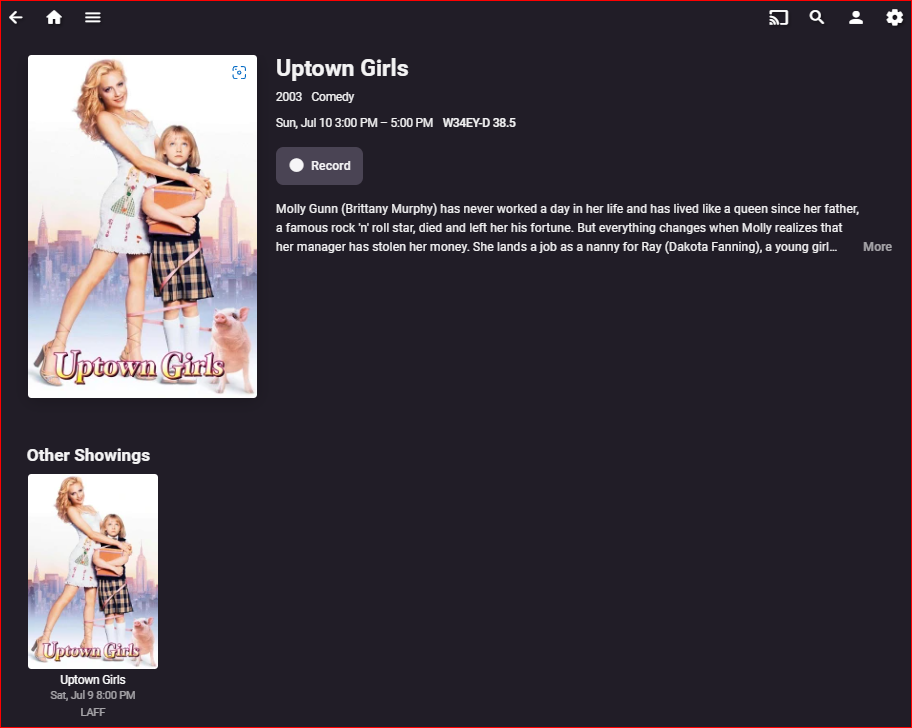
I see the issue now. The nearest airing is not at the top. (I don't remember even seeing the second one before, but I did mark the JUL 9 airing to record in the guide (then later unmarked it).)
 1 point
 -
This is working on the beta client. update 1 and 21 point
-
Yes, it can but needs a secured connection which looks like you have. Its possible have two external ports is tripping something up. I'd set things up to use only port 443. For you to do this the easiest method is likely setting 443 as the external port in Emby Server Network for public port that's secured. On your router modify the port forwarding to allow only port 443 forwarding this to the Emby Server's IP address to port 8920. So 443 to 8920 on Emby. Emby receives the data internally on 8920 vs 443 (which will conflict usually with other Synology.) but marks the packets with the port of 443. This way you receive everything at the router on 443 but send it to Emby working around Synology issues. Alexa should be good with 443 as it's the standard point it would normally use for secured connections. Let us know how this works.1 point
-
Same! I especially like seeing the container format for music.1 point
-
Have a look at Vantage Point in the Plugins - it's the Cinema Intro feature on steroids and can probably do exactly what you want and more ... @Cheesegeezer1 point
-
@cayars can improve the help article but you don't tag the intro, you tag the library item, and then the intro file name just matches the tag.1 point
-
Well that's very odd. Can you please install this version: https://www.dropbox.com/s/u1obwrckg4lkjc8/emby-android-google-armeabi-v7a-release.apk?dl=0 And then provide a log from the android app: Thanks.1 point
-
I actually don't think we will see animated posters from emby any time soon. As for the resolution, this is the best work around I could find to make it work for mobile app and web Browers. If you only use the web option, then there is a simple solution. It works for me, but I haven't really tested it with anyone else. you could copy and paste the animated png link into emby and you would not lose resolution, but this will only work on web. I hope this will help you1 point
-
Version 1.2.9 is only 20 days old so you should be good. Try redownloading it and make sure you uninstall the previous version before trying to install.1 point
-
@NachoMan77 I only have the template for this file, but if you install our official package inside the plugin jail it will overwrite the file with the correct one. You can SSH into the jail and run: pkg add -f https://github.com/MediaBrowser/Emby.Releases/releases/download/4.7.0.5/emby-server-freebsd13_4.7.0.5_amd64.pkg Replace freebsd13 with freebsd12 if this is a 12 jail.1 point
-
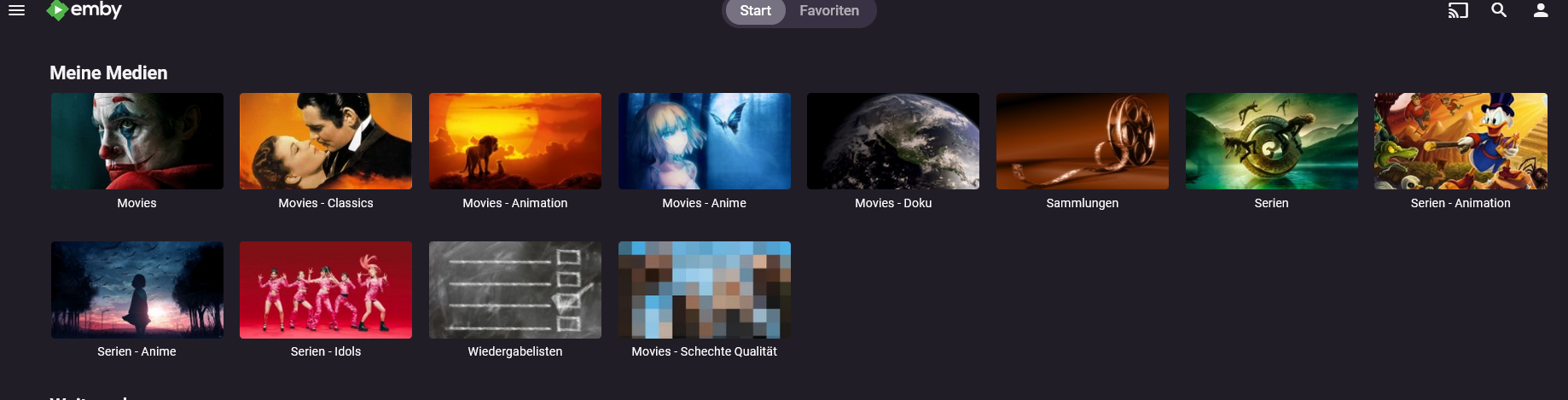
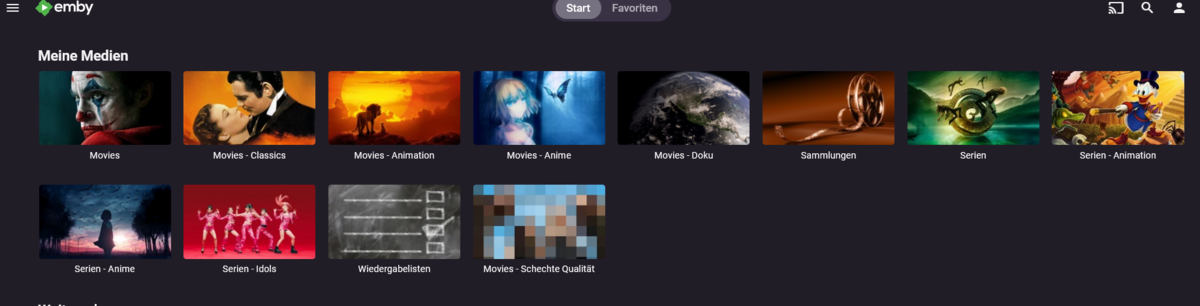
Please add Tags/Marker to the header top menu besides Start and Favorites I can go into each library and yes there i have Tags/Maker besides all the other stuff but when i click it i see only this tag in this one library. I need it as a global search as i have my movies splitted in different librarys (picture in attachement) When i now wanna look for tags like Blockbuster, Cyberpunk, Remake, Anime, Space Opera, etc. than i wanna see all Media i have with this tag. Not just from one library - i need it for all. It works perfectly fine over the search in top right corner. When look for one tag than it give me all my media with this tag - movies and shows mixed together. So it works already. All i need is a global Tag Menu added to the top thank you
 1 point
 -
Hi, we'll take a look at it. Thanks.1 point
-
@Anderella - thanks, your samples were indeed helpful. The ID3v2 tags were from different versions of the spec: MAHLER, GUSTAV - Symph N. 2 C-Moll 'Auferstehung' (4.6) , Ulricht. Sehr Feierlich, Aber Schlicht [1975#04] [file @ 00000293D82606C0] Setting default whitelist 'file,crypto,data' [aiff @ 00000293D829A880] Format aiff probed with size=2048 and score=100 [aiff @ 00000293D829A880] id3v2 ver:3 flags:00 len:155446 [aiff @ 00000293D829A880] Before avformat_find_stream_info() pos: 4096 bytes read:188232 seeks:2 nb_streams:2 MENDELSSOHN, FELIX - Ein Sommernachtstraum Op. 21 (4.7) , Intermezzo. Allegro [2016#04] [aiff @ 000001536742FA40] Format aiff probed with size=2048 and score=100 [aiff @ 000001536742FA40] id3v2 ver:4 flags:00 len:138973 [aiff @ 000001536742FA40] Before avformat_find_stream_info() pos: 54 bytes read:171759 seeks:2 nb_streams:2 MOZART, WOLFGANG AMADEUS - Symph N. 1 Es-Dur K 16 (1.3) , Molto Allegro [1969#01] [aiff @ 000001A9A4971540] Format aiff probed with size=2048 and score=100 [aiff @ 000001A9A4971540] id3v2 ver:4 flags:00 len:94554 [aiff @ 000001A9A4971540] Before avformat_find_stream_info() pos: 54 bytes read:127340 seeks:2 nb_streams:2 PÄRT, ARVO - Ein Wallfahrtslied [2002#01] [aiff @ 000002F229D6FA40] Format aiff probed with size=2048 and score=100 [aiff @ 000002F229D6FA40] id3v2 ver:2 flags:00 len:26227 [aiff @ 000002F229D6FA40] Before avformat_find_stream_info() pos: 54 bytes read:59013 seeks:2 nb_streams:2 WAGNER, RICHARD - Rheingold (02.44) - 1. Sz , Weia! Waga! Woge, Du Welle! [1970#02] [aiff @ 000002227365D780] Format aiff probed with size=2048 and score=100 [aiff @ 000002227365D780] id3v2 ver:4 flags:00 len:108389 [aiff @ 000002227365D780] Before avformat_find_stream_info() pos: 54 bytes read:141175 seeks:2 nb_streams:2 Regarding the TCON field, there has been a change between v2.3: https://id3.org/id3v2.3.0#Text_information_frames_-_details and v2.4: https://id3.org/id3v2.4.0-frames (search TCON) in the way that since v2.4, no braces are required anymore around the number. ffmpeg/ffprobe do not properly implement this for v2.4 and still expect braces. Your files are correct. I have fixed this now in our ffmpeg. The fix will be probably in the next beta (or one after). Thanks a lot for reporting!1 point
-
HI, sorry, we've been held up on other things but it is on our short term to do list.1 point
-
Keep in mind a true Multi-Cast is only good for the network it's broadcast on short of having L2/L3 routers or multi-cast proxies. So I'd doubt "Multicast" in the true sense of the word would be used to create a watch together type feature as we would want it to work with existing clients remote or local. Personally, I'd envision this working probably different then many of you. I'd envision a web chat type program with private channels and a lobby. You could have random anytime watch together where someone is in the lobby and another person drops by and decides to watch something with you. You of course could also schedule a watch together event for the future and send out invitations to others using your private room. In that room you're the moderator with control over playing the video, stop, pause, etc but could delegate or grant access to any others or everyone. The video would play taking up most of the screen with a side panel for ongoing chat. Ideally you could cast to an Emby client or Chromecast as normal. That would allow you to watch on any device you want while still being connected to the watch party chat. Done this way none of the normal Emby clients would need to be "watch together" aware as all the control is web based which is far better suited for chat. When I say chat it could be just text based or audio or full blown audio and video. That would be up to the moderator to control assuming the admin has the feature available to use. What would be cool as well would be queuing up little videos that play before the main event. Like the 5 minutes to movie time. 2 minutes, grab your popcorn. Maybe have another for 2 or 3 minutes breaks that might be needed were you click the 2, 3, 4, 5 button after pausing which queues up the intermission video but starts immediately after resume where you were. Would something like that work? Of the different existing watch together type utils others have what you're favorite or what you would consider the gold standard?1 point
-
Hi, I agree with EFEris, a "premiere only" option is better then none and saying "working on it" is way too often used in this Forum, but without delivering results (Sorry, sounds hard, but that's how I feel about it) And Samsung is the most common TV Brand in the EU, there is no doubt about it. Maintaining is a point, but to be honest, I can not imagine, that this will get out of control, Tizen is Linux based and u got a client for US already, as a plus, just quit the support of some useless old devices like a PS3? which will be used by a max of 1 % ? And in my opinion it's a waste of energy using such a power consuming device for streaming. Anyways, we got ur point, but ignoring the biggest Brand of TV Manufacturers is not a good idea I guess. And of course we could use Roku, Fire-tv etc. but its another device, another remote etc. pp And if it's about a few euros once, everyone can make it's own decision.1 point
-
Hi, I got it to work : 1. Set-up ddns xxx.synology.me domain in Synology Control Panel/Security - this step is really necessary? To be verified. - Synology can create a free 'Let's certify' SSL. - When I export it I cannot activate it. I gave up on this and went for other free SSL. (see 3.) 2. From the Control Panel/Security export the SSL cert to my harddisk 3. Get the free SSL cert files from https://www.sslforfree.com/ (3 month expiry) 4. Download the zip file (with pem format cert files) to my harddisk 5. Download the CA bundle file from https://www.ssls.com/knowledgebase/where-do-i-get-a-ca-bundle-file/ - I downloaded both, but used only the ECC format for conversion. 6. Convert the pem files into PKCS#12 format: https://decoder.link/converter - cert file, private key file and CA bundle file - set the password for the certificate (use in control panel/network) 7. Check the SSL with my xxx.synology.me domain using checker tool on the same site. 8. Upload the cert file to the emby content folder on my nas. 9. Enter the SSL file and password info in the Emby server/Network settings 10. Map https: ports in router and firewall, and - Check that you assigned the same port in Emby/Network settings... Hope its helpful.1 point