Leaderboard




Popular Content
Showing content with the highest reputation on 07/08/22 in all areas
-
ANNOUNCEMENT: WE WILL be removing the IntroSkip plugin from the catalogue. This will help us facilitate a lot of rework to align us with the core but still provide an editor and focus on end credits. Please use the core intro detection task in order to process your intros. As of now - no further support will be provided for IntroSkip Plugin. It will resurface soon - so all is not lost - we really need to force this to align with the core. Thanks everyone and we'll see you soon3 points
-
When the Emby server is exposed to the public net, then every item image is accessible without authentication or api key! This is especially critical if someone has private photo libraries in Emby. With a simple brute force attack to http://{public domain}/emby/items/{increment number}/images/primary it's possible to compromise every piece of someone's private life. This has to be fixed immediately!2 points
-
No, the saved sort title in the database does not need any special casing. That is an improvement that came along in 4.6.2 points
-
Actually I lied. Looks like there is a fix to make. For something so fundamental I'm surprised it's been like this all these years without being noticed before.2 points
-
I changed the plugin server requirement to sever >=4.7.3.02 points
-
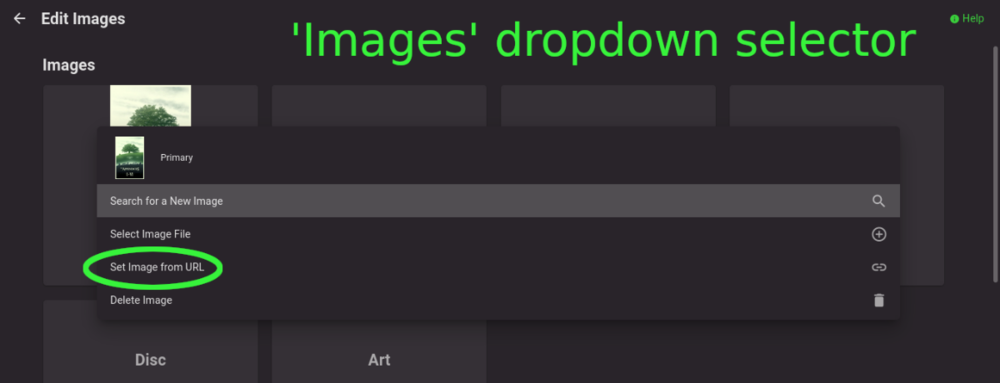
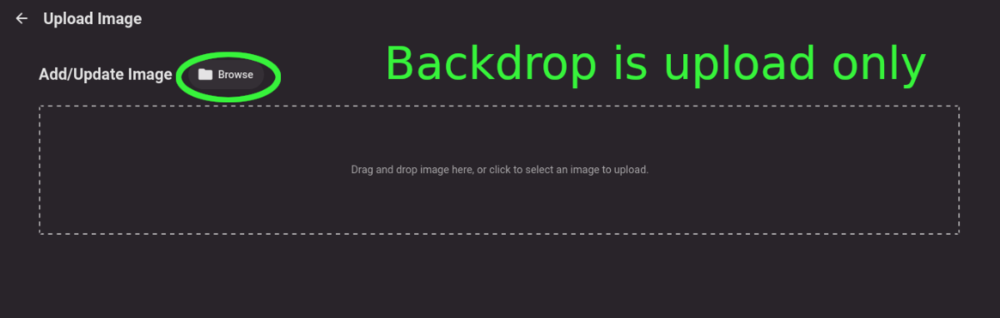
Title describes what I want but also here are some web app screenshots: The Image editor for all the types under 'Images' has a wonderful selector that includes a 'Set Image from URL' option: The Backdrops section only allows for adding images by file upload: I'd like to add Backdrops from URLs please.
 1 point
 -
Emby Server 4.7 - Table View Option Emby Server 4.7 and it's point releases provide some very cool new functionality. This is the first or introduction blog post in a new series we're doing to show you in depth the new features in 4.7. We're going to try and publish 1 or 2 blog posts in this series each week but will depend on other releases. Let's kick this off with a cool new feature from the recent 4.7.4 point release. Add new table view option The new Table View Option is available to use in all libraries and tabs. The examples below use a TV Library mainly with show names/series and episodes but applies this new view is available everywhere in the libraries. You could use the table view for movies, music albums, songs or any other part of your library. Let's start by showing how you change the view. The first thing we want to do is click the 3 dot menu circled in yellow in the pic above which will open the following settings: Change the view to Table as shown above. You will then have the following settings screen to select the fields nd you'll have a set of fields you wish to display. For now click the top left back arrow and you'll see a new table view that looks similar to below. Now that we have an idea what the Table view look like, click the 3 dot menu and select other fields to display. The picture below shows additional fields added. Instead of using the 3 dot menu to work your way to select fields to display you can click the icon shown in the yellow square (top left corner). This gives you direct access to the display fields without having to select the view first! Select a few more fields to display (or select them all) to see what it looks like. If the table scrolls off the screen you can use the scroll bar at the bottom of the screen, gestures or two finger trackpad slide to scroll the grid. You can right click on any row and bring up the action menu which should look familiar. Most of the column headers can be clicked to quickly sort by that column. A second click on the header reverses the sort order. The picture below shows the table is using the Community Ratings and it's sorted in a reversed order to find the highest ratings. Tip: Use the Keyboard to Jump to sections closer to your Media. You can type up to 3 characters to jump to the media starting with those characters. This feature ignore common words such as "a", "the", etc If you type BON it jumps to media starting with "bon" which is helpful if you want to watch "Bones". To jump to a show "The Rookie" or "The Big Bang Theory" you could use ROO or BIG to get these results: If you type a single character such as "S" it will jump to the "S" section of the media. Typing "TR" would make it easy to access Training Day or Treadstone. Just like the Primary view you can apply filters (tab up top). I just used this to find the name of a show I watched with my son. I remembered it was a Science Fiction show so I tried this filter knowing the show had been played. This filter produced the following results which had the show name I was looking for "Terra Nova". I could have used a couple different Genres in my search with success. The table view expands the viewing flexibility of Emby a great deal and is already something of an instant hit! Try it in different situations, such as remote when you want the fastest view of media without waiting for graphics to load. Or when you want to see the maximum amount of meta-data. Please share with us your favorite use of the new Table View and any tips or tricks you discover! The next blog post will cover the following bullet point from 4.7.4 that doesn't do the feature justice. Add Episode Intro Detection and Skipping feature If you would like to see an in-depth blog post on any 4.7 feature let us know in the comments.1 point
-
Emby for iOS 2.1.7 Released: Features Intro Skip & Table View Requires: Emby Server 4.7 or later Emby for iOS Version Changes: • Intro Skip • Table View • Add new field options for display • Various playback fixes over SSL connections Click for Extended Blog Coverage Intro Skip One of the exciting new features recently released is the TV Show Episode Intro Skip feature. This allows you to jump right to the start of the action saving you a great deal of time. Intro skip can be setup on each client to do automatic skipping or manually skipped. In manual mode a new icon shows up on the OSD that can be selected to skip ahead. Combine Into Skip with Automatic Play Next Episode for a superior binge-watching experience! Here's Skip Intro in action using the manual mode. Anytime during the intro you can select the Skip Intro button. Each client's Playback menu will have an option to select the Intro Skipping method to use. Make sure to click the Intro Skip link in the table above for extended coverage on this new feature including setup on your Emby Server. Table View A new library view has been added to all libraries. It uses a grid (column & row) format displaying information about your media. This new view is completely customizable with selectable columns as well as column sort order. This view is ideal for many uses including the ability to see a lot of data on small screens. Because it doesn't use cover graphics it loads extremely fast as well. Here's a couple pictures showing the new Table View in action. Make sure to follow the Table View link in the table above for extended coverage. Other Changes Add new field options for display Various playback fixes over SSL connections1 point
-
Emby for Apple TV 1.6.1 is currently rolling out. Thanks guys.1 point
-
@alucryd The 4.8 beta is working for me. The server started up and everything is working normally (so far). Thanks.1 point
-
Some sorting is case sensitive which it should never have been.1 point
-
Glad to hear! I am on travel for the next couple of weeks but will test any new point released when I return.1 point
-
Same! I especially like seeing the container format for music.1 point
-
I am not home at the moment… I will try to do it tomorrow.1 point
-
I just tried it and I'm getting the same thing. When I try to play a video or music, I either get a black screen which I have to press the back key to get out of or it just flickers and goes back to the "press play" screen. Here is the log file you requested: 19a9d72f-2b5f-445b-a881-8b6a1af9fe5a.log1 point
-
OK we'll take a look at it. Thanks.1 point
-
I use the 64bit arm v8 one on my Shield pro. Tube users should use the 32bit v7a one. However, the 32bit one will run on both.1 point
-
Good, now I'm at work, but when I get home I'll check out the new plugins!1 point
-
Haven't used it but you could check this plugin.1 point
-
Have a look at Vantage Point in the Plugins - it's the Cinema Intro feature on steroids and can probably do exactly what you want and more ... @Cheesegeezer1 point
-
Well, then it works !!! I was able to match each studio intro to his film. Thank you so much everyone luke and happy2play1 point
-
@cayars can improve the help article but you don't tag the intro, you tag the library item, and then the intro file name just matches the tag.1 point
-
@lLuke appreciate your support and fast response. I will look into it and keep I posted.1 point
-
It's something that will be reviewed in future updates. Thanks.1 point
-
For some reason, I never tried to log connected outside of my LAN (I swear it worked when I accessed my external IP from inside the LAN when I had it set up on my desktop). I just tried login through the App on my phone connected only to my mobile data, and it worked This can be closed. I'm sorry for the pointless post.1 point
-
I'm trying to play audio files (in this case an MP3, but I've also tried it with M4B and AAC) on my NVIDIA Shield; however, they won't play when my Shield is connected to a different network than my media server. The problem does not occur when accessing Emby through my web browser or the Emby app on my phone. It also never occurs when playing video files, regardless of what device or what network I am playing them on. NOTES: Media Server (running Win10, with Emby Server 4.7.5) is connected to my home network/router. NVIDIA Shield (running Shield Experience 9.1, with Emby app 2.0.77g) is connected to a different network/router. STEPS TAKEN IN THE ENCLOSED LOGFILE: -Opened Emby on NVIDIA Shield; tried to play the song "Blinding Lights." Playback is stuck at on 0:00 on my Shield, with no sound coming out; however, according to my server's dashboard, the song was playing. See the enclosed pictures for what the Shield and the server dashboard look like. -At this point I connected my NVIDIA Shield to my home network/router. -Re-opened Emby on NVIDIA Shield; again tried to play song "Blinding Lights." Same result as before, as seen in the images. -In Emby app on NVIDIA Shield, clicked "Switch Server" then re-selected the same server. Tried to play the same song again. This time, the song works just fine. I hope I've provided enough information; please let me know if I need to give more. EDIT: finally solved this myself 15 minutes after posting it...after waiting 2-3 months to post it to these forums. Go figure. Apparently my Emby server config was pointed at my old security certificate rather than my new one. Not sure why this only affected audio files, and not video files, but it seems to be resolved. Mods, feel free to delete/close/whatever.1 point
-
Hi. We'll have to invite you once we have tried this change.1 point
-
Hi. The Android TV and Roku apps use your guide sorting setting for the "On Now" section. So, sort your guide how you wish to see it and then your On Now will be as well. Does that answer your question?1 point
-
Hi. To me, that seems awfully redundant (and potentially confusing). You are telling the recording exactly when you want it to start and end. Why not just put that in the start/end times?1 point
-
What software do you use to join files? Paul1 point
-
solved! looks like nolock was missing from the cifs mount options. popped that in and all is well now1 point
-
hii!! yes, i contacted the server owner and they gave enter server manually- code and port thingy and it worked1 point
-
nps, I will give it a go shortly.1 point
-
To answer the question, Emby Server has never enlarged your original images, so I'm not sure what happened.1 point
-
Hi, we'll look at making them consistent. Thanks for reporting. @ebr1 point
-
HI, sorry to hear about this. Can you please try this version: https://www.dropbox.com/s/u1obwrckg4lkjc8/emby-android-google-armeabi-v7a-release.apk?dl=0 And then provide a log from the android app by following these instructions: Thanks.1 point
-
Not in the plugins I tested. @eosol is there a specific plugin you are having issues with? Can you screen capture a specific example. Only tested the iOS app.1 point
-
Thanks for the feedback !1 point
-
Technically you can search and multi-select/group them from any library. But yes the plugin will do this automatically for you no matter the location. These options have been around as long as this topic.@damienseidel1 point
-
That has been supported for quite some time, depending on your folder structure and/or libraries, you can either: 1) Multi-select and select "Group Versions" in three-dot menu if within same library or 2) Use community-made Auto-Grouping plugin which works across libraries1 point
-
it's most definitely not that, but thanks for the feedback. The frozen frames are coming out from the stations having a malformed mpeg2 packet. Roku doesn't handle it AT ALL and it freezes on the frame. It's been a problem with Roku and they just don't acknowledge it. I had things set so EVERYTHING would get encoded to be transcoded and not be mpeg2 but something happened over time with updating that it just doesn't seem to do that anymore and I re-encounter the frozen frame problem. I'm getting more time now so maybe I'll get down to what the hell changed to make it so it was the way I had it, it's probably something with the video card drivers changing in my linux environment, so I will start there.1 point
-
Ok, thanks! I think that does confirm what I was gathering, so I'll consider that the answer I needed. I think I'll have to investigate the script/path remap angle more fully.1 point
-
I can confirm that it also doesn't work for me and I have the correct TVDBID, IMDBID, TraktID, and TMDBID for the episode. Trakt also has the right IDs for that episode, so that doesn't seem to be the issue. I also have other episodes that are of a different order than what is on Trakt and those still work if you have the proper IDs. There seems to be something about the fact that this episode is listed as a Special on Trakt/TMDB, but as part of Season 4 on TVDB.1 point
-
One of my favorite uses is on mobile devices on cell networks. This loads quicker on cell networks without the posters. You also get to see listings for more media this way.1 point
-
Hi, yes it's just a first pass but I think ultimately we'll end up doing something like this.1 point
-
resolved it - took a bit of messing about but now seems to be up and running with correct version. not sure if it was anything due to getting the camera upload activated as the initial 45 image uploads were corrupted but the rest were fine.1 point
-
I requested here. We already have 3 whole votes:1 point
-
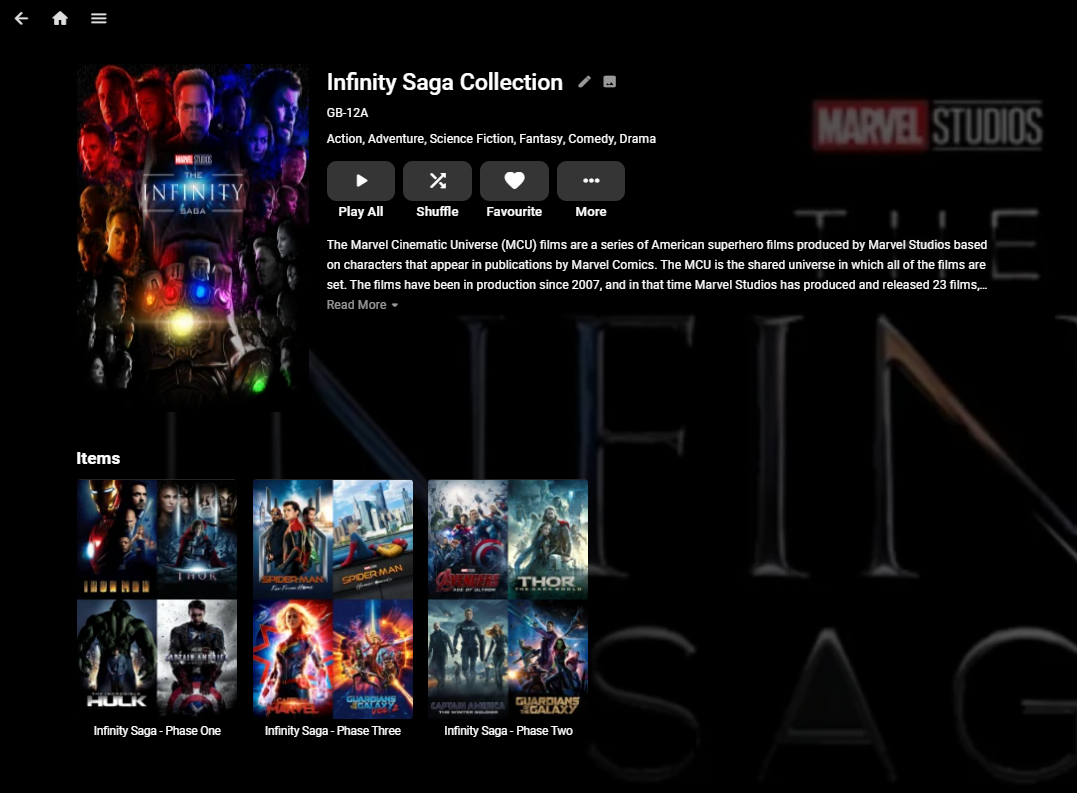
I've been running with Nested Collections for a while now and have not seen any issues. Creating them involves creating the links directly in the database which is strictly unsupported, so if you do not want to wait for the official support, then ping me a PM and I'll share the document I wrote on how to do it. edit 2nd Feb 2024 - This no longer works ... As an example - This is the Infinity Saga Collection comprising of the Phase 1,2 & 3 (Collections).
 1 point
 -
Hi. We have that kind of thing planned for the future at a system-wide level.1 point
-
So absolutely pointless compared to what you used to be able to do with it then. I liked to be able to see if parental ratings were missing etc. I needed to select a whole bunch of movies that had corrupt or broken images (I had a RAID break and a messy data recovery) so I could do a mass metadata refresh and replace images. This used to be easy to do. Even in the normal library I had to do it in batches because of the 100 item per page restriction. You may as well remove it from the product in its current state, or put it back to how it used to be ... useful.1 point