Leaderboard




Popular Content
Showing content with the highest reputation on 07/06/22 in all areas
-
Save Time With Emby's Intro Skip Requires: Emby Server 4.7 or later One of the new features in Emby Server 4.7 is the ability to skip TV Show Episode Introductions segments. This allows you to jump right to the start of the action saving you a great deal of time allowing you to quickly get to the good stuff! Combine Into Skip with Automatic Play Next Episode for a superior binge-watching experience!. This guide will cover the following: Configure a TV Library in Emby Server Configure Emby Client for Automatic or Manual Intro Skip How to use Configure a TV Library in Emby Server In order to use Intro Skip a TV Show library needs to be configured. Edit a TV Library on the Emby Server console. Scroll down to the Markers section in the library and change the option from NEVER to either "as a scheduled task" or "as a scheduled task and when media is added" depending on your particular needs. Once setup go to Scheduled Tasks and you'll see a new option has been added: By default this task is set to run every 24 hours. You can adjust it to run at specific time if you like. To add a new Task click the + sign above. This shows a new schedule that starts at 3 AM and is allowed to run for 4 hours. After clicking Add: We can now click the trashcan icon on the 24 hours schedule ending with: From our Scheduled Tasks menu we can manually run this job clicking the arrow icon. You will then see a status bar showing the percentage complete. There is nothing more needed on the server to use Intro Skip except to give it time to analyze all episodes and build the Intro Skip indexes. This process may take a while depending on the number of episodes you have. Configure Emby Client for Automatic or Manual Intro Skip Each client can be set to ignore TV Show Intros, automatically use Intros, or to prompt use showing a button. You can set this option in the client option's Playback Menu. Using Intro Skip With the Skip Intro button selected you can clearly see the button on the OSD immediately at the start of playback. The timeline is still at 0:00 before the show has started to play and we can already skip the introduction of the show. Clicking the Skip Intro button immediately jumps right to the start of the Episode. With the client option set to Automatically skip intros our TV show intros have been put on auto pilot. Right at the start of playback it jumps to the end of the intro right at the point of the fade in. View the full article3 points
-
Yes Yes No probs2 points
-
Couldn’t agree more2 points
-
@ebr @Abobader Ok, sounds good. Since this site is the only one still available it got it's password updated so the rest dont matter to much I guess. I'm guessing it was probably one of the old mediabrowser databases that were compromised, if they've been kept alive for historical purposes. If not then idk what the deal is. I had used same the password all the various sites that MB and emby have used over the years, so I don't know where the leak originated but somewhere along the line, there had to of been some info taken. That is unless the keeper of all my passwords (Google) is infact the one who lost them to begin with.... And the plot thickens... Haha lol but anyways, glad to know everyone here is doing well and staying safe. Seems most of the gang I used to converse with has grown into some sort of development roll here and become part of the team, so that's awesome! Congrats to all, even tho it's now years late! Better late than never. Catch y'all on my next visit at some unknown point in the future. Till then, take care2 points
-
I'm a plex life time member, but I have been using Emby for over six years continuously, but there is a feature which I have always thought is missing in Emby which I would like and encourage the developer to consider including especially in this dispensation where families can social or commingle due to COVID 19. Today, I received a notification from Plex about it new feature titled Watch together you can read about it here https://support.plex.tv/articles/watch-together/ The feature allows friends and families at distance to watch same movies together instantly, you simply invite all your buddy, once they signed to the system which can be seeing in the server then play and pause as needed, this I think is cool feature should be added to emby. Let's here your though if Emby developer should consider adding this feature to our beloved Emby Media https://www.bing.com/news/search?q=Plex+Watch+Together&qpvt=plex+watch+together&FORM=EWRE1 point
-
This plugin has been used by a couple people but should be considered beta. You can get more information on the plugin and it's companion utility, the source for each, and the executables at this Github page.1 point
-
For some reason under v2.0.77g when I start a movie with rating information (rated R, PG, etc), it is now showing on the screen for a few seconds. I don't need to see this, how do I turn this off?1 point
-
Although there is a wiki page detailing Emby integration with Google Home, from comments online it appears that hasn't been working for a long time. Emby itself is a solid system, but it's a shame that Google Home isn't in a working state. More and more of us are building connected homes, and it would be great to include Emby in all of this - as so much of our media consumption is driven through Emby. Without this integration, it becomes less relevant as time goes on. Can the developer team respond back and explain what we can expect regarding Google Home support in the near future?1 point
-
I have made the change to my virtual machine to give it tons of disk space so it can store the transcoded files in the default location. I'll report back in a few days if the problem seems to be resolved, or as soon as I can see that the solution did not work.1 point
-
OK I've passed this onto our Synology packaging developer for review. Thanks.1 point
-
Those are changes I made when having issues with space but this issue started before that (but with the old server version). I've created a new folder and set transcoding etc to point there. Should be able to see if it corrects it tomorrow. Thanks for the time on this.1 point
-
Yup. That would be super easy to do.1 point
-
updated to 3.2.52 and still works well. Think one time there was a slight lag in the video starting when jumping, audio continued immediately, but just once and not the same thing. Didn't freeze or anything and was direct playing all the time.1 point
-
One, I'd like this feature. I'd both find excuses to use it, and I feel like it'd be a huge selling point/marketing tool for the platform. Two, I think people confuse the feature requests here. It's not that Emby develops the most popular feature, it's just to give the team ideas (and it being something someone wants is an added bonus). Something with hundreds of votes may never get developed if it isn't necessary or cost effective to do so, and something with two votes might get developed if it's fairly easy and looks good in the next versions release notes. With that in mind, I think something like that Jellyfin page will only frustrate users more, as making highly voted feature requests more visible isn't magically going to give the Emby team the staff/resources to prioritize them.1 point
-
Yes. It may not resolve it but it's important to at least try it to rule it out. Thanks.1 point
-
Here is what that list has that you don't. - It's easily searchable - It's sortable - No duplicates - Easy to track I am not saying get rid of the forum, you could have links to the posts. Once again you are too focused on refusing my idea that you can't even take the one extra step to improve it. __________________________________________________________ Please tell me you are not being serious. __________________________________________________________ It's not about participation per se. Also I'd argue that your whole user base is technically-biased, at least to some degree. __________________________________________________________ That's why having an index that collects features into a list is a good solution, it'd help everyone. __________________________________________________________ || || \/1 point
-
Works great thanks. I do wish it would transfer .srt and .bif files though but it did what I needed it to. Thank you1 point
-
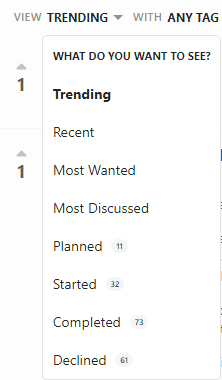
It's easier to find, somewhat better organized, easier to read, easier to vote and see the vote count. I mean what could be cleaner than this:
 1 point
 -
I'll 3rd this1 point
-
I'll take another look this week.1 point
-
I found a remote that works amazing with the firecube, it's the Buzztv ARQ100 all the live tv keys work, number, go back, channel up and down! YAY!1 point
-
Raspi pico are pretty cheap, and you could most likely get a used monitor from an online marketplace, or from a used item retailer. I totally found mine on someone's front yard they were throwing it away... Little did they know I had other plans for the old thing.1 point
-
Yeah you could easily show the Emby logo statically for sure. Could probably even request the logo right from the Emby splash screen in the dashboard.1 point
-
In my opinion, the more the staff relies on the forum as a means to request features the more misleading will the number be. This is what is needed https://features.jellyfin.org/, a clear list that people can go through.1 point
-
I didn't know that, that's probably why none of the files seemed to have been renamed before when it looked like it was working. I will give it a try, thank you so much for your help.1 point
-
Thanks. I thought that was the case but at my age I can only be sure about things if someone else confirms my belief or hunches. Remember "The mind is a terrible thing to use."1 point
-
It is not affecting Edge/Chrome or FF103/104 so I would not think it will be an issue if you forget to remove.1 point
-
Okay. Must note it looks good, amazing. Good job Luke @Abobader1 point
-
Actually just found out that soundiiz will do the transfer from all sources to Emby! Thanks for trying to help though!1 point
-
Bingo, the main display works properly, and the back screen was off, and I didn't find the log file, thanks for your support!1 point
-
OK, one more time. Let's see if this resolves it: https://www.dropbox.com/s/u1obwrckg4lkjc8/emby-android-google-armeabi-v7a-release.apk?dl=0 Thanks.1 point
-
OK Thanks for the info.1 point
-
I understand, but currently there's no other place in the system to put these kinds of overrides.1 point
-
Emby for Android 3.2.51 Released: Features Intro Skip & Table View Requires: Emby Server 4.7 or later Emby for Android Version Changes: • Intro Skip • Table View • Add new field options for display • Add new theme options Click for Extended Blog Coverage Intro Skip One of the exciting new features recently released is the TV Show Episode Intro Skip feature. This allows you to jump right to the start of the action saving you a great deal of time. Intro skip can be setup on each client to do automatic skipping or manually skipped. In manual mode a new icon shows up on the OSD that can be selected to skip ahead. Combine Into Skip with Automatic Play Next Episode for a superior binge-watching experience! Here's Skip Intro in action using the manual mode. Anytime during the intro you can select the Skip Intro button. Each client's Playback menu will have an option to select the Intro Skipping method to use. Make sure to click the Intro Skip link in the table above for extended coverage on this new feature including setup on your Emby Server. Table View A new library view has been added to all libraries. It uses a grid (column & row) format displaying information about your media. This new view is completely customizable with selectable columns as well as column sort order. This view is ideal for many uses including the ability to see a lot of data on small screens. Because it doesn't use cover graphics it loads extremely fast as well. Here's a couple pictures showing the new Table View in action. Make sure to follow the Table View link in the table above for extended coverage. Other Changes Add new field options for display Add new theme options View the full article1 point
-
Thanks, HEVC is only supported on UHD (not FHD) models for webOS 1.x ::: LG | webOS TV Developer :: AV Format on webOS TV 1.0 (lge.com) Updated for the next release.1 point
-
Having done quite a bit of further testing, I must admit that I still can't quite figure out what happens behind the scene. But, I can see that with some work, a full migration from my very legacy data is possible with a very high rate of success. So, thanks to everyone for support - mostly of course @pünktchenfor guidance and for a great plugin.1 point
-
Thank you. Having the info like this makes it much easier to report as it clearly shows what's wrong. Carlo1 point
-
that worked, thanks1 point
-
I can confirm that it also doesn't work for me and I have the correct TVDBID, IMDBID, TraktID, and TMDBID for the episode. Trakt also has the right IDs for that episode, so that doesn't seem to be the issue. I also have other episodes that are of a different order than what is on Trakt and those still work if you have the proper IDs. There seems to be something about the fact that this episode is listed as a Special on Trakt/TMDB, but as part of Season 4 on TVDB.1 point
-
Hi, I think this will be better handled by the smart views feature that we'd like to build, and then you'll be bale to create your own top level categories based on various criteria.1 point
-
Never mind, I had to hand pick each photo under Movies > Genres but then it updated them in the playlists section as well. Though the playlists genres appear to be empty for all users. But that's ok, just didn't want the pictures of movies showing to users who weren't supposed to be able to watch those movies.1 point
-
It works for probably 95% of all my TV Shows. The type of show it's not going to be ideal for is the type that starts out playing the show for 1.5 to 3 minutes, then does the intro. In a nutshell, Emby analyzes each episode of a show. It then compares the show episodes together looking for a common Introduction sequence. If it finds this sequence it can jump to the end of it for you, aka Intro Skip.1 point
-
Thanks for helping confirm that. I was able to figure out a way to consistently trigger it (heavy file reads with dd). Other NFS clients were able to continue accessing the NFS server at the time of the hang. From there I figured out that there was something in the networking of the guest VM where I'm running Emby server. I haven't changed any configs on the guest VM, the VM host, or the NFS server, so I'm thinking that a recent update brought along something ugly. I think I've cured it now by turning off multiqueue on the VM's network adapter - or at least I can no longer trigger it as I had been able to before.1 point
-
I would guess that, for some reason the owner of the server has invalidated you login or changed your password. You should contact the server's owner to see what is wrong.1 point
-
Yup, as I pointed out to earlier, just because people don’t feature request, it doesn’t mean people don’t want it.1 point
-
Finally realize you meant add that code. Seems to be good now. Thanks.1 point
-
Honestly, i think having dedicated event is the best option. For example you could fire this event when the user watched 90% of the episode/movie like plex it doesn’t have to happen at 100% you could even make it configurable and let the user decide when the item is marked as watched. Any way it’s up to emby team if they think it’s worth it. i already made the adjustment to work with playback.stop1 point
-
The music quality setting is set to "Auto", if I set a manual setting transcoding works correctly but that's not the problem, the problem is that "Auto" is not detecting the download speed of the external connection (whether WiFi or mobile), something the webapp does correctly.1 point
-
I found very interesting. It could also be added another way to browse the content. For example Prime Video and other apps. Remove the cover on the left side, and leaving the screen wider with title, synopsis, and other metadata. When browsing the titles, on the bottom line, go already showing the image from the top right side etc... as in prime video. great. Also, removing the title from my media, I find it very unnecessary. AMAZON PRIME VIDEO NA SAMART TV.mkv1 point
-
If you've got something like this css for the Home page, under the section "/* Moving My Media Down */" - /* Add to blank home page online image Gollum - remember to untick Enable Backdrops in Display */ /*div.scrollFrameY.flex.flex-direction-column.flex-grow.focuscontainer-down.emby-scroller.scrollY.overflowYScroll {background-image: url("https://static0.srcdn.com/wordpress/wp-content/uploads/2019/03/Gollum.jpg");}*/ /*div.scrollFrameY.flex.flex-direction-column.flex-grow.focuscontainer-down.emby-scroller.scrollY.overflowYScroll {background-size: cover;}*/ you need to replace with something like this - /* Add to blank home page online image Gollum - remember to untick Enable Backdrops in Display */ [data-type="home"] div.focuscontainer-down {background-image: url("https://static0.srcdn.com/wordpress/wp-content/uploads/2019/03/Gollum.jpg");} [data-type="home"] div.focuscontainer-down {background-size: cover;} Hopefully, as mentioned, thats for the Home page. If you have an image under the TV Guide, that still seems to work. I need to put up a new version, it juse always seems to be a tomorrow, tomorrow, tomorrow thing... EDIT - thanks to Happy2Play for the new css1 point



















.thumb.jpeg.1f6f89ab6ab9e63551e513f3762b58cf.jpeg)