Leaderboard




Popular Content
Showing content with the highest reputation on 06/30/22 in all areas
-
Shield Experience 9.1 has been released. It is the same as the 3rd ebeta installment. https://www.nvidia.com/en-us/geforce/forums/shield-tv/9/496476/shield-experience-upgrade-91-released-63022/ Today we released SHIELD Experience Upgrade v9.1 (33.2.0.125) for all SHIELD and SHIELD Pro units. This update is based on SHIELD Experience Upgrade 9.0 and includes the following fixes: Enhancements: Adds support to automatically enable game mode on supported TVs (ALLM) Adds night listening mode (HDMI audio only) Adds option specify network workgroup when connecting to SHIELD over local network Adds option to create your own password when connecting to SHIELD over local network [SHIELD Pro 2019] Adds AI upscaling support for 60Hz HDR10 video [SHIELD Remote 2019] Adds option to only wake SHIELD with power button or NETFLIX button [Game Controllers] Adds option to only wake SHIELD with logo button Adds option to match uncompressed audio with Dolby reference volume levels Adds option to disable displaying HDR/Dolby Vision content Adds notification when app uses microphone Bug Fixes: Display Fixes bug where Dolby Vision mode would become re-enabled after reboot Network Resolves issue where link speed was not reported when connecting ethernet cable Resolves issue where “Restart Wi-fi” in Quick Settings was not working properly Audio Resolve audio pops heard after hotplug of USB audio devices Fixes bug where some apps would only play through headphones after “Match content audio resolution” is enabled Resolves issue where HDMI fixed volume required disable-enable cycle to work properly Fixes bug where stereo upmix would not become enabled after playing multichannel discrete audio [SHIELD 2019] Disables comfort noise feature when Dolby Audio Processing is enabled Storage Improves file transfer speeds to attached storage Resolves issues where NAS would not reconnect after SHIELD restart Accessories Fixes bug where SHIELD Controller 2017 or SHIELD Remote 2015 would not auto pair after taking upgrade SHIELD TV app Fixes bug where SHIELD TV app would not send keyboard entries while streaming GeForce NOW Resolves SHIELD TV app issue where user could not copy/paste text (passwords, URL, etc) Other Resolves issue connecting to GeForce NOW servers while NVIDIA Share is active Improves stream to twitch duration indefinitely Resolves issue where system would become unresponsive after enabling Dolby Audio Processing from quick menu Resolves issue where SHIELD would wake up unexpectedly Improved HDMI-CEC compatibility with other HDMI connected devices Resolves issue where app switcher (double tap home) would not show most recent screenshot properly Resolves adb connection issue where host PC would need to be re-authorized after 7 days Fixes bug where D-pad "up" and "down" would not function after upgrade2 points
-
Make sure to enable mlock on the jail.2 points
-
Previous discussion Currently you can add them, change them, but not completely remove them once added from a nfo file. Complete removal requires UI intervention. Have not tested tags at every possible level though.2 points
-
Response today from Samsung: and now we wait... Please let me know if you see new firmware updates for your TV, then we will have to work out how to test this.2 points
-
Ideally, I'd like an option with the Android TV app so that when I click on an something which is currently playing, that it starts playing immediately rather than going to the "Tune To Channel" pop up. I realise that I can do the same thing by pressing play, but the Shield remote implementation of play/pause is not very intuitive and not something my other half will ever use! Hope this is okay and I've put this in the right area. Thank you.1 point
-
Emby Server 4.7 is Released with Many New Features, Improvements and Fixes Emby Server 4.7 is starting to rollout to different platforms. It's packed with new features, improvements and fixes. We wanted to give you a Preview of some new functionality and changes to Live TV as well as bring to your attention possible post installation configuration changes that might be required. If you currently use one of the following Live TV Plugins (NextPVR, MediaPortal, ServerWMC, TVHeadEnd, TVMosaic, Vu+, DVBLink or DVBViewer) you will need to reconfigure the plugin after it is updated following the 4.7 installation (the server checks for new plugins after a new install). As part of this process the guide will refresh. Please let it completely finish before going to the next step. Once the guide refresh is complete please go to Live TV menu and add a new tuner. You will see an entry for the plugin you are using. See Below: Live TV has many new features as well as a new plugin framework. Our own internal tuners and guide have been moved into plugins using this new framework as well. Setting up a tuner for use in Emby thanks to the new framework allows for a unified architecture, simplifying tuner/source setup. Here's an example of the Add TV Source dialog showing a few of the different choices using the new plugins. Whenever you install a new Live TV Plugin an entry will appear on this dialog. All available tuner types are now managed from one central place simplifying setup and configuration. All tuner types now share a common set of features. This allows 3rd party plugins to work exactly the same as Emby provided sources. This is now possible thanks to a new TV framework Emby uses debuting in this release. This new framework allows for simpler TV plugin creation as the server takes over responsibility of many functions previously needed at the plugin level. This helps to prevent issues related to specific plugin code as Emby server can now handle streams in a very consistent manner regardless of source. This is a WIN/WIN for developers as well as users! Emby Server 4.7 along with it's new TV plugin Framework includes new features and expanded functionality. Some of the highlights are: Support for OTA ATSC 3.0 & 4K Live TV If you have an ATSC 3.0 compatible tuner and live in a TV market currently broadcasting ATSC 3.0, Emby has everything you need to embrace this new technology. This includes new support for the proprietary AC-4 coded needed to decode audio streams. Not only will you get a beautiful picture especially on 4K HDR channels, but awesome sound as well! Cable Support for 4K Channels Emby supports receiving 4K digital cable channels. All you need is a compatible tuner like the ever popular HDHomeRun Prime. Of course your provider needs to support 4K channel transmission and have this turned on for you account. Check your providers website for 4K support as many providers have this available, often at no additional cost. 4K Channel support is not limited to built in OTA and Cable tuners but is fully supported through all tuner types if the source itself support 4K. Here's a great screenshot of a 4K SDR broadcast captured from an HDHomeRun Prime tuner: Universal Closed Caption Support In All Emby Clients Every Emby Client including web browsers fully support Closed Captions, not to be confused with subtitles. The Emby Transcoder is fully Closed Caption aware, so it doesn't matter how or where you play Live TV in Emby, it's now available if you require it. Manual Recordings Support Another new addition to Emby is support for manual recordings regardless if you have guide information or not. You can setup these recordings to use specific channels, set the starting start and end times, you can set the frequency of recordings (one and done or Recurring) as well as specific days of the week. Of course you can personalize the title of the recording(s) as well. You can setup a manual recording easily by clicking the the Create Recording button followed by choosing the Channel and Time option on the popup window. You can then setup the manual recording criteria that will be used. Here you see the custom recording already scheduled to record. Multiple Channel Support for Series Recordings You can now setup a single recording that can be used across specific multiple channels you choose. Emby also has adds new options to allow: Support Negative Recording Padding Values Enter a negative Number in the Start or End Options Max Recording Length for Series Recordings You can now set as a precaution a maximum duration that any recording can have. This shouldn't be needed but is there if you need it should you have a "fringe" reception channel that sometimes causes you grief with recordings. All New Views in Live TV Recordings Tab Emby now supports viewing your recordings just like other Movies or TV Shows libraries. Explore this option on your own and you should feel right at home with it. Server Dashboard Changes The server dashboard has been reorganized a little to make it easy to quickly find information. It also adds additional information. Here you can quickly see 2 Active Recordings taking place on the Server. Now Playing Dashboard The Now Playing section on the Dashboard sports a lot of new information but is easier to view as well. In the above picture you can quickly see Apollo 13 is Direct Playing the content as well as see additional information about the streams. My Cousin Vinny on the other hand is Transcoding the Video while leaving the Audio untouched, but is sending this to the client using HLS. The little graphics in the Video section following HEVC tell you it's using Hardware Transcoding. You can see the transcoder is Throttling (waiting) as it's producing 53fps which is more than what's needed at the time. The new Now playing also sports new features such as being able to click on the video name (ie Apollo 13) and be taking directly to it's detail page. Same with clicking on the username or device type. It's very cool! Improved Tab Design Used at the Top of Pages Emby now uses an improved design for tabs whenever show on a page. It's much easier to quickly see there are multiple tabs on the page with options and features. It's also much easier to see which tab your currently using. The new tab interface look follows your choice of theme information as well. New Theme Options Emby Server 4.7 gives you more control than ever over the look of your pages by allowing you more control over the theme options. You now have separate theme and accent color options. Want a strong all blue theme? How about and easy to see dark theme with Pick Highlights? You can also use a bit of imagination mixing different Theme, Setting Theme and Accent colors to achieve interesting results not possible previously. Embedded Lyrics Support for Music Files Emby now supports display of musical lyrics you provide. This doesn't require modifying your actual music tracks but is done using a text file residing next to the track! You can quickly and easily use a tool such as MediaHumon Lyrics Finder that makes quick work of adding Lyrics to your existing content. Rescan your music library and have this: This is a great new feature that's easy to implement, uses hardly any storage space (text files) and gives you great results! (first icon bottom left) Audio now playing screen The above picture shows one view of our new audio Now Playing Screens. Here's another version of the same screen without the lyrics showing your current queue: This view uses the middle button at the bottom between Lyrics and the cog/settings icon. Clicking the last icon (cog/settings) brings up a mini menu allowing you to change playback speed, Stats for Nerds or the ability to save your current queue as a playlist. Without any of the options selected you can have a simpler viewer centered on the page like this: You can get to these screens clicking the far right icon on the audio playback toolbar at the bottom of the screen. This new audio toolbar put everything you need right at your fingertips. See the artist, album and song. Change volume, set repeat mode, pause, stop, change tracks or switch views as shown above. The toolbar stays at the bottom of the screen for music while allowing you to explore other parts of the system. Very Nice! Audio Book Continue Listening Emby supports continue listening to Audio Books. The above screen shot shows the docked toolbar at the bottom of the screen while the top portion show a new option being set to display on the home screen to be able to quickly access and continue listening to audio files. New On Screen Display (OSD) Features Some of the new 4.7 OSD features have been shown recently in a couple Emby client blog posts using a preview release of 4.7. Some of the functionality of visual timelines and thumbnail graphics have been available in some form the past but now are fully unified in a cohesive manner that's very easy to use from a keyboard, mouse or remote. It's very slick, adds new navigational functionality as well as additional information you had to quick playing in the past to access. You can see how much thought and care went into this design allowing it to work effortlessly across the different cleints. Visual Timeline Showing Overlayed Chapter Information Done Through Keyboard Navigation Info - Bottom-Left Menu Option This will bring up information about the movies, show episode or TV channel you happen to be watching. Chapters Menu This shows the next menu option displaying a list of embedded chapters including the Chapter name, the timeline it starts as well as of thumbnail from the start of the scene. Cast & Crews How often have you watched something and wanted to know the actor or actresses name playing a part? Previously you had to exit playback to look this information up but now it's right here always available a click or two away. What a non-intrusive time saver this option is! On Now You can quickly and easily see what's on TV using the two new views added to the OSD. The On Now view above uses the programs graphics if available (Emby Guide supports this) to show what's currently on each channel in your lineup. You can easily scroll the list sideways to get a good look at everything currently being broadcast. The Guide showed below allows you to quickly see what's on a currently as well as what's coming on later. It's not limited to what's shown but allows scrolling up and down channels as well as the timeline so you can see what's coming on 12 hours from now. It's a fully functional Mini-Guide built right into the OSD. All of the OSD functions shown above work right over top the currently playing media allowing you access to a lot of new information with the least amount of disruption possible. Previously you probably got gripes and complaints from family members if you exited the media playback to get a look at the cast list to see the name of the actor. Now instead of having to wait to the end of the movie to see the cast list or catching wrath from the family, you can quickly view this information in a non-disruptive manner. Having all this new information as well as new tools for easier navigation right at your fingertips during playback shows how much thought and design went into this new version. Emby sets the bar high for OSD functionality that others can't compare to. More To Come! We're excited to share how awesome Emby Server 4.7 release is. We plan to following up this blog post with additional posts in the coming days expanding on it's new features. A special thank you goes out to all the people that helped test the many beta versions along the way! Inevitably with a monster release of this size there will likely be some issues we'll address with quick to follow maintenance releases. Please make sure to let us know in the community forum what you think of our new 4.7 release and any issues or questions you might have. Post Questions, Comments and Issues Here. Other Improvements Update to .NET Core 6.0 Update to ffmpeg 5.0 id3v2 parsing: Read full null separated list for text info frames Add Log anonymization feature Add now playing screen style options Reduce port mapper network traffic Add library option to control importing of playlist files Add log file rotation option Clean HLS segments during playback when disk space is low Reduce sizes of server log files when debug logging is not enabled Add subtitle download max age option Add subtitle download option for forced subtitles only Support comment tag as description for audio files Preserve subtitle track language with conversion and download features Safeguard against junk year values when probing audio files Save writers as composers when probing audio files Support a-z picker in descending order Support a-z picker when sorting by album artist or album Support reading roontracktag for music Clear episode external ids when changing series display order in metadata editor Improve deriving hw devices Support Audio Book resume Adjust for QSV changes in ffmpeg Support HW Acceleration for (graphical) subtitle burn-in Add subtitle background color and opacity options Add logo as title display option Add resume rewind playback option Make context menu header texts clickable Update TVDB plugin to newer TVDB API Update multi-episode metadata fetching to work with all metadata providers Add South African ratings Improve camera upload error handling Support convert feature with multi-select tool Improve multi-version display names Don't show video OSD on double tap skipping Reworked Active Devices display into Now Playing Improve audio book detail screen Improve audio OSD Improve efficiency of real-time monitor Improve DSD audio support over DLNA Minor adjustment of detail screen buttons Display chapter name in seek thumbnail previews Add channel name and channel number as DVR post processing command line arguments Improve scan metadata folder scheduled task progress reporting Improve performance of playlist detail screen Add sort by track number option to folder views Add Copy to Clipboard support in API Keys screen Enable chapters for audio books Update decision making for periodic refreshes Support TCM as composer Show full Chinese display name in track languages Update top tab design to be more discoverable Improve layouts with docked sidebar Set DLNA Server to off by default Allow for higher audio stream copy bitrate Support subs and subtitles folder case-insensitive Update album/song links with Included In section Make DVR wake server optional on supported platforms Set subtitle filename when downloading subtitle files to the browser Always display sort title in the metadata editor Make sort title lockable in the metadata editor Add Italian ratings Always record episodes when the option to check existing library is not selected Adjust recording image save behavior for series episodes that are sports Don't convert really large images to webp Improve album Identify search results display Support audio description and studio from copyright tag Support wm/year and original year tags Improve same subnet detection Improve episode parsing with episode titles contain numbers Add paths to log file for reference Allow deleting albums and artists Update folder queries to fix metadata manager sorting for albums Log DX detection into main log if debug logging is enabled Avoid resetting real-time monitor to parent folder when possible Adjust continue watching query Improve series grouping in mixed content Remove rejection of large camera uploads to allow any file size Support .mid audio files Support sort_with embedded sort title for videos Update sort by date last episode added to not be impacted by virtual episodes Prevent split button on missing episode detail screen Resolve performance issues associated with having large numbers of devices in the server database Bug Fixes Fix android database errors on deletion Fix year not being parsed from movie folder name Fix QuickSync HW overlay with tone mapping Fix display of incorrect video format names Fix Avoid detection of duplicate DX11VA devices Fix regression bug with ASF when reading image attachments Fix search displaying previously aired programs Fix incorrect photo orientation in slideshows Fix Roku playback failures with very long recordings Fix Windows: restart scheduled task and DVR times when system time changes (daylight savings) Fix QuickSync HW overlay with tone mapping Fix CBR books sending wrong mime type Fix DVD & Bluray folders not being hidden via .ignore files Fix transcoding throttling not occurring with Chromecast Fix classic image series extraction Fix music album parsing error when album name is () Fix folder images getting replaced when not saving images in media folders Fix identify feature with music videos Fix episodes with season numbers greater than 200 Fix photo scanning getting stuck in a loop with certain files Fix edge case closing of streams being left opened after stopping playback Fix occasional display of incorrect video format names Fix occasional duplicated Sign Out entry Fix list view multi-select in FireFox Fix hide from resume getting unhidden after adding a new episode Fix local NFO ignoring date added value in certain cases Fix for graphic subs burn-in with tone mapping on QSV Fix scaling of wrong-sized graphical subtitles Fix incorrect hw context indication for D3D11VA decoders Fix av1 direct play Fix album items being added to playlist alphabetically Fix transcoding audio channel count with convert function Fix artists inheriting genres from albums when they shouldn't Fix sporadic cases of burned in subtitles not appearing Fix detection of video stream vs. embedded image Fix web app playback failures in cases of videos that played successfully with Emby Server 4.5 Various fixes with manual subtitle downloading for multi-version videos Various fixes for Apple TV top shelf content Various transcoding fixes1 point
-
Emby Server 4.7 - Table View Option Emby Server 4.7 and it's point releases provide some very cool new functionality. This is the first or introduction blog post in a new series we're doing to show you in depth the new features in 4.7. We're going to try and publish 1 or 2 blog posts in this series each week but will depend on other releases. Let's kick this off with a cool new feature from the recent 4.7.4 point release. Add new table view option The new Table View Option is available to use in all libraries and tabs. The examples below use a TV Library mainly with show names/series and episodes but applies this new view is available everywhere in the libraries. You could use the table view for movies, music albums, songs or any other part of your library. Let's start by showing how you change the view. The first thing we want to do is click the 3 dot menu circled in yellow in the pic above which will open the following settings: Change the view to Table as shown above. You will then have the following settings screen to select the fields nd you'll have a set of fields you wish to display. For now click the top left back arrow and you'll see a new table view that looks similar to below. Now that we have an idea what the Table view look like, click the 3 dot menu and select other fields to display. The picture below shows additional fields added. Instead of using the 3 dot menu to work your way to select fields to display you can click the icon shown in the yellow square (top left corner). This gives you direct access to the display fields without having to select the view first! Select a few more fields to display (or select them all) to see what it looks like. If the table scrolls off the screen you can use the scroll bar at the bottom of the screen, gestures or two finger trackpad slide to scroll the grid. You can right click on any row and bring up the action menu which should look familiar. Most of the column headers can be clicked to quickly sort by that column. A second click on the header reverses the sort order. The picture below shows the table is using the Community Ratings and it's sorted in a reversed order to find the highest ratings. Tip: Use the Keyboard to Jump to sections closer to your Media. You can type up to 3 characters to jump to the media starting with those characters. This feature ignore common words such as "a", "the", etc If you type BON it jumps to media starting with "bon" which is helpful if you want to watch "Bones". To jump to a show "The Rookie" or "The Big Bang Theory" you could use ROO or BIG to get these results: If you type a single character such as "S" it will jump to the "S" section of the media. Typing "TR" would make it easy to access Training Day or Treadstone. Just like the Primary view you can apply filters (tab up top). I just used this to find the name of a show I watched with my son. I remembered it was a Science Fiction show so I tried this filter knowing the show had been played. This filter produced the following results which had the show name I was looking for "Terra Nova". I could have used a couple different Genres in my search with success. The table view expands the viewing flexibility of Emby a great deal and is already something of an instant hit! Try it in different situations, such as remote when you want the fastest view of media without waiting for graphics to load. Or when you want to see the maximum amount of meta-data. Please share with us your favorite use of the new Table View and any tips or tricks you discover! The next blog post will cover the following bullet point from 4.7.4 that doesn't do the feature justice. Add Episode Intro Detection and Skipping feature If you would like to see an in-depth blog post on any 4.7 feature let us know in the comments.1 point
-
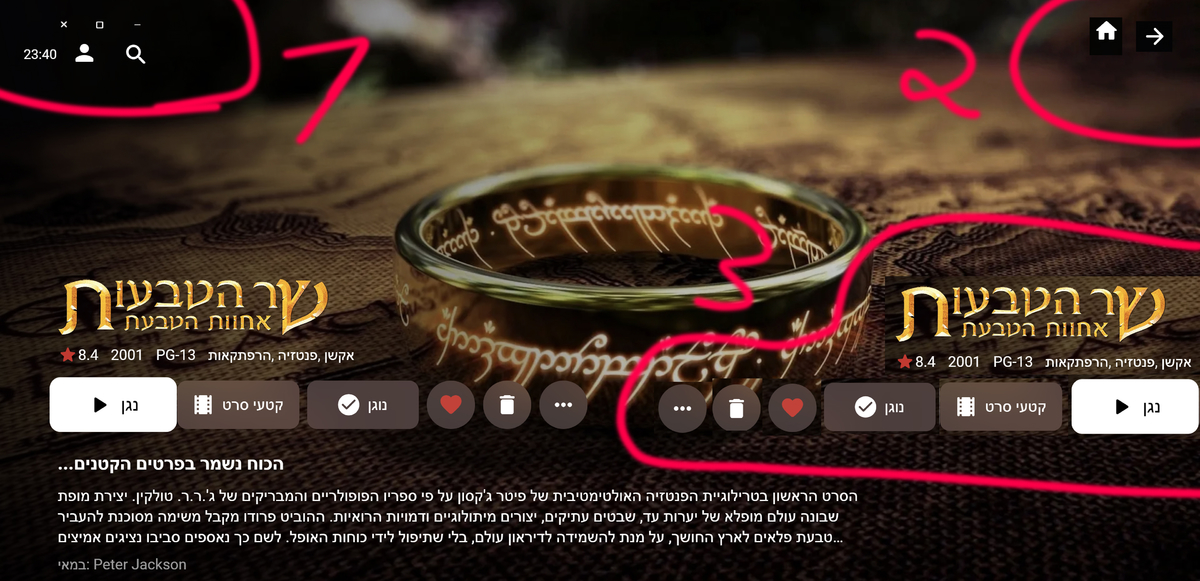
Here are 3 lists. Definitely important points. I made changes in Photoshop to illustrate this better. If it is not well explained please tell me
 1 point
 -
Find instructions here: https://emby.media/open-media-vault-server.html, both options assume you are familiar with using Linux from the command line. Today most folks would recommend running Emby in a docker container. But you could also install it directly on your Debian OMV system (use the package labeled Ubuntu): Ubuntu X64 Download emby-server-deb_4.7.5.0_amd64.deb (you could use # wget https://github.com/MediaBrowser/Emby.Releases/releases/download/4.7.5.0/emby-server-deb_4.7.5.0_amd64.deb) dpkg -i emby-server-deb_4.7.5.0_amd64.deb Open a web browser to http://localhost:8096 I'm running Emby with OMV 6 with no issues.1 point
-
Of course I will do it! Happily! I start working on it right away1 point
-
Me again with a naming convention issue. I am looking at Portals To Hell S03E09 currently TVDB and download sites are labelling it as S04E09 however my naming of the file is Portals To Hell S03E09.mkv and Emby is reading it as a Special no matter how many times i try different naming conventions. Any suggestions? FORGET THE ABOVE I FOUND MY PROBLEM - dirty glasses and one missing 31 point
-
Luke, to answer your question about the delimiter, I don't know what they are doing on the backend. I do know that when you enter the information into the musicbrainz database you follow these guidelines: https://musicbrainz.org/doc/Artist_Credits I haven't seen a semicolin there, just comma, &, feat. , etc.1 point
-
I guess it depends on what you're doing with that. If you're only using it internally for database index purposes that's one thing, but if you're for some reason forwarding that on to Listenbrainz as the track artist that's another. The plex code as you know is closed, so I don't know what they are doing, but here are some projects that are handling it fine: https://github.com/mariusor/mpris-scrobbler/ https://github.com/InputUsername/rescrobbled/ https://github.com/kawaiiDango/pScrobbler Or, you could simply ask them: https://community.metabrainz.org/c/listenbrainz/ You'd be better prepared to ask the question rather than me because you are (of course) familiar with exactly what your code is doing. They are good people and typically respond quickly.1 point
-
Thanks already fixed..1 point
-
Right now it looks like LG is not making the function available to third party apps. At least the ones that aren't LG partners.1 point
-
Okay, I think we've identified the issue. Thanks.1 point
-
not immediately before, but in the past, yes it was played...as well as many of the 1,000+ other tracks/albums that were dropped, that were tagged xVarious Artistx as the AlbumArtist, but with the actual artist name as the Artist1 point
-
Ok thanks. I haven't gotten a chance to take a second look at the code yet for a fix, but will as soon as I can. In the meantime, try putting a space between the episode numbers and the tilde symbol ('S01E01 ~').1 point
-
Hi. Same thing. According to freshports, at 4.7.4.0_1 they moved from mono to .Net. I tried fresh jail (13.1) with [pkg install embyserver], it wont try to start:" service start emby-server" produce no pid /var/db/emby-server is not populated. Atm rolled back to daily snapshot, maybe will try to troubleshoot later1 point
-
Can you try an episode without the '-' in the filename?1 point
-
Thanks all for the info on scheduled tasks and disabling the language for automatic downloads - think that should sort it. I would still suggest that the options be reworked some to consolidate subtitle behavior together in an intuitive way (even if that screen links out to library settings, tasks, etc).1 point
-
No inconvenience at all. No hurry what so ever. Enjoy your vacation.1 point
-
Ah sorry about that if that is the case. Unfortunately I am away on vacation two weeks so won't be able to take a look at it until then. Sorry for the inconvenience!1 point
-
These scripts do just about anything DV related, and tutorial videos are good. I don't use MP4, but there is an option for that. The guy who created them has a C2 so I'm sure MP4 works. Dolby-Vision-Tools - Google Drive The guy hangs out on the Makemkv forum if you wish to communicate with him.1 point
-
Yes i have multiple versions of the boys it'q maybe the reason and since i update my windows the problem is solved and the app does'nt bug anymore thanks for the answer1 point
-
The problem is that i shut down the nas during the night, and when it start in the mornig, the results are not present. I must run the scan and then they appear.1 point
-
Are you guys waiting for the library scan to finish and for emby to do its thang ? Results won;t be instant - they take a little while to 'come though' even after a library scan - this is normal. I don't use the real time monitor - but I have zero issues with this plugin on a schedule (every 2 hrs).1 point
-
HI! I have the same problem. I'm running TrueNAS-13.0-RELEASE Emby not auto-start after update to 4.7.4.0_1 I'm install second plugin emby2 but clear install does't help! And i REALLY do not want to loose all those hours of tweaking and personnalization on movies metadata TOO.1 point
-
All those settings are applied to a particular task: So go to Scheduled Tasks -Library - Download subtitles There should be a daily trigger established there, just delete the trigger if you don't want the automation.1 point
-
Thanks for the heads up. I submitted a ticket and they re-enabled my account on Monday. I sure wish the would have notified me. The basically said that between Emby and Plex, too many API calls were happening and I ended up with a lot of duplicate "stuff". They de-duped it for me. Again, would have nice if they would have notified me, especially since I have paid them for VIP for the last 10 years.1 point
-
After many days cant figure out why this problem happens to my friend but only with MKV files, I found your answer on google and tried it and it works. I just registered on this forum to say thank you very much for your information. Saved my friend life1 point
-
@arrbee99 I guess add something like this div.topDetailsMain .virtualItemsContainer.vertical-list.padded-left, div.topDetailsMain .virtualItemsContainer.vertical-wrap.padded-left { margin-left: 0; padding-left: 3.4%; } div.topDetailsMain .virtualItemsContainer.vertical-list.padded-right, div.topDetailsMain .virtualItemsContainer.vertical-wrap.padded-right { margin-right: 0; padding-right: 0%; } div.topDetailsMain .virtualScrollItem.dataGridItem, div.topDetailsMain .virtualScrollItem.listItem { width: 93.5%; }1 point
-
OK there was a topic in the testing area about this a couple months ago. It's something that needs to be looked at when importing existing metadata. When something is missing, the server doesn't really know if the metadata is just incomplete or if it's actually intended to not be there, so that's why this currently happens.1 point
-
First I think this topic is more appropriate for the Non-Emby General Discussion section as it is not intended to be about Emby at all. As far as the actual question goes I did a rather intensive search for "convert ac3 file to true-hd" and all it returned was results about converting True-hd to ac3 or just about any other format. However there was not one result about converting ac3 to true-hd. I guess the people that said there were restrictions that prevented such conversion were right. If there was a tool to do it I believe that there would be a number of hits on my searches but there was almost nothing related at all. The only exception was one software product that costs over $10.00/month and did not exactly say that it would work for the task you are describing. However if you want to go the other way there are, quite literally, 100s of choices and a simple internet search will give you more choices than you could possibly evaluate. Convert: true-hd to ac3 = easy ac3 to true-hd = nearly impossible1 point
-
That was it! Didn't realize that the onUserDataSaved exposed that stuff. Works perfectly. Thank you.1 point
-
yes, it's ONLY the items that have tags where Artist tag is not the same as the AlbumArtist tag....all other tracks that are tagged with Artist the same as AlbumArtist (majority of my library) never have a problem....and this issue is only with the plug-in, Emby Server never drops these items1 point
-
Can you try with the standard Android app on the same device?1 point
-
+1 for a request to be able to pull posters from theposterdb.com. This site is always my go-to for poster artwork. I've stopped using Emby's built-in poster search entirely at this point, as theposterdb has far superior poster selection than Tmdb. It's more manual work, but I'm able to get posters that all follow a consistent theme (e.g. all title logos centered at the bottom of the poster, etc) much more easily via theposterdb given their sheer volume of posters and large number of consistent artwork contributors.1 point
-
Thats normal, as you didn't specify the datadirectory it should use to start up, can you copy paste the start-up script that's installed? (/usr/local/etc/rc.d/emby-server) Does it look like this: emby-server.in « files « emby-server « multimedia - ports - FreeBSD ports tree You can add the command line options, and see if it also runs by keep adding them, eg "./EmbyServer -os freebsd -programdata /var/db/emby-server" Try adding "ip6 = inherit;" to the jail config too1 point
-
Hi, yes it is1 point
-
Hi! i resolved the issue changing the port to 7777, restarting emby and then changing the port again to 8920 and restarting the server.1 point
-
Emby Server 4.7 - In Depth (Part 1) Emby Server 4.7 and it's point releases provide some very cool new functionality. This is the first or introduction blog post in a new series we're doing to show you some of this new cool functionality. We're going to try and publish 1 or 2 blog posts in this series each week but will depend on other releases. Let's kick this off with a cool new feature from the recent 4.7.4 release. Add new table view option The next blog post will cover the following bullet point that just doesn't do it justice: Add Episode Intro Detection and Skipping feature NOTE: if you have a request for something you would like to see covered sooner than later make sure to comment below and let us know your preference. The new Table View Option is available everywhere in the library views but we'll be showing this using a TV Library using the show names and a couple examples of episodes. You could use the table view for movies, music albums, songs or any other part of your library. Share with us your favorite use. Let's start by showing how you change the view. The first thing we want to do is click the 3 dot menu circled in yellow in the pic above which will open the following settings: Change the view from (likely) Primary to Table and you'll have a set of fields you can choose to display. For now click the top left back arrow and you'll see a new table view that looks similar to below. Now that we have an idea what it looks, like click back on the 3 dot menu and select other columns to display. Below I added a few more columns. You no longer need to use the 3 dot menu as the table has a built in way to add/remove columns quickly. Click the icon shown in the yellow square top left in the picture above. Yep, much more convenient to use. Select a few more columns to display (or select them all) and let's see what we get. If the table scrolls off the screen you can use the scroll bar at the bottom of the screen, gestures or two finger trackpad slide to scroll the grid. You can right click on any row and bring up the action menu which should look familiar. Most of the headers can be clicked to quickly sort by that column. A second click on the header reverses the sort order. The picture below shows the table is using the Community Ratings and it's sorted in a reversed order to find the highest ratings. Tip: Use the Keyboard to Jump to sections closer to your Media. You can type up to 3 characters to jump media starting with those letters. If you have a keyboard you can type up to 3 characters to jump to media starting with those same letters. This jump will ignore the commons words like "a", "the", etc f I type BON it jumps to media starting with "bon" which is helpful if you want to watch "Bones". If I wanted to quickly jump to the show "The Rookie" or "The Big Bang Theory" I would use ROO or BIG to get these results: You could use a single character like "S" to jump to media starting with "S". Typing "TR" would make it easy to access Training Day or Treadstone. Just like the Primary view you can apply filters (tab up top). This came in handy as I was trying to think of a show name my son and I watched together but couldn't think of the name. I remembered it was a Science Fiction show so I tried this filter knowing the show had been played. This filter produced the following results which had the show name I couldn't remember "Terra Nova". Looking at the Genres I could have used a couple different Genres in my search. The table view expands the viewing flexibility of Emby a great deal and we think it's going to be an instant hit! Try it in different situations, like remote use on a small screen when you want the most media showing with it's additional information while having fast loading screens since all the media graphics don't have to load. Please share with us your favorite use of the new Table View and any tips or tricks you discover! View the full article1 point
-
Just started playing with this feature on Emby (Roku) and its great on DVR content! I notice however it will not generate on an in progress recording (or I assume a LiveTV stream that you have paused and thus are timeshifted). Is it possible to enable the thumbnails to be generated in more 'real time' so that in progress recordings could also benefit from easy commercial skipping/timeshifting? Thanks!1 point
-
Check with Trakt support. They may have disabled your account due to too many API calls. They'll usually reset the call count and get you working again. This has happened to a few of us. Just know Trakt support could take a month to get back to you. In that time I just created a new trakt account, ran the sync task and never thought of it again.1 point
-
Is there any update to this? I have been experiencing the same problem for the past week now. Black screen with spinning circle and only audio. Disabling MPV also works on "some" of the videos but has unusual video glitching going on every few seconds. Frame skips or redraws or something.0 points