Leaderboard




Popular Content
Showing content with the highest reputation on 06/27/22 in all areas
-
Emby Server 4.7 - In Depth (Part 1) Emby Server 4.7 and it's point releases provide some very cool new functionality. This is the first or introduction blog post in a new series we're doing to show you some of this new cool functionality. We're going to try and publish 1 or 2 blog posts in this series each week but will depend on other releases. Let's kick this off with a cool new feature from the recent 4.7.4 release. Add new table view option The next blog post will cover the following bullet point that just doesn't do it justice: Add Episode Intro Detection and Skipping feature NOTE: if you have a request for something you would like to see covered sooner than later make sure to comment below and let us know your preference. The new Table View Option is available everywhere in the library views but we'll be showing this using a TV Library using the show names and a couple examples of episodes. You could use the table view for movies, music albums, songs or any other part of your library. Share with us your favorite use. Let's start by showing how you change the view. The first thing we want to do is click the 3 dot menu circled in yellow in the pic above which will open the following settings: Change the view from (likely) Primary to Table and you'll have a set of fields you can choose to display. For now click the top left back arrow and you'll see a new table view that looks similar to below. Now that we have an idea what it looks, like click back on the 3 dot menu and select other columns to display. Below I added a few more columns. You no longer need to use the 3 dot menu as the table has a built in way to add/remove columns quickly. Click the icon shown in the yellow square top left in the picture above. Yep, much more convenient to use. Select a few more columns to display (or select them all) and let's see what we get. If the table scrolls off the screen you can use the scroll bar at the bottom of the screen, gestures or two finger trackpad slide to scroll the grid. You can right click on any row and bring up the action menu which should look familiar. Most of the headers can be clicked to quickly sort by that column. A second click on the header reverses the sort order. The picture below shows the table is using the Community Ratings and it's sorted in a reversed order to find the highest ratings. Tip: Use the Keyboard to Jump to sections closer to your Media. You can type up to 3 characters to jump media starting with those letters. If you have a keyboard you can type up to 3 characters to jump to media starting with those same letters. This jump will ignore the commons words like "a", "the", etc f I type BON it jumps to media starting with "bon" which is helpful if you want to watch "Bones". If I wanted to quickly jump to the show "The Rookie" or "The Big Bang Theory" I would use ROO or BIG to get these results: You could use a single character like "S" to jump to media starting with "S". Typing "TR" would make it easy to access Training Day or Treadstone. Just like the Primary view you can apply filters (tab up top). This came in handy as I was trying to think of a show name my son and I watched together but couldn't think of the name. I remembered it was a Science Fiction show so I tried this filter knowing the show had been played. This filter produced the following results which had the show name I couldn't remember "Terra Nova". Looking at the Genres I could have used a couple different Genres in my search. The table view expands the viewing flexibility of Emby a great deal and we think it's going to be an instant hit! Try it in different situations, like remote use on a small screen when you want the most media showing with it's additional information while having fast loading screens since all the media graphics don't have to load. Please share with us your favorite use of the new Table View and any tips or tricks you discover! View the full article10 points
-
Emby Server 4.7 - Table View Option Emby Server 4.7 and it's point releases provide some very cool new functionality. This is the first or introduction blog post in a new series we're doing to show you in depth the new features in 4.7. We're going to try and publish 1 or 2 blog posts in this series each week but will depend on other releases. Let's kick this off with a cool new feature from the recent 4.7.4 point release. Add new table view option The new Table View Option is available to use in all libraries and tabs. The examples below use a TV Library mainly with show names/series and episodes but applies this new view is available everywhere in the libraries. You could use the table view for movies, music albums, songs or any other part of your library. Let's start by showing how you change the view. The first thing we want to do is click the 3 dot menu circled in yellow in the pic above which will open the following settings: Change the view to Table as shown above. You will then have the following settings screen to select the fields nd you'll have a set of fields you wish to display. For now click the top left back arrow and you'll see a new table view that looks similar to below. Now that we have an idea what the Table view look like, click the 3 dot menu and select other fields to display. The picture below shows additional fields added. Instead of using the 3 dot menu to work your way to select fields to display you can click the icon shown in the yellow square (top left corner). This gives you direct access to the display fields without having to select the view first! Select a few more fields to display (or select them all) to see what it looks like. If the table scrolls off the screen you can use the scroll bar at the bottom of the screen, gestures or two finger trackpad slide to scroll the grid. You can right click on any row and bring up the action menu which should look familiar. Most of the column headers can be clicked to quickly sort by that column. A second click on the header reverses the sort order. The picture below shows the table is using the Community Ratings and it's sorted in a reversed order to find the highest ratings. Tip: Use the Keyboard to Jump to sections closer to your Media. You can type up to 3 characters to jump to the media starting with those characters. This feature ignore common words such as "a", "the", etc If you type BON it jumps to media starting with "bon" which is helpful if you want to watch "Bones". To jump to a show "The Rookie" or "The Big Bang Theory" you could use ROO or BIG to get these results: If you type a single character such as "S" it will jump to the "S" section of the media. Typing "TR" would make it easy to access Training Day or Treadstone. Just like the Primary view you can apply filters (tab up top). I just used this to find the name of a show I watched with my son. I remembered it was a Science Fiction show so I tried this filter knowing the show had been played. This filter produced the following results which had the show name I was looking for "Terra Nova". I could have used a couple different Genres in my search with success. The table view expands the viewing flexibility of Emby a great deal and is already something of an instant hit! Try it in different situations, such as remote when you want the fastest view of media without waiting for graphics to load. Or when you want to see the maximum amount of meta-data. Please share with us your favorite use of the new Table View and any tips or tricks you discover! The next blog post will cover the following bullet point from 4.7.4 that doesn't do the feature justice. Add Episode Intro Detection and Skipping feature If you would like to see an in-depth blog post on any 4.7 feature let us know in the comments.5 points
-
Yes, that is probably true. Your TV doesn't support DTS, so it needs to convert the audio. However, due to the recent change, DirectStream is probably failing, so it then transcodes. I think for now I'll revert one change which will make it work like it did just before you did the server upgrade.2 points
-
Hey All, Firstly, excellent work! secondly, I noticed that this has stopped working in Emby 4.6.4.0, I have forked the repo and fixed if anyone is interested. (Have PR out for main repo) https://github.com/ShanePe/Emby.SmartPlaylist.Plugin/ Sorry also, I have made an update, if the playlist has NOT yet been generated, it will generate it, regardless of the playlist schedule trigger. So one no longer need to 'manually' run first to initialize the playlist if it falls outside of playlist generation schedule. (Make sense !?!?!?!) Version 2.4.0.3 Feature Create a copy of a playlist. (Duplicate) Decluttered UI by adding a pop up menu to playlists New Criteria: Added Audio Stream Codec Criteria (Stream: Audio Codec) Added Audio Stream Language Criteria (Stream: Audio Language) Added Audio Stream Display title Criteria (Stream: Audio Display Title) Added Subtitle Stream Language Criteria (Stream: Subtitle Language) Added Video Stream Codec Criteria (Stream: Video Codec) Added Video Stream Display title Criteria (Stream: Video Display Title) Updated Criteria: Parental Rating: Now uses official rating under the hood Resolution Height: Now uses video streams to determine the available video heights rather than the metadata. Resolution Width: Now uses video streams to determine the available video widths rather than the metadata. Added Monitor Mode to shuffle playlist type. Meaning that the playlist will be destroyed and recreated on a schedule, but between scheduled executions, media item changes will be batched and monitored for inclusion/exclusion. (So .... combination of live and shuffle modes but could have a perf hit on larger playlists, experimental) Collapsible sections in the playlist editor that keeps state, for more UI real estate. Added the ability to add notes to a playlist (limited to 256 chars). If there are notes assigned a pop up is displayed when hovering over a playlist (2 second delay). Order all selection lists on criteria with dropdowns alphabetically. ------------------------------------------------------- Releases Here -> (See change logs in this thread .... way down) Plugin for Emby Server 4.8: SmartPlaylist-2.5.0.4810.zip1 point
-
ComSkipper ... A Emby Plugin that skips commercials in recordings using output from comskip. This plugin will work with EDL files generated by Comskip, ShowAnalyzer or any other application capable of generating them to automagically skip past commercials when playing back recordings in Emby. A visual localized notification will be presented on the screen when this happens. UNC network mappings are fine - as long as the .EDL file is in the same filename as the media file. A PDF is included in the download that explains all of the details. But one thing should be made clear up front. And that is this plugin does NOT contain comskip, show analyzer, or any other program that detects the commercials and creates the EDL files with the skipping information. Also, the donator version of comskip is required because Emby stores its recordings in .TS format. I'm told the donator version is no longer required. User @vdrovergraciously created a PDF file on how to get this working on Ubuntu. It can be found in the Github repository in the doc folder and will be included in future releases. The PDF file also shows an easy way to configure Emby to automatically run comskip after each recording on a Windows server. Linux server users will need to figure out the best way to do this for their flavor of Linux. I am not a Linux advocate or user, however I did find this information in the NextPVR forum that is encouraging, and I encourage Linux users to help each other out with this as I will be of little to no help in this regard. https://forums.nextpvr.com/showthread.php?tid=60803 Building Comskip is really quick and easy on Ubuntu, so probably the same for any Debian based distro: $ sudo apt-get update $ sudo apt-get install ffmpeg libavcodec-dev libavformat-dev libavutil-dev autoconf automake git libargtable2-dev libtool $ git clone git://github.com/erikkaashoek/Comskip $ cd Comskip $ ./autogen.sh $ ./configure $ make $ sudo make install Once this is out long enough where I am pretty sure it is stable, I'll make its GIT repository public. Git Repo Getting it into the plugin catalog could follow after that, assuming the Emby team approves. I rarely record, my main use case is NFL football games. I record our local teams game, which when complete runs comskip on the recording which takes about 40 minutes. We then watch the game while eating dinner that evening. Skipping halftime (manually) it brings the time from 3-4 hours to 2 to 2.5 hours. Comskip does a very good, remarkable really, job on all of my recordings including the games to date. I have attached the comskip.ini that I use. It works well for me in the US. If you add this to your ini (make sure your system has the processing power to handle it), it will greatly reduce he time comskip takes to process your file (requires donator version). thread_count=2 Have fun and enjoy commercial free recordings Current Release Version 2.2.0.0 - Updated Emby library to latest. Version 2.1.1.0 - Added popular .editorConfig for consistent coding standards. Upgraded to latest Emby library. Version 2.1.0.0 - A change in Emby 4.8 caused a code update to be required in how DL files are read. If the plugin stops working in server 4.8, update to the latest plugin. Version 2.0.0.0 - Allows for chapters to identify commercial points if they exist. PlayOn and perhaps others identify commercials that way. Version 1.6.0.0 - Allows configuration of time message is displayed on the screen. Allows configuration of message displayed on the screen. Optionally displays the skipped time in minutes:seconds. Version 1.5.0.0 - Added optional commercial duration skipped to the on screen message by request. Version 1.4.0.0 - Made a couple log messages info from debug by request. Version 1.2.3.0 - Upgraded to Emby server 4.7. Version 1.2.2.1 - Added German (de) translation. Version 1.2.2.0 - Culture set so EDL file can be parsed everywhere. Version 1.2.1.0 - Real time no longer experimental. Session ID fix for LG (and maybe other) clients. Version 1.2.0.0 - Experimental feature to allow commercial skipping when watching during recording Initial open source release. Version 1.0.0.2 - Initial release. Version 1.0.1.0 - Addition of configuration switch to disable on-screen notifications. **Note** You will need to clear your browser cache due to the config UI change. comskipper.ini1 point
-
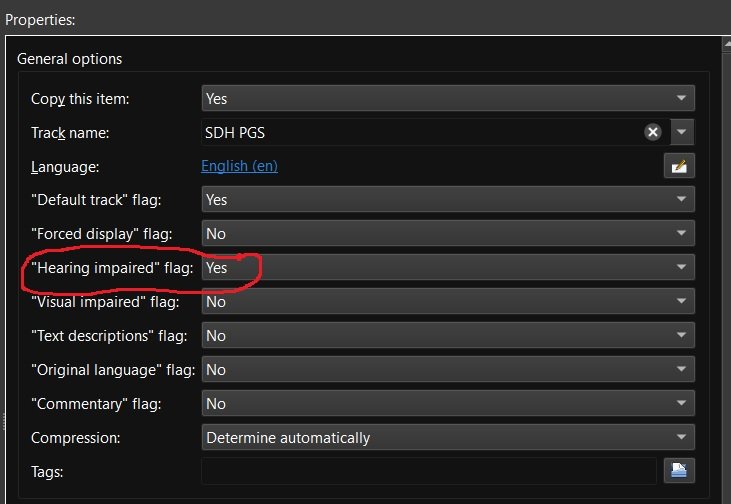
Recently matroska and mkvtoolnix added support for additional subtitle flags including "Hearing impaired" for subtitles for the deaf and hard of hearing (SDH). Request: Emby add some or all of the additional subtitle flags to media info and also as a choice for playback under user user settings. add support for external SDH subtitle naming (ex. moviename.SDH.eng.srt) Reason: my wife and are are getting older and it seems more and more I'm hearing "What did they say" a lot. If I could set certain Emby users to always play the "Hearing impaired" subtitles if available then I wouldn't have to back up and restart playback with SDH subtitles enabled. Other flags like "Commentary" would be nice also as I have several films with those Having this flag would also make it easier to run a script to list which movies have and don't have "Hearing impaired" / SDH subtitles so that I can go out and get the missing ones.
 1 point
 -
I suggested in a totally different thread a bit ago about possibly adding Discogs as a meta fetcher... https://emby.media/community/index.php?/topic/79280-duplicate-music-artists-entries-how-to-get-rid-of-them/ That thread has had a few +1 reply posts. As such i figured adding it to the feature requests was the proper way to gauge interest. If you have used MP3tag you should be familiar with Discogs. Its a GREAT alternative to Musicbrainz.1 point
-
Emby Server 4.7.4 - Point Release: Round 3 Fixes This is the latest point release of Emby Server containing fixes for identified issues. Add Episode Intro Detection and Skipping feature Add new table view option Add more fields for selection in poster views Add new theme options Fixes for downloads automatically redownloading Remember subtitle selections even when user option is set to None Fix graphic subtitle position when burning in subtitles with transcoding Fix sporadic cases of errors when reordering live tv channels Improve automatic channel mapping with xml tv Support sort by composer Fix glibc errors on certain NAS devices Image processing fixes on FreeBSD/TrueNAS Original Blog posts for the 4.7 release: Emby Server 4.7 Release: Many New Features, Improvements and Fixes Emby Server 4.7.1 - Point Release: Round 1 Fixes Emby Server 4.7.2 - Point Release: Round 2 Fixes Please report any issues you may have in the General/Windows section of our Community Forums: Emby Community General/Windows Forum1 point
-
I'd still really love a fix for this. I hope it made it into your issue tracker!1 point
-
It did continue on and record the next two shows fine. Fingers crossed that first hiccup was a one time glitch. Proof in the pudding will be when mutlple things are recording at the same time, with padding for each so many tuners needed at once. I will simulate that today as a test - before it is needed.1 point
-
its working again. i renamed the old folder, created a new with old name, reset ownership and everythings fine (whysoever) thanks and have a nice evening1 point
-
It would be more ideal for them to be next to each other in that one situation, yes. It's just a special case that needs accounting for.1 point
-
Just wanted to add a request for more speed settings for audiobooks. The app I currently use lets you increase by .05 increments and I like to listen at 1.4. Would love more options.1 point
-
Yes we got options there, but nothing like the "taste" of having a "native" and "optimized" device. hehehe. I know it sounds like some sort of treat to me. The end result is what we aim for and both options below will be totally transparent to them: Raspbian + Theater autostart KODI + Emby addon I'll keep this post updated as I advance on it later this week. Thanks for your interest.1 point
-
That behavior is not new and that always has been the result. Removing a checkmark just resets the number of views.1 point
-
Yeah makes sense with the elders and no phone. I prefer to browse on the tv itself as well. I'm not using a chrome cast, it's the screen sharing option on my phone so I could show someone a website or texts or whatever it just mirrors the screen. But the video it seems to treat differently which works very well. Doesn't solve your issue though it's frustrating isn't it. Maybe you can do something like install ubuntu and have theater launch on boot. I've not done that but that might be an option? Or use a ps4 or something else. Actually even an old laptop should do the trick and easier to obtain and will work with the remote i would think. Simplicy is key for them right!1 point
-
Hi, best thing to do is follow the release notes for new releases. Thanks.1 point
-
Jay have you got a smart TV? My girlfriend has a Sony which can't get thr emby app. Whereas my LG can. Anyway I wanted to use a theater pi on her telly but I found out if I do screen share from my phone to the TV it works really well, keeps playing even when I use the phones other apps! Had no idea it would work like that so now I don't need the theater at all.1 point
-
Yes, Samsung dropped DTS support on all TVs in 2018. If you check the back of your user's manual you should see a table with all the audio types supported. If you do try and play DTS Emby will then convert the DTS to AC3 and remux your file. You should always pre-select an audio format which is compatible so you don't have to remux. Conversion is there when needed. For best results though getting something like a Shield Pro and plugging it into the HDMI input port of a soundbar would be best. Then you wouldn't be limited by the audio formats of what your TV supports.1 point
-
Yes everything is good. I'll see when I get home if I notice any difference after updating.1 point
-
I just restarted emby, and then the two scheduled recordings started....... Will be monitoring this closely.1 point
-
Actually i found what was the issue and corrected it. So now everything is working as it should be! Thanks. The combination of Sony TV (Google TV) and EMBY is truly amazing!!!1 point
-
Have wondered about this too - the buttons for it are gone when playing music on web and android1 point
-
Hi guys, exact same problem for me here. Don't suppose there is a way to get hold of an older image in the meantime which we could try? Thanks!1 point
-
for the moment i solve the problem with http server, thanks for answer1 point
-
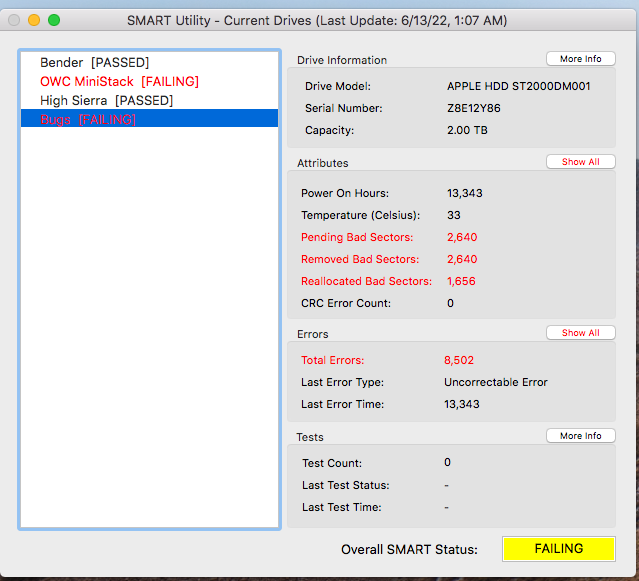
the drive was indeed shot. replaced with a new WD blue 5400 2TB. Rebuilding Emby now from back ups. It's happening much faster SMART Utility is very handy.
 1 point
 -
Just started playing with this feature on Emby (Roku) and its great on DVR content! I notice however it will not generate on an in progress recording (or I assume a LiveTV stream that you have paused and thus are timeshifted). Is it possible to enable the thumbnails to be generated in more 'real time' so that in progress recordings could also benefit from easy commercial skipping/timeshifting? Thanks!1 point
-
I ended up letting a program run, and unfortunately the problem happened a lot during the playback while on 4.7.5. Attached is the embyserver.txt file (it happened about 5 times in the last five minutes of the file). I've also attached the transcode log for the program I watched. In the log I noticed that there are a lot of "waiting 3000ms for subitle segment" messages -- could that be the issue, or is that just an FYI? ffmpeg-directstream-2dc78f90-eccb-41c9-93ac-02bd1a59a944_1.txt embyserver (1).txt1 point
-
Hi, you'd have to do this in two steps, first use the api to query for items (seasons) missing primary images. Then once you have that list, then you'd use the api to refresh the metadata on those.1 point
-
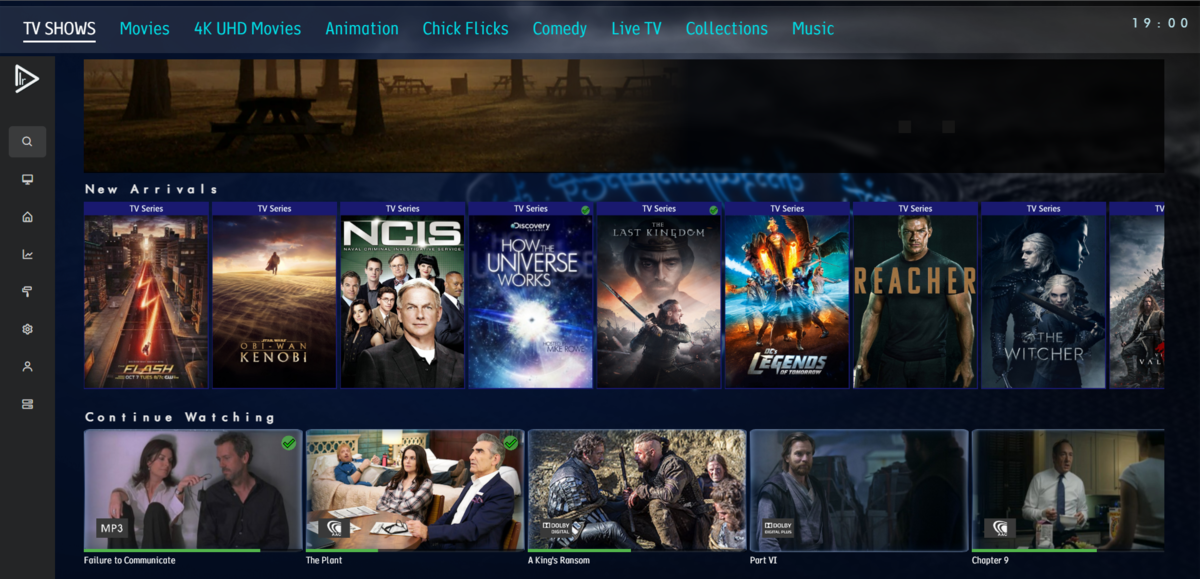
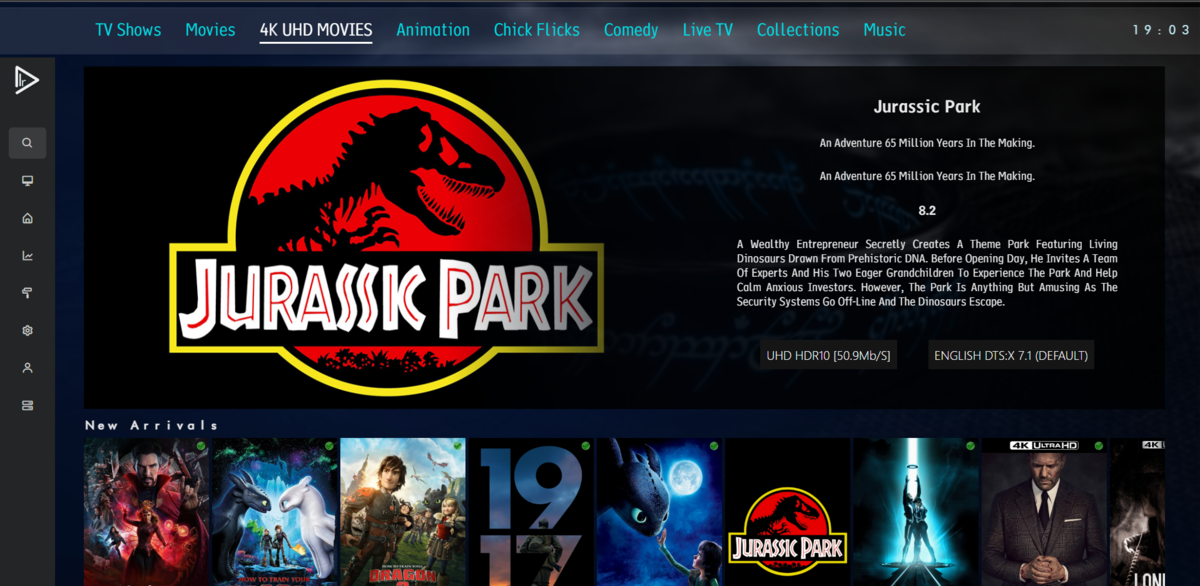
Home screen is getting there. ignore the dual taglines
 1 point
 -
Well you could post the apng here and I could check to see if it works on my end. Also if you have cover arts install, then you need to Uninstall it . I'm still trying to figure out why it doesn't work for other emby user, since emby versions are suppose to be the same across the broad.1 point
-
Yeah I had thought about that, but figured I'd let core Emby handle that if they thought it was of value. But certainly someone could do it that way Also push a skip button for intros makes sense, it's once. Needing to keep the remote in your hand to skip every commercial would be annoying and I'm not sure anyone would do it. I know I would not.1 point
-
Installed 4.7.5.0, so far so good. More complete testing can start now. I am sure my family will tell me when something is not working, but I am reasonably confident that I will not land in the doghouse. Big thanks to the dev team again for all their work!1 point
-
Hi @BillOatman I've never really been a big liveTV user but recently started recording a few programmes and thus first time I've had the need to look at this plugin. Now that the Introskip and EndCredit 'markers' have been included in the 'Core' (Chapters table in the main dB) - do you think there is any merit in getting the Commercials marked in the same way as Introskip ? ie each commercial gets a hidden MarkerType = 'ComStart' and 'ComEnd' and the emby client core does the skipping via a manual 'Skip Commercial' button (or Auto), not the plugin via Auto only (the same limitation we originally had with Introskip) ? Detection would obviously remain with comskip - but another advantage is any code changes around button usage/placement etc/sessions/clients etc are all managed by the core. Maybe something to think about - as you know, the Introskip team working with Luke & Eric managed to get both Intro and Credits working this way (and all clients now have this 'marker' framework/button in them I believe) - so I think it would be really cool if commercials could be skipped this way as well and your plugin basically becomes an EDL import process. Alternatively of course, Emby may choose to directly support EDL files (lol) - but not sure if that is on the cards - this would certainly be a welcome stepping stone towards that. Adding @Cheesegeezer for info but sadly I think @chef is out of the scene at the moment.1 point
-
This is supported in iTunes/Apple Music, but for those of us who listen to multi-movement works (e.g., classical, some jazz, even some pop), it would be great if we could get playback by work, not movement/track, especially when randomizing. For example, I have a baroque playlist with many works, each having 3 or more movements (separate tracks). When I randomize the playlist, it would be great if there was an option to randomize by work, instead of it being randomized by track/movement. The workaround many use is simply to join the separate movements into one audio file, but that makes it more difficult to search/play individual movements.1 point
-
HI; all correct, these are audio files (album in mp3 format), at each update the .nfo files are updated with the latest changes (Italian translations), We confirmed that currently if you reinstall the metadata are not read on the local .nfo files but are always taken from the external server (and everything has to be re-translated). Thanks I will wait for the new version (and I will take the opportunity to go to premiere even if I do not think I will have any advantages, but the software deserves it). Greetings1 point
-
Hey All, new release just for bug fixes, I am in the process of adding some new suggested features, watch this space. I have only tested this on the latest release of Emby (4.7.4.0) but don't foresee any issues on older versions, let me know. Version 2.3.0.2 Feature Removed "Sort newly added items" if the playlist is in "Live" mode Disabled "Execute" on management ui if the playlist/collection is in "Live" mode Bug Fixed bug when limit cache clear check is failing as limit is null. Fixed bug when updating a collection: Error Method not found: 'Void MediaBrowser.Controller.Library.ILibraryManager.UpdateItems(System.Collections.Generic.List`1<MediaBrowser.Controller.Entities.BaseItem>, MediaBrowser.Controller.Entities.BaseItem, MediaBrowser.Controller.Library.ItemUpdateType, System.Threading.CancellationToken)'. SmartPlaylist-2.3.0.2.zip1 point
-
Just released beta.37 that will normally will fix the current exceptions. Also I added 3 more sorting columns in the show list (state, seasons and episodes) @Ametz, I will look into your issue asap. I'm using the MinDateLastSaved on Emby to check if I need to update the media. Looks like that fails for some reason. I created a github issue for tracking here1 point
-
In addition to sorting by Albums, Artists, etc. for classical folks being able to sort by Composer would be HUGE.1 point
-
Don't purchase Emby Premiere from anyone other than Emby There are some unscrupulous individuals out there selling Emby Premiere keys through Ebay or other such marketplaces in other countries. ALL of these are a scam and you will eventually lose whatever money you pay them and not have a working key. The only way to purchase Emby Premiere is directly through our web site or through one of our official apps (Android or Apple). Please help us stop these people by reporting any listings you see by sending a direct message to "ebr" and don't get taken by one of them. Thanks! View the full article1 point
-
Is there a reason you're using the DSM 6 file? DSM 7 file name is emby-server-synology7_4.7.1.0_armv7.spk1 point
-
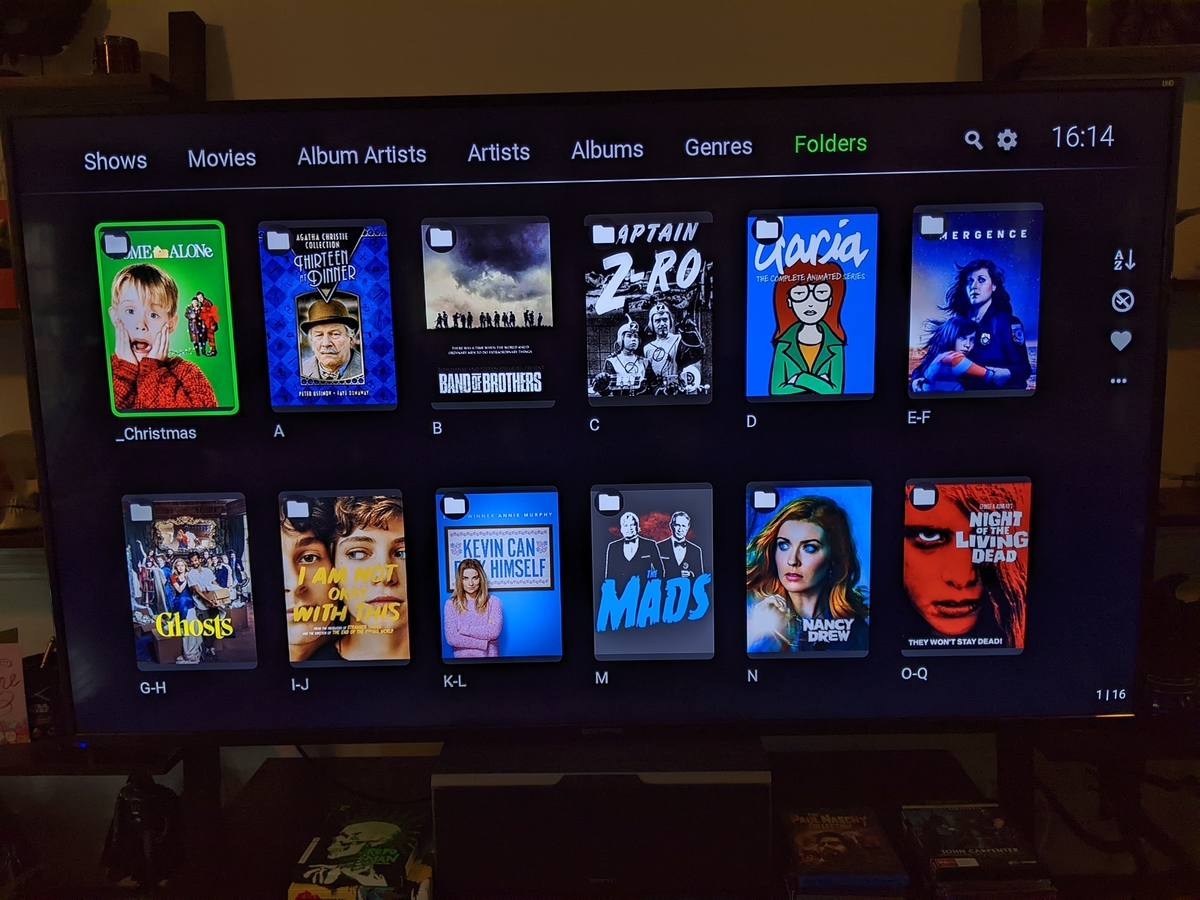
My previous "thank you" post was deleted, but I know why. I apologize: I shall rephrase. I use Emby on Roku to browse my media, view the embedded metadata, and play my videos. THANK YOU. THANK YOU. THANK YOU. I use Emby literally every day.
 1 point
 -
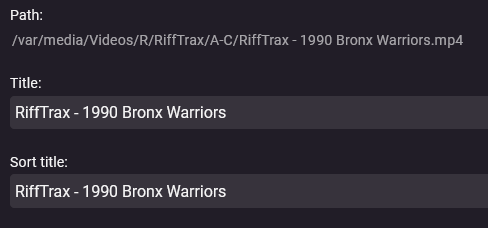
I love that choosing the "Home videos" option means that Emby displays my video titles as I have set them. Love.
 1 point
 -
Model 4640X - Roku Ultra I trim my thumbnails and folder images to 10:13.9. I have reasons for that, but they won't make sense to anyone else. So I doubt the grey bars you are noticing are Emby's fault. Thanks for asking, though.1 point
-
It is all good. You did nothing wrong. You have nothing to be quiet about. Please keep doing what you are doing. Thanks for the words of encouragement. Please keep the feedback train going. Any other issues, concerns, questions? In your screenshot the images show cut off some on the top and bottom where the grey bars are. They do not fill the green frame completely with the images. What model Roku are you using to take that screenshot?1 point
-
Oh, okay. Should I delete this one? Not trying to be a pest. It's in my nature to be quiet unless I need something, but I wanted to go out of my comfort zone and show my gratitude.1 point
-
I guess it was just moved to here: But thanks again for the feedback.1 point
-
Discogs is a good source, please count my vote. It should be also available as image source.1 point