Leaderboard




Popular Content
Showing content with the highest reputation on 06/10/22 in all areas
-
No, not needed because finally i've found the real problem with your data. Your series.xml has <LockData>True</LockData> and that prevents Emby from grabbing additional metadata from online sources. Even just for people! Do a search and replace with notepad++ for <LockData>True</LockData> to <LockData>False</LockData> for all your series.xml files but keep TMDB as active metadata downloader. The order of the metadata downloaders doesn't matter.2 points
-
Youtube's Content ID uses 'finite-state transducers and Gaussian mixture models' to produce 'an inventory of music phone units similar to phonemes in speech', which is apparently an arrangement of words that makes sense. https://ieeexplore.ieee.org/document/42175022 points
-
And drive pooling. Then you can expand as much as physical constraints allow without really impacting any of the consumers of the data.2 points
-
Actually the librarys will need to be refreshed in the plugin. So Tick refresh and run again.2 points
-
..and that was exactly the right thing to do. To be honest, with the hardware you have - there should be plenty of horsepower to run emby and transcode without issues. The performance issue is likely that failing HDD - but even if it wasn't - always put the emby folder and it's metadata cache/db on an SSD. A PCIe riser card with an NVME drive (as I assume that 4th Gen motherboard is not going have any NVME slots..) and emby should be ultra fast again imo.2 points
-
The scheduled task for it is currently missing from that screen in 4.7.2. It will be resolved in the upcoming 4.7.3 update. Thanks.2 points
-
Looking at your screenshot, they likely weren't identified due to series folders naming used; for recommended naming convention check out KB article: https://support.emby.media/support/solutions/articles/44001159110-tv-naming To solve your issue, rename/restructure your folders accordingly and rescan library. Correct. Nope. Nope again.2 points
-
Which "same CPU"? If the cost of electricity is part of the equation and you want a dedicated 24/7 media server then ditch the GPU and get a recent generation (8+) Intel CPU. It's the simplest, best supported and cheapest approach in the long term. Don't bother with Xeon if your goal is to lower electric bills unless you have other heavy workloads that benefit from server grade hardware. If you plan to use the same machine as a workstation then that changes things and you have to account for that. It really doesn't take much to build a very capable box. As stated by others - fast SSD storage for the software, database, metadata, cache and transcoding. Big HDD storage for the media. A recent Intel i3 or higher can do multiple 4k transcodes and a lot of (F)HD.2 points
-
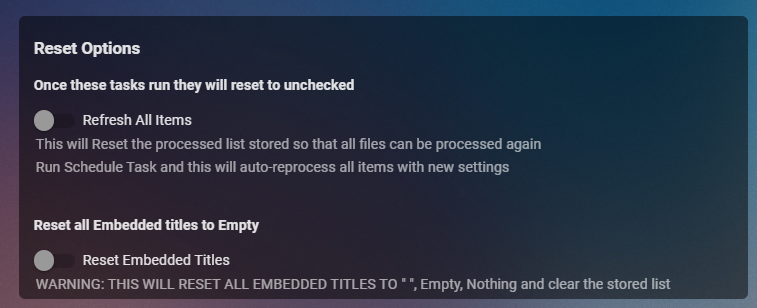
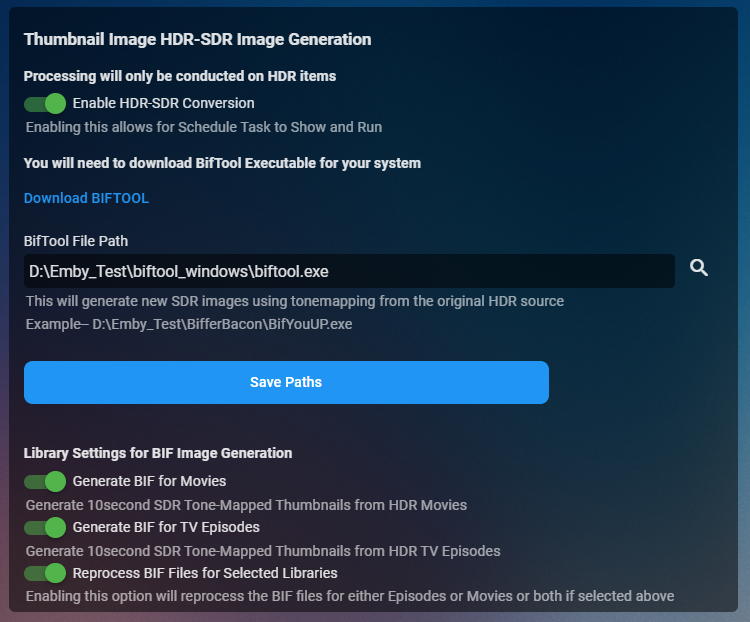
Cheesey Productions brings you MediaInfo for Emby Bringing your Media Info Formats up to Date (including HDR, Vision, Atmos, HLG, DTS:X, DVx, etc) And HDR-SDR Image Extraction using tone mapping for clearer seek images Available from the plugin store A huge shout out to @rbjtech for all his help with this. He was my knowledge base. Thanks Rich Please read the wiki page available that will help you get set up. MEDIAiNFO WIKI PAGE PLEASE NOTE THIS PLUGIN WILL MODIFY YOUR MKV EMBEDDED TRACK TITLES Some examples Also you can add tags to your items Enable the options in the settings and this will only add the tags for the unique formats the emby doesn't already take care of. There are plently of options for you to chose from to get your media looking how you want New Feature Added ---- HDR - SDR BIF File Creation using Mobius Algorithm for ToneMapping This generates larger and crisper images for Chapters and 10Sec ThumbnailSets WE URGE YOU TO READ THE WIKI PAGE 2 SO YOU UNDERSTAND FULLY WHAT'S INVOLVED HDR-SDR IMAGE GENERATOR WIKI Settings can be found at the bottom of the media info page. Feed back is always good. After replacing the dll always remember to clear your browser cache and restart it, to load new changes in the UI.
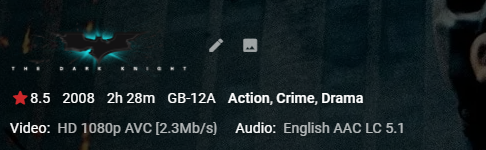
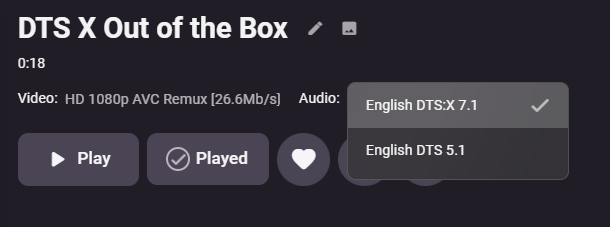
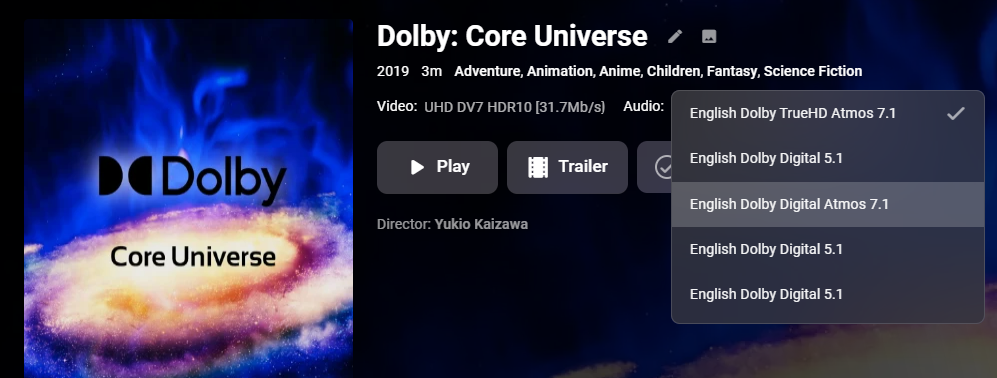
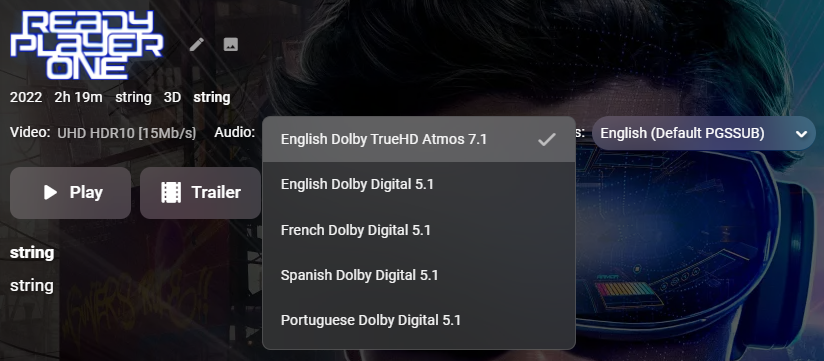
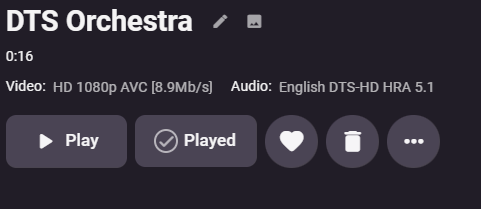
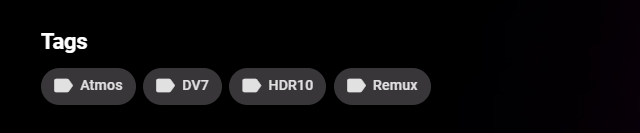
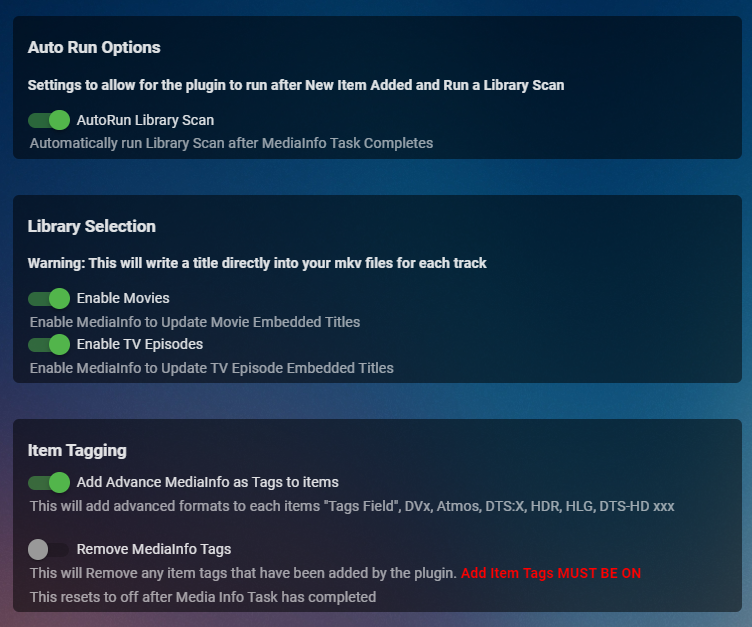
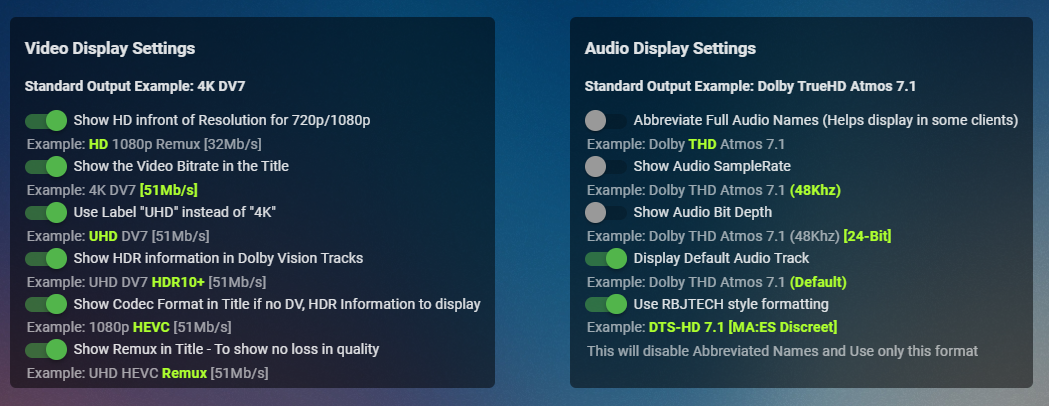
 1 point
 -
As I mention in a related post, I love the additional subfolders for Movie Extras (eg, Shorts, Scenes, Interviews, etc.)! It would be awesome to extend this functionality to TV Series as well. Specifically to add support for many/all of the same folders supported for Movie Extras, eg, extras specials shorts scenes featurettes behind the scenes deleted scenes interviews trailers As well as any additional folders that get added in the future (eg, hopefully Galleries). Support Placement of "Extras" Folders Within Each Season Folder, Plus A Naming Scheme to Link A Particular Extras Folder with a Specific Episode (eg, "\Season 1\E1 - Deleted Scenes\" for episode 1 deleted scenes): I want to clarify that it would be great if these various "extras" folder types could reside within each Season folder. So for example, within a Season 1 folder we could then have an "Extras" folder, a "Deleted Scenes" folder, a "Featurettes" folder, etc. And furthermore, that we could designate a particular folder to refer to a specific episode (eg, "\Season 1\E1 - Deleted Scenes\" for episode 1 deleted scenes). See more below, particularly why I think this would be so useful: https://emby.media/community/index.php?/topic/55915-emby-server-theater-additional-extrasspecial-folder-types-for-tv-series-similar-to-movies/&do=findComment&comment=587195 Thanks for your consideration! PS - If this is something you might like to see implemented, be sure to "Like" this top/first post (as well as any subsequent posts in this thread that highlight particular aspects of what you are interested in) -- "Liking" the top/first post helps the Devs to know how much interest there is in a given Feature Request.1 point
-
Say I have a custom collection of 56 Christmas movies. During the Holiday Season, I would like to show this on the main page as a Library. Now, I could make a drive folder called "Christmas" and put these movies in that folder. However, now we're getting away from using metadata for organization and moving back to using folders for organization. Something you've spent the last few years trying to get away from. So each collection should have a toggle to show it as a library on the Home Page. Then people can make collections for Christmas, Halloween, Summer Romance, Summer Slasher Films, whatever and show them on the front page where they are easily accessible. Don't want to show it anymore, switch the toggle off.1 point
-
This was happening on one of my TVs but I had an older version. I think it might have been 6. I updated that TV to 7 and haven't had the issue again. I'll keep an eye on it. So far all 5 of my devices are working well.1 point
-
"blind as a bat" comes to mind.1 point
-
no issues with art on the shield1 point
-
True but something like this nvidia always announces a new beta that is about to be released then releases it. Its out of character for them. I still think it is because @CBers is a special case1 point
-
1 point
-
@MagicDoubleM @neik @Mookdog Version 3.0 is up on first post... I haven't had chance to create a wiki for the Convert to MKV, but the video above will help you out massively. NOTHING WILL BE DELETED UNITL WE ARE HAPPY WITH THE CONVERSION. So please check your logs in DEBUG mode to keep an eye on this. If you have any doubts about running the convert to mkv feature, just leave it alone. Following fixes NFO tag writting and removal should be fixed Items remaining in cache should be fixed.1 point
-
That's what had me confused. It looked like it was done, but 2 days later there are still images trickling in. Thanks for the clarification.1 point
-
restarted the pc and did another reinstall of kodi and still have the same problem . will wait for others to chime in and see if they have any issues i will try and upgrade on a shield tv and see if that works1 point
-
I realize this is an old thread but just in case ... I was reading about this on AndroidTVNews.com where the article was discussing how DV works on Plex with a Shield TV, dual layer/single layer etc... https://androidtvnews.com/nvidia-shield-dolby-vision/ It mentions how it would sometimes work and sometimes not...1 point
-
Hi, please try removing these plugins: 2022-06-10 19:22:03.693 Info App: Loading SonosController, Version=1.0.12.0, Culture=neutral, PublicKeyToken=null from /Users/adam/.config/emby-server/plugins/SonosController.dll 2022-06-10 19:22:03.693 Info App: Loading CoverArt, Version=4.1.17.0, Culture=neutral, PublicKeyToken=null from /Users/adam/.config/emby-server/plugins/CoverArt.dll 2022-06-10 19:22:03.693 Info App: Loading Emby.Plugin.TelegramNotification, Version=1.1.0.0, Culture=neutral, PublicKeyToken=null from /Users/adam/.config/emby-server/plugins/Emby.Plugin.TelegramNotification.dll 2022-06-10 19:22:03.693 Info App: Loading IntroSkip, Version=1.0.0.0, Culture=neutral, PublicKeyToken=null from /Users/adam/.config/emby-server/plugins/IntroSkip.dll 2022-06-10 19:22:03.693 Info App: Loading Emby.Kodi.SyncQueue, Version=2.2.0.0, Culture=neutral, PublicKeyToken=null from /Users/adam/.config/emby-server/plugins/Emby.Kodi.SyncQueue.dll 2022-06-10 19:22:03.693 Info App: Loading NewReleases, Version=1.0.0.2, Culture=neutral, PublicKeyToken=null from /Users/adam/.config/emby-server/plugins/NewReleases.dll 2022-06-10 19:22:03.693 Info App: Loading ListenBrainz, Version=1.0.4.0, Culture=neutral, PublicKeyToken=null from /Users/adam/.config/emby-server/plugins/ListenBrainz.dll Then restart the server and see how that compares. Thanks.1 point
-
But it can be overcome without having to change the relative addresses of the data if you use shares (and drive pooling). You could add external bays or even change to an entirely new NAS but keep the same share names and nothing will have changed from the consumers' viewpoint. In your case - you have all your bays filled with the largest drives available?1 point
-
When on a Season page, It would be useful to have buttons to take me to the previous or next season. Currently, you are required to return to the Series page and then select the season that you want. For anthologies shows, this would be a huge help. For long-running anthologiy series like NOVA, this is particularly painful because you have to scroll through the list of 50 seasons on the Series page each time.1 point
-
@MagicDoubleM This has been fixed - we are testing it now. In summary, the NFO data is not written as part of the usual metadata update (for some reason), it's written by a separate 'Library' function - this is why it was understandably missed. Once it's tested, Cheese will update the DLL and then the NFO for each Item will be immediately updated, allowing any further NFO processing to include the Tag updates from MediaInfo.1 point
-
Try latest 7.x version, LiveTV should work in this version.1 point
-
Hi. Please see: https://support.emby.media/support/solutions/articles/44001159110-tv-naming1 point
-
I need to upgrade my storage. Which means moving my files. The ability to store timings with files would be very, very helpful...1 point
-
Lend your support here:1 point
-
thanks for the idea, just worked doing sudo rm /var/lib/emby/plugins/Emby.Plugin.Ard.dll1 point
-
Thanks! That made the most sense, I just didn't remember ever seeing it throttle at below a playback rate before.1 point
-
The most simple workaround till this problem is fixed is to set the subtitles OFF in the movie/series screen befor pressing PLAY. So the Movie/Episode will start at once like it should be... after the Movie/Episode started playing simply select and activate the requested Subs from the OSD. This works without any problem.1 point
-
I just uploaded beta.36 with some path fixes for everyone. So now normally the log file page should work again correctly. @t123thomas, thanks for testing the application first of all! If you downloaded the windows zip file you have to open a command window in the folder and run EmbyStat.exe. If you want to pass in some startup flags you can run EmbyStat.exe --help for more information about the flags. After that the application will start running and you can access is on http://localhost:6555. You can also download the installer https://github.com/mregni/EmbyStat/releases/download/0.2.0-beta.36/EmbyStat_0.2.0.36_windows-x64.exe and install embystat as a service in the install wizard. If you have any problems or you are finding bugs feel free to message here or send me a PM.1 point
-
I often pause at the start of credits and then press back to stop watching at all, and finding that playback resumes as a result feels unnatural to me. Paul1 point
-
Updates Emby when running as a service. .\EmbyServiceUpdater.ps1 -ApiKey "YOUR_API_KEY" -ServerUrl "http://YOUR_SERVER_URL:PORT" [-InstallTask] [-UninstallTask] [-UpdateScript] Github: https://github.com/hatharry/Emby.ServerUpdater/blob/master/EmbyServiceUpdater.ps1 Note: An Emby api key and url is required, The api key can be created using the dashboard advanced menu, security tab.1 point
-
We can always assume the remote will have directional and an OK button, so that should be enough.1 point
-
Thanks! You read my mind!1 point
-
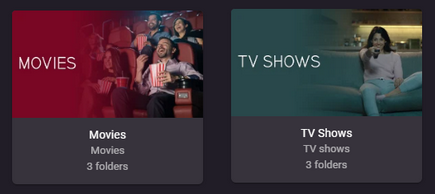
Have you defined separate libraries for 'Movies' and one for 'TV Shows' in your Library setup? Looks like you may have combined them together, if so what is the library type? EDIT: Ignore, at first glance I thought these were movies mixed with tv shows. Follow Grims instructions.
 1 point
 -
Re Tags... I noticed that movies with a radarr tag again lost their mediainfo tags. So here's the only explanation I have currently, emby seems to reset tags when it reads metadata from an nfo file and doesn't ever write tags through the metadata saver plugin, hence tags get lost as soon as there's one in the nfo and a metadata refresh is happening. I'll have to test this, but that's basically what was going on.1 point
-
Not sure on why it was mis-identified, but you can manually Identify it, or remove it from folder, do a library scan and readd to see if it is correctly identified and grouped. But suggest something in folder content is breaking these items. You could test with only the three media files.1 point
-
Right click the item "Identity Thief" and select edit metadata what path does it show? But am guessing one got mis-identified. As for not grouping I am not sure as the filenaming looks correct.1 point
-
Hi, unfortunately LG devices do not accept self-signed certs, so as a result, neither does Emby for LG. If you browse through the forum though I some users have had success with zerossl.1 point
-
Hi, there is no way to do that, sorry.1 point
-
@Juan Simón Adding it asap!1 point
-
running the OS on an nvme drive will likely give you your biggest bang for buck in terms of lag in the interface from my experience1 point
-
Thanks for the info.1 point
-
I think what we're going to do is introduce a legacy package for older versions of the OS.1 point
-
It would be great if we could turn off the Rotten Tomatoes score. I don't agree with their scores ever and have no need to see them on the screen.1 point
-
Now that Emby support tonemapping of HDR content, it would be nice if the playback thumbnails Emby generates could be tonemapped as well, because as of now, they're pretty washed out.1 point
-
All, FYI, I am moving my network back behing a Pfsense Whitebox firewall after living on Fortigate while I was studying for my fortinet NSE certification. I really like the Fortigate firewalls. I am at the point that I need an OpenVPN Client on my firewall again and Fortigate doesn't really support that well. I also have a hardware limitation on the 60F as it doesn't have a 10Gbps interface for my internal network VLANs. I decided to keep NGINX as it has been working so phenomenally well since last October I don't really want to go back to HAProxy on my Pfsense firewall. My NGINX system also has Cert bot for Let's encrypt Certificate integration and has been able to keep my Emby service up and running flawlessly since build. I literally have done nothing to keep it going. After i switched back to PFsense from Fortigate I ran into a problem where external clients were not able to access Emby through pfsense even though i could confirm that the NAT and firewall rules were working. I then switched my internal network split brain DNS back to a WAN Hairpin (both external clients and Internal clients access my Emby server via the WAN port and the NAT). At this point internal clients could access but clients on the public Internet could not. my PAT configuration on the NAT is as follows: NAT from the WAN public IP on https port 443 to the NGINX server on port 443. The NGINX.conf file is set to access the Emby server on port 8096 (I really just don't want to manage certs on the Emby server and my Server VLAN is locked down pretty tight). I also have defined LANT Networks for all my VLANs in Emby "Settings - Network LAN Networks:". It took me a couple days of off-hours diagnostics but I found the problem. the source of my frustration was my configuration on the firewall and NGINX using port 443 then passing traffic to emby on port 8096 can conflict with an Emby server setting "Settings - Network - Secure connection mode" if it is equal to "Required for all Remote Connections" because PFsense doesn't re-write the the inbound packet's source IP with the firewall's internal IP address, the NGINX Server also was not setup to re-write the packet's source IP with the NGINX server IP. Thus Emby saw the traffic as external and denied the traffic as it was not secured on port 8096. In my case I set "Settings - Network - Secure connection mode" equal to "Handled by Reverse Proxy" which fixed my problem.1 point
-
Longtime Subsonic user here who loves his iOS app 'play:Sub'. But Subsonic is abandonware and I have little hope it that Apple's walled garden will see Subsonic die. I've been messing with Plex and the PlexPass only Plexamp almost does it for me. It has a rudimentary equalizer. But it's doing some weird sh!t with my library and so I found my way to Emby. I like it quite a bit, considering. I saw the thread re: music specific app and so +1 for that. But I need that equalizer. It is a must! One time I'll be playing solo instrument chamber music, the next System of a Down. And in between there's no telling! At the beginning of this thread Luke said an equalizer was a "possibility for the future". Any closer than three years ago?1 point