
Leaderboard




Popular Content
Showing content with the highest reputation on 05/30/22 in all areas
-
Could the way User Settings are handled be changed so that: 1 - Every setting that is changed via the Admin/Server - Users settings page becomes the new default for that particular user (instead of the Emby supplied default). 2 - Any setting that is changed appropriate for an end user to change from within that particular user account being signed in is saved at the local device level, and would be used instead of Server specified defaults. This wouild: A - Allow us to adjust the default behavior when NO local settings exist. B - Still have local device specific settings override what have been set as Server defaults. (Allowing the same User to have different settings per Device - as it is now.) It doesn't seem like the logic would be that much different than it is now. Assuming if no local settings already exist today, the Server has to pass along what it has them as for a starting point. The change wouild just be allowing us to alter what any of those base default settings are.3 points
-
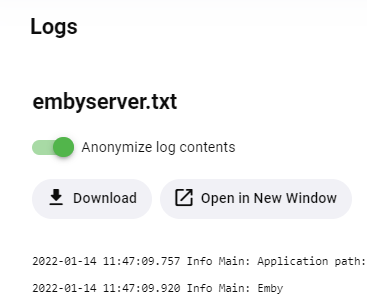
If you want to know HOW it works, that's actually pretty cool I think (guess why I'm saying that.. ) There were several - partly contradicting - requirements for implementing this: Doing something like simple pattern of expression replacements doesn't cut it The sanitation needs to work in a way that everybody can rely on and regex replacements are not reliable enough, there will always happen to appear a certain pattern that hasn't been considered and not handled by such replacements The sanitation replacements shall be Precisely controllable e.g.: hide host name or ip address from a URL, but not the protocol (http/s), not the port (sometimes but not always), not the path (but sometimes certain sensitive path parts) and not the query (not in general but possibly sanitize specific query parameters in a URL) Intelligent like @rbjtech mentioned above: replace different parts with different replacement strings, but replace identical parts always with the same replacement string (e.g. host1, host2, host3..) Still Expressive e.g: IPs and host names are replaced by "host4", passwords are replaced by "*******5", path parts by "x_path6", etc. The sanitation procedure needs to be extensible and re-usable to allow plugins make use of it without much effort There should not be an up-front decision to make between sanitized and non-sanitized logging just like uncle Murphy told: the choice would always be wrong When a log file is sanitized on writing, it would be irreversible and important information might be lost forever When there's a problem and the logs aren't sanitized one couldn't post them Dual logging (one regular and one sanitized) would have been very undesirable as well (IO overhead, disk space, keeping all in sync, etc: very ugly) So, these were some pretty tough requirements... Well - not the individual ones but fulfilling all of them - not that easy, especially now, as we're coming to the twist of the story where you'll get to understand.... The Magic Seeing the toggle that Luke had posted above, most of you had probably thought that this is controlling whether the server is writing sanitized or non-sanitized log files to disk. But that's not the case. The green toggle just controls how you get the logs presented when downloading or viewing. In fact you can download a log with toggle on and right afterwards with toggle off - and you will get the same log, but one being sanitized and the other not. All requirements above are fulfilled and a plugin can freely choose which parts of its log output should be sanitized and in which way (like as hostname, as password, etc.) In fact, a plugin could mark the part 'quire' of the word 'requirements' as host name and it would be treated as such. It's a puzzle for those who enjoy - how can this work?3 points
-
This is for Emby Theater for Tizen and iOS. It seems all these recent updates are to “clean up” the OSD etc. Well, there is tons of room now that you have removed the poster from the video details screen, so can we please get the “Ends at” time back on details? Makes absolutely no sense that that it was removed in the first place. I realize it can be seen after the video is playing by pressing down to get to video info but the whole point is to see if you have time to watch the video BEFORE you start it! Seems pretty straightforward. thx!2 points
-
I sometimes enter my movie library with the desire to watch a movie but no real idea about what movie I would like to watch. Currently I can browse from a-z or z-a or by date added or by genre or by date released or maybe a few other choices but that means I am limited to seeing my movies in just a few orders and I see the same movies first in each sort every time. While that may seem like a good variety it really limits browsing and also means that some movies are always late in the browse. I have a library of well over 3000 movies and it sometimes takes a long time to find a movie to watch. What I would like to have is the option to present the movies in a random order that is different each time I browse. That way movies that I usually do not get to browse might show up earlier. I do NOT want random play I just want to be able to choose to browse my movies in a random order. I would really like this on the Roku client but I believe if it were implemented at the server then it would be easier for the clients to implement it.2 points
-
Maybe something has changed with the tool you used to remux it rather than the client itself ? Has this has any updates ? Maybe try a direct ffmpeg create/add the new track and remux in one command ? The below should create a new eac3 1536k track from track 1 (1st Audio track - the thd in your case) inserts it and then makes it the Default audio track and labels it. All other tracks are just copied. ffmpeg -i input.mkv -map 0:v -map 0:a:0 -map 0:a -c:v copy -c:a copy -c:a:0 eac3 -ab 1536k -disposition:a:0 default -disposition:a:1 0 -metadata:s:a:0 title="Samsung DD+" output.mkv2 points
-
Man’s gotta eat!!!2 points
-
They let you keep calves on an oil rig ?2 points
-
So we have added the OPTION to add tags for the 'extra layer of video and audio detail' - such a Atmos, DV profile etc. Combined with the existing filter options - then you now really filter down to exactly what you want. You can of course click on the tag itself in the item - so to see all your 'DV7' titles for example - it's now just a single click away ! Fantastic job @Cheesegeezer ! I'll post some more screen grabs soon ... All - please remember this is a short-medium term stop-gap to get the info into Emby today using MediaInfo as the content provider. Until ffmpeg provides it, then the Core Team cannot provide this extra level of info - thus needing to use this Plugin. Consequently, we are simply holding the data in the track 'Title' and selected 'Tags' only. This is not being held in the database, and as such, it has limited potential but we CAN of course now see it and using the power of Tag's - we can filter on it as well. The Films/Movies filters has the ability to combine Tag's - making it very easy to combine existing filters and then adding one or more of the Tag's - such as maybe DV7 and DTS:X for example. Unfortunately, TV Shows do not have this extra layer of Tag Filtering - but you can just click on any Tag and filter globally by that Tag. -- This is still in beta - so our advice is to run on an isolated test library. There are a few items to sort out - such as removing the Tag's the plugin added (should you wish) but this will probably just be a remove all tags as opposed to just remove what this Plugin added. I believe we have captured most of the popular 'special' codecs/layers/types out there - but if you need one added, then let us know - along with how it looks in MediaInfo (JSON Output) and @Cheesegeezer may be able to add. Thanks.. 30/05/2022 - Latest DLL will be posted by @Cheesegeezer shortly (that adds the option of Tag's ..)
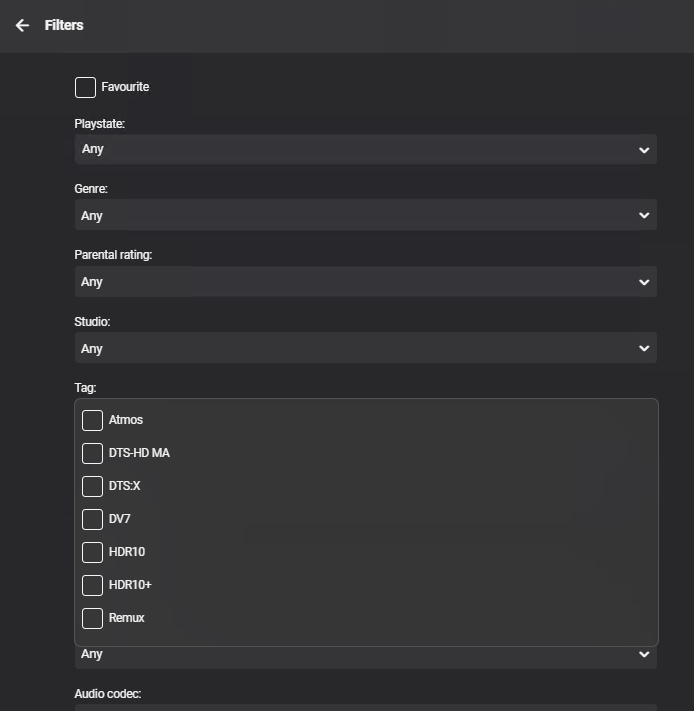 2 points
 -
Done.2 points
-
I think they're just saying they saw the new feature in the update blog post. @SuperNic I'm sure the accents will eventually be updated in the apps. Not currently available in the Android app.2 points
-
HLG episode in json format if you need { "@type": "Video", "StreamOrder": "0", "ID": "1", "UniqueID": "1", "Format": "HEVC", "Format_Profile": "Main 10", "Format_Level": "5.1", "Format_Tier": "Main", "CodecID": "V_MPEGH/ISO/HEVC", "Duration": "3278.800000000", "BitRate": "18636140", "Width": "3840", "Height": "2160", "Sampled_Width": "3840", "Sampled_Height": "2160", "PixelAspectRatio": "1.000", "DisplayAspectRatio": "1.778", "FrameRate_Mode": "CFR", "FrameRate": "25.000", "FrameCount": "81969", "Standard": "Component", "ColorSpace": "YUV", "ChromaSubsampling": "4:2:0", "BitDepth": "10", "Delay": "0.000", "StreamSize": "7638022382", "Title": "4K HLG", "Default": "Yes", "Forced": "No", "colour_description_present": "Yes", "colour_description_present_Source": "Container / Stream", "colour_range": "Limited", "colour_range_Source": "Container / Stream", "colour_primaries": "BT.2020", "colour_primaries_Source": "Container / Stream", "transfer_characteristics": "HLG", "transfer_characteristics_Source": "Container", "transfer_characteristics_Original": "HLG / BT.2020 (10-bit)", "transfer_characteristics_Original_Source": "Stream", "matrix_coefficients": "BT.2020 non-constant", "matrix_coefficients_Source": "Container / Stream" },2 points
-
json from Moon Knight DV5 file { "@type": "Video", "StreamOrder": "0", "ID": "1", "UniqueID": "14332962216991161246", "Format": "HEVC", "Format_Profile": "Main 10", "Format_Level": "5.2", "Format_Tier": "Main", "HDR_Format": "Dolby Vision", "HDR_Format_Version": "1.0", "HDR_Format_Profile": "dvhe.05", "HDR_Format_Level": "06", "HDR_Format_Settings": "BL+RPU", "CodecID": "V_MPEGH/ISO/HEVC", "Duration": "2838.375000000", "BitRate": "22415925", "Width": "3840", "Height": "2160", "Sampled_Width": "3840", "Sampled_Height": "2160", "PixelAspectRatio": "1.000", "DisplayAspectRatio": "1.778", "FrameRate_Mode": "CFR", "FrameRate": "24.000", "FrameCount": "68121", "ColorSpace": "YUV", "ChromaSubsampling": "4:2:0", "ChromaSubsampling_Position": "Type 0", "BitDepth": "10", "Delay": "0.000", "StreamSize": "7953100275", "Default": "No", "Forced": "No", "colour_description_present": "Yes", "colour_description_present_Source": "Stream", "colour_range": "Full", "colour_range_Source": "Stream", "colour_primaries_Source": "Stream", "transfer_characteristics_Source": "Stream", "matrix_coefficients_Source": "Stream" },2 points
-
Hi, comming back with some good news ! Works perfectly fine on 4.7.1.0 :yeah: I deactivated suggested plugins, and will reactivate one by one AND I had some file corruption that snapraid resolved for me this weekend, it could ave been that too. Thanks a lot !2 points
-
My guess is hes paying for a share to someone whos got it installed, as thats not the default message.2 points
-
Hello Emby I'm wondering if anything can be done to improve the quality of Trailers please? I'm using the Trailers plugin (1.3.5.0) and the trailers appear blocky / low res and once upon a time they looked quite sharp. Is there any way to improve the quality of are there other plugins/options for increasing the quality please? Cheers Rob1 point
-
That looks like the same line SamES gave me in a PM. I'll give it another shot though.1 point
-
I’ll look at it tomorrow bud1 point
-
I did, and turns out the issue was from not installing the driver correctly, as you mentioned. To fix, I downloaded the driver from Nvidia, ran the script as root, and said yes to DKMS, 32-bit libs, and X headless config, and rebooted. The issue has been resolved. Apologies if it has wasted your time.1 point
-
Yep we use the HDR_Format Profile to see the DV Level. I believe Cheese has added DV5, 7 & 8 as you (and I..) have described .. I didn't have anything with DV5 to test though, so if you do, I'm sure Cheese would appreciate the test. It should not list any HDR10/10+ backwards compatibility profiles for DV5 obviously ..1 point
-
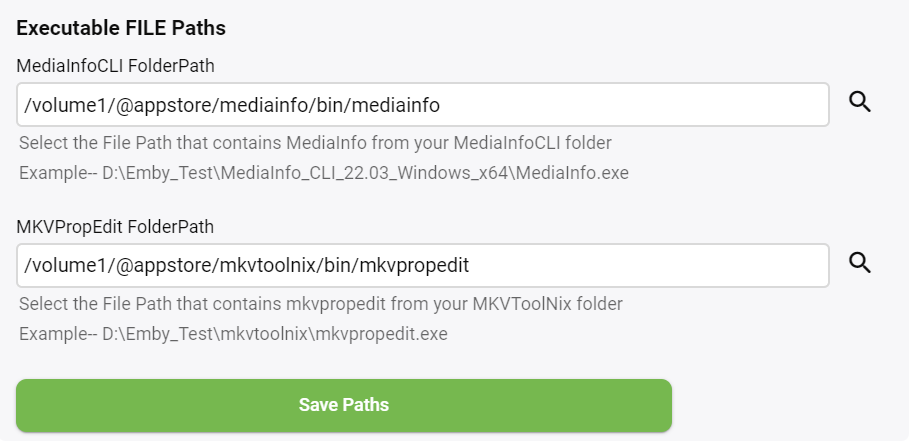
It runs fine for just Movies, but not just TV shows.
 1 point
 -
So if the color primaries are bt.2020 then i go thru a whole lot of switch cases to select the correct one, so it will look at the HDR format and then if it matches one of thise, we go into DV selection mode using hdr format profile and select 7 or 8. hoof the log over when you get a chance. I’ll see whats going on!1 point
-
@Cheesegeezer is writing these codecs as Tag's (optional) - so it should be easy to invoke a DV or Atmos trailer based off these etc ..1 point
-
I think I got the latest. The time is newer than the rest, but the version stays the same. I'll redownload, turn debugging on and let you know in a bit.1 point
-
Ok, hatte nur eine HRA-Datei und das ist 96 kHz. Ich habe 2 Dateien gefunden, die 48 kHz sind und die "Hi Res" nicht auslösen. Ich sende Protokolle an @ebr1 point
-
Maybe something people don't know. It is also working on Libs with mixed content. I have a Documentation library and it is skipping intros for the multi part documentations. really nice1 point
-
I just added tagging today, as an option of course. which me and @rbjtech have been testing, so it will add DVx, HDR formats, HLG, Atmos, all DTS formats AAC SBR to your items tags for filtering or for other plugins to use, such as VantagePoint. Hehehe Rich will get some screen grabs up as I’m off to ear tag my calves now!!1 point
-
my setup is server on windows and most media on a synology nas. the stuff i record off tv is on a drive in the windows pc though and there is no perceptible difference in terms of start time1 point
-
Very cool, I just started the process. Thank you very much!1 point
-
Just to follow up. It was a character it didn't like in the filename. I took out the # and it's working now. Before (didn't work): Rich Vos on O&A #63 - Trashing Larry King (64 kbps).mp3 After (works): Rich Vos on O&A 63 - Trashing Larry King (64 kbps).mp3 Seems like it may save some headache if it were a bit more lenient on parsing the filenames for downloaded/offline content. Sorry to piggy back on this thread.1 point
-
This seems to have worked for now. Will try a few more times and report back.1 point
-
Ok. I did read it, but didn't see a new option for "Send Logs". So just trying to verify.. Trying to replicate the issue now. So far the shows playing fine, but will look for the Send Log option when it freezes again. Thank you, ebr!1 point
-
thanks a lot~ I have tried just now, it also can update through manual installation without data missing. I think I don‘t have to wait for the app store update in the future.1 point
-
The most important thing to probably consider is how much do you transcode 4K, or transcode at all. Emby runs great on a Synology and I won't be going back to Windows as my server. Synology DSM is a great server OS and it's nice only needing one machine up at all times. However, the NAS won't be able to compete with your PC for transcoding. The DS220+ does have a 4K gpu though so it can probably handle a stream or two with no problem. If you're going to get the NAS anyway for storage you could try it as an Emby and just have two servers for a bit.1 point
-
Along these same lines, I have found that restarting the wifi can also help. Not sure if the FireCube has that capability or not, but the shield does,1 point
-
The problem seems to exist for any screen with a button at the bottom. For example, Edit Metadata and Identify both have the issue.1 point
-
Welcher Film ist das? Ich möchte es versuchen.1 point
-
LOL. In reality...it's exactly the other way round: as a developer, when I would ask about whether multi-value tags are allowed, they'll say: "Read the spec". And when I'd say "The spec allows multi-value tags, but ffmpeg doesn't support it", they would respond: "Ok, submit a patch!". It's best when you ask yourself on the user mailing list: https://lists.ffmpeg.org/mailman/listinfo/ffmpeg-user/1 point
-
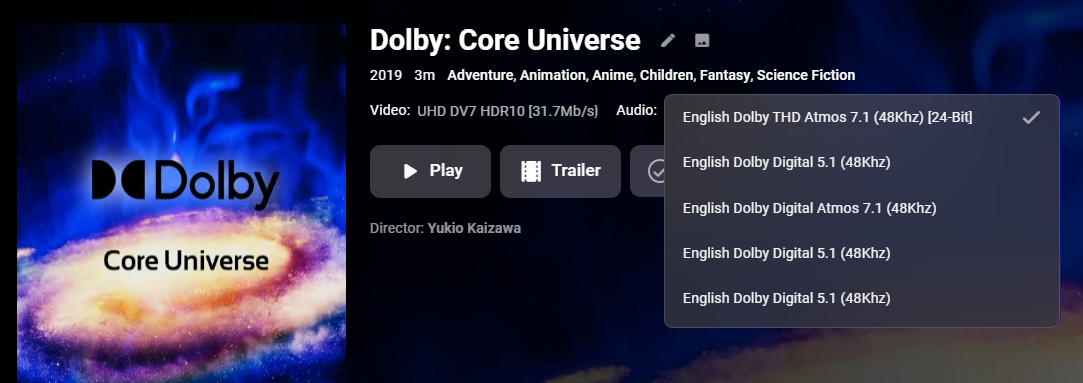
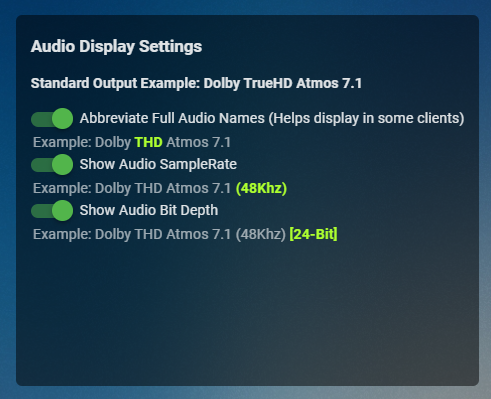
I found a bug in my code @FrostByte i'm just doing some tests, you may or may not get the episodes to work. @MagicDoubleM added some options for the geek in you
 1 point
 -
I believe Luke mentioned it can take up to a few weeks for Synology to test it on their end once they get it.1 point
-
Here you can found official and beta version Synology for DSM7 and Synology (DSM6) https://emby.media/download.html manual installation via package center1 point
-
Ich habe jetzt gerade trotzdem mal das Protokoll über die App geschickt!1 point
-
This would work well with Dolby Vision and Atmos with your MediaInfo plugin, too.1 point
-
If you can out put an example in json from mediainfo gui i can get these in. I can throw them in but it will start to look like an essay lol this is just a cutoff , anything above these values are classed as Remux. for 4k its 37mb/s and for 1080p its 22Mb/s If you can out put an example in json from mediainfo gui for video i can get these in. thanks again fellas { "@type": "Video", "StreamOrder": "0", "ID": "1", "UniqueID": "1", "Format": "HEVC", "Format_Profile": "Main 10", "Format_Level": "5.1", "Format_Tier": "High", "HDR_Format": "Dolby Vision / SMPTE ST 2086", "HDR_Format_Version": "1.0 / ", "HDR_Format_Profile": "dvhe.07 / ", "HDR_Format_Level": "06 / ", "HDR_Format_Settings": "BL+EL+RPU / ", "HDR_Format_Compatibility": "Blu-ray / HDR10", "CodecID": "V_MPEGH/ISO/HEVC", "Duration": "224.390833333", "BitRate": "51549385", "Width": "3840", "Height": "2160", "Sampled_Width": "3840", "Sampled_Height": "2160", "PixelAspectRatio": "1.000", "DisplayAspectRatio": "1.778", "FrameRate_Mode": "CFR", "FrameRate": "23.976", "FrameCount": "5380", "ColorSpace": "YUV", "ChromaSubsampling": "4:2:0", "ChromaSubsampling_Position": "Type 2", "BitDepth": "10", "Delay": "0.000", "StreamSize": "1445895826", "Title": "UHD DV7 HDR10 Remux [51.5Mb/s]", "Language": "en", "Default": "No", "Forced": "No", "colour_description_present": "Yes", "colour_description_present_Source": "Stream", "colour_range": "Limited", "colour_range_Source": "Stream", "colour_primaries": "BT.2020", "colour_primaries_Source": "Stream", "transfer_characteristics": "PQ", "transfer_characteristics_Source": "Stream", "matrix_coefficients": "BT.2020 non-constant", "matrix_coefficients_Source": "Stream", "MasteringDisplay_ColorPrimaries": "Display P3", "MasteringDisplay_ColorPrimaries_Source": "Stream", "MasteringDisplay_Luminance": "min: 0.0050 cd/m2, max: 4000 cd/m2", "MasteringDisplay_Luminance_Source": "Stream", "MaxCLL": "1000 cd/m2", "MaxCLL_Source": "Stream", "MaxFALL": "362 cd/m2", "MaxFALL_Source": "Stream" },1 point
-
HI there, yes we're looking into this. Thanks.1 point
-
It's a type of HDR, but it isn't HDR10. I think it should replace it, maybe rbjtech has an opinion These are the HDR formats I'm aware of DV5,7,8, etc (DV7 and DV8 have a DV and HDR10 layer) HDR10/HDR10+ HLG Hybrid Log Gamma: everything you need to know about HLG HDR | TechRadar1 point
-
I corrected some minor bugs and added a "GOTO" pulldown list. You can now jump to an item based on the first character of its name. For example, from the GOTO pulldown list select the letter "B" to start the display with the first item's name that begins with a "B". Vic emby_new_tool_27.html1 point
-
It doesn't matter if you have a good soundbar and eARC. Since you're playing the movie from the TV then the TV has to have a TrueHD decoder also in order to pass it to your soundbar. Check the back of your user's manual and you should see a chart similar to the one in the link below. Those are the codecs and file formats your TV can support when running apps. Anything not supported requires transcoding. You will need something like a nVidia Shield to use HD audio, or use an alternate audio track in order to use the Samsung app. 2022 TV Video Specifications | Samsung Developers1 point
-
It will be right on the log screen, and the toggle will apply to all functions - the built-in log viewer, downloading a log file, opening in a new window, etc.
 1 point
 -
Yaksplat's roadmap is what I needed to begin working with the API. A couple points that might help other folks not familiar with the Emby REST / API model, 1. This is server-side code. Until I thought about it more, I originally thought client-side browser could simply invoke the javascript API and this would all happen client-side with ajax calls. 2. Any server-side programming language should be fine, as long as it supports HTTP GET and POST syntax. I used python (already installed on my linux server). 3. To play a song, requires several GET and POST commands. I'm sure this is described somewhere, but I couldn't find. As outlined above, the sequence is: GET System/Info using api_key to connect and authenticate GET Devices using api_key to list devices (optional) With DeviceId, GET Session; this returns an json object, with SessionID stored in PlayState Id With SessionId, start/stop playback, POST Sessions/<SessionId>/Playing?ItemIds=.... Observations, Sessions Playing will play songs, starting with the specified ItemId and will playnext or shuffle until told to stop playing. Logging out POST Sessions/Logout deletes the Emby Api Key. I'm not sure if this is correct behaviour -- I wanted to disconnect/logout of the session Here's my first-pass python code, following Yaksplat's sequence, import requests import json import time # Setup emby_url="http://10.10.0.4:8096/emby/" api_key = "xxx1324ccf324bd4993ef6a50b1032eb" device_id = "861765ab-84ed-4f13-937d-1fadc09ae2e9" song_id = "11367" # Authenticate url = emby_url + "System/Info?api_key=" + api_key response = requests.request("GET",url) # Get all devices (optional) url = emby_url + "Devices?api_key=" + api_key response = requests.request("GET",url) # Get session with DeviceId url = emby_url + "Sessions?DeviceId=" + device_id + "&api_key=" + api_key response = requests.request("GET",url) session_dictionary = json.loads(response.text) session_id = session_dictionary[0]["Id"] # Play song url= emby_url + "Sessions/" + session_id + "/Playing?ItemIds=" + song_id + "&PlayCommand=PlayShuffle&api_key=" + api_key response = requests.request("POST",url) # Wait a bit time.sleep(20) # Stop playing song url = emby_url + "Sessions/" + session_id + "/Playing/Stop?api_key=" + api_key response = requests.request("POST",url) I hope this helps others get started with the API. The API is pretty easy to work with. Thanks again for all your help.1 point
-
public static Playlist GetPlaylistByName(ILibraryManager libraryManager, IPlaylistManager playlistManager, string name, User user) { var playlistFolder = playlistManager.GetPlaylistsFolder(user.InternalId); var playlists = playlistFolder.Children.OfType<Playlist>(); return playlists.Where(p => name.Equals(p.Name, StringComparison.OrdinalIgnoreCase)).FirstOrDefault(); } I did this, which seems to work. Not sure if that is the "correct" way. Of course, since playlists seem to be "shared" not sure why I need a userid. My biggest hurdle is how to clear the playlist. What I'm trying to do is create a dynamic (sort of, updated by a task) playlist that contains movies that have Chinese subtitles. I can use a query like above, I can create a new playlist, and I can even add Shares to it playlist.Shares = _userManager.Users.Select(u => new Share { UserId = u.InternalId.ToString(), CanEdit = u.InternalId == listUser.InternalId }).ToArray(); playlist.UpdateToRepository(ItemUpdateType.MetadataEdit); How can I remove items from it? _playlistManager.RemoveFromPlaylist wants an EntryID (void RemoveFromPlaylist(long playlistId, long[] entryIds) which seems like it is some sort of session/user specific value. I see that the REST api has PlaylistItemId but the "server" api doesn't really have a good method for pulling playlist items in a way that works well with other playlistmanager methods. I guess I'll look into using the REST api inside the server plugin... Edit: Closing the source has made a lot of this work harder. Before I could go look at how it was implemented to get ideas on how to solve issues myself. Edit 2: I figured it out. I was looking past the property ListItemEntryId. This will effectively "clear" a playlist...(at least for me since manipulation of the list is always done as a specific user). _playlistManager.RemoveFromPlaylist(playlist.InternalId, playlist.GetChildren(listUser).Select(c => c.ListItemEntryId).ToArray()); Overall, a bit clunky, but I think workable. Leaving this all here in case someone else is looking for similar information.1 point























