Leaderboard




Popular Content
Showing content with the highest reputation on 05/09/22 in Posts
-
I found an additional setting for the comskip.ini file that allows comskip to skip processing the last x seconds of a video file. This is a helpful with some programs that have a short segment after the last commercial break. I found that without this setting I was missing that short segment on some programs. always_keep_last_seconds=60 ; Sets comskip to not process last x seconds of file Likewise there is a similar setting for the first x seconds of a recording. always_keep_first_seconds=60 I didn't find either of these in the comskip.ini sample file that comes with comskip.2 points
-
We can return to talk about this in a while. That's why I said to only display this for reducing the bandwidth and only when a "hang" is imminent, i.e. it would only precede the greater "bother" of the video to be "hanging".2 points
-
So everything was fine after the Roku app was updated to no longer transcode FLC audio files. Not sure if this an Emby beta problem or a Roku problem with the latest Emby beta. I updated Emby to the latest beta and it is transcoding FLAC files, but never starts to play. I went back to the latest stable version of Emby and FLACs direct play with no problems. Does this beta version, of the Roku app, fix the problem when using the beta version of Emby? [quote] 4.0.51 (10 April) Fix direct audio container playback (FLAC)[/quote] ffmpeg-transcode-4dd41b38-29a5-42c7-bd7e-824b371a72a7_1.txt1 point
-
Used Plex for years and it sucks absolute a*s. Spent more time fixing it than I did using it. I am yet to see artifacting in Emby it once was alright but it feels like it became to mainstream and once money was made they got sloppy and its just been a downhill spiral ever since. past the point of return Don't get me wrong i have things with Emby i'd like to see added/changed but man its is in a different realm when comparing to plex. Even the guy making the video started to sound like he moved to Emby shortly afterwards free marketing, made a penny from him buy premium, shown to be better than Plex in pretty much every category, borderline converted him over to Emby - Sounds like a massive win to me1 point
-
I use simple commas in the Genre field, which I set (or edit) in MP3Tag, and it seems to work great in Emby. Plus they work fine with the unofficial Smart Playlist plugin (example: Genre includes Jazz AND Piano).1 point
-
It was the one you posted, 3.2.47 I believe.1 point
-
Yes, i was searching the formating, i'm bad at understanding the DN syntax. I usually use dsquery on the windows DC server to find it, with synology it's a little different. I finally figure it out and everything works now. Thank you!1 point
-
okay I'll give that a try and report back. Thanks for info1 point
-
No, that is not his issue. He was using the web app.1 point
-
Hi, you can certainly try but unless the data matches up exactly between both providers then I don't think it will be retained.1 point
-
The TV app will ultimately catch up. Thanks.1 point
-
+1000 Exactly what I was trying convey.1 point
-
I think this is the problem: 23:26:37.477 Stream #0:0 -> #0:0 (copy) 23:26:37.477 Stream #0:1 -> #0:1 (dts (dca) -> ac3 (native)) A known issue with Emby remuxing HEVC content.1 point
-
Huh? What's he talking about not being able to skip forward?1 point
-
so much this. the even more annoying thing is that it was done and abandoned1 point
-
Hi, if you're referring to the resolution/bitrate all Emby clients are set to AUTO by default. This is a client setting, not a user settings so multiple devices owned by the user could each be set different if needed. This is a client setting so you can't control this from the server. Hope that helps, Carlo1 point
-
The TV app is back in the store this morning.1 point
-
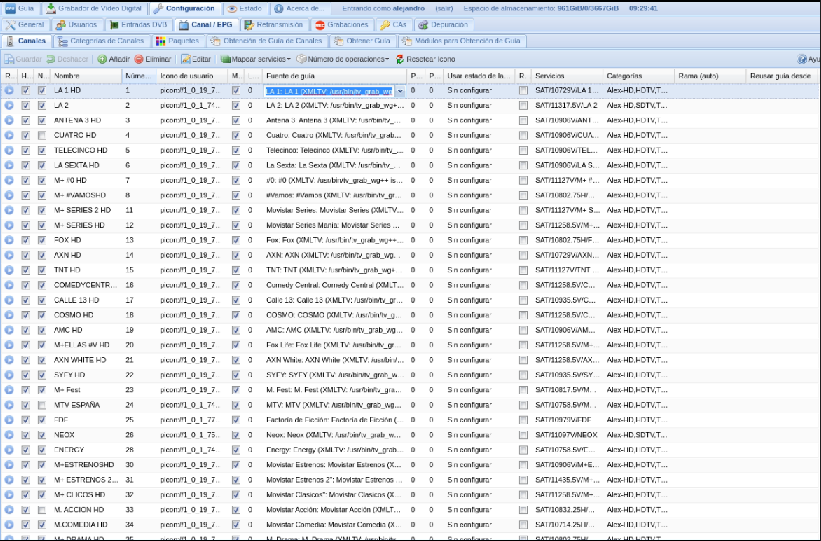
Hello ok thanks. Well, for me, the fastest way if it has to be done through the WebUI would be using the channel configuration of the tvheadend backend, where you can edit each cell and see all the channels at the same time, and be able to drag etc. here you enter each channel and select the guide file and then the guide channel. It may be very complicated, but it's an idea
 1 point
 -
I have a recurring problem trying to play music albums on the Roku app. Most albums play ok, but a significant minority won't play at all, and cause the app to crash and shut down - there is no error message, the app just closes down. Weirdly, I can play individual tracks from these albums without a problem, but when I click on the album so that all the tracks are listed, and then press 'play' to play the whole album, the app just crashes. I'm running Emby server on a QNAP NAS, and the issue occurs when playing albums on a Roku TV. There is no issue playing these albums on the web app in Windows or in the Android app, so it only seems to happen on the Roku app. The server log is attached embyserver.txt1 point
-
That’s a good idea. I’ll test that. I was expecting live processing to be more cpu intense based on the documentation in the plug-in.1 point
-
while this was well done research, it didnt really confirm anything that wasnt expected. i'd have been more interested in the impact of the detection method on accuracy of detection as i believe its possible that detection post recording is more accurate than in progress1 point
-
This is awesome @vdrover @BillOatman I can confirm this is working with the latest server beta and Firestick client.1 point
-
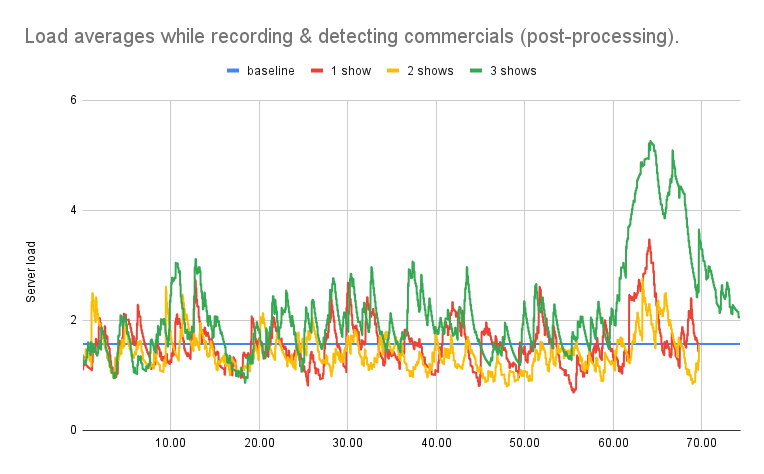
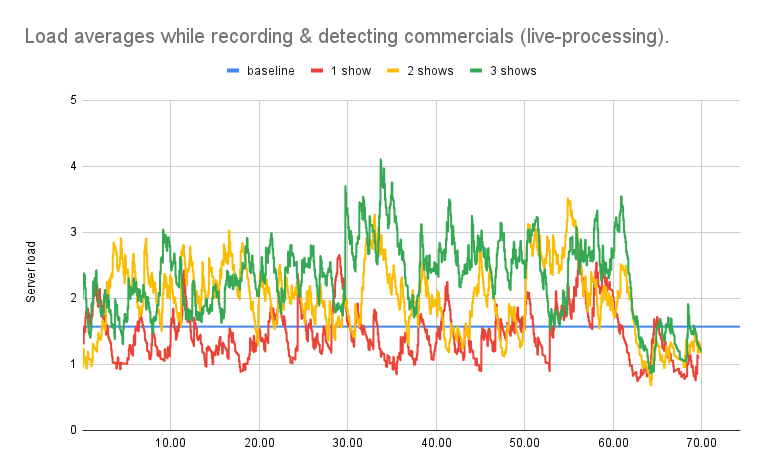
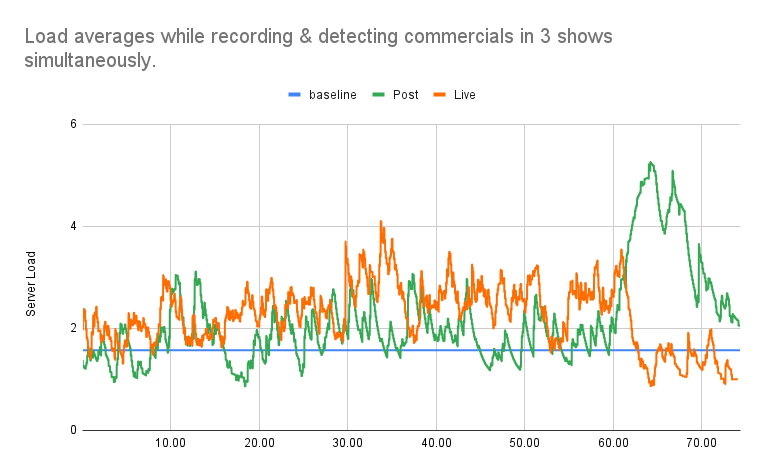
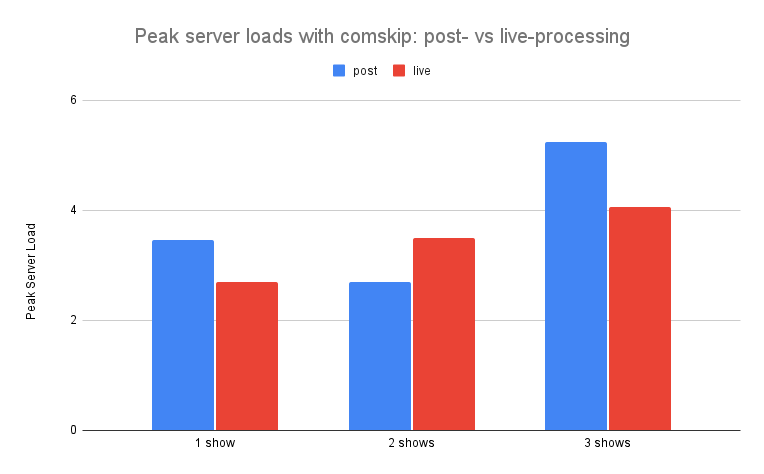
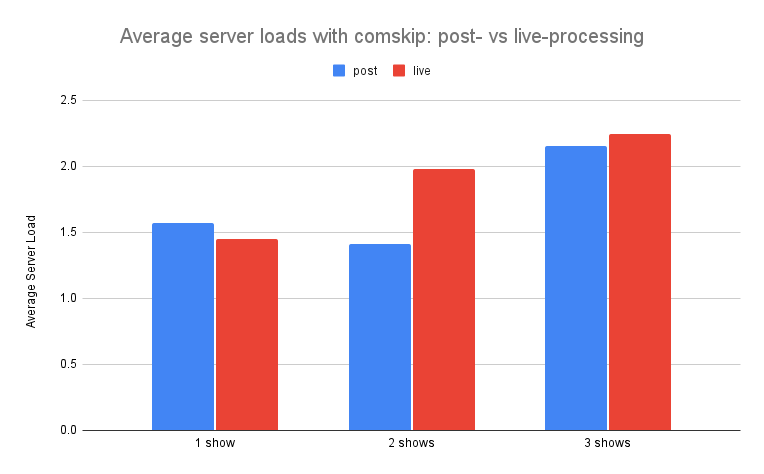
Performance testing 2: live- vs. post-processing In my first performance analysis, I described in detail the methodology I used to monitor the effects of multithreading and low resolution detection on server performance and commercial detection time while using comskip. I used the same methodology in this analysis, so I won't repeat it here. However, my goal was the same: to find the most efficient way to use comskip while keeping my server load at or below 3. Live detection has the advantage of being able to skip commercials while shows are still recording. At the same time, it might be an added burden on your server. To determine if this was the case, I measured server load while recording shows and detecting commercials. Effects of post-processing In my first test, I monitored server load in a seventy minute interval starting when a new recording began. I knew from my earlier analysis that 70 minutes would be enough time to record a 60-minute show and complete the detection of commercials after the recording was complete ("post processing"). As you can see below, the server load hovered just above or just below the baseline (shown in blue) during the 60 minute recording interval. When recording one or two shows, not much change was observed when detecting commercials in the 60-70 minute interval after recording had finished. However, there was a clear spike in server load in the post processing window when 3 shows were recorded at once. Even 15 minutes after recording completed, the server load had not yet returned to baseline. Effects of live-processing Next, I repeated my server load measurements for the same 70-minute interval, but with live commercial detection (live processing). When recording a single show, the server load hovered just above or just below the baseline. When recording 2 or 3 shows at once, the server load trended higher than baseline with a few spikes evident in first 60 minutes (example, 35 minutes). However, once recording was complete, the server returned to baseline within 2 minutes regardless of the number of shows being recorded. Recording 3 shows Since 3 simultaneous recordings put the most strain on the server, I thought it might be helpful to compare the post- and live-processing data on the same graph to get a relative idea of the peaks in load. As you can see, live processing shows a number of load spike while recording, with post-processing showing a large spike after recording with a slow return to baseline. Comparing peak server load As shown above, the spike in server load when post-processing 3 shows is higher than any spike when live-processing commercial detection. I processed the existing data to isolate and plot the peak server load for all of the conditions above. As expected, the highest server load occurs when post-processing 3 shows. However, this was not a consistent trend. The peak server load when recording one show was higher for post-processing. But live-processing was higher when recording two shows. This is likely due to the variability in server load, which is quite high even when no recording or commercial detection is in progress, and the low sample size (n=1). Comparing average server load Due to the inherent variability in server load and small sample size, I thought average server load might be informative. As you can see below, the average server loads over the entire 70-minute interval did not exceed 2.25. This is well within my goal of keeping server load at or below 3. Conclusions Based on the data presented above, I make the following conclusions: Average server load is comparable when detecting commercials with comskip either post-processing or live-processing. Post-processing with 3 shows simultaneously causes the largest peak in server load. Post-processing takes longer to complete then live processing. Given these conclusions, I will definitely be using live processing for commercial detection. Although average server loads may be a marginally higher in some cases, the peak server load is generally lower for live processing, the detection process completes sooner, and commercials can be skipped when watching a show that is still recording.
 1 point
 -
Yeah thanks for the update! Will check out xteeve haven't heard of it before but sounds like it will fill the gap until the functionality is in emby native.. So thanks for the suggestion will start exploring1 point
-
Thanks for your response, I've been playing around with xTeve for the last couple hours and using the VLC engine I am able to get a 720p video stream running on Emby (it still says 480p but nerd stats show otherwise). Would be awesome to have this behavior directly in Emby however xTeve is a great workaround for now1 point