Leaderboard




Popular Content
Showing content with the highest reputation on 05/08/22 in all areas
-
Well that explains it, I was very confused here! lol Thanks!2 points
-
The thing to realize there is that YT already has pre-created multiple bitrates of the same item and everyone is playing the same one so this only has to happen once. With Emby it is a very different story as everyone has their own media and all of these conversions would have to be done on the fly. That is a very different and much more complex problem than simply switching to a different pre-created stream during playback (which is already built-in to the HLS protocol).2 points
-
DSM7 Upgrade for Emby.mkvEDIT: The instructions assume default Synology install volume of /volume1. If your location is different use that instead! This is based on the release version of Emby which at the time of writing/video creation was 4.6.3. The video will become dated so just use the latest DSM 6 Emby version from the website https://emby.media/synology-server.html. If you happen to be running a beta version update to the latest beta version before the DSM 7 update. The idea is to do any updates on DSM 6 first before installing DSM 7. Since the creation of the video Emby Server is now availing in the Emby Package store (release version) so you can install Emby on DSM 7 now from that. ----------------------------------------------------------------------------------------------------------------------------- Attached is a quick video of upgrading DSM 6 to DSM 7 with Emby Updates. The video will show only browser items and not the PUTTY/SSH commands but everything done in browser is recorded. The SSH commands are included below. I converted this to MKV/H.265 to make it small enough to download and view offline. DMS7 Upgrade for Emby.mkv21.57 MB · 78 downloads Instructions used were: Download and have ready DSM 7 package for update. https://www.synology.com/en-us/DSM70 (I will be downloading both a virtualDSM 7 & for 920+) Download and have ready Emby Server 4.6.3 for both DSM 6 & DSM 7 https://emby.media/download.html - update Emby Server to current release of 4.6.3. - restart Emby Server and verify your on the latest release version. - uninstall Emby - update DSM to v7 - install Emby 4.6.3 (or same version that was running above (dsm7 version) - You can now install the DSM 7 version directly from the Synology Package store! (still on our website too) - stop Emby - remove emby_pkg user and video group - enable admin account if needed - enable ssh in Synology settings (Terminal & SSH menu) Not shown in video: - connect with Putty to Synology, login with admin user and get root rights with: sudo -i - copy files from old Emby share to new data location: cp -rv /volume1/Emby/* /volume1/@appdata/EmbyServer - adjust owner from copied files: chown -R emby:emby /volume1/@appdata/EmbyServer - close putty Shown again in video: - From Control Panel go to Shared Folder and edit each share that is used by Emby Server. Click the share, then EDIT, go to permission tab, select System internal user from drop down, grant emby user read/write access. - start Emby Notes: You can now disable the default admin account as well as SSH. You may also want to rename /volume1/Emby to /volume1/Emby6 as well. This will help make sure you don't have anything referencing the old directory. If you don't notice any issues in a week or two you can delete this old folder/share to free up space. DSM7 Upgrade for Emby.mkvDSM7 Upgrade for Emby.mkv1 point
-
So basically this. I have TV Shows, Movies, and Anime libraries. For anime; I'd prefer to set the default to Japanese with Subtitles. For movies, English and no subs unless forced. For TV Shows, the same. However, Emby only allows one overall setting this for this, for all libraries, instead of just one. I think it'd be a pretty nice little feature.1 point
-
It is really cool that Emby has the ability to support multiple versions of the same movie. It would be nice to have a setting on the client side to allow the user to set which version should be selected by default. This could be as simple a user-entered string, or it could be a list of detected strings to choose from. It could allow multiple entries and it would choose them in the order entered. On the Kodi side, it would also be nice to get the "Choose the Best Version for Me" option that the Emby app has.1 point
-
Hi, I’d love that audio and subtitles choice would be saved per show, according to what you select on the last episode you watched. The main audio/subtitles parameters is a good point but there are many cases it is not enough and you need to adjust audio and subtitles at the beginning of every episodes. For example i like to watch Casa de Pale in Spanish with french subtitles, The Big Bang Theory in English with french subtitles, French TV shows in french without subtitles, ....1 point
-
Can we have an option to flatten series if there are XX episodes or less. Just provides the ability to eliminate one frustrating click. I wouldn't want it on my 1,000+ episode Looney Tunes series. However, when you only have one or two seasons in a series, it helps drill down easier.1 point
-
I suggested in a totally different thread a bit ago about possibly adding Discogs as a meta fetcher... https://emby.media/community/index.php?/topic/79280-duplicate-music-artists-entries-how-to-get-rid-of-them/ That thread has had a few +1 reply posts. As such i figured adding it to the feature requests was the proper way to gauge interest. If you have used MP3tag you should be familiar with Discogs. Its a GREAT alternative to Musicbrainz.1 point
-
Hello @quickmic well I also just made the switch from Kodi 18 to Kodi 19, thinking now might be a good time and many of my addons are already in a "final" version. First of all thanks for your great work and the further development of the addon. Have "then" very intensive exchange on the error message with Angelblue05 & Sualfred held. I have decided in the first step for the "final" 6 version and wanted to give you feedback on it. The actual synchronize is damn fast and faster than old E4K 4.xxx. Also the caching of image files is very fast in the default setting (without caching). But now for the "but"^^ :-): With large media libraries (movies + series), the image buildup without caching no longer comes behind, which is not bad at all. But the process of caching takes very, very long compared to before. I took a look at it and found that it's because it also makes it much neater. I have 3 times the amount of images (>70,000) because unlike before the process also saves all actor photos, to my knowledge back then it was "only" posters and fanarts. Can you confirm this and is it possible to include this as an option again in the future? Furthermore, the process unfortunately came to a standstill after many hours at 100%, but I think you already know the problem. Do you already have a hotfix for version 6? Will hear us now certainly more often and thank you already for your great effort and the great addon. If necessary, I will also immediately go to the Vers. 7, so you have someone with a large library at hand :-). Oh well, my client is running on a Win 10 machine. Many greetings Seger1 point
-
Hey Guys, The basic "list view" showing just a list of titles without thumbnails is not available on the Emby Client for AndroidTV. Would be GREAT to have list view available. Being forced to load huge volumes of thumbnails can be real pain on FireTV. Would be so much easier to simply have a list of all movies (for example) without the need to scroll through hundreds of thumbnails. Same for any large media source. Cheers - AWESOME platform. -SBO.1 point
-
Ok I'll try it. Thank you ebr & Luke.1 point
-
Mac, I agree with Luke. He knows the encoding options. The higher end server you have, you could probably go higher in the bit rate choices. What I was talking about, was to separately encode all the videos with a 3rd party encoder and then you can could choose higher quality settings which gives you a little better look for the same bit rate. This only helps if you save the file to the video and audio codec that does not need to be reencoded to playback for your users. That is why I mentioned video codec x.264 in .mp4 and audio codec AAC FKK LC bit rate 128 kbps or less, or HE-AAC for higher bitrates or MP3 any bitrate setting. When you have a video like that, the video and audio codecs are acceptable and do not need reencoding. There are some exceptions. If your user is on a slower Internet and is not accepting the video playback at a set minimum speed, then even this mp4 video can trigger a reencoding to a lower bitrate by Emby. This depends on your Emby encoding settings. This combination would probably happen with low bars or an old phone trying to playback something like a 2400 kbps video, a 1080P copy, for example. Another video codec option called variable speed encoding, might trigger Emby to start reencoding a lower bit rate copy if the variable bit rate goes over a maximum limit, again to a user with 1 or 2 bar Internet connection. To avoid this, you can not encode with a variable bit rate or average speed 2 Pass encoding and not exceed past a certain bit rate per video size. You can also optionally turn off Emby encoding and perhaps give the user different video sizes, instead, that they can switch to, if the top resolution stutters. Currently, the user has to stop playback, choose a different copy that you made and put in the media folder for that video. It is not automatic, as far as I know. This solution is not that popular. If you leave the Emby encoding turned on, then the playback is fixed automatically. I hope that makes some sense. So, if you are prepared to make your own encoded video copies for each video and you are willing to use x.264 instead of HEVC x.265 video encoding, then you can dig in more to some of the settings that help improve quality, somewhat per bit rate. The biggest noticable improvement is the bitrate. All other settings are very minor and hard to notice. You can set the Motion Estimation Method to Uneven Hexagonal Search and set the subpixel Refinement to top setting best, usually 11. Up the GOP settings to minumum 24, maximum 120 and I-frame threshold to 40. Usually these are higher. Increase the vector search range to 32, add partition search for 8x8, 8x16, 16x8, Bframes and 4x4, 4x8, 8x4, P frames. This is normally off, and just larger 8x8 P frames are set. This helps a little with fog, smoke explosions and pan against complex backgrounds. You have to look very close to see any improvement for on any particular bit-rate test. These settings probably make your encoding 3 to 5 times longer. On bitrates with 3rd party encoder, I use 1200 kbit/s for 720P, sometimes 1400 if it is heavy action with a lot of effects. For 1080P I use 2100, and sometimes 2400. Stay on the upper end of these rates for media with 1.37, 1.85 AR and you can move down 100 with AR 2.39 or wider. I use AVIDemux to encode. This is a lot more work and using Emby to encode. which is a lot simplier and I think it will probably do an excellent job all around. If you don't have a fast server, then prepping your videos with a 3rd party encode makes more sense. Hope that helps.1 point
-
Yep, got it now, mine is always disabled hence never noticed that.1 point
-
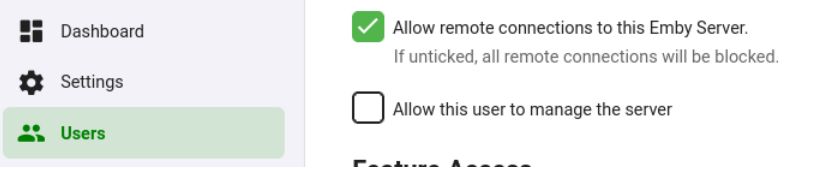
If you have disabled the remote connections on the Network settings sections then it won't be available on the Users settings.1 point
-
We must be talking past eachother here. I know that the Network option must be enabled, I'm talking about the Users option, which prevents particular accounts to logging in while accessing Emby remotely.
 1 point
 -
And when your client can't doesn't have an HDR display and can't do tone mapping? And when you have a video with ASS subtitles having animations, custom embedded fonts or foreign charsets that the client doesn't support? Yes, and even for non-regular users it would be much more convenient when you get a message _before_ the video will hang where you just need to confirm OK without going through the OSD menus. And there - how should a user even know which quality/bandwidth level to choose that matches the current connection? The typical situation is that you end up trying - and might need multiple attempts. What goes on top is that it's often not possible to break out of the spinning-wheel state to try a different quality setting. I can't even say how much I hate those "spinning wheel situations". It's not the wheel itself, it's the lack of information. what is happening. You don't know whether the server could be contacted, whether video data is already being downloaded or not, or whether some error has occurred at the client or at the server., and hence you also don't know whether you should continue waiting for playback start or whether the wheel would continue spinning until the end of days. In earlier days, streaming clients always has some status indication showing "Connecting to server", "Loading", "Buffering x%", "Error", etc. I liked that as it doesn't leave you totally clueless...1 point
-
It is best to have season folders within the show folder. Paul1 point
-
you cant skip on emby? i call this bullshit. does he know that he has a mouse that he can use to press "somewhere" on the progress-bar? what did this guy smoke.1 point
-
I used to use My movies back in the day. Emby is worth the cost.1 point
-
It is interesting that 1.0.85 USB works without any issue, so you might be right about this. That would be unfortunate.1 point
-
I'm starting to believe that. I don't know if I would say definitely all 2015 and 2016 models are affected, but lately there have been a bunch of people with older models who mentioned they can no longer update through usb. The work around has been loading 1.0.88 from usb, or connecting to the US or UK store and getting the latest there. I haven't seen anyone with an older model say newer versions still work for them either. Right now I'm just trying to get them up and running. If we could figure out another way to get them running though with a newer version that would be great1 point
-
You will need to delete your old version first. I just downloaded the one from the link I gave and it's 1.0.88. Anything newer usb release than that version has a time bomb in it which disables itself 30 days after it's compiled. USB releases are for beta testing only, which is why Samsung puts the 30 day limit on them. There is a changelog in the pinned posts. Like Luke and I mentioned though, all usb releases are now required to have the 30 day limit. You should be working to fix the problem though by supplying the information requested.1 point
-
We can, but Samsung won't let you install them anymore after they are 30 days old.1 point
-
Hello everybody, I came across a strange behaviour of Emby Theatre, when I click on add external player it simply doesn't work, it stays blocked of button. Usually it's always have worked, but now seems almost broken. Thank you.1 point
-
Ya, before the time bomb that's in the current usb installs there was a period when there was just a reminder to upgrade message every 30 days. Your friend can just ignore that since newer usb builds won't load. There is another option. Your friend can change their app region to US or UK. There is a slightly newer version on the Samsung store for 2016s. That should also get rid of the message because Samsung is no longer accepted apps for the store for 2016 TVs. The downside is that it resets your settings to factory, and you can only install apps from one region at a time.1 point
-
Sorry I forgot to mention that the apple tv theme in TV mode. Checked on one of the pcs and the backdrop is showing correctly.1 point
-
Hi @quickmic I'm just starting testing the 7.x version (latest) of your nice plugin. First let me say thumbs up for the beautiful new arrangement of the settings menu and the cool animated new logo - nice! I'm running into trouble in the following usecase: If you are installing the new plugin and cancel the first prompt to connect to an emby server let's say cause I want to setup the plugin first like I prefer, than restart Kodi it will show a emby-next-gen error popup and you can't manually add a new server connection. Only way is to reinstall the plugin. This does not happen if you deal with the first prompt and directly connect to a server.1 point
-
Understood. Thanks for your help.1 point
-
You should be proud @ebr, i am proud of emby, that a person who basically is sucker for plex also became fan how emby works. Its a big win. Hope the next release lives upto the expectations.1 point
-
Byte My Bits is a Plex sponsor, and Emby beat Plex in all of the categories that he tested......... Kudos to Emby.1 point
-
Emby For iOS 2.1.6 - Point Release: Additional Changes & Fixes This is the latest point release of Emby for iOS containing the latest changes & fixes. Fix double paste when copy/pasting text into text fields Minor fix to stop pasting copied items twice (double paste) Exclude downloads from iCloud backups This change excludes the Emby download folders from iCloud backup, reducing your iCloud bandwidth and storage needs Fix sporadic video playback crashes This set of fixes address video playback crashes that could happen under specific situations. Other related Blog posts to this release: Emby For iOS 2.1.3. Released, Featuring: Timeline Seeking & Thumbnails Maintenance releases: Emby For iOS iOS 2.1.5 - Release: Fix For Intermittent Loss of Audio Please report any issues you may have in the iOS forum of our Community Forums: Emby Community iOS Forum View the full article1 point
-
Posso avere il testo che hai inserito in Referrer http header Grazie Hispa1 point
-
Hi. What can we help you with?1 point
-
The TV app is back in the store this morning.1 point
-
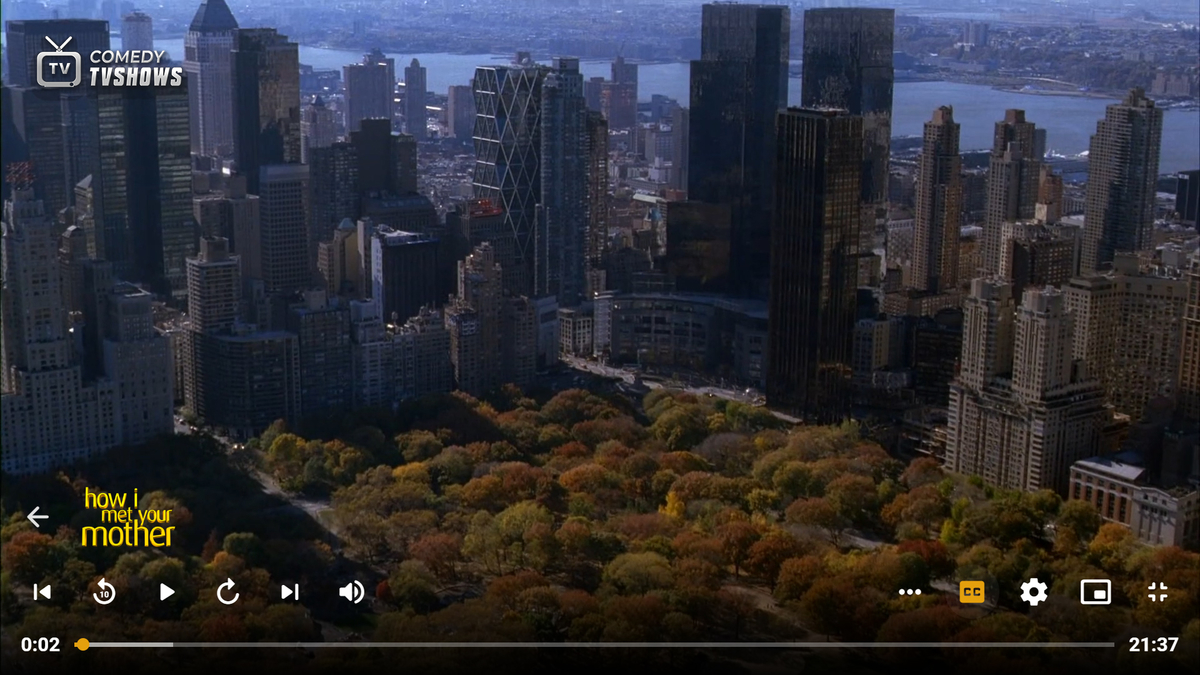
I love this plugin and am a regular user of it. Would it be possible to add a logo of the channel playing in the video OSD? See a simple mockup below. But I am guessing this maybe have to be done by the emby team to even be possible?
 1 point
 -
thats certainly one. my files are delivered perfectly named and with years by radarr. but for the last few months i've been using TMM. i have a lot of movies and no time to check if emby has it right so this additional step saves me a lot of headache. plus TMM pulls down loads more metadata than emby. its a great addition - still not 100% accurate but 99.9% rather than emby 90%1 point
-
As soon as we're satisfied that the open issues have been resolved.1 point
-
New version 1.1.2 in the starting post: Playback: Fixed watch state for consecutive items in Playlist mode Added Playlist (Archive) playback mode to always start shows at the beginning General: Added compatibility version for Emby 4.7.x1 point
-
For desktop (Win, Mac, Linux), Sonixd is pretty good. Its built for Jellyfin but seems to work with Emby as well. https://github.com/jeffvli/sonixd My favorite feature is Resume Playback: "Remember play queue on startup. The current Now Playing queue will be saved on exiting, and will be restored when you reopen Sonixd." My play queue is my playlist.1 point