Leaderboard




Popular Content
Showing content with the highest reputation on 04/29/22 in all areas
-
Hi Luke - no, was just providing a link to the Blog that's all...2 points
-
Emby for Samsung 1.2.6 has been released. We hope you enjoy the many new features of this build! Visual Timeline Seeking including Thumbnail Graphics Included in our new 1.2.6 release for Samsung is support for visual seeking. You can Rewind, Fast Forward or Jump to any position in the timeline quickly and easily using our new seeking. Best of all, our new seeking combined with thumbnail graphics makes it easy to pin-point the scene you want to re-watch or queue up. The above pictures shows how easy it is to find a scene you want to watch. You even get the chapter name embedded in the thumbnail picture. Speaking of which, Chapters make use of our thumbnail graphics as well, with their own set of information and use of graphics. The above screenshot shows the use of Thumbnail graphics in our Chapter selector available from the easy to use OSD menu, and that's no bull. This screen demonstrates how easy it is to view the Name, Starting Time as well as Thumbnail showing the action taking place at the start of the Chapter. Improvement to Audio On Screen Display (OSD) You can now toggle the play queue on and off, allowing you to choose between seeing the list, or just the artwork. This change makes room for additional space needed for a new user requested feature that is quite popular. New Use of Graphics Elements This release of Emby for Mac uses additional graphical elements in subtle ways that sure to please. It still has the classy interface you've come to love but uses additional graphics in a modest manner giving it an elegant and refined look. The screenshots above demonstrates this with a couple simple changes such as changing the title that was text to graphical. Additional useful information is now available right in the OSD besides the chapter shown above. You can now quickly get a look at different things on TV with graphics using On Now or easily bring up a traditional Guide in grid format. These new OSD designs strike a nice balance of providing additional information while still allowing you to easily enjoy the content be watched. Of course that's not all. Emby for Samsung 1.2.6 has additional new features and fixes including: Better remote control and fixes for certain models Improve Performance with Large Libraries Improved Performance of Playlist Detail Screen Improved Audio Book Detail Screen Addition of a Resume Rewind Playback Option (Server version 4.7+ required) Newly added Support for A-Z Picker with Descending Order New Support for A-Z Picker when Sorting by Album or Album Artist Various Improvements for Subtitles New Options for Subtitles allowing you to set Background Color and Opacity Options for Easier Viewing View the full article2 points
-
Here's the nfo. I know I even deleted the previous nfo file and let Emby re-create it. Though I just checked Emby again for that season, and now it's magically fixed. Guess it just takes more than a few minutes to update. I still have a couple other seasons, so I'll try the same things and just wait longer I guess. Magnum P.I. - 3x01 - 3x02 - Did You See the Sunrise (1)&(2).nfo
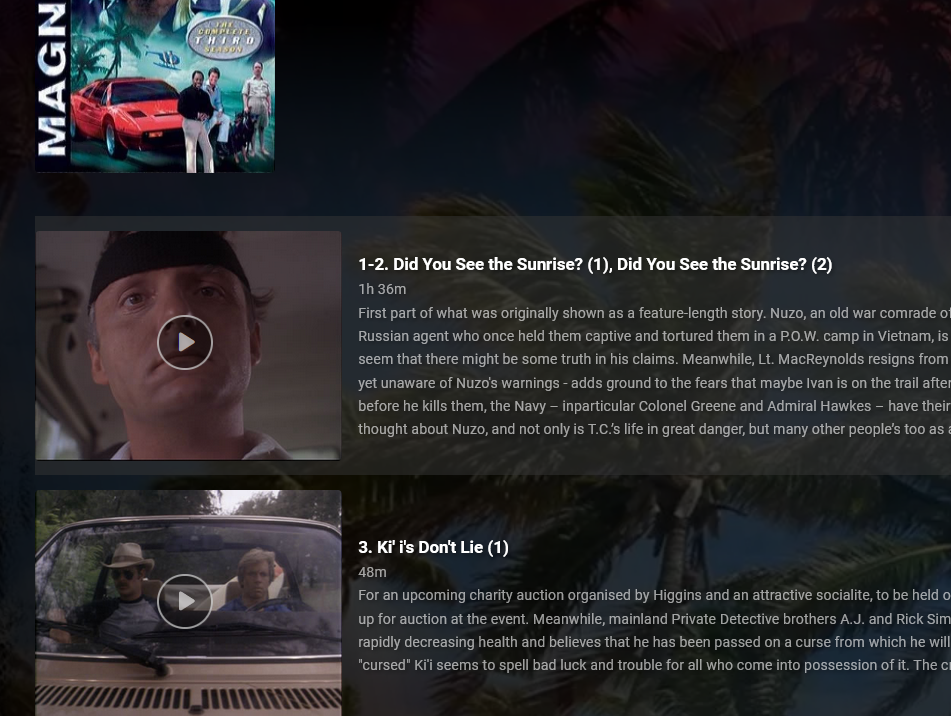 2 points
 -
@@Luke stated in a previous post (https://emby.media/community/index.php?/topic/49933-replaygain-music-support/) adding support for this could easily be done for at least the theater client seeing as the player used already supports replaygain. I'm making this feature request in hopes that this support is added, as I have no dev experience myself1 point
-
Emby for LG 1.0.35 has been released. We hope you enjoy the many new features of this build! Visual Timeline Seeking including Thumbnail Graphics Included in our new 1.0.35 release for LG is support for visual seeking. You can Rewind, Fast Forward or Jump to any position in the timeline quickly and easily using our new seeking. Best of all, our new seeking combined with thumbnail graphics makes it easy to pin-point the scene you want to re-watch or queue up. The above pictures shows how easy it is to find a scene you want to watch. You even get the chapter name embedded in the thumbnail picture. Speaking of which, Chapters make use of our thumbnail graphics as well with their own set of information and use of graphics. The above screenshot shows the use of Thumbnail graphics in our Chapter selector available from the easy to use OSD menu, no bull. This screen demonstrates how easy it is to view the Name, Starting Time as well as Thumbnail showing the action taking place at the start of the Chapter. Improvement to Audio On Screen Display (OSD) You can now toggle the play queue on and off, allowing you to choose between seeing the list, or just the artwork. This change makes room for additional space needed for a new user requested feature that is quite popular. New Use of Graphics Elements This release of Emby for LG uses additional graphical elements in subtle ways that sure to please. It still has the classy interface you've come to love but uses additional graphics in a modest manner giving it an elegant and refined look. The screenshots above demonstrates this with a couple simple changes from a text based titles to the graphical logos. Additional useful information is now available right in the OSD besides the chapter shown above. You can now quickly get a look at different things on TV with graphics using On Now or easily bring up a traditional Guide in grid format. These new OSD designs strike a nice balance of providing additional information while still allowing you to easily enjoy the content be watched. Of course that's not all. Emby for LG 1.0.35 has additional new features and fixes including: Better remote control and fixes for certain models Improve Performance with Large Libraries Improved Performance of Playlist Detail Screen Improved Audio Book Detail Screen Addition of a Resume Rewind Playback Option (Server version 4.7+ required) Newly added Support for A-Z Picker with Descending Order New Support for A-Z Picker when Sorting by Album or Album Artist Various Improvements for Subtitles New Options for Subtitles allowing you to set Background Color and Opacity Options for Easier Viewing1 point
-
Emby for Samsung 1.2.6 has been released. We hope you enjoy the many new features of this build! Visual Timeline Seeking including Thumbnail Graphics Included in our new 1.2.6 release for Samsung is support for visual seeking. You can Rewind, Fast Forward or Jump to any position in the timeline quickly and easily using our new seeking. Best of all, our new seeking combined with thumbnail graphics makes it easy to pin-point the scene you want to re-watch or queue up. The above pictures shows how easy it is to find a scene you want to watch. You even get the chapter name embedded in the thumbnail picture. Speaking of which, Chapters make use of our thumbnail graphics as well, with their own set of information and use of graphics. The above screenshot shows the use of Thumbnail graphics in our Chapter selector available from the easy to use OSD menu, and that's no bull. This screen demonstrates how easy it is to view the Name, Starting Time as well as Thumbnail showing the action taking place at the start of the Chapter. Improvement to Audio On Screen Display (OSD) You can now toggle the play queue on and off, allowing you to choose between seeing the list, or just the artwork. This change makes room for additional space needed for a new user requested feature that is quite popular. New Use of Graphics Elements This release of Emby for Samsung uses additional graphical elements in subtle ways that sure to please. It still has the classy interface you've come to love but uses additional graphics in a modest manner giving it an elegant and refined look. The screenshots above demonstrates this with a couple simple changes such as changing the title that was text to graphical. Additional useful information is now available right in the OSD besides the chapter shown above. You can now quickly get a look at different things on TV with graphics using On Now or easily bring up a traditional Guide in grid format. These new OSD designs strike a nice balance of providing additional information while still allowing you to easily enjoy the content be watched. Of course that's not all. Emby for Samsung 1.2.6 has additional new features and fixes including: Better remote control and fixes for certain models Improve Performance with Large Libraries Improved Performance of Playlist Detail Screen Improved Audio Book Detail Screen Addition of a Resume Rewind Playback Option (Server version 4.7+ required) Newly added Support for A-Z Picker with Descending Order New Support for A-Z Picker when Sorting by Album or Album Artist Various Improvements for Subtitles New Options for Subtitles allowing you to set Background Color and Opacity Options for Easier Viewing1 point
-
Alright I'm running the latest build, if I run into any trouble I'll make sure to report it. Thanks for the tech support and FAQ1 point
-
Will try it when im at home1 point
-
It is very strange @Bagul it's late here but will check this against my config tomorrow and come back with results. Thanks.1 point
-
Major improvements are for music content, but there are also countless minor improvements for syncing, Emby server connection etc. Also every bug reported in 6.x. will be firstly fixed in 7.x and after that backported to 6.x beta (if possible). Some reported fixes needs major code rewriting. Those will not be backported. 6.x. is very very well tested, but some edge case issues are still present.1 point
-
1 point
-
Holy smokes. That is amazing. If it works really well, this is going to be a game changer for my family and me. Thank you. @Luke1 point
-
Better an older stable release than a new release with features and bugs. Patience young padawan1 point
-
Hi there, can you please go over a specific example,? Thanks.1 point
-
It's intended to show whatever comes next after the last one you watched.1 point
-
yea and a way to push people to get a new TV. That would make sense why some apps in the app store don't show up on my older tv, when they do on my new one.1 point
-
That makes sense This reference suggests (Samsung TV: How do I Play Media Files in USB Devices? | Samsung Hong Kong) Adding exFAT and NTFS should be fine. Thanks FrostByte, cayers1 point
-
If your problem is with playing media that is local, why did you confuse things by bringing up cloud storage at all and including an internet link in your playback chain? Paul1 point
-
the reinstall fixed the problem. Thanks a lot1 point
-
I already quoted their response, that file can be deleted although they do not recommend doing it, but it would be spawned back after reboot.1 point
-
The same meme applies to Plex, but instead it's "Waiting for a member of the dev team, or even support to acknowledge your problem and your post exists"1 point
-
Emby for LG 1.0.35 has been released. We hope you enjoy the many new features of this build! Visual Timeline Seeking including Thumbnail Graphics Included in our new 1.0.35 release for LG is support for visual seeking. You can Rewind, Fast Forward or Jump to any position in the timeline quickly and easily using our new seeking. Best of all, our new seeking combined with thumbnail graphics makes it easy to pin-point the scene you want to re-watch or queue up. The above pictures shows how easy it is to find a scene you want to watch. You even get the chapter name embedded in the thumbnail picture. Speaking of which, Chapters make use of our thumbnail graphics as well with their own set of information and use of graphics. The above screenshot shows the use of Thumbnail graphics in our Chapter selector available from the easy to use OSD menu, no bull. This screen demonstrates how easy it is to view the Name, Starting Time as well as Thumbnail showing the action taking place at the start of the Chapter. Improvement to Audio On Screen Display (OSD) You can now toggle the play queue on and off, allowing you to choose between seeing the list, or just the artwork. This change makes room for additional space needed for a new user requested feature that is quite popular. New Use of Graphics Elements This release of Emby for Mac uses additional graphical elements in subtle ways that sure to please. It still has the classy interface you've come to love but uses additional graphics in a modest manner giving it an elegant and refined look. The screenshots above demonstrates this with a couple simple changes from a text based titles to the graphical logos. Additional useful information is now available right in the OSD besides the chapter shown above. You can now quickly get a look at different things on TV with graphics using On Now or easily bring up a traditional Guide in grid format. These new OSD designs strike a nice balance of providing additional information while still allowing you to easily enjoy the content be watched. Of course that's not all. Emby for LG 1.0.35 has additional new features and fixes including: Better remote control and fixes for certain models Improve Performance with Large Libraries Improved Performance of Playlist Detail Screen Improved Audio Book Detail Screen Addition of a Resume Rewind Playback Option (Server version 4.7+ required) Newly added Support for A-Z Picker with Descending Order New Support for A-Z Picker when Sorting by Album or Album Artist Various Improvements for Subtitles New Options for Subtitles allowing you to set Background Color and Opacity Options for Easier Viewing View the full article1 point
-
It's been added for the upcoming Emby Server 4.7 release.1 point
-
Both issues are related to a corrupted addon settings.xml There is something wrong/broken in your setup, please upload a Kodi.log (no debug mode) and/or reinstall the plugin.1 point
-
I think the jist of my post was lost on some. If you use Cloudflare as your proxy/WAF/DDoS protection service it means you trust them with your data. That is fine, it's what they do. But understand that your data is not encrypted to Cloudflare. It's encrypted BETWEEN you and CF and BETWEEN CF and your clients. They've been cracking down on media streaming over free accounts per Section 2.8 of their ToS. So if you're concerned about bans keep in mind you are not hiding anything from them.1 point