Leaderboard




Popular Content
Showing content with the highest reputation on 04/26/22 in all areas
-
https://mdblist.com/ Contains ratings from all relevant sites for movies and tv shows. Service also has api access and should be easy to implement. With one integration it would be possible to have all the ratings for movies and tv shows. Ratings are updated every 4 days. Edit , description from web site :2 points
-
Emby for LG TV's 1.0.35 has been released. Stay tuned to the blog for the release announcement.2 points
-
Oh my god I feel so stupid. I didn't have it in quick access in Home and I was sure that deleting it from App block would delete the app. And it was still hidden in the settings in Apps. Thanks, Samsung for this convenient OS. Thanks! It works now!2 points
-
While waiting for a new build TV is connected to the Internet? You uninstalled previous version from app settings? Just removing the icon from Home doesn't uninstall You unzipped the downloaded file in the root of the usb? (X:\userwidget)2 points
-
The ram will help. As for transcoding, you should be able to easily do 15-20 1080p transcodes with that beast and probably 5-6 4k transcodes. I can handle 17 1080p transcodes with my i3-8130U and 3 4k transcodes, and I only have a UHD 620. Your Tiger Lake processor is a beast for quicksync. It has a iGPU: Intel UHD Graphics Xe G4 48EUs.2 points
-
I think it would be nice to have the Audience Rating (icon) / Audience Score for movies along with the Critic Rating (icon) / Critic Score. It looks like the data is available from the Rotten Tomatoes API via the ratings field. 14 "ratings": { 15 "critics_rating": "Certified Fresh", 16 "critics_score": 99, 17 "audience_rating": "Upright", 18 "audience_score": 911 point
-
I have a fairly large movie collection (5k+) starting with films from the 1920's and in the absence of "smart" playlists how about a filter by decade option? Filtering by year works, but if I want to watch something from say the 1950's I have to start navigating from the 1930's and work my up to the 1950's which is quite a few number of pages. Another option might be to have Years running vertically much like the alphabet when viewing by title.1 point
-
Those aren’t the Smart Playlists OP is referring to. Smart Playlists in iTunes are rule based, very similar to the Smart Playlists plugin for Emby. https://support.apple.com/en-ca/guide/itunes/itns3001/windows1 point
-
Oh my God, Glory to Luc! Now the ball is in the court of those who have already requested .iso and I hope they will see what you just said. Emby would become "La Rolls" even if it is already "a Rolls" in terms of ease of exterior access! Maybe you can do a banner with survey first and engagement second. Many people only have .iso in their nas and they complain that they can't access it remotely so some go to .mkv with death in their souls. Today it is increasingly easy to be able to cast outside of your home, at the hotel, with family, with friends thanks to equipment with this function. I remain hopeful Luc. best regards, Eric1 point
-
Only time I have had issues with cache was back when I was modifying mframe colors. But have not noticed any issues changing treatments in my current testing.1 point
-
Using the web app, I played a movie then deleted it. It went away instantaneously.1 point
-
The 30 day cache is different from, say a browser cache, and Emby has mechanisms for instant updating of items in the 30 day cache when something about the image changes. So, under normal circumstances, the 30 day cache doesn't get in the way of anything.1 point
-
I did a backup of the emby folder, just in case. Deleted contents of cache\images as suggested. Seems to have worked!!1 point
-
in my opinion its actually quite bad. so bad i use tiny media manager instead. and my files are perfectly named1 point
-
Yeah, well that's because they force you to be "logged in" with them... We don't. You do not have to have any sort of account with us to use our system or purchase Premiere. That does make some of this type of thing a little more complicated, but it also means we aren't in charge of all of your users - you are.1 point
-
I have one with 56 songs. I will work on making one in the same range or longer and get back to you.1 point
-
Yes via web app seems to be fixed. Thank you! Any status on the Samsung tv app1 point
-
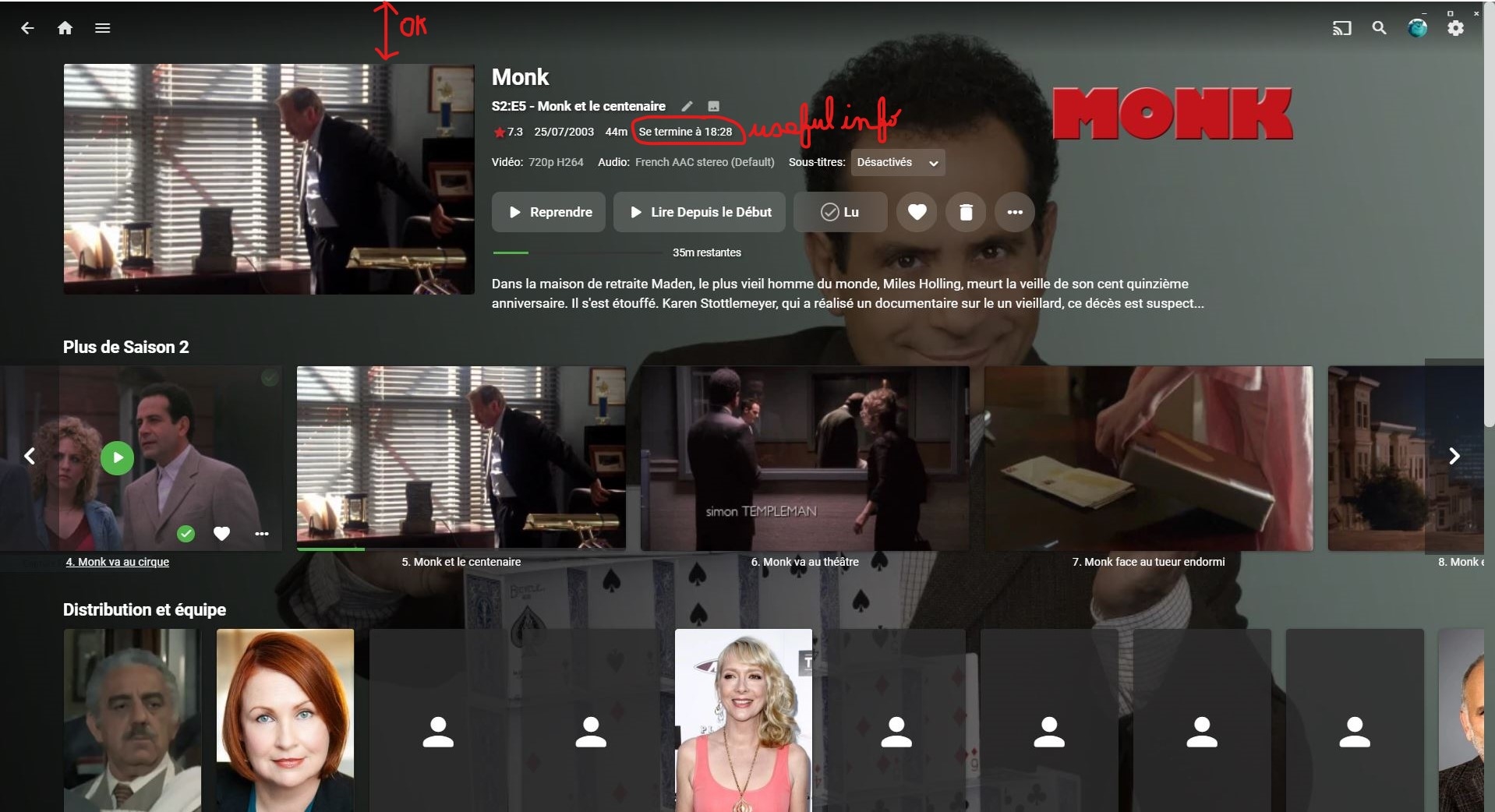
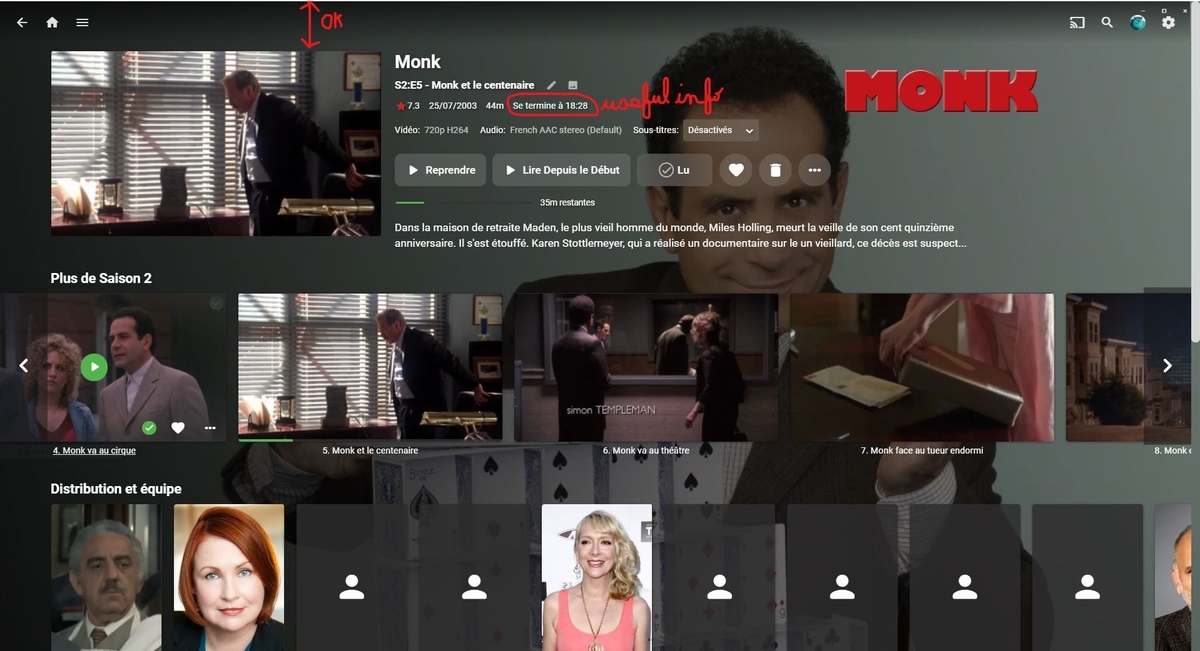
Hello and thank you very much for this new version 1.035. I tested it and I can say that now the media buttons work again (play, stop, pause, forward, backward). I asked the opinion of the 3 other members of the family on the new visual of the app. In fact, the visual is very close to that of "emby theater". There are 2 suggestions that we would like to propose (2 points which are present in "emby theater" and not on the app) : - the end time information is no longer present, however we find it useful. - wouldn't it be better to move up the description of the video, rather than centering it vertically? I'm attaching 2 images to show what I'm talking about (one printscreen of emby theater, and one photo of the app on my tv). Thank you again for this great app. (Excuse me for my bad english, my native language is french)
 1 point
 -
Thanks for the update -- I can confirm that the problem is fixed in the latest version on the LG app store (1.0.35).1 point
-
Well, as long as THEY are doing it - and have not been DMCAed yet - don't see how does that affect Emby? It's practically same as getting RT ratings from OMDB.1 point
-
The only fix for this: too many failed authorizations recently is to wait a bit. The link at the end of the error message describes the limits in detail, and the delay required depends on which limit you've hit. In your case it seems to be: "There is a Failed Validation limit of 5 failures per account, per hostname, per hour." so waiting a hour or so should clear it, but I can't guarantee that. As it happens, I never hit any of the limits when creating my setup, so I can't speak from experience on this one! Paul1 point
-
Well... I guess I'll just leave it as is for right now... I mean, it works as long as the resources are generated properly, which I've copied over... If I continue to have issues I'll try out a different caching path. Thank you to everyone that helped! Emby support is phenomenal compared to your competitors. And @Luke, I find it amazing that you have time to maintain Emby AND respond to what it seems to be every single support thread on here. Stunning. Thank you, and good luck!1 point
-
Glad it worked. It happens a lot which is why I thought I'd mention it.1 point
-
Excellent, thanks. @Luke, released!1 point
-
No worries I hope dose catch up lol1 point
-
So you count data coming from the internet as local? Sure, it's a fast link, but that's not what "local" means in my book. Paul1 point
-
By the way, if everybody else is wondering, why suddenly their / (/dev/md0) has lot less free space, than before... In my system, / is now uncomfortably full (86% utilized), so I started to wonder and found that space-preserve file, consuming over 500MB on /dev/md0 and spawned an support ticket, to understand what it is and why it is there.1 point
-
That's weird, not sure what the issue was but I could install it afterall. Really cool app, might even make me switch from Plexamp!1 point
-
Thank you so so much @kirkj, I'm going to take a look at this today. That is awesome thank you again!1 point
-
THANKS TO ALL! I'm sure this is a common rookie mistake and I appreciate the fix and all the suggestions!1 point
-
Will do, I just ordered a "Lifetime" key anyway lol.1 point
-
The presence of x 265 in the file name throws off the number parsing. We'll look at this, although this is a pretty tricky example. Instead of "Season 01 Episode 01", if you use S01E01 or 1x01 you'd probably be able to resolve this.1 point
-
Well from the image they were all parsed on "265" (S2E65)1 point
-
Heres a better way to push bans to Cloudflare... no need for php, no need for converting to exe, purely done via powershell $ip=$args[0] $email="YOUREMAILADDRESS" $apikey="APIKEY" if($ip -like '*:*') { Write-Host 'IPv6 Address! Cancelling operation' exit } $BODY = @{'mode' = 'block' 'configuration' = @{ 'target' = "ip" 'value' = "$ip" } 'notes' = 'IPBan' } $Jsonbody = $Body | ConvertTo-Json Invoke-WebRequest -Uri "https://api.cloudflare.com/client/v4/user/firewall/access_rules/rules" -Method 'POST' -Body $JSONBODY -ContentType "application/json" -Headers @{'Accept'='application/json';'X-Auth-Email'="$email";'X-Auth-Key'="$apikey"} Still working on a clean way to unban Edit; threw this together,, might not be the cleanest way to get the job done, but it works fine $ip=$args[0] $email="EMAILADDRESS" $apikey="APPIKEY" if($ip -like '*:*') { Write-Host 'IPv6 Address! Cancelling operation' exit } $content=Invoke-WebRequest -Uri "https://api.cloudflare.com/client/v4/user/firewall/access_rules/rules?page=1&per_page=1&mode=block&configuration.target=ip&configuration.value=$ip&match=all&order=mode&direction=desc" -Method 'GET' -ContentType "application/json" -Headers @{'Accept'='application/json';'X-Auth-Email'="$email";'X-Auth-Key'="$apikey"} $id=$content.tostring() -split "[`r`n]" | select-string "id" | Select-Object -First 1 | % {$_-replace ('"id": "')} | % {$_-replace ('",')} | % {$_-replace (" ")} Invoke-WebRequest -Uri "https://api.cloudflare.com/client/v4/user/firewall/access_rules/rules/$id" -Method 'DELETE' -ContentType "application/json" -Headers @{'Accept'='application/json';'X-Auth-Email'="$email";'X-Auth-Key'="$apikey"} And this is how I call these scripts within IPBan C:\Program Files\PowerShell\7\pwsh.exe|C:\path\to\script.PS1 ###IPADDRESS###1 point
-
I would highly recommend you run files through either filebot ($$), or rename my tv series (foss).1 point
-
@harrv Thank you again mate, I've just rectified this issue and released version 4.0.0.7 on the official catalog, under BETA version, and requires Emby Server Beta 4.7.35+ Minimum. ChangeLog for 4.0.0.7: 4.0.0.7 General When sending JSON payload with WEB:POST the template provided defines the format and the tokens required for the variables to be sent, however the variables were not being subsidised in a JSON-Safe escaped format. This has now been rectified, and token values are now supplemented using a JSON-safe escaped format. This addresses https://github.com/AnthonyMusgrove/Emby-ScripterX/issues/63 Packages Online Package Catalog in implementation stages, allows search functionality however there is currently no download or installation functionality from Online catalog - this will be released very soon.1 point
-
Hey mate, Thank you so much for the feedback I really appreciate it. It's my pleasure to get back into this plugin and get more features and fixes in place. I'm so sorry to hear that you've had to spend copious amounts of time for working around this one. It's something I definitely should have thought of when writing the WEB module. I've added it to the GitHub issue list, and I'm going to check it out right now - it should be a fairly simple one to fix on my side GitHub ISSUE: https://github.com/AnthonyMusgrove/Emby-ScripterX/issues/63 Warmest regards, Anthony1 point
-
Correct they have to be in the same folder with naming rule from KB to automatically multi-version. But there is a community plugin to group them no matter where they are or group them Manually as mentioned above. https://emby.media/community/index.php?/topic/63643-automatic-version-grouping-for-movies1 point
-
You can manually group them by multi-selecting and then clicking on the 3-dot menu and selecting "group versions", but it doesn't happen automatically. I believe there's a plugin to do that, though.1 point
-
Is there development for this feature? I really miss the decade filter, filter year by year is useless for me. Thank you to consider adding it.1 point
-
I reported it to the Apple TV forum, thanks for your feedback.1 point
-
Understood and the server will provide more control over this in future updates. Thanks1 point
-
The easiest option would be to use this free tool to add the tag "audiobook" to all your audiobooks, and then filter that out (You can do it from within Emby, but you'll have to do it one book at a time there - this lets you do a bunch of them in bulk.)1 point
-
You’re 100000% right. I have just the images cached. Tunnel running. Docker containers running. Emby running natively and GDrive encrypted via RClone for storage. Been working for a week, and before that with the Docker encryption scheme for two years. Here’s hoping I don’t have any other issues, and if I do, I’m glad we have the community here.1 point
-
Hi, I agree with EFEris, a "premiere only" option is better then none and saying "working on it" is way too often used in this Forum, but without delivering results (Sorry, sounds hard, but that's how I feel about it) And Samsung is the most common TV Brand in the EU, there is no doubt about it. Maintaining is a point, but to be honest, I can not imagine, that this will get out of control, Tizen is Linux based and u got a client for US already, as a plus, just quit the support of some useless old devices like a PS3? which will be used by a max of 1 % ? And in my opinion it's a waste of energy using such a power consuming device for streaming. Anyways, we got ur point, but ignoring the biggest Brand of TV Manufacturers is not a good idea I guess. And of course we could use Roku, Fire-tv etc. but its another device, another remote etc. pp And if it's about a few euros once, everyone can make it's own decision.1 point
-
It makes sense why Emby doesn't support playing blurays in a normal bluray manner, but its still a format many people like to archive their content in (i.e. keep it 1:1). However, even without supporting blurays in a normal matter with menus and all, emby should be able to stream a bluray playlist as a single movie much like it streams and mkv or any other container format. Now, blurays contain lots of playlists (and some contain obfuscated playlists), so it wouldn't be the best ui experience to just enumerate every playlist. What would be nice is if one culd drop a metadata file into the dir containin gthe BDMV file structure or the iso that basically enumerates which playlist one wants emby to know about and simple metadata to enumerate what it is (i.e. movie name, extra name, tv episode). I would say if this could be done, the next step would be to do the same for DVDs (though their playlist mechanism is less user friendly) thoughts?1 point
-
Emby for LG TV's 1.0.33 has been released. Stay tuned to the blog for the release announcement.1 point
-
OK, I have run an initial trial of Caddy version 2, and it works as simply as they say it should. I used Caddy 2 rc3 for the trial. Note that you can no longer get Windows binaries of Caddy v1, only source, so v2 is where it's at now! First, the setup I tried it in, and the assumptions I made. A domain name is required for external access; you need to get that and specify your IP address in the DNS. I use ports 80 and 443 for Caddy, because this enables it to get the required certificate from Let's Encrypt; it does this completely automatically in most circumstances, but you must have port 80 open for the process to work. When you try to access port 80, however, Caddy automatically redirects the request to port 443 - again, you don't need to configure this or think about it. So, I open ports 80 and 443 in my router to the machine running Caddy (and in the router's firewall as well, if this is a separate action), and ensure that the Windows firewall will also allow these ports through to caddy.exe. Next, I am running Emby in another machine, which for this example has IP address 192.168.1.66. I leave its ports as default, and only use the http one (8096). As it's on a different machine I could change this to port 80 for convenience, but I don't bother for other reasons. For an initial test, I went to the directory where I had dropped the Caddy executable and in a command window in the directory containing Caddy typed the command: caddy reverse-proxy --from emby.mydomain.com --to http://192.168.1.66:8096 That's it - the first time it may take a little while to get the certificate organised, but subsequent runs will be almost instant, as the certificate is already in place. The command doesn't return, so the window needs to be preserved while Caddy is running in this manner. Then simply typing emby.mydomain.com in a browser shows me what I expect. Note, I use the external domain name for internal access as well - this means that I can set up mobile devices to work whether I am at home or away. This does require a router that will loop back internal requests to the outside address efficiently, though; my Draytek Vigor does this perfectly. Finally I tried a config file for Caddy which enables running in the background or as a service (I haven't checked setting Caddy 2 up as a Windows service yet, which is how I'm running Caddy v1). This went as follows: in the same directory as caddy.exe I created a file called caddyfile (no extension). In this I placed the following text: { email name@maildomain.com } emby.mydomain.com { reverse_proxy http://192.168.1.66:8096 } Note the underscore in "reverse_proxy" where the command line version had a dash. If you can't find how to edit a file without an extension, create it with ".txt" and then delete the extension after editing it. The email directive enables Let's Encrypt to email you warnings if problems arise in the future. If Caddy is started in the directory containing the exe file and caddyfile, it will automatically use the specified configuration. I first simply ran it in the command window using the following command: caddy run As before, this does not return, and the proxy is now operating. It is also possible to start Caddy in the background from a command, thus: caddy start In this case you can stop it using the command: caddy stop which is rather unsurprising. If you ran caddy using the previous commands which held the window without returning, Ctrl-C will stop it in the usual manner, as will closing the window, or using the "caddy stop" command in another window. At least in my system, this really is all it takes for the proxy to work and do all the things required. But Caddy can be extensively customised if other systems require tweaks. There is even a facility to give it an nginx config file which it should then translate internally, but as I don't use nginx, I'm not going to try that out - in any case, it would take as much typing to specify that as to provide the trivially simple Caddy commands that work. Paul1 point
-
BS by omission is still BS. 5 years and still no Samsung app tells me there will never be one.0 points