Leaderboard




Popular Content
Showing content with the highest reputation on 04/06/22 in all areas
-
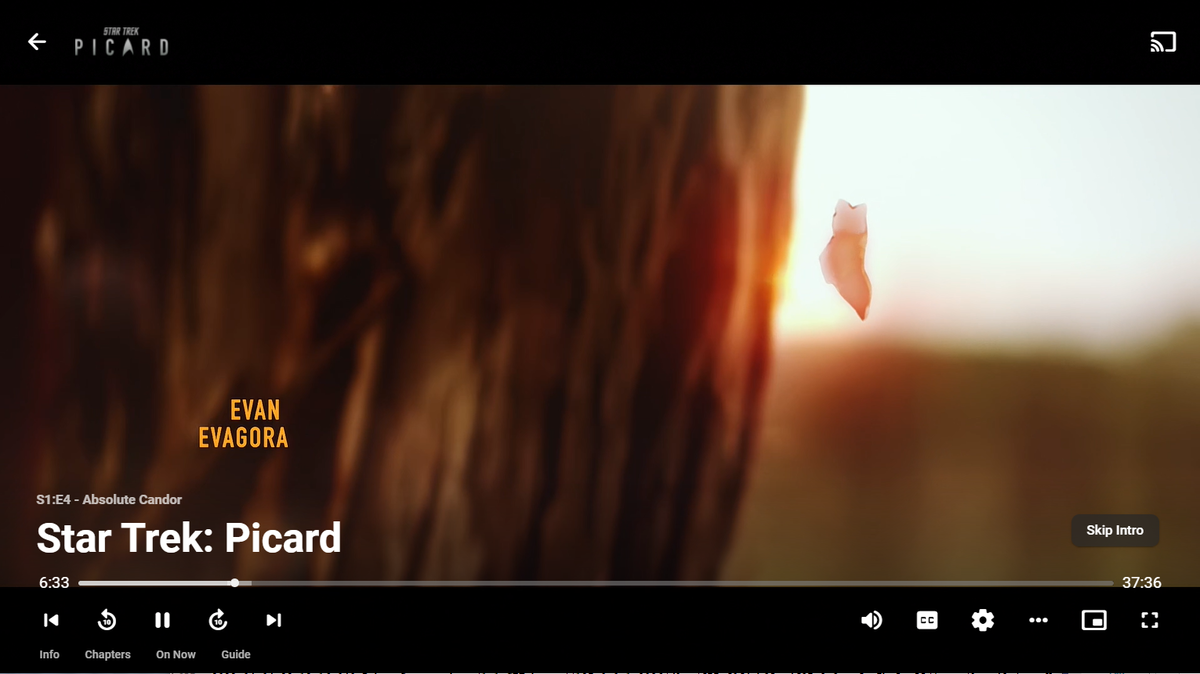
Well we're not sure yet if this will be part of the 4.7 release or a 4.7.x follow-up, but this will be coming very soon to Emby Server and Emby apps:
 8 points
 -
Plugins are generally available for free, though some charge a fee. As to source, many are open, some are not. It is 100% up to the plugin author as to cost and availability of the source. I believe one consideration in this case to close the source may have been the amount of work put in by the developers and others and the desire to avoid others taking their work and using it on other platforms.4 points
-
So let me explain. The introskip plugin will create chapter markers (if enabled) for introstart/end and credits. These are put into the chapters.db as additional chapter points. We did not manipulate the video files at all. So the chapter markers you see in emby are firstly collected from the media container, then parsed to the chapters.db, if no chapters exist in the media container then emby will create default chapter markers every 5 minutes. By conducting a metadata refresh. after the plugin has been removed, you will force emby to recreate these markers from the orignial source and therefore remove the introskip markers that are inserted3 points
-
Version 2.0.70a of the Fire TV App Released Version 2.0.70a of our popular Fire TV app is now available on the Amazon store as well as Emby for Fire TV Download Web Page This version contains fixes and internal improvements for general use and includes compatibility updates for an upcoming server release. Your device should update automatically or you can update manually from the Amazon store. Normalize max height on 1080 setups Improve SSL support - this should help with compatibility of self-signed certificates Compatibility with upcoming server release Improve audio handling Improve WOL support Various minor improvements and fixes If you want to check out all the cool features in Emby for Fire TV make sure to checkout and scroll down this page looking at all the features. Emby for Fire TV Web Page2 points
-
Forum update done, please report back any issue, thanks all.2 points
-
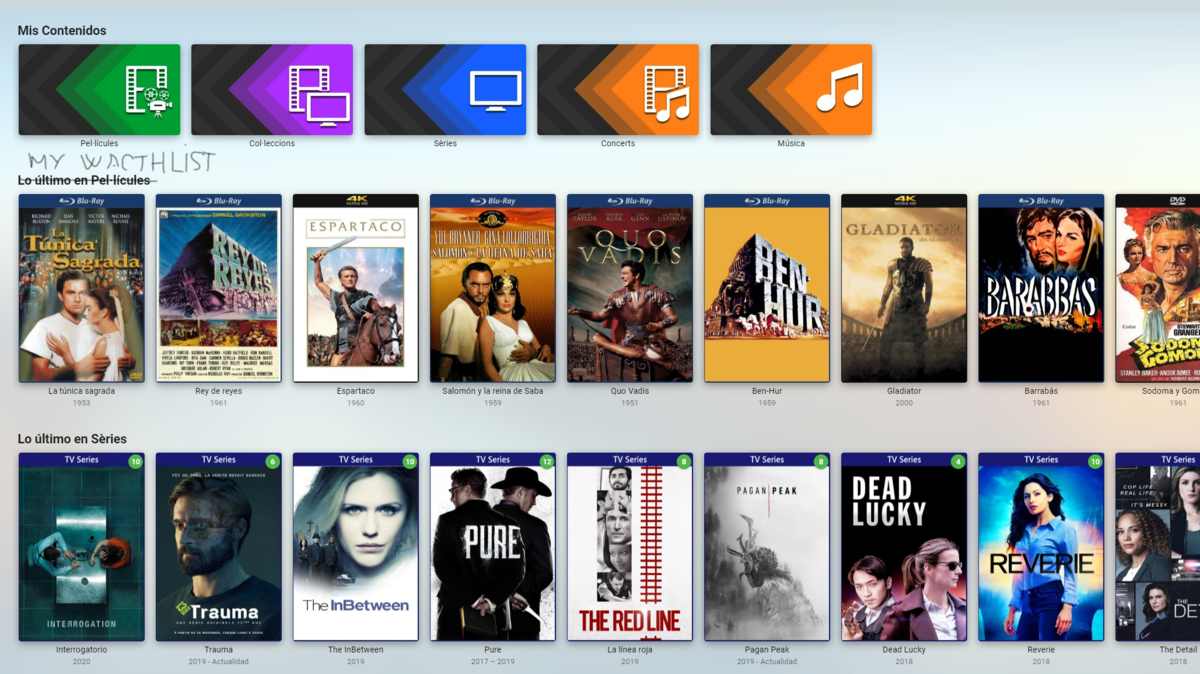
I would settle for a watchlist (private for each user) anchored on the home screen as if it were a library.
 2 points
 -
I've added how to remove in the IntroSkip Plugin Wiki :- https://github.com/chefbennyj1/Emby.IntroSkip.Release/wiki/9.-Removing-Introskip2 points
-
Any chapters added by Introskip are just added to the emby database, we never modify the original source file. btw - you also need to remove the fingerprint files - held in ..\programdata\plugins\data\intro_encoding @Cheesegeezer - I should probably add an uninstall section in the Wiki ... ?2 points
-
Version 2.0.70a of the Fire TV App Released Version 2.0.70a of our popular Fire TV app is now available on the Amazon store as well as Emby for Fire TV Download Web Page This version contains fixes and internal improvements for general use and includes compatibility updates for an upcoming server release. Your device should update automatically or you can update manually from the Amazon store. Normalize max height on 1080 setups Improve SSL support - this should help with compatibility of self-signed certificates Compatibility with upcoming server release Improve audio handling Improve WOL support Various minor improvements and fixes If you want to check out all the cool features in Emby for Fire TV make sure to checkout and scroll down this page looking at all the features. Emby for Fire TV Web Page View the full article2 points
-
made a start on coding Iridium, lots to do still but thought i'd share a wee teaser with you all (short video). For the home screen and the details page. Not much time to myself at the moment. iridium_details.mp42 points
-
I'm a plex life time member, but I have been using Emby for over six years continuously, but there is a feature which I have always thought is missing in Emby which I would like and encourage the developer to consider including especially in this dispensation where families can social or commingle due to COVID 19. Today, I received a notification from Plex about it new feature titled Watch together you can read about it here https://support.plex.tv/articles/watch-together/ The feature allows friends and families at distance to watch same movies together instantly, you simply invite all your buddy, once they signed to the system which can be seeing in the server then play and pause as needed, this I think is cool feature should be added to emby. Let's here your though if Emby developer should consider adding this feature to our beloved Emby Media https://www.bing.com/news/search?q=Plex+Watch+Together&qpvt=plex+watch+together&FORM=EWRE1 point
-
I wrote this reply last night, but didn’t hit send, so apologies if you’re already on top of this. Newer TV’s will have updated root certificates, so that may be the difference between the two TV’s You haven’t mentioned, but I’m assuming you’re using a Let’s Encrypt SSL certificate. It is a known issue due to the root certificates built into the tv for let’s encrypt have expired. The recommended solution is to use a ZeroSSL certificate as this is still supported1 point
-
Yes, if the OSD isn't already open.1 point
-
I store artwork/graphics/bif/nfo all with the media. So those objects won't be in the meta-data folders sitting in NVRMe but that's ok because Emby keeps this information in it's cache which will be on NVMe. Once it's in the cache it won't pull it from the media folders. So don't change anything to "help" the new use style. Just follow the directions and you'll be all set. Then after a few days of use go back and think about changing the location where things are saved. However, I bet you won't think about it then. You'll be fine, Carlo1 point
-
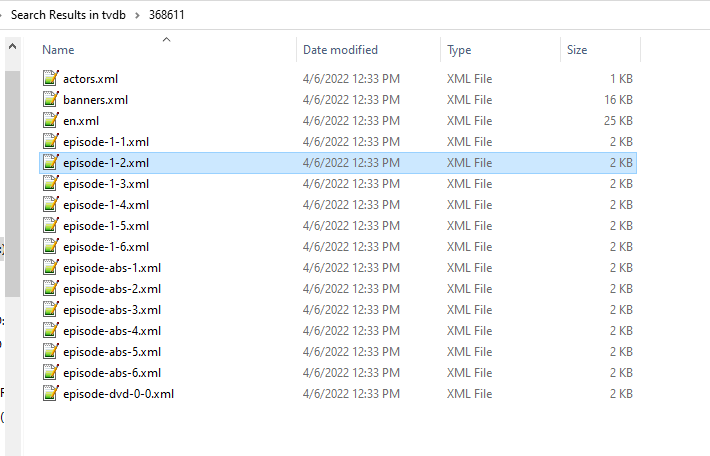
There is up to a 24 delay on TVDB v3 api. So all updates made today will not like be available via the API until tomorrow. In 4.7 we update to TVDB v4 api that does not have as big of delay. But I have this series and see the same issue, Stable server shows TBA and Refresh does not resolve issue do to v3 api, where Beta server is on v4 and a Refresh shows updated info. This has been mentioned on several topic about TBA/missing overview metadata. And a Feature Request somewhere to refetch TBA after x amount of time. But in the end this is TVDB provider defect. v3 api cached data refreshed today <?xml version="1.0" encoding="utf-8"?> <Episode> <id>8950493</id> <Combined_episodenumber>2</Combined_episodenumber> <Combined_season>1</Combined_season> <DVD_chapter>0</DVD_chapter> <DVD_discid/> <DVD_episodenumber>0</DVD_episodenumber> <DVD_season>0</DVD_season> <Director>|Aaron Moorhead|Justin Benson|</Director> <EpImgFlag/> <EpisodeName>TBA</EpisodeName> <EpisodeNumber>2</EpisodeNumber> <FirstAired>2022-04-06</FirstAired> <GuestStars/> <IMDB_ID/> <Language>en</Language> <Overview/> <ProductionCode/> <Rating>0</Rating> <RatingCount>0</RatingCount> <SeasonNumber>1</SeasonNumber> <Writer>|Michael Kastelein|</Writer> <absolute_number>2</absolute_number> <airsafter_season>0</airsafter_season> <airsbefore_episode>0</airsbefore_episode> <airsbefore_season>0</airsbefore_season> <filename/> <lastupdated>1648798676</lastupdated> <seasonid>1909725</seasonid> <seriesid>368611</seriesid> <thumb_added/> <thumb_height/> <thumb_width/> </Episode>
 1 point
 -
Yes, this is all absolutely possible. I'll work on that next.1 point
-
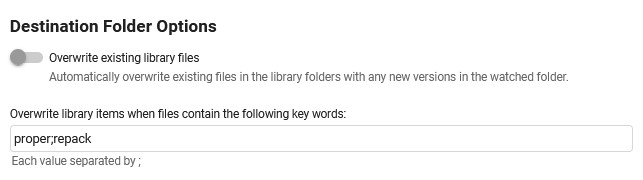
sry to get back, keywords are saved now correctly, but overwriting still does not work, also with one keyword 2022-04-06 20:07:49.320 Info App: Beginning Episode Organization 2022-04-06 20:07:49.320 Info App: Sorting file D:\SORT IT BITCH !!\video\Meine Wilden Töchter - S03E01 - Duschen mit den Jungs.repack.mkv into series E:\Serien\Meine wilden Töchter 2022-04-06 20:07:49.320 Info App: Sorting file D:\SORT IT BITCH !!\video\Meine Wilden Töchter - S03E01 - Duschen mit den Jungs.repack.mkv to new path E:\Serien\Meine wilden Töchter\Season 03\S03E01 - Duschen mit den Jungs.mkv 2022-04-06 20:07:49.321 Info App: Plugin options: no overwrite episode 2022-04-06 20:07:49.321 Info App: File 'D:\SORT IT BITCH !!\video\Meine Wilden Töchter - S03E01 - Duschen mit den Jungs.repack.mkv' already exists as 'E:\Serien\Meine wilden Töchter\Season 03\S03E01 - Duschen mit den Jungs.mkv', stopping organization
 1 point
 -
Thanks to @Happy2Play link and @FrostByte I easily managed to access the Var folder !! Thanks again for the help.1 point
-
I'd suggest going into the NextPVR Settings->Devices page, hold the ctrl key on your keyboard, and click the 'delete' button that appears on your specific IPTV device. Go back into the back into the generic 'IPTV' device, click 'import m3u', and supply your m3u and xmltv urls and click import. (ie, import the m3u and xml at the same time - this is a lot more straight forward than trying to add the EPG to the IPTV channels at a later stage) You should now see the list of channels, ready to save. At this point, before saving, I'd suggest filtering out the channel you're not going to be using. There is no point in importing 20,000 TV channels you're never going to watch. These unused channels will just make your database bigger and slower, and make everything a less enjoyable experience. Click the 'filter channels' button, untick 'Select All', then just tick the group's you'd really want to keep. for example, you might select UK / US channels and leave the rest unselected. Then click 'Save', and accept it's offer to update the EPG.1 point
-
Only a new install.1 point
-
ok now the keywords get saved, but the delimiter gets replaced by a , instead of the entered ; and it's not working, even with one word entered just as a throwin, the ignore list is comma separated (at least as stated by the info text), the cleanup and overwrite lists are semicolon sparated wouldnt it be easier to use one delimiter in all fields?1 point
-
Habe es grad bei mir getestet aufm z9x neuste Server beta sowie Android beta alle Sachen mit dts HD ruckeln und laufen unsauber nachm spulen egal ob h264 oder H265 egal ob 4k oder 1080 Gegenprobe mit zdmc und internem Player vom z9x ohne Problem tritt allerdings nur mit HD Ton auf. Server is ne windows 10 Büchse virtuell auf esxi Basis Mfg Vroniefan1 point
-
We plan to support Jasper in upcoming updates. Thanks.1 point
-
Seem to be having an issue with 1.6.1.8 and 1.6.1.9 on my Synology runing 4.7.30 Nothing is being populated in Auto Organize 2022-04-06 16:53:39.987 Error LibraryMonitor: Error in Directory watcher for: /volume1/online-backup/emby-primary/Movies *** Error Report *** Version: 4.7.0.30 Command line: /volume1/@appstore/EmbyServer/system/EmbyServer.dll -programdata /volume1/Emby -ffdetect /var/packages/EmbyServer/target/bin/ffdetect -ffmpeg /var/packages/EmbyServer/target/bin/ffmpeg -ffprobe /var/packages/EmbyServer/target/bin/ffprobe -nolocalportconfig -ignore_vaapi_enabled_flag -pidfile /volume1/Emby/EmbyServer.pid -defaultdirectory /volume1/Public -updatepackage emby-server-synology_{version}_x86_64.spk -noautorunwebapp Operating system: Linux version 3.10.105 (root@build3) (gcc version 4.9.3 20150311 (prerelease) (crosstool-NG 1.20.0) ) #25556 SMP Sat Aug 28 02:15:59 CST 2021 Framework: .NET 6.0.2 OS/Process: x64/x64 Runtime: volume1/@appstore/EmbyServer/system/System.Private.CoreLib.dll Processor count: 4 Data path: /volume1/Emby Application path: /volume1/@appstore/EmbyServer/system System.IO.IOException: System.IO.IOException: The configured user limit (8192) on the number of inotify watches has been reached, or the operating system failed to allocate a required resource. Source: TargetSite: No Stack Trace Available 2022-04-06 16:53:39.988 Info LibraryMonitor: Stopping directory watching for path /volume1/online-backup/emby-primary/Movies 2022-04-06 16:53:40.009 Info LibraryMonitor: Watching directory /volume1/online-backup/emby-primary/Movies 2022-04-06 16:53:41.334 Error LibraryMonitor: Error in Directory watcher for: /volume1/online-backup/emby-primary/TV *** Error Report *** Version: 4.7.0.30 Command line: /volume1/@appstore/EmbyServer/system/EmbyServer.dll -programdata /volume1/Emby -ffdetect /var/packages/EmbyServer/target/bin/ffdetect -ffmpeg /var/packages/EmbyServer/target/bin/ffmpeg -ffprobe /var/packages/EmbyServer/target/bin/ffprobe -nolocalportconfig -ignore_vaapi_enabled_flag -pidfile /volume1/Emby/EmbyServer.pid -defaultdirectory /volume1/Public -updatepackage emby-server-synology_{version}_x86_64.spk -noautorunwebapp Operating system: Linux version 3.10.105 (root@build3) (gcc version 4.9.3 20150311 (prerelease) (crosstool-NG 1.20.0) ) #25556 SMP Sat Aug 28 02:15:59 CST 2021 Framework: .NET 6.0.2 OS/Process: x64/x64 Runtime: volume1/@appstore/EmbyServer/system/System.Private.CoreLib.dll Processor count: 4 Data path: /volume1/Emby Application path: /volume1/@appstore/EmbyServer/system System.IO.IOException: System.IO.IOException: The configured user limit (8192) on the number of inotify watches has been reached, or the operating system failed to allocate a required resource. Source: TargetSite: No Stack Trace Available 2022-04-06 16:53:41.334 Info LibraryMonitor: Stopping directory watching for path /volume1/online-backup/emby-primary/TV 2022-04-06 16:53:41.655 Info LibraryMonitor: Watching directory /volume1/online-backup/emby-primary/TV 2022-04-06 16:56:41.709 Error Server: Error processing request *** Error Report *** Version: 4.7.0.30 Command line: /volume1/@appstore/EmbyServer/system/EmbyServer.dll -programdata /volume1/Emby -ffdetect /var/packages/EmbyServer/target/bin/ffdetect -ffmpeg /var/packages/EmbyServer/target/bin/ffmpeg -ffprobe /var/packages/EmbyServer/target/bin/ffprobe -nolocalportconfig -ignore_vaapi_enabled_flag -pidfile /volume1/Emby/EmbyServer.pid -defaultdirectory /volume1/Public -updatepackage emby-server-synology_{version}_x86_64.spk -noautorunwebapp Operating system: Linux version 3.10.105 (root@build3) (gcc version 4.9.3 20150311 (prerelease) (crosstool-NG 1.20.0) ) #25556 SMP Sat Aug 28 02:15:59 CST 2021 Framework: .NET 6.0.2 OS/Process: x64/x64 Runtime: volume1/@appstore/EmbyServer/system/System.Private.CoreLib.dll Processor count: 4 Data path: /volume1/Emby Application path: /volume1/@appstore/EmbyServer/system SQLitePCL.pretty.SQLiteException: Error: no such column: ExtractedResolution - SELECT ResultId, OriginalPath, TargetPath, FileLength, OrganizationDate, Status, OrganizationType, StatusMessage, ExtractedName, ExtractedYear, ExtractedSeasonNumber, ExtractedEpisodeNumber, ExtractedEndingEpisodeNumber, ExtractedResolution, ExtractedEdition, ExternalSubtitlePaths, DuplicatePaths from FileOrganizerResults ORDER BY OrganizationDate desc LIMIT 50 SQLitePCL.pretty.SQLiteException: Exception of type 'SQLitePCL.pretty.SQLiteException' was thrown. at SQLitePCL.pretty.SQLiteDatabaseConnection.PrepareStatement(String sql, String& tail) at SQLitePCL.pretty.DatabaseConnection.PrepareStatement(IDatabaseConnection This, String sql) at Emby.AutoOrganize.Data.SqliteFileOrganizationRepository.GetResults(FileOrganizationResultQuery query) at Emby.AutoOrganize.Core.InternalFileOrganizationService.GetResults(FileOrganizationResultQuery query) at Emby.AutoOrganize.Api.FileOrganizationService.Get(GetFileOrganizationActivity request) at Emby.Server.Implementations.Services.ServiceController.Execute(HttpListenerHost appHost, Object requestDto, IRequest req) at Emby.Server.Implementations.Services.ServiceHandler.ProcessRequestAsync(HttpListenerHost appHost, IRequest httpReq, IResponse httpRes, RestPath restPath, String responseContentType, CancellationToken cancellationToken) at Emby.Server.Implementations.HttpServer.HttpListenerHost.RequestHandler(IRequest httpReq, ReadOnlyMemory`1 urlString, ReadOnlyMemory`1 localPath, CancellationToken cancellationToken) Source: SQLitePCL.pretty TargetSite: SQLitePCL.pretty.IStatement PrepareStatement(System.String, System.String ByRef) 2022-04-06 16:57:09.072 Info HttpClient: GET https://api.github.com/repos/MediaBrowser/Emby.Releases/releases 2022-04-06 16:57:38.593 Info Server: http/1.1 POST http://host1:8096/emby/System/Configuration/autoorganize?X-Emby-Client=Emby Web&X-Emby-Device-Name=Chrome Windows&X-Emby-Device-Id=b1b12d7d-1577-4318-b8e3-9790fe47b9e6&X-Emby-Client-Version=4.7.0.30. UserAgent: Mozilla/5.0 (Windows NT 10.0; Win64; x64) AppleWebKit/537.36 (KHTML, like Gecko) Chrome/100.0.4896.60 Safari/537.36 2022-04-06 16:57:38.656 Info Server: http/1.1 Response 204 to 87.114.77.180. Time: 63ms. http://host1:8096/emby/System/Configuration/autoorganize?X-Emby-Client=Emby Web&X-Emby-Device-Name=Chrome Windows&X-Emby-Device-Id=b1b12d7d-1577-4318-b8e3-9790fe47b9e6&X-Emby-Client-Version=4.7.0.30 2022-04-06 16:58:07.173 Info Server: http/1.1 POST http://host1:8096/emby/Environment/ValidatePath?X-Emby-Client=Emby Web&X-Emby-Device-Name=Chrome Windows&X-Emby-Device-Id=b1b12d7d-1577-4318-b8e3-9790fe47b9e6&X-Emby-Client-Version=4.7.0.30. UserAgent: Mozilla/5.0 (Windows NT 10.0; Win64; x64) AppleWebKit/537.36 (KHTML, like Gecko) Chrome/100.0.4896.60 Safari/537.36 2022-04-06 16:58:07.184 Info Server: http/1.1 Response 204 to 87.114.77.180. Time: 11ms. http://host1:8096/emby/Environment/ValidatePath?X-Emby-Client=Emby Web&X-Emby-Device-Name=Chrome Windows&X-Emby-Device-Id=b1b12d7d-1577-4318-b8e3-9790fe47b9e6&X-Emby-Client-Version=4.7.0.30 2022-04-06 16:58:07.473 Info Server: http/1.1 POST http://host1:8096/emby/System/Configuration/autoorganize?X-Emby-Client=Emby Web&X-Emby-Device-Name=Chrome Windows&X-Emby-Device-Id=b1b12d7d-1577-4318-b8e3-9790fe47b9e6&X-Emby-Client-Version=4.7.0.30. UserAgent: Mozilla/5.0 (Windows NT 10.0; Win64; x64) AppleWebKit/537.36 (KHTML, like Gecko) Chrome/100.0.4896.60 Safari/537.36 2022-04-06 16:58:07.475 Info Server: http/1.1 Response 204 to 87.114.77.180. Time: 2ms. http://host1:8096/emby/System/Configuration/autoorganize?X-Emby-Client=Emby Web&X-Emby-Device-Name=Chrome Windows&X-Emby-Device-Id=b1b12d7d-1577-4318-b8e3-9790fe47b9e6&X-Emby-Client-Version=4.7.0.30 2022-04-06 16:58:15.904 Info Server: http/1.1 POST http://host1:8096/emby/System/Configuration/autoorganize?X-Emby-Client=Emby Web&X-Emby-Device-Name=Chrome Windows&X-Emby-Device-Id=b1b12d7d-1577-4318-b8e3-9790fe47b9e6&X-Emby-Client-Version=4.7.0.30. UserAgent: Mozilla/5.0 (Windows NT 10.0; Win64; x64) AppleWebKit/537.36 (KHTML, like Gecko) Chrome/100.0.4896.60 Safari/537.36 2022-04-06 16:58:15.907 Info Server: http/1.1 Response 204 to 87.114.77.180. Time: 2ms. http://host1:8096/emby/System/Configuration/autoorganize?X-Emby-Client=Emby Web&X-Emby-Device-Name=Chrome Windows&X-Emby-Device-Id=b1b12d7d-1577-4318-b8e3-9790fe47b9e6&X-Emby-Client-Version=4.7.0.30 2022-04-06 16:58:17.992 Error Server: Error processing request *** Error Report *** Version: 4.7.0.30 Command line: /volume1/@appstore/EmbyServer/system/EmbyServer.dll -programdata /volume1/Emby -ffdetect /var/packages/EmbyServer/target/bin/ffdetect -ffmpeg /var/packages/EmbyServer/target/bin/ffmpeg -ffprobe /var/packages/EmbyServer/target/bin/ffprobe -nolocalportconfig -ignore_vaapi_enabled_flag -pidfile /volume1/Emby/EmbyServer.pid -defaultdirectory /volume1/Public -updatepackage emby-server-synology_{version}_x86_64.spk -noautorunwebapp Operating system: Linux version 3.10.105 (root@build3) (gcc version 4.9.3 20150311 (prerelease) (crosstool-NG 1.20.0) ) #25556 SMP Sat Aug 28 02:15:59 CST 2021 Framework: .NET 6.0.2 OS/Process: x64/x64 Runtime: volume1/@appstore/EmbyServer/system/System.Private.CoreLib.dll Processor count: 4 Data path: /volume1/Emby Application path: /volume1/@appstore/EmbyServer/system SQLitePCL.pretty.SQLiteException: Error: no such column: ExtractedResolution - SELECT ResultId, OriginalPath, TargetPath, FileLength, OrganizationDate, Status, OrganizationType, StatusMessage, ExtractedName, ExtractedYear, ExtractedSeasonNumber, ExtractedEpisodeNumber, ExtractedEndingEpisodeNumber, ExtractedResolution, ExtractedEdition, ExternalSubtitlePaths, DuplicatePaths from FileOrganizerResults ORDER BY OrganizationDate desc LIMIT 50 SQLitePCL.pretty.SQLiteException: Exception of type 'SQLitePCL.pretty.SQLiteException' was thrown. at SQLitePCL.pretty.SQLiteDatabaseConnection.PrepareStatement(String sql, String& tail) at SQLitePCL.pretty.DatabaseConnection.PrepareStatement(IDatabaseConnection This, String sql) at Emby.AutoOrganize.Data.SqliteFileOrganizationRepository.GetResults(FileOrganizationResultQuery query) at Emby.AutoOrganize.Core.InternalFileOrganizationService.GetResults(FileOrganizationResultQuery query) at Emby.AutoOrganize.Api.FileOrganizationService.Get(GetFileOrganizationActivity request) at Emby.Server.Implementations.Services.ServiceController.Execute(HttpListenerHost appHost, Object requestDto, IRequest req) at Emby.Server.Implementations.Services.ServiceHandler.ProcessRequestAsync(HttpListenerHost appHost, IRequest httpReq, IResponse httpRes, RestPath restPath, String responseContentType, CancellationToken cancellationToken) at Emby.Server.Implementations.HttpServer.HttpListenerHost.RequestHandler(IRequest httpReq, ReadOnlyMemory`1 urlString, ReadOnlyMemory`1 localPath, CancellationToken cancellationToken) Source: SQLitePCL.pretty TargetSite: SQLitePCL.pretty.IStatement PrepareStatement(System.String, System.String ByRef) 2022-04-06 16:59:46.993 Error Server: Error processing request *** Error Report *** Version: 4.7.0.30 Command line: /volume1/@appstore/EmbyServer/system/EmbyServer.dll -programdata /volume1/Emby -ffdetect /var/packages/EmbyServer/target/bin/ffdetect -ffmpeg /var/packages/EmbyServer/target/bin/ffmpeg -ffprobe /var/packages/EmbyServer/target/bin/ffprobe -nolocalportconfig -ignore_vaapi_enabled_flag -pidfile /volume1/Emby/EmbyServer.pid -defaultdirectory /volume1/Public -updatepackage emby-server-synology_{version}_x86_64.spk -noautorunwebapp Operating system: Linux version 3.10.105 (root@build3) (gcc version 4.9.3 20150311 (prerelease) (crosstool-NG 1.20.0) ) #25556 SMP Sat Aug 28 02:15:59 CST 2021 Framework: .NET 6.0.2 OS/Process: x64/x64 Runtime: volume1/@appstore/EmbyServer/system/System.Private.CoreLib.dll Processor count: 4 Data path: /volume1/Emby Application path: /volume1/@appstore/EmbyServer/system SQLitePCL.pretty.SQLiteException: Error: no such column: ExtractedResolution - SELECT ResultId, OriginalPath, TargetPath, FileLength, OrganizationDate, Status, OrganizationType, StatusMessage, ExtractedName, ExtractedYear, ExtractedSeasonNumber, ExtractedEpisodeNumber, ExtractedEndingEpisodeNumber, ExtractedResolution, ExtractedEdition, ExternalSubtitlePaths, DuplicatePaths from FileOrganizerResults ORDER BY OrganizationDate desc LIMIT 50 SQLitePCL.pretty.SQLiteException: Exception of type 'SQLitePCL.pretty.SQLiteException' was thrown. at SQLitePCL.pretty.SQLiteDatabaseConnection.PrepareStatement(String sql, String& tail) at SQLitePCL.pretty.DatabaseConnection.PrepareStatement(IDatabaseConnection This, String sql) at Emby.AutoOrganize.Data.SqliteFileOrganizationRepository.GetResults(FileOrganizationResultQuery query) at Emby.AutoOrganize.Core.InternalFileOrganizationService.GetResults(FileOrganizationResultQuery query) at Emby.AutoOrganize.Api.FileOrganizationService.Get(GetFileOrganizationActivity request) at Emby.Server.Implementations.Services.ServiceController.Execute(HttpListenerHost appHost, Object requestDto, IRequest req) at Emby.Server.Implementations.Services.ServiceHandler.ProcessRequestAsync(HttpListenerHost appHost, IRequest httpReq, IResponse httpRes, RestPath restPath, String responseContentType, CancellationToken cancellationToken) at Emby.Server.Implementations.HttpServer.HttpListenerHost.RequestHandler(IRequest httpReq, ReadOnlyMemory`1 urlString, ReadOnlyMemory`1 localPath, CancellationToken cancellationToken) Source: SQLitePCL.pretty TargetSite: SQLitePCL.pretty.IStatement PrepareStatement(System.String, System.String ByRef) EDIT; Deleted FileOrganization.db and all is good again1 point
-
Good day, We need to put the community forum offline for maintenance matters, we hope to do it as fast as we could, but est. time for offline will be 30 minutes or less. It will start about one hour from this post. The update will start after 7 hours from now. Thanks for your patience. My best1 point
-
Hi. The player/device only sees it as DTS. Can you hear a difference?1 point
-
Try turning off transcoding on the server and the app should try to direct play it.1 point
-
In your other thread I asked you to install NextPVR and see if the EPG loaded., Of course you need to add the URL for both URLs. After adding the EPG URL as a second step looks like channels didn' map so go to the Settings Channels page again click Advanced Tools - Automap and fill out the dialog so see if they map. If the don't I would suggest an issue with the tvg-id and you might need to manually map each channel. Since this is a NextPVR support question I would say continue your post on the NextPVR forum and include zipped logs with future requests. For NextPVR this has nothing to do with Schedules Direct. Besides, if you used Schedules Direct it would be allowed for NextPVR's guide. The reason we recommend SD for North America is you get two+ weeks of good, legal metadata with art and updates are fast. OTA data for broadcast might be 8 hours or less and the pirated IPTV EPG data might be one day. Martin1 point
-
Hi Devs, Please consider enable additional AAC encoders, so that the Transcoding page in the server management lists all available AAC encoders and allows user to choose from. The reason for such request is that I, and many other music listeners who choose to self-host their library, or maybe you can easily tell the difference between the output from FFmpeg built-in AAC encoder and CoreAudio encoder. Try it here https://satellitemx.github.io/static/aac-py/ (80 Kbps). As transcoding for music happens when the client cannot DirectPlay (Safari doesn't directly play Opus/Vorbis without hacks, or FLAC in high bitrate), or the client has slow internet connection (3G), or client has specified slower speed (to lower internet usage), a better encoder really helps. As far as I know, ffmpeg bundled with Emby Server for macOS is built with CoreAudio support. Similar to macOS/iOS video acceleration layer VideoToolbox, the AudioToolbox is the audio counterpart and uses CoreAudio AAC encoder. user@mac Downloads % ./EmbyServer.app/Contents/MacOS/ffmpeg -encoders | grep aac ffmpeg version 4.3.0-emby_2021_02_21 Copyright (c) 2000-2021 the FFmpeg developers and softworkz for Emby LLC built with clang version 11.0.0 Execution Date: 2022-04-06 09:27:40 A..... aac AAC (Advanced Audio Coding) A....D aac_at aac (AudioToolbox) (codec aac) On Windows, OBS is able to use the CoreAudio encoder if user has non-Microsoft Store version of iTunes installed. https://github.com/obsproject/obs-studio/tree/master/plugins/coreaudio-encoder Much appreciated. satelli1 point
-
Cool mate, thanks for the video. Looking good! I know how you feel about getting free time to do stuff like this, it's just work, eat, sleep for me also at the mo. Have fun with it mate and take your time, because it is your free time after all.1 point
-
Thank you. Yes I was referring to movies. I've tried what you said and it works fine. I didn't realise it was under Emby Options, I was just pressing 'Extras' in the context menu. Thank you for your help. Much appreciated!1 point
-
standby we have wiki page on github, it's in the tools and utilities forum1 point
-
Conservative is a nice way to describe a problem known for years. I am sitting here on a 350Mbit line and still get SD stuff transcoded from 2,5Mbit to 1/1,5Mbit. If this is the accuracy of the auto feature then it is simply useless, sorry. And no it is not my connection to my server, I can saturate my line using SFTP/SSH and as soon as I set the bandwith manually to 50Mbit or so I can even watch 4K stuff just fine.1 point
-
يحتوي Premiere على 25 جهازًا بحد أقصى Premiere has a limit of 25 devices Emby Premiere - Emby
 1 point
 -
It is now the future, sure would be nice to have this feature.1 point
-
Passion, maybe.... Time, not so much - portable is working fine for now, so I'll stick with that!1 point
-
no problem thanks again user: stephan time: approximately 08:35 pm UTC-51 point
-
@Luke okay I can report that as of the latest TVDB plugin update (v1.2.2) - I am no longer seeing TVDB errors and scans in my log. The only errors that remain are from TheMovieDB plugin for the same series: 2022-04-06 11:44:41.366 Info HttpClient: GET https://api.themoviedb.org/3/tv/8519/season/3?api_key=f6bd687ffa63cd282b6ff2c6877f2669&append_to_response=images,keywords,external_ids,credits,videos&language= &include_image_language= ,null,en 2022-04-06 11:44:41.371 Error App: Error in TheMovieDb *** Error Report *** Version: 4.7.0.33 Command line: C:\Users\<username_obfuscated>\AppData\Roaming\Emby-Server\system\EmbyServer.dll Operating system: Microsoft Windows 10.0.19044 Framework: .NET 6.0.2 OS/Process: x64/x64 Runtime: C:/Users/<username_obfuscated>/AppData/Roaming/Emby-Server/system/System.Private.CoreLib.dll Processor count: 16 Data path: C:\Users\<username_obfuscated>\AppData\Roaming\Emby-Server\programdata Application path: C:\Users\<username_obfuscated>\AppData\Roaming\Emby-Server\system System.IO.IOException: System.IO.IOException: The filename, directory name, or volume label syntax is incorrect. : 'C:\Users\<username_obfuscated>\AppData\Roaming\Emby-Server\programdata\cache\tmdb-tv\8519\season-3- .json' at Microsoft.Win32.SafeHandles.SafeFileHandle.CreateFile(String fullPath, FileMode mode, FileAccess access, FileShare share, FileOptions options) at Microsoft.Win32.SafeHandles.SafeFileHandle.Open(String fullPath, FileMode mode, FileAccess access, FileShare share, FileOptions options, Int64 preallocationSize) at System.IO.Strategies.OSFileStreamStrategy..ctor(String path, FileMode mode, FileAccess access, FileShare share, FileOptions options, Int64 preallocationSize) at System.IO.Strategies.FileStreamHelpers.ChooseStrategy(FileStream fileStream, String path, FileMode mode, FileAccess access, FileShare share, Int32 bufferSize, FileOptions options, Int64 preallocationSize) at System.IO.FileStream..ctor(String path, FileStreamOptions options) at Emby.Server.Implementations.IO.ManagedFileSystem.GetFileStream(String path, FileOpenMode mode, FileAccessMode access, FileShareMode share, Int32 bufferSize, FileOpenOptions fileOpenOptions, Int64 preAllocationSize) at Emby.Server.Implementations.IO.ManagedFileSystem.GetFileStream(String path, FileOpenMode mode, FileAccessMode access, FileOpenOptions fileOpenOptions) at Emby.Common.Implementations.Serialization.JsonSerializer.SerializeToFile(Object obj, String file) at MovieDb.MovieDbSeasonProvider.EnsureSeasonInfo(String tmdbId, Int32 seasonNumber, String language, String preferredMetadataCountry, IDirectoryService directoryService, CancellationToken cancellationToken) at MovieDb.MovieDbSeasonProvider.GetMetadata(RemoteMetadataFetchOptions`1 options, CancellationToken cancellationToken) at Emby.Providers.Manager.MetadataService`2.ExecuteRemoteProviders(MetadataResult`1 temp, LibraryOptions libraryOptions, String logName, TIdType id, IEnumerable`1 providers, MetadataRefreshOptions options, CancellationToken cancellationToken) Source: System.Private.CoreLib TargetSite: Microsoft.Win32.SafeHandles.SafeFileHandle CreateFile(System.String, System.IO.FileMode, System.IO.FileAccess, System.IO.FileShare, System.IO.FileOptions) I imagine the same language fix would be applied to the TMDB plugin and it may resolve these scanning loops once and for all.1 point
-
Forgot to say, you will need to let him know the time you sent the log and the user who was logged on1 point
-
thank you! done1 point
-
You did, and I appreciate the in depth answer(s). I surely could have read up on this on my own, but since you guys/gals are knee-deep into this, I just assumed you would know the answer already (which you did), and likely others may have the same question so great to have it on here!1 point
-
Diedrich, I love these. I don't suppose you have made any more ... like 70's or 00's ?? Thanks1 point
-
Don't initialize a new progress value in your return function of the task execute method, just use "progress".1 point
-
1 point
-
Hi, yes more control over this is possible for future updates. Thanks.1 point
-
@Lukecan we know the reason why google removed the app? Can you tell us in details why the app has been removed / retracted?1 point
-
We're still working on this. We'll let you know when it's back in the store. Thanks guys.1 point
-
Hi Luke, this is the error report of my Trakt plugin fail from my log *** Error Report *** Version: 4.6.7.0 Command line: /system/EmbyServer.dll -programdata /config -ffdetect /bin/ffdetect -ffmpeg /bin/ffmpeg -ffprobe /bin/ffprobe -restartexitcode 3 Operating system: Linux version 4.15.0-142-generic (buildd@lgw01-amd64-039) (gcc version 5.4.0 20160609 (Ubuntu 5.4.0-6ubuntu1~16.04.12)) #146~16.04.1-Ubuntu SMP Tue Ap Framework: .NET Core 3.1.21 OS/Process: x64/x64 Runtime: system/System.Private.CoreLib.dll Processor count: 8 Data path: /config Application path: /system MediaBrowser.Model.Net.HttpException: MediaBrowser.Model.Net.HttpException: InternalServerError at Emby.Server.Implementations.HttpClientManager.CoreHttpClientManager.SendAsyncInternal(HttpRequestOptions options, String httpMethod) at Emby.Server.Implementations.HttpClientManager.CoreHttpClientManager.SendAsync(HttpRequestOptions options, String httpMethod) at Emby.Server.Implementations.HttpClientManager.CoreHttpClientManager.Get(HttpRequestOptions options) at Trakt.Api.TraktApi.GetFromTrakt(String url, CancellationToken cancellationToken, TraktUser traktUser) at Trakt.Api.TraktApi.SendGetCollectedShowsRequest(TraktUser traktUser, CancellationToken cancellationToken) at Trakt.ScheduledTasks.SyncLibraryTask.SyncShows(User user, TraktUser traktUser, ISplittableProgress`1 progress, CancellationToken cancellationToken) at Trakt.ScheduledTasks.SyncLibraryTask.SyncUserLibrary(User user, TraktUser traktUser, ISplittableProgress`1 progress, CancellationToken cancellationToken) at Trakt.ScheduledTasks.SyncLibraryTask.Execute(CancellationToken cancellationToken, IProgress`1 progress) at Emby.Server.Implementations.ScheduledTasks.ScheduledTaskWorker.ExecuteInternal(TaskOptions options) Source: Emby.Server.Implementations TargetSite: Void MoveNext()1 point
-
@Zerok Send me a PM (hovre over my avatar and click on message link) and we can setup a remote session that will be quicker then trading messages to figure out what needs adjusting.1 point
-
.. you and your TMM.. haha. Getting the HDR (and HD Audio in my example) codec data out your collection, really is not an issue - it's a 1 line 'script' using mediainfocli .. FOR /F "delims=" %%x in ('dir /a-s /b /s "M:\Films 4k\*.m??"') DO (mediainfocli --Output=file://hdr.txt "%%x" >> output.txt ) hdr.txt is just a template file .. you can grab whatever fields you like from MediaInfo .. General;"""%CompleteName%""" Video;,V#%StreamKindID%,%HDR_Format%,%HDR_Format_Profile%,%HDR_Format_Level%,%HDR_Format_Settings% Audio;,A#%StreamKindID%,%Format/String%,%Format_Commercial_IfAny%,%Channel(s)%,%Language% \r\n The 'hard part' is getting the results into emby tag's and matching the ItemId - although the 'Path' option in the API makes that a lot easier than I first thought as the Path should be unique. This would probably take the likes of @chef or @Cheesegeezer seconds to do, but as I have no experience of writing Emby Plugin's .. I had a quick look at Scripter-X, but that seemed to be more 'Operational' type scripts rather than changing Metadata. @VicMoore HTML is Javascript - so I got lost pretty quickly lol. If I can get some time - I'll maybe take a look at fudging something together - having emby tags of all the specialist MediaInfo info does sound enticing .. btw : All the fields you can get out of MediaInfo are listed in the attached text file .. parameters.txt1 point