Leaderboard




Popular Content
Showing content with the highest reputation on 03/22/22 in all areas
-
Emby For iOS 2.1.3. Has Been Released, Featuring New Timeline Seeking and Thumbnails Graphics! Visual Timeline Seeking including Thumbnail Graphics Included in our new 2.1.3. release is support for visual seeking. You can Rewind, Fast Forward or Jump to any position in the timeline quickly and easily. Best of all our thumbnails graphics help you pin-point the scene you want to re-watch or queue up. The above pictures shows how easy it is to find a scene you want to watch. You even get the chapter name embedded in the thumbnail picture. Speaking of which, Chapters make use of our thumbnail graphics as well with their own set of information and use of graphics. The above screenshot shows the use of Thumbnail graphics in our Chapter selector available from the easy to use OSD menu. This screen demonstrates how easy it is to view the Name, Starting Time as well as Thumbnail showing the action taking place at the start of the Chapter. Improvement to Audio On Screen Display (OSD) You can now toggle the play queue on and off, allowing you to choose between seeing the list, or just the artwork. This change makes room for additional space needed for a new user requested feature that is quite popular. New Use of Graphics Elements This release of Emby for iOS uses additional graphical elements in subtle ways that sure to please. It still has the classy interface you've come to love but uses additional graphics in a modest manner giving it an elegant and refined look. The screenshots above demonstrates this with a couple simple changes from a text based titles to the graphical logos. Pretty sweet! Of course that's not all. Release 2.1.3. has additional new features including: Fixed intermittent app crashes on device rotation during video playback Addition of a Resume Rewind Playback Option Additional Info in the OSD including Chapter, On Now and a Guide for Live TV Newly added Support for A-Z Picker with Descending Order New Support for A-Z Picker when Sorting by Album or Album Artist New Subtitle Background Color and Opacity Options to make Subtitles Easier to View Improved Audio Book Detail Screen Updates to the Top Tab Design to be More Discoverable and Easier to Use Improved Performance of Playlist Detail Screen Various Subtitle Improvements View the full article5 points
-
Emby for Android 3.2.43 has been released. We hope you enjoy some of new features! Visual Timeline Seeking including Thumbnail Graphics Included in our new 3.2.43 release is support for visual seeking. You can Rewind, Fast Forward or Jump to any position in the timeline quickly and easily. Best of all our thumbnails graphics help you pin-point the scene you want to re-watch or queue up. The above picture shows how easy it is to find a scene you want to watch. You even get the chapter name embedded in the thumbnail picture. Speaking of which, Chapters make use of our thumbnail graphics as well with their own set of information and use of graphics. The above screenshot shows the use of Thumbnail graphics in our Chapter selector available from the easy to use OSD menu. This screen demonstrates how easy it is to view the Name, Starting Time as well as Thumbnail showing the action taking place at the start of the Chapter. Improvement to Audio On Screen Display (OSD) You can now toggle the play queue on and off, allowing you to choose between seeing the list, or just the artwork. This change makes room for additional space needed for a new user requested feature that is quite popular. New Use of Graphics Elements This release of Emby for Android uses additional graphical elements in subtle ways that sure to please. It still has the classy interface you've come to love but uses additional graphics in a modest manner giving it an elegant and refined look. The screenshot above demonstrates this with a change from a text based movie title to the graphical logo version shown. Pretty sweet! Of course that's not all. Releasee 3.2.43 has additional new features including: Addition of a Resume Rewind Playback Option Additional Info in the OSD including Chapter, On Now and a Guide for Live TV Newly added Support for A-Z Picker with Descending Order New Support for A-Z Picker when Sorting by Album or Album Artist New Subtitle Background Color and Opacity Options to make Subtitles Easier to View Improved Audio Book Detail Screen Updates to the Top Tab Design to be More Discoverable and Easier to Use Improved Performance of Playlist Detail Screen Improvements for HDR Playback Various Subtitle Improvements View the full article5 points
-
Don't ask that too loud. There's a large cult, I mean crowd of power users, many from the early days, who would probably love nothing more than have all other clients work the way the ATV app functions. It's still the "go to" app many feel everything else compares to. So I wouldn't be worried about it disappearing any time soon. Obviously newer app releases have a bit different different design and more consistent functionality that is more menu oriented vs having to remember special key codes or patterns that have special meaning. The newer app designs have a more elegant and modern look to them with better thought out navigational designs that equally work for new users to the more experienced existing users (but might have an extra click or so). The newer apps use a converged or dynamic UI that adapts to different size device screens including smartphone, tablet, desktop to TV. Not only does the UI change based on size but also adjusts to different methods of interaction. The new Android app for example works with taps, swipes and gestures to keyboards and mice, blue tooth and TV remotes as well as voice command. It support communication via WIFI, WIFI Direct, Blue Tooth or Ethernet. Not to mention receiving or sending streams to other devices and Chrome Casting. A converged app that works in this manner brings the same feature sets to all members of the OS family which might be hard to do otherwise. It should be able to simplify support, allow parallel testing of different device types leading to better testing before release. Not only will the OS rollout at the same time giving all our users the same set of features so what they do on their tablet, phone or TV will work the same. It will allow the same set of features for all OS clients if possible, so it won't be just your Android Mobile that can download and watch media offline. Little things like this go a long way from a consistency standpoint as well as user expectation.4 points
-
Emby for Android 3.2.43 has been released. We hope you enjoy some of new features! Visual Timeline Seeking including Thumbnail Graphics Included in our new 3.2.43 release is support for visual seeking. You can Rewind, Fast Forward or Jump to any position in the timeline quickly and easily. Best of all our thumbnails graphics help you pin-point the scene you want to re-watch or queue up. The above picture shows how easy it is to find a scene you want to watch. You even get the chapter name embedded in the thumbnail picture. Speaking of which, Chapters make use of our thumbnail graphics as well with their own set of information and use of graphics. The above screenshot shows the use of Thumbnail graphics in our Chapter selector available from the easy to use OSD menu. This screen demonstrates how easy it is to view the Name, Starting Time as well as Thumbnail showing the action taking place at the start of the Chapter. Improvement to Audio On Screen Display (OSD) You can now toggle the play queue on and off, allowing you to choose between seeing the list, or just the artwork. This change makes room for additional space needed for a new user requested feature that is quite popular. New Use of Graphics Elements This release of Emby for Android uses additional graphical elements in subtle ways that sure to please. It still has the classy interface you've come to love but uses additional graphics in a modest manner giving it an elegant and refined look. The screenshot above demonstrates this with a change from a text based movie title to the graphical logo version shown. Pretty sweet! Of course that's not all. Release 3.2.43 has additional new features including: Addition of a Resume Rewind Playback Option (Server version 4.7+ required) Additional Info in the OSD including Chapter, On Now and a Guide for Live TV Newly added Support for A-Z Picker with Descending Order New Support for A-Z Picker when Sorting by Album or Album Artist New Subtitle Background Color and Opacity Options to make Subtitles Easier to View Improved Audio Book Detail Screen Updates to the Top Tab Design to be More Discoverable and Easier to Use Improved Performance of Playlist Detail Screen Improvements for HDR Playback Various Subtitle Improvements2 points
-
OK so the next webhooks plugin update will have six new events related to live tv that you can subscribe to. It will be available for server versions 4.7.0.32+:
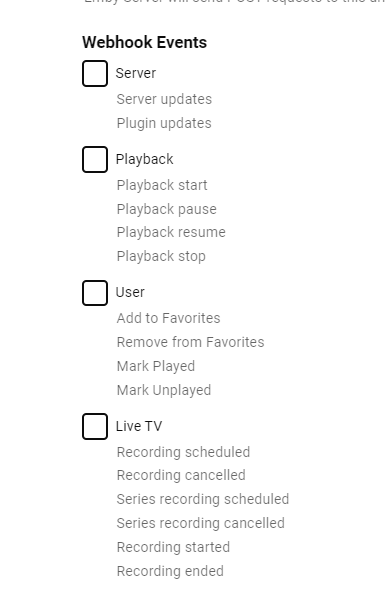 2 points
 -
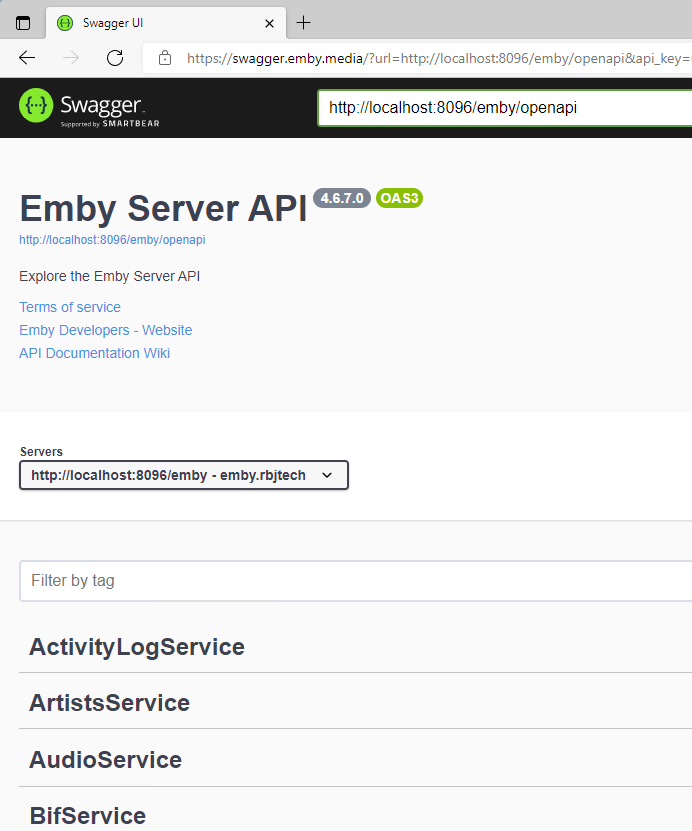
To add, Swagger is a bit broken atm if not using https - you need to use https://swagger.emby.media - and you also need to use https for the local host connection - OR actually use 'localhost' (only) if using http. ie
 2 points
 -
It's planned for future updates. Thanks.2 points
-
And another. This app is useless on the Shield - it's very slow and clunky. Nowhere near as refined as the ATV app is. I understand the reasoning to have just 1 Android app, but this has a long way to go to be usable on a daily basis. Sorry, just saying.2 points
-
Here's one.2 points
-
I have the same issue but only with the new app version 3.2.43. My other android phone is still using version 3.2.32 and Album artist, Artist, and composers shows.2 points
-
I'm having the same issue2 points
-
I have the same issue as hapewe. 2.1.2 works perfectly fine while in 2.1.3 there's simply no sound on iOS devices. (also DTS track)2 points
-
Client reports codec not supported. &VideoCodec=h264&AudioCodec=ac3,aac,mp3 &TranscodeReasons=VideoCodecNotSupported But is odd no client name listed in ffmpeg log. App: But it is not Direct Playing it is transcoding do to unsupport codec.2 points
-
Hey there, Not sure how much demand there would be for this but something I noticed scrolling through Netflix last night was how many of the videos I have in my library are now on Netflix / Prime...it made me think as I now access Emby through devices that have access to Netflix / Prime I should be able to remove the movies physically from the server and instead link through from my Emby library on certain devices. I know it's not everyone's cup of tea, but for me it makes sense to only hold the movies that I need to on physical disc taking up space and for the others to link through to the appropriate store if I have a subscription. Meaning I have one central Emby repo for all my links, whether that link is to a local share hosting the media locally or to an online repository such as Netflix / Prime. Clearly this is a little niche but is probably where we are all going at somepoint in the future... There would be a lot to work out in the logic of it I'm guessing and is probably based mainly on the client side with an "emtpy" move / tv holder being placed on the server to be ignored by clients that are told they don't have access to the streaming service. Thoughts appreciated on whether this is a stupid idea or one that makes sense? I know I can setup watchlist and in turn I can and do use the PlayOn Channel which gives me the option to view those streams, but it would be slick if they were natively in my library as is now Cheers mini1 point
-
I know the answer to this is probably going to be no..... ...but.... A standalone music player for iOS would be very useful. Trying to get the wife to use the full client for music is just not happening. Something that was simple and intuative and quick and easy to use would be killer, something like spotify. The simpler the app is to use, the better. If all else fails, I have a project that's on the back burner that was an iOS music player for subsonic, but I could always target emby as well. It had an spotify a-like interface. Screenshot from as far as I got with the UI, it was playing back music from the server.1 point
-
As I mention in a related post, I love the additional subfolders for Movie Extras (eg, Shorts, Scenes, Interviews, etc.)! It would be awesome to extend this functionality to TV Series as well. Specifically to add support for many/all of the same folders supported for Movie Extras, eg, extras specials shorts scenes featurettes behind the scenes deleted scenes interviews trailers As well as any additional folders that get added in the future (eg, hopefully Galleries). Support Placement of "Extras" Folders Within Each Season Folder, Plus A Naming Scheme to Link A Particular Extras Folder with a Specific Episode (eg, "\Season 1\E1 - Deleted Scenes\" for episode 1 deleted scenes): I want to clarify that it would be great if these various "extras" folder types could reside within each Season folder. So for example, within a Season 1 folder we could then have an "Extras" folder, a "Deleted Scenes" folder, a "Featurettes" folder, etc. And furthermore, that we could designate a particular folder to refer to a specific episode (eg, "\Season 1\E1 - Deleted Scenes\" for episode 1 deleted scenes). See more below, particularly why I think this would be so useful: https://emby.media/community/index.php?/topic/55915-emby-server-theater-additional-extrasspecial-folder-types-for-tv-series-similar-to-movies/&do=findComment&comment=587195 Thanks for your consideration! PS - If this is something you might like to see implemented, be sure to "Like" this top/first post (as well as any subsequent posts in this thread that highlight particular aspects of what you are interested in) -- "Liking" the top/first post helps the Devs to know how much interest there is in a given Feature Request.1 point
-
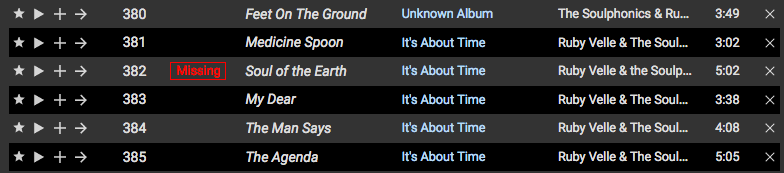
I've recently switched from Subsonic to Emby for music streaming and one nice feature that Subsonic has is that if an item in a playlist is missing—has been removed, renamed, etc.—it is flagged as missing (see attached image). Because Subsonic is not entirely tag based in its organization—it's based of folder hierarchy—it's a bit more forgiving if things are not tagged correctly. Now that I'm in Emby, I'm trying to clean up things using MusicBrainz Picard, but once a song is renamed after being properly tagged, and if it was in a playlist, it is simply removed from that playlist. That said, it would be great if Emby could flag these missing items in playlists instead of removing them. My particular use case is for music, but I imagine this would be useful for other content as well. Thanks for your consideration!
 1 point
 -
Hello, I have set up Emby on my server and it seems to be working well for internal network use. I am having a heck of a time getting it to work for remote use though. I have the Emby app on my iPhone and iPad and have been testing getting the app to connect remotely by turning off Wifi and turning on 4G. The Emby apps just will not connect remotely no matter what I've tried - I've got the user account I'm trying to use tied to my Emby Connect account, I have Emby Premiere, and I've even tried to add the server manually via the remote (WAN) access IP, but no dice. Whenever I try to log in to Emby Connect on the app, it just kicks me back to the start screen and says "Connection Failure" whenever I try to connect to my server remotely. Could I get some assistance with resolving this? Thanks!1 point
-
Emby For iOS 2.1.3. Has Been Released, Featuring New Timeline Seeking and Thumbnails Graphics! Visual Timeline Seeking including Thumbnail Graphics Included in our new 2.1.3. release is support for visual seeking. You can Rewind, Fast Forward or Jump to any position in the timeline quickly and easily. Best of all our thumbnails graphics help you pin-point the scene you want to re-watch or queue up. The above pictures shows how easy it is to find a scene you want to watch. You even get the chapter name embedded in the thumbnail picture. Speaking of which, Chapters make use of our thumbnail graphics as well with their own set of information and use of graphics. The above screenshot shows the use of Thumbnail graphics in our Chapter selector available from the easy to use OSD menu. This screen demonstrates how easy it is to view the Name, Starting Time as well as Thumbnail showing the action taking place at the start of the Chapter. Improvement to Audio On Screen Display (OSD) You can now toggle the play queue on and off, allowing you to choose between seeing the list, or just the artwork. This change makes room for additional space needed for a new user requested feature that is quite popular. New Use of Graphics Elements This release of Emby for iOS uses additional graphical elements in subtle ways that sure to please. It still has the classy interface you've come to love but uses additional graphics in a modest manner giving it an elegant and refined look. The screenshots above demonstrates this with a couple simple changes from a text based titles to the graphical logos. Pretty sweet! Of course that's not all. Release 2.1.3. has additional new features including: Fixed intermittent app crashes on device rotation during video playback Addition of a Resume Rewind Playback Option (Server version 4.7+ required) Additional Info in the OSD including Chapter, On Now and a Guide for Live TV Newly added Support for A-Z Picker with Descending Order New Support for A-Z Picker when Sorting by Album or Album Artist New Subtitle Background Color and Opacity Options to make Subtitles Easier to View Improved Audio Book Detail Screen Updates to the Top Tab Design to be More Discoverable and Easier to Use Improved Performance of Playlist Detail Screen Various Subtitle Improvements1 point
-
Emby and NextPVR are isolated so while they can still work separately it could be a nightmare to manage. NextPVR recordings will also have priority over streaming to Emby since that to NextPVR is live TV Martin1 point
-
My TV has Version 1904 since mid January In older Versions the problem was also there Just tried App Version 1.2.5 and still the same behavior1 point
-
When I check in the google playstore, it says I upgraded to 3.2.43 on December 2nd. Was this update already out for some phones?1 point
-
Emby grows more every day. The success is that Emby Support listens to its customers and improves every day. Thank alot.1 point
-
Emby android app is best.1 point
-
There is an API link at the bottom of the Emby Dashboard that will lead you to the Swagger page for your local server. The page is hosted externally, but connects to your server locally. If you want to look at the endpoints for Intro Skip, they are under SequenceService (and SequenceThumbnailService) It’s probably exactly the one you’re thinking of1 point
-
I confirm exact same bug since update. Artists and album artists shows black empty page1 point
-
embyserver-63783559156.txthardware_detection-63783559162.txtthanks Luke, hope this helps.1 point
-
It's possible for future updates. Thanks.1 point
-
Yes we are.1 point
-
We are working hard on it. Thanks.1 point
-
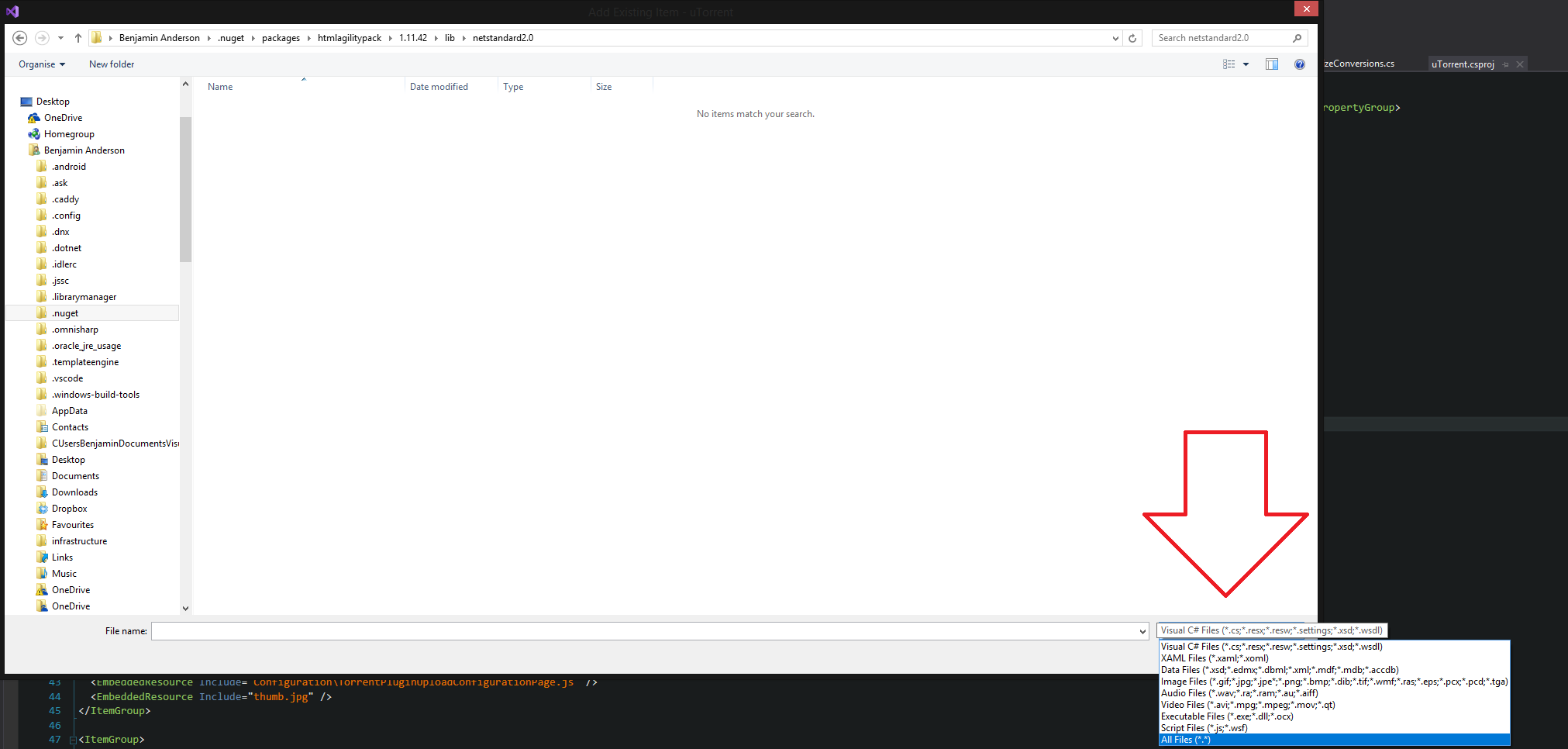
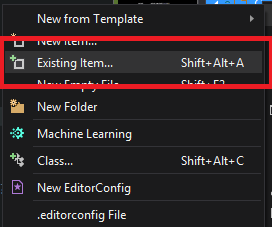
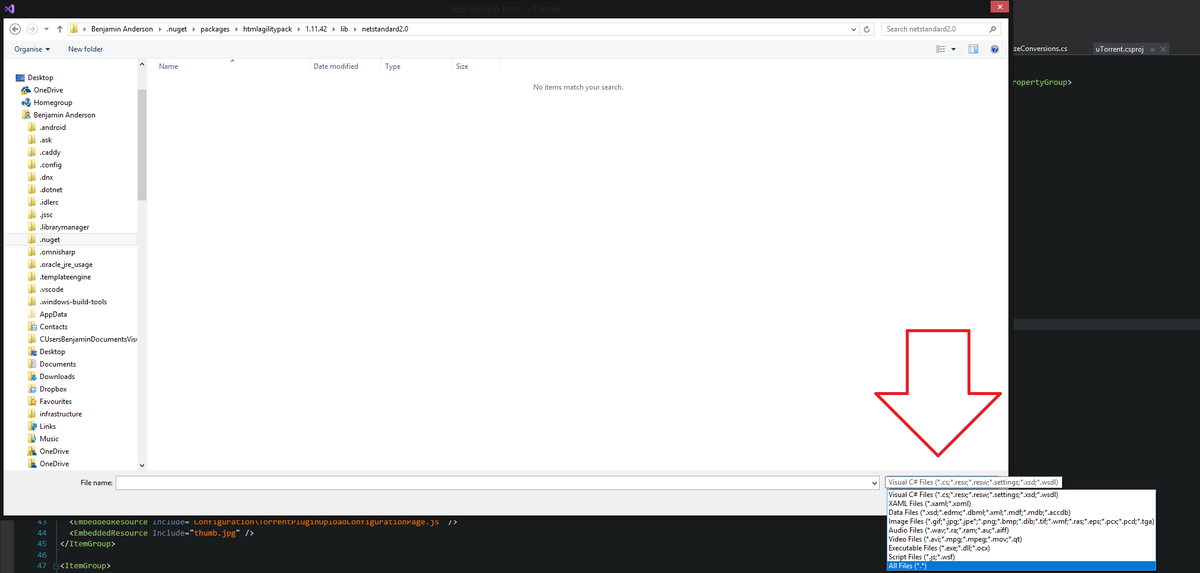
Ah yes, loading dependencies on command. This is a super cool trick. To do this we are going to create an event handler on the AppDomain Assembly, so when the plugin loads and it tries to use a dependency that isn't there it will load it. Cool right?!? Add the Dependency to your project for the Dynamic Link Library you want to use. In your case you will add the HTMLAgilityPack dependency. You have already done this. We will need the library accessible while you are coding it. However, issues happen when you want to load your plugin into Emby. Emby doesn't have this library, and your plugin can only use the libraries that Emby uses... not for long! 2. Create a folder in your project called "References" 3. Click on the "Reference" folder, and "Add an Existing Item" 4. Search for "HTMLAglilityPack.dll" It is most likely saved in a folder on your computer called ".nuget/packages/HTMLAgilityPack". This is where Visual studio keeps all it's nuget libraries. Be sure to Select "AllFiles (*.*)" to show the DLL in the open window I'm on Windows, this is what I see below. 5. Add the DLL inside the "Reference" folder 6. Right Click the DLL => Properties => Build Action: Embedded Resource Now, your plugin will ship with HTMLAgilityPack! And... It has references to it! Awesome! But, we are not done yet! Emby doesn't know what HTMLAgilityPack is. So, when Emby tries load you plugin it is going to error. It will NOT load your plugin. So we need to interrupt Emby's and tell it what to do when it comes across a reference to an Assembly it doesn't undertsand! 7. The Magic! Hopefully you understood what the IServerEntryPoint interface does from what I explained before. This will become important here. Remember, any class that implements the IServerEntryPoint will start when Emby loads. We'll use this to our advantage. We are going to interrupt ("extended") Emby's loading, by attaching to the "AssembyResolve" event's in the Runtime. So Cool! Now we can load our DLL before Emby has a chance to Error in the callback of this event.... ("callback"... can I use that terminology in c#.. or is that just a JS thing... maybe it is the "subscriber method"?... meh... you get it.) AppDomain.CurrentDomain.AssemblyResolve += CurrentDomain_AssemblyResolve; It's magical! LOL! Create this class: using System; using System.Linq; using System.Reflection; using MediaBrowser.Controller.Plugins; using MediaBrowser.Model.Logging; namespace YAScrapper.References { public class AssemblyResolve : IServerEntryPoint { private ILogger Log { get; } public AssemblyResolve(ILogManager logMan) { Log = logMan.GetLogger(Plugin.Instance.Name); //This event will fire when the plugin is loading dependencies AppDomain.CurrentDomain.AssemblyResolve += CurrentDomain_AssemblyResolve; } /// <summary> /// Load any required dependent libraries into the plugin. /// </summary> /// <param name="sender"></param> /// <param name="args"></param> /// <returns></returns> private Assembly CurrentDomain_AssemblyResolve(object sender, ResolveEventArgs args) { //Don't try and load items that are not theHTMLAgilityPack namespace if (!(args.Name.Contains("HTMLAgilityPack"))) return null; //Don't load the assembly twice var assembly = AppDomain.CurrentDomain.GetAssemblies().FirstOrDefault(a => a.FullName == args.Name); if (assembly != null) return assembly; Log.Info($"Load Request {args.Name}"); //r1 is that Assembly we were looking for. Naming? Meh.. fix it later. var r1 = Assembly.GetExecutingAssembly().GetManifestResourceNames().FirstOrDefault(s => s.Contains(args.Name.Split(',')[0])); Log.Info($"Loading Assembly {r1}"); using (var stream = Assembly.GetExecutingAssembly().GetManifestResourceStream(r1)) { byte[] assemblyData = new byte[stream.Length]; stream.Read(assemblyData, 0, assemblyData.Length); return Assembly.Load(assemblyData); } } public void Dispose() { } public void Run() { } } } Craziest thing is that you can load all your external DLL's here. From this point forward, you can simply: add your DLL as an embedded resource in the "References" folder, Extended the condition: if (!(args.Name.Contains("HTMLAgilityPack")) || !(args.Name.Contains("MY_OTHER_DLL_NAME"))) return null; Mind you this code is still somewhat in it's infancies... I only just learned how to do this myself, so there is some obvious refactoring that could be done. Perhaps iterating over a static List of DLL names during load.... or something like that. And... I know... I know... attaching events in constructors *might* (not be the right thing to do (I dunno)... But we need to get that event attached ASAP. so... we're doin' it! LOL! Does this explain things in a good way. Do I need to make any steps clearer?
 1 point
 -
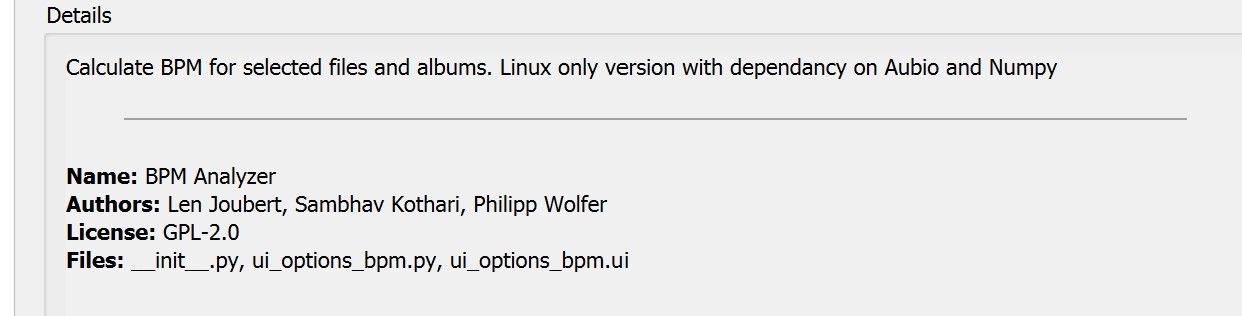
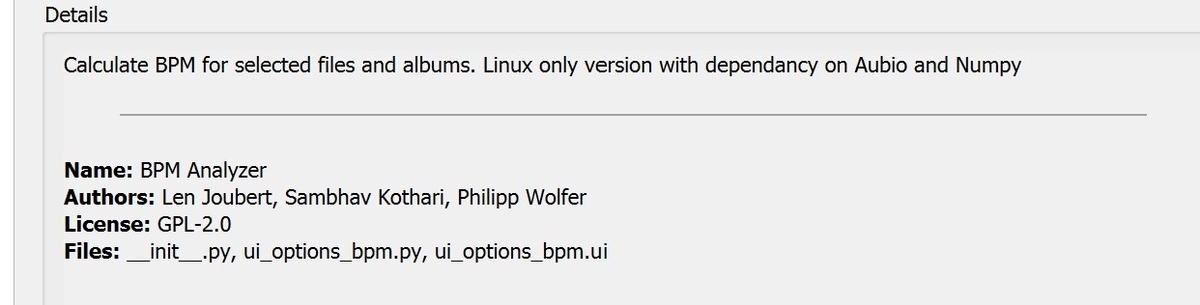
Hi, No. It seems to be a very specific use case "DJ" that is not applicable to me. I did a quick check and Picard does have a plugin for BPM. (see below). It is linux only with a couple of external dependencies, so again I can't comment. -vicpa
 1 point
 -
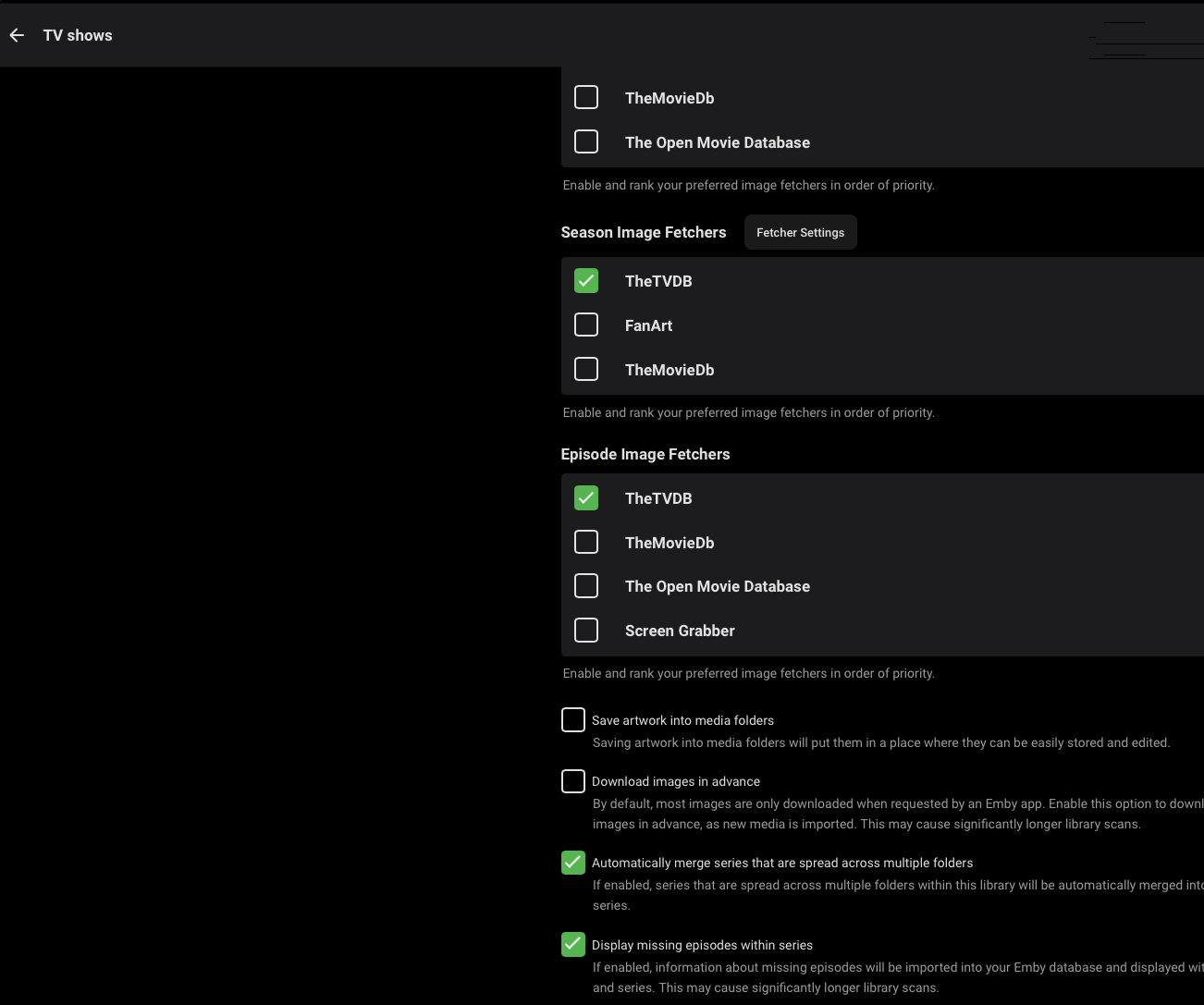
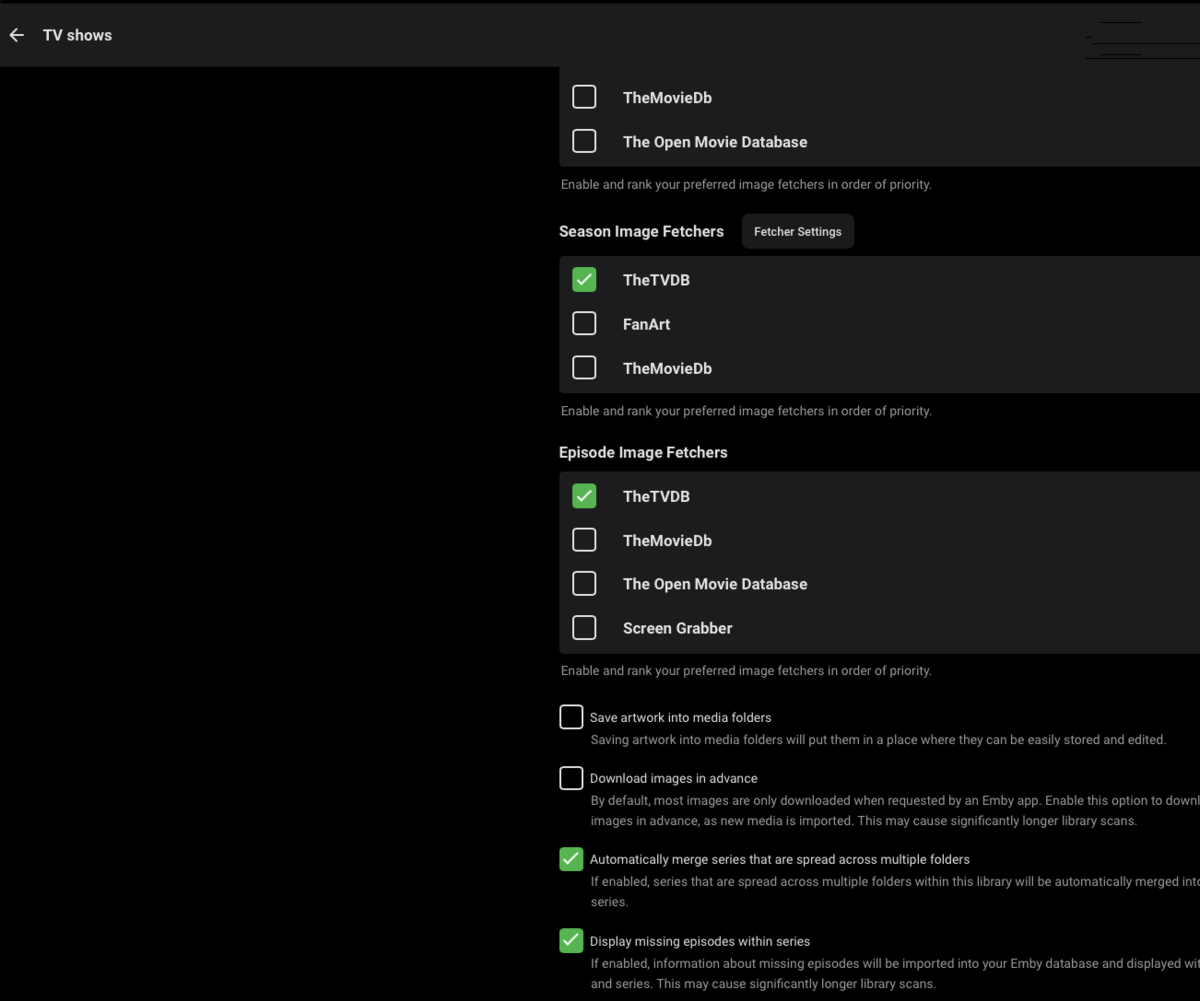
Not sure if you got it working or not but rename the files that has worked for me. But I can't get the report plugin to show missing episodes. I have included a snap shot of the report and then a screenshot showing I have missing episodes ticked and considering the amount of files I have I want an easier way to find my missing episodes rather than using the Statistics options. Anyone got any ideas of has the plugin changed?

 1 point
 -
Two - well maybe for cult, not so much power user...1 point
-
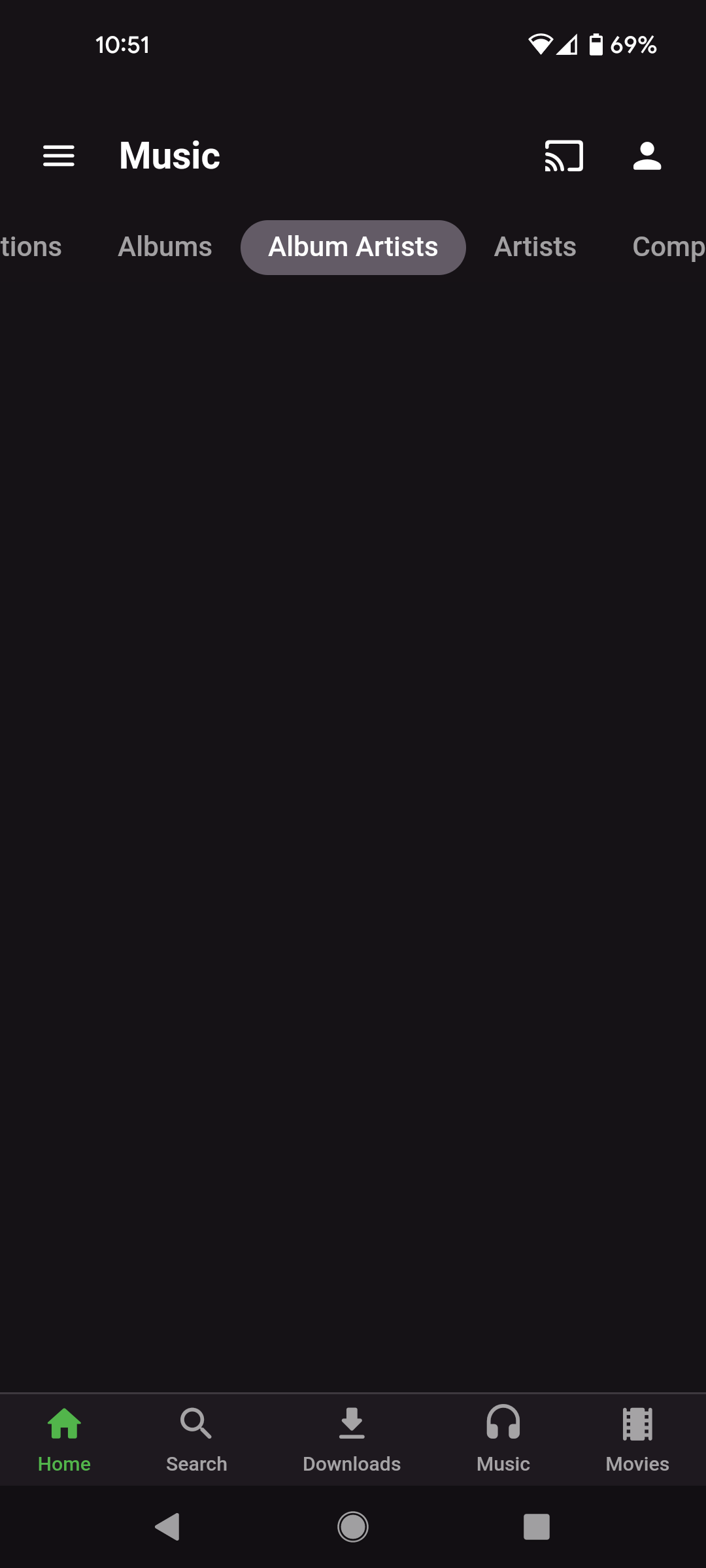
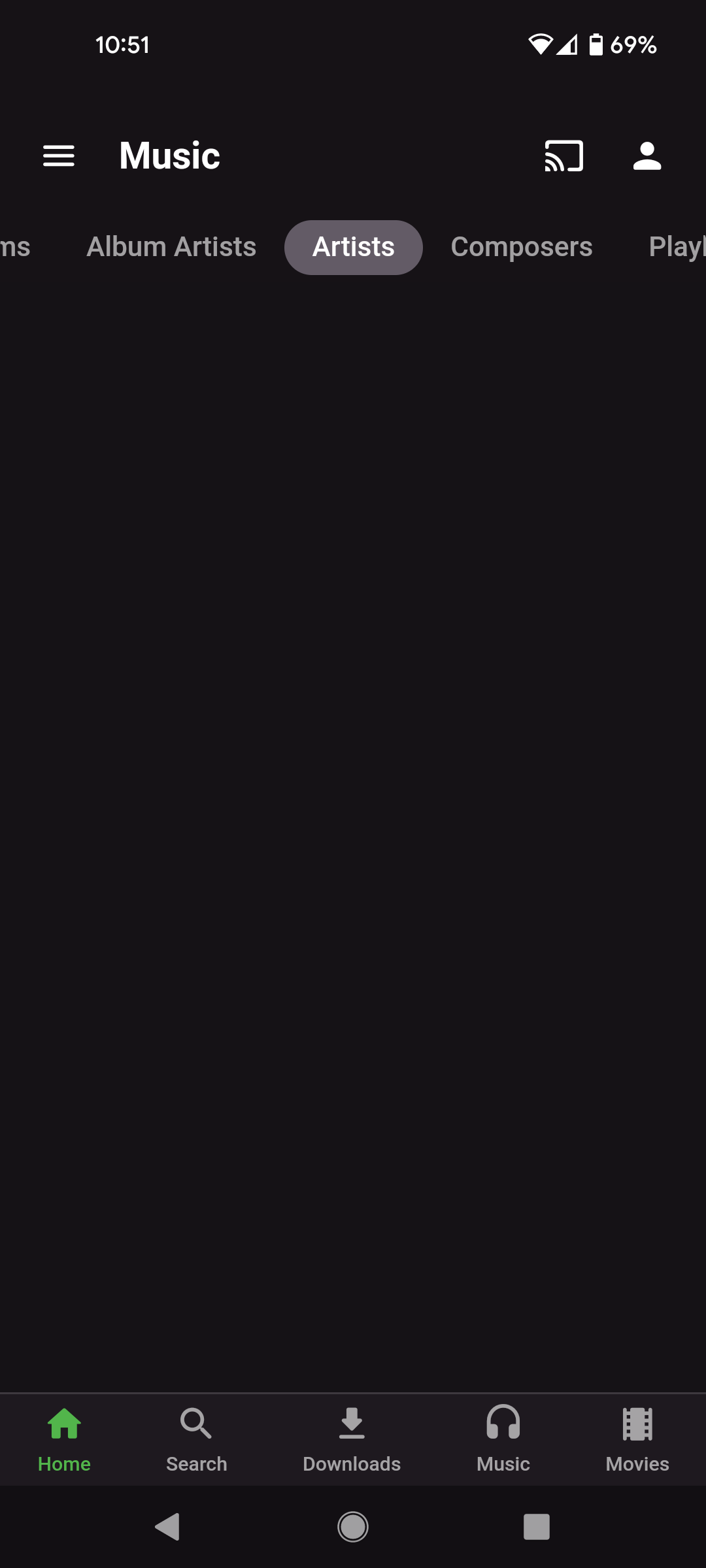
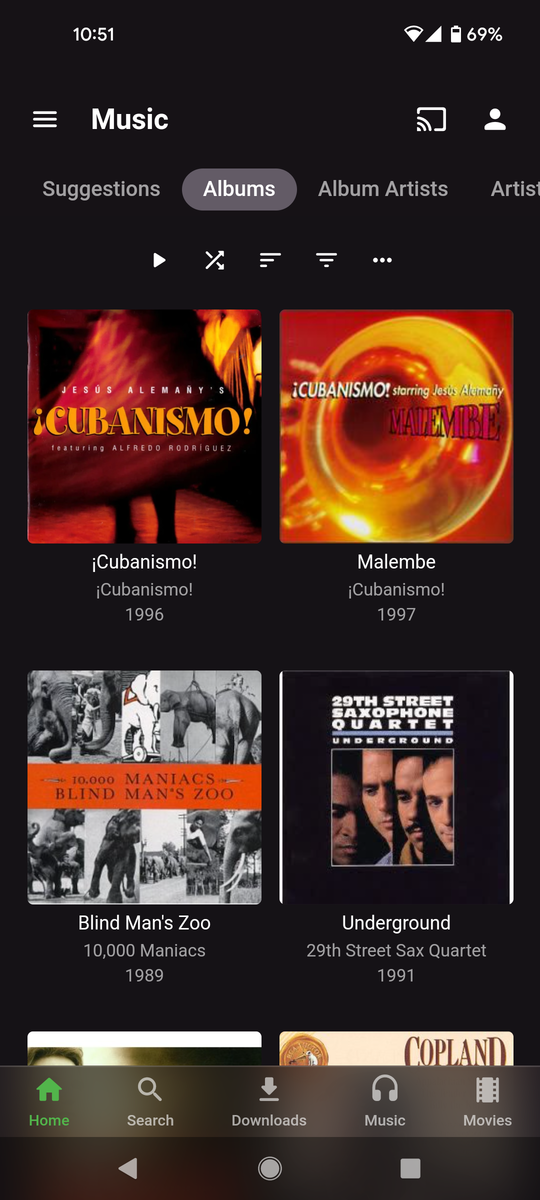
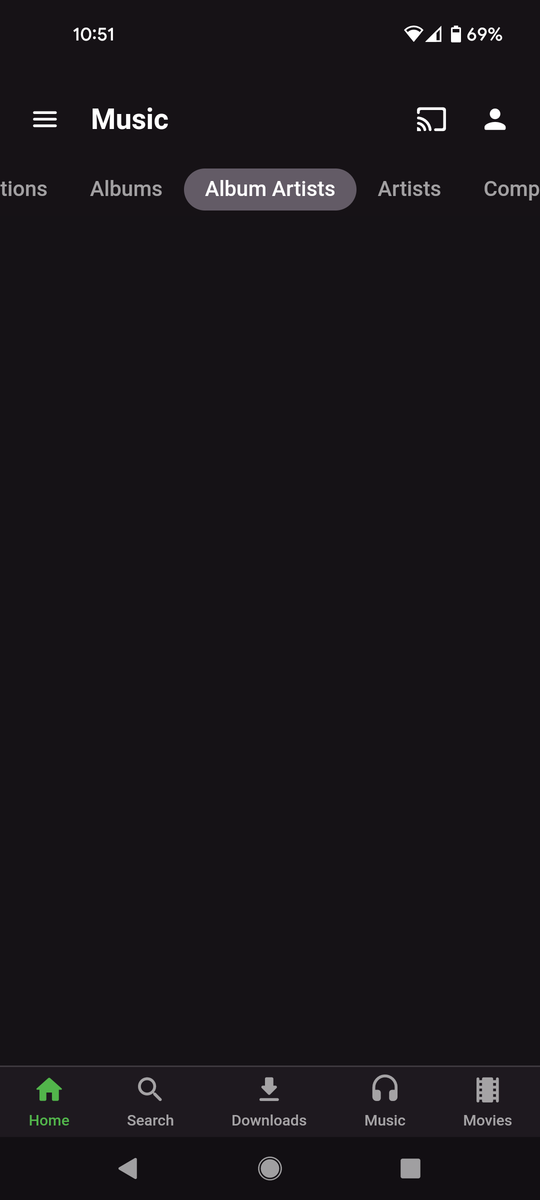
After installing latest - 3.2.43 on a Pixel 5a phone as well as Samsung tablet - several views in the Music module are broken/missing. Album view works fine, but not Artist nor Album Artist:
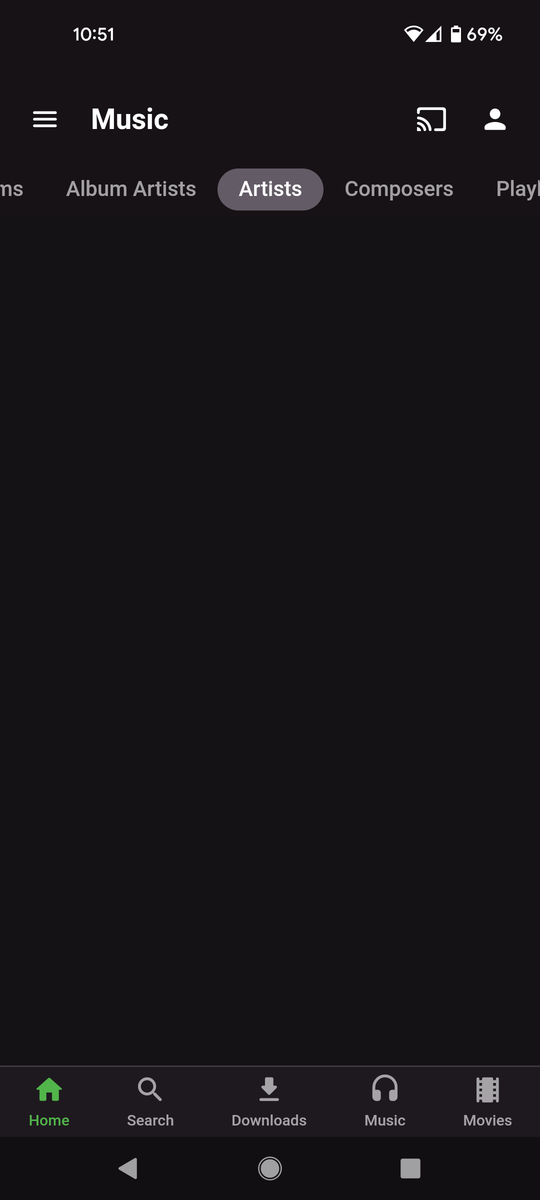 1 point
 -
To my knowledge Emby read "criticrating" for this.1 point
-
Ran it and the server is up and running and "stable" but I can't connect to it from any device (laptop, desktop, iphone)1 point
-
There is a tool created but a user here that may do what you need. This may help up may help but is still limited as SmartPlaylists needs to make it into server core for what most users want.1 point
-
OK, then the client is just buffering. Maybe something like the next 5 minutes. Of course the client doesn't care about your bandwidth. It just takes it as fast as it gets it. The next thing you do is this: Watch the full movie from start to end and record the network activity. Most likely it will go down after a while. In the end you will know whether the movie was transferred once or twice..1 point
-
"No client" - I don't think so. There are two clients involved, one at .106 ("next gen..") and one at .107. (probably a TV?)1 point
-
TranscodeReasons=VideoCodecNotSupported The log is not DirectPlay. And despite from what the parameters are - effectively the output was only 2Mbps and the reason why it didn't play smoothly is slow transcoding and not network related. Please post a log from a situation where you are actually seeing such high bitrates on the network.1 point
-
Hi. Thanks. Yes, I have installed Emby apps on the other devices.1 point
-
Amazing quality-of-life and feature-rich update! Hats off for the Android team1 point
-
Just want to add a plus one to this issue. Web app working fine. Android app on tablet and phone will not show any music artists. Emby server running on Windows 101 point
-
Let us know how you get on. Thanks.1 point
-
As @rbjtechstates. The code has never been open source. It is hosted on a private github repository. As Kodi is a Front end of Emby anyway you would just have to access the api which is publically available on swagger to utilise the features. no point reinventing the wheel!1 point
-
Thank you, I was looking for a command line low resource fast solution So if anyone is interested this is the command (linux) find . -name *.nfo -exec sed -i 's/rottenTomatoes/tomatometerallcritics/g' {} \; It scans recursively on every movie folder with .nfo files search for rottenTomatoes entry and replace it with tomatometerallcritics1 point
-
Yea, Notepad++ is great for search and replace across files!!!1 point
-
We have some exciting news. Over the next couple of months, Media Browser will become Emby. Our new home will be http://emby.media Why are we changing the name? Media Browser has been a great name over the past several years but we feel we have outgrown it. It is no longer descriptive of what we really are and carries with it some preconceptions in the minds of both people who may have heard about or used us in the past and new people who have never heard of us. We want to change that. So, introducing our new, short, catchy name that still pays homage to our origins (it sounds like "MB" when you say it) but lets us break free and continue to grow into the entire ecosystem that we are becoming. Given our broad presence in all the app stores, and future potential, we wanted to come up with a short and fun name that everybody's wives, kids and grandmothers will be able to remember. We were not looking for a name that describes the project, because that's very difficult to do and, undoubtedly, will end up meaning different things to different people. Short, catchy and unique were really the top requirements. Why something so odd? Think "Google" or "Skype" before you knew what they were. That's what we're going for. We don't want someone to hear the name and think they know what it is based on a connotation of that particular word. We want them to hear the name and say "What's that...?". Then, as time goes on, we become the name and the name becomes a synonym for "Awesome Media Server Ecosystem". Please know that this change has not happened overnight. The process of finding a new name has been going on for months and has been very, very difficult but, we are happy with where we have finally landed and believe it will accomplish the goals we set out when we started thinking about a new name for the project. What about the website? The new website address will be emby.media. Securing a domain name was one of the largest constraints in this whole process but we feel emby.media describes what we are and will be a fine home for us going forward. We hope maybe to also get emby.tv but that is currently in use. We are working on it though. In the end, the actual domain name isn't as important as the other goals because people will find us via search engines, not by typing in a web address. What about the logo? This is where we are going to want to enlist your help. Watch the forums for a call for submissions on ideas for a new logo to fit with our new name. We will open it up to everyone and consider all ideas. I know you guys can help us come up with a great new look for our new name. When is all of this going to happen? The whole process will take some time as a lot of things will need to change. It won't be a single, coordinated date where you see everything change. It will trickle out over all of the different components over a period of weeks and maybe even a few months. We'll take our time and allow developers adequate time to make all of the branding changes necessary. So, that's it. We on the dev team are very excited about this new direction and the possibilities it opens up for us for the future. Nothing is changing but the branding. The product is still going to be the best darned media solution out there. Welcome to the new ride.1 point