Leaderboard




Popular Content
Showing content with the highest reputation on 03/21/22 in all areas
-
Emby for Android 3.2.43 has been released. We hope you enjoy some of new features! Visual Timeline Seeking including Thumbnail Graphics Included in our new 3.2.43 release is support for visual seeking. You can Rewind, Fast Forward or Jump to any position in the timeline quickly and easily. Best of all our thumbnails graphics help you pin-point the scene you want to re-watch or queue up. The above picture shows how easy it is to find a scene you want to watch. You even get the chapter name embedded in the thumbnail picture. Speaking of which, Chapters make use of our thumbnail graphics as well with their own set of information and use of graphics. The above screenshot shows the use of Thumbnail graphics in our Chapter selector available from the easy to use OSD menu. This screen demonstrates how easy it is to view the Name, Starting Time as well as Thumbnail showing the action taking place at the start of the Chapter. Improvement to Audio On Screen Display (OSD) You can now toggle the play queue on and off, allowing you to choose between seeing the list, or just the artwork. This change makes room for additional space needed for a new user requested feature that is quite popular. New Use of Graphics Elements This release of Emby for Android uses additional graphical elements in subtle ways that sure to please. It still has the classy interface you've come to love but uses additional graphics in a modest manner giving it an elegant and refined look. The screenshot above demonstrates this with a change from a text based movie title to the graphical logo version shown. Pretty sweet! Of course that's not all. Releasee 3.2.43 has additional new features including: Addition of a Resume Rewind Playback Option Additional Info in the OSD including Chapter, On Now and a Guide for Live TV Newly added Support for A-Z Picker with Descending Order New Support for A-Z Picker when Sorting by Album or Album Artist New Subtitle Background Color and Opacity Options to make Subtitles Easier to View Improved Audio Book Detail Screen Updates to the Top Tab Design to be More Discoverable and Easier to Use Improved Performance of Playlist Detail Screen Improvements for HDR Playback Various Subtitle Improvements View the full article4 points
-
Emby for Android 3.2.43 has been released. We hope you enjoy some of new features! Visual Timeline Seeking including Thumbnail Graphics Included in our new 3.2.43 release is support for visual seeking. You can Rewind, Fast Forward or Jump to any position in the timeline quickly and easily. Best of all our thumbnails graphics help you pin-point the scene you want to re-watch or queue up. The above picture shows how easy it is to find a scene you want to watch. You even get the chapter name embedded in the thumbnail picture. Speaking of which, Chapters make use of our thumbnail graphics as well with their own set of information and use of graphics. The above screenshot shows the use of Thumbnail graphics in our Chapter selector available from the easy to use OSD menu. This screen demonstrates how easy it is to view the Name, Starting Time as well as Thumbnail showing the action taking place at the start of the Chapter. Improvement to Audio On Screen Display (OSD) You can now toggle the play queue on and off, allowing you to choose between seeing the list, or just the artwork. This change makes room for additional space needed for a new user requested feature that is quite popular. New Use of Graphics Elements This release of Emby for Android uses additional graphical elements in subtle ways that sure to please. It still has the classy interface you've come to love but uses additional graphics in a modest manner giving it an elegant and refined look. The screenshot above demonstrates this with a change from a text based movie title to the graphical logo version shown. Pretty sweet! Of course that's not all. Release 3.2.43 has additional new features including: Addition of a Resume Rewind Playback Option (Server version 4.7+ required) Additional Info in the OSD including Chapter, On Now and a Guide for Live TV Newly added Support for A-Z Picker with Descending Order New Support for A-Z Picker when Sorting by Album or Album Artist New Subtitle Background Color and Opacity Options to make Subtitles Easier to View Improved Audio Book Detail Screen Updates to the Top Tab Design to be More Discoverable and Easier to Use Improved Performance of Playlist Detail Screen Improvements for HDR Playback Various Subtitle Improvements2 points
-
For now the web app does, but avoid writing any new code with jQuery. Eventually it will be removed and only pulled in via CDN url when requested, and some users will complain about that.2 points
-
I'm a plex life time member, but I have been using Emby for over six years continuously, but there is a feature which I have always thought is missing in Emby which I would like and encourage the developer to consider including especially in this dispensation where families can social or commingle due to COVID 19. Today, I received a notification from Plex about it new feature titled Watch together you can read about it here https://support.plex.tv/articles/watch-together/ The feature allows friends and families at distance to watch same movies together instantly, you simply invite all your buddy, once they signed to the system which can be seeing in the server then play and pause as needed, this I think is cool feature should be added to emby. Let's here your though if Emby developer should consider adding this feature to our beloved Emby Media https://www.bing.com/news/search?q=Plex+Watch+Together&qpvt=plex+watch+together&FORM=EWRE1 point
-
Would some kind of music service integration be on the cards, like plex has tidal (I like music videos, but plex handling is piss poor and very restrictive) on an official basis as opposed to people creating work arounds, I ask because I think the majority now use streaming services as opposed to keeping a music library locally (the opposite of habits with films and tv show stuff) and to access everything in 1 program would be quite simply awesome, I know this wouldn't be as simple as coding because there would I assume be a need for some kind d of commercial arrangement? Cheers1 point
-
We announced a while back that Emby for WMC would not continue to be supported beyond server version 4.6. With the release of 4.7 getting closer, we just wanted to issue a gentle reminder.1 point
-
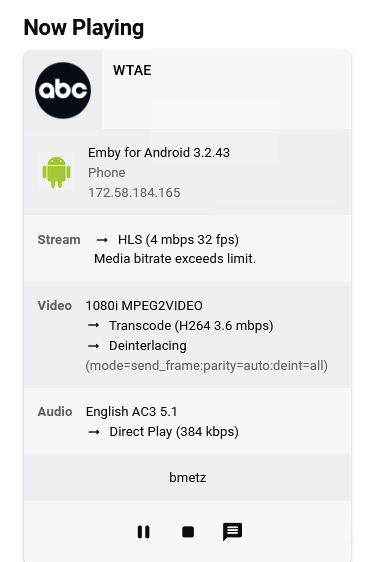
I can't believe I didn't see that as well. NAT was turned on on the inbound firewall rule. Silly me. Thank you.
 1 point
 -
It was fine then all of a sudden it wasn't. My setup has always been: /mnt/Television/TV Series/Series Name/Season Folder/Series Name (date) S??E?? Episode Title.??? In this case /mnt/Television/TV Series/Devs (2020)/Devs Season 1/Devs (2020) S01E01 Episode 1.mkv Love Emby, hate the TVDB.1 point
-
I actually made a skeleton here too. YAScrapper-master.zip @BillOatman That's what we should do, maybe create a github tutorial with a skeleton project to start people off with. Just the barebones example of an IService, IServerEntryPoint, and the Plugin class. With a couple embedded web pages so they can see how to wire them up and get it working. a quick write up about what is necessary, and what are the limitations as well. If there is time LOL!1 point
-
Thanks, I think it's Kodi related.1 point
-
@DarKni8 I just gutted that Comskipper plugin code to be just a generic plugin with a enable/disable config control. I'll try it when I get home and when it works, I'll post a github link.1 point
-
I don't think it does.1 point
-
I suspect it just uses the Microsoft System.Json which is used almost identically to newtonsoft.1 point
-
Thanks a lot for your help. FYI: Just renaming the folders as per your guide and running a media scan did the trick. Much appreciated!1 point
-
Exact example will be needed, Movie? TV show? Have you checked does provider actually have that item in Norwegian?1 point
-
Remove both shows from your parent TV show folder, run Scan media library scheduled task, rename Series folders to: Whose Line is it Anyway? (1988) [tvdbid=78521] Whose Line Is It Anyway? (US) (1998) [tvdbid=76808] move them back, Scan media library.1 point
-
I'll try and report back!1 point
-
Ooh. I'll have to try that out. Hopefully it works well with my collection. Thank you1 point
-
Yes, please let us know how it goes after you update. Thanks.1 point
-
Ésto supera todo lo imaginable!!! Siento mucho haberle hecho perder el tiempo.1 point
-
Thanks for your quick reply. I noticed something else - and imho quite important - while playing around with Carplay: Selecting playlists or artist folders takes some time in Carplay - quite in contrast to using the Emby app directly on the phone, where everything seems to be loaded instantaneously. This has led me to investigate a bit. I checked the mobile data statistics on my phone and found the following: - When using the Emby app on the phone, the downloaded data directly corresponds to the size of the played music-files. No surprises here - When using Emby in Carplay, the amount of downloaded data is many times higher and corresponds to the total size of all (!) files within the selected folder or playlist. Even if I only played one single song. This causes not only the inconvenience of waiting until the whole folder/playlist has been loaded before the music starts to play but also eats up mobile data volume. emby for iOS 2.1.2 server version 4.7.0.31beta1 point
-
Awesome, thanks a lot.1 point
-
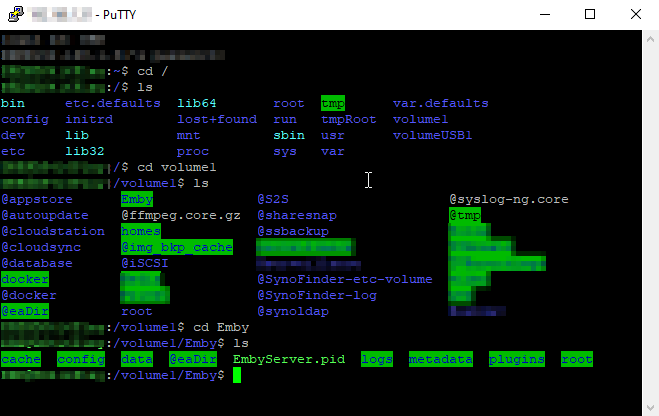
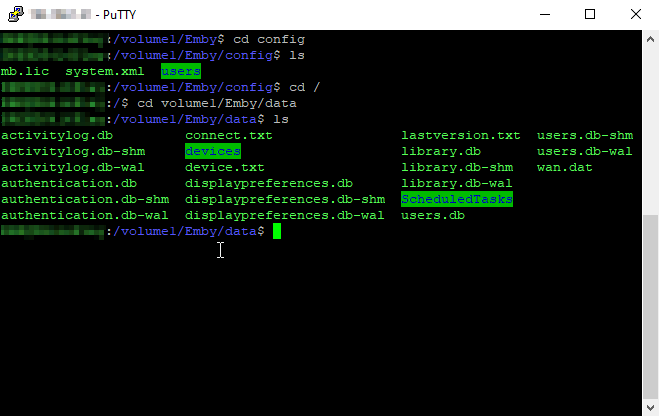
Hi, i was able to access the "Emby" folder. Will this help? @cayars
 1 point
 -
Hi All Some feedback. Loaded and activated the Emby Server on my Android Media Box. Manage this via the Web portal and activated 2 users on 2x LG TV's using the Emby app. The storage HDD with media is connected to my Netgear R7000 Router's Rapidshare, and added this to the Windows PC as a Network location. Everything works seamlessly. I'm extremely impressed with Emby. Even though I'm a novice in this type of setup, Emby makes it easy to install and configure. Thanks to everybody.1 point
-
When Auto Organise imports an episode of a show configured for an alternative display order. Could/should the %en title variable respect the title of the currently selected display order. Eg. With show set to display order=DVD Wonderfalls - S01E02.mp4 should be imported as Wonderfalls - S01E02 - Pink Flamingos.mp4 not Wonderfalls - S01E02 - Karma Chameleon.mp4 thanks for considering1 point
-
We are trying to arrange for an updated NextPVR plugin compatible with these recent Emby changes. Hopefully we'll be able to have something up an running in the near future. It wont provide the same functionality, but will fit in with Emby's new model.1 point
-
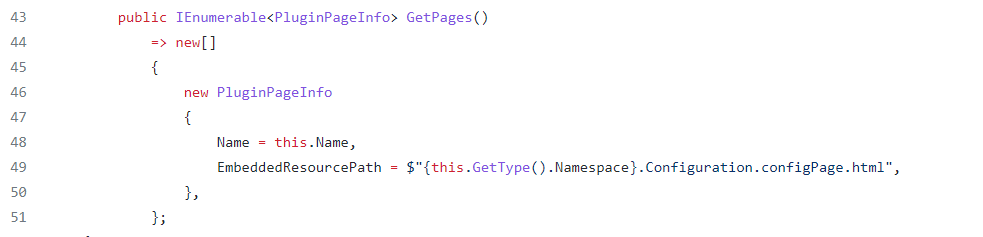
@chef yup it makes sense to me , its like giving address to my controller to let know where exactly configpage is located. But i have already given it on line 49 , and embedded script inside html under <script> tag, I will try restructuring how u said and see how things go.
 1 point
 -
that's all it was, i hadn't re-enabled the delete option, but i just did....everything working fine now1 point
-
You have to do so via the terminal (e.g., ssh into your Asustor). You'll need to make sure the service is enabled before doing so: https://support.asustor.com/index.php?/Default/Knowledgebase/Article/View/190/22/how-to-ssh-into-my-asustor-nas1 point
-
Yep TVDB doesn't always play well with YEAR unless it is versioned with YEAR. As "Devs+(2020)" does not return this Series. I know my test system I just used Devs but you can reIdentify the series if you will to keep Devs (2020).1 point
-
Hi, try searching the library for Sweet Magnolias. It looks like it might be getting picked up as that.1 point
-
OK sorry, just wanted to make sure. So yes, you are correct. I would suggest specifying it to be explicit. The server may know you're strictly on https, but the app that's trying to connect doesn't. I would check in the Emby for WMC settings but I don't believe there is. I'd probably suggest switching back to the default to maximize longevity of using Emby for WMC.1 point
-
Also in your html, make sure you have the data-controller attribute set to link the javascript. data-controller="__plugin/MyPluginConfigurationPageJS" example: <div data-role="page" style="align-items: center; margin: auto;" class="type-interior pluginConfigurationPage withTabs MyPluginConfigurationPage" data-require="emby-button,emby-input,emby-select" data-controller="__plugin/MyPluginConfigurationPageJS"> <div class="content-primary"> <div class="verticalSection verticalSection"> <br /> <div class="pagingContainer"> <div class="tablesContainer"> </div> </div> </div> </div> </div> which was created in the Plugin.cs new PluginPageInfo() { Name = "MyPluginConfigurationPageJS", EmbeddedResourcePath = GetType().Namespace + ".Configuration.MyPluginConfigurationPage.js", }, which tells the plugin to look for the file "MyPluginConfiguration.js" page that has been set as an embedded resource. Does that make sense to you?1 point
-
Let us know how you get on. Thanks.1 point
-
I'll check it. Did you enable the delete option in plugin config settings?1 point
-
Deleting Playlist does not/should not delete media. What exact steps did you take?1 point
-
I think it should be better with the next app update. Thanks.1 point
-
Sehr merkwürdig, aber ohne, dass ich etwas verändert habe, funktioniert es jetzt. Keine Ahnung warum, aber so ist das mit der IT ja öfter... Gruß H.1 point
-
Hello @chef, unfortunately I could not hear from me for quite a while. Privately, it was here under and over. The current state of the plugin is that series are recognized in the correct language, but are no longer moved and named. Movies are now moved and named, but no longer in the correct language. Somehow there is the worm in it. What do you need? Greetings from Wuppertal, Germany!1 point
-
@Cheesegeezer, @chefso glad to see that Iridium hasnt been fully forgotten, it was looking so good before and this new version looks even better! sign me up for any testing when its ready!1 point
-
This looks amazing. Happy to give this a test when the time comes. Keep up the good work!1 point
-
This look great! I can't wait to see where this goes. Thanks for your work on this and all the best for the future.1 point
-
What do you see in your "\emby-server\programdata\root\default\TV Shows" folder? I am betting you will see a *.mblink issue in that folder as you should only have 4 according to your applies folders shown in image above..1 point