Leaderboard




Popular Content
Showing content with the highest reputation on 03/19/22 in all areas
-
Hi. We have to prioritize our development time on the features that will impact and improve Emby for the largest possible audience and also take into account the cost of implementation. This is still something we are potentially interested in but this feature request has 9 likes in that time period. So, the antithesis of your analysis is that only 9 people have shown support for this in that fairly long time period. This would also be a very large undertaking encompassing the entire suite of apps so the "cost" of implementing it is fairly high. At this point in time, that cost/benefit simply doesn't make this something that we can prioritize over many other items. Thanks.3 points
-
No. The Samsung video player just happens to have trouble with videos having large numbers of subtitles.2 points
-
Greeting Embians! Quick Subsonic plugin update: Just got back home from an on-site work week abroad so I will be continuing work on the plugin this weekend. Had someone open an issue at the repo regarding support for Subsonic's Lyrics API, and since Emby 4.7 will apparently be supporting embedded and external lyrics, I will look into that, although I don't know at this time if there will be an Emby API LyricsService. I'll check out the newest beta Swagger to see if I can spot anything. That said, I'll keep it on the front burner since that has been supported for a while in the Subsonic API anyway. I also wanted to let ya'll know that I changed the name of the project slightly, as EmbySub could have been confused with subtitle functionality. New repo URL: https://github.com/trifleneurotic/EmbySonic Cheers!2 points
-
Log shows 42. 18:38:07.148 Stream #0:43 -> #42:0 (subrip (srt) -> webvtt (native))2 points
-
I seem to have discovered the culprit, I tried turning off the firewall, and it allowed me to connect. In looking through the rules, it looks like somehow a rule was automatically created to block embyserver.exe on private networks, so I wasn't able to access it while on my home network. I turned off that rule and the server is now accessible. Thank you so much for all your help!2 points
-
This would be my biggest issue. It is a small tool bar that isn't taking up any space. The posters wouldn't move further to the right because then you wouldn't have room for the count at the bottom. In landscape layouts, vertical space is at a premium while horizontal space is a bit more available.2 points
-
Basically. People meet up in some sort of lobby inside plex and the movie is started. The feature keeps everyone in sync, if one person pauses everyone is paused. https://support.plex.tv/articles/watch-together/ @chefand I have had conversations about it, and like you said the remote control api would allow the pause/play etc. For us to do it in a plugin would require a external server for the "lobby", or have plugins from different users communicate to each other. It hasn't gone further than a few "what-if" messages, largely due to IntroSkip being worked on. And the fact that a core Emby implementation would be much easier and better.2 points
-
3.2.43 indeed fixes the regression I'm reporting here. Thanks.2 points
-
I'm a plex life time member, but I have been using Emby for over six years continuously, but there is a feature which I have always thought is missing in Emby which I would like and encourage the developer to consider including especially in this dispensation where families can social or commingle due to COVID 19. Today, I received a notification from Plex about it new feature titled Watch together you can read about it here https://support.plex.tv/articles/watch-together/ The feature allows friends and families at distance to watch same movies together instantly, you simply invite all your buddy, once they signed to the system which can be seeing in the server then play and pause as needed, this I think is cool feature should be added to emby. Let's here your though if Emby developer should consider adding this feature to our beloved Emby Media https://www.bing.com/news/search?q=Plex+Watch+Together&qpvt=plex+watch+together&FORM=EWRE1 point
-
I like to have complete albums but sometimes I really dislike some of its tracks at the first listen. I'd like for them not to appear in the playlist, wether it's from Play All button on the album page or the whole music library Shuffle button, but be able to play them manually (by clicking on it or adding it the to playlist myself). Just like knowing it's here and that I can give it a new try sometimes What do you think?1 point
-
An emby server log could be helpful. To make sure I understand it's Ubuntu (or Linux) running samba sharing to a Windows PC running Emby in Docker? Docker on Windows is not in my wheelhouse but can think of a few things. Don't use the CIFS/SMB share for Emby config and databases. Having cache on a network share sort of defeats the purpose of a cache. I don't know if mapping SMB shares in Windows has the same problems as mounting CIFS type in Linux, such as the need for nobrl. I would try: Check the samba server smb.conf and make the user connecting/mounting the share from Windows an admin user for the share, as long as you want to allow full access and control to this share, for example if it's media only for the Emby server. This may fix some of the .Net access errors by giving full control. Then map the share to a Windows drive and in turn map the drive to the container volume. Or if mounting the cifs share directly in Docker then add the nobrl mount option along with the others. But DO NOT include the Emby databases in this share or you can run the risk of DB corruption.1 point
-
I removed all the subs and now it plays just fine. Thanks for that.. Earlier, the same TV played the old files just fine , has there been a limit introduced recently? I havent changed anything from server end so.. . Hope this gets fixed soon coz it would be trouble to remove all the subs and only then be able to play the files. @Luke thanks1 point
-
We are looking into this so that you won't have to do that.1 point
-
You're right about the AUTO setting for client bitrate detection. It's too inconsistent and more often than not it errs in the wrong direction resulting in unacceptably low bitrates and resolutions. Can't always blame the client or the app since there are so many variables between that and the server. I agree that changing this setting it is one of the first things to do when remote clients have playback problems, or even before they complain.1 point
-
I want to thanks Cayars, for his amazing help through remote connection, his makes it worked! It was difficult but Cayars is top! Thanks man, and of course all of the Emby support is amazing! Through years I didn't find nothing similar like of your support guys, that must be said!1 point
-
Personally I would do this outside of Emby before you ever add the content to your library. Part of curating the media so to speak. What I'd recommend as one tool to look at is sickbeard mp4 automator which has a name you can ignore. It can do a lot from fetching meta data, pulling subtitles down, interfacing with multiple different programs many people likely use as well as the "core". I personally use a modified version of the core part of the program which is a wrapper around ffmpeg that you can use to setup specific criteria. For example I have my config set to create 2 channel audio if it doesn't exist, keep other audio tracks in English only. Discard all subtitle tracks if audio is in English or keep only English tracks if audio is different than English. The I have it setup to deinterlace video as needed take any video codec and convert it to 8 bit HEVC using the compression level I find a good balance between not being able to tell it's been modified with 30-40% space saving (video alone) to 50-60% savings but quality IMHO is blown. So I compress down to where I can just notice it then back up a notch or two. The above is for non 4K. I never got the settings where I like them to use for both 4K and and 1080 media but never tried that much to be honest. I didn't want to hack it to death with if 4K logic. So what I did is install a 2nd/3rd copy in a different folders and setup the config for these. I cheated. So two ways to process 4K video depending on color space & HDR vs SDR. SDR gets processed just like the 1080 for subs & audio but I don't touch the video if HEVC 8 bit. Otherwise this gets processed as well. 4K HDR same as above this time it's using 10 bit files for basic processing but then I create a 1080p version as well from it. I can then optionally use it or not depending if I have it already in 1080. The toolkit above can fetch srt subs, so if I need/want the sub but it's a graphical format it gets removed if an SRT is found. All files use the MKV container. So my library is 99%+ MKV, H.265, 2 channel AAC, optional English subs, English subs if not English audio. https://github.com/mdhiggins/sickbeard_mp4_automator It uses python and scripting so you have to dig in and RTFM. It not a program you can copy/paste (don't ask me for my settings) as you need to adjust it for your use and equipment which is different than mine. Speaking of equipment it will use GPUs like Emby does but since you aren't under pressure time wise you can do different style encodes like 2 pass, so you know where to allow extra bits, and no when lower amount of bits is ok. You can also set limits or ceilings so that even fast scenes that need high level of bits can't overly spike or playback will be problematic on remotes systems if their playback buffer empties. The last part of my setup is for DVR. I run these through comskip set for me to never cut the into the movie/show but I have it cut and leave the sections. I can then quickly check the front back and trim anything it missed very fast. Then I move it to a sub folder when it gets put back together pulls the CC out and converts it to SRT. Then it funnels it to when any 1080 media starts out. That was the way things were but I'm planning on trying to redo this a completely different way when I can find time.1 point
-
I think it should be better with the next app update. Thanks.1 point
-
I have a playlist with a lot of video music in it, and from time to time new video music is added to the playlist. Now I want to start playing from the end of the playlist and then play the second to last. Hope to add reverse order play to the playlist.1 point
-
To Clarify My plugin Does NOT download anything from IMDB or TMDB during the repair process of actors. What it does: It removes the blocks that prevent Emby from working properly by, 1. Removing corrupt files that are linked in the Emby database and prevent the actor image loading or updating. 2. Removes invalid links in the database that point to files on servers that do not exist. Therefore resetting the actor card to its state before anything is downloaded for that actor. As you have found out, downloading from TMDB requires either a full metarefresh>replacing images to be run, or clicking the actor card/placeholder. This is done by Emby itself and its other plugins such as TMDB or TVDB. if you have put http://media-and-meta.com in the server config tab (which it seems you did), then the plugin looks on my own private webspace as tries to find the person image. In order to find it on there I have to have uploaded it, so therefore the person would have come from my actor backup. There are no language variations here, just the images that I have. I do not have all the images that TMDB has, however I also do have quite a few that TMDB doesn't have. So both plugins are the best of both worlds. This is searching one of the servers in the global tab, not imdb or tmdb. The references here are to ids for imdb or tmbd on my backup server. The plugin has looked on my personal server for 3 seperate references. Imdb, tmdb and the actor by name. This person is not on my server. If you have external images with your media in a hidden actors folder ".actors" (usually created by either kodi or external media management software), the plugin can also import those on a button click. At least 776 Images were automatically replaced, as well as the "other" blanks repaired so that they will work again. So thank you for your idea, but thats not for this plugin, that is what Lukes plugin is doing.1 point
-
Hello i think saying only 9 person are interested is close ot be a lie there's multiple post about this feature and for a very long time. A random guy did a plugin for that and it didn't sound that much complicated and/or difficult to implement.1 point
-
@CassTG Thank you for testing. I appreciate it. I am still a greenhorn in the media server game and although I managed to get my proxmox setup I went in blind, read the docs and applied what I read. I am always learning so I will state ahead that I may not sound knowledgeable in some areas. What are your LXC settings LXC is a debian 11 standard image configured with a single admin user and root user. Updated (at the time of install) and then emby installed on top of that. It has 2 cores (for now) and 8GB RAM. I have tried going up to 8 cores but didn't see much of an improvement at that point. How re you mapping your media to the container i.e are you using NFS to the container via Resource mounts I have a zfs pool of 8TiB in a RAID10 zfs using 2TB ssds. I have a folder in that pool which is mounted to my lxc. So it is directly mounted and not using network share service. How quick does the actual transcoding complete I have been testing with files as small as 1GB and as big as 5GB. These are a mix of 2k/4k (5GB files) and some 1080/720 (1GB) files. I say 2k/4k/1080/720 according to the resolution that media info reports to me. On 1 2k/4k stream to 1 android tablet the transcoding happens near the duration of the file runtime. And it definitely stutters on the tablet. How does Top / Htop or even better Btop look like as opposed to proxmox monitoring I'm guessing I would need to run these commands both in the lxc and the host at the same time while the transcoding is happening? how does your cpu usage appear when transcoding multiple files, does it max out and stutter or work ok I have seen similar to your tests in terms of cpu usage but unlike your test I definitely get stutters and even worse sometimes the playback just stops altogether. So the question would be how many transcodes are likely to happen versus cost of gpu solution At any given realistic time I would have a max of 5 streams active. The 2 android tablets, the 2 smart tvs, and my main pc. This should be the max number since when all 4 devices were running and I did notice some stuttering/pausing I went into the web browser of the server to attempt to play the same problem file and compare. On your M900, while it may have a 6400T processor I think I read somewhere that even newer intel processors without ht can still outperform a xeon processor with ht. I know that I have dual xeons but I tend to think that even though our processors (6400T to xeon e5-2430 v2) were released 1 year apart that's still a significant processor upgrade. I could be wrong on this thought too. Thanks again @CassTG for your time and efforts.1 point
-
Thanks chef i will keep the points you highlighted in mind, Need more people like you who are cheerful in helping others. Thanks again Also I am sulking through your repos to learn ways. thanks again. @chef Also if you look at my repo i have defined config page for plugin just to show its name ! but still when i click on my plugin icon, it just doesnt load anything. How can i track and log these kind of things?1 point
-
Okay! Cool! Your repo is looking good! You'll probabaly want to remove the IHttpClient from the plugin class. Keep only the values that structure the plugin in that class. Example: Id, Name, Configuration Pages, etc. You could create a "PluginServerEntryPoint" class that implements the IServerEntryPoint interface. Put any implementations for interacting with the server in there. Then, you could create an API folder, and place a "Service" class file, which implements IService. That file would handle any connection from the front end using Routes (like in ASP), and any connections to other services (like the Provider service, you are connecting too).1 point
-
Hey! Sorry I missed this. If you have any other questions let me know. More plugin developers, means more plugins... More plugins the better! DiskSpace on my GitHub uses a lot of the different plugin tricks. Recently, I posted an AI recommendations plugin on GitHub that does some cool things with .dll dependancies.1 point
-
How would anyone know they were there if they were hidden by default?1 point
-
First you create a local user on your server for the individual, the user would have to create a Connect account, then you add their Connect Username to that account in the optional field. Then they should be using their info on the Pin url. Registration1 point
-
As I understand it, in order to see any settings you have to install one of the subtitle plugins first. Paul1 point
-
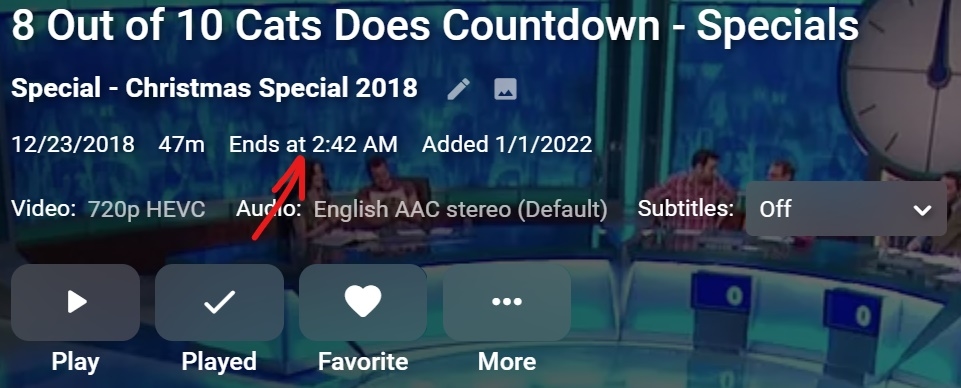
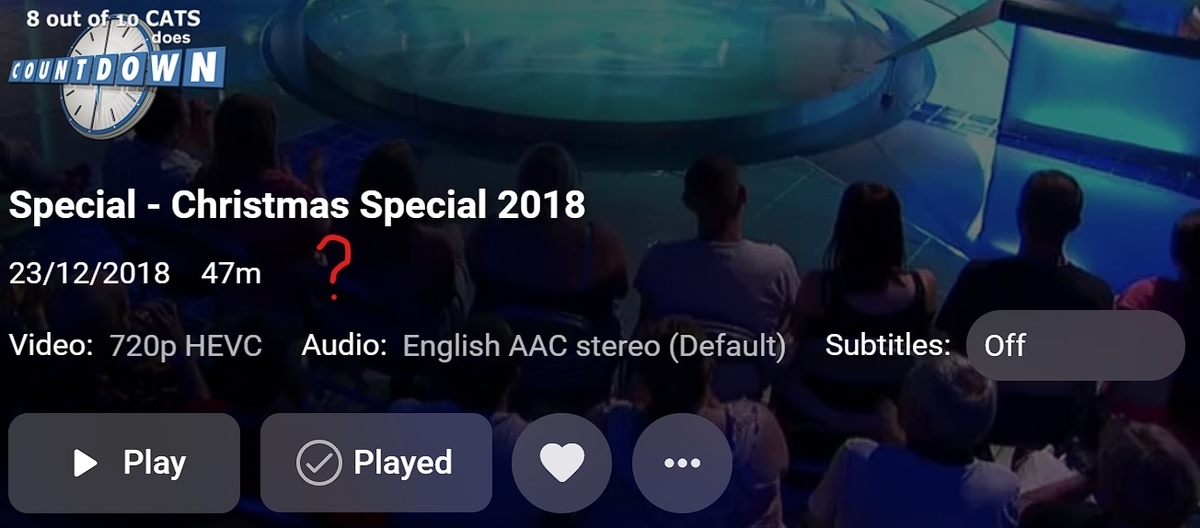
I've lost the 'Ends at' time display that used to show on videos. I'm not sure exactly when it disappeared, it's been weeks, possibly months though. Server still displays it as the attached screenshot shows, you will see it's not there on Theater 3.0.15, this is occurring on three different PC installs, also not showing on Android although I don't know if it ever in that app. This was a really handy feature, when watching TV in bed and wondering if I can fit another episode or a movie in.
 1 point
 -
Hello as title says i stopped using kodi as it crashs more than it plays something - started to love emby again but i realllllly miss one feature sorting my movies by genre & genre Here in emby when i add 2 genres in Filter than it shows me for example all action movies + all thriller movies but with an "AND" modifier i could see only movies that have both genres at the same time for example what i used before: Action - Thriller SciFi - Horror SciFi - Adventure War - Romance Romance - Drama ... etc. - the possibilities are endless please consider this for a future change1 point
-
Bumping this as it would go a LONG way toward making music usable for me. I'd love to dump my favorite artists into a playlist and then bump specific tracks off the playlist as they come up. That's far, far easier than trying to pick individual tracks to add.1 point
-
At long last, I have a solution! Or rather, a workaround, since the hardware decoder on the 4k Fire Stick Max is still broken. There is a commonality in the broken files. When the integrity of the video stream is checked using ffmpeg -v error -i brokenfile.mkv -map 0:v:0 -f null /dev/null A broken file will produce the stderr output "Application provided invalid, non monotonically increasing dts to muxer" (while a clean file will produce no output). Most H.264 decoders will happily ignore this, or at worst, drop a few frames and go on. It seems the Fire Stick 4k Max decoder does not know how to recover from this. Remuxing also does not fix the timestamps, even if attempting to remux with the "fix timestamps" option in either ffmpeg or mkvmerge specifically selected. But there is a way to fix the timestamps in a broken file without reencoding. First we extract the video track to raw h264 using mkvextract: mkvextract tracks brokenfile.mkv 0:video.h264 Then we merge it back with the audio/subtitle/etc. tracks from the original file. But this will now create new, correct timestamps. mkvmerge --ui-language en_US --output '/home/falcon/encodes/fixedfile.mkv' --language 0:und '(' /home/falcon/encodes/video.h264 ')' --no-video --language 1:en '(' '/home/falcon/encodes/brokenfile.mkv' ')' --track-order 0:0,1:1 The 4k Max stick can now play back through this new file with no issues.1 point
-
FYI the TRAKT link is per TMDBid. A url is created from the TMDBid. There is nothing specific to TRAKT in Emby database. https://trakt.tv/search/tmdb/85723?id_type=show https://trakt.tv/search/tmdb/632727?id_type=movie Or possibly IMDBid https://trakt.tv/search/imdb/tt83353321 point
-
Hi, the next time it occurs, please capture the emby server log and the ffmpeg log (if one was generated). Thanks.1 point
-
so as i understand the reason why they don't want this is it could be complicated for grandmas? Well ... I mean each account has an configuration menu. How about adding there options how people want the filters? options could be : Filters: Standard or Expert Standard is as it is now and when activate expert in account configuration than we can have modifiers? all it needs is a single button right behind the bar thats a [+] (for how it is now) and when click on it it change to [&]1 point
-
Hah, you can't give me enough time (anymore)!1 point
-
The end will be better though as I'm giving him the core assistance that he needs to improve playback with this.1 point
-
Danke für eure Antworten erstmal, @quickmic Das Problem was ich habe ist wenn ich an meinem HTPC Spiele (Retro Games) bleibt mein NAS aus weil die Spiele Local auf der SSD liegen. Geben ich jetzt das Signal das NAS zu Starten um ein Film zu schauen bekomme ich keine Verbindung zum NAS (Emby Server) ich müsste daher den HTPC neu Starten oder Emby-Kodi Plugin einmal Deaktivieren und wieder Aktivieren dann findet er auch wieder den Server. Es müsste eine Funktion geben wo das Plugin Automatisch nach einer Verbindung sucht.1 point
-
@Deathsquirrel That is what I am after; when playing an album, playlist, instant mix (just when playing music) to be able to tap dislike. You can tap the heart to add to favourites when playing so I imagine a broken heart next to it for "dislike".1 point
-
I'd have to agree with the other commentators here too. It would be completely impractical to create a playlist for each album just to exclude songs. Also playlists don't get downloaded to the mobile devices, so it wouldn't work very well offline. I like to have whole albums and while I am listening to them, just to be able to tap "dislike". Then it just means by default they don't get played or downloaded offline. I think it would be more useful than the favourite button, its a lot easier to decide if your not a fan of something than if it really is your favourite. I wouldn't want to favourite 95% of the library. Thanks!1 point
.thumb.jpg.21d888786f2104b4f688825203ce7598.jpg)