Leaderboard




Popular Content
Showing content with the highest reputation on 03/18/22 in all areas
-
Dear Sirs It would be great to be able to play music and view photos at the same time. It would be even better if you could drop a music playlist into the picture folder. BR Jukka3 points
-
Also, It would be cool if we have various m3u lists and have the option to choose/assign each m3u list for each user.. Example. In user settings we can choose which library to give them for VOD so this shouldnt be hard enough to do it for live tv too no? USER 1 - Playlist 1 - Playlist 2 - Playlist 3 USER 2 - Playlist 3 USER 3 - Playlist 1 - Playlist 3 Etc etc.... *** Delete this message from another topic I opened because I posted it by accident there1 point
-
I like to have complete albums but sometimes I really dislike some of its tracks at the first listen. I'd like for them not to appear in the playlist, wether it's from Play All button on the album page or the whole music library Shuffle button, but be able to play them manually (by clicking on it or adding it the to playlist myself). Just like knowing it's here and that I can give it a new try sometimes What do you think?1 point
-
Thanks! I appreciate it. That's the version I had been running so it's perfect.1 point
-
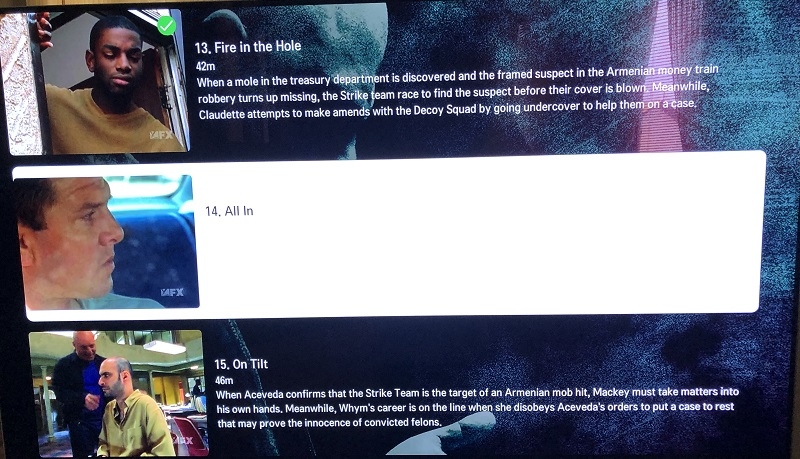
Since the last LG Smart TV app update I have noticed while browsing TV episodes, the highlight that shows which episode is selected is a white panel behind the episode. The text for episode title, length and synopsis is also white so when I select an episode, the synopsis and length are impossible to read (white on white). The title details change to black. I cannot find any settings on the server or app that will let me change the highlight characteristics. Is it possible to change?
 1 point
 -
Sorry I took so long to reply, I have been doing tests at nights after work, so it seems it was the NIC on my NAS, my Emby Server runs on a VM and reads from my TrueNAS box where all the media is stored, it seems the NIC couldn't handle the data transfer after I added 32TB more of storage. I replaced the NIC for a better one on my NAS and I haven't had issues yet.1 point
-
Hmm what version of the Android TV app are you using on your Shield, because there has definitely been no side bar for many years.1 point
-
Aehm nope. Automatic scraping with an scraper is onyl "less work". But you get only the information on your media thats provided from the website. And thats a bad way for tagging movies as most tags are not maintained for all the movies. I use tags like "1001" for movies from the "1001 movies you need to watch until you die" list. Or Oscar Winner, Wuxia etc. - you get some of this tags on some of the movies with a scraper, but i want my library to be correct. anyway - thats not the thema this thread was opened for1 point
-
Another possibility is that the address of the server has changed, and you're still using the old one. This can happen if for some reason the DHCP lease runs out and a new address is supplied for a new lease; it doesn't have to be a change in the software or anything like that. You can see on the Emby dashboard what Emby thinks the address of the machine is, or you can type "ipconfig" on a command line on the server to see the address there. Paul1 point
-
That is the same idea as: "If your friends all jumped off a cliff would you jump too?" Which in one form or another parents have said to children since there has been history and, probably, since primitive humans first discovered the uses to which an antelope's thy bone could be put. A popular feature is just as apt to be a bad feature as an unpopular one in fact a lot of time the true value of a feature is inversely proportional to its perceived value. I believe it is a "feature" that only a small minority of people want and I believe that an even smaller minority would actually use it after the novelty wears off. In many ways I care very little one way or another about any "Watch together" implementation but it has been my experience that many times when a feature gets added it effects the basic operation of the code it was grafted onto or jammed into.1 point
-
How can it be a worthless feature if literally everything else has it?1 point
-
At long last, I have a solution! Or rather, a workaround, since the hardware decoder on the 4k Fire Stick Max is still broken. There is a commonality in the broken files. When the integrity of the video stream is checked using ffmpeg -v error -i brokenfile.mkv -map 0:v:0 -f null /dev/null A broken file will produce the stderr output "Application provided invalid, non monotonically increasing dts to muxer" (while a clean file will produce no output). Most H.264 decoders will happily ignore this, or at worst, drop a few frames and go on. It seems the Fire Stick 4k Max decoder does not know how to recover from this. Remuxing also does not fix the timestamps, even if attempting to remux with the "fix timestamps" option in either ffmpeg or mkvmerge specifically selected. But there is a way to fix the timestamps in a broken file without reencoding. First we extract the video track to raw h264 using mkvextract: mkvextract tracks brokenfile.mkv 0:video.h264 Then we merge it back with the audio/subtitle/etc. tracks from the original file. But this will now create new, correct timestamps. mkvmerge --ui-language en_US --output '/home/falcon/encodes/fixedfile.mkv' --language 0:und '(' /home/falcon/encodes/video.h264 ')' --no-video --language 1:en '(' '/home/falcon/encodes/brokenfile.mkv' ')' --track-order 0:0,1:1 The 4k Max stick can now play back through this new file with no issues.1 point
-
I still love emby, but waiting two years for a feature that many have asked for is glacial development. Other platforms (plex, jellyfin not to mention the likes of hulu, disney, etc) have turned the same request around in a much timelier fashion. It was a really great thing during the pandemic to be able to watch shows with others (had to use other services to do so) and it would have been great to be able to do the same with my emby instance and my catalog of shows. I think I've seen 2 people say it was a worthless feature - guessing they don't have friends or family that they like to watch with.1 point
-
I refreshed the skin by doing exactly what you said. I use confluence, so I switched to estuary and back. That's how I noticed that estuary could process the movie posters under Leia, but confluence could not. By the way I tried everything. Reloading the skin, caching all artwork... nothing I did can make the movie posters show up on the recently added list on Confluence-Leia, but it seems to be working normally on Confluence-Matrix. I also noticed another weird behavior on 6.2.11. I often re-download episodes or whole seasons. Say I downloaded a season in SD in the past and I now re-downloaded it in 1080p. Then I go to the folder, delete all the old files, paste the new ones where the old ones used to be and finally trigger a refresh on emby. We know that Emby updates its own database, removing the old files/old metadata, adding the new ones instead and re-scraping for info and thumbs. When I perform substitutions like this, with 6.2.11 I end up with two entries per file. One to the new file and a broken one to the old file. Re-scanning on emby seems to have no effect and on the Kodi side there's only two solutions: a) remove the dead links manually one by one if the option is enabled in the plugin or b) rebuild the local library (which is great, but takes time). This one is happening in my Leia and Matrix boxes and it didn't happen with the previous version. I suspect the plugin is not processing the removal of the old files, while correctly processing the addition of new ones. I'll install another RPi with libreelec and give 7.0 a spin, then provide you some feedback as well.1 point
-
I'd like to understand the requirement a little more. The existing API allows you to fully control the 'session' and start/play any media you like (fully control, stop,start,pause etc). Therefore, if you just collection all the session Id's (those users who are logged on to Emby, local or remote, doesn't matter) and then you fire a simultaneous 'play' command to them all at the same time, they will all play at the same time. A 'watch' task is used to monitor the sessions - if anybody pauses, then emby sends the same pause to all the other sessions. This is exactly how Autoskip works in Introskip .. .. but obviously only on a single session. Is this what people mean by 'Watch Together' ? @chef maybe a quick proof of concept could be put together in your lunch break ?1 point
-
Its also not smooth on mine tizen 2019 and i also don't have the image preview like luke presented a few posts before.1 point
-
unfortunately I can't answer this question because I don't have that type of TV but I was asked the question by one of my listener ... however, being a smart TV it may be that it does ...1 point
-
@rbjtechI have not had the chance yet. Work is a little nutty, but I intend to do it this weekend and will definitely report back to the thread.1 point
-
Hi, its on our to do list for future updates. Thanks1 point
-
[Off-topic:] Kind-of; but then, bear in mind that in the UK the analogue phone system (both pstn and isdn) will be decommissioned in 2025 and replaced by - guess what! https://business.bt.com/insights/digital-transformation/uk-pstn-switch-off/ I've no idea what they are going to do about those remote places that have an analogue phone but can't get either a mobile signal or Internet - just cut them off, I suppose. Or I guess they could make up a unit to go in the relevant exchange to convert between systems just for the local loop - at a price. Paul1 point
-
OK. No problem. Sounds like nothing I can do. Thanks for getting back to me. Cheers1 point
-
Known issue in 4.6, but resolved in new layout in 4.7. https://emby.media/community/index.php?/topic/98907-2x-sign-out-button-in-menu1 point
-
Actually that's not needed for the desktop app.1 point
-
They did pass the bill, but I've resolved this for the next release of Emby Server anyway. It will still help the server react immediately if the admin ever changes the system clock manually.1 point
-
Thanks for the feedback.1 point
-
Latest beta .42 solved all DV issues I had. Smooth playback and no crashes (direct play, MKV).1 point
-
I updated the "Quick Links" page for Synology in the Knowledge Base with an entry for "Forgot Password (admin account). https://emby.media/support/articles/Synology-NAS.html1 point
-
@t1m You should also have a look at https://github.com/erdesigns-eu/M3U2STRM That scprit does a perfect job. Especially if you teddy up the m3u a bit for IPTVservice specific flukes and errors. If you are on git-hub you can have a look at my code/ script where I do quite a bit of house cleaning before i feed the m3u to the strm converter. This process is important to avoid lost titles and messy out-put. I can also just send you a PM with a download link. It wound be fun to have an another programmers opinion on the approach ;O)1 point
-
ok - so the Shield Pro even with SE9/HTTP is perfectly capable of full 4K remux Dolby Vision playback - I have one myself with an LG C7. Unfortunately SE9 means you have lost the ability to do Direct File Playback (SMB Shares mounted on the Shield) - there is a long thread on this in this sub forum, but in summary, Android now needs 'permissions' for this and Emby have made the decision to not provide them. HTTP 'should' work (and did for the very brief time I was forced to use it) but then I reverted back to SE8/DFA as I wanted to keep using a known configuration which has played everything I have thrown at it for the last 2-3 years without a problem or hitch. While it should not be your wireless (especially with Wifi 6 and it working perfectly well via DLNA/Plex) to eliminate it being 'network' - is there anyway you can cable the Shield into the server using 1Gig Ethernet ?1 point
-
Hi. I'm afraid we've lost direct file access with the Shield firmware update to Android 11. That should not be critical, however. As for your other issues, if you sideload this app, how does it compare?1 point
-
Its been like this for at least 2 years now. Apple TV 4K (1st Gen). Its if you scroll with any speed other than slow when you have a few pages of stuff in your library.1 point
-
Try ILibraryManager.GetPeople for an item, update that list to add a new person, and then ILibraryManager.UpdatePeople to save it back.1 point
-
We'll look at improving it. Thanks for the feedback.1 point
-
The end will be better though as I'm giving him the core assistance that he needs to improve playback with this.1 point
-
Yes, something like that is planed. But the current version is on feature freeze now. Because of future changes to Emby's Live TV engine i'll have to completely rewrite the plugin and that will take a long time.1 point
-
Yes I'll take another look, but as I don't have the hardware for testing it's a little hard to track down right now.1 point
-
That was the best part of that movie.1 point
-
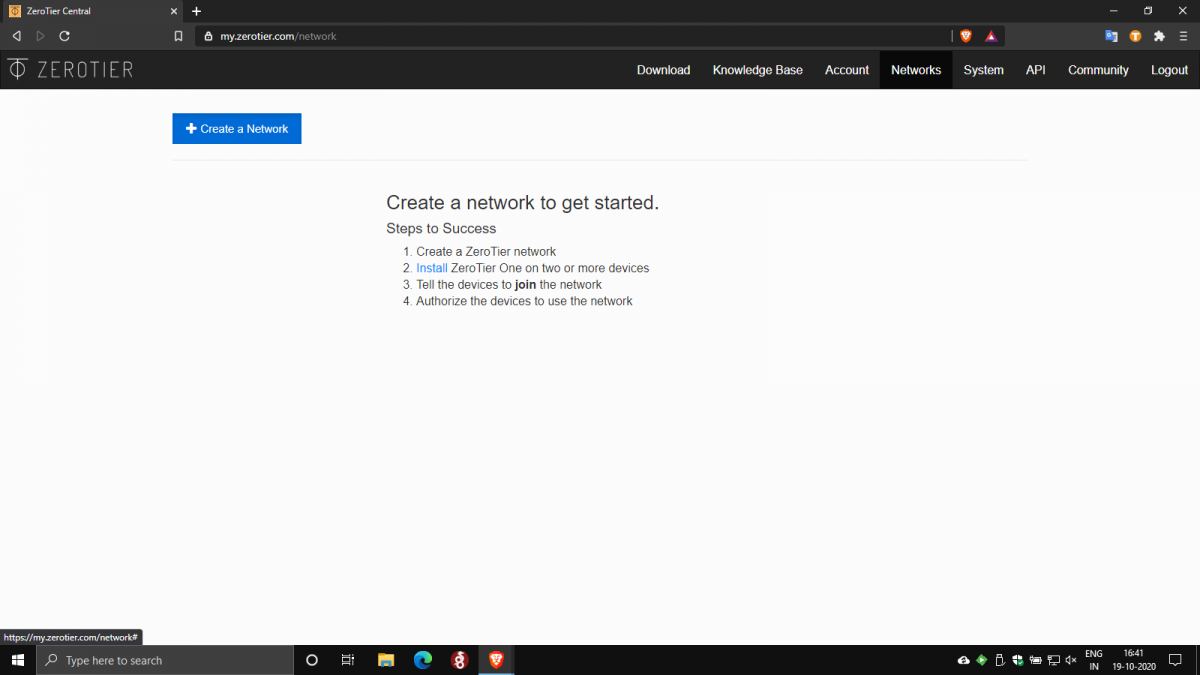
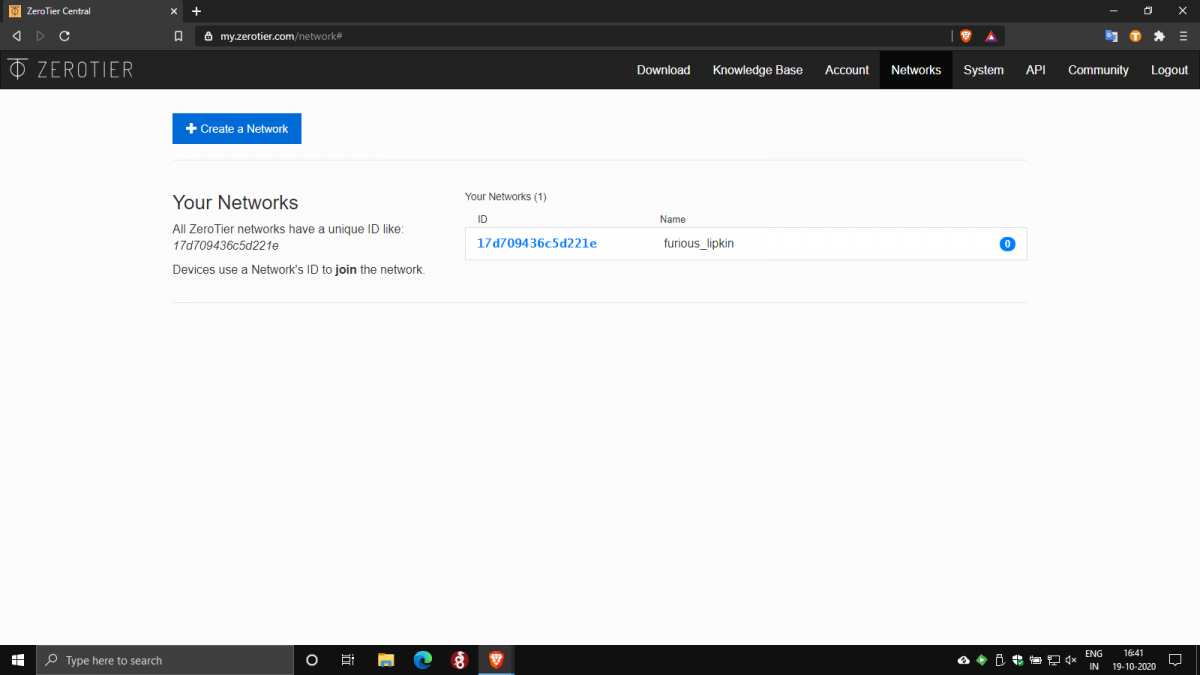
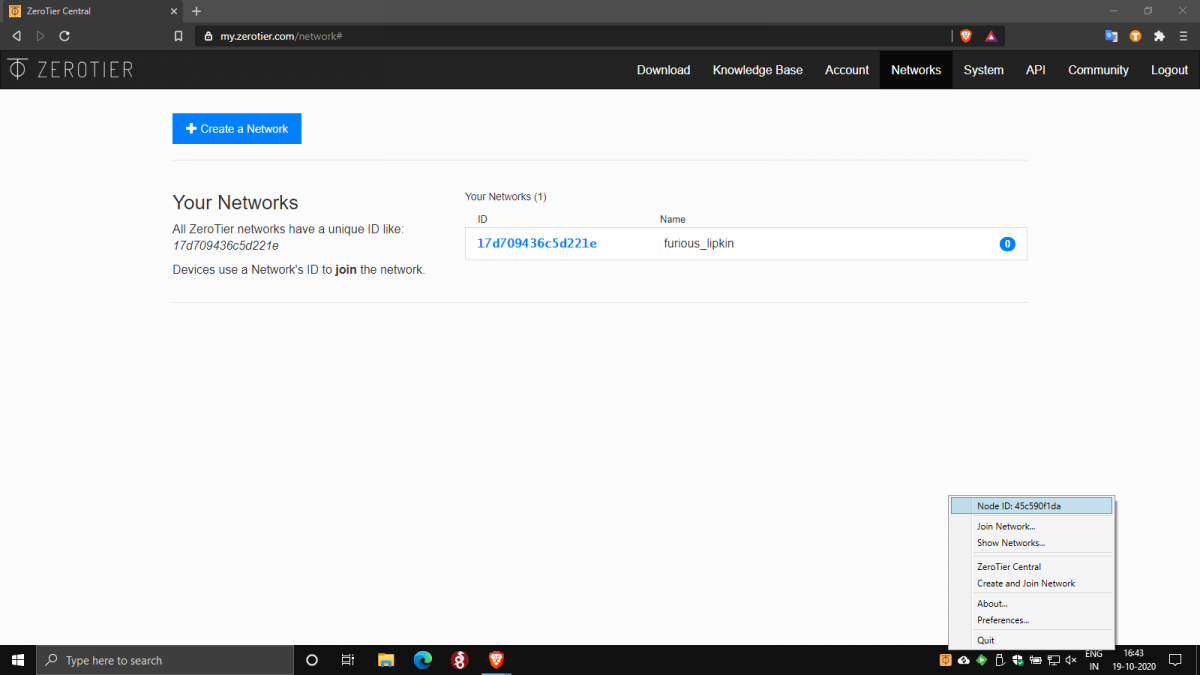
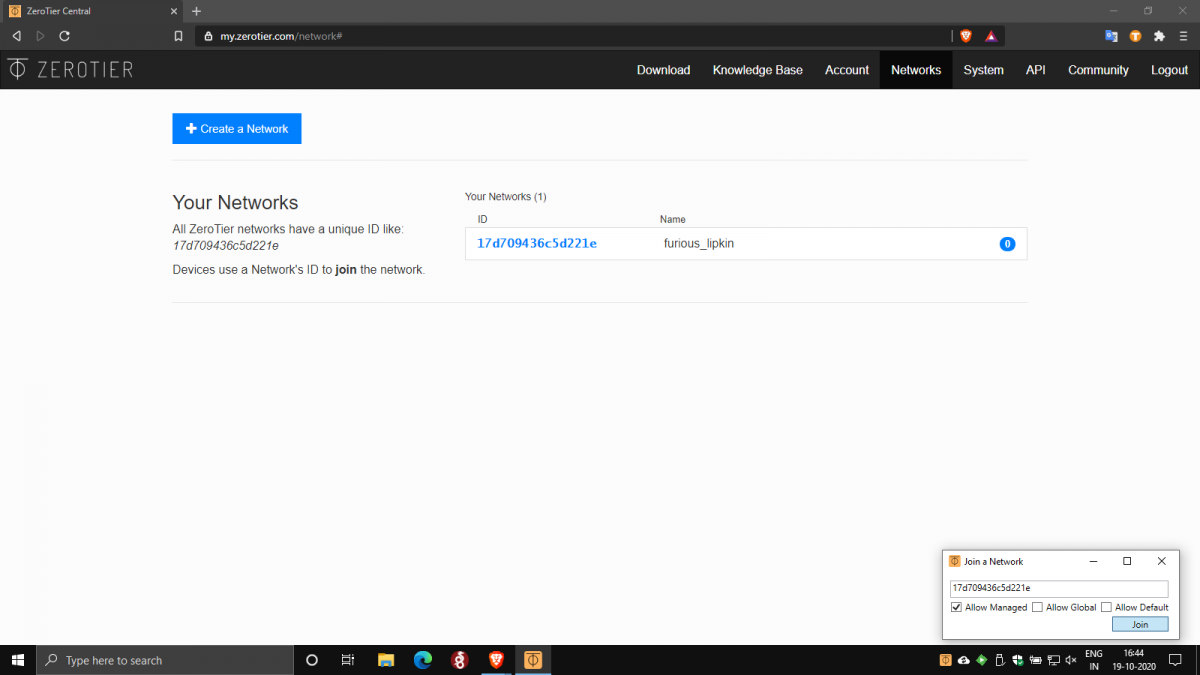
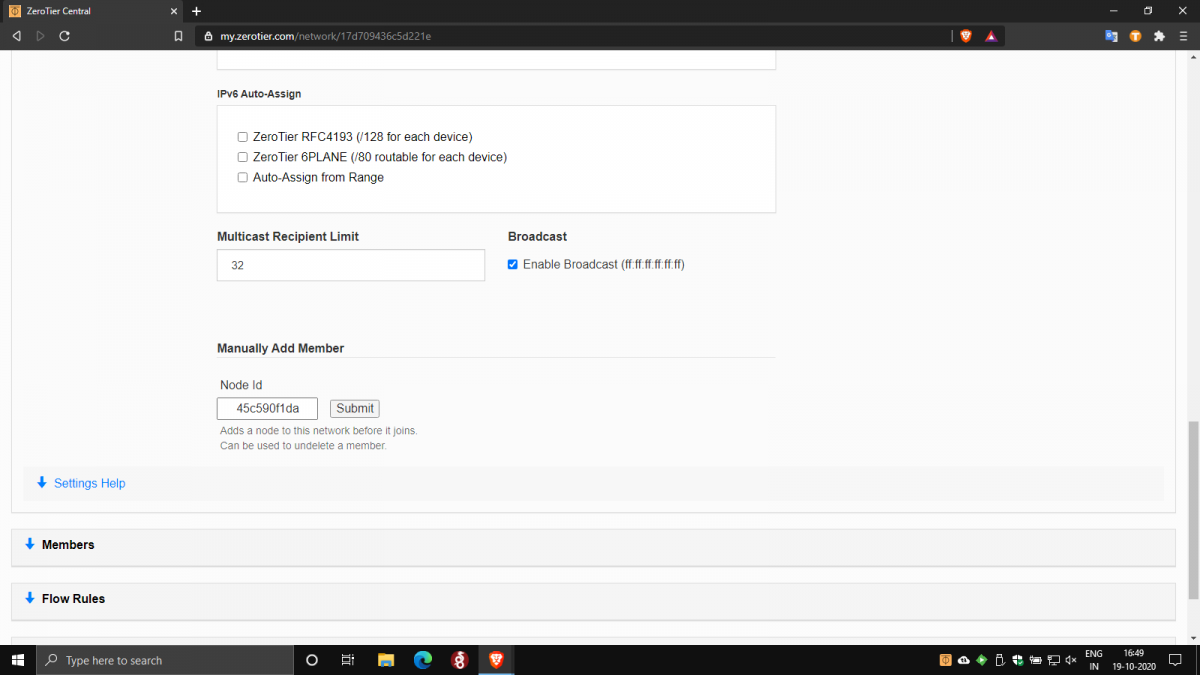
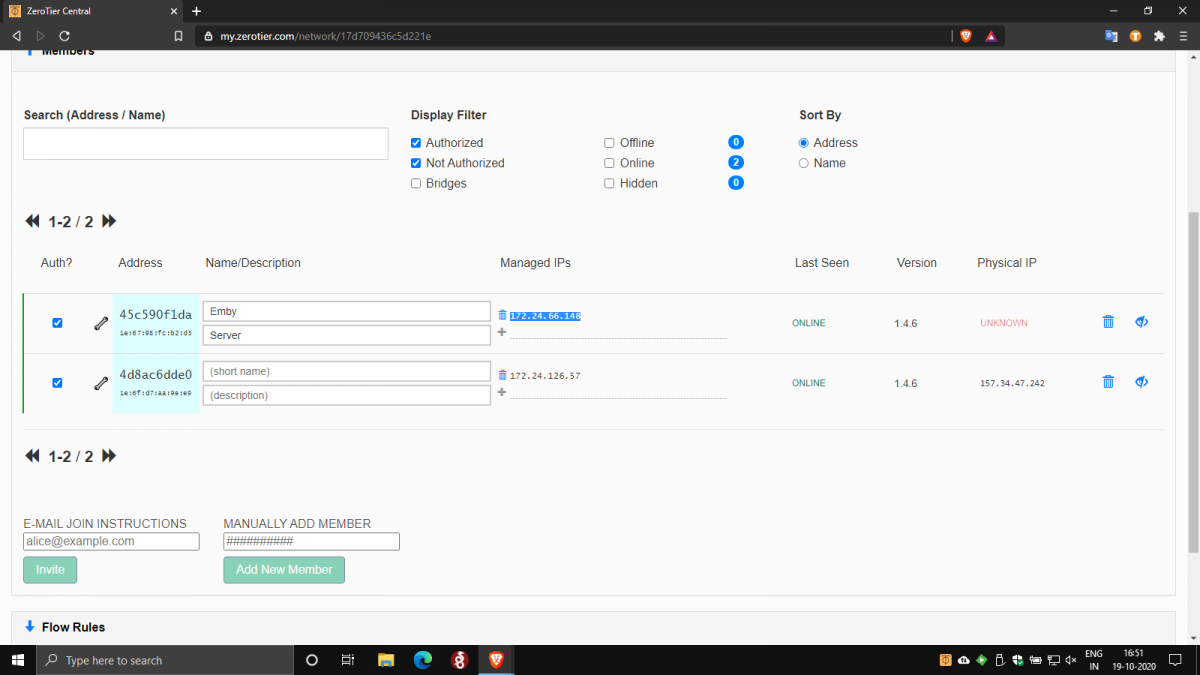
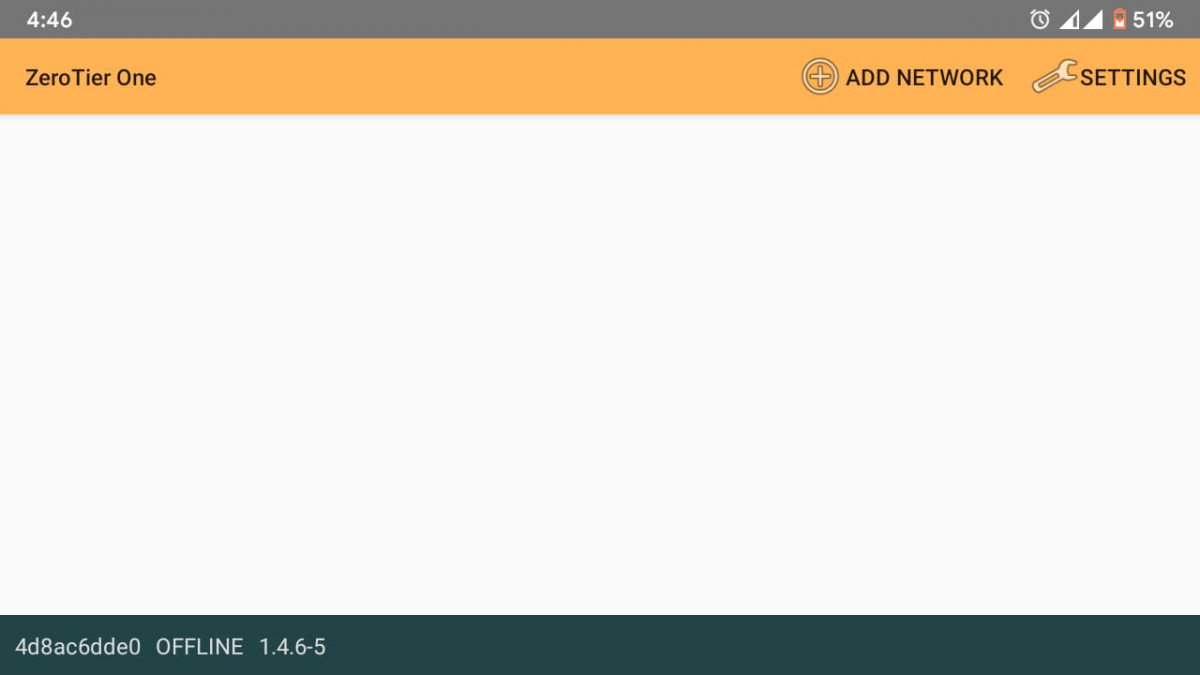
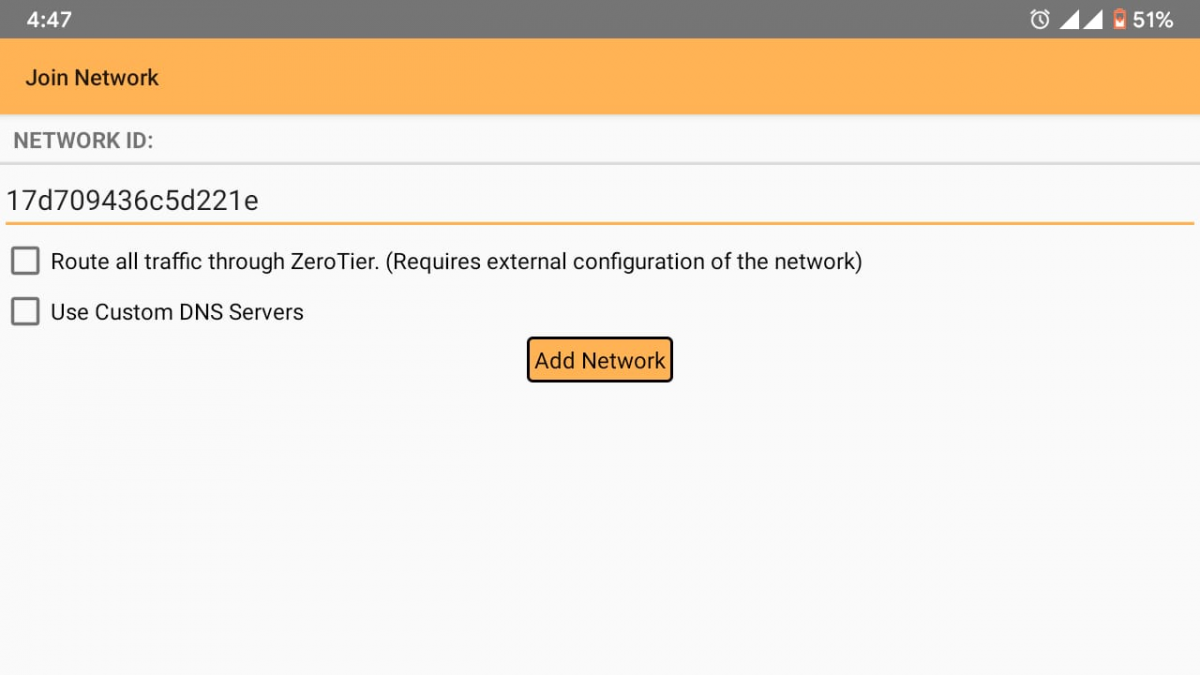
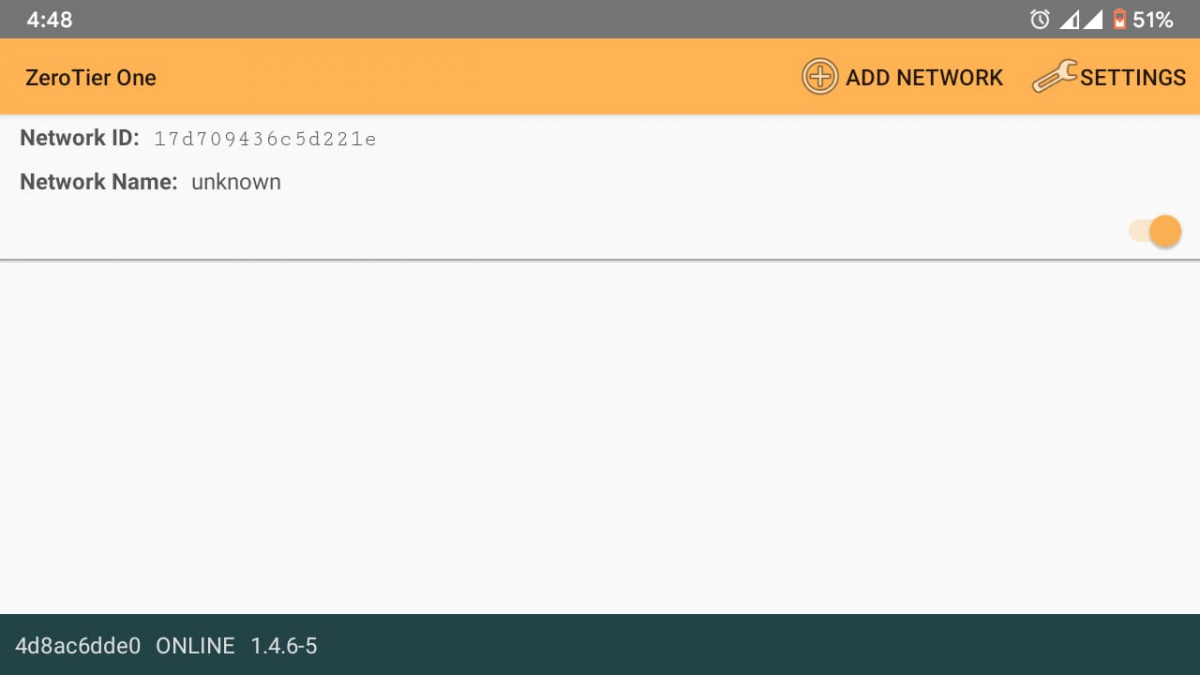
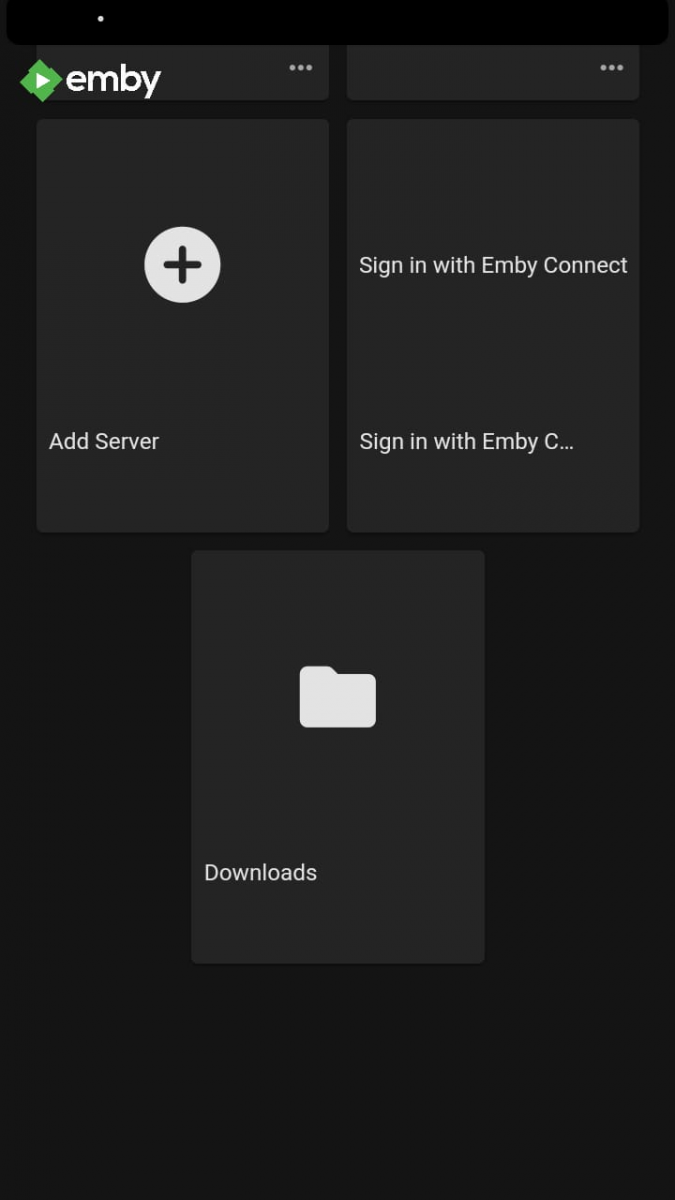
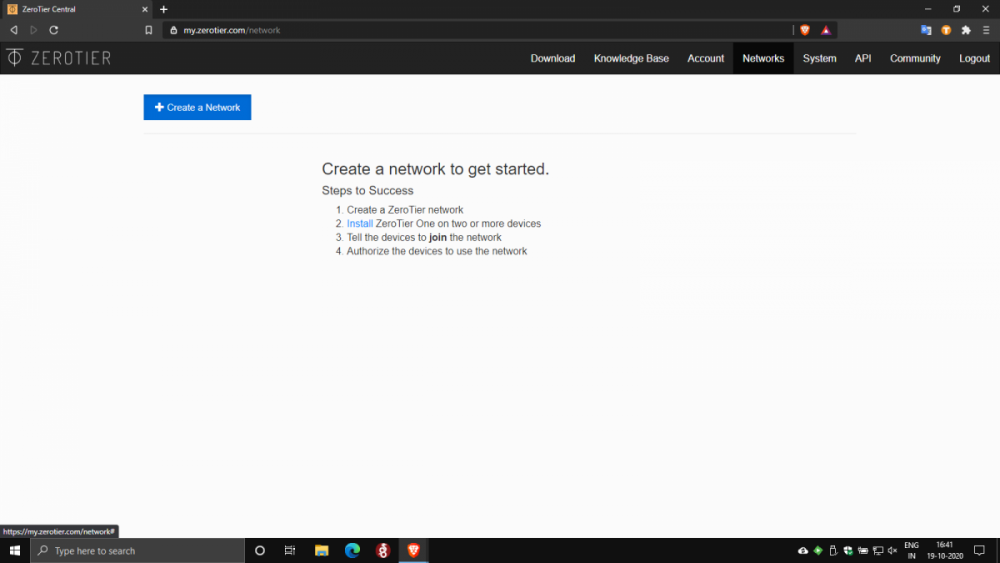
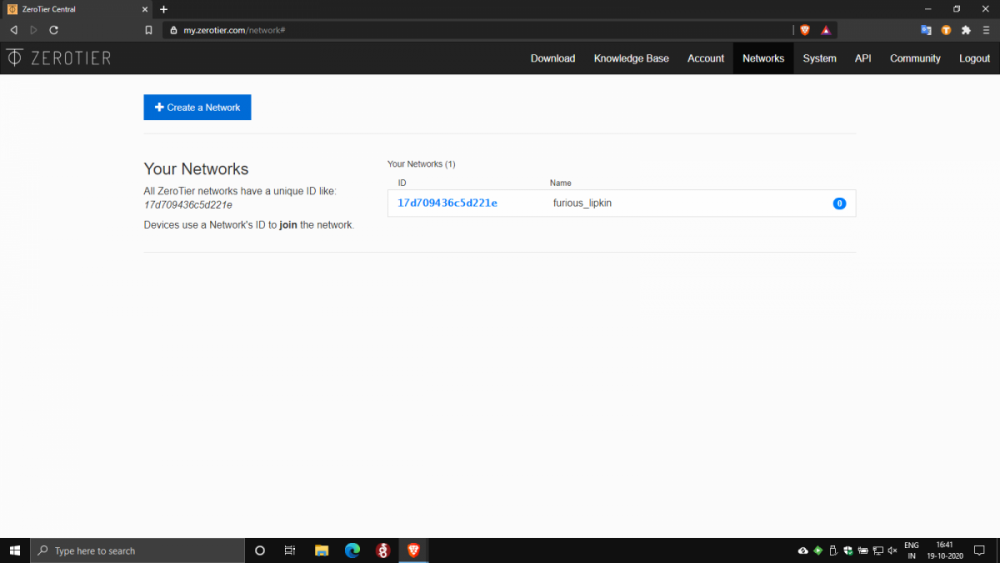
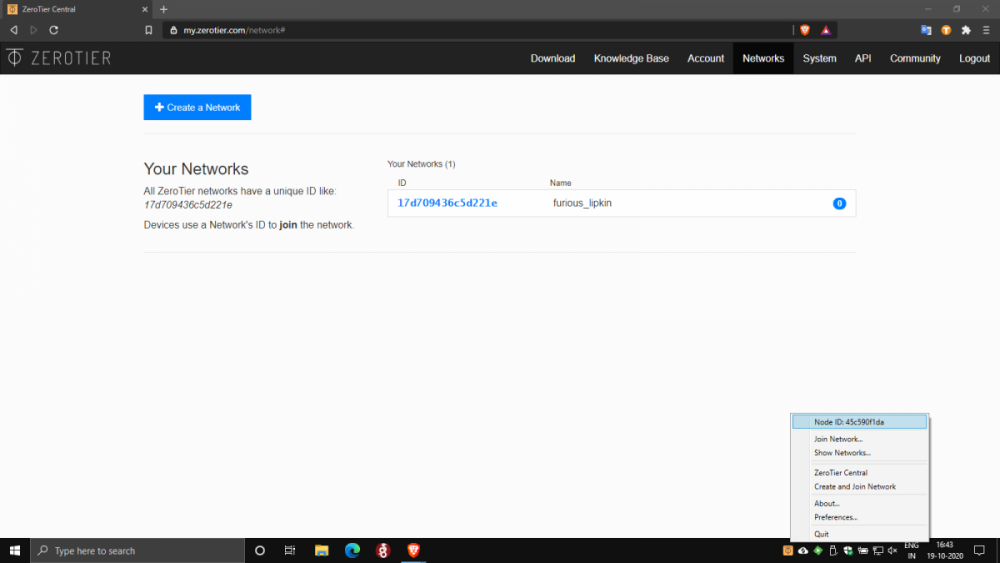
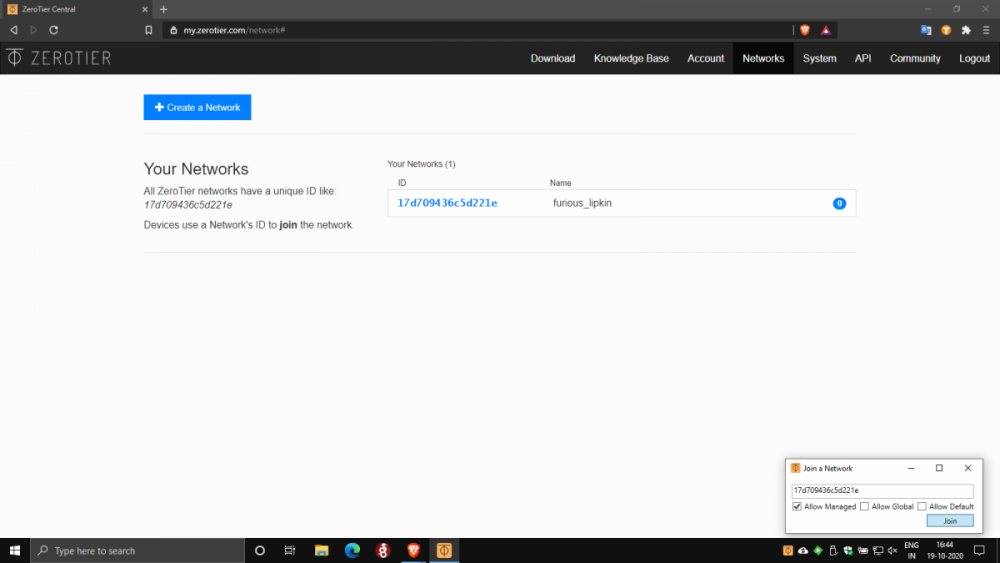
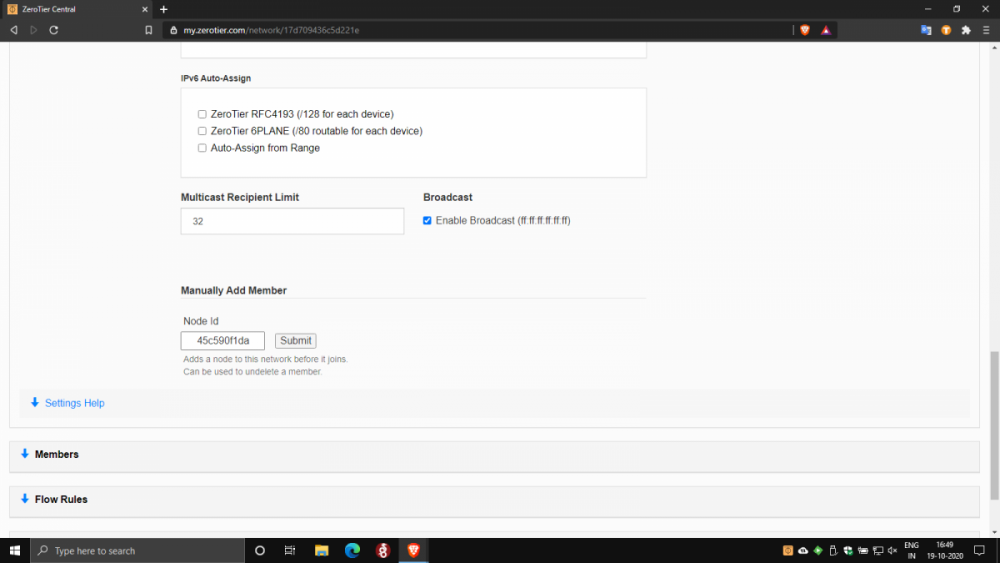
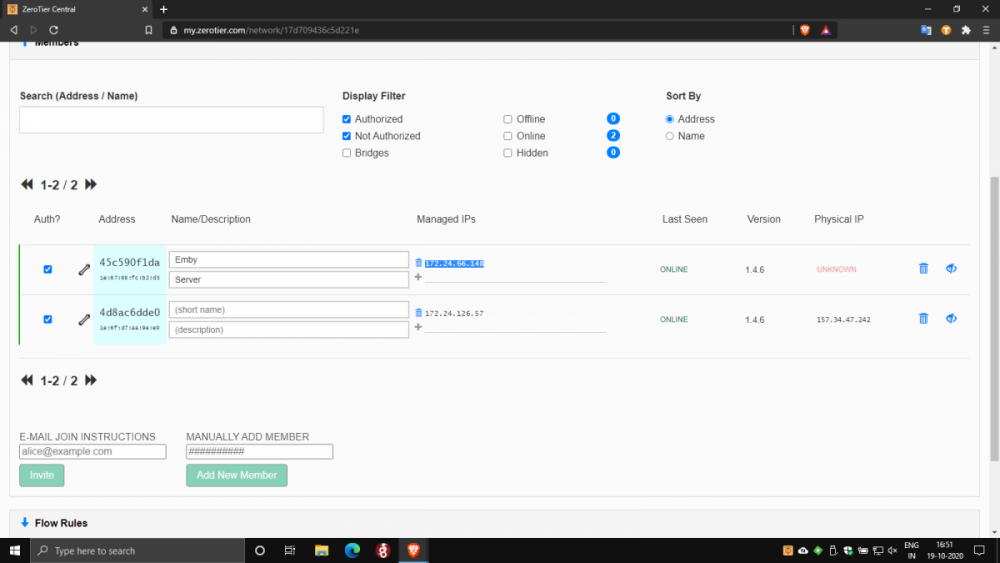
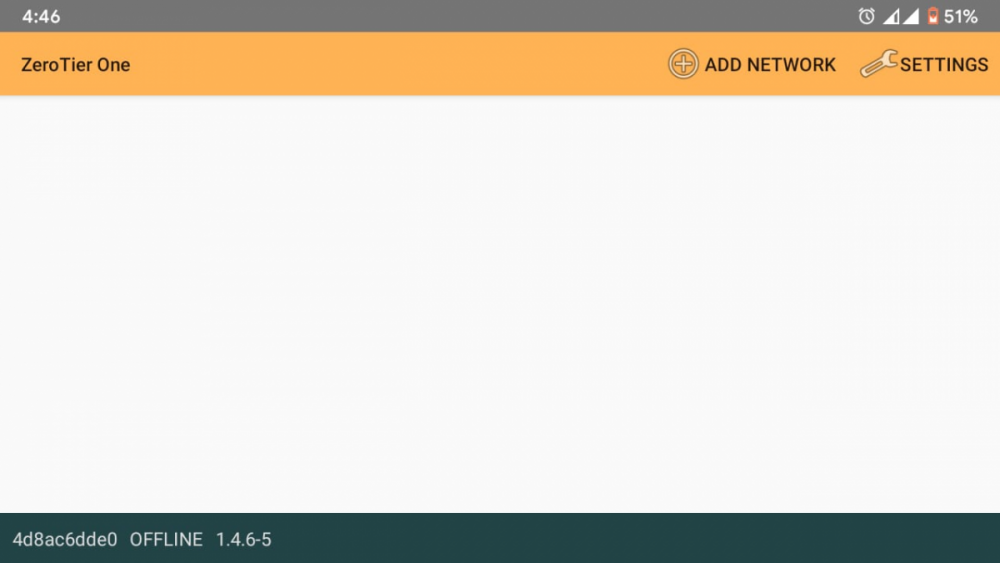
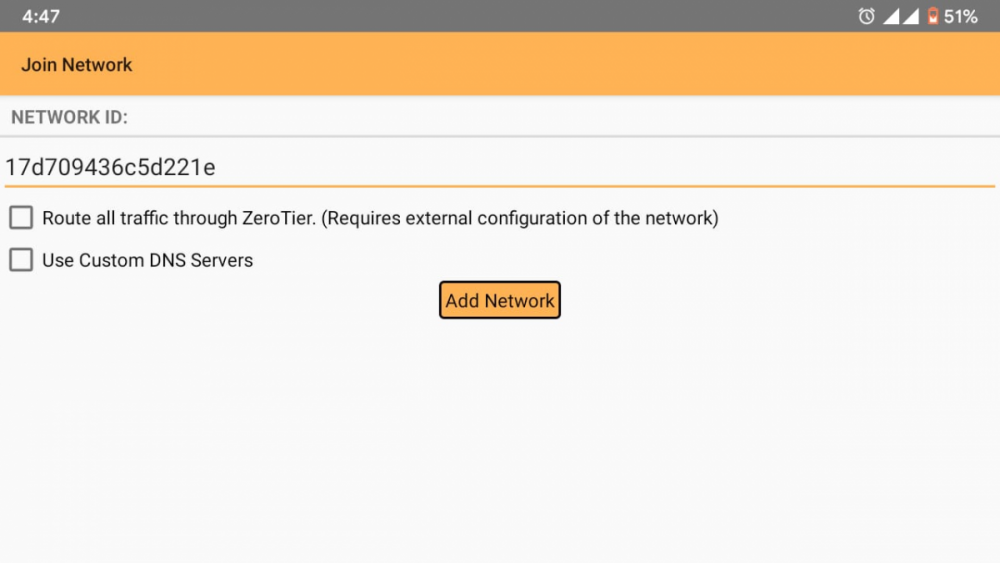
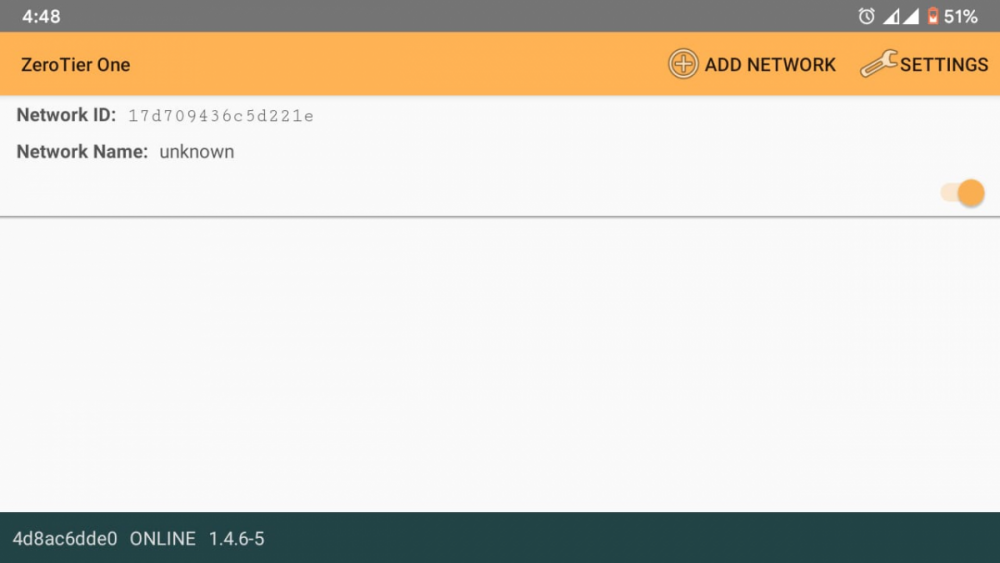
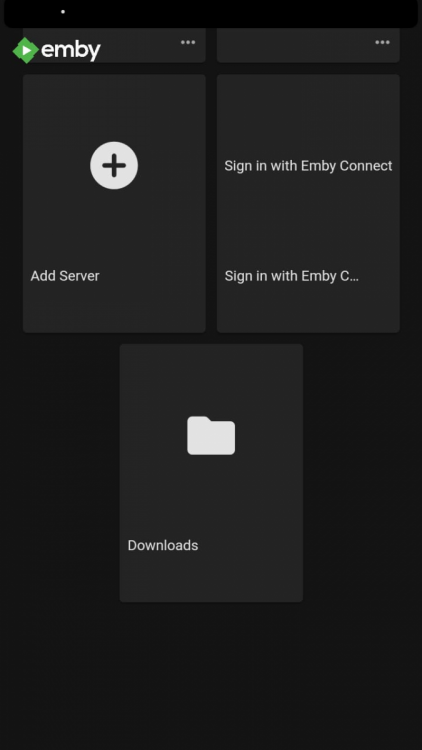
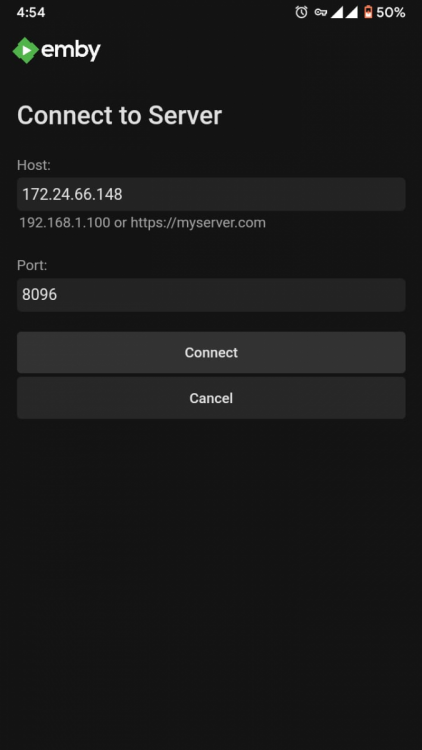
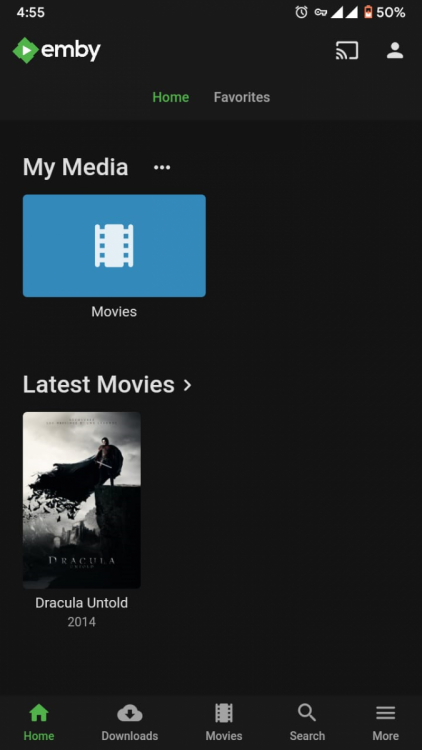
Of course. For anyone in a similar situation to mine looking for a solution to CG NAT 1) Download Zerotier on your Emby Server Platform here: https://www.zerotier.com/download/. I downloaded the Windows installer and installed zerotier on my PC. Setup is pretty straightforward and self explanatory. 2) Download Zerotier on your clients too. I needed remote access on my smartphone, so I downloaded the android app here: https://play.google.com/store/apps/details?id=com.zerotier.one. Apps for all clients are here: https://www.zerotier.com/download/ 3) Create a ZeroTier account. It's free. Activate your account with the activation link in the email ID you used to register. 4) Go to https://my.zerotier.com/ and log in to zerotier using your account credentials. 5) In the top right, click on the networks tab. Click on create a network. A network is automatically created and added to the Your Networks list. Note the network ID(16 digit). 6) Open the Zerotier application on your server PC. Click on the icon in the taskbar. Note the first Node ID(10 digit) here. Click Join network. Enter the network ID(16 digit) and click join. Similarly open the Zerotier app on your client device. Note the second Node ID(10 digit bottom left) here. Click on the Add Network icon in the top right, and enter the network ID, then press Add Network. Flip the slider to connect. 7) Back in the browser, click on the network ID to open the network configuration. In the Settings section under the Advanced subsection, under 'Manually Add Member' enter the 2 Node IDs noted in step 6 one by one, clicking submit after each entry. 8) At this point Zerotier setup is complete. In the browser under the Members section note down the IP address of the server PC, then open the emby app on your client and click on Add Server. Enter the IP address in the host text box, port should be 8096 by default, press connect. Log in to your user account and you are good to go.
 1 point
 -
In every folder you want to be ignored just create an empty .ignore file this let emby know to ignore everything inside this folder and sub folders1 point
-
Hi all. Unfortunately I don't have the files anymore. :)0 points