Leaderboard
.thumb.jpg.21d888786f2104b4f688825203ce7598.jpg)



Popular Content
Showing content with the highest reputation on 03/12/22 in all areas
-
Hello fellow Embians! Just wanted to post a quick update on my Emby plugin that provides a Subsonic API-compatible service layer to enable use of Subsonic apps against an Emby music library. The Subsonic API page groups API calls by category, but I am working on the top 3 categories: System Browsing Album/song lists I have roughly a third of those API calls implemented and am working on the remainder. After that my next priorities will be, in descending order: Playlists Media retrieval Searching After I have at least a majority of the API methods from the above categories implemented with most of their parameters, I think we'll be ready for testing (right now I'm testing against my own local Emby instance running 4.6.7.0, and Android Subsonic apps subtracks and Audinaut). Probably the main limitation right now is that the Subsonic app you are using needs to support legacy authentication (no hash/salt). I do plan to implement support for that kind of authentication later, probably leveraging an API key in my plugin's config page. If you want to try it out right now you are more than welcome although it really only supports getting random songs, getting all artists, some browsing functionality and license/ping so it really isn't anything earth-shattering yet. Even the methods that do work don't support all of their (non-required) parameters at the moment. I also have no instructions at the repo yet for building & installing, but if you have at least .NET Core 3.1 installed, you should be able to build the .DLL and copy it to your plugin directory. After that you'd need to restart Emby to "see" the plugin. But that being said, I wouldn't even consider the plugin "alpha" so if you want to build the plugin, install it in Emby and try a Subsonic app against it, go ahead, but do so at your own risk. As always, if you have any questions, problems or requests, feel free to bring up an issue at the repo (linked above). I'll most another update probably later next week as more functionality is implemented. Cheers!4 points
-
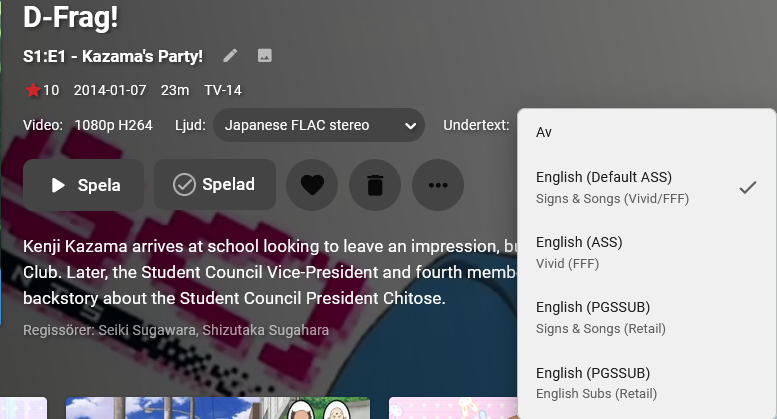
Before you go ahead and label this a duplicate or suggest that the "set preferred language" option in settings pleases this request, I'm talking about a use-case for a feature such as this for scenarios where language-labeled subtitles doesn't benefit from the already existing preset in settings, i.e if you're watching a foreign media and there's a signs track in English because there's also a dub of the show. Having to change tracks every episode even though technically the correct language is selected but it's still not the right one gets quite tedious. What I'm suggesting is that you add the per-episode menu to the show/season details one more or less-.
 1 point
 -
https://www.nvidia.com/en-us/geforce/forums/shield-tv/9/485389/shield-experience-upgrade-901-released-21522/1 point
-
Yep, I don't beleive qaa gets detected as neither any other language nor Und, use standard ISO codes. In that French/English combo, one item is wrong, for sure. Case 2 is definitely wrong, Dev will have to comment on that one, as "Always play subtitles" should display subtitles in preferred language regardless of Audio language. @Luke1 point
-
hi thanks for the update but still I don't see any subtitles after search any movies logs.zip1 point
-
I just try new version v1.2.4 and issue remains1 point
-
So I had a play today - and in summary, I can't appear to re-create the problem. I used a different file (but from the same scene-DVSUX) - so that may be the issue but I successfully - 1) Played back the original file on the LG Client using the LG Internal Speakers no issues - DV and Atmos triggered and played fine. NO SUBS - this forces a transcode. (subs were 'timed text - tx3g Codec ID in mediaInfo) 2) Demuxed the mp4 using mp4demuxer - into .265 and .ec3 - subs were saved with .DAT (?) 3) Remuxed the video and audio components above into a new .mp4 using mp4muxer - set DV profile as 5 (same as original) - no subs. 4) This new file played back just fine as well - triggering DV and Atmos. So - you can try doing the demux/remux to see if that fixes the issue (but you'll lose subs as I couldn't find a way to embed these - external .srt subs didn't appear to work either ) If you can upload the original file to dropbox or something (or pm me the magnet link) then I'm happy to try with that, but its looking like the file in it's original mux may not be compatible with the Emby wrapper of the LG Client ...1 point
-
Hi Version 1.0 released https://github.com/nRafinia/Emby.Subtitle.Subf2m/releases/latest Emby.Subtitle.Subf2m.dll1 point
-
Great to hear! thanks so much for your hard work!1 point
-
Hello, i have already installed the new beta version and the green lines are gone Thanks so much for fix the problem.1 point
-
https://www.howtogeek.com/336602/how-to-sideload-apps-on-the-fire-tv-and-fire-tv-stick/amp/1 point
-
Thank you both for your help, it's much appreciated and apologies for being a pain/novice etc. Cheers1 point
-
Hi. The request is getting to the server and it simply looks like an incorrect password. You could use the Server Configuration Backup plug-in.1 point
-
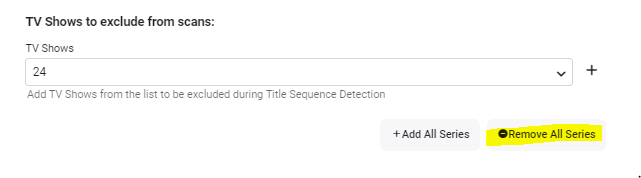
I would suggest trialling with a subset of the 104Tb of data though You can either setup another instance of emby to test or you can exclude all shows using the Plugin Advanced options - and then remove a couple of shows (ie now INCLUDED) to test. Let us know how it goes.
 1 point
 -
Thank you. Everything is now how it should be.1 point
-
Hi, thank you for your response. Apologies for the profanity, I'll keep that in mind. That is a very nice edit made to my post lmao.1 point
-
Sounds like maybee the solution may be to add emby to the app repository so it will update on the apt upgrade and then the apt upgrade command can run on a schedule easily.1 point
-
Added Backup & Restore LiveTV Timers as this is simple and seems to be something that might come in handy to some users. The locations are the same backup location used in the Global Config.

 1 point
 -
If you add language ISO Code to the naming scheme otherwise it is unknown. Emby Subtitles : Emby1 point
-
Only way this can happen is if item metadata has the information to create them. But do you have an example we can look at, providing content of movie nfo files that are making the Collection.1 point
-
Do you have the server installed onto an SD card or external storage? It's not supported if you installed it that way.1 point
-
That fixed it! Thank you!!1 point
-
The challenge with this approach is that it usually takes and admin account or an account in the sudo group to perform commands such as yum, apt, etc.; sudoers also requires a password reprompt. It is risky to grant a service this level of privilege.1 point
-
Excellent, I can wait. Thanks for all the hard work. Looking forward to it.1 point
-
The end will be better though as I'm giving him the core assistance that he needs to improve playback with this.1 point
-
Yes, something like that is planed. But the current version is on feature freeze now. Because of future changes to Emby's Live TV engine i'll have to completely rewrite the plugin and that will take a long time.1 point
-
Hey up, Wrote a longish posts few months back, I reckon you'll find most of the answers there (click arrow top-right): One thing worth of note, though: while Emby can run completely offline - and doing it in a great manner - it cannot do it indefinitely as Premiere license will have to be verified every so often, AFAIK it'll run on cached license for about three weeks at the most. But, depending on your choice of clients and your needs, Premiere license ain't actually required at all, in which case it will run offline with no time limit whatsoever.1 point
-
There is actually an extremely good chance of that. However, it seems to me what you are asking for is a duplicate of the above request because it is also asking us to somehow select the "same" subtitle for each subsequent episode once one is chosen. Please lend support to that topic.1 point
-
Hello, Have a lot of files on my server, most of which are MKV, I'm using Emby's tool to convert, all right so far! However, I can't access the "conversions" tab to see what Emby is converting at the moment and edit some file in the queue, believe it's because of the high number of files I put for conversation. The tab is always loading in a loop, although it fixes the files without problems. ell, how can I clear this queue? Then I'll put small batches of files to have better control.1 point