Leaderboard




Popular Content
Showing content with the highest reputation on 02/22/22 in all areas
-
Yes, sure am. I mentioned this yesterday in another thread. Don't know why but for some reason the old "Spidey senses" are tingling so I'm doing a full backup of the NAS before proceeding. I already have 7.1 ready to go as well as some of the other main apps people are likely to use which I'll also upgrade. As soon as it's done backing up I'll be testing it.3 points
-
Hi, improvements are coming to the next update to the Emby Samsung app. The seek bar will be able to receive focus and you'll be able to use left and right on it to seek quickly.3 points
-
Or just kill server machine internet connection completely, that'll prevent it to scrape anything, that's how I do it instead of repeatedly ticking each library.2 points
-
-= PLEASE UP VOTE & PROMOTE THIS REQUEST IF YOU WOULD LIKE THIS FEATURE =- DO THIS BY CLICKING THE "LIKE" BUTTON ON THIS POST REQUEST: Properly pool multiple M3u IPTV sources, so when adding more than one with the exact same M3u emby treats them as one source with however many "Concurrent Streams" you set for each. https://emby.media/community/index.php?/topic/63725-multiple-iptv-tuners-double-channels/?p=636718 https://emby.media/community/index.php?/topic/59607-duplicate-channels-one-tuner/?p=607031 https://emby.media/community/index.php?/topic/57420-multiple-identical-m3u-tuners-without-duplicate-channels/?p=560949 Basically once M3u #1 has used all 5 of its tuners, I then need to start using the login info that is within M3u #2... once those 5 tuners are used (now all 10 tuners), then emby issues "no tuners available". This is how emby treats HDhomeruns today, so it can't be to difficult. @@snodrog742 @@manolodf @@robrhedrick @@cayars1 point
-
Request that Emby server store Dolby Vision (including profile), Dolby Atmos, DTS:X, HDR10+ (smpte2094) and HLG for appropriate video in the db and use it for display in the media info and track selection sections of movie/episode details screen. This information once in the db can then also be used in numerous other areas like: Mediainfo Cover Art, Stats for Nerds, Distinguishing different DV profiles for hardware support and tone mapping Example Mediainfo app display of HDR10+ ffmpeg patch for HDR10+ https://patchwork.ffmpeg.org/patch/11491/ Related requested that may require DV profile information in order to prevent unneeded TM1 point
-
Say I have a custom collection of 56 Christmas movies. During the Holiday Season, I would like to show this on the main page as a Library. Now, I could make a drive folder called "Christmas" and put these movies in that folder. However, now we're getting away from using metadata for organization and moving back to using folders for organization. Something you've spent the last few years trying to get away from. So each collection should have a toggle to show it as a library on the Home Page. Then people can make collections for Christmas, Halloween, Summer Romance, Summer Slasher Films, whatever and show them on the front page where they are easily accessible. Don't want to show it anymore, switch the toggle off.1 point
-
Hi. Why do you think that? You can have complete control of your users with us. No global login required and no tracking of anything.1 point
-
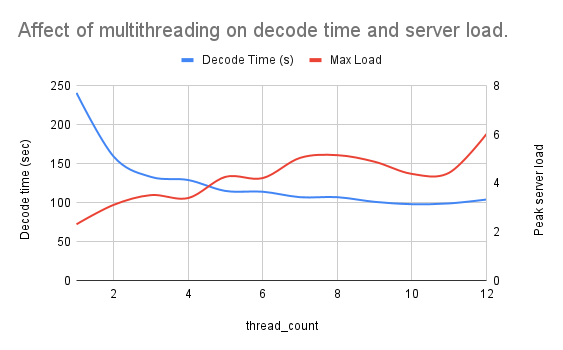
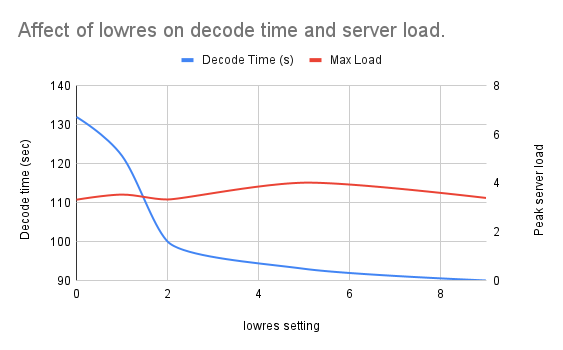
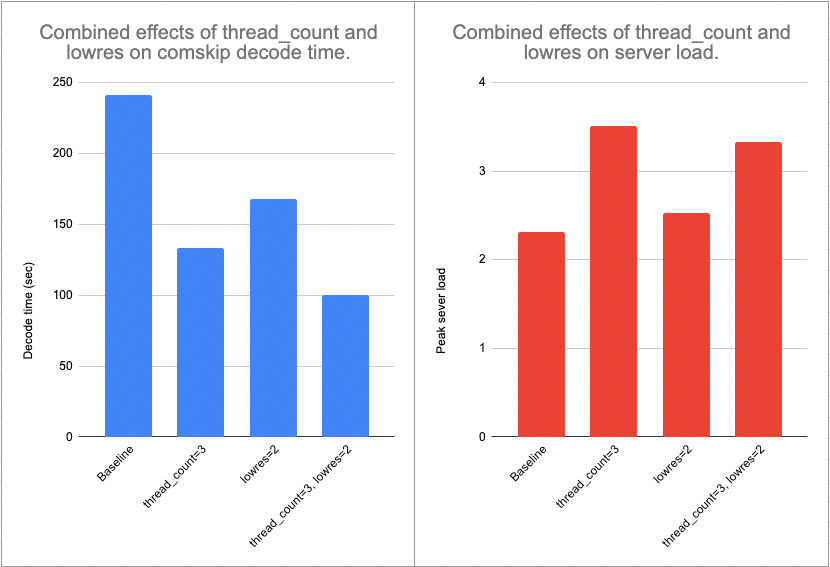
Performance testing 1: Multithreading and low-resolution decoding I've done quite a bit of performance testing and optimization in the last few days. Herein I present my findings with two comskip parameters mentioned above by @TMCsw: thread_count (specifying the # of processor cores to use at once) and lowres (decoding the video file in "low resolution" mode). Test environment Hardware: Intel NUC10i7FNH NUC 10 Core i7 with 32GB RAM and a 4TB SSD. # of cpu cores: 12 @ 1.10GHz OS: Ubuntu 20.04.3 LTS (64 bit) Test file 61 minute show recorded with my HD Homerun Codec: 1080i MPEG2VIDEO Resolution: 1920x1080 Framerate: 29.97 Bitrate: 8,139 kbps Bit Depth: 8 bit Pixel Format: yuv420p Test procedure and data collection Here are the steps I took for each test. Record the server load by running the following command from a terminal window (terminal A): while true; do uptime >> '/home/username/Downloads/uptime.log'; sleep 1; done In a second terminal window (terminal B), modify comskip.ini by adding the parameters below. In my case, I tested variations and combinations of the following (where X and Y are an integer between 0 and 10): thread_count=X lowres=Y Run comskip in terminal B. When complete, terminate the uptime command in terminal A. Record the following data in a spreadsheet: decode time (from terminal B). peak 1-minute server load (from uptime.log saved in step 1. Delete the contents of uptime.log file and return to step 1 to test a new parameter. Note: Most of the data below is simply the result of one test (n=1). Anecdotally, identical parameters produced very similar results within a few percentage points of each other. Interpreting the results The two metrics I followed in this test were the total time required for comskip to complete (the decode time), and the server load. My server generally operates at a load of 1.2 when not recording a show, detecting commercials, or transcoding video. I have noticed that Emby works well at a load of 4, but I am hesitant to push the load above this for fear of affecting overall server performance. For a full discussion of server loads in Linux, this is a good resource. For most folks, having fast commercial detection without a big impact on server load is ideal (especially true if your server has a loud fan!). My goal is to make commercial detection as fast as possible while keeping the peak server load around 3. Results Note: All the graphs below are color-coded: blue represents decode time and red indicates peak server load. Multithreading I first tested the effect of enabling multithreading, or using multiple CPU cores at once, to detect commercials. As shown below, a significant reduction in decoding time was achieved when thread_count=3 was added to comskip.ini. Only marginal improvements occurred with additional cores/threads, while server loads trended upwards. I concluded from this data that thread_count=3 was best for my system. Lowres I don't really have a clear understanding of how the lowres parameter affects comskip performance, but I imagine it has to do with how carefully it examines each frame of the video. In any case, the data was clear. As shown below, increasing lowres did not increase the server load in a consistent way. However, lowres=2 dropped the decode time by about 30% (remember, thread_count=3 was held constant in these tests). Note that lowres=10 automatically sets this parameter to the best value. In my case, the data using lowres=10 (not shown) was a very close match to lowres=2. I concluded from this data that lowres=10 (i.e. lowres=2) was best for my system. Update 2/25/2022: The lowres=10 is great for performance, but the accuracy was not appropriate. I adjusted to 5 with much improved results, but eventually removed the parameter entirely. Multithreading + lowres As a final test, I compared the individual effects of lowres and thread_count to the combined effect of both. Consistent with the other data presented, thread_count=3 and lowres=10 had signifiant individual impacts on decode time. Together, the two parameters produced a nearly 60% reduction in decode time. Server load increased 44% under the same conditions. However, the peak load was still close to my desired threshold (3). Importantly, the higher load was short-lived. Conclusion I concluded from the data that lowres=10 and thread_count=3 was best for my system and I'll be adding those parameters to my comskip.ini file. Next steps In my next analysis, I'll be looking at server performance when running comskip as a post-recording process compared to running it in real time as recordings occur.
 1 point
 -
HI, yes we can add this for the upcoming 4.7 server release. Thanks.1 point
-
Cause, I got lot of libraries and I don't want to bet I'm faster than the system to start a scan.... And , IMHU, for repeadted tasks, a good SQL sentence with SQLiteDatabrowser is a way faster than clicking in the browser....1 point
-
This. I also do not use Emby Connect. Everything is on my own domain, on my own server, in my own basement. Everything works as it should.1 point
-
Other details, I try to change languagge, from Italian to English just to see if something change, following the screen , I see an error message, maybe it will help you .
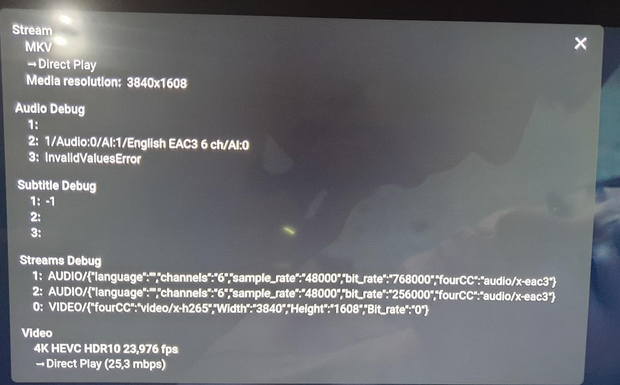 1 point
 -
Ok , now try and put the result.1 point
-
Hi, yes the plugin is using .org.1 point
-
I don't see why not.1 point
-
Can you please try this version that is attached here. What we need you to do is start playing, then open up the stats for nerds features. We've added additional information to the display to help us identify the problem. Once you've got stats for nerds open, please capture a screenshot or picture. Thanks. tizen.zip1 point
-
Nice tip, haven't tried that!1 point
-
Hey there, Is there a way to batch edit or global change the update rate? I currently have over 300 Smart playlists set to live. and it is really starting to slow down emby. Is there a way to edit all of them to say once per day, without doing them individually?1 point
-
Thanks. To be fair I think its a problem with the browser not supporting hevc. That said I just discovered emby theatre app for windows and its working flawlessly. https://emby.media/emby-theater.html1 point
-
I'd forgotten them. Seems to be working fully now. Thank you.1 point
-
First of all this is for "New Releases" which is distinct from "Date Added" ie. a 1932 movie downloaded today would show in Date Added but not in New Releases. I'm trying to create an equivalent experience for my users who have come from Plex where I had a number of collections of content for them to choose from (when you have 6,000 movies and 15,000 episodes of TV stored it becomes much harder to decide what to watch ) By way of example here are some of the auto collections I was building under Plex before my move to Emby (which I am VERY happy with): Oscar Nominated Movies 2022 Popular Movies (via IMDB) Popular Kids Movies (via IMDB) Top Rated Movies 2020-2022 Top Rated Documentaries Oscars Best Picture Winners Best of the 80s / 90s / 00s / 10s1 point
-
The good news is that Package Manager on Synology should be quite accurate now and be able to tell you when updates in the catalog are available. You should also get a notification right on your Emby Dashboard as well. New releases will almost always be available on our website before the package center due to logistic but it will not matter where you install from. One release could be downloaded and manually installed while the next is done through Package Manager. You can flip back and forth at will.1 point
-
Thank you, I will do that1 point
-
What @Happy2Play said makes for quick loading. The downside for you is having to edit 32 libraries to turn everything off then back on again after it's done. You can make this a bit easier by installing the Server Backup Config Plugin, setting it up and taking a backup of your configuration right before you edit those 32 libs. That would allow you to just restore the library settings quickly after it's done loading everything. That a whole lot of libraries for 13TB of media. I've got about 6 for hundreds of TBs as I think having only 1 Movie, 1 TV Show, is easiest to navigate. Or maybe I'm lazy and just don't want to think to much at the home screen. LOL1 point
-
1 point
-
Yep, its really just the syntax of linux that sometimes give me pause... understanding most of the variables/switches, etc. Give me an old dos machine and I'm golden. I usually google that stuff so I can see and understand all the possibilities of a command/request.1 point
-
Good morning Horstepipe... I checked my code and the request to the API was correct. So, I posted a request on the API forum asking if the API was working properly. Luke said the API only returns one result. He further said that He would fix the problem in the next Emby release. Vic1 point
-
1 point
-
https://github.com/trifleneurotic/EmbySub1 point
-
I did another install, recreated the libraries and reinstalled the apps on the devices. Not sure which of these solved the issue, but it is working now. Thanks1 point
-
Hi, that's how it currently works but we can add support for this for the next release. Thanks.1 point
-
Or none of the above1 point
-
Hi, there is currently no way to exclude epg content other than I suppose parental control, but more options are possible for future updates. Thanks.1 point
-
For c# development, check out early videos from:Tim Corey and also Jamie King on YouTube. Tim taught me almost everything I know about c#. Jamie King is hilarious to watch. For css/html, for the front end check out: Kevin Powell on YouTube. For JavaScript check out: freeCodeCamp, JamesQ Quick, and Developing with Mosh. But, FreeCodeCamp can teach you a lot for free. And also, trial and error.... A lot of trial and error. Console apps are the easiest way to learn. I can also answer any questions you have. I became intermediate in coding. Not a pro, but I learned a lot.1 point
-
Yep that’s what I was referring to above “sort newly added items” - no difference1 point
-
We'll take a look at it. Thanks.1 point
-
What is your Roku audio settings? Your Roku is not showing support of DD at all which is odd. VideoCodec=h264,hevc,mpeg2video&AudioCodec=aac,mp2,mp3,flac,vorbis,lpcm1 point
-
I think it is necessary to remove information from site : https://emby.media/synology6-server.html section Beta , about DS215J : "ARMv7 - Supported models: armada375: DS115, DS215j" Because file is not correct for DS215J , it is not "mono".1 point
-
That is the thing as all items still somewhat get queried from providers even if you have images and metadata with media. On a rebuild I disable all providers and import my existing metadata then enable providers.1 point
-
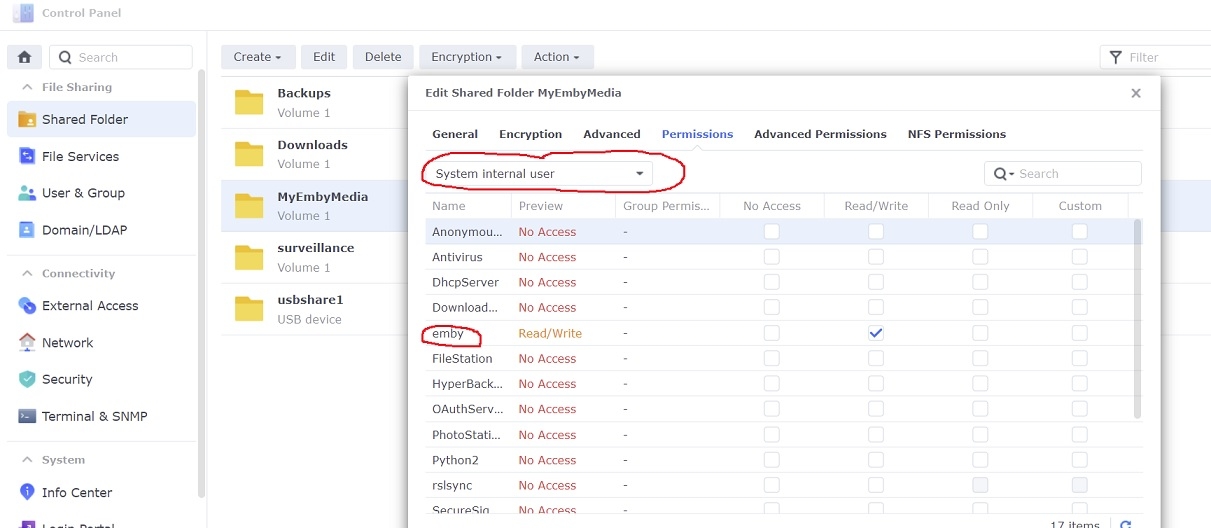
Adding libraries to Emby server is a little different under DSM 7 in that setting permissions for the shared folders has changed some. If you've ever tried to add a library to Emby and it wouldn't accept, then the permissions might be wrong 1. Give emby read/write permissions to the shared folder Open Control Panel...Shared Folder in DSM on your NAS Select your shared folder...Edit... and then under the Permissions tab select the dropdown box and change it to "System internal user" Check Read/Write next to the user 'emby' and then click Save 2. Add libraries in Emby server Settings...Library...New Library Select the library type and enter library folder information Example:
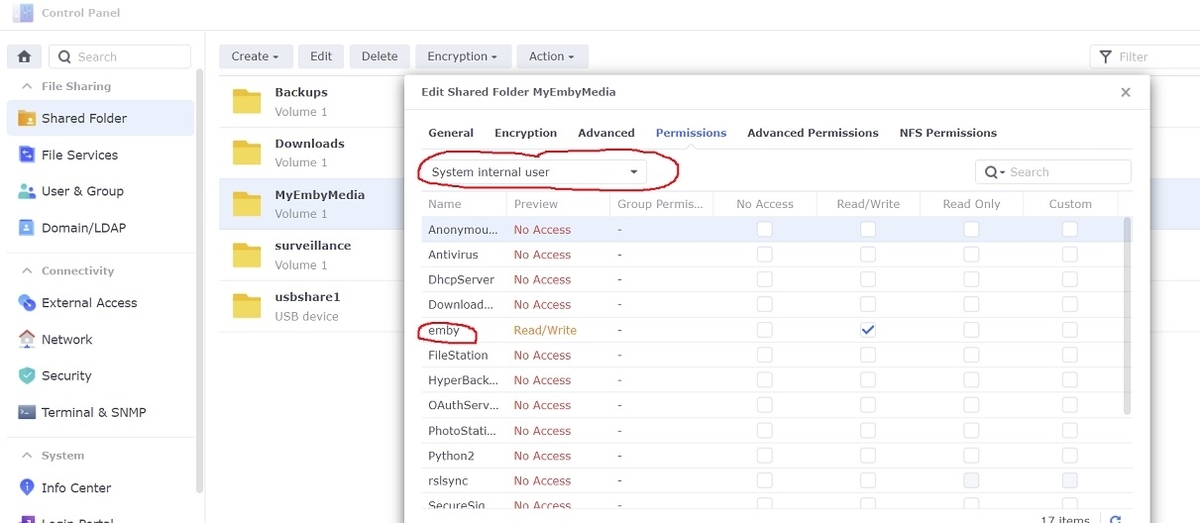
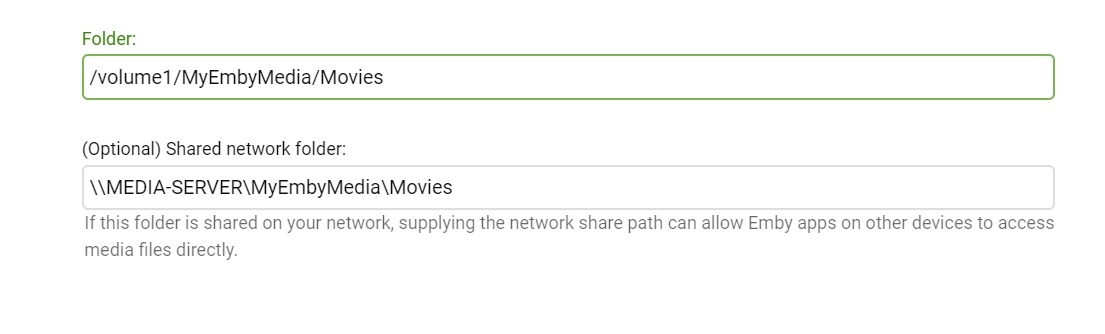 1 point
 -
There might be one: You could try the latest beta version and check whether you'll see some QuickSync entries on the Transcoding configuration page (after you have set the mode to "Advanced"). Then, uncheck all VAAPI ones and check the QuickSync ones retry transcoding! The acceleration capabilities of your CPU are rather limited, so I can't say whether that would work, but it would surely be worth trying.1 point
-
I want to suggest you to add powerful HW+ decoder in Emby Android TV client app. In this way, a totally fluid reproduction is ensured without jerks and without jumps in the image of all devices with the Android TV operating system. MX Player app (MX Media - formerly J2 Interactive), managed to achieve wonderful results in fully smooth playback without stuttering or skips on Android TV images with its powerful HW+ video decoder. Do you know if the internal player in the Plex Android TV client app has an HW+ decoder? It is that the Plex client works almost identically to the MX player, without jerks and without startles in the images. Thanks. greetings1 point
-
Hi guys, sorry for the delay. Just turned my NAS back on so I should be able to test and report back soon.1 point
-
Hi. Its just that TV episodes are not usually associated with a "Cinema" experience. We can look into adding them.1 point
-
Emby for LG TV's 1.0.33 has been released. Stay tuned to the blog for the release announcement.1 point
-
Just as a follow up - the docker worked mostly fine, but I had issues with GPU passthrough. The 'Truecharts' repository has Emby within, and that worked with a single button press - it also allowed GPU Passthrough to work without a hitch, meaning my NASbox (finally) hardware transcodes anything my users throw at it This follow up is mostly to help anyone who follows - I know my particular setup isn't exactly common.1 point
-
This isn't a cosmetic issue about whether or not to show the resolution (although I agree that only bitrate is really needed as a choice) From what I can tell there seems to be something up with the calculations used to determine how to scale the transcoded video for certain sources. For the source video used in my example, the resolution drops straight from 1920x806 to 720x302. This is an equivalent drop straight from 1080p to 360p with nothing in between. (remember 720x302 is is not 720p, this is 302p.) I would expect a more gradual decrease in resolution as the bitrate is reduced - e.g. 1280x538 as the next step. (720p cropped to match source aspect) When transcoding a video with a more standard source resolution (e.g. 1920x1080), this works fine and there is a progression of resolutions that makes sense: 1920x1080, 1280x720, 720x405, 640x360 etc etc1 point
-
The "vulnerability" in itself is that a non-admin can get to any admin section (regardless of what they can see or change).1 point
-
For an individual user, i can see that but an admin user should be able to change any user's password without knowing the current one.1 point
-
Absolutely for this feature. This is badly needed for IPTV especially. No reason why it shouldn't be able to "combine" channels from multiple IPTV M3Us just like it presently does for HDHomeRun tuners. I'd actually love to see this combine sources from EVERY source input with the ability to set priorities. Thus you could have ABC as an example available in MU3(s), OTA and cable and set them by priority to use OTA first, then cable, then IPTV(s). This would also help down the road when proper conflict resolution is added as well. But as a "quick" fix having IPTV work the same as HDHomeRun by pooling them together as ONE SET of channels is fine!1 point









.thumb.jpg.d002242e0c7e0c5339181325e5a3b60c.jpg)



.thumb.jpg.21d888786f2104b4f688825203ce7598.jpg)