Leaderboard




Popular Content
Showing content with the highest reputation on 02/15/22 in all areas
-
HI, this should be improved with the upcoming releases of both the 4.7 server and Emby Apple TV app. Thanks.3 points
-
Hi, This has been talked about a lot on the Apple TV forums, but there is no formal request for it. So I do it here, please add support for MKV HEVC HDR playback using Apple TV (without tone mapping). I don't care what technique you use. Either adding HLS fPM4 support to the server or improving the MPV player. I anticipate that I am not satisfied with you saying that Apple TV does not support that, since most players on the market support it. Thanks2 points
-
https://www.nvidia.com/en-us/geforce/forums/shield-tv/9/485389/shield-experience-upgrade-901-released-21522/2 points
-
Shield Experience 9.0.1 has been released.2 points
-
It's a recursive scan, I would imagine that it would scan the first one, then save it, then it would scan the next source. Because they share an ID, most likely the second source would save over the first. Or, it only grabs the first file path, because we don't iterate the media sources. I'm going to try this today, to see.2 points
-
A lot people here also download movies from amazon, netflix, hulu etc. there are also no real working chapter markers on a lot of them. And some netflix produced shows have amazing long end credits2 points
-
I moved from Plex to Emby and even though I think Emby is superior in its flexibility there are some things I like better with Plex, especially in terms of its looks. This theme is trying to fix that by making it a bit more similar to Plex but with some, in my opinion, improvements. The CSS is attached to this post for anyone interested and below are some screens to show it off Good to know I only use Chrome so I can't guarantee this CSS works as expected in other browsers. If you want the sidebar menu to look like in the screens, make sure to pin the sidebar. Watched badge/banderoll is inverted which means that the badge will not be shown if media have been watched, like in Plex. For desired look, please use the "Dark" theme for both Theme & Settings theme in the display settings. Emby-Stable-style-v3.6.txt





 1 point
 -
Thought I'd stick my css up here. Mostly its actually from Happy2play, Penkethboy and others who OK, I admit, I can't remember. Anyway, bear in mind, there's undoubtedly bits that have been done in a weird way (my stuff), bits that don't work any more (my stuff), bits that accidentally get applied twice (ditto), alternative ways to do the same thing, variations in general of similar things. And a few bits at the end not much good for anything, but I left them there anyway. So its not in the same league as The Plex Inspired Look, and others... But it might possibly count as a theme. Hope I haven't posted this somewhere else already... Don't say you weren't warned (full stop) EDIT - mostly tested in Firefox, though hopefully OK for Chrome, and its only really set up for the Dark Theme for both Media and the Dashboard. EDIT 27 Dec 21 - There's a slightly newer version a few posts further down... EDIT 06 Jan 22 - Another (third) version added here (dated 06 Jan 22)... EDIT 06 Jan 22 - fixed (I hope) bug in previous 06 Jan version, well the one I spotted anyway... EDIT 15 Jan 22 - appears the blur effect I added no longer works (temporarily I hope) in Firefox. Chrome and Edge seem to be OK... EDIT 23 Aug 22 - bit of an update, fixes a few bits, adds a few things, can't remember what, hopefully an improvement... Emby css for posting 23 Aug 22.txt Emby css for posting 06 Jan 22 mod.txt Emby css for download.txt1 point
-
CSS + Netflix Billboard Clone + Danmaku (bullet chat/moving subtitle comments) CSS modified from the forum, fixed bugs and parts that didn't work for me. Added front page Netflix Billboard, which is dynamic and updated according to the content provided by the backend server. Use Canvas to make a bullet chat system and pass in comments through an external open API from DandanPlay.1 point
-
Alright, will wait. Thanks for the quick reply.1 point
-
Thanks for registering. Unfortunately, new registrations can take up to 24 hours before they fully activate. If you still don't have full access after that time period, please let me know. I've gone over this with the Emby team a few times, and there doesn't seem to be anything I can do about it from the plugin side.1 point
-
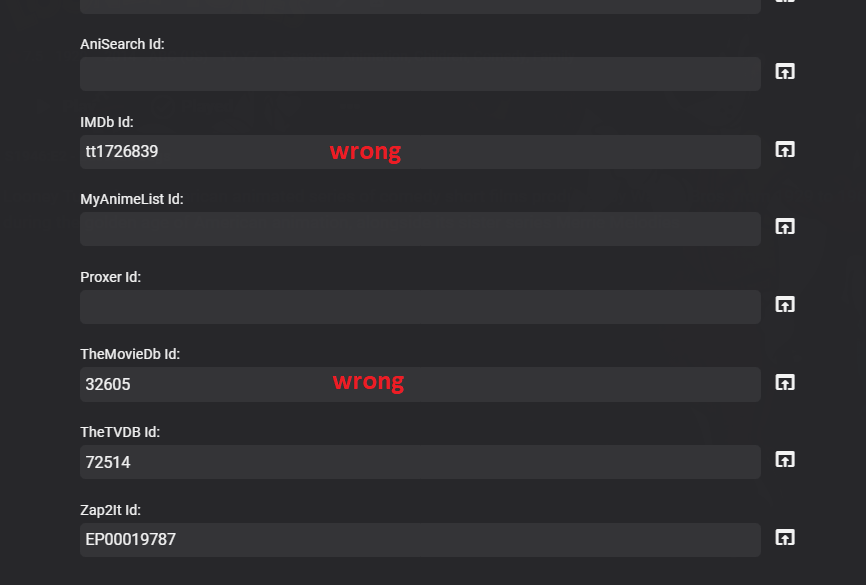
This could be used when there is a miss match of data between providers by locking to a specific providerid and being able to lock to a empty provider. Say Looney Tunes as you have to lock the entire series or you get mismatching id. So technically if primary provider does not have all info then secondary will be completely wrong. An option like this is needed or per show provider options. This this would probably be the easier route.
 1 point
 -
If it actually has a season and episode number then that will provide uniqueness. If not then the current date will go into the file name.1 point
-
Both bug fix for me. Thx1 point
-
OK so what we'll do is ignore this value, and that should prevent this issue going forward. If you're on Emby Server 4.6, this change will be in the upcoming 4.7 server release. If you're on the 4.7 beta channel, I'll have an update to the Emby Guide Data plugin published shortly. Thanks.1 point
-
Just circling back to close the loop on this. So even though my TV has eARC/HDMI 2.1 and can can pass TrueHD, my receiver is only ARC/HDMI 2.0, so it was triggering the transcode. Solved by adding a Shield Pro > Receiver > TV. Everything direct plays now. Thanks for the insights!1 point
-
Thanks, the update solves this!1 point
-
This will be in the upcoming 4.7 server release. Thanks.1 point
-
Hey Luke, So I was trying to filter base items on it's tags for the SmartPlayList, but I have built the logic into the SmartPlayList Plugin to handle the inheritance and all working. Thanks for this.1 point
-
Hi, there is no way to monitor this, but we're happy to help you resolve playback issues: Thanks.1 point
-
And then run a guide refresh again after that. Please let us know if this helps. Thanks.1 point
-
We'd have to look at an example, but this should be improved following the Emby Server 4.7 release as well as release of the updated Emby Apple TV app. Thanks.1 point
-
Additionally, the way it is now if you have multiple clients watching the same stream, Emby can send that stream to all of the clients while using only 1 connection to the IPTV source.1 point
-
@levander I have added the country and a checkbox when deleting to retain the generated playlist. Release is good to go, just seeing if there are any other items I can squeeze in as I don't want to release to often, that could get annoying , for now you could just "turn the smart list off" in the management section to stop it from generating. @Tangsgod well ... yes and no :D, I was calling the refresh metadata when generating the collection, which is what I suspect was causing the issue, although I did not see the images disappear in my tests at home. BUT in saying that, there is no reason for me to be calling that in the first place. So removed it. Let me know if you see this again. @BagulDo you perhaps know the related metadata field?1 point
-
Count me in that group. For IntroSkip and Commercial Skip I prefer to press Play then put the remote down and enjoy the show.1 point
-
If the player supports the remote control commands from Emby then yes it should.1 point
-
So the "next episode" popup? Is there any thought of extending this to movies, and using it for deciding when to count something as played and when to count it as resumable? Shoah is nine hours with only a few minutes of credits, so it counts as played when a ton of the movie still remains. Shorter films get to the start of the credits, I exit, and it still lets me resume them.1 point
-
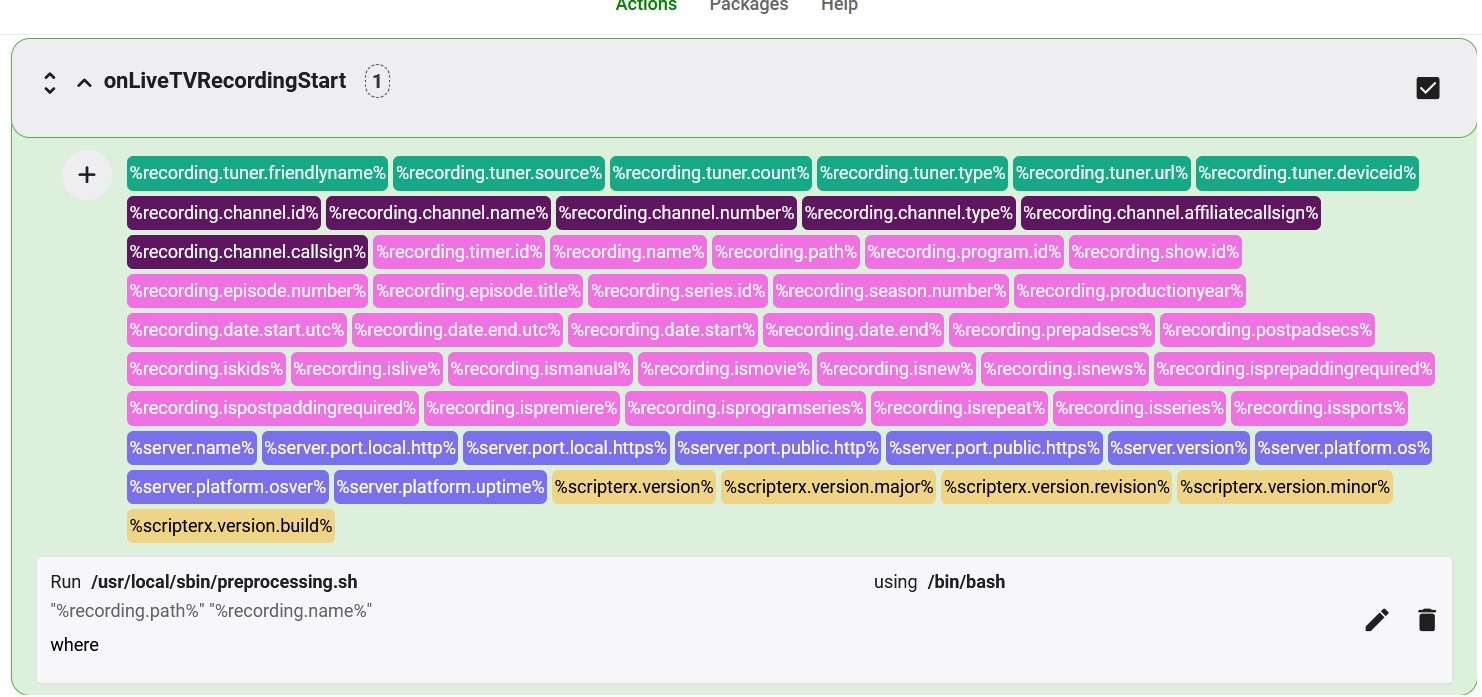
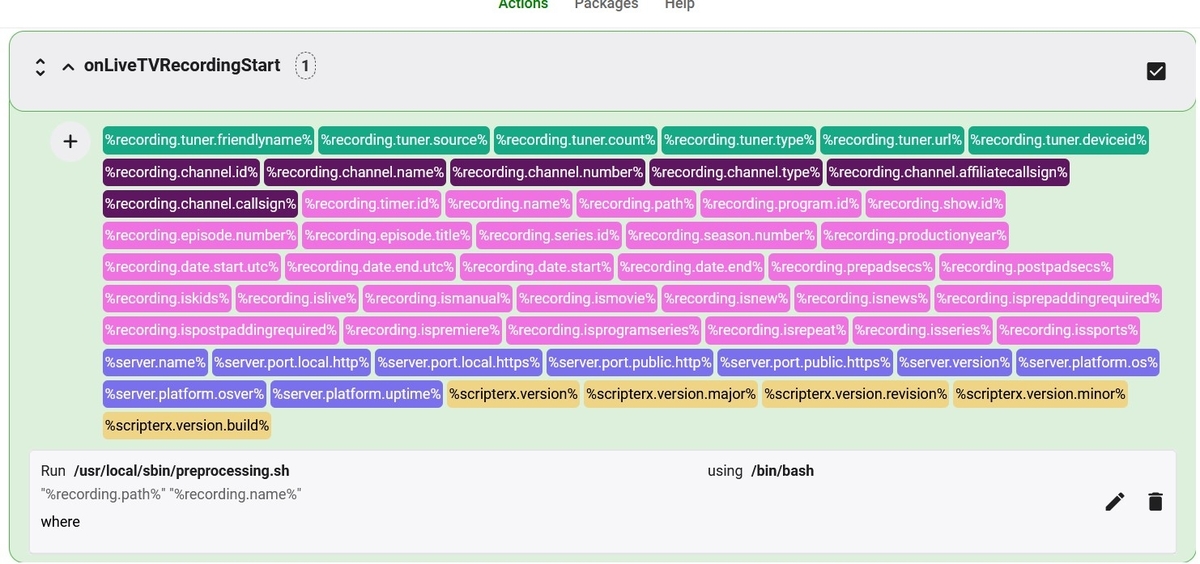
I have ubuntu server and I use a bash to start comskip. See the enclosed image. the command in scriptx is : Run /usr/local/sbin/preprocessing.sh using /bin/bash "%recording.path%" "%recording.name%" In my bash script I do some validation to use different comskip.ini and logo file according to specific show. Hope this help
 1 point
 -
Dont worry, they are still looking into it1 point
-
Keeping this topic live. Bumping up for the devs to notice!!1 point
-
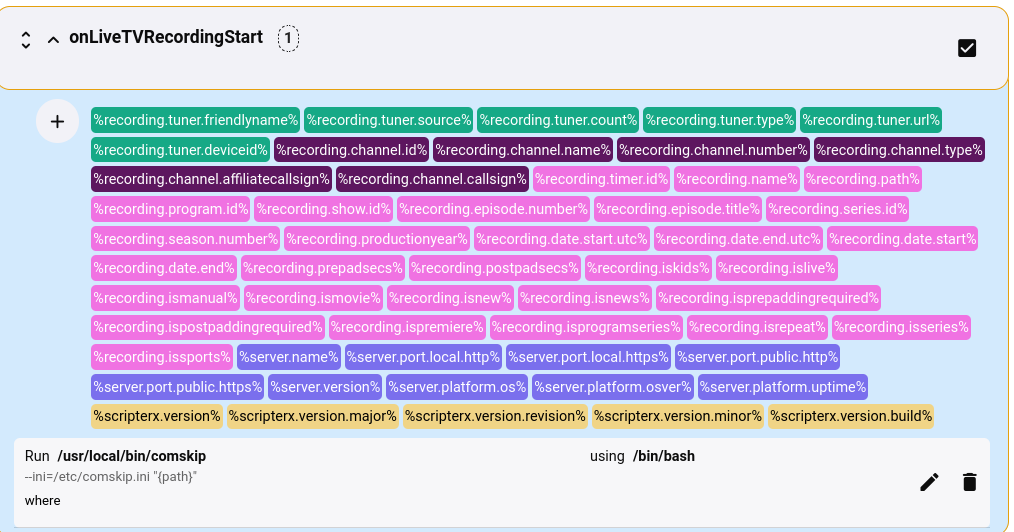
Which Linux? It may make a difference for the shell. Also tried haven't it yet, but based on the screen shot in the above post, this "should" work on Linux Mint. Ooops! Replace "{path}" with %recording.path% --ini=/etc/comskip.ini "%recording.path%" 2nd edit -- Doesn't seem to be working, but then I don't use scripter-x and the wiki page seems to be offline.. Sorry I can't help further. If I get it to work, i"ll update.
 1 point
 -
You are really advanced on what is done in personal multimedia server. I have tried everything. Congratulations! Proof that perseverance and a job well done produces results!1 point
-
@BillOatmanRuns fine from shell, and as a post processing script. BTW, useful batch script for processing existing files in linux: https://forums.nextpvr.com/showthread.php?tid=618311 point
-
Hi Josephus, could you share css and plugins used in your skin please? Love it... Thanks1 point
-
i raised the same issue over a year ago - and its related to the api not "caching" api calls - usually not a problem but when the call takes a lot of "work" you have to put in a delay or things go missing. Dev's said this was not possible even though it is very reproducable etc etc1 point
-
I noticeD this started happening several days ago as well. I'm not sure if it was the 8th, but that sounds about right. I use Chromecast. The problem actually started between episodes of a TV show. One ep was fine and the next was tiny, it was actually on the jump between seasons if that matters. I assumed it was just something with that ep/season and ignored it. It's happened on everything sense, I've changed the CC caption size to max in the server, and then restarted the server and chromecast, no change. I've manually reviewed a few of the CC files and there's no font/display info in the files.1 point
-
If you did a completely clean install, it should have been making the subfolders by default. If it isn't, there's a parameter you can set in your "\EmbyServer\programdata\config\system.xml" file: <EnablePeopleLetterSubFolders>true</EnablePeopleLetterSubFolders> I'm on a QNAP NAS (Linux), so the QNAP OS doesn't let you browse to the location where your installation folder is, but on Windows you can use WinSCP (a free app) to get to it and edit the file. YMMV. Note that (I believe) you must still be on a beta version of Emby, as I don't think the code has made it back into the main release yet. No, both folders are not needed. As soon as person has a TMID number linked, they'll be using the folder with the ID appended. You can just delete the non-ID folders, or if you really care about the images, you can compare the image files and pick your preferred image and stick it into the ID-appended folder first. It's a pain, but sometimes your old pic is better than the new one and the old one is no longer available online.1 point
-
@Luke could someone please have a look at this? It kind of makes using Chromecast unusable for everyone in need of subtitles. Thanks in advance.1 point
-
Same here with Chromecast, Chromecast Ultra and Chromecast on Nvidia Shield.1 point
-
Possible reason? - https://9to5google.com/2022/02/08/pixel-6-wi-fi-issues-february/1 point
-
Here the same problem with Google Chromecast (ultra).1 point
-
Here the same problem with Google Chromecast (ultra).1 point
-
Same issue for me : Subtitles appearance ignored by chromecast Black screen with subtitles when video stops I have tried without success : Updating emby from 4.7.0 to 4.7.23-beta Cast from my phone ( android ) Cast from my computer ( chrome ) If this help : Issue started : Between 7th and 8th February. Chromecast : "Chromecast with Google TV"1 point
-
Hello crissan, ** This is an auto reply ** Please wait for someone from staff support or our members to reply to you. It's recommended to provide more info, as it explain in this thread: Thank you. Emby Team1 point
-
New release in first post.1 point
-
I've updated the main post with a updated version for Emby Beta (v.4.7.0.20) if anyone is interested It looks the same but with some small fixes here and there.1 point
-
You can either: 1) Move all shows out of genre subfolders one level up and leave drive as library root folder or 2) Add each genre subfolder as separate library path via "+" sign.1 point
-
That's not true: HDR passthrough is only supported by Apple TV native player (MPV player does tone-mapping) MKV direct playback is not supported by Apple TV native player, so direct streaming is required HLS HEVC streaming in Apple devices requires HLS fMP4 Emby Server does not support HLS fMP4 So, HEVC in MKV container is full transcoded using Apple TV native player. I hope it is understood, this is an Emby's limitation not Apple TV.1 point
-
Hello, Is there an update on this feature? I would love this during NFL season! Thanks!1 point
-
+1 (x10000000000000.........) I do prefer the native Apple TV player over MPV - it seems to have better image quality (besides also allowing for frame rate matcing ).1 point