Leaderboard




Popular Content
Showing content with the highest reputation on 02/06/22 in all areas
-
Complete novice to Emby here, only been using it for a few weeks now, and this plugin for slightly shorter than that. I was expecting some inconsistencies or smaller issues, but I've been blown away by how great it works. Thanks so much for the huge amount of work you're putting into this project. If you ever need help with anything, testing or such, I'd be happy to pitch in.3 points
-
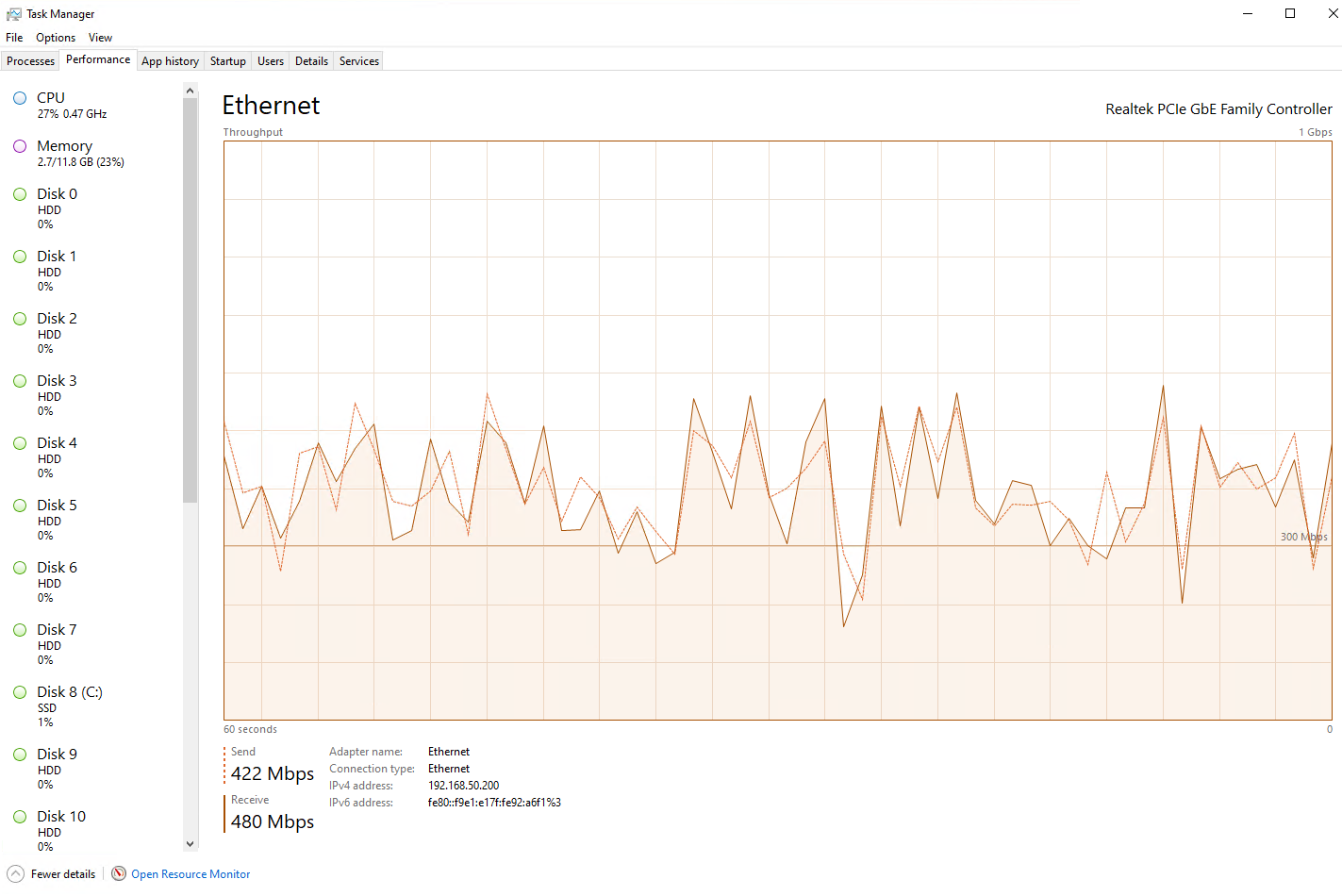
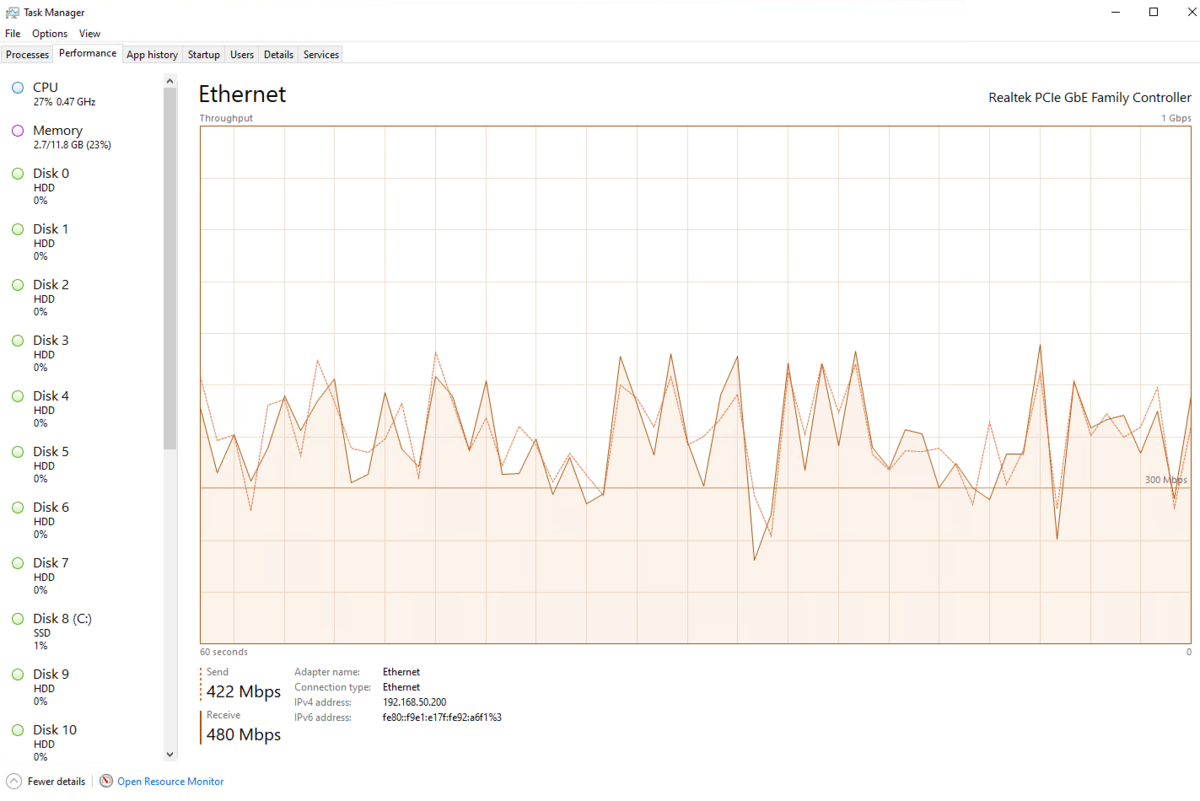
Hmm - tbh not what I predicted, but SMB access to the Server and then HTTP delivery was faultless ... 6 x 4K Remux streams running on a dual core i3 CPU @ 1.2Ghz - that's a full Duplex Ethernet stream averaging between 400-500Mbit. Local disk I/O is 0% - as this is all running from a 'NAS' (a Windows File Share). That is pretty impressive tbh. I have no idea why this is working better than direct file access, maybe emby is more efficient with data in the network stack as opposed to local disk I/O ? Who knows. The last test I'd like to do is run Emby on the Shield itself - never done this before. if that chokes, then we know the issue is likely the Shield itself as opposed to the 'HTTP' vs 'SMB' debate ... More to follow ...
 2 points
 -
We will look at making the default the cancel button. Honestly, I thought it already was...2 points
-
Okay, we can look into that for those since they do not auto renew. Thanks.2 points
-
We will be proving the use case for DFA - if I'm reading it correctly, your tone in this thread suggests you think there is no technical need for it and ultimately want to remove it. A lot of us beg to differ. Once we have agreement on the need for it or not, then, assuming we do - we can move onto the next stage of why it does not work in Emby on Android 11 when other apps have no issues with it. It pointless moving onto the next stage if we genuinely have no need for it, but we can only make that decision with use cases.2 points
-
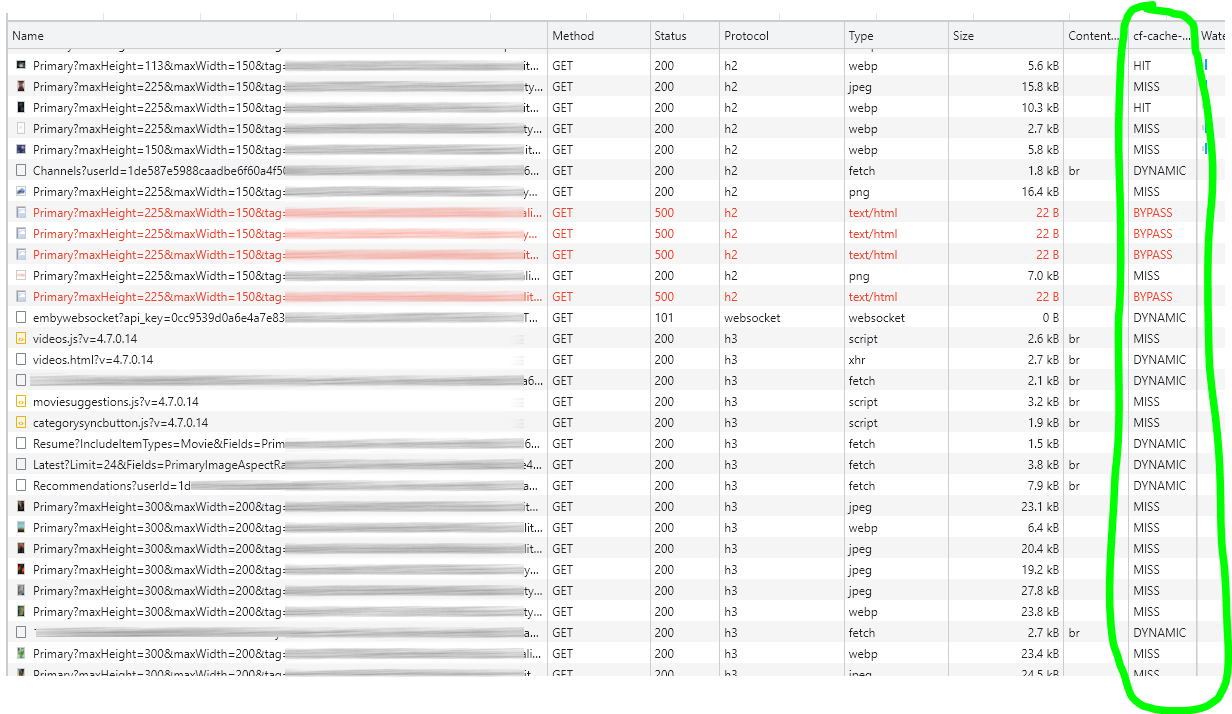
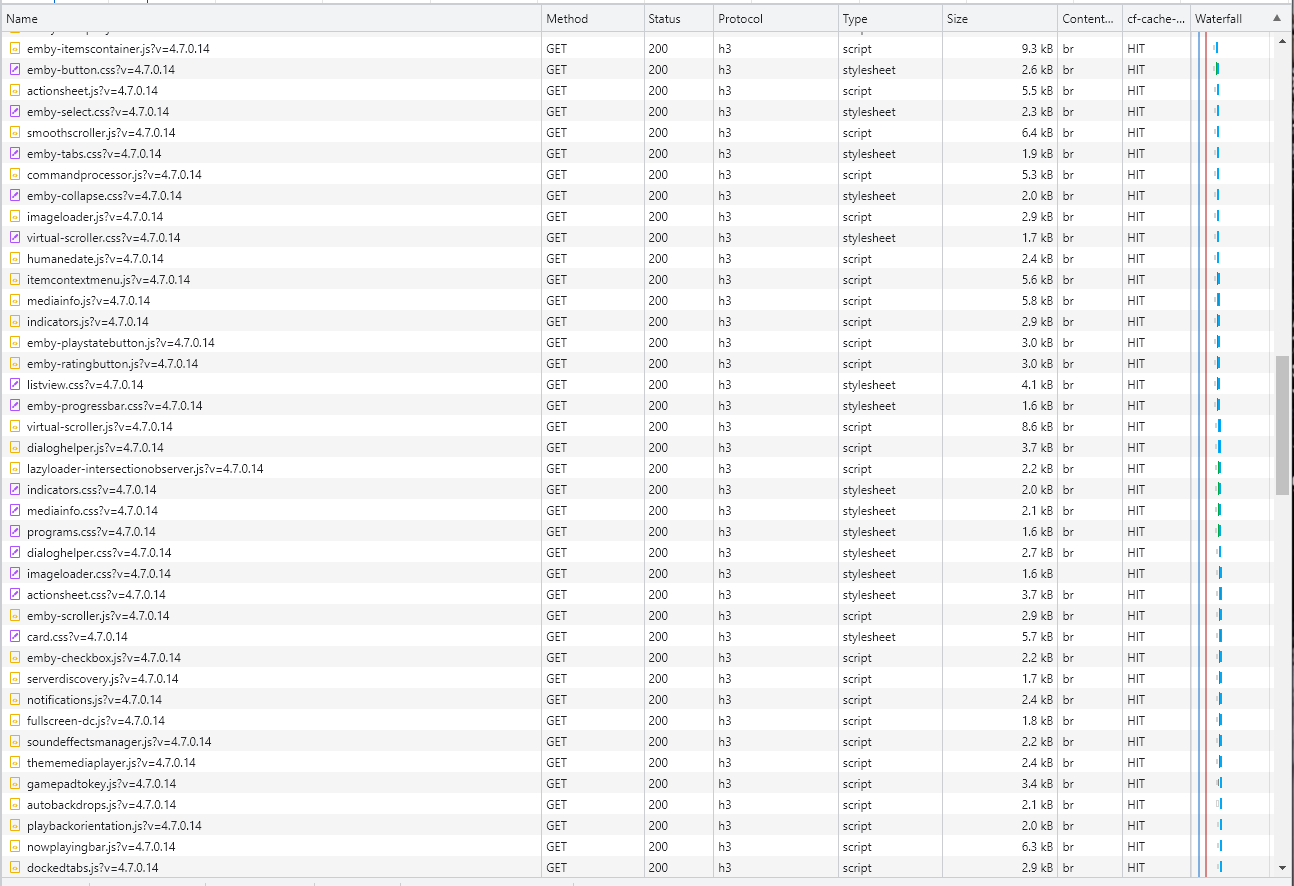
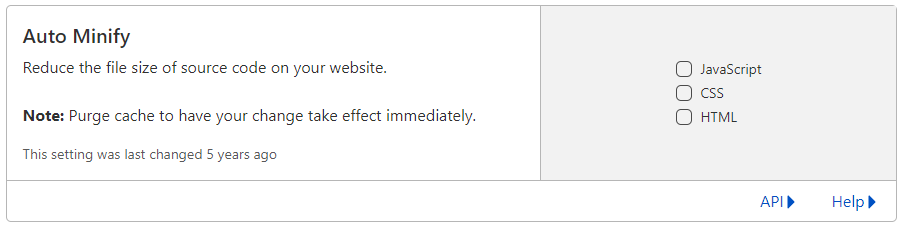
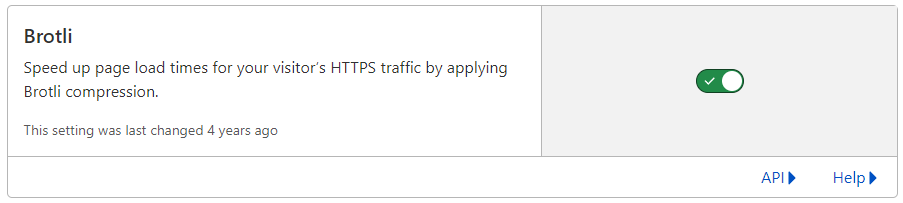
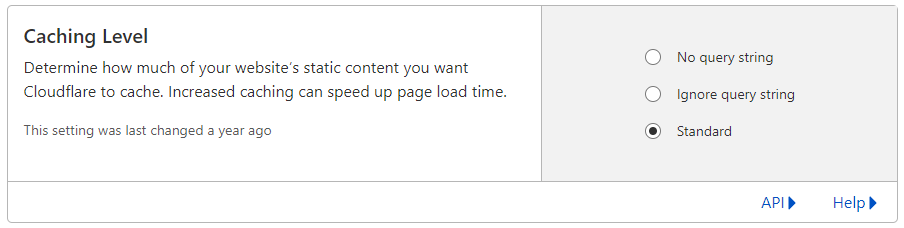
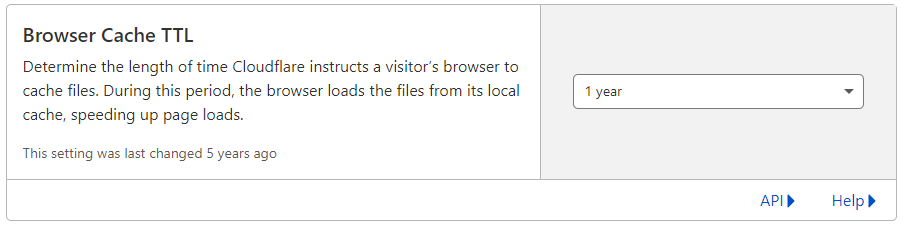
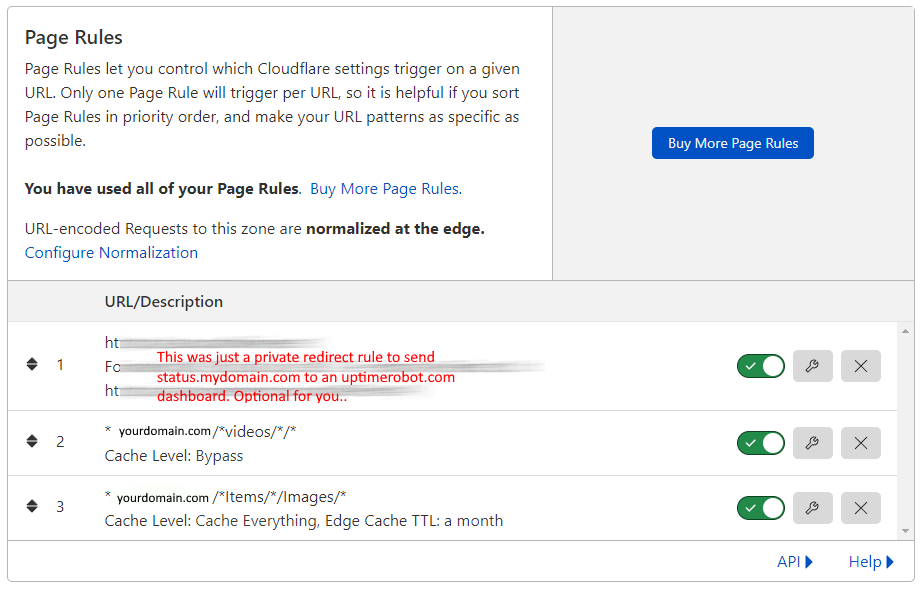
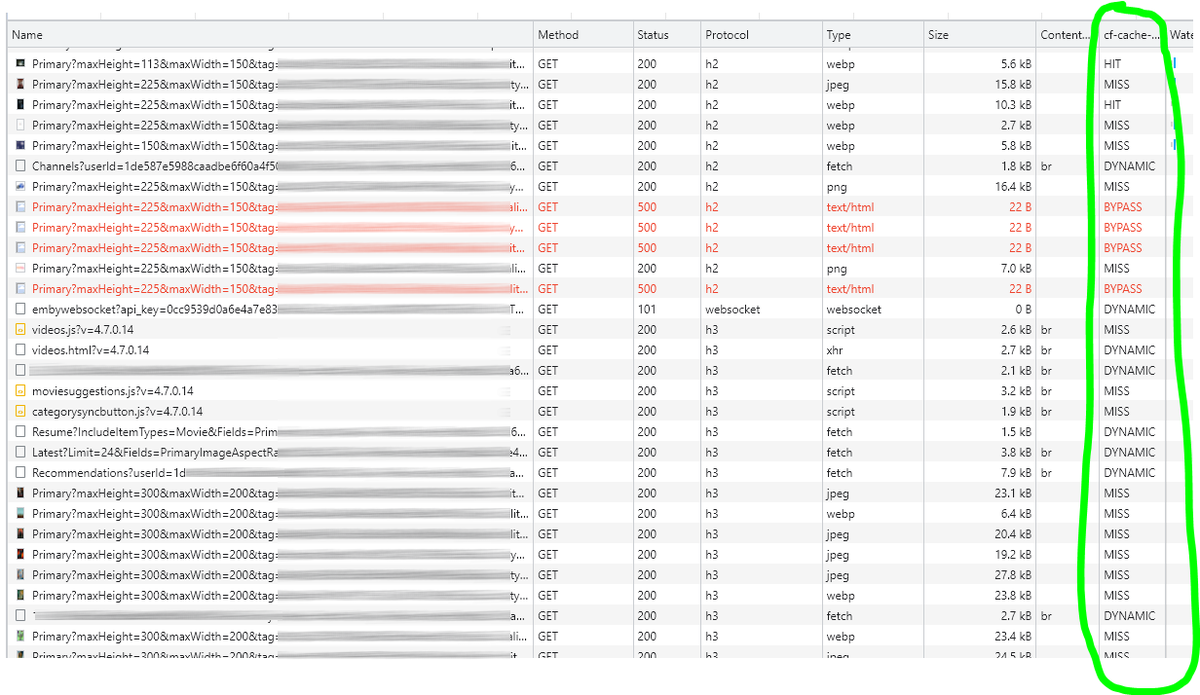
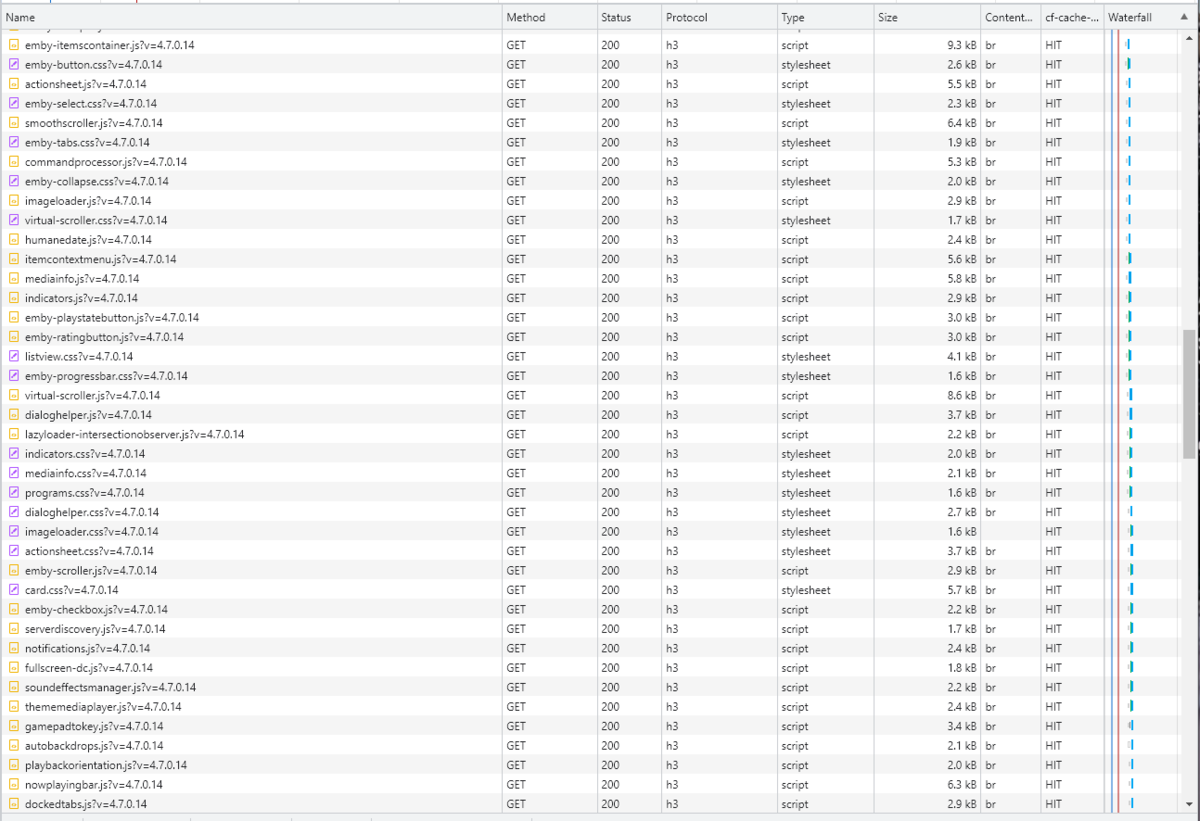
Cloudflare and emby Config Version 1.0.0 Last Update 02-25-2022 Update by Pir8Radio ** UPDATE: I AM HEARING OF EMBY USERS GETTING VIDEO FILES BLOCKED WHEN USING CLOUDFLARE (FREE TIER). IF THIS IS THE CASE, I NO LONGER RECOMMEND USING CLOUDFLARE. Even with the cache bypass rules, your video still passes through their system and is technically against their TOS. Use CloudFlare at your own risk if you choose to continue. I'll update if I get more info. Please post in this thread if you find you have video loading/playing/downloading issues while using cloudflare or have received an email from them about this. MESSAGE FROM CLOUDFLARE: Free, Pro, and Business Plans serving videos or a disproportionate amount of non-HTML content can be in violation of Section 2.8 of the Self-Serve Subscription Agreement (TOS). This will turn into a full Cloudflare how-to. Others are welcome to edit this or PM me with suggestions.. However right now I'm just going to post some recommended settings for people who already have Cloudflare setup. There are a few cloudflare settings that break emby, some break it in obvious ways, some only certain apps in certain situations.. These are the settings I found that work well as of today. I'll try to maintain this post and update the header info should new features come out, or the community discovers better settings than these. As of today, these are the settings available to us in Cloudflare FREE account: First disable the two main things that will break emby, go to the "Speed" tab then "Optimization" sub-tab. DISABLE Auto Minify and Rocket Loader! (screen shots are in the recommended state) Other options on this settings page are optional to enable, I suggest enabling Brotli compression. It's a good thing. Now head over to the "Caching" tab and select the "Configuration" sub-tab. Set your Caching settings as shown below. THIS IS OPTIONAL: Other settings in this settings tab are optional to whatever you like.. I have "Always Online" enabled, its kind of a neat feature that caches as much of your emby server as it can in case your server is down, users will at least see an emby splash screen, that's usually about it.. but its something... kind of useless otherwise.. Handy if you have other websites, it will totally cache normal html websites and users can continue to use your cached site when you have a web server outage. Next head over to the "Rules" tab. Create these two rules: Rule #2 here we will bypass caching 99% of all video. Caching the video will actually slow down the client experience. It screws with the chunks and often times has to fully cache 1 chunk before cloudflare sends it to the client, causing playback delays. Rule #3 here will cache all images on the edge servers for 30 days. We need this rule, because cloudflare only caches known file urls, like picture.jpg or poster.png emby serves up webp images with NO EXTENSION so cloudflare doesn't know to cache these items. But 99% of emby images come from the /items/XXXXXX/images directory so we will just force cache everything that comes from this URL, it should be only images. Keep in mind when you enable this it can take some time to build up cache.. emby serves up different sized images based on browser screen size, apps, etc.. so if you load a page that is minimized to a small window on your desktop emby will serve smaller sized images, if you make your browser full screen, now emby will serve up larger images and those images may load slow the first few times until they get cached too. Go below this screenshot and I'll show you how to check if caching is working. Check to see if Cloudflare Caching is working Well, how do you know Cloudflare is doing its thang'? Use a browser like chrome, or the new Microsoft edge (which is just a rebranded chrome). Open the browser, right click in the browser window and go down to "Inspect" (there is an F key for this too I forget what it is, I should add that here lol). Once the dev window pops up adjust it so you have a good view on the right, click the "Network" tab, hit the reload button on whatever page you are on so some info populates on the right dev screen. You should see something similar to this: Right click on the table header (Name, Method, Status, Protocol) anywhere, just right click the "Name" one. Go down to "Response Headers" then "Manage Header Columns". A little window will pop up hit "Add custom header..." and then add this header: cf-cache-status Now select the little sub tab that says "all" now surf your way to your emby server, and you should see something like the below screenshot. Hit is well..... a hit! this image came from cloudflare and was never requested from your emby server, saving you from sending this image to the client, saving time and bandwidth. MISS is also kind of obvious, it was a miss, either due to never being cached yet (first time Cloudflare has seen this image or document) if you hit refresh a few times, cloudflare will then cache it and it will turn to HIT. BYPASS I'm actually not sure why my server is returning server 500 errors below, this image is being called for by emby clients but the server has no image to serve, but usually you should only see BYPASS on playing video's if your rules above are correct. Or in my case, a server error will not be cached. DYNAMIC this is also a NO HIT response.. this is usually due to Cloudflare knowing this resource changes a lot and doesn't want to cache it so your clients don't get served stale data, or its a video, websocket, or some other format Cloudfare's great automated intelligence deems it should not be cached. That is the basics that will save you a lot of headache and blaming emby for things not working.. There are lots of cool options to enable outside of these basic settings above, ask questions here, send ideas that maybe I have missed that work great for you.. I just wanted to throw this up due to a lot more of you guys using Cloudflare. In the end you should start to see more "HIT" responses... and a noticeably faster loading time for the clients, less bandwidth usage for your emby server, and everyone is happy.. Well..... within reason....




 1 point
 -
Hi all, I'm the proud owner of a new LG OLED which looks asbolutely stunning. Since I do plan to keep using it for quite long I am quite concerned about burn-in. I have all the built-in protection enabled but when watching HDR content on emby the subtitles are always blinding me at full brightness. The OLED of my friend already had burn-in there after two years. Therefore it would be pretty cool if I could sett the subtiltes to be a bit dimmer when watching HDR content. Thanks for the awesome app!1 point
-
As I mention in a related post, I love the additional subfolders for Movie Extras (eg, Shorts, Scenes, Interviews, etc.)! It would be awesome to extend this functionality to TV Series as well. Specifically to add support for many/all of the same folders supported for Movie Extras, eg, extras specials shorts scenes featurettes behind the scenes deleted scenes interviews trailers As well as any additional folders that get added in the future (eg, hopefully Galleries). Support Placement of "Extras" Folders Within Each Season Folder, Plus A Naming Scheme to Link A Particular Extras Folder with a Specific Episode (eg, "\Season 1\E1 - Deleted Scenes\" for episode 1 deleted scenes): I want to clarify that it would be great if these various "extras" folder types could reside within each Season folder. So for example, within a Season 1 folder we could then have an "Extras" folder, a "Deleted Scenes" folder, a "Featurettes" folder, etc. And furthermore, that we could designate a particular folder to refer to a specific episode (eg, "\Season 1\E1 - Deleted Scenes\" for episode 1 deleted scenes). See more below, particularly why I think this would be so useful: https://emby.media/community/index.php?/topic/55915-emby-server-theater-additional-extrasspecial-folder-types-for-tv-series-similar-to-movies/&do=findComment&comment=587195 Thanks for your consideration! PS - If this is something you might like to see implemented, be sure to "Like" this top/first post (as well as any subsequent posts in this thread that highlight particular aspects of what you are interested in) -- "Liking" the top/first post helps the Devs to know how much interest there is in a given Feature Request.1 point
-
Hello again. I decieded to buy emby for fire tv. I bought it already and im happy with it. But there is one thing im actually missing. I have a movie collection created. The screen is full of pictures from the movies to choose them from there. Is it possible to change the layout from pictures to title text of the movies only? Thanks. Regards. Fry1 point
-
My movie library is formatted according to the 'simple' naming scheme as outlined in https://support.emby.media/support/solutions/articles/44001159102-movie-naming However, movie art is available only if I select a preferred metadata/image download language in the library settings [and I have selected English]. Is there a way to select the native language of the movie? .. or select the language by movie [also manually, e.g. in the filenames]? Also, some movies don't have English art and it won't show (the TMDB and IMDb are generated correctly, e.g. https://www.themoviedb.org/movie/47188-dr-jekyll-and-mr-hyde Is it possible to enable/allow art from other languages if the primary language is not available? Many thanks1 point
-
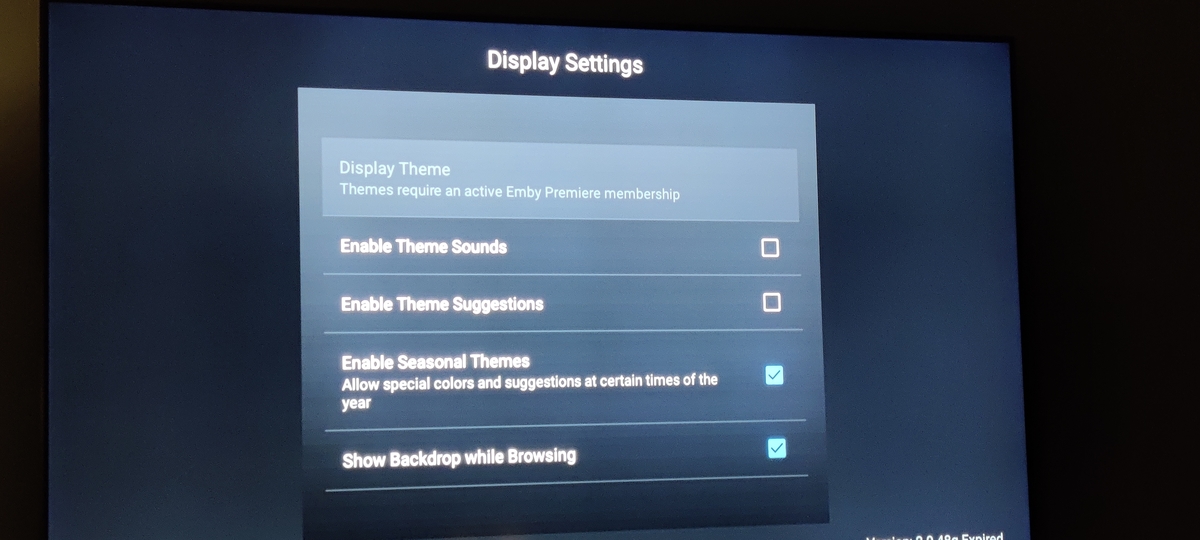
This is what I see in the app. There isn't much to do with Emby, but I could be nice to do that Ye, have bought the app
 1 point
 -
I'd say majority of power users' choice here would be Shield Pro with Android TV client app. If you prefer to stay with Winows, I suppose any NUC (8-th gen or up) with ET would serve the purpose just as well. Both would give you some future-proofing.1 point
-
So I'm making progress... It' appears to be a cpu/thread limitation - I'm not sure if the http engine is multi-threaded, but I'm now running Emby with Direct Attached Storage on an old i3 (12Gb Ram) - reduced to 2 cores (hyperthreading disabled) and reduced to 1.2Ghz (as low as it would go), the 6 x 4K (~400-600Mbit/sec) test streams are now choking / stalling (but not stopping). Interesting, the CPU is not anywhere near Max and nor are the disks - so something is choking the streams .. This test simulates Emby Server running on a NAS. Next is to add SMB read into the mix (ie remove Direct Attached Storage) .. this will simulate Emby running on a Shield using a NAS as the storage. I think this will be a worst case scenario.. predictions ?1 point
-
Thanks so much for the feedback. The good news is that things are about to get even better.1 point
-
OK, tried everything again, that probably could have been my mistake. I correctly stopped kodi ( i think i did at least using "systemctl stop kodi") and after a db reset, everything seems to be progressing correctly. Great thanks for all your help.1 point
-
Made a longish post few months back, gimme a minute to find it. Here:1 point
-
Thanks, I will give this a go and let you know.1 point
-
No, there is nothing in the logs. Just play something. Talk to @GrimReaper. I believe he uses the app disconnected for periods.1 point
-
Agreed - it has, but it doesn't scale well and it will always be a bottleneck from a network perspective - and that is where DFA has a BIG advantage. I'm working on it today, if the Shield or a low powered (1-2 core 1Ghz cpu) can stream 6 x 4K remix 70-90Mbit streams over HTTP without issues - then I'm totally happy to hold my hand up and say it's no longer needed for anything but extreme setups.1 point
-
The thread exists and is this active because a feature that many used 'without incident' is no longer working. If you can fix Emby to use Android 11 like otehr Apps have, then this thread will be totally redundant ... After my Android 9 recovery, it took less than 30 seconds to configure in the Shield... And we aren't arguing that case either - we agree with you lol - we are simply suggesting that for that 1% of cases that DO need it (for whatever reason), then why take that reason away ? I'm in the middle of doing this - it is reasonably clear that on decent hardware, it does make no difference and HTTP is fractionally faster. I've literally just finished an experiment where I have setup a '1Gig NAS' (instead of my production Direct Attached Storage) and had 6 x 100Mbit 4K remux's running over HTTP - zero issues on any of them, BUT the Emby server is my current i7 12700K - and the NAS was on a separate VLAN and physical interface to the Clients. ie Best Case Scenario. I now want to go the opposite end of the hardware spectrum, and run Emby Server on a low powered CPU - maybe the Shield itself on the same Network (that 99.9% of people will have) and see if I can repeat the exercise. ie Worst Case (typical?) Scenario.1 point
-
Hi guys, Pack v1.2 has been released. Please find updated download link HERE. @DJKoopa@CrispinD The font I used is called Norwester. @mptpro "books" added @bgeelen "recordings" added @DJKoopa I'm not sure what kind of picture should I use for "new releases", any kind of feedback would be appreciated.1 point
-
HTTP has come a long way since DFA was first added. Whatever Luke, or whomever, did has helped a lot. For me, even movies like Gemini Man (90Mbps/60fps) can be streamed now using HTTP. Couldn't do that before w/o DFA.1 point
-
I'm not arguing the theory that direct access is more efficient. I'm arguing whether or not that extra efficiency is needed in 99% of cases. This option is an extremely expensive one for us. This thread is a great example of why. It is difficult to setup properly, difficult to understand and even more difficult to prove it actually translates to increased performance. All of that makes it very expensive for us to support so, if it doesn't provide a very real and very needed benefit, then it isn't worth it.1 point
-
Did not intend to twist any words. I asked specifically how he knew that Direct access was "faster" with the new update in place and he responded to that with a statement that he tested it. Sorry if there was a misunderstanding.1 point
-
Really? I see it all the time - when the two applications are serving the same basic purpose. (help desk software, forum software, Financial management software, etc.) Having said that, I don't think our interfaces really look all that much alike (other than broad functionality and presentation but then we look like a lot of other video apps in that regard).1 point
-
Not sure how you quoted me for that, but ebr is the one who twisted your words. Not me There's been enough people who got DFA to work in the past that found it helpful to now say it can be useful for some. I may be delusional, but I doubt everyone claiming it helps is. nVidia says Plex reached out to them when Plex had problems after SE9, maybe Emby can do the same.1 point
-
Think i will go with NGINX, i wont jump right in, lots of reading to do. Thanks1 point
-
It worked lie a charm. Thank you1 point
-
In the current beta, common whole words are still removed, but not common letters in different words - so this specific case is fixed. For example: Film Name (year) - The Stereo version Film Name (year) - The Surround version appears as: Stereo version Surround version Paul1 point
-
Couple of other annoyances that might be fixed: Can the server data be saved? Every time I reset the database on my two devices now I have to manually connect and enter the details for my server. Or at least it seems to be saved in the background, Emby is just not showing this. Can it automatically connect to the server upon starting the device(s), provided the database has been reset? Alternate device names don’t seem to get saved. I’ve entered multiple times but I always have to check and enter them again. Again, it might just not be reflected in Emby again? With the latest update, after manually entering the server details I have to restart the device for the sync to happen. This is confusing. Could be a bug? And on both devices I had to delete the entire artwork cache multiple times, because Kodi sometimes wouldn’t show the artwork anymore. Seems to be a bug as well? Maybe not everything gets deleted even though I’ve selected ‘yes’ to ‘remove all artwork?’? Edit; I’ve manually removed the thumbnails and textures files and folders but some artwork still doesn’t get shown or loaded. Artwork with fanart1.jpg (or other higher numbered files) instead of fanart.jpg does not get loaded. This seems to be an issue with the update.1 point
-
Thanks for following up.1 point
-
I remuxed with ffmpeg ffmpeg -i old.mkv -c copy -map 0 new.mkv And it now plays. The original file played with the emby web client and vlc so Roku must be finicky about something. Is there a way to force Emby to remux certain files when played so I don't have to remux them myself? Is there a set top box that works better than Roku? This is at least the 3rd time Roku barfed on something that plays fine on everything else. Thanks1 point
-
definately a linux related error, my code allows for this but something is obviouslyt not working, so im going to have to go back to get an old pc out of the attic and install linux on it to see whats happening, I suspect as in my server everything works fine on windows. Thanks for checking1 point
-
*** Player state changed: finished The Roku player thinks the item is finished. Try remuxing one of them to be sure the headers are correct.1 point
-
To my knowledge: Emby and Jellyfin split from a common source. The original Plex Windows Client was forked from XBMC (now Kodi). However that original Plex Windows Client has been abandonned for a long time and was replaced by a new Plex Windows Client years ago.1 point
-
Hi All, Thought I'd introduce myself. I'm Spaniard (but the name was already taken here haha). IT tech for about 15 years. I've been an Emby user for about a year now. It started when I was looking for a better way to serve all the media on my NAS for my wife. She has been using Kodi, connected to different shares on my NAS, running on a raspberry Pi 3 and 4 for the last couple of years. But having her have to navigate through badly named folders or having trouble with HEVC content on the Pi's made me realize I should invest some extra effort in making it nice for her. Was also looking into being able to share my collection with some family members. That's when I started looking around for the available options, had not heard of Emby before, but did hear the word plex a few times, although I had no idea what it was or did until I started my research. (I tend to research anything I invest either time or money into to autistic levels) Quickly realized that the terms of service for Plex completely rubbed me the wrong way, and it having constant connections and sending back my media info to them felt extremely iffy and dangerous. Then I stumbled upon Emby and immediately fell in love with the project. I decided to pull the trigger and started setting it up (my god, it was so easy and intuitive to setup for me personally, I got hooked instantly) Only took me a day to fall in love with the software and jump on Premiere to test transcoding. I keep a monthly premiere subscription so I can keep supporting this project into a very bright future. As of this writing, my setup is as follows: Emby Server is running on a command Line Interface headless Linux Server (Ubuntu Server 18.04 64-bit) with the following hardware: - AMD Athlon 200ge (APU with vega graphics) - Gigabyte B450 Aorus Wifi ITX motherboard - 16GB G.Skill Ripjaws DDR4 3200Mhz - Gigabyte GTX1050Ti 4GB (only added this for better encoding for Emby, did not run a dedicated gpu before, this thing does the job very well for me) - 250GB Samsung 860 Evo Sata SSD *This server is also running PiHole and a few dedicated game server via LGSM. Media library is hosted on 2 separate Synology 4 bay NAS systems running 12TB each in Synology RAID setup. Both have 4x4TB NAS drives. Buying 2 completely separate 12TB systems was cheaper than buying 4 x 8 TB NAS disks at the time (and still is). The vast majority of my media consists of 1080p HEVC/x265 10bit content in .mkv containers to save space and retain a good quality image. My internet line consists of a fiber connection running 650Mbit up/down (effectively 630Mbit available on the Emby server after network loss) My wife now mostly watches on an Apple TV (4) HD using the Emby Theater App and on her Samsung Galaxy Tab S6 Lite also with the app. I myself use my Samsung Galaxy S7, Samsung Galaxy S10e, Samsung Galaxy Tab A6 10.1 (2019), Emby Theater client from Windows Store, Opera/Chrome browsers, Xbox One S, Xbox One X and Xbox Series S to watch my Emby content. I absolutely love this project, I've been looking at the forums for a while now, and decided it might be nice to have a profile here too. I hope to be able to use this software for many years/decades to come. **Secretly wishing for Emby Theater to become available on Nintendo Switch in the future, so I can use the OLED screen for watching in bed, but knowing Nintendo it probably will never happen. Nintendo still fails to allow a release of netflix on the device after 5 years xD If you guys ever pull it off to get Nintendo to do this, that would be extremely awesome. Especially since the Nvidia Shield and Nintendo Switch seem to share a similar SOC with the Tegra X1 chip, I bet HEVC content would run great on the Switch.1 point
-
Release 20220203: Fix problem causing channels not to work until a new channel scan was preformed after upgrading from 2020 and older firmware. Firmware Changelog1 point
-
Moving to hardware discussion for now.1 point
-
thats fair i just dont want to go through the effort of having to dismantle my hard drive, buy a sata to usb converter, and all that just to get this working. its much easier to just copy and paste the emby folder every time i wanna use it, which isnt too bad imo1 point
-
but things like this should never default to a destructive action. what happens if you drop the remote or a cat steps on it1 point
-
Hi again Chef I've moved on quite a bit havent I? .. However ive never heard of path.combine i'll have to take a looksie , thanks Thanks for your time Heres a new build which "should" fix the issue. Let me know, if it doesn't please pm me your log (as before try it after a restart so i can find it in the logs easily). download removed (newer version below)1 point
-
There are currently only two ways to get the Emby app on your TV because of where you are. The first is to download the install file, copy to usb and then install that way. Because Emby doesn't have a contract with Samsung in all countries yet the other way would be to change your app region to US or UK and install from the Samsung store.1 point
-
In ETA 1-2 Weeks there will be a release, but keep in mind for windows it is only working with the BETA. Modding the ffmpeg files does work but this is what Luke calls a corrupted Emby installation as it is no longer the original one and "could" cause other problems1 point
-
Hi, you can't yet but it's planned for the future. Thanks.1 point
-
The table that lists Broadwell and Skylake but doesn't include Haswell - which is what I wanted to point out, sorry for the confusion. This is Gen7/KabyLake and it will work well with both. This can be a bit confusing because QuickSync is Intel's marketing term for video acceleration. There are two way to access that technology: (1) VAAPI (2) and Intel Media SDK (=MSDK, =libmfx), which is - in case of Linux - built on top of VAAPI. In decoding, both are equal, they are different in processing (VPP) and encoding. In case of encoding, (2) provides better performance, better quality a much wider range of features and parameters. To make the confusion complete: at the side of ffmpeg (1) is called VAAPI and (2) is called QuickSync and that's also how Emby is naming them.1 point
-
While that is mostly true, there are still some of those that fall outside of that percentage (myself being one of those "Using it offline for months at a time", as I assume few others could be found in the same line of business). Been throwing bits and pieces around the forum with how to best cope with that scenario, maybe to summarize it here and assist someone in the same/similar situation. As a preamble, I'm a seaman by profession (long - ocean - trade), with voyages between ports (or any land in sight, for that matter) usually spanning few weeks, often 30+days. Meaning cell-access is few-and-far-between and certainly not something one can count on. And it is so 6+ months out of every 12-months period, so I'm basically more offline than online. Up until few years ago there was absolutely no way to go online while on board (and there was no alternative, meaning being literally at the mercy of occasion, when/where you'll find yourself in some cell tower range) - nowdays there's satellite internet (which still does cost a pretty penny), and Premiere verification can be done every few weeks, as needed, although it does incure some extra costs, it is doable. Tbh Premiere ain't really required (though in my case it is, since I'm making use of Live TV engine, courtesy of VirtualTV plugin), bigger problem are the clients and current verification scheme. So, here's a quick rundown: 1) Browsers Can be fully used while offline (with or without Premiere), with no timeframe restrictions. Granted, that heavily depends on one's library and formats within, as (due to portability being primary condition for my own, vast majority of my content is HEVC) browsers are notorious for their HEVC (and some other audio formats) poor support, resulting in majority of sessions being transcodes (10-15ish in my case), which precludes having a server powerful enough to serve those. MS Edge (Chromium) did alleviate some of those issues when introduced, however was broken at some point, hence switched to Marmaduke's Chromium and that is the scheme I'm currently settled on, resulting in almost all content being DirectPlayed. Of course, there's still those nugging "Get/Discover Emby Premiere" popops/flags, but I reckon that's the price to pay for free playback. 2) Theater Desktop Won't even start while offline, useless for this usage case 3) Theater Store Will start offline, with or without server running on cache license. However, playback is possible only if the app was actually run and connected to the server at the same time Premiere verification was taking place, i.e. there was a live connection at that point, and it will run for few days (not weeks that cache lasts). To clarify, if one goes online, verifies license, goes offline and then starts Theater Store - no joy. It has to be run/online at the same time. This is a serious downer for Premiere-license owners. 4) Android TV app Unlocked app works offline with no issues whatsoever (tbh, that's from memory, as I've been running on Premiere cache for several years now which means that unlock is not required, but AFAIR there were no issues back in the day, can't really say for how long it would run before verification) save long initial loading time while offline, as mentioned in another thread. And, of course, as its usage is restricted to TVs/Boxes only. So, generally, even without Premiere, installation can be used being offline for longer periods of time with certain trade-offs, while for Premiere licensed ones it could use some adjustments from the Devs side, and does require some from Users side.1 point
-
Do NOT create a user or use that user you made You have to click on the permissions tab for the shares and the click the down arrow to change it to "System internal user" and that's where you give read/write permissions for each Emby library share1 point
-
It is platform prevalent but it resides in Emby's /system/dashboard-ui path. You should see that path in the top section of your log. Example from Windows Application path: C:\Users\{username}\AppData\Roaming\Emby-Server\system Note anything changed in the system folder is replaced with every update as the folder is renamed as system.old and a new system folder is applied.1 point
-
The --umount 002 flag should allow any user on the system to see the drive. Otherwise, you can run the rclone mount command as the same user that emby runs as. John1 point
-
Hello all. I have a workaround that has some extra benefits. I recently ripped all my DS9 discs and each season has 15-16 extras. I wanted a better way to do it. So, if this helps anyone, great. If you have tweeks, please post them. One big note: This is not automatic and takes a little time. However, for me it was well worth it. I will post a few screenshots. 1. Step 1 - Rip all files into MKV. It helps if you make them all the same video and audio. 2. Make sure all the extras are labelled or you have a list of the correct name for each. 3. Download MKVToolNix. 4. For one season, combine all the MKV files (extras) into one MKV file (added benefit: I was able to remove all the non-english audio and subtitles at this point). (for instructions, see MKVToolNix, however, you open the first file and then append the remaining ones). 4a. Rename the output file to something memorable. I labelled mine as "Star Trek Deep Space Nine - S02E99 - All Season 2 Extras" and multiplex the file. I choose E99 so it would show at the end of the episode list and I do not know of any tvshow that has > 98 episodes in one season. 5. Open the file in Chapter Editor of MKVToolNix. Change the name of each chapter to the name of the extra. For example, S2 extra#14, i relabeled chapter 14 to "Section 31 - Hidden files - 09 - Andrew Robinson (Garak) interview". 6. After EMBY has auto-named the actual episodes, then you can move this new file into the appropriate sub-directory. Then scan the libraries. Emby will put enter this into the library. and display. 7. Personal touch. I changed the image that emby chose as it was terrible. 8. Now, instead of 15-16 extra files for each season, I have one AND the best part, the chapters show up as scenes in Emby with titles (see picture). Notes for next time. For some reason, Season 1 extras did not show the first chapter, but season 2 did. The MKV tool on season 2, but a header in the first chapter place with a 0 second, so allowed me to put in the first chapter name. Not sure how I did it. Anyway, I really liked how this turned out. Like I said, some work is involved but well worth the effort. Don Luke, thanks for the inspiration.1 point