Leaderboard




Popular Content
Showing content with the highest reputation on 02/01/22 in all areas
-
You can I just got the example wrong. you don’t have to put quotes around each one. So it should look something like “movies,kids movies”2 points
-
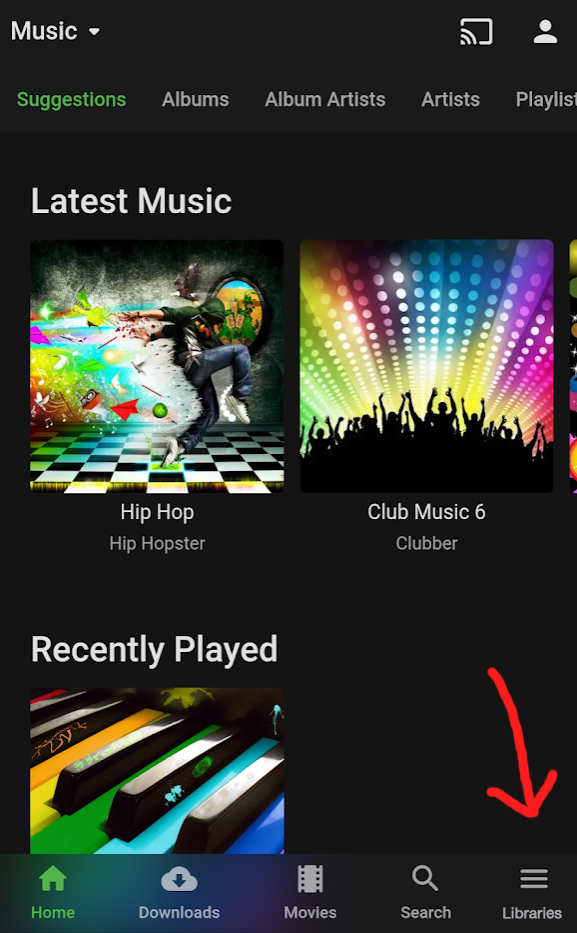
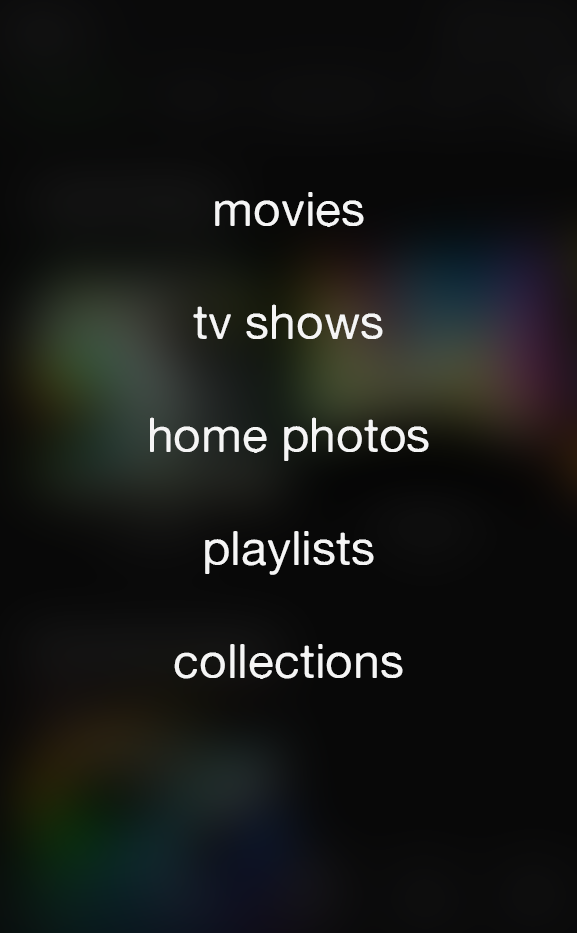
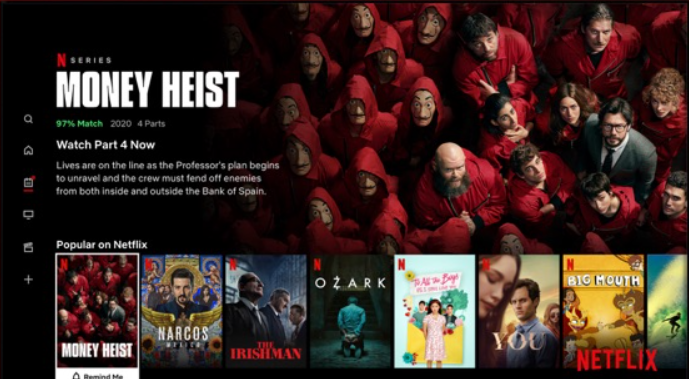
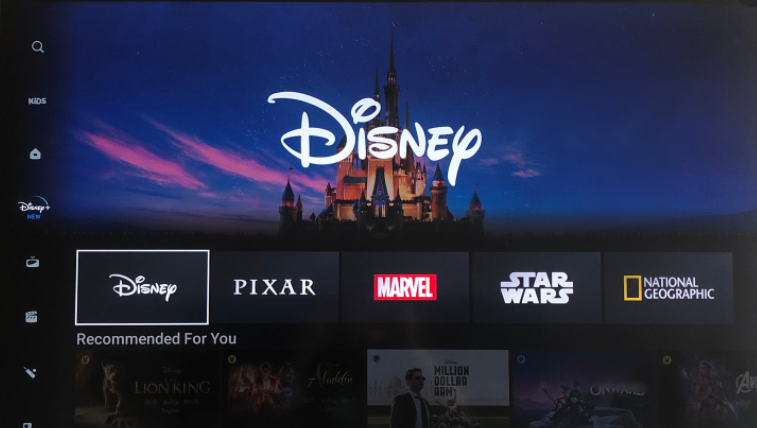
EDIT To clear things up: The title of my post is the feature request itself, while the bulleted content is one proposed solution that I’ve come up with to achieve it. It doesn’t have to be “solved” that way. Seeing as how many Emby users value customization, a different proposition could be the following. Allow users to chose navigation styles on all clients by giving the option to utilize a navigation drawer (like the web app already has). The point of this request is to accomplish exactly what the title says because, at the moment, different clients offer exclusive, different options that can lead to discrepancies described later in the thread. END OF EDIT ————————————————————— In order to streamline, modernize, and overall enhance library navigation through all of the clients, I propose the following changes: Completely remove the "My Media" and "My Media (small)" options from the Home Screen personalization. Utilize the navigation drawer approach (as seen in the web app) to display all of the library links. Examples of apps and services that utilize this approach on TV clients: All of these services offer an easy-to-use navigation menu for library links on the left-hand side of the screen. On the contrary, Emby's Android TV, Roku, etc apps lack this menu and rely exclusively on the users having "My Media" somewhere on their customized homescreen. As for mobile devices: In the Emby iOS app, there are multiple ways of getting to the same "Settings" menu; selecting the icon in the bottom-right or the profile picture in the top-right. As both of these icons are always on the screen at the same time, one of them is undeniably wasted space. Changing the bottom-right "Settings" icon to "Libraries" would replace the no-longer present "My Media" sections. This icon would slide up a small submenu of all libraries, or even a full-page list that blurs the background. Quick mockup: While customization - including the Home Screen section settings - is usually welcomed and praised, streamlining this particular aspect of the server across all clients should prove to be cleaner and more intuitive.
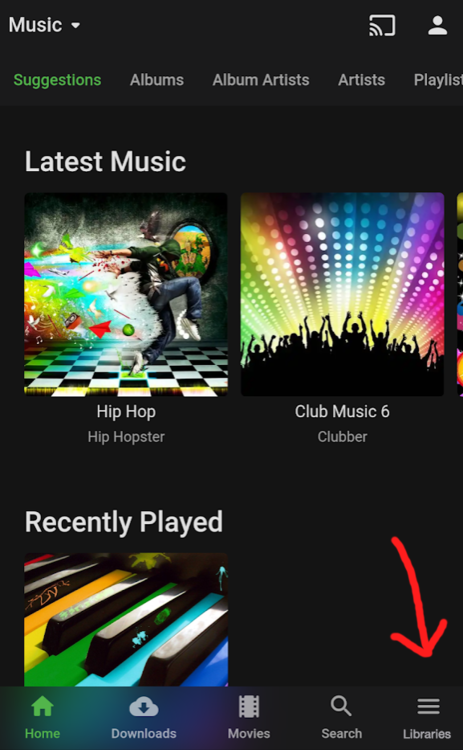
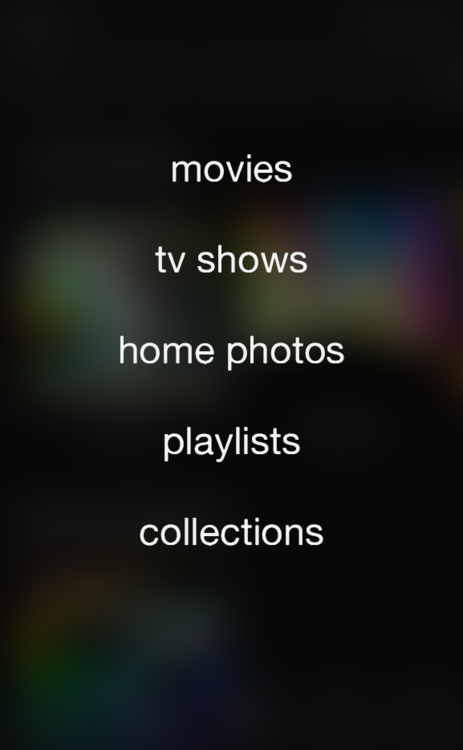 2 points
 -
You can give it a shot, but @cayars may also be able to remote in if Putty is still confusing2 points
-
It works how I said, but it reports http in stats for nerds, and not how file, but the difference is there. I did the re-check and yes the FF is faster when the APP is set to direct path, nevermind if change or not the Android settings. I can't tell you why, you're the programmer, I'm just an user reporting for you.2 points
-
To be honest, I haven't delved too deeply into it. The updated UI seems cleaner and it isn't causing any issues (so far) with Emby. So far, so good.2 points
-
I spent lots of time looking for a script that would migrate user watched history from plex to emby without luck so I decided to just write one myself. This project contains a few python scripts that will help you migrate some of the data from your plex server to you emby server. The scripts match using IMDB, TVDB , and TMDB. Right now there are two main scripts. The first one is named metadata-migration.py . It will migrate the following data: Posters Title Original Title Sort Title Parental Rating Labels/Tags The second one is named watched-history-migration.py . This script can migrate watched history for any user but there is a caveat. You have to be able to get that user's plex token. Checkout the readme in the project repository for more details. It will migrate the following data: Watched History https://gitlab.com/CloudWing93/plex-to-emby-migration1 point
-
ComSkipper ... A Emby Plugin that skips commercials in recordings using output from comskip. This plugin will work with EDL files generated by Comskip, ShowAnalyzer or any other application capable of generating them to automagically skip past commercials when playing back recordings in Emby. A visual localized notification will be presented on the screen when this happens. UNC network mappings are fine - as long as the .EDL file is in the same filename as the media file. A PDF is included in the download that explains all of the details. But one thing should be made clear up front. And that is this plugin does NOT contain comskip, show analyzer, or any other program that detects the commercials and creates the EDL files with the skipping information. Also, the donator version of comskip is required because Emby stores its recordings in .TS format. I'm told the donator version is no longer required. User @vdrovergraciously created a PDF file on how to get this working on Ubuntu. It can be found in the Github repository in the doc folder and will be included in future releases. The PDF file also shows an easy way to configure Emby to automatically run comskip after each recording on a Windows server. Linux server users will need to figure out the best way to do this for their flavor of Linux. I am not a Linux advocate or user, however I did find this information in the NextPVR forum that is encouraging, and I encourage Linux users to help each other out with this as I will be of little to no help in this regard. https://forums.nextpvr.com/showthread.php?tid=60803 Building Comskip is really quick and easy on Ubuntu, so probably the same for any Debian based distro: $ sudo apt-get update $ sudo apt-get install ffmpeg libavcodec-dev libavformat-dev libavutil-dev autoconf automake git libargtable2-dev libtool $ git clone git://github.com/erikkaashoek/Comskip $ cd Comskip $ ./autogen.sh $ ./configure $ make $ sudo make install Once this is out long enough where I am pretty sure it is stable, I'll make its GIT repository public. Git Repo Getting it into the plugin catalog could follow after that, assuming the Emby team approves. I rarely record, my main use case is NFL football games. I record our local teams game, which when complete runs comskip on the recording which takes about 40 minutes. We then watch the game while eating dinner that evening. Skipping halftime (manually) it brings the time from 3-4 hours to 2 to 2.5 hours. Comskip does a very good, remarkable really, job on all of my recordings including the games to date. I have attached the comskip.ini that I use. It works well for me in the US. If you add this to your ini (make sure your system has the processing power to handle it), it will greatly reduce he time comskip takes to process your file (requires donator version). thread_count=2 Have fun and enjoy commercial free recordings Current Release Version 2.2.0.0 - Updated Emby library to latest. Version 2.1.1.0 - Added popular .editorConfig for consistent coding standards. Upgraded to latest Emby library. Version 2.1.0.0 - A change in Emby 4.8 caused a code update to be required in how DL files are read. If the plugin stops working in server 4.8, update to the latest plugin. Version 2.0.0.0 - Allows for chapters to identify commercial points if they exist. PlayOn and perhaps others identify commercials that way. Version 1.6.0.0 - Allows configuration of time message is displayed on the screen. Allows configuration of message displayed on the screen. Optionally displays the skipped time in minutes:seconds. Version 1.5.0.0 - Added optional commercial duration skipped to the on screen message by request. Version 1.4.0.0 - Made a couple log messages info from debug by request. Version 1.2.3.0 - Upgraded to Emby server 4.7. Version 1.2.2.1 - Added German (de) translation. Version 1.2.2.0 - Culture set so EDL file can be parsed everywhere. Version 1.2.1.0 - Real time no longer experimental. Session ID fix for LG (and maybe other) clients. Version 1.2.0.0 - Experimental feature to allow commercial skipping when watching during recording Initial open source release. Version 1.0.0.2 - Initial release. Version 1.0.1.0 - Addition of configuration switch to disable on-screen notifications. **Note** You will need to clear your browser cache due to the config UI change. comskipper.ini1 point
-
So the Steam Deck is pretty hyped now. They showed it as a streaming device in some videos today. It's powerful enough to play pretty much anything directly, heck it could even be a server quite easily with it's specs. A lot of people got to talking and now people are saying Plex is going to release a version to Steam so that it'd just run through that and play onto SteamOS without the user having to muck about outside of Valves ecosystem. There are plenty of free tools / video players in Steams Software section, so it'd be a pretty neat little thing I imagine.1 point
-
Here it's how it looks like:
 1 point
 -
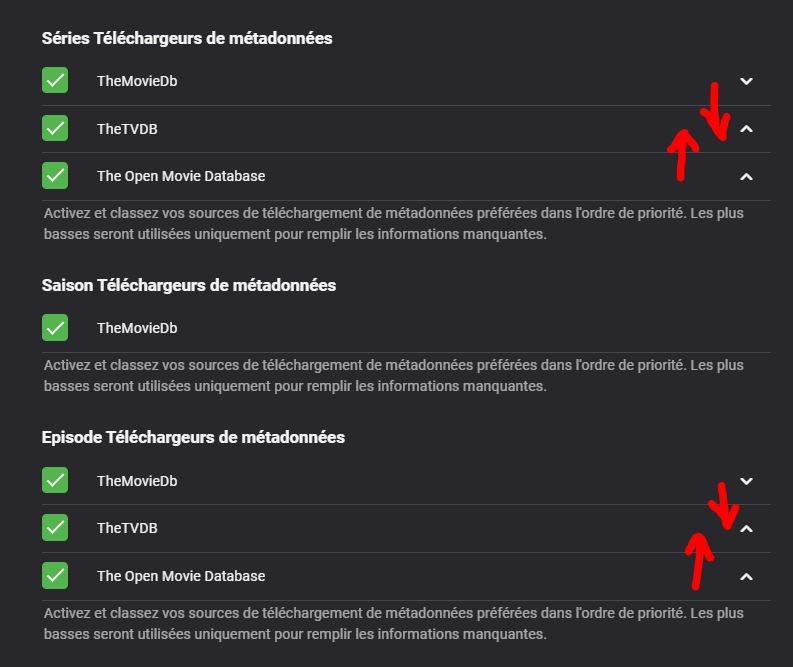
I can't choose the order of the providers it simply doesn't move or change. I have to Close Emby Theater, use the web client to make the change, then re open Emby theater.
 1 point
 -
Thank you for all the wonderful help!!!!! For others that may be having a similar problem with "Playback Error..." after changing your WD MyCloud from OS 3 to OS 5... WAIT until it finishes INDEXING (WD will look at EVERY file, so this can take some time). It also seems that WD provided an update that lets you see in WD's Dashboard that the drives are indexing, etc (I did not see that before). I also had a couple of other issues that made for a real mess involving ports because of 2 servers & a VPN that I thought was turned off (you also need to exit the app). This process has been worth it as Emby is providing my family with good access to our media. I consider this problem closed. The Emby Support Team has been WONDERFUL!!. Thank you.1 point
-
You can try it any time, download from Github repo.1 point
-
We'll take a look at it. Thanks.1 point
-
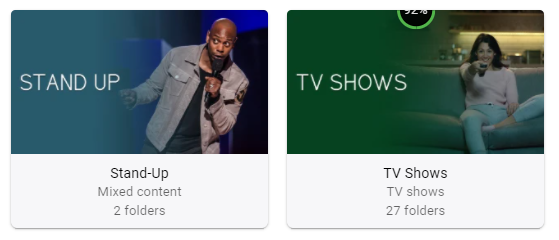
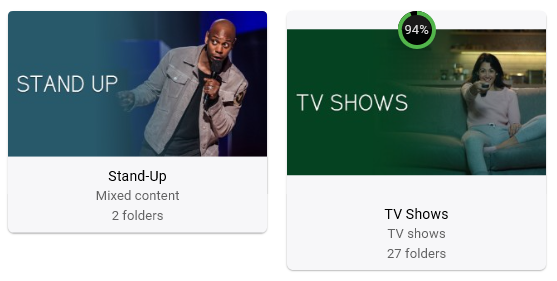
And again, I can reproduce this on Theater Desktop 3.0.15. Additionally, Theater Store 1.1.395.0 moves complete thumbnail down in respect to other libraries and shows full progress circle. 3.0.15 1.1.395.0
 1 point
 -
Testing this this is only an issue when connected to server 4.6.7.0, this works fine for me connected to beta 4.7.0.22.1 point
-
I can reproduce this on Theater Desktop 3.0.15. Theater Store 1.1.395.0 seems unaffected. @Luke1 point
-
Yes he is. He thinks these "people" should work for free and do this one , several things. Sadly most who want to use this app dont have a clue how long these folks have actually been trying to perfect as well as improve upon it. So to make false assumptions on "full time devs vs vol dves" is plain stupid. This app has an overall fantastic community who will attempt to help if possible and mostly FEASABLE for EVERYONE. I have been emby since its inception prior to name change, jumped from xbmc and these folks do great work. My complaints if you will, are very far and few. Sometimes is simply just because they updated something and I was unaware, and just opposite too, they are aware and working on it. So I have no issues with their support. People just need to learn to read, research, and be PATIENT:)1 point
-
It affects AndroidTV client app on Shield, regardless of your server platform. If you haven't utilized DFA till now, you'll see no change and can safely update.1 point
-
Merci pour l'explication Samuel. Par contre je ne suis vraiment pas tres doué et je ne trouve pas où se trouve ce réglage pour désactiver le MPV EDIT : Ah si pardon c'est directement sur l'application. Je regardais au mauvais endroit dans les paramètres du serveur1 point
-
you need to install it using pip. It should look something like: pip install plexapi I also just updated the script to not use arguments anymore. I also added a bunch of other improvements. You should download the latest version from the repository. Now you just have to edit a few variables at the top of the python file.1 point
-
I just noticed that I have a Kaby Lake-R (UHD 6xx) myself and went for it myself. Don't need many transcodes at the same time 3-4 max and only 1080p and was impressed with the performance of my 15W cpu. For testing I used a 20mbit 1080p -> 5mbit 1080p and and also a 4k (HDR) -> 5mbit 1080p and there results were always >150fps - quite impressive I must say. Using the throttle I can imagine this being able to transcode a couple of streams. Also did a test on a Ryzen 5500U but on 4K unfortunately it seems to only be able to transcode 1 stream (~ 35-40fps) and no tone-mapping is available (yet). On the other side for 1080p I had similar results as with my Intel i5-8250U.1 point
-
Hi, OK, I will test that file again with the new server release and I will let you know. Thanks1 point
-
.. on an i7 6500K or i7 12700K ? The HD520 (in the i7 6500K) is 'weak' vs the HD6xx - it'll do 1x 4K stream and maybe 4-5x 1080p streams - but no more. Tonemapping also cripples it. From the Tonemapping work we did with @softworkz - the HD6xx is a big leap forward vs HD520 but I've never owned one - I skipped a generation and went from HD520 to a HD770 ..1 point
-
Dont worry, nothing to do with Neil Young Anyway, with the apps for emby, I dont suppose there is a way to integrate spotify into it? Possibly in a similar manner as to Plex does with Tidal (only, one that actually works haha). In fairness, or youtube music, or anything like that? or, is that just a dream?1 point
-
Additionally, it would be nice to have two restrictions: - create recordings and - create series recordings1 point
-
Ok, I will do some digging and see what I come up with. I don't have a lot of "native" knowledge on that stuff so I will need to consult Google1 point
-
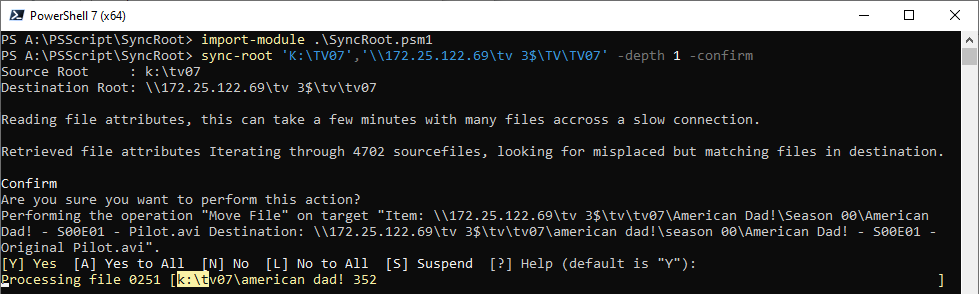
Finds and corrects file location inconsistencies between a source and its copy. This tool was created to efficiently keep a copy in sync, when bandwidth between the source and destination is low; and where files in source had been moved but not changed. Eg after re-naming specials. Tools like Robocopy and Beyond Compare would copy the entire file again. Consider using this function prior to Robocopy, to ensure those files which exist in the destination are moved rather than copied again. Installation requires Powershell 7+ import-module .\SyncRoot.psm1 -force -verbose Help get-help sync-root -full get-help sync-root -examples Usage sync-root 'K:\TV07\ShowName','\\172.25.122.69\tv 3$\TV\TV07\ShowName' -confirm <-start here sync-root 'K:\TV07','\\172.25.122.69\tv 3$\TV\TV07' -whatif <-or here sync-root 'K:\TV07','\\172.25.122.69\tv 3$\TV\TV07' sync-root 'K:\TV07','\\172.25.122.69\tv 3$\TV\TV07' -depth 1 Notes Test thoroughly on your own filesystems, use -confirm to begin with, to move one file at a time. Tested on Windows, local drives and UNCs issues and suggestions welcome Download SyncRoot v0.0.0.1.zip
 1 point
 -
Well, there shouldn't be any differences compared with 6.2.8. There are just minor fixes included. Nothing related to sync/progress updates.1 point
-
Well, I uninstalled it and returned to 6.2.7, I’m just testing versions on nvidia shield after update to android 11. Probably it was something I did wrong. Emby for kodi is working fine on android 11. Fingers crossed. Plex kodi connect for example is giving me lots of problems with 19.3 and skin embuary.1 point
-
Hi, there is currently no way, although it's probably a good idea to display this info. But you can control who can create recordings via user permissions.1 point
-
Luke, I'm afraid not. On the other hand I was able to go into Qnap and set up a new share which shows the recordings, and then map that share to my PC. At least this way I can now move recordings around from my PC.1 point
-
I performed a quick test with movie and seek to 10/20 minutes. Icon on Kodi correct, resumepoint correct. Stopped Kodi, restarted. Icon correct, resumepoint correct. I need a test case.1 point
-
I was wondering if it would be possible to implement a left bar with the differents librairies choices like it is in the web client and Emby Theater? I anderstand that in the Android mobile client there is less need for it since this is a vertical screen, but in the Android TV app used in 16/9 screens this has a rightfull sense. The going back button on the remote could give acces to the left bar instead of giving the choice to leave Emby, it will feel much more natural. Alsot, it can give us the choice of changing the librairie and still see the librairie raw we are watching instead of the same top raw. In 16/9 screen it is really important to give acces to as many options as possible on the sides of the screen because while the eyes are focusing in the middle of the screen, processing the posters choices , so the most important choices (display from the bottom to the top) what is optional like changing to new librairie on the left side and letters on the right side is natural acces for the eyes. I hope I was clear enough to be anderstood1 point
-
1 point
-
These cache settings would NOT apply if I am only using Cloudflare for DNS Only (grey cloud) at this point right?1 point
-
In your folder structure, that trailer actually does not belong to any movie as it is multi-version folder, and trailer name has to be exactly <moviename>-trailer, i.e. Starship Troopers (1997) - 1080p-trailer. You can just drop that in \trailers subfolder, upon which it should be recognized/played.1 point
-
Sorry overlooked it but there is a order of precedence when you have multiple tags for the same thing. As you have found out AlbumArtist and Album Artist can conflict. But believe it is from multiple id3 version tagging. Any time I see multiple tagging I usually just clear all tags and retag. Bur that is up to you. Since you can see it in extended tags you can just adjust the tag and rescan the album.1 point
-
Copying the library.db and titlesequence.db together is key - as they both use unique emby ID's to link to each other. Ongoing - The new version of Introskip will store it's data inside the core library.db - thus we can get rid of titlesequence.db alltogether.1 point
-
Thanks for your response, I better understand the choice you made. In fact, there should be a master database somewhere that keep all those intros and endings timings so that it's computed once (for all). That would be the dream. Isn't there something like that out there, like a opensubittle for chapters ? And just for the record, I migrated Emby to another server yesterday and by simply copying titlesequence.db and library.db to the new server (after restoring the last backup of the source server of course), everything was working. Piece of Cake!1 point
-
It works sorry ... you are the man1 point
-
Hi I can confirm. For me multiple servers work just fine.1 point
-
seems to be working on the remote side. But I no longer can see the remotes sign in. But I only used that for troubleshooting anyway. Since 2 of the 3 remotes are working, more an FYI than and issue. However, the important thing here may be that I am running High Sierra on an unsupported MacPro for that version of the OS. Even though it doesn't show up in Finder, of course in Activity Monitor, it does.1 point
-
Hi. Please see: Running Emby Server as a Windows Service1 point
-
For completeness, I can confirm this is now resolved. Didn't get another chance to look at this until Sunday 30th Jan. Removed the tuner and guide data. Re-added both and channel changes have been applied and the guide data is now correct.1 point
-
This isn’t something nvidia will fix for Emby when I’ve submitted logs in the past. They simply state state fixing the Emby app is up to Emby as other apps have done.1 point
-
That is a share from DSM 6 and can be deleted once DSM 7 is up1 point
-
Hi....It's weird that it doesn't work....I had to make a transfer "The.Emperors.New.Groove.2000.1080p.BluRay.H264.AAC-RARBG"....I don't know why it works for me .... I made a transfer and ok :-)...1 point
-
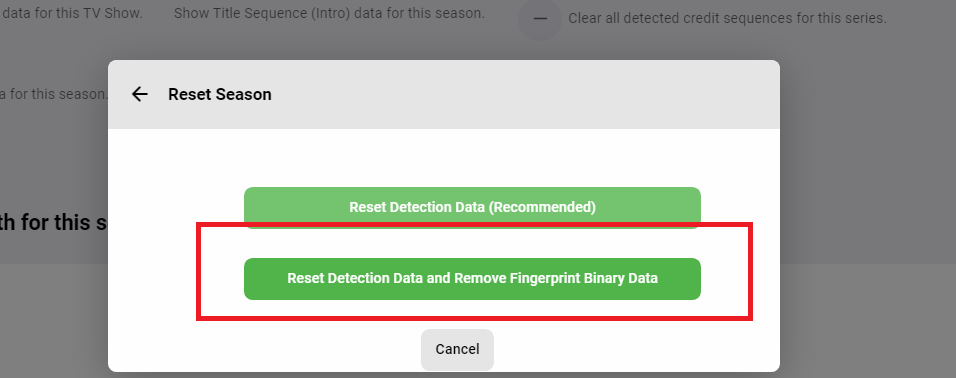
Hi! Thanks for taking the time to get this up and running. The fingerprint Binary files are saved in the "Plugins/data/intro_encoding" folder. No they are not deleted unless you reset the season in the configuration, and select the button to do so If you migrate Emby to a new installation, and it changes the library.db in a way that it creates new InternalIds for your media, then (currently) the process will have to be run again. However this is not the way that it will stay. We are currently working on integrating specifically with embys chapter API. That means that we will save the data in a way that migrating to a new install will be "super easy - barely and inconvenience", while also keeping the data proprietary to Emby. This is also why we decided to keep the fingerprint files. That means that any beta user who processed their library already will be ahead of the game as far as having compiled the data required for future releases. The reason the processes have to be run in succession is why you got that SQLite error posted above. While we are writing to the database table during fingerprinting/Detection, it gets a write lock on it. If the other process tries to access it, we'll throw that error. In fact it is a bug, and the user should only see it in the log. I will fix that before we put up the next releases with some fixes. Thank you for bring that to my attention. Another thing to keep in mind is that there are some power users out there that have massive libraries, and fingerprinting alone could take a very long time. It is expensive on the I/O, but, so is the Detection Task. Flipping back and forth between the two methods, and using FFMPEG as many times as we do, started to get complicated. Breaking the tasks into two allowed us to keep the code simple, and also the process simple as well. In the future we will not be using that database, and instead we'll be using the Chapter.db/API. It will makes things a lot better, no SQLite errors. Thanks so much for the feedback! That's really great to hear. Sounds like you're happy so far with how the plugin has come along.

 1 point
 -
Thanks for the feedback.1 point
-
Have you tried putting CF in Development mode temporarily? I've seen this as well with caching. 1. What are your cache settings in CF? Standard, Respect Browser TTL? 2. What are your page rules? I am Bypassing Cache for sub.domain.tld/web/* and since then I do not experience your issue (that I previously had) So, putting CF in development mode temporarily essentially bypasses CF cache and fetches from your origin (in this case Traeffik then Emby).1 point