Leaderboard




Popular Content
Showing content with the highest reputation on 01/31/22 in all areas
-
If you want only manual control - then at this time, yes, that is the only way to skip. The button is in progress, but we need core Dev development to accommodate the changes we need. But the Auto-Skip function works well - and will automatically skip the 'Intro' and jump to the next episode when the 'End Credits' roll - this can be set per user, so maybe setup a test user and have a play.2 points
-
There is no intro skip button yet. Though, it will come eventually. For now, the plugin can only skip the intros automatically and this must be enabled in the settings of the plugin.2 points
-
IntroSkip is taking priority atm Let me talk to @chef about this plugin - as he has a LOT on his plate atm so this might be one project too far - but tbh it's not complex and as long as we stick the original scope, then it should be easy to implement. I'll report back if he is able to help at this time.2 points
-
Hey All, Firstly, excellent work! secondly, I noticed that this has stopped working in Emby 4.6.4.0, I have forked the repo and fixed if anyone is interested. (Have PR out for main repo) https://github.com/ShanePe/Emby.SmartPlaylist.Plugin/ Sorry also, I have made an update, if the playlist has NOT yet been generated, it will generate it, regardless of the playlist schedule trigger. So one no longer need to 'manually' run first to initialize the playlist if it falls outside of playlist generation schedule. (Make sense !?!?!?!) Version 2.4.0.3 Feature Create a copy of a playlist. (Duplicate) Decluttered UI by adding a pop up menu to playlists New Criteria: Added Audio Stream Codec Criteria (Stream: Audio Codec) Added Audio Stream Language Criteria (Stream: Audio Language) Added Audio Stream Display title Criteria (Stream: Audio Display Title) Added Subtitle Stream Language Criteria (Stream: Subtitle Language) Added Video Stream Codec Criteria (Stream: Video Codec) Added Video Stream Display title Criteria (Stream: Video Display Title) Updated Criteria: Parental Rating: Now uses official rating under the hood Resolution Height: Now uses video streams to determine the available video heights rather than the metadata. Resolution Width: Now uses video streams to determine the available video widths rather than the metadata. Added Monitor Mode to shuffle playlist type. Meaning that the playlist will be destroyed and recreated on a schedule, but between scheduled executions, media item changes will be batched and monitored for inclusion/exclusion. (So .... combination of live and shuffle modes but could have a perf hit on larger playlists, experimental) Collapsible sections in the playlist editor that keeps state, for more UI real estate. Added the ability to add notes to a playlist (limited to 256 chars). If there are notes assigned a pop up is displayed when hovering over a playlist (2 second delay). Order all selection lists on criteria with dropdowns alphabetically. ------------------------------------------------------- Releases Here -> (See change logs in this thread .... way down) Plugin for Emby Server 4.8: SmartPlaylist-2.5.0.4810.zip1 point
-
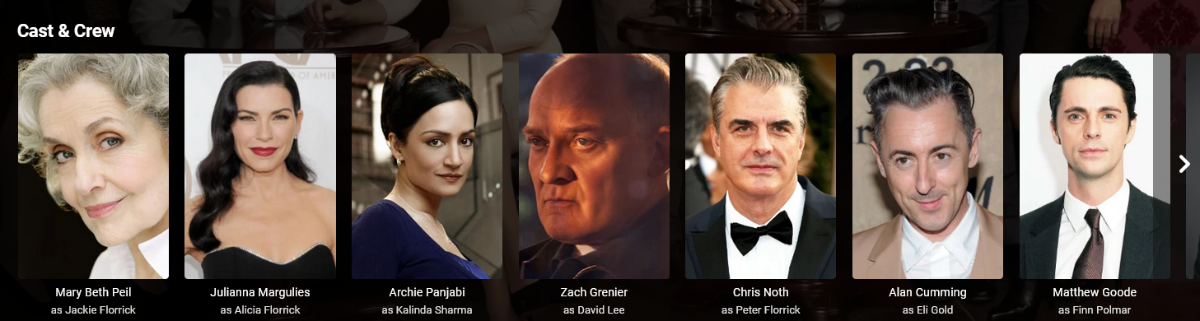
Is there a way to correct the sort order of actors (cast & crew) so that main actors appear before supporting cast? An example below:
 1 point
 -
Hi One thing that takes a while in Emby is actually trying goto the media folder of the currently playing media in Emby. I am not talking about using file explorer/manager type thing. This is within Emby. I propose that there should be a way to go to the folder of the currently playing media. For instance, I start playing a video from Latest Video. Now, I want to go to the media folder of that playing video. That is a bit cumbersome, like looking in the info for the path, go back to the home and start recursing into the subfolders. This can be a single click instead like an option like "browse folder" in one of those media's options places. thanks1 point
-
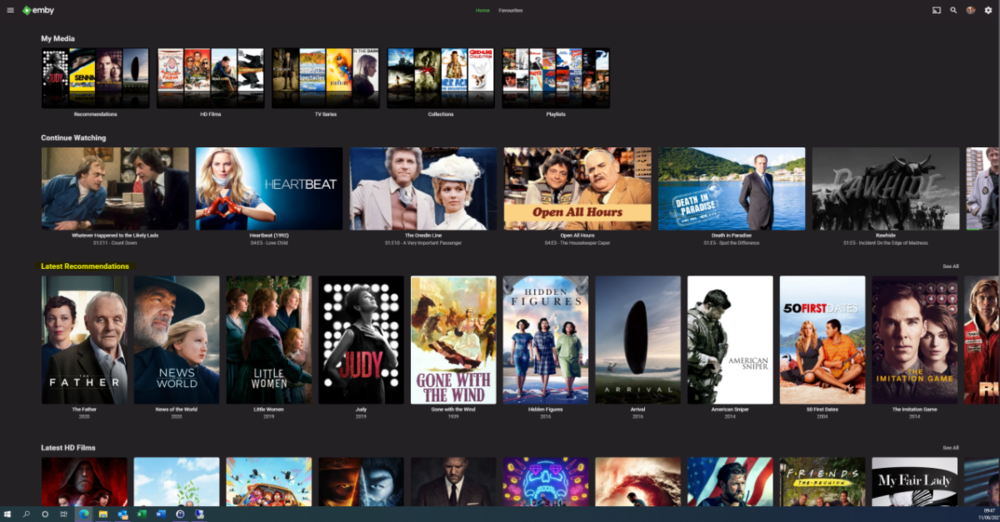
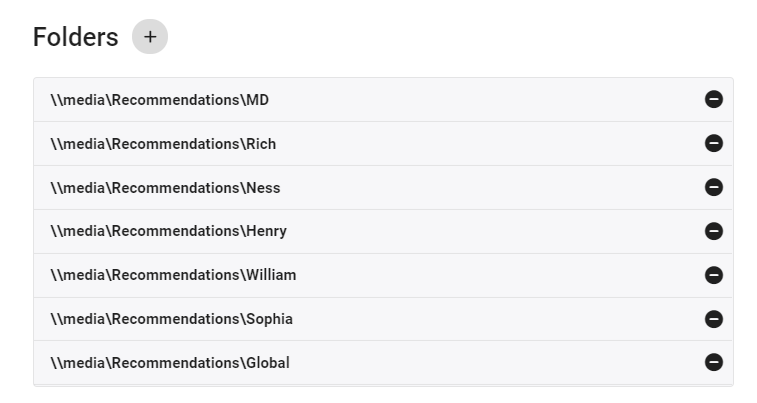
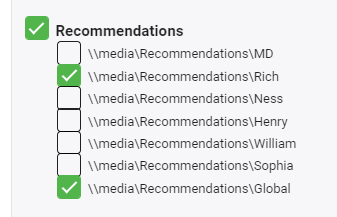
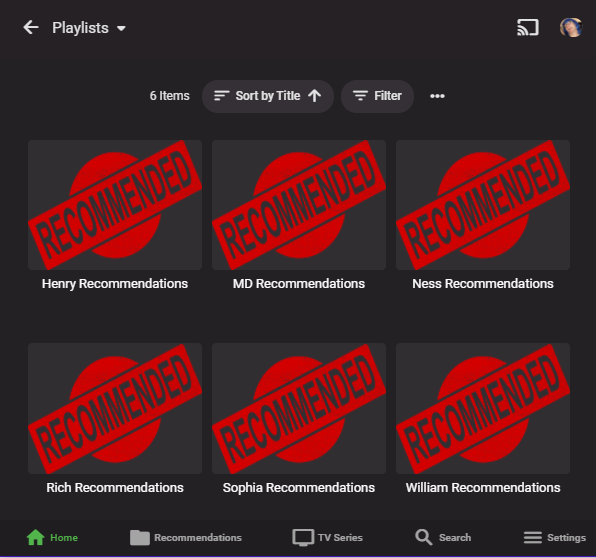
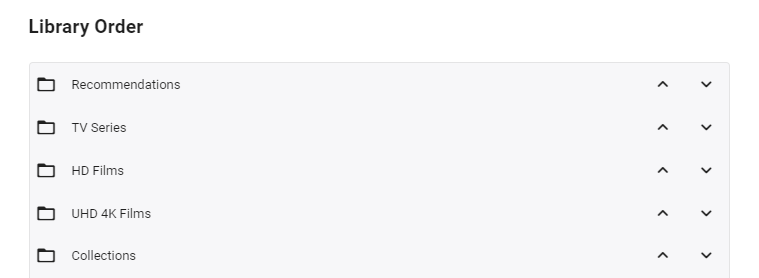
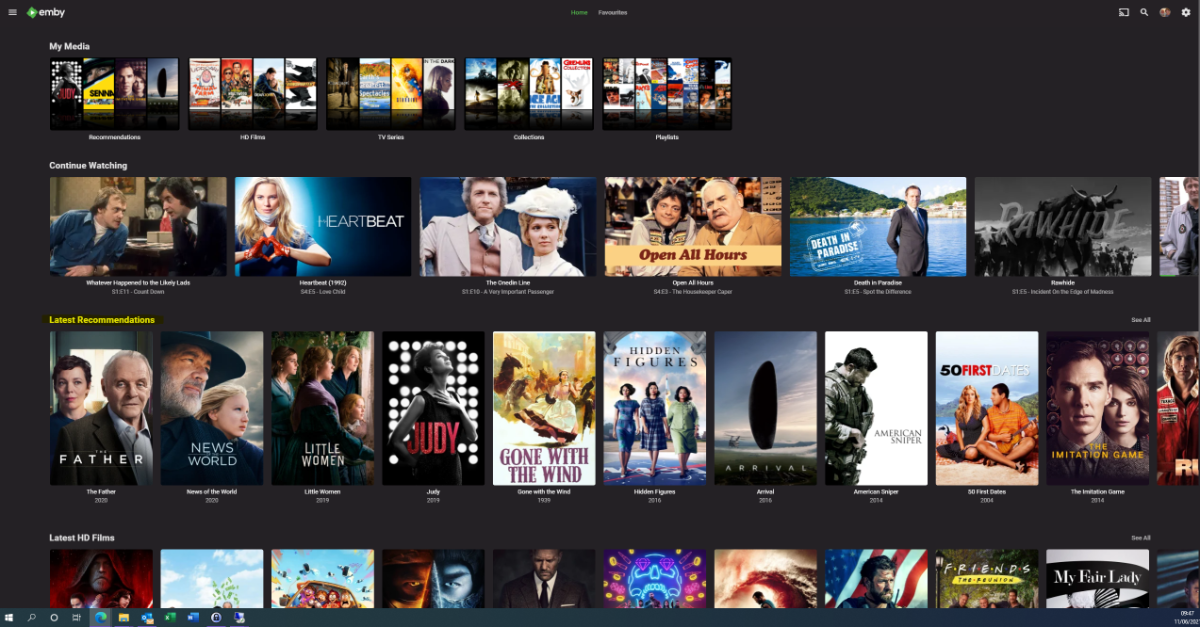
I'm posting here to gauge interest in this potential tool/utility - I use it for my parents and it works really well - but to be useful for the masses, it will need some more time spent on developing the code to make it more universal. However, before doing that, I wanted to see if this is useful as I don't want to waste my time.. What does it do ? It creates a 'Recommendations' library for each user based on items added to a Recommendations playlist. This library is then displayed in the usual 'Latest' list. As items are watched, they disappear off the list. Example (Actual) screen grab - (note 'Recommendations Row') How does it work ? A new library is setup and each user plus a global entry is given their own folder :- In these folders will be links (STRM files) to the real media. These are automatically created on a schedule via a standard playlist file (see below). Individual user based permissions can be applied to these folders - therefore, personalised recommendation lists can be created or globally set if added to the global recommendation playlist. So for this user - they will just see Recommendations for Rich and Global. The Recommendations 'library' needs to go to the top of the list for it to be easily visible :- Note - if there is nothing in the Recommendation library for that user (ie it is empty) - then the Row will not be shown. How do I flag an item as a Recommendation and to whom ? The script pulls the recommendation file locations from the XML playlist - thus you can just use the normal emby playlist functions to add or remove recommendations and add them to the relevant playlist. Anybody can add any entry to any playlist (as playlists are not permissioned), so be wary of that.. If you want everybody to see the Recommendation - then just add it to the Global Recommendation playlist. How often does it update ? Currently my script just runs every night and automatically creates any new entries added to the playlists. Now the initial library and playlist setup is done, this is now fully automated for me - I just add recommendations to the playlist and the following day it appears on those users screens. ... Of course, if emby allowed a playlist to have permissions and allowed it to be shown on the main screen in a row, then there would be no need for these scripts to hack a 'virtual' library... Any thoughts ? Is this worth progressing to make the initial setup more automated ?
 1 point
 -
Could you please add a Webhook for the New content added notification?1 point
-
Should be okay with only clearing browser cache. There is going to be one more update with some fixes. I'll post it tonight.1 point
-
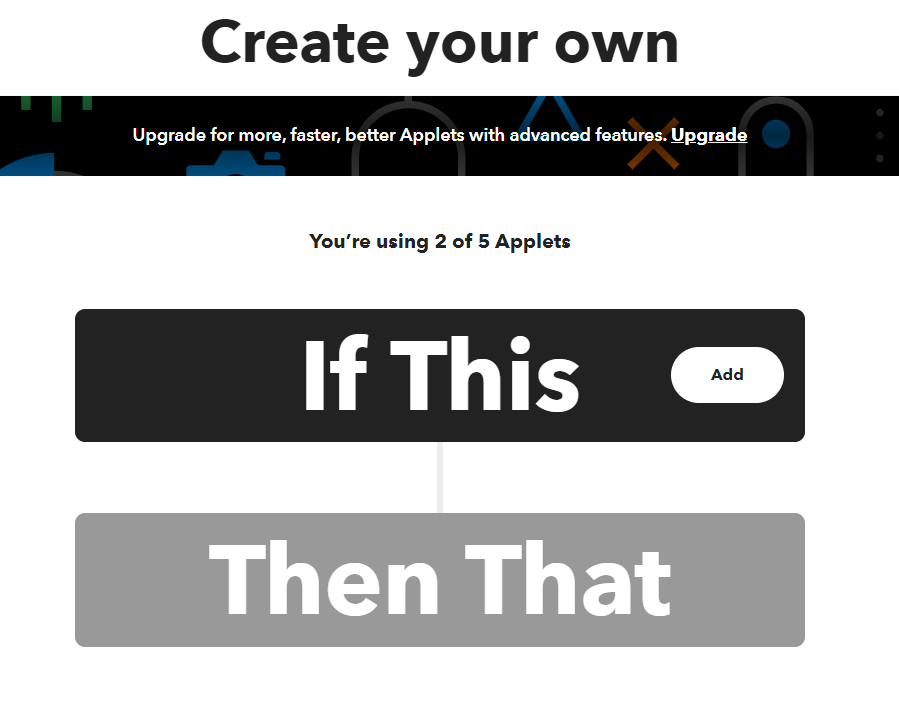
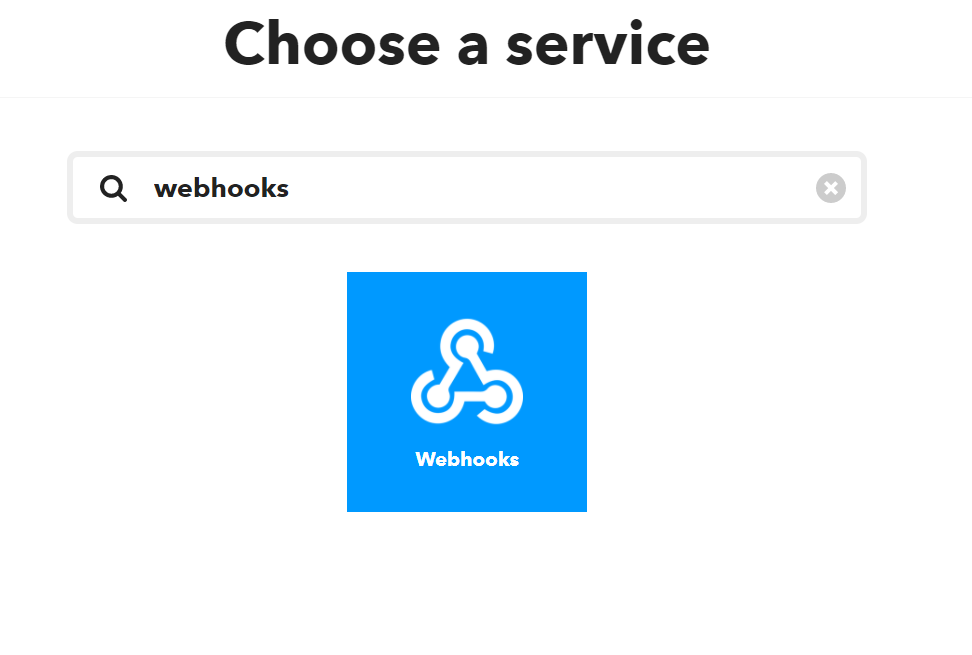
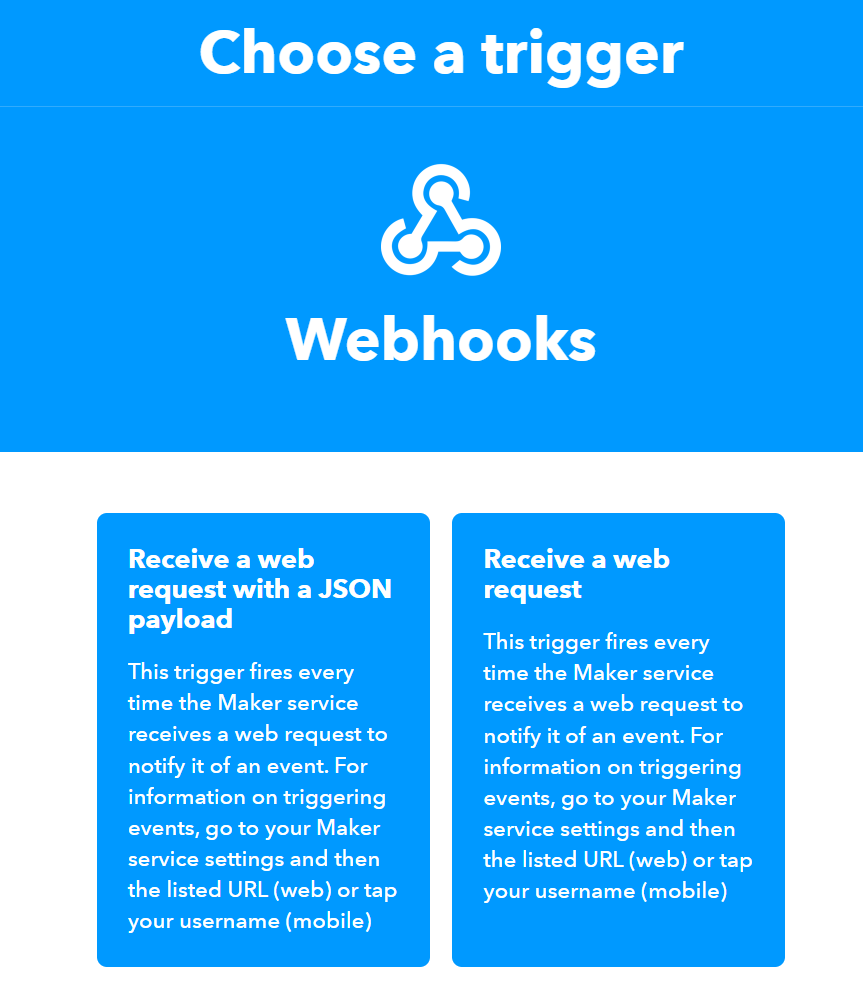
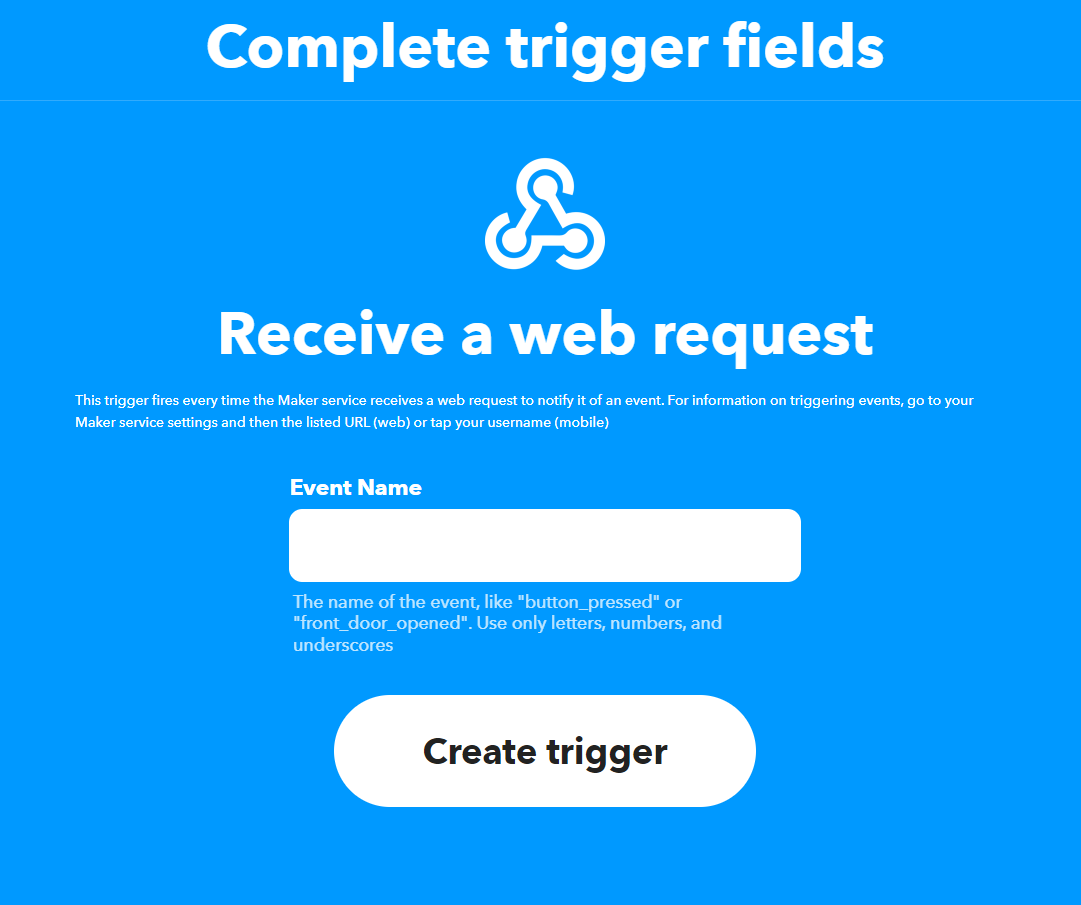
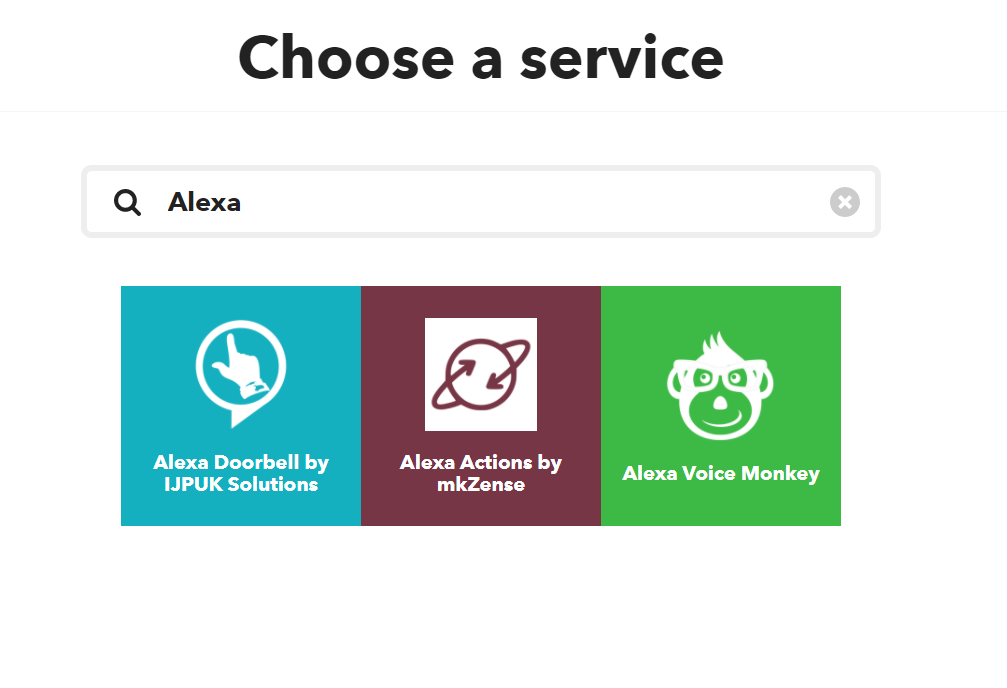
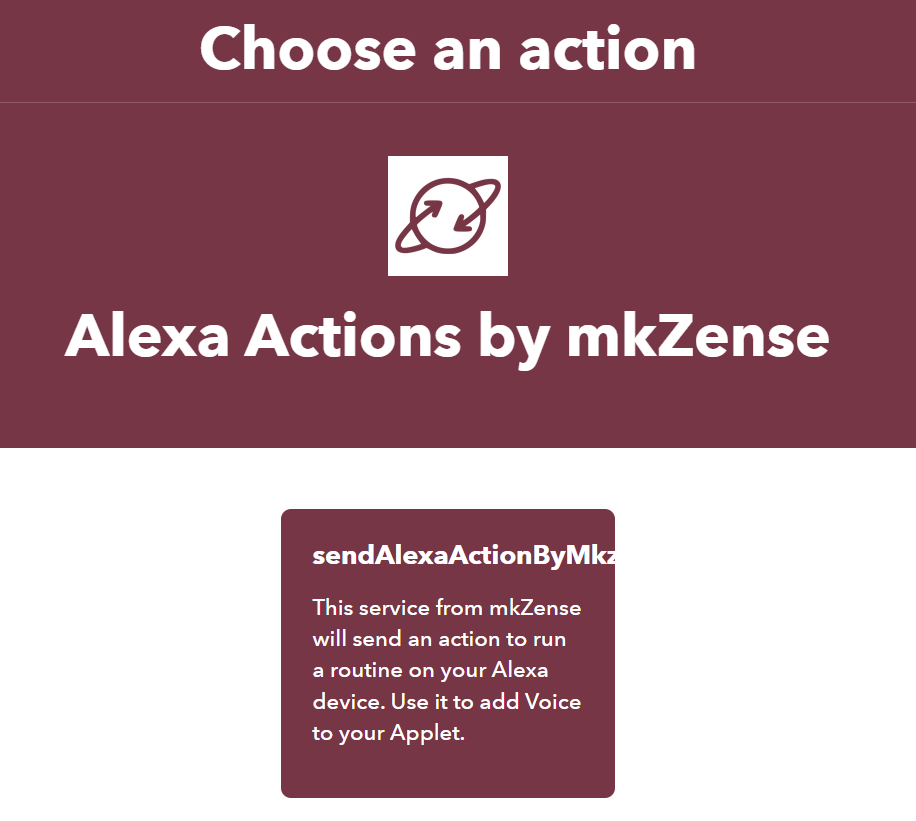
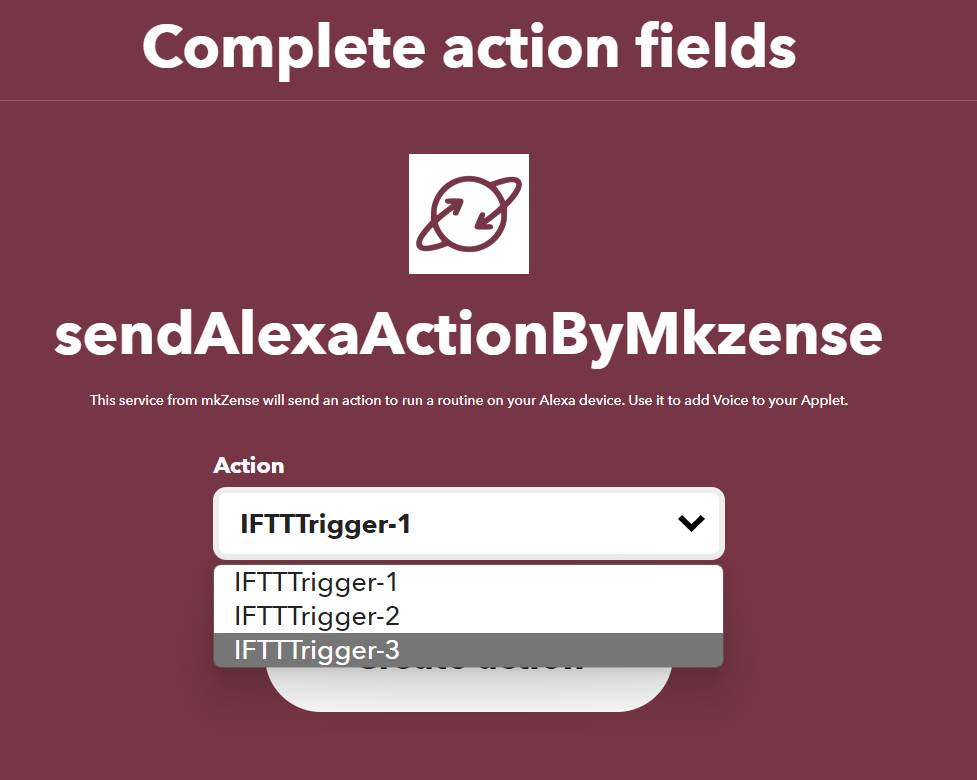
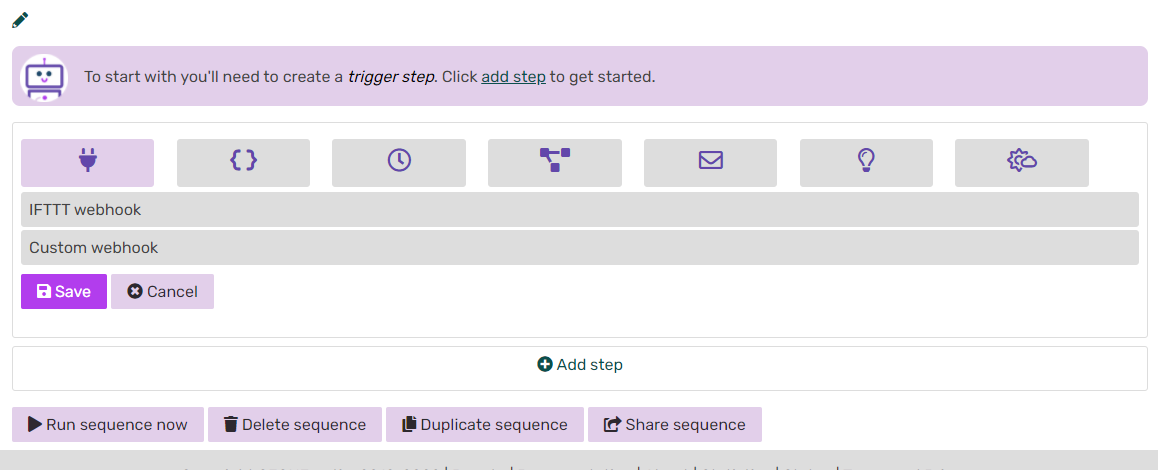
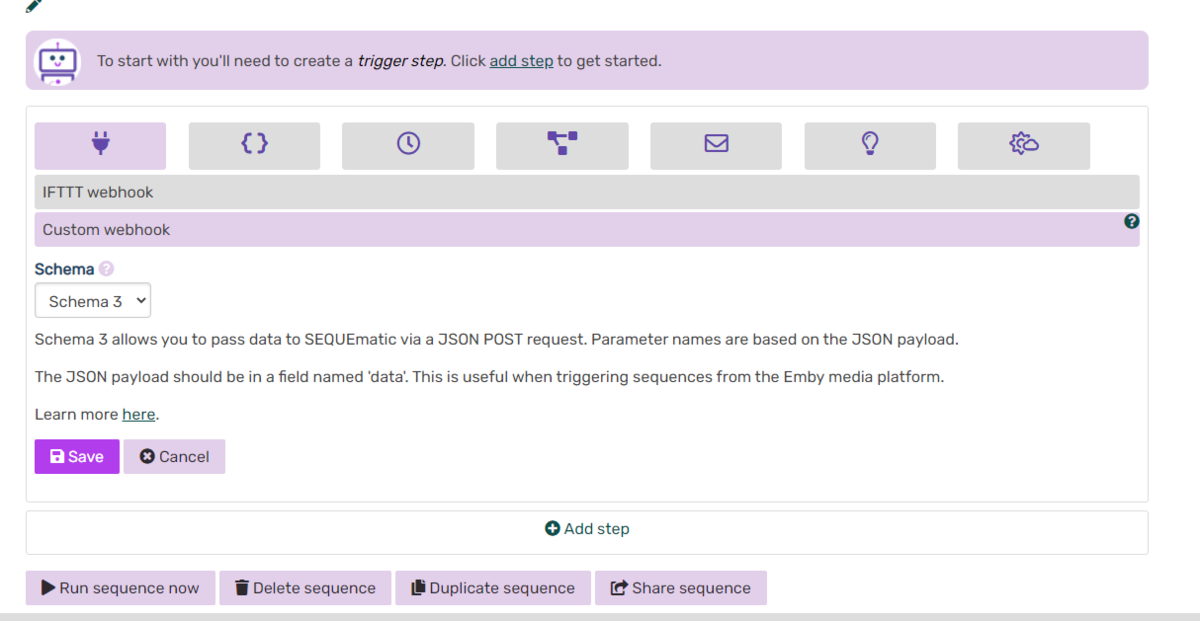
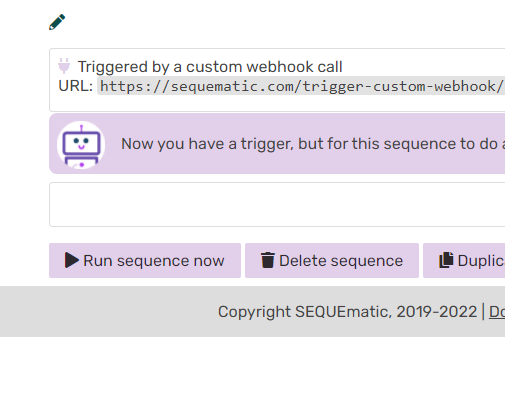
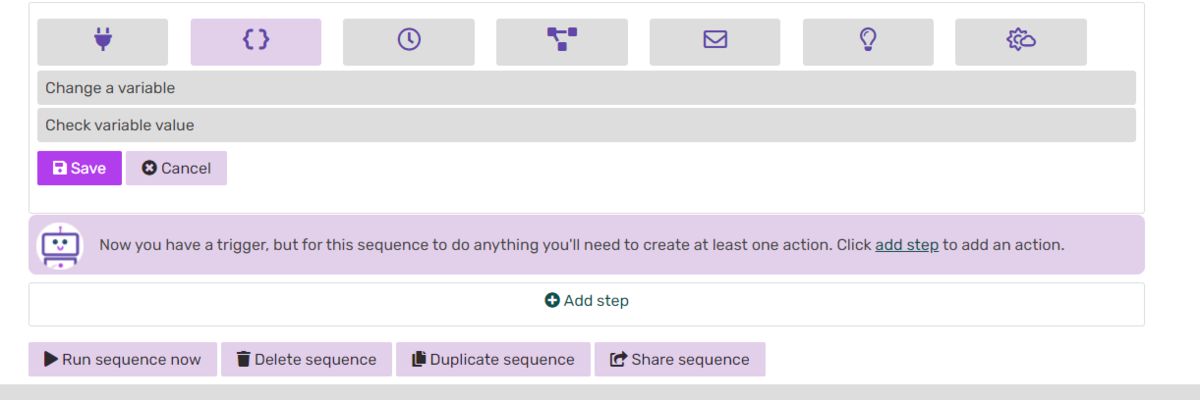
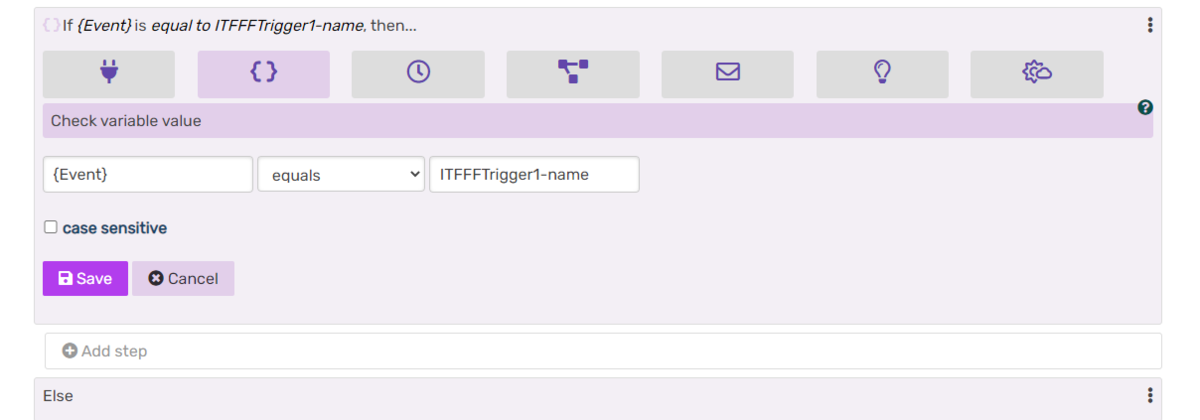
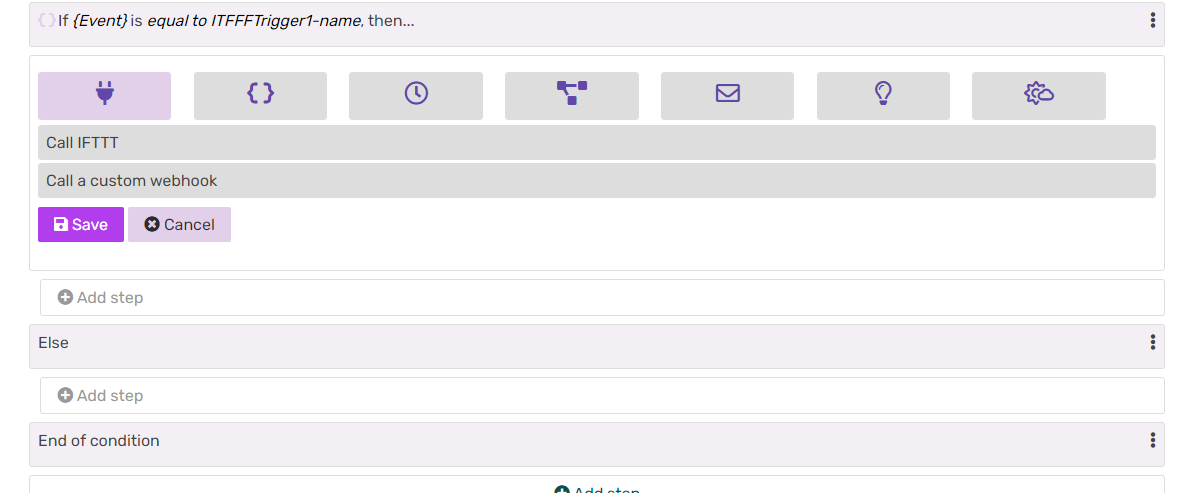
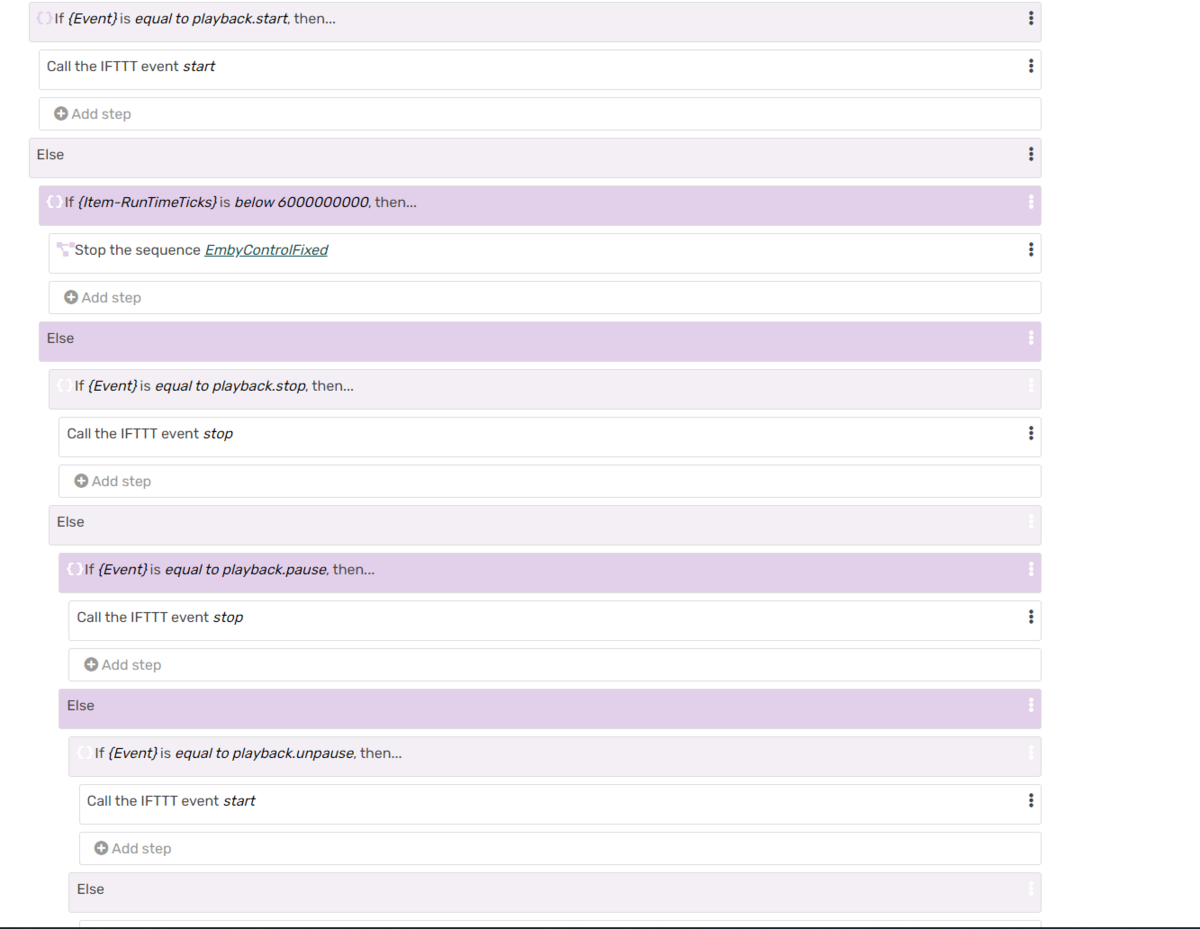
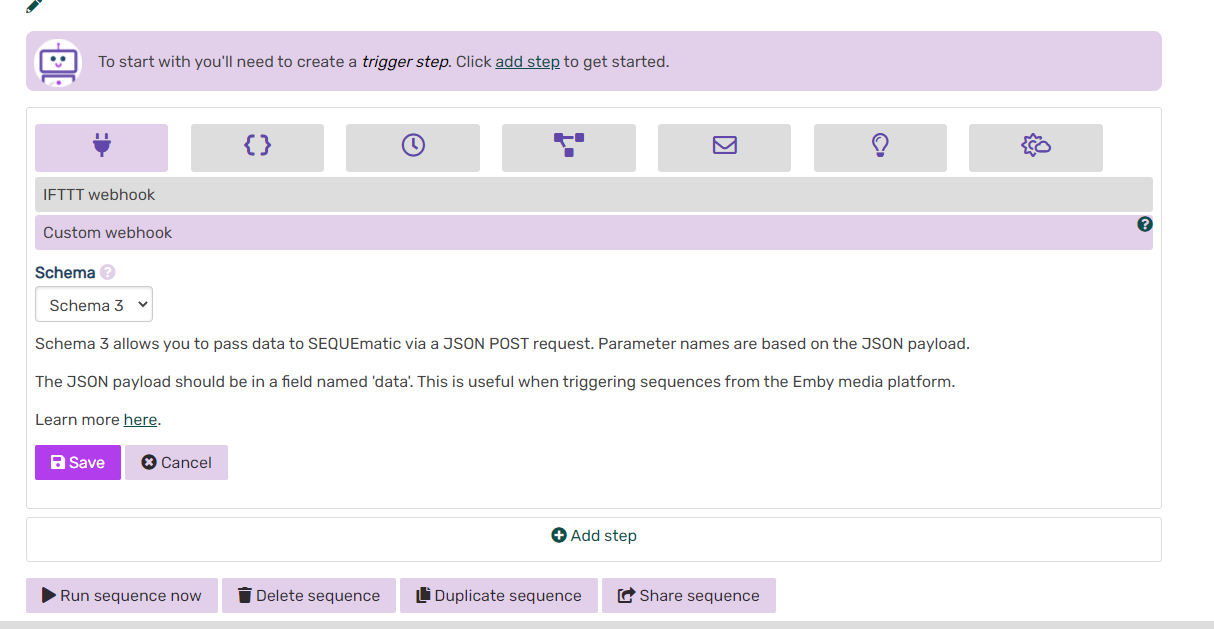
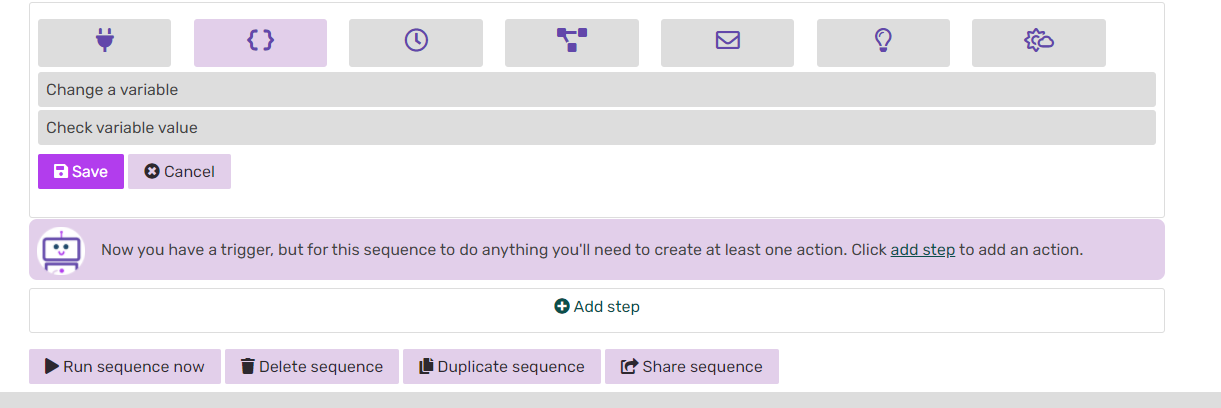
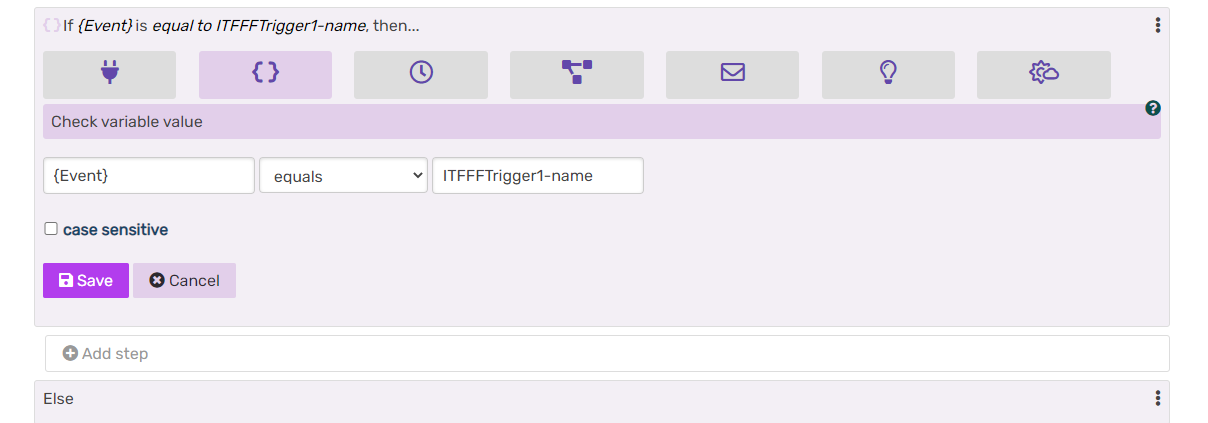
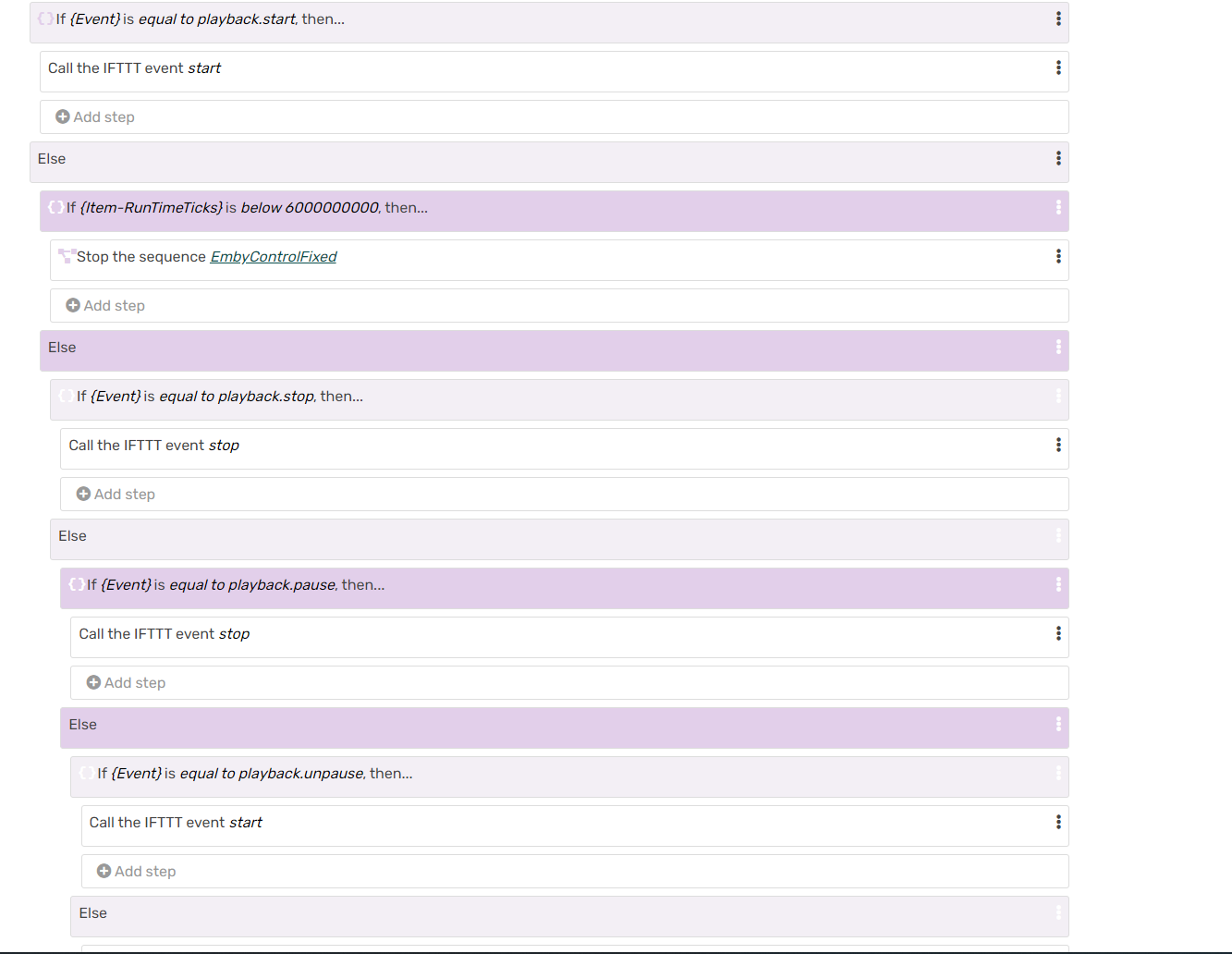
This tutorial is for Home automation with the Emby Webhooks plugin using Sequematic.com custom sequence and IFTTT.com applets communicating directly to Amazon Alexa app. This works with Cinema Intros and Vantage Point plugins to prevent your lights from turning on after trailers or bumpers. 1. Register for a free account with Sequematic.com and IFTTT.com. (If you do not have an Alexa account setup yet, you will need to do that as well) 2. Sign into your Alexa app and go to (More>Skills & Games). Select the search spyglass and type IFTTT. (enable this skill with IFTTT credentials) 3. After the skill is enabled, you will be asked to search for new devises from that skill. (Make sure you select this) It will find devises IFTTTrigger-1 through 3 and add them to your devise list. 4. Log into your new IFTTT.com account and select "Create". 5. Select "If This" and add your criteria. Do a search for "Webhooks" and add it. 6. Select "Receive a web request". 7. Enter a name for your event. (Remember that this will be the same name use to call the event from Sequematic.com later) 8. After you complete this step, now select "Then That" and enter your criteria. (You will be selecting "Alexa Action by mkZense") Here you will able to link it to your Amazon account. 9. Select "sendAlexaActionbyMKzense" 10. Select the trigger you want to assign it to. 11. When finished select "Continue" and then "Finish". You have successfully setup your first trigger. These triggers can be used in your Alexa app you create "Routines". Please refer to the Alexa app help to receive information on how to create routines, for I will not cover this in the tutorial. 12. In IFTTT.com, Select you account icon>My Services>Webhooks>Documentation. There you will find your confidential key. Copy and save this. You will need it for later when you set up your Sequematic.com account. 13. Log into Sequematic.com, select "Setting" and paste your IFTTT confidential key into the IFTTT key box, select your time zone and select save. 14. Now it is time to create your sequence. Go back to the dashboard and select, new sequence and give it a name. 15. Select "add step" and "Custom webhook" 16. Be sure to select "Schema 3", or none of this will work. 17. Select "Save". After you hit save, Sequematic will generate an https link that you will cut and past into your Webhooks plugin in Emby. 18. Continue to create your sequence by now selecting "Add step", now you will choose "Variables" > "Check variable values". 19. This first variable you want to check is "playback.start". You will use one of your ITFFF triggers for this process. The finished product should look like this... 20. Now select "Add step" under the previous and choose Webhook>"Call IFTTT". If you save your IFTTT key it should automatically populate. 21. The IFTTT Event name will be the name of the event you saved within IFTTT.com service. "Save and continue to the next step". 22. From here you will continue to create additional steps to complete the sequence by imputing the data into the "Else" fields. 23. It is important to have the {Item-RunTimeTicks} variable checked after the {Event} playback.start variable, or this will not work correctly. After that you can create a variable check for playback.stop, playback.pause, playback.unpause, and playback.scrobble. Below is the entire sequence for my setup. This configuration works with "Cinema Intros" as well as "Vantage Point" plugins for a real cinematic experience. Finally - It is important to make sure that your variable name is imputed in the following fashion.... {Event} - This is for checking the playback status {Item-RunTimeTicks} - If set to "below 6000000000" it will check to see if the video is less than 10 minutes. Enjoy!!!
 1 point
 -
Currently, the behavior is the thumbnails are not shown.1 point
-
Good Idea, I'll try. I think it will not generate to much overhead. Query should be snappy1 point
-
1 point
-
Sure it could, given general increase in mobile device storage, I'd guess it wouldn't be an issue as it once would.1 point
-
Just saw the updated version. Are there any special steps that I need to take once I copy in the new .dll?1 point
-
Hi, there is currently no explicit option for this.1 point
-
You almost there. The script was actually written so you didn't need to edit the file. All you should have to do is open a powershell window and copy and paste the following command and then change the values to what they need to be for your server: python poster-migration.py --plexUrl localhost:32400 --plexAuthToken xxxxx --plexServerName SomeFriendlyName --plexMovieLibraries "Movies" --plexSeriesLibraries "TV Shows" --embyUrl "localhost:8096/emby/" --embyApiKey xxxxx If you aren't comfortable trying to run the script with arguments above I also created an edited version that has a section at the top for you to edit and set the values you need. I attached it to this post. Also it's not safe to share your emby and plex api tokens. You should really edit your post and remove them and then delete and recreate them on your servers. poster-migration-var.py1 point
-
Great work @VicMoore1 point
-
GrimReaper... I may be able to do this... I have to try it with the API. vic1 point
-
I could activate chapters then and skip to the next chapter?1 point
-
Ah thanks, was beginning to think i missed something in the wiki.1 point
-
It's a work in progress - but this wiki should help you out : https://github.com/chefbennyj1/Emby.IntroSkip.Release/wiki1 point
-
Thanks, I worked late into the night on it Vic1 point
-
@Luke Could you take a look at my pull request? I have added support to "Nintendo 3DS" and a couple of new extensions.1 point
-
I've just installed and test it, and it works.1 point
-
Yes, I think so. I had left the pw open, as I didn't want to affect people using Connect, but realized a few weeks ago that anyone can access any user, made me realize that my access was too open. Will be implanting strong passwords for the accounts, and setting up the reverse proxy.1 point
-
Hiya. Well, my upload speed test was shite, so it seems I cannot stream outside my network. Not a biggie. Thanks so much for your help. Everything else is working perfectly, thanks.1 point
-
Linux servers were one of the first platforms to be compatible with the plugin actually So if you’re on Linux, you can likely already try the plugin. Latest version is found here:1 point
-
@Tangsgod I added a script to the repository called poster-migration.py that should migrate all the posters. https://gitlab.com/CloudWing93/plex-to-emby-migration1 point
-
If only it were possible. Its a browser only thing...1 point
-
Been there done that. With css anyway - /* Make Metadata window narrower */ div.focuscontainer.dialog.dialog-fixedSize.dialog-medium-tall.formDialog.opened {width: 900px;} /* Make Filter (WIDE) window narrower */ div.focuscontainer.dialog.dialog-fixedSize.dialog-small.formDialog.opened {width: 900px;} and maybe /* Make TV play recording dialog box shallower */ div.focuscontainer.dialog.dialog-fixedSize.dialog-small.formDialog.recordingDialog.opened {height: 560px;} /* Make TV play recording dialog box narrower */ div.focuscontainer.dialog.dialog-fixedSize.dialog-small.formDialog.recordingDialog.opened {width: 800px;} its from this - Put it in Dashboard > Settings > custom css box. Hope it still works. Edit - adjust sizes as appropriate...1 point
-
I just took a quick look at it and I think I can get a easy script for poster migration working within the next day or so. I'll let you know when it's ready if you want to test it out for me.1 point
-
Hang tough another week Bert and I'll have a guide for how to do this and possibly more. I ordered some additional things to try and manipulate the NAS as much as possible while still being pretty easy to do. I've got everything but 2 pieces which were delayed. They were scheduled for delivery yesterday but we had a snow storm. Got rescheduled for delivery today and USPS pulled up out front. I walk out the front door walking toward the vehicle, get waved at and it drives off. I then walk in the house and get an Alexa notification (and email) message in a few minutes "Delivery Attempted - No Access to Delivery Location" which is quite annoying as the driver even waved at me as I was walking down the front steps. Tried to reschedule delivery but turns out that's not possible for Sundays. So hopefully tomorrow evening I'll be able to test these other items and see if needed drivers can be loaded. Then I'll be able to write up how to accomplish a few of these things the easiest way. Carlo1 point
-
It might be possible smb is required in order to use FILE _MANAGMENT though. For some reason I don't believe Emby is requesting or has permission to request an SMB2/3 connection and the only reason it works for me after 60 seconds is that it sees another smb connection and jumps on it. It's sort of like Jurassic Park when the guy says somehow Mother Nature finds a way.1 point
-
Version 0.0.1.83 IntroSkip_v0.0.1.83.zip This version has taken into consideration some of the bugs that have been mentioned on this thread, as well as some we have found while testing. This shouldn't need anymore then clearing of the browser cache, to load the latest javascript. We'll start working on the chapter code next. Very Exciting! If something comes up, let us know so we can fix it! TODO's: Series that have all their episodes in season 1 need to be handled differently. How? I don't know yet. When Chromaprint is not available in ffmpeg, IntroSkip needs to better alerts the logs, make sure the alert is shown in the web config, and stop iterating the library. If you have TV Shows in your library that place entire series into one season (ex. Mr.Rogers Neighborhood) they need to be added to the exclude list in the "Advanced" settings of the plugin, until they can be handled properly. Thank you @sydlexius for bring this to our attention. The one thing that didn't end up changing was Auto Skip. We tried a bunch of different way to handle Frame Rate Switching, and monitoring the session, but it was buggy. Sorry @datanet Auto skip is a large undertaking in of itself. It is a very cool feature. When Intro Skip has it's next major released, we can extract Auto Skip into its own plugin. Auto Skip will be open source. So anyone who wants to make a pull request can do it, and we can work together to make it really awesome, and work smoothly with all devices steaming all sorts of media. Looking forward to feedback.1 point
-
Hi. This isn't a terrible idea but I would suspect it could be difficult to maintain. We would probably have to spend a lot of time keeping it up to date. Given that, we'd probably prefer to spend that time on true features for Emby.1 point
-
Simple: Garbage in=garbage out. You folder structure is completely off and not following any of the supported naming conventions as per KB: Emby TV Naming : Emby Emby Movie Naming : Emby As per your folder structure, there is no way for Emby to know what is a series and what is a movie there. Since there is not path shown on your screenshot, I'd assume that is parent folder you selected as Library path and not SAO folder. Edit: Upon looking more closely, that apparently IS a SAO folder, which makes it even more convoluted having another show and a movie within it. 1. Gun Gale Online is a separate TV Show and you need one for SAO as well for it to be recognized as as series, Season folders alone won't do. Edit: you can't have another TV show inside a different TV show folder, take it one level up ソードアート・オンライン オルタナティブ ガンゲイル・オンライン - TheTVDB.com ソードアート・オンライン - TheTVDB.com 2. If you want Edit: Can't have it as a separate Movie there either, if you'd like to have Ordinal Scale as a movie, rename that folder to "Sword Art Online: The Movie – Ordinal Scale (2017)" and take it one level up, or if you want it as SAO Special, rename to "SAO S00E22" and put it in SAO "Season 0" subfolder. Sword Art Online: The Movie – Ordinal Scale (2017) — The Movie Database (TMDB) (themoviedb.org) ソードアート・オンライン - Aired Order - Specials - TheTVDB.com 3. Your files are missing Season identifiers, which can be somewhat mitigated with season folders and hope they'll be recognized or just name them properly as per KB and be sure they will 4. "Mixed content"-type library means you can have both Movies and TV Shows inside that library, but same structure/filenaming needs to be respected as if it were separate content-type Hope that clarifies why you're wasting time. Cheers1 point
-
There's certainly acknowledgement that the documentation particularly in aomenc is... lacking. Unfortunately nobody has actually gotten around to writing up details of what every option does. There's also an entirely other layer of "speed features" in aomenc which are hidden from the user and controlled by `cpu-used`. So... it is indeed a mess. Some of us are trying to improve the state of it, but it's a long process, especially since there's not much help on the documentation side coming from AOM engineers. I'm sorry you've had a bad experience with the AV1 community until now. Most of us try to be open and educational. I'm no fan of gatekeeping either.1 point
-
AV1 is more complex than HEVC. It needs a literal order of magnitude of CPU power to get comparable speeds without using SVT. The other issue is some of them are only single threaded, and at times the encoders don't respect "threads" command and you'll have only 1 core encoding, and the rest idle. Hence why I get angry when no one explains switches and why they don't work.. It's a mess and they refuse to acknowledge that.1 point
-
Hey @chef, I have a suggestion for potentially speeding up matching within a season. I have shows, such as Mr. Rogers' Neighborhood that has 130 episodes in season 1. If I understand the matching mechanism used after fingerprinting, that would mean roughly 130^2 episodes to match (approximately 16900 pairings). Compared to a typical show that has 20-25 episodes/season (or fewer), this exponential growth creates disproportionate levels of computational weight. Might I suggest for your algorithm to subsample random episodes (say, 5-10%) for title sequence detection, and once you have a confidence level for the top choice over a certain percentage, begin matching the other 90-95% against that value? If the confidence level is below a certain threshold, then continue to match more episodes? I realize I'm probably both oversimplifying and possibly even incorrectly describing some of the functions, but there has to be a better way to handle shows like this? Further, what are your thoughts on certain series (such as, say, Attack of the TItans) whose 4th season is split, and has a different intro for the 2nd half? Forgive me if you've already addressed this. Cheers, Jesse1 point
-
Does sound like a good idea for a feature request, but I would suggest that it also might help if you do things gradually ? You can apparently run Plex and Emby side by side successfully (though I've never tried it), so that would give you time to set things up. You can add users slower instead of having 12 users switch (almost) overnight. Also Emby does its own collections, which work fine for me, though I'm not into adding my own except for a select few. I figure I don't need say a Harrison Ford Collection, I just go to one of hos films, click on his actor image, and it'll show the rest.1 point
-
O ok. I was just in the impression that it was added and then removed again because the date on the post I'm referring to was back in 2018 and Luke quoted "Hi, the next release of the server will have expanded IP filtering settings." Looks like it was never added then. Thank for the info.1 point
-
Ok,I see! Thanks for the suggestion!1 point
-
Have you tried editing its metadata and adding the word "The" into the 3rd box "Sort Title" ?1 point
-
Thanks Luke, great to hear a new app is incoming, been a life long Emby fan but the Electron based Theater app has some odd quirks! Looking forward to testing out the new app. For anyone else that finds this thread, I manged to fix the issue by positioning a second screen in the same space as the screen that previously had the Emby app. E.g. If you previously had the Emby Theater app open on a second screen that was position above your main screen in Windows, plug in another screen in that same location and the Emby app will be there. Hope this helps.1 point
-
Or setup like playlists where you can drag an item and reorder it.1 point















.thumb.jpg.888f41f295aa5e3f52da1aea01254650.jpg)