Leaderboard




Popular Content
Showing content with the highest reputation on 01/26/22 in all areas
-
After some testing I think you solved my problem, that was it! Now it seems to work consistently.2 points
-
Also to note, which has thrown me a few times, if you are using a Browser to view/test the Auto-Skip, the first Session that you created is the one that will get the trigger. So if you then open up a second Tab, Auto-skip will not work on that 2nd tab. If you go back to the first tab, it should work perfectly well.2 points
-
Keep in mind that the skip intro functionality does not work if any scans are currently running. Also, if you have "match resolution" or "match refresh rate" enabled in your client device then any intros that start at 00:00:00 aren't currently skipped.2 points
-
I actually had two users already. But I tried your suggestion and created a new one but the problem persists EDIT: A reboot solved it!2 points
-
Managed to use the ffmpeg/ffprobe/ffdetect binaries included in the deb package and now seems to be working! and yes, with the correct ffmpeg version I see the options you mention: I guess I didn't see them since it assumed I did not have hw acceleration. If anyone is running arch Linux and faces the same problem, that is what I did to solve it: Download beta deb pacakge and decompress it (the files are in the data.tar.xz file) Copy the emby-server folder to /opt Create a new emby-ffprobe wrapper in /opt/emby-server/bin/ based on the /opt/emby-server/bin/emby-ffmpeg script (just change the last line to execute ffprobe) Modify the configuration in /etc/conf.d/emby-server so it uses the new binaries Modify the `FFmpeg options` in the `Advanced Transcoding` configuration (install the Diagnostics plugins to see it) so they point to the new binaries. Restart emby-server (sudo systemctl restart emby-server)

 2 points
 -
Attempt to play the video and on the video itself, right click, then go down to 'Inspect' - it will show the source in the browser debug mode. If it can't get to this http link, then that's why it is not playing. A screenshot of the debug mode would help.2 points
-
Hello, Yup everything works really well. I have been using emby on my nas with HDs the last 3 years. The SSD changed everything. I am really happy with the product. Thank you!2 points
-
I've been looking at some info about high resolution audio support on Android and all I've seen is complaints about poor support by the Android driver in this regard, where the driver resamples everything to 48Khz instead of playing the audio in its real resolution even on phones with DACs that support up to 192Khz. In a previous release of Emby for Android mobile I saw the release notes saying the app was supporting high res on phones that support it, but given the above situation I wonder what the Emby app actually supports in this regard. One suggestion could be adding the real output the app is giving in the "Stats for nerds" option inside the cog icon in the now playing screen.1 point
-
Very simple, zero configuration, open source plugin to download TV series theme music automatically. Source and release
 1 point
 -
What about adding new option to link calibre to emby as the plugin to link emby to kodi so we can have all our books ready to download via interface of emby .If we want, we can link the calibre libraries to emby, so we can use all the abilities of calibre of conversion and cover fetching etc then display the resultant libraries in emby I think this can be added by one of three ways: 1-Connect to calibre content server 2-use the db file found in every calibre library and read it to present the book without interfacing with calibre at all but using ready made libraries directly 3-parse the opf files of books to create the database of books of Emby1 point
-
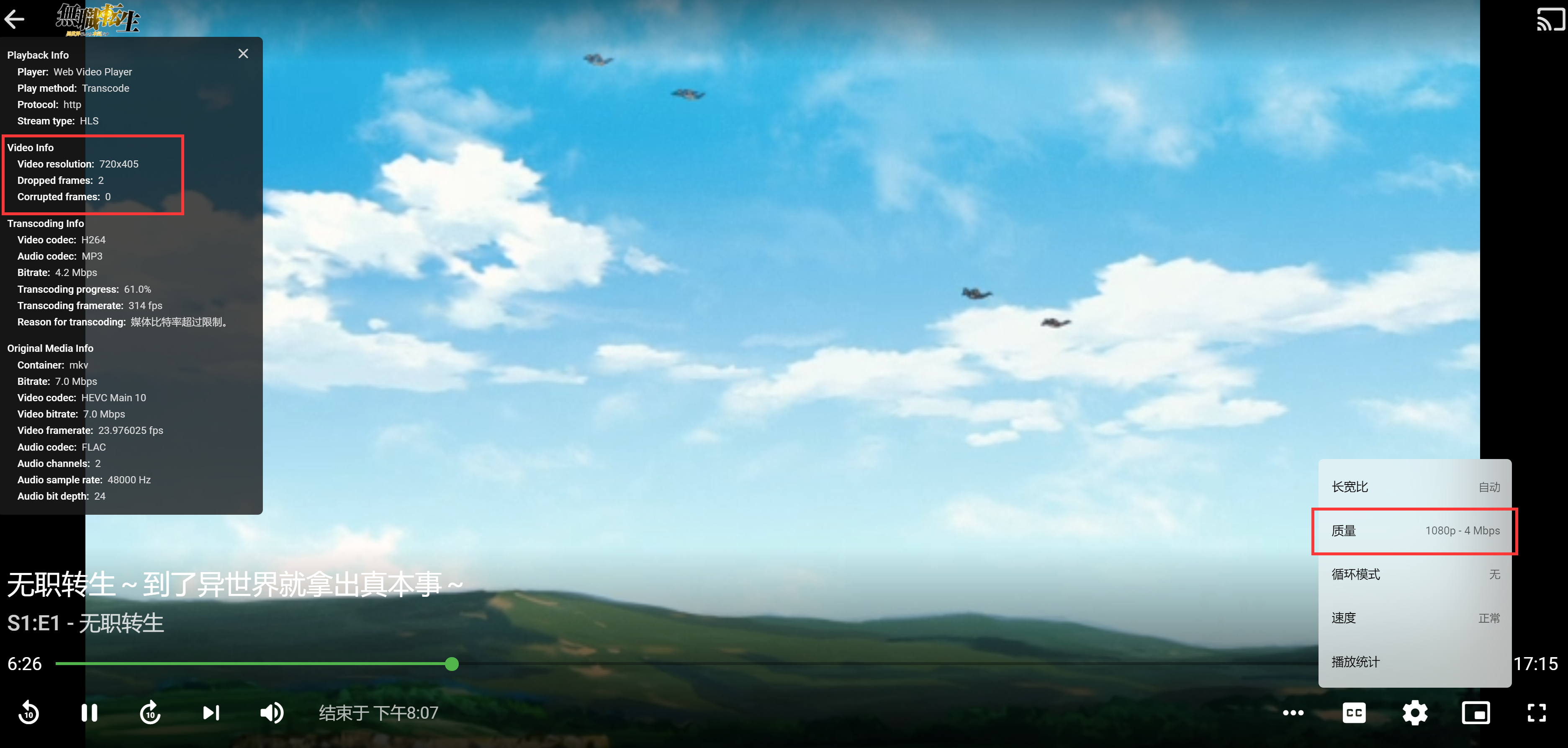
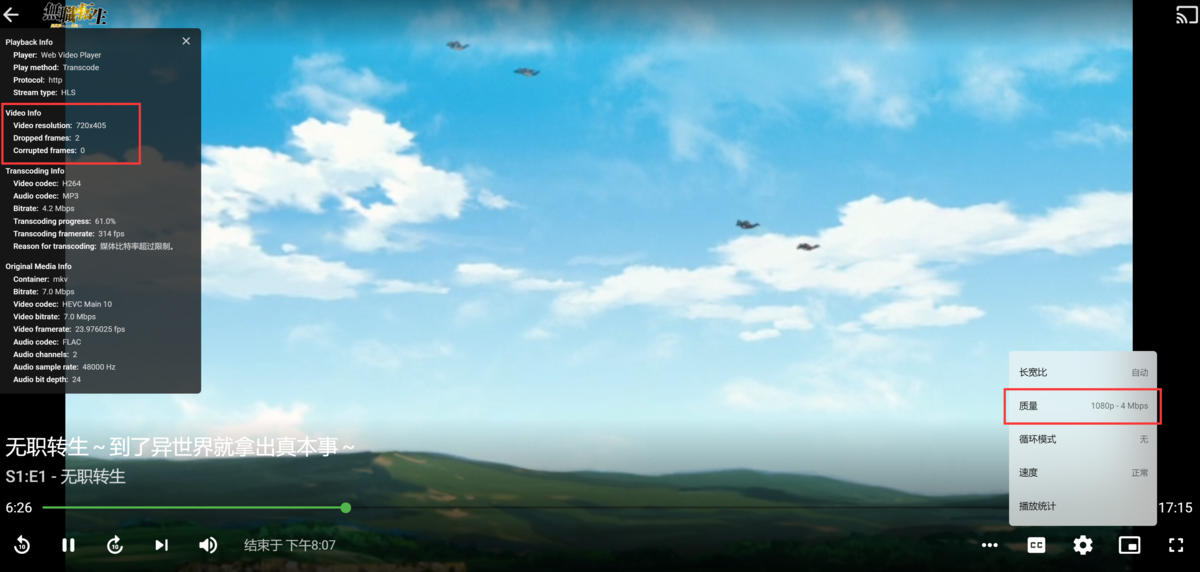
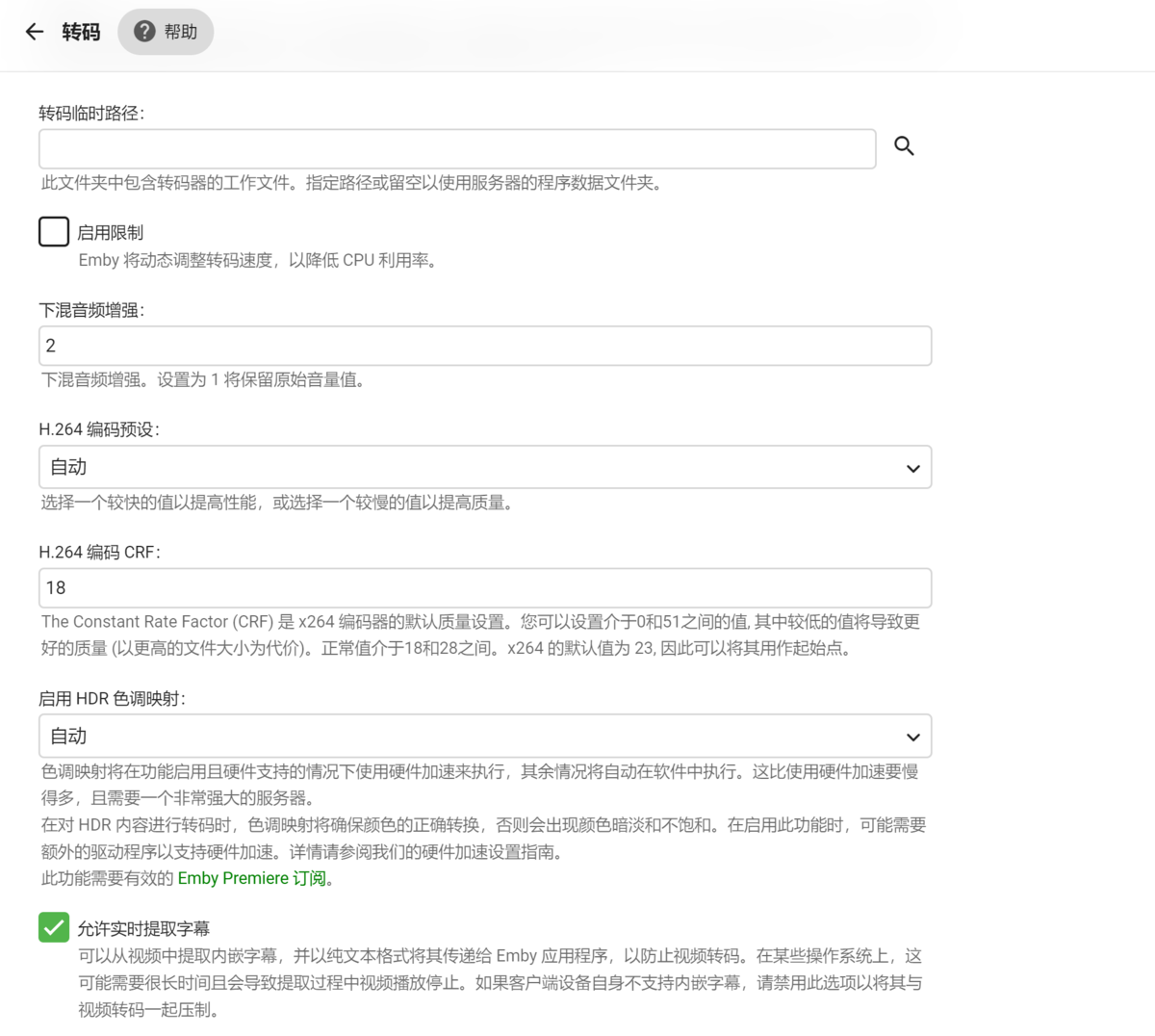
I choose 1080p-4m, but emby transcode the media to 720*405, which will not happen before. I haven’t used emby for a few days because I’m busy. I don’t know what updates have been experienced? Is my setting wrong?
 1 point
 -
I really miss this capability in WMC and even Uverse.. Pause Live TV on one TV and pick up the stream on another TV. Currently, I hit record then pause and pick up the recording in the other room. Can this be made to work in Emby?1 point
-
@visproduction I don't know how to write a script or run one and I shouldn't have to to keep other users from seeing what I have been watching. I don't want anybody seeing what anybody else is watching. Granted, it's my server so ultimately I can see anything in the dashboard but on the home screen of emby it is inappropriate in my opinion. This should be a part of emby not something I have to figure a work around to correct.1 point
-
Is anything at the top of the 'to do' list at all? Where is the new properly functioning Live TV that I was told was a few months out almost a year and a half ago....which is why I bought Premier...but can't actually use yet. I love emby but I would really like to actually use it for what I purchased it to do.1 point
-
This is correct, I may have fixed this, but I'm not entirely sure. We create a monitor that runs alongside the stream. When the stream starts it calculates when it should skip the intro. It is no longer based on what the client is reporting exclusively. However, if the client reports an update during progress, we will attempt to sync where the client is with our monitor. If match refresh rate is on, it may throw the whole thing off still. That part is still being tested.1 point
-
Yup. That error is known. It's already fixed for the next update.1 point
-
I assume they have already given each other permissions to logon and see each other's libraries which requires you to log off and log back on to the other server. The OP mentioned 'combine' though in his second post which would allow them to see each other's stuff w/o jumping back and forth.1 point
-
A Browser Cache 'clear' would have also likely fixed it - Especially if you ran a previous version of the IntroSkip plugin.1 point
-
Hi there, please make sure to attach complete ffmpeg log files. Thanks.1 point
-
I've sent you a PM.1 point
-
@rbjtechAlright, hope this helps. I've added one show or so since I last ran the plugin so it did the intros for those ones as well. But the one you should be looking for is "Classroom of the Elite", that's the one I reset (yielded the same results as expected). IntroSkipServerLog.txt1 point
-
I think I already mentioned that in the DMs yesterday.1 point
-
Thank you very much for the hint. I followed your suggestion and have figured out what the problem was. <video style="width:100%; height:100%" preload="metadata" autoplay="autoplay" webkit-playsinline="" playsinline="" crossorigin="anonymous" controls="" src="http://xxx.xxx.xxx.xxx:8096/emby/Videos/32884/stream.mp4?....I SHORTENED THE LINK HERE......,TranscodeReasons=AudioCodecNotSupported,DirectPlayError&allowVideoStreamCopy=false</video> This showed me that the player would have to transcode the stream but I had transcoding disabled for my user. After enabling it, video plays fine.1 point
-
Sounds like a multi backdrop issue. My tests never addressed multiple fanarts. Thanks, that's a very important information. I'll check, should be easy to fix.1 point
-
@quickmic and @markdj I can confirm the following behavior: If you add more than one fanart for a tv show in emby (for example 3 background fanarts) and than remove two of them so that basically only one should be left, the files will correctly deleted on the storage but in Kodi (good to see if you have installed a skin with rotating background images) it will still make use of the two fanarts which shouldn't exist anymore. If you than look in Kodi (in German) "Mehr / Fanart laden" you could see that fanart / fanart1 / fanart2 are still mapped to the show. Of course there should only be fanart left. But I don't know if this is a Kodi caching bug or if it has something to do with emby-next-gen. @quickmic hope you understand what I mean, if not we can PM in German.1 point
-
Same issue as Swagger. Access to fetch at 'http://xxx.xxx.xxx.xxx:8096/emby/system/info/public' from origin 'http://tv.emby.media' has been blocked by CORS policy: The request client is not a secure context and the resource is in more-private address space `private`. Access to fetch at 'http://xxx.xxx.xxx.xxx:8096/emby/openapi' from origin 'http://swagger.emby.media' has been blocked by CORS policy: The request client is not a secure context and the resource is in more-private address space `private`. So you have to have HTTPS Emby connection. https://emby.media/community/index.php?/topic/102121-cors-issue-when-trying-to-use-api/&do=findComment&comment=10732331 point
-
Exactly - that would be useful. At the moment, the .bin files are not removed - so it is actually going to re-calculate exactly the same as it did before (or should !) thanks !1 point
-
It works just fine for me in Edge and Chrome - The function is heavily dependent on the configuration of browser however, so it may be totally out of our control as you say. If the OP can post the Browser Debug - and it contains the correct http URL - but doesn't work, then there is not a lot we can realistically do ...1 point
-
Update: I found a music update sync bug in 6.2.7. It will break music content once updated (after init sync it's fine). Will be fixed in 6.2.8...1 point
-
It works rather nicely on Firefox (and it might work better in general, my browser is somewhat "heavily" modified outside what the ordinary user would do, which has broken some things).1 point
-
Ah, I had an issue with DNS after switching over to opnSense... unexpected DHCP behavior! All working now!1 point
-
I'm interested in trying this when I get some free time!! Thank you for your work!1 point
-
Hi mate, yep I would list the miniseries as specials. That's what TVDB has them listed as. https://thetvdb.com/series/v/seasons/official/01 point
-
Not sure what you are calling automatic scan. There is a Real Time Monitoring option per library you can disable. This will prevent items from being added/update via Real Time Monitoring. And you can disable/delete the Schedule task trigger that runs every 12 hours by clicking on the task in Settings-Scheduled Tasks. But doing this will require you to do manual scans.1 point
-
Thanks, I'm doing that now. I'm not sure what constitutes a large library, but I have around 2000 episodes total.1 point
-
Starting with the 4.7.0.21 beta releases, we've switched over to the .NET core runtime 6.0. That means there's no longer any dependency on the mono runtime.1 point
-
Not with css as the script would need to be updated to add that information to that view/card.1 point
-
well it turned out my issue was something related to server version .20. all back to normal after updating to .211 point
-
Well, thank you! It took me 30 minutes to write the subject I didn't think that I would have such quick and clear reply I just tried it and it work perfectly! I'll see if tomorow I'll have another idea to propose, just to find out it exist already1 point
-
Hey up, and wecome to Emby. Both of your requests are already implemented but depend on your folder structure/filenaming. Check out KB article, Multi-version section: https://support.emby.media/support/solutions/articles/44001159102-movie-naming In short, if you put all versions of your movie inside a single folder and name them in supported naming convention, with everything after "space-dash-space" being what you want to see in the dropdown, you'll get what you're describing. If you keep them in separate folders, then you have to join them manually or use Auto-grouping plugin.1 point
-
Sadly not, these are all anime. I can still reference some if you really want to test this out more extensively, I trust that you doing it by yourself would work better than me being in the mix. But isn't it more odd that it somehow does this repeatedly at the beginning? Do you guys start scanning the first episode of a series/season? Because if so then if that's the source of the intro theme and all the following episodes gets their intro correctly detected shouldn't it be able to perhaps then "correct" itself (if you programmed it to do so)? Like double check just the first episode. I don't know, it just feels strangely peculiar that it's happening 95% of them time on the first episode and I've only seen one or two cases where it put the intro randomly in the middle section of an episode. Maybe this is unique to anime? That's why I proposed a while back for "profiles", where the plugin will act differently depending on a type of show's established episode structure. In this case, perhaps, it would've meant that the plugin should assume that there's a lower chance for an intro on the first episode, since that's almost always the case with anime (especially modern ones). On the other side outro detection is on point more or less, and I've got a show where the intro plays along some scenery shots/background noise and the plugin still managed to pick up 70% of the intros which is impressive, but kinda ironic how it manages that and not ordinary intros. Of course, if there already exists an intro-marked chapter (as you mentioned) there would be no need to tamper with chapters. And if the plugin has detected the intro length it's just a breeze for it to find some strings among the chapters like "OP" and cut down significantly on detection time while maintaining accuracy. You seem to be making the point though that the plugin will always create chapters, and I don't know if regular media never/scarcely includes chapters, but assuming any tampering with chapters would be needed to be taken into account isn't necessary. Oh and I briefly tested the auto skip function, and the option to have a manual button will surely elevate this plugin. The client (Shield/Android TV) only reports the playback position to the server once every 2-4 seconds and that seems to delay the activation of auto skip by equally as much. I've set delay in the plugin to 0. Don't know if it's possible to ramp up the communication between client and server, but if so then more powerful systems should be able to handle it? I'm kinda talking outside my area of expertise though, so I leave this up to you to answer. Glad to be helping out!1 point
-
OK there's currently no option for that, but it's always possible for the future. Thanks.1 point
-
Hide/remove Latest Episodes from Suggestions.1 point
-
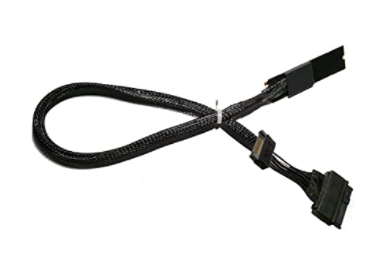
Thus far I've tested with 2 1 TB NVME sticks setup as read/write cache. Above with an addition of Samsung SATA SSD attached via USB. Then removing the 2 "cache" sticks from Synology control, formatting one manually as a new volume. For simplicity this I'm sure is the go to. Only question is 1 or two NVMEs. 1 could hold meta-data, cache and the other for DVR recording and transcoding. That could allow buying 1 nice nvme to hold good data and make loading and general navigation quick. The 2nd could be a cheap stick maybe 256MB used as a beater for transcodes and maybe DVR. This weekend I'm trying: Above with an addition of Samsung SATA SSD attached via eSATA. I've got 3 news ways to try this (adapters, cables, expander). I may also see if the NVME slot can be used any other ways as I've got a few other toys like some of these I can try. some variations Except it would be more like this
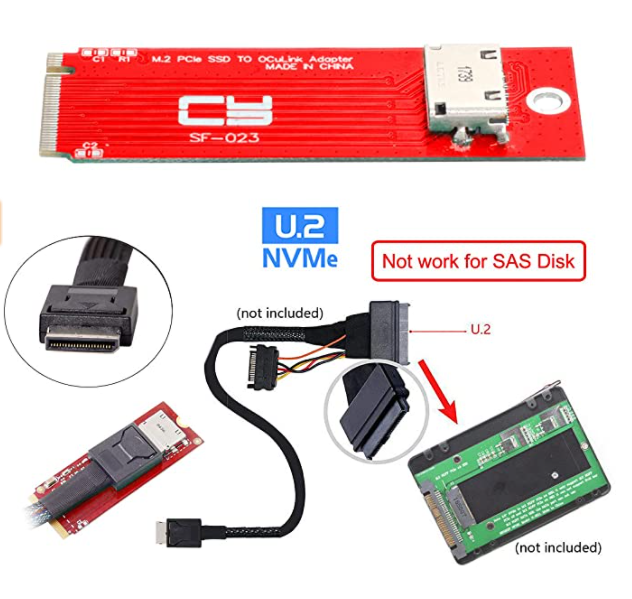
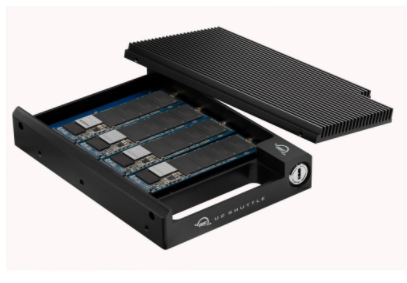 1 point
 -
My DS920+ is now unbelievably fast. At first there was not much improvement until I realised that all my artwork and .bif files were inside the media folders. That seemed like a cleaner and more manageable option at the time as I could easily have access to artwork. Once I replaced the artwork, the old files inside media folders were cleaned up. However, video preview .bif files were a pain. It would have taken a month to recreate them all on NAS. So I took a look at the library.db file and made a program that copies the .bif files into the same folder where the corresponding artwork sits. With exception of few files with special character, it all got copied and works. It's amazing how much of an improvement this was. I want to say it should really be mandatory running everything except the media from a decent NVME. Moving transcoding-temp to nvme was also a huge improvement and changing position is instant when watching a transcoded video. I almost want to sign that lego song "Everything is Awesome"!... lol1 point
-
Just pushed an updated package in the repos, it should work fine with HDR content now.1 point
-
Is there any progress? I choose 1080 4M now and only get 720×404 4M, which is very unfriendly. For most videos, 1080 4M will bring a better viewing experience than 720×404 4M.1 point
-
Yes but after that the owner said that he going to move the site to another hosting and keeping alive the site.1 point
-
This is my preferred behavior, but I can't get my trakt plugin to behave this way. Instead, I can't mark anything unplayed in Emby (for a rewatch) without wiping out my entire play history for that show/movie from Trakt. Unchecking the "Update Tracked Watched History" box (which should theoretically be scrobble only) doesn't help either.1 point
-
Hi Emby Friends, I love that the latest 4.6 server update allows you to include Specials and Extras in the "Next Up" queue for shows, but there are a lot of extras (bloopers, NCOP/NCED, etc.) that I don't want included in the "Next Up" queue. Is there any way to exclude extras/specials from the queue without needing to remove them from Emby entirely? I've tried both blanking out the season and episode numbers, as well as setting it to Season 0, and blanking out the "special episode info", but both ways it still shows up at the start of the "Next Up" queue.1 point