Leaderboard




Popular Content
Showing content with the highest reputation on 01/15/22 in all areas
-
Long pressing the BACK button on the Shield remote will return you to the HOME page of the Android TV app, where your libraries are listed. If it's not working for you, then you may have a problem with the remote. The functionality has been in the app for a few years . Thanks.2 points
-
@Jonz While it is possible and there are tutorials to flash a shield, if you are not familiar with adb commands using windows, it can be a daunting task. I’ve done this a few times with the 2019 pro. So for emby server on shield, for the nas, make sure you have it mounted in shield. You can use something like VLC or xplore and try to play a file to verify. For permissions this what I have for shield Emby server. Go to settings>apps>see all apps>Emby server>permissions> and set files and media to allow. Leave the screen and go back into it to verify that it stuck. Go back to apps>special app access>NAS storage access and make sure Emby Server is set to allowed. This worked for me.2 points
-
Maybe it's time to update Exoplayer then-- either now, or the next beta cycle. The Exoplayer we're using is almost a year old and there are a few Android 11 fixes which have been made. Even if it doesn't fix this problem there has got to be something in that huge list of fixes which would be beneficial.2 points
-
@ebr @rbjtech @FrostByte So my query with nvidia yielded nothing helpful. Basically if VLC and xplore can see and execute files fine using the smb2 calls, then there is a permissions issue outstanding yet to be addressed with Emby.2 points
-
@ebr @FrostByte @rbjtech I just sent some logs to nvidia while reproducing this. Maybe they can see something that will be helpful.2 points
-
Great, so for now, I will add sorting the items before adding them to ensure the items to add in the "batch" are in some kinda order. Phase two = resorting collection/playlist. I'll also just double check the renaming issue, I tested this and was working, so maybe I missed something.2 points
-
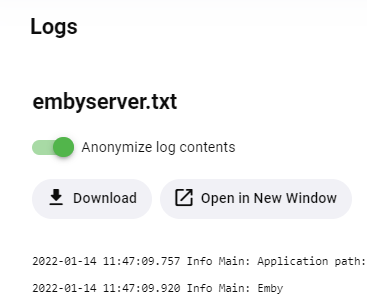
It will be right on the log screen, and the toggle will apply to all functions - the built-in log viewer, downloading a log file, opening in a new window, etc.
 2 points
 -
With College Football and NFL seasons starting up in the States, a multi-screen option for Live TV would be a nice addition to the Emby feature set. I am thinking of what the WatchESPN app offers thru their Web Browser access. The ability to open a multi-screen window that breaks into four (4) screens that allows you to select streams (Live or Replay) for each and then go full screen. Audio is from whichever of the four screens you have as active. I can accomplish the same right now with the HDHomeRun Quick View TV app. I open multiple instances of the Windows app and then snap them to each corner on my 110" projector screen. Equivalent of four (4) 55" screens. Would be nice if this were a remote friendly option from within Emby Theater and the WebUI clients. I have only seen it in Web Browsers at the moment and not any of the Win10 UWP apps (FS GO, NBCSn, WatchESPN). But, Fox Sports Go just released a multi-screen solution for their Apple TV app. https://techcrunch.com/2016/08/26/fox-sports-go-hits-apple-tv-allows-viewing-of-four-games-at-once/1 point
-
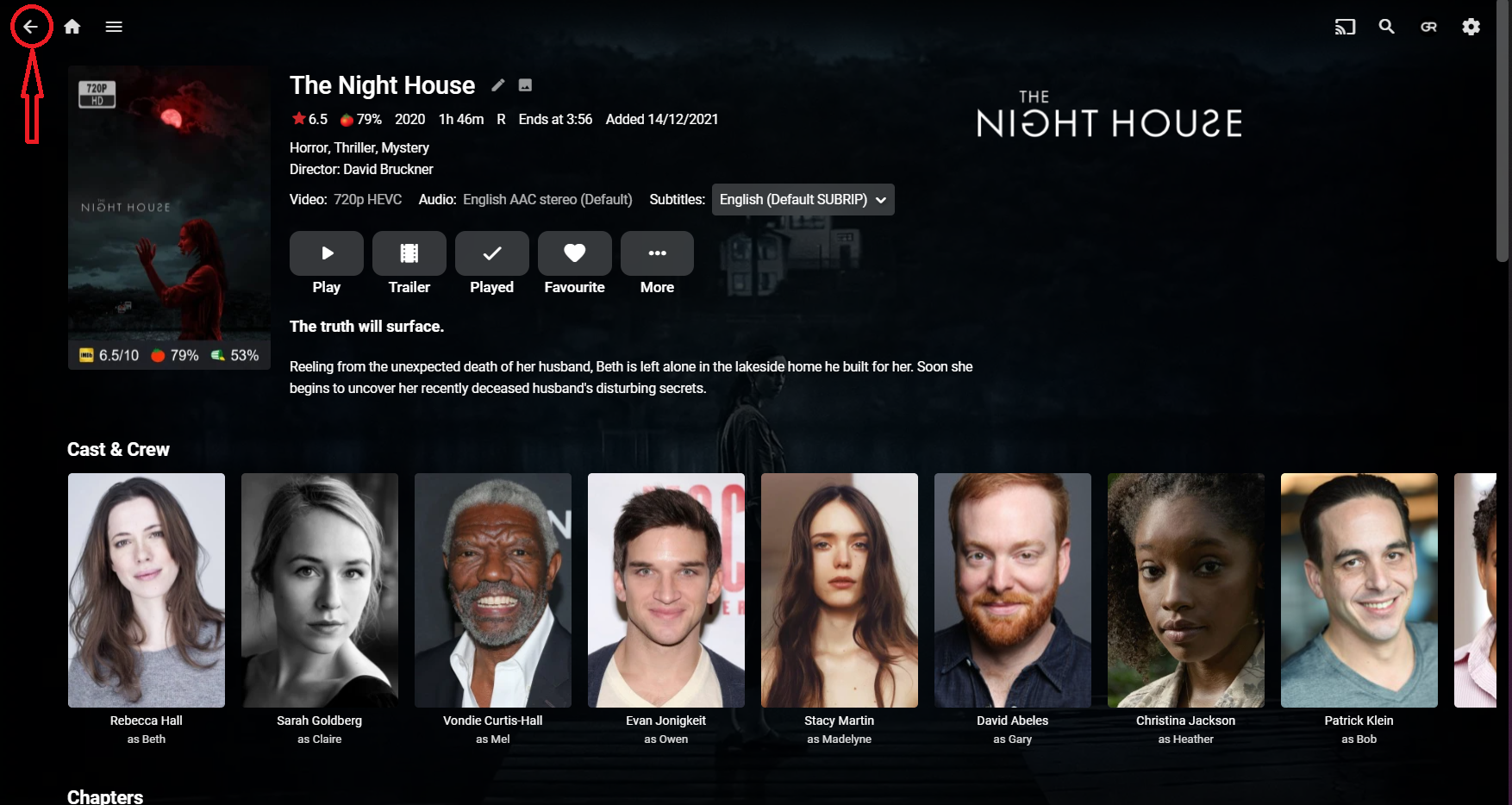
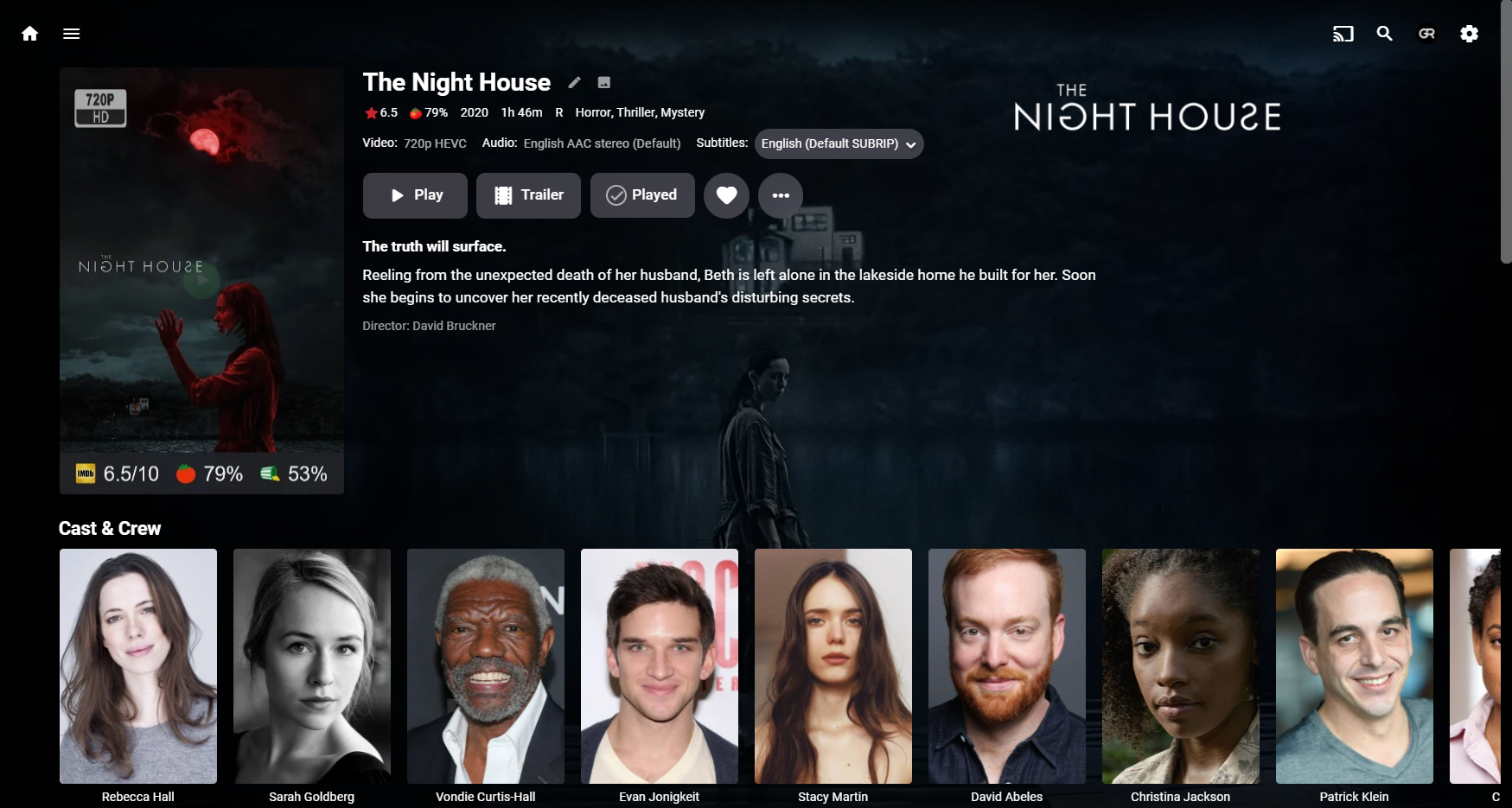
Whatever happened to "Back" UI button in online Web app? Which is particularly inconvenient during any item detail view while browsing library, can't back to library, only on Home Screen? Yeah, thumb mouse button makes short work of it, but assuming everyone is having one is quite a stretch. 4.6.7.0. local web app online web app In addition, while I appreciate nice poster as much as the next guy, that size is excessive and it is intruding in Actor roles, scrolling down just to see role seems quite unnecessary. For comparison, local 4.6.7.0 even shows next row (Chapters) header. Both on still fairly typical 1920x1080 screen res. And hate that "new" button design, 4.5.4. still has the best overall page design of them all, it's been going downwards ever since. Edit: It's actually gone throughout UI: Settings and all tabs and subtabs: Dashboard, Activity, Alerts...
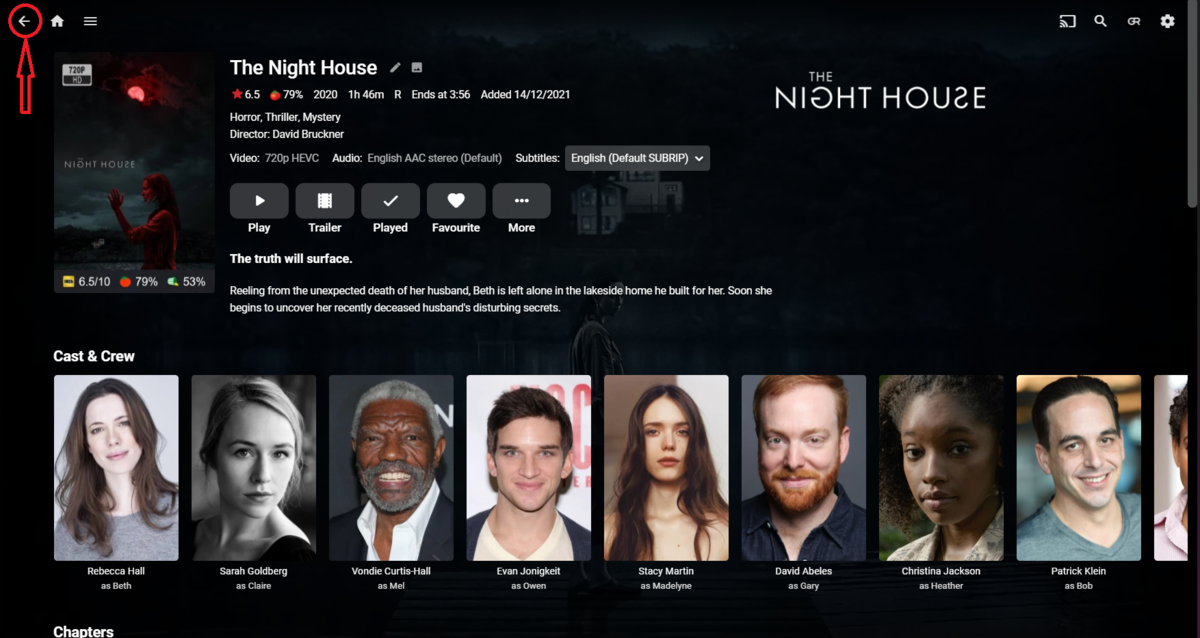
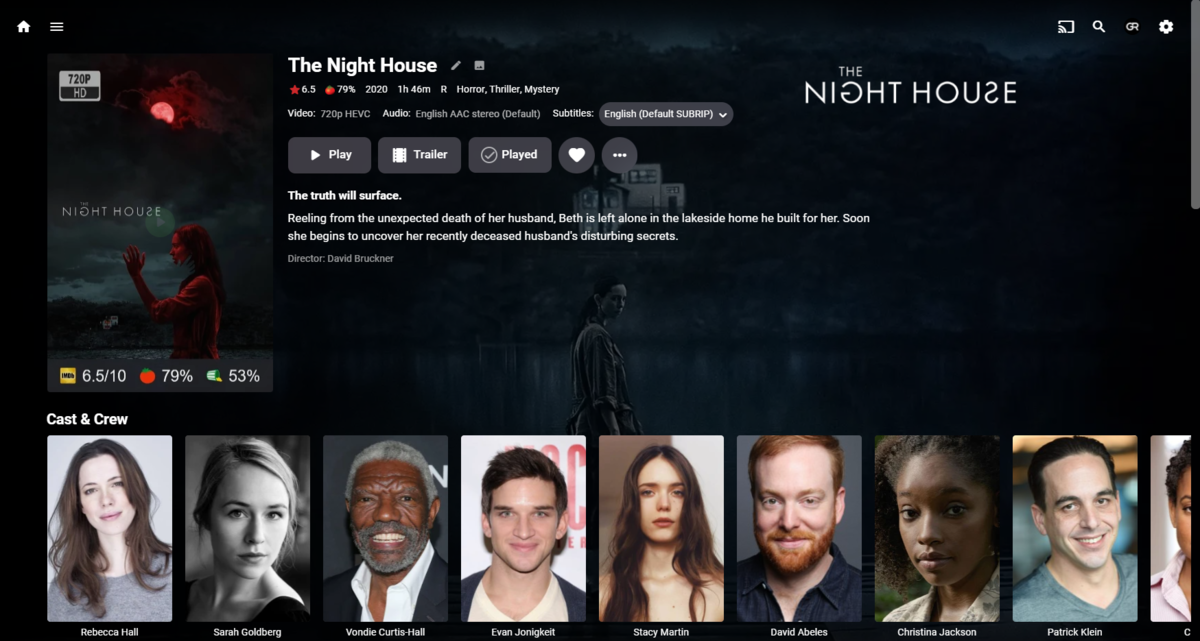 1 point
 -
Nope doesn't strike me as odd. Struck me odd that there isn't a home button build into the pages of the app I am running the current version of EMBY, current version of Android TV on an Nvidia Shield .. not a fire stick or another system . Sat here pressing the back button on a totally stock system ...1 point
-
Hey up, Check below thread:1 point
-
Well, you certainly shouldn't have to buy a special remote to get it to work. To me it should work as is, and you on the latest release version, far as I can see, not a beta. I could wildly guess, if you're using the stable release and maybe the beta version of the server, there's some interaction going on stopping it working, but seems pretty unlikely, Or maybe some Shield setting has disabled it. Sorry, not much help. But still pretty sure it should work, so the feature you want should already be there. I was just testing on a Fire TV stick, and it works, press back to Emby Home screen, it even pops up a little message saying 'Returning Home...'1 point
-
Yes, holding back should take you to the top of the Emby Home page, where My Media is. If you're in the TV Guide, I think it takes you to the first entry in the TV guide. Hope I'm right, I'm good at talking rubbish with complete confidence... EDIT - my better half is using the Shield at the moment, so I can't (daren't) check1 point
-
Harmony remote works with holding back button. That's what I use and it's worked in the past on the Shield. I'll have to test again later, to make sure it still works.1 point
-
Well, there is on a web page. Also, on the Shield, you long press the Back button to go home (think its the back button). Same on FireTV I think. Thats ebr's Android TV app.1 point
-
I am trying to perform a download to an iPad using the IOS Emby Client, and seeing the same thing. Server: 4.7.0.19. Both sides show "Ready to Transfer" and it never starts. I also tried using my iPhone and see the same. "Ready to Transfer" but never starts. I was able to successfully download in the native Mac Emby client and using the web client without issue.. I was also able to download using the Infuse app on the same iPad, connected natively? to the Emby Server.1 point
-
Don't hold your breath! Get a cheap AndroidTV box.1 point
-
Hi, right, depends on what you're playing it on.1 point
-
@ebr @FrostByte Yes, the server on shield can access those localtions.1 point
-
On the to-do list. Thanks for the update.1 point
-
I see Network issues reported for the Windows update. Have a look here for a possible solution: https://thewindowsplus.com/no-internet-windows-10.html/ Hope that helps.1 point
-
Finally got it working! Not sure if it will help anyone else but here's what I did: 1. I made an Emby shared folder and copied all the files back in there from my DSM 6 build. This was on a new machine with DSM 7 so no previous DSM 6 data was on it. 2. Installed the latest Emby package and then stopped it. 3. Copied and owned the files as per the instructions at the beginning. 4. Restarted Emby but still now working so stopped Emby and did this from LemurTech's post: rm -r /volume1/@appdata/EmbyServer/* 5. Copied and owned the files again and started Emby. Setup all back and working now. Thanks all for the help.1 point
-
But I'm looking for a situation where the server can access the same locations from the same device that the TV app is having trouble with.1 point
-
1 point
-
Thanks, but something doesn't make sense here. Why doesn't Emby just use the embedded artwork, regardless of whether the "Song Image extractor" option is on or off? The artwork is embedded in the mp3 file for a reason, but Emby seems to care less about this fact.1 point
-
My shares are folder level Windows shares using a separate read only service account. This works perfectly well (previously) and today with VLC/X-Plore. You can see the access with the named service account in Computer Manager - so you know it's the shield reading that file Once this is sorted, I'd strongly suggest a service account with read only, if any the Apps ever went rogue, then you don't want to give it the option to delete/infect/encrypt all your files .. the only downside of course is you cannot use the Apps to modify anything.1 point
-
Testing post, please ignore.1 point
-
It was interesting post the factory reset - because on installing the Apps for the first time (ie not an 'upgrade') - VLC for example asked for many permissions - from memory 6 or 7 for each area of the local storage , X-Plore didn't (and when loaded has an error shown), you only get to see local storage if you add the permission yourself but as soon as you do, the shares instantly show up and are accessible. When Emby (.63 beta) was installed for the first time - it asked for nothing. So personally I'm with your thoughts, I think Emby needs further work to ask for (and keep) the relevant permissions. We know emby is requesting SMB access, as we can clearly see it in the packet traces - so I'm reasonably confident this is just an Android 11 permission issue.1 point
-
You have Song Image extractor disabled. Enable the option then Refresh the items or Library.1 point
-
The beta version will install over the top of the stable version.1 point
-
Also having issues since updating to Shield Experience 9. New files cannot play and come up with "Too many errors. Giving up". Old shows play but take longer with the spinning circle going around. Everything play using an external player though. Also noticed that the there is no media information for each new show now. It just states <Unknown>. Whereas older shows give the video and audio codec information. I am running the server from the shield with a USB HDD connected. The ATV app has the permission for files and media set to allow while using this app. Tried updating to the ATV 2.0.64 version and clearing the data but that didn't help. I don't think the issue is just relating to the ATV app only though as new media isn't showing up correct either. New albums aren't being tagged correctly so it seems to be a server issue as well. Would the HotFix Image help? Edit: Not sure what happened but starting from scratch again fixed all the issues1 point
-
It appears the blur effect I added no longer works (temporarily I hope) in Firefox. Chrome and Edge seem to be OK... See https://bugzilla.mozilla.org/show_bug.cgi?id=1741779 about 'backdrop-filter'.1 point
-
looks like its a Firefox thing - https://stackoverflow.com/questions/63789769/why-backdrop-filter-in-firefox-dont-work Something to do with version 96.1 point
-
I don't think Windows' settings have anything to do with it, as it's only affecting certain files. I don't think I have any choice but to ignore it.1 point
-
Okay then there must be 4 options and not 3 like nvidia forums suggested Allow Allow all the time Allow only when using the app Don't allow ATV and ET use the 3rd option. VLC and X-plore use one of the top two1 point
-
Actually that’s not quite accurate. Xplore has 2 choices according to my shield, allow and don’t allow. VLC has 3 choices. Allow all the time, allow only while using the app, and don’t allow. Good question though.1 point
-
Moot. Misunderstood OP.1 point
-
Ya, nvidia mentioned in their link above there are 3 possible options the app can display1 point
-
Interesting. Xplore has allow and don’t allow. VLC has 3 choices. Allow all the time, allow only while using the app, and don’t allow. Emby has allow only while using the app, and don’t allow. For what it’s worth.1 point
-
According to nVidia Files and media is the new permissions option on the Shield Unable to use file management software after upgrading to Android 11 | NVIDIA (custhelp.com) Android 11 includes a new permission system to allow file access to apps. Many apps have not yet adopted the new system. To allow file permission manually for these apps go to Settings -> Apps -> [File management app] -> Permissions and enable “Files and Media” access for the app. If you see permission options to "Allow while using this app" and "Allow all the time", select "Allow all the time".1 point
-
I don't have the 'Storage' Permission - I'm using beta .63 with the latest hotfix. I only have ''Files and media' the same as the screen grab above. Also to note - all the other apps that do have SMB access also have 'Files and media' only - I've not seen a 'Storage' permission for any app.1 point
-
Oh thanks @Happy2Play, it didn't even occur to me that was editable in the GUI, I was poking around in /var/cache/emby. Sweet, that did the trick!1 point
-
It opens and forwards the port on your router to your PC.1 point
-
That's why I say it, I see it illogical to have two buttons that do the same thing... I say the one with the plus button, because I see it as safer to avoid deleting a file.1 point
-
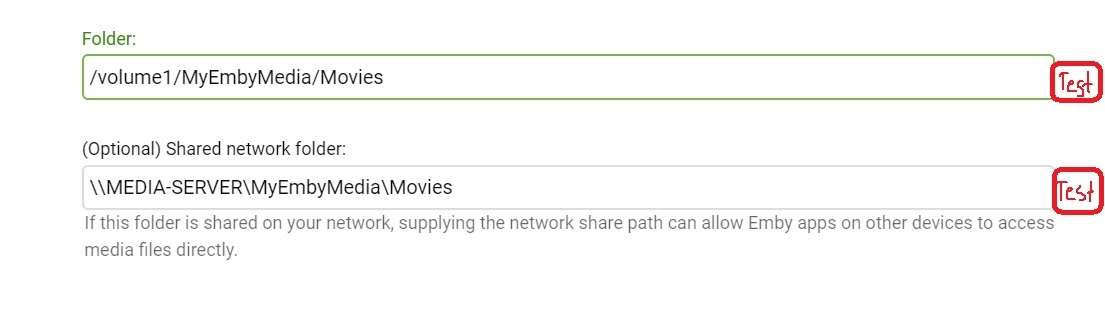
I've seen many people ask for help to see if their network paths are correct when setting up their libraries, especially the Optional shared folder path. I've also seen other apps have a test button to check if a connection is up and running. Would it be possible to add a TEST button, at least for the Optional path? Then it would pass back if the connection were good or not. It could even be one button that checks both paths.
 1 point
 -
@hugoclo I would suggest checking out our Connection Troubleshooter: https://support.emby.media/support/solutions/articles/44001849007-connectivity Please try the steps listed there and let us know which ones succeed and which ones do not. Thanks !1 point
-
Status Update: Currently I have no more issues on my list. (Music compilations support will not be added in next betas as long as a stable version is not released). One improvement is still on my list and pending. Autodetect bandwidth Several reported (internet stream) issues are actually related to bandwidth limitations and can be easily fixed by manually adjusting the network speed. However, this is not user friendly and very hard to detect. Kodi sometimes just crashes in that case, no proper error msgs. Impossible to know what's going on without sophisticated debugging the kodi.log If any other issues still exists, let me know, but no more feature requests are accepted (feature freeze) till stable version is released.1 point
-
Ah, I see my confusion: I was not seeing this option using the account that created the playlist, but when I logged in as an admin, I was able to do so. Thanks!1 point
-
There is that that's not so much an issue as when I have to travel as I have gigabit symetrical at home but when I travel the down speeds are questionable.1 point
-
A new release of Emby Server is currently rolling out, and this is largely a bug fix maintenance release while we work on new features for future updates. Here is the list of improvements and issues resolved: Fix regression with local network multiple subnet detection Improve cleanup of transcoding processes View the full article1 point