Leaderboard




Popular Content
Showing content with the highest reputation on 12/28/21 in all areas
-
There is no setting on the Shield to tonemap HDR to SDR because it's automatic based on what the Shield detects your TV supports. See nVidia's response in the link below HDR to SDR | NVIDIA GeForce Forums You should see what's supported in the Resolution setting I would concentrate on the TV settings to try and get colors correct.3 points
-
Using current BETA of emby with a library of @200,000 items. I would like to be able to select Genres or anything really and send it to a playlist or play queue - either one and be able to shuffle the play. Currently I can shuffle the albums, (which for my personal taste, isn't really intuitive) - I can shuffle ALL songs.. I cannot shuffle from genre's or folders by selecting them, no after sending them to Queue. The Platlist creation will allow me to come back and shuffle the items on the playlist.. but a playlist must be created first. Hopefully that explains the issue or break in the functionality or usability from my standpoint. Still being able to shuffle these items is fine, but it would seem better to me to simply have the option on the player instead of exacting on only certain types of selection and playback. As from what I can see, currently there is no easy way to do that at the moment. My suggested or feature request would be to add 'SHUFFLE' option to player, like most out there. This is the webui I am referring too. I am not for sure if this exists on the player in the apps but would like to see this feature in the future.2 points
-
Initial notes: Please don't decompile our project for the sake of using the code in other projects. We have many open source emby plugin projects on github to read and borrow from. V.0.0.1.55 release notes: Auto skip (you'll have to check it out to see what it is... there is a lot of features there). Add all series to exclude list Configuration UI option to cache images to the file system (beware: image cache can get very very big, very quickly) Configuration UI caches images locally in the browser for speedy loading after the UI loads a season the first time. (different from the file system cache). Local browser Cache is globally scoped, so as long as the emby dashboard is open, you can browse back to the intro skip configuration and the cache will persist for fast loading. Setting a "true" detection to "false", will reset the Extracted Thumb image, and set it's timestamp to "00:00:00". Don't forget to "Save". Pagination added to the Sequence table, so we will only load (and attempt thumbnail extractions) for five sequences at a time. This helps loading times, as well as limits CPU usage while editing sequence data. Known limitations: Linux users on Emby beta release can not see extracted thumbnail images for sequences (problem with linux ffmpeg on beta release) spinning circle does not disappear after season reset (fixable) Localization is not being used for credit skip Some localization strings need updating for intro skip message. Sending a message during intro causes some websocket issues if the client reports the capability to receive messages but actually can not. Emby API says we can control the message duration (API: "SendMessage") I don't believe this is true. Option in the intro skip plugin for message duration may not actually affect the duration.2 points
-
ComSkipper ... A Emby Plugin that skips commercials in recordings using output from comskip. This plugin will work with EDL files generated by Comskip, ShowAnalyzer or any other application capable of generating them to automagically skip past commercials when playing back recordings in Emby. A visual localized notification will be presented on the screen when this happens. UNC network mappings are fine - as long as the .EDL file is in the same filename as the media file. A PDF is included in the download that explains all of the details. But one thing should be made clear up front. And that is this plugin does NOT contain comskip, show analyzer, or any other program that detects the commercials and creates the EDL files with the skipping information. Also, the donator version of comskip is required because Emby stores its recordings in .TS format. I'm told the donator version is no longer required. User @vdrovergraciously created a PDF file on how to get this working on Ubuntu. It can be found in the Github repository in the doc folder and will be included in future releases. The PDF file also shows an easy way to configure Emby to automatically run comskip after each recording on a Windows server. Linux server users will need to figure out the best way to do this for their flavor of Linux. I am not a Linux advocate or user, however I did find this information in the NextPVR forum that is encouraging, and I encourage Linux users to help each other out with this as I will be of little to no help in this regard. https://forums.nextpvr.com/showthread.php?tid=60803 Building Comskip is really quick and easy on Ubuntu, so probably the same for any Debian based distro: $ sudo apt-get update $ sudo apt-get install ffmpeg libavcodec-dev libavformat-dev libavutil-dev autoconf automake git libargtable2-dev libtool $ git clone git://github.com/erikkaashoek/Comskip $ cd Comskip $ ./autogen.sh $ ./configure $ make $ sudo make install Once this is out long enough where I am pretty sure it is stable, I'll make its GIT repository public. Git Repo Getting it into the plugin catalog could follow after that, assuming the Emby team approves. I rarely record, my main use case is NFL football games. I record our local teams game, which when complete runs comskip on the recording which takes about 40 minutes. We then watch the game while eating dinner that evening. Skipping halftime (manually) it brings the time from 3-4 hours to 2 to 2.5 hours. Comskip does a very good, remarkable really, job on all of my recordings including the games to date. I have attached the comskip.ini that I use. It works well for me in the US. If you add this to your ini (make sure your system has the processing power to handle it), it will greatly reduce he time comskip takes to process your file (requires donator version). thread_count=2 Have fun and enjoy commercial free recordings Current Release Version 2.2.0.0 - Updated Emby library to latest. Version 2.1.1.0 - Added popular .editorConfig for consistent coding standards. Upgraded to latest Emby library. Version 2.1.0.0 - A change in Emby 4.8 caused a code update to be required in how DL files are read. If the plugin stops working in server 4.8, update to the latest plugin. Version 2.0.0.0 - Allows for chapters to identify commercial points if they exist. PlayOn and perhaps others identify commercials that way. Version 1.6.0.0 - Allows configuration of time message is displayed on the screen. Allows configuration of message displayed on the screen. Optionally displays the skipped time in minutes:seconds. Version 1.5.0.0 - Added optional commercial duration skipped to the on screen message by request. Version 1.4.0.0 - Made a couple log messages info from debug by request. Version 1.2.3.0 - Upgraded to Emby server 4.7. Version 1.2.2.1 - Added German (de) translation. Version 1.2.2.0 - Culture set so EDL file can be parsed everywhere. Version 1.2.1.0 - Real time no longer experimental. Session ID fix for LG (and maybe other) clients. Version 1.2.0.0 - Experimental feature to allow commercial skipping when watching during recording Initial open source release. Version 1.0.0.2 - Initial release. Version 1.0.1.0 - Addition of configuration switch to disable on-screen notifications. **Note** You will need to clear your browser cache due to the config UI change. comskipper.ini1 point
-
Feature request for Auto Box Sets & the Emby server to show missing collection items / placeholder images for what we don't have that is part of a collection. http://emby.media/community/index.php?/topic/22732-auto-box-sets-show-missing-collection-items/ Thanks, hoping to see it worked out.1 point
-
Perfect. Thanks so much!1 point
-
The best defense for this is your offense: use Theater for Desktop instead.1 point
-
Hi, there are a couple ways you can do this. Take a look at both of these threads at the posts linked.1 point
-
I looked up the disk you named, and found there were different mixes (Brian May's was the second, as he wasn't satisfied with the original), and releases both on DVD-A and later on DVD-V (i.e. lossy audio only), and most recently a BD release - so my assumption you had the DVD-A version was misplaced. I think playing from a straight rip of the DVD structure is deprecated in Emby. I recall others having issues (with video media), and being told it was not under active development, or some such. So, given you have a DVD-V, I would agree that simply ripping the contents into MKV would be the way to go. Even if you have to do it manually, you can put chapters in to enable jumping between tracks. Or you could rip the tracks into separate audio-only files and play them that way; Emby's audio facilities are not limited to stereo - I have audio-only surround tracks which play in it just fine. Paul1 point
-
The extracted images are not updating when edited in the config in .55. It has been fixed. I'll post an update here in a moment.1 point
-
I think I figured it out. 1. Create new user 2. Make sure Configuration Backup Plugin is installed 3. Run configuration backup from Tasks 4. Open Configuration Backup plugin, scroll down and click on the back up you just created 5. At the top, choose None to unselect all boxes. 6. Towards the bottom, check the box next to the user you want to copy data From and in the drop down choose the user you want to transfer data To 7. Click Restore and acknowledge the prompt. That seemed to work for me.1 point
-
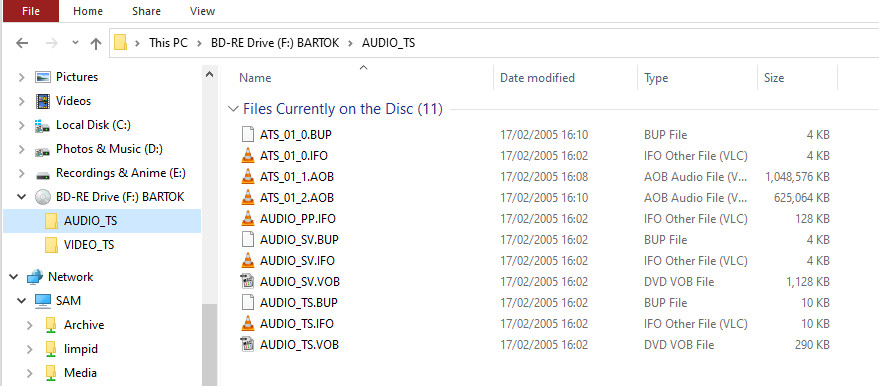
DVD-A is a different format from DVD-video; the audio is either WAV or MLP, and video tools will not touch it because it's in a different folder (AUDIO_TS): Most DVD-As have a video layer as well, containing the audio in AC-3 or DTS format, with still images for each track. Handbrake will read the video layer of some of those, but not all - I tested two, and it hung on one of them. MKVToolNix, when I opened the audio directory explicitly, was prepared to extract the menu, but not the audio content. To get the proper audio off a DVD-A disk, you need a program such as DVD Audio Extractor, which I use. Be careful googling for alternatives, because many programs which using that name as a search term brings up are merely extracting the audio from DVD-Vs. Paul
 1 point
 -
The source of the 'problem' is likely the TV configuration - my advice would be to factory reset and then download some HDR test patterns and actually test / calibrate the TV first to ensure it meets basic HDR requirements. avsforums HDR test patterns link Yes a lower end LCD TV is not going to rival an OLED for colour accuracy/blacks but this is still a relatively modern HDR10+ (dynamic) Samsung TV - if it really is that bad, then it may be faulty - things like the backlights (producing the 'brightness') may have failed.1 point
-
What format is the file? Can you provide logs? You can also try to reencode it with tools like "handbrake" and convert it to mkv or mp4 containers so we know this should be played.1 point
-
Cool I should be able to give you a test dll today or tomorrow to try out1 point
-
Fixed on: Version 1.0.41 point
-
Hi, that's strange. I don't see this on a Pixel 5. We'll take a look. Thanks.1 point
-
Pm you the log1 point
-
Disable ublock origin then try starting Emby again, if it works then you have some choices, either allow localhost as a filter or add Emby as a trusted site (ublock can be turned off on a site by site basis).1 point
-
What is the series Display Mode? Since you say all episodes in season 1, I am guessing it is Absolute and that is a problem as Specials have no Absolute order only Aired order. No way to have mixed modes that I know of or tested. Best guess would be you have to set Series to Aired Order, Refresh metadata w/replace images on Specials, Lock specials, change order to Absolute and Refresh w/replace images on Season 1.1 point
-
@Luke The beta version seems to handle this situation MUCH better. At least it seems that way, unless there's something else going on with my stable server. I'll know for sure once beta is ready to move to stable.1 point
-
i have studied for hours and written the best solution to delete all genres and lock it: #!/bin/bash # Change media-path: DIR="/mnt/media/docu" echo "Starte Emby-NFO Genre Script..." # # List all .NFO files # !!! NOTICE: I use it ONLY delete Seasons and Episodes genres: # Warning : If you want to change ALL NFOs in selected "DIR" (include series + season + episodes) remove "-mindepth 3 -maxdepth 3" # Or remove it for a movie folder # find $DIR -mindepth 3 -maxdepth 3 -type f -name "*.nfo" -print0 | while IFS= read -r -d '' file; do # Open only .NFOs without genre blocker entries if ! grep -q "<lockedfields>Genres</lockedfields>" "$file"; then # REMOVE all genre entries sed -i "/<genre>.*<\/genre>/d" "$file" # INSERT genre blocker sed -i "6i \ \ <lockedfields>Genres<\/lockedfields>" "$file" # OUTPUT which file was edit echo "File edited: '$file'" fi done echo "Script finished ..." This script first checks whether an NFO has locked genre or not. (Only open UNLOCKED files) If the "Genre" field was not set to locked, all genres are deleted first, then the field is set to locked "genres" ---- For Unraid user or user with a SSD Cache drive (better because you only work with newly added files) : #!/bin/bash # Change to only CACHE dir: DIR="/mnt/mycache/dive/media/docu" # Check if cache folder exists if [ -d "$DIR" ]; then # insert the script fi Now use a cron-job (run every hour) and i never have genres in my documentary episodes again Sorry for my bad english guys1 point
-
If you are direct playing hdr content tland it looks washed out.. your tv likely isn't an HDR tv or you have HDR turned off. Direct playing hdr tone mapping isn't even used.1 point
-
A Transport Stream is not designed for seeking. It has none of the index information that other true containers have for that purpose. So seeking is implemented using some "guessing" techniques within the player. This is only possible if you have the entire file upon which to base those guesses. Sometimes that guessing doesn't work very well but it probably should for most files. To enable seeking in live TS we deliver it via HLS (Http Live Streaming) which is designed just for this.1 point
-
Unless your Samsung TV is absolute garbage, there should be no issues. Use the Shield to do the tone mapping as EBR suggests. There is no point in watching 4k movies if they are not in HDR as tone mapping is no where near perfect. Just stop watching them and wait till you can afford a better TV.1 point
-
Sorry, still working on it. Hopefully soon.1 point
-
Hi. No, there are no context menus in the Roku app at this time. There will be at some point in the future. Thanks.1 point
-
Came up with a too obvious solution before I tore it down, uninstall 4.6.7 that's broke and reinstall 4.7.0.19 just to see. Everything came back as it was before and running fine. Moral is don't try to downgrade once you move up a full version.1 point
-
I can only tell about the "Finding Dory" files in the logs and there's something totally wrong, like the codec being indicated as H.264 even though it's probably HEVC actually. Maybe your remuxing procedure is fixing this automatically, can't say for sure without seeing a log from the modified one, but I'm very sure that this has nothing to do with subtitles at all.1 point
-
thanks @ShaneP. new version works great for keeping shows in collections1 point
-
Hi. That combination is going to be a problem. If your TV doesn't support HDR and your server is not powerful enough to transcode in order to tone-map, then you need non HDR material. However, you said that you were using a Shield and that should be able to do the tone-mapping for you. Be sure you haven't disabled that in the Shield...1 point
-
It's holiday season, give the devs some slack1 point
-
why dont you want hdr? there is a setting to enable Enable HDR tone mapping: under transcoding in server settings. make sure that enabled and hdr should look good. otherwise make sure your player is play direct and not transcoding the video. if you just disable hdr then the color will be washed out. thats why you want tone mapping turned on. it does use much more cpu power though1 point
-
1. Edge HEVC playback has been broken for some time though it reports support for it, hence DirectPlay, you can maybe hack it by installing previous version of HEVC codec, try 1.0.31823 (uninstall current version first). 2. It appears transcoding was not fast enough and it couldn't keep up, maybe your server was busy doing some other stuff. 3. Here transcoding progress was barely keeping up, with 2 sec buffer. Overall I'd say your HD500 is underpowered or at least bare minimum for 4K HEVC transcoding, and you should preferably try to avoid it alltogether.1 point
-
I realize this may be an old topic, however, all of the tweaking of the band with, I believe is wrong. The problem exists in file naming. Make sure that your files are properly named so that they can be read by the server correctly. Particularly if you are streaming complete series of shows. They should be properly numbered and labeled so they can be picked up correctly.1 point
-
Any news on this Dashboard ?1 point
-
Looks like it worked a long time ago, but this user didn't want them for specials.1 point