Leaderboard




Popular Content
Showing content with the highest reputation on 12/27/21 in all areas
-
Initial notes: Please don't decompile our project for the sake of using the code in other projects. We have many open source emby plugin projects on github to read and borrow from. V.0.0.1.55 release notes: Auto skip (you'll have to check it out to see what it is... there is a lot of features there). Add all series to exclude list Configuration UI option to cache images to the file system (beware: image cache can get very very big, very quickly) Configuration UI caches images locally in the browser for speedy loading after the UI loads a season the first time. (different from the file system cache). Local browser Cache is globally scoped, so as long as the emby dashboard is open, you can browse back to the intro skip configuration and the cache will persist for fast loading. Setting a "true" detection to "false", will reset the Extracted Thumb image, and set it's timestamp to "00:00:00". Don't forget to "Save". Pagination added to the Sequence table, so we will only load (and attempt thumbnail extractions) for five sequences at a time. This helps loading times, as well as limits CPU usage while editing sequence data. Known limitations: Linux users on Emby beta release can not see extracted thumbnail images for sequences (problem with linux ffmpeg on beta release) spinning circle does not disappear after season reset (fixable) Localization is not being used for credit skip Some localization strings need updating for intro skip message. Sending a message during intro causes some websocket issues if the client reports the capability to receive messages but actually can not. Emby API says we can control the message duration (API: "SendMessage") I don't believe this is true. Option in the intro skip plugin for message duration may not actually affect the duration.3 points
-
We are finishing a wiki over on GitHub. https://github.com/chefbennyj1/Emby.IntroSkip.Release/wiki/Emby-Intro---Credit-Skip Here is the latest beta build of the plugin. It is not perfect. It has come a long way. There are a couple known UI issues.... but I think overall it is a beta worth checking out. Please clear your browsing data before navigating to the configuration page. IntroSkip_v0.0.1.55.zip3 points
-
Please create topics for issues and questions. Locking.2 points
-
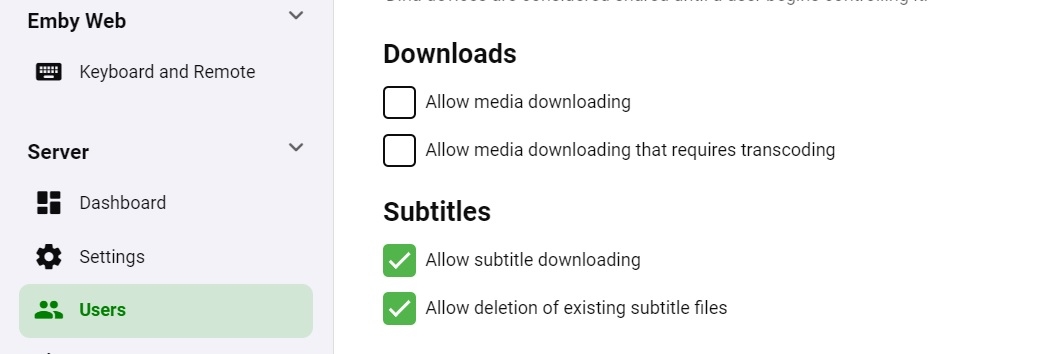
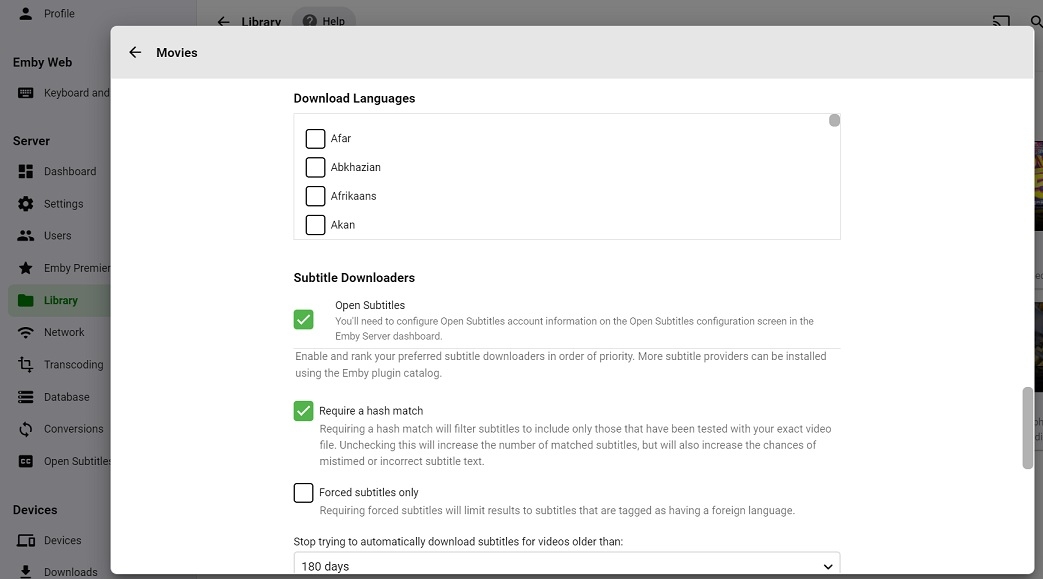
Did you enable subtitle downloading for the user on the server? and then for each library as mentioned by CUN
 2 points
 -
Hello, Would you think the possibility to improve the exclusion capability ? I have almost 150 series, and I wanted to try this plugin with 2 or 3 to get an idea on how it works and see what are the limits I can set. But as it's actually available, it's a pain to add one by one series to exclusion list. It should be good to have a button to add a full library to exclusion list. And when I want to remove some series from exclusion, the list is cropped, I can't see full list, but only around 50 series. I think it's only a display bug, because if I search with browser for one serie that I konw excluded, it found 1 result, but can't display it, it's too low on the page. Thanks for this great plugin ! I wish all of you my best wishes for Christmas !2 points
-
I'd really like to have 2 Factor Authentication added to the login screen. It's just this (optional) extra layer of security to help secure the server (which, especially if people use camera uploads) contains pretty private data. There are for every type of programming language quite a few libraries available, so implementation on a server shouldn't be too hard to realise1 point
-
I mentioned it in another thread, but thought I'd put it here since this looks like a new section--just for posterity. Would like to have a bulk meta data editor function. For example, if I have 750 videos whose producing studio is the same, I want to select those videos and apply the name of the studio to those videos. Similarly, if there is a custom tag I want to apply to a subset of those movies, I want to be able to select them in bulk and apply the tag to those videos (instead of selecting them one by one).1 point
-
Guys, The ebook side of Emby/MediaBrowser has been long stalled or rather stagnated. I would like to offer up a couple of suggestions. Many people use calibre as an ebook/comic book tool for scraping data and general management of their collection already. This program is absolutely astonishing in its ability to pull metadata from post calibre scans, as well as draw in metadata from the file source and/or directory structure. http://vaemendis.net/ubooquity/ Its a self contained .jar server/reader combination. And honestly I am very impressed by it's small footprint and wide range of abilities. The other option is COPS , which was written specifically with calibre in mind. It is open source, so making it work with emby I would think would be fairly easy. https://blog.slucas.fr/projects/calibre-opds-php-server/ Ever since the original release of MediaBrowser's bookshelf I have always wanted something that would allow me to 'read' my collection, rather than being basically nothing more than a place-set for images of books I own. I am sure that those who mainly have audiobooks are thrilled with bookshelf , but it's nothing more than an extension of the music library IMHO, not new features. We can have both right? Here I give you two suggestions free of charge.. Just because I love you, and Emby Personally I plan on running the Ubooquity Server along side of Emby from now on, just because of it's massive functionality and tiny footprint. But I sure hope that someone decides -- "yeah, ebook support should be in here too" and do something about it - rather than allow this now very very ancient issue to continue to remain an issue. And so I don't have to have 20 different ports open, some with SSL support - some not, because Emby isn't delivering the 'complete package'. (Please take some of this with humor, I know you have your hands full with improvements/bugs/suggestions/requests)1 point
-
While Emby already has recommendations built in based on previously watched items I find they are not all that helpful. They seem to be based on genre only, for example, because you watched a comedy here are other comedies in your library. I do like how the also directed by/appear in recommendations work though. What would be great is if Emby could incorporate Trakt's recommendations as they are much more sophisticated. Trakt's recommendations are not only based off of what you have previously watched but also what your Trakt friends and other Trakt users have watched. It takes user ratings and trending/popular media into account. Ideally Emby would include full Trakt integration allowing users to rate media after watching, view lists and recommendations, and view upcoming media all from within Emby but for now I think recommendations would be a nice addition. Trakt has the potential to give Emby that community feel and allow users to discover new media, find something to watch, and recommend media to other users. http://docs.trakt.apiary.io/#reference/recommendations1 point
-
Hello all, i figured since i got this to work i would share my guide on how you can use no-ip and emby together. I realize this is a paid option and not free (20$ for the year with coupon), but for me its worth it as i dont have to worry about my domain name expiring every month or the ssl cert either for an entire year. hopefully this wall of text isnt too crazy. any q's let me know. ____ ** this guide is assuming you use windows 10 or windows server 2016,2019,2022 and no-ip Enhanced Dynamic DNS - 25 Hostnames*** ** always can get coupon so its 20$ for the entire year*** **Enhanced Dynamic DNS - 25 Hostnames gives you 1 included ssl cert* **NOW CALLED Encryption Everywhere DV**** ** now get a free cert with free version of dynamic no-ip** what i currently use -------- 1-manage user certificates in windows search bar. 2-select personal on left then right click on right open space. 3-all tasks > advance > create custom request 4-can follow this guide -but when done leave cert manager open you will be uploading this file to no-ip -- Remember the "common name" you entered will need this to search for in step 6 https://www.noip.com/support/knowledgebase/generate-csr-windows-10/ **Remember to use 2 upper case letters for state and country** **you can choose where to save this csr as well so you dont have to search later, but they are stored by default in C:\windows\system32 if you need to find later as well steps 5-9 explain the other way** you can wait for your status to validate on no-ip.com (took 15 min for me) they are use for my dns so i can skip the txt part. download the pem file to your server once it validates. 5-now you need to get your private cert from your system 6-go back to cert manager right click personal and click find certs 7-search for your common name you setup before (should be 1 that matches) 8-right click and export 9-below is how to do this (sorry its long) Go to Start > run > MMC. Now navigate into the console tab. Select File and then click Add/Remove Snap-in. Under the Available Snap-Ins column, select Certificates and click Add. Choose Computer Account and click Next. Now select Choose Local Computer and hit Finish. Now close the Add Standalone Snap-in window and click OK on the Add/Remove Snap-in window. Step 2: Export Your SSL/TLS Certificate. Now, open the Certificates (Local Computer) snap-in and go to Personal > Certificates from the left-hand pane. Right-click on the certificate you want to export and go to All Tasks > Export. Once you do this, the Certificate Export Wizard will open up. *** you may need to search for your cert by riight clicking personal and clicking find certificates. search by your "common name" in the cert not the name you made. *** Select the Yes, export the private key option and click Next. Now the Export File Format window will open. Make sure that the option for Personal Information Exchange — PKCS#12 (.pfx) is selected. Tick the box for Include all certificates in the certificate path if possible. Now, de-select Require Strong Encryption. <--may or may not have this option (thanks to Teredactle ) Enter a password for protecting your PFX file and click Next. remember this password! Now choose a file name and the location to export the file and click Next. Finally, verify all the information and click on Finish if it’s okay. 10-install https://slproweb.com/products/Win32OpenSSL.html grab latest version (i used Win64 OpenSSL v1.1.1s) open an explorer window to the directory of openssl and place the 2 files. 1 file is from your export you just completed. the other is the pem file no-ip. once installed open a cmd prompt with admin privilege cd to the directory of openssl (mine is located here C:\Program Files\OpenSSL-Win64\bin ) C:\Program Files\OpenSSL-Win64\bin> openssl pkcs12 -in privatekeyemby.pfx -out localprivatekeyemby.pem -nodes <---converts private key from server to pem file the file will be created in the same place you ran the openssl tool. now u will take the localprivatekeyemby.pem you just exported by command line and combine with the pem file you downloaded from no-ip. C:\Program Files\OpenSSL-Win64\bin> OpenSSL pkcs12 -export -in noiphostnamedownload.pem -inkey localprivatekeyemby.pem -out emby.pfx <--combines pem cert from no-ip and private to a pfx file for emby ****As of Feb 2023 we now need to use the new cert from "Encryption Everywhere DV" there is a bug when downloading the PEM file. the file is all garbled and wont work in the command above. download the pem chain file instead and remove all sections but the first.. save as a normal pem file and use this in the openssl command above see my post on feb 2nd 2023 for more details ****** now go to emby server and select the file. in my case its emby.pfx and add the password you created when you exported the pfx file from your server. make ssl external connections only and reboot your server. make sure your ports are properly open. i use https://www.yougetsignal.com/tools/open-ports/ you can verify your cert is working properly with https://www.geocerts.com/ssl-checker i use the default emby 8920 https port. cheers!1 point
-
A Transport Stream is not designed for seeking. It has none of the index information that other true containers have for that purpose. So seeking is implemented using some "guessing" techniques within the player. This is only possible if you have the entire file upon which to base those guesses. Sometimes that guessing doesn't work very well but it probably should for most files. To enable seeking in live TS we deliver it via HLS (Http Live Streaming) which is designed just for this.1 point
-
That's cool. I've got dietpi on my list of OSes to try on it. My "problem" with the Pi is that I can't figure out what I want to do with it long term. Ideally I'd like it to have of a web based NAS like UI so it's easy to access/config with a phone or tablet when you're not around a computer or something easy to SSH with. Something like https://casaos.zimaboard.com/ could be ideal as it combines the ability to have things run in docker along with adding said items to a web based menu. It's likely something to keep an eye on to see how it progresses. But I'll probably end up doing something close to your OP post so you've got a portable wifi router, VPN, Emby Server.1 point
-
confirmed! Thank you @ebr!1 point
-
Came up with a too obvious solution before I tore it down, uninstall 4.6.7 that's broke and reinstall 4.7.0.19 just to see. Everything came back as it was before and running fine. Moral is don't try to downgrade once you move up a full version.1 point
-
I can only tell about the "Finding Dory" files in the logs and there's something totally wrong, like the codec being indicated as H.264 even though it's probably HEVC actually. Maybe your remuxing procedure is fixing this automatically, can't say for sure without seeing a log from the modified one, but I'm very sure that this has nothing to do with subtitles at all.1 point
-
Hi. I believe this is fixed in the current beta of the app.1 point
-
@Styromaniac Hi, from the server's data folder, go to config/system.xml and you can edit the config file manually and set it back to defaults.1 point
-
It's planned for the future. Thanks.1 point
-
It's only off by default for non-admin users.1 point
-
Thanks, we'll take a look.1 point
-
You can try this version. The internal ports are changed to 57341 and 57342. But I really doubt, that this solves any issue. plugin.video.emby-next-gen-6.2.4-build 15 (ex2) - test -> ports.zip1 point
-
Ok. I will use it after I kick my sons off of the game. Nothing was showing up in the log area. Nothing basic, information, or warning.1 point
-
There is a kodi plugin called something like log uploader. you can use it. In the kodi.log must be at least in information what's the problem. Not necessarily a crash msg.1 point
-
Not necessarily. That's why the option exists. Some TS files can be seeked when direct played. Live TV streams however cannot.1 point
-
The "Allow video stream copy" option is probably not needed anymore. If you disable it, then the system will not allow a simple remux - it wil force a transcode (will not allow the video to just copy the stream). That was added when we were having problems with certain UK-based live TV streams but I think we've tackled those issues now in our Exo mods.1 point
-
Hi. That combination is going to be a problem. If your TV doesn't support HDR and your server is not powerful enough to transcode in order to tone-map, then you need non HDR material. However, you said that you were using a Shield and that should be able to do the tone-mapping for you. Be sure you haven't disabled that in the Shield...1 point
-
السلام عليكم ورحمه الله وبركاته قبل اي شي اشكر اسرة امبي علي هذة الخدمه الاكثر من رائعه لكم جزيل الشكر ثانيا ابحث عن طريقه للتحكم الكامل في المستخدمين مثل موعد انتهاء الحساب بمعني لو عملت حساب جديد اقدر اشغله شهر او اكثر حسب منا عايز ويكون فيه خاصيه ان اليوزر يشتغل علي جهاز واحد او اكثر وشكرا1 point
-
For me personally it would be enough if only the "Ask to play trailers"-Options were split, because I don't watch trailers for episodes.I don't know about others1 point
-
Sure it would be possible but let's get that straight. Onlt the "ask to play trailers" option should be split into two categories for episodes and movies OR. The trailers playback should be separated into categories OR both? Actually everything is possible.1 point
-
This is horrible. WWE used to do this when presenting 4:3 content on DVDs and Blu-rays of old matches. There's a reason they stopped.1 point
-
Hi, you don't think that's distracting?1 point
-
Correct. It came with the improvements in subtitle burn-in, which requires a certain color format for overlay.1 point
-
Yes, it's a problem that's been going on for a while now with DV profile 7 and I'm guessing profile 8.1 also. I've got a discussion in the beta section but following this one also since I'm sure it's the same problem. Stuff sourced from UHD should fallback to HDR10 on a non-DV television. The app used to work so I'm sure Luke can fix it. Luckily, I can still use ATV on my Shield.1 point
-
So with 6.2.3 kodi keeps crashing. I'm assuming its the plugin as it seems to happen during updates... but who knows. I'll PM recent logs. Cheers.1 point
-
I assume you mean if they will play ok, as they will download ok either way, even on 2 mbps, it'll just take more time? Yes, 30 mbps for 1080p media should generally be enough, bitrate for those typically ranges from single digits to 10-20 mbps (of course, depending on number of factors, but for some general usage it'll suffice). Majority of Nvidia cards have 3-sessions ingrained limit, patching it basically "unlocks" it and ebables as many transcodes as your card can handle. For your 1050Ti, that should typically give you 10+ 1080p transcodes.1 point
-
Adding the folder direct to the library and Kodi shows all details as expected. Sent db files with screenshots via DM for reference.1 point
-
Sideloading an app is not hacky? If the Fire TV version is being deprecated in favour of the Android one then please say so, but I hope not because at the moment the former works much better then the latter. You guys have a clear and reproducible problem with the official version on your hands, it doesn't make much sense to start digging into another problem before having fixed the first one IMHO. If and when you fully switch out to the Android one I will be more than happy to make a detailed report of any issue I find, but for now my priority is being able to watch a movie without a transcoding galore...1 point
-
hey what I'm really missing is support for audiobooks. Simply saving the resume point for those mp3s would be absolutely enough, no need to fetch metadata etc.1 point
-
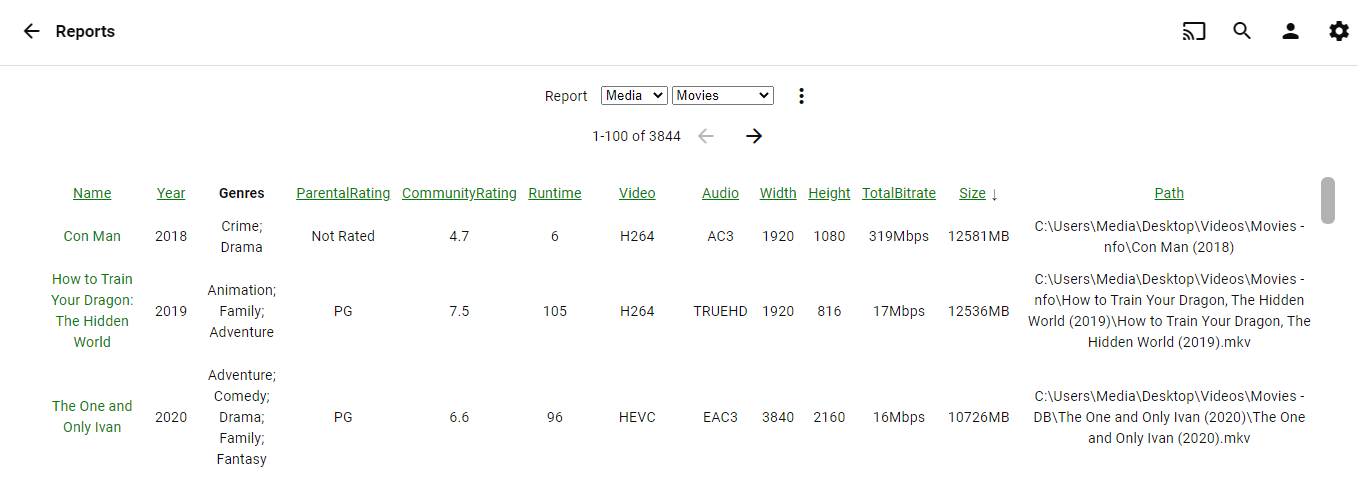
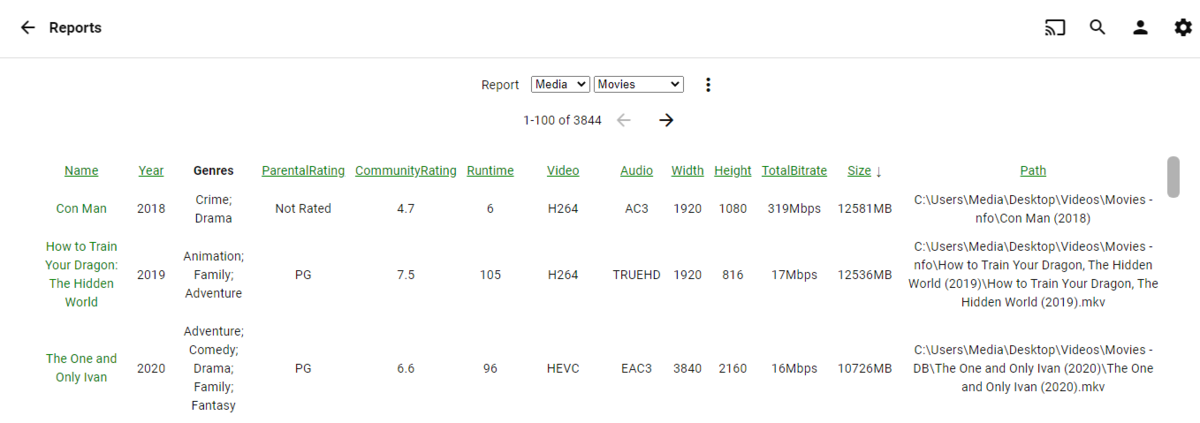
Something like this. Some copy and paste guess work adding and calculate size and bitrate columns. custom css to make is align better removing the text wrap. Didn't add it directly into plugin. /*Reports Plugin changes*/ #libraryReportManagerPage .content-primary {padding-bottom: 1em;} .reporContainer { overflow-y: scroll; height: 630px !important; } .tblLibraryReport th{ position: sticky; top: 0; background: black; z-index: 1; } #tblReport tbody {white-space: nowrap;} Haven't figured out how to get the Video/Audio columns to sort yet. customizedEmbyReports.zip
 1 point
 -
@Luke@ebr @cayars any chance this being implemented for Emby on iOS devices? I have been using Plex for along time and every now and then bounce back to Emby because of the frustrations that Plex has. Mainly because their development folks do not listen to anything being talked about by the users in their forum. One topic alone is requested support for multiple versions of the same movie. If a request has been going on for 8+ years, with absolutely no response, I guarantee Plex has no interest in it and users are wasting their breath. I know its a struggle keeping up with each device/platform that Emby can be used on. But would really like to settle on ONE media server and not flip back and forth because of limitations. Hope that issues like this can be resolved. Thanks1 point
-
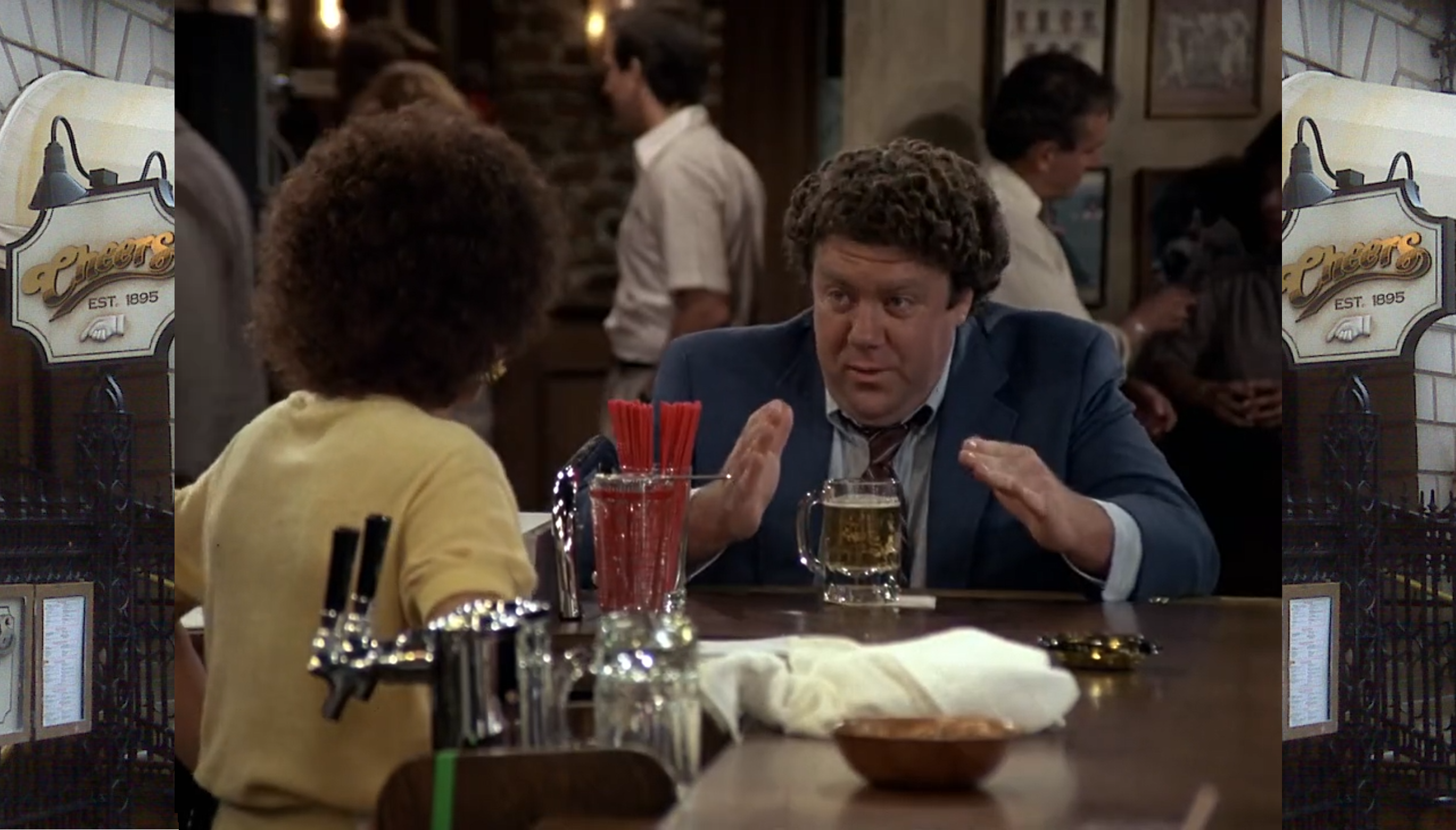
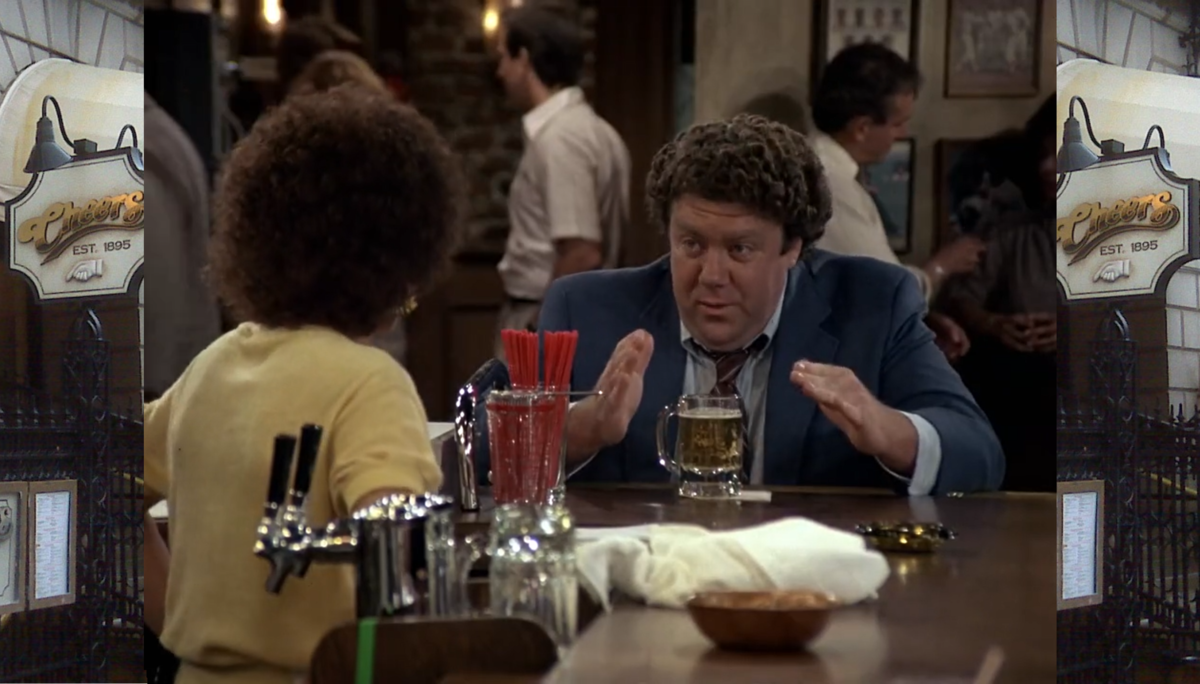
I've recently got into retro gaming and a lot of games for the gameboy etc... are all 4:3, I've also been watching some old school shows like Cheers and Taxi, of course these are all 4:3 ratios. On my Batocera Retro box the emulators support 'frames', ie it frames the game with either gameboy screen or N64 console or artwork for the game you are playing, it's lovely, so can we do something like this for shows that are marked as 4:3? If people aren't sure what I mean, something like below; Before; After; I know a lot can vary on screen resolution, ie 720p, 1080p, 2160p etc... and there would need to be the artwork would need to be created and then stored and of course pulled from somewhere, theTVDB might be a good start if they were interested in such a thing, or a more 'exclusive to emby' feature that has user generated artwork that only emby users get, I don't know the logicistics but I do hate seeing black bars down the side of my screen. I suppose a starting option could be the backgrounds rotating behind the video, it won't be 'custom' artwork but could be nice rather than having black bars?

 0 points
 -
Hi. It does because the two are related. You say the same item will play on app one but requires transcoding and will not play at all on app two. It is the best way for us to deliver the standard app to these devices for testing without completely confusing normal users by exposing it in the store. It is issues exactly like what you are reporting that we need to discover before it can be exposed. Thanks.0 points
-
Exactly. This isn't a "hacky" solution. It is a full blown app that is being developed to support both mobile and TV so we would really like to diagnose whatever playback issue you are having.0 points