
Leaderboard




Popular Content
Showing content with the highest reputation on 12/23/21 in all areas
-
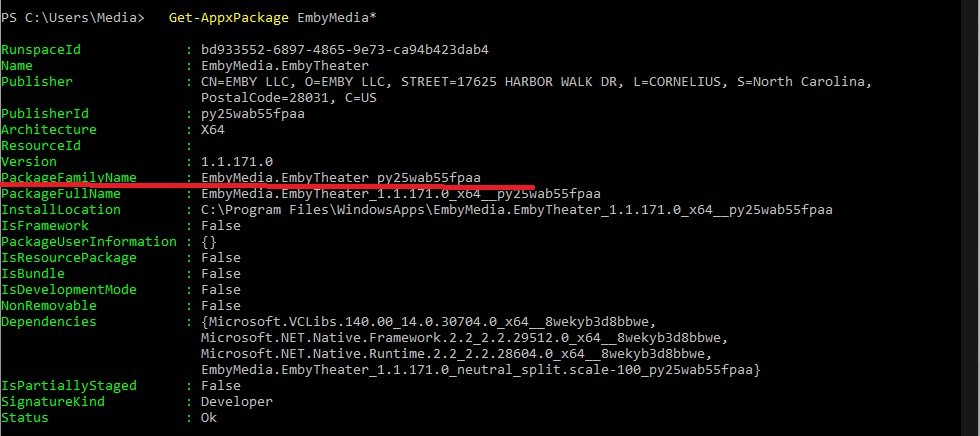
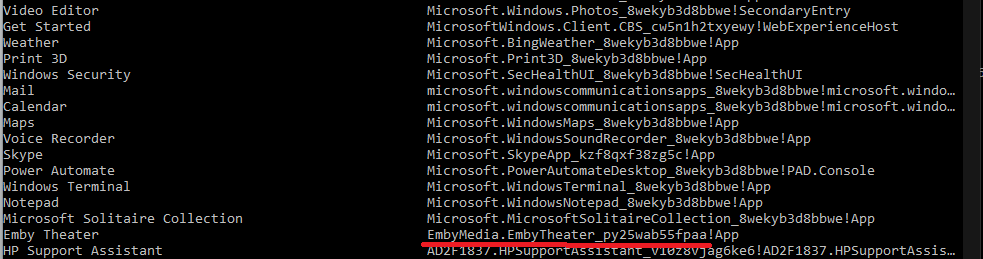
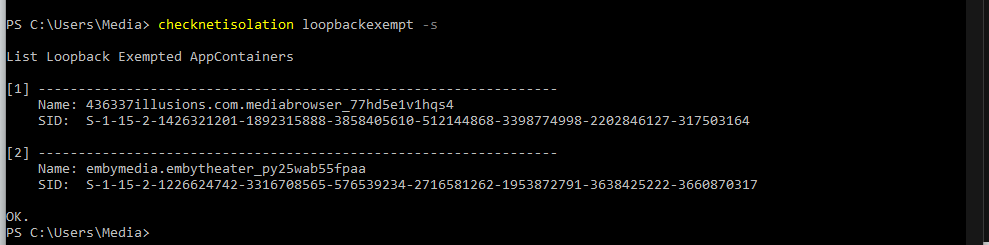
Steps to allow app loopback access in Windows 10/11. This is required for apps like Emby Theater on the same system as Emby Server. 1. You need to get the appid/packagefamily name. open Powershell and get list of apps. Type: Get-StartApps # For all applications Or Type something like this Get-AppxPackage EmbyMedia* 2. Once you have the apppackageid you type: checknetisolation loopbackexempt -a -n="EmbyMedia.EmbyTheater_py25wab55fpaa" ensuring you have quotes around the id or the command will fail in PowerShell. 3. Now you can check which apps that are allowed localloopback access. Type: checknetisolation loopbackexempt -s If you need to delete an app you would use the appid with -d. Type: checknetisolation loopbackexempt -d -n="EmbyMedia.EmbyTheater_py25wab55fpaa"

 4 points
 -
They come from guide data, but also from metadata providers based on the usual library options.2 points
-
2 points
-
I would check out both ZeroTier and TailScale which are very similar products. They both have a free tier you would easily fit into with 50 and 20 devices on the free plan. Essentially both allow you to setup your own private VPN service where you setup and control the clients and use of your VPN. It's rather elegant in how they work. Your first node will the the Emby Server machine. Your Emby Server node machine opens a port to their server and basically lays dormant until a client you setup on a PC or phone want to access it. So if you were on your phone, you would turn on the ZeroTier client which logs you in. As soon as you try to access your Emby Server a connection is established directly from your phone to the Emby Server. The tunnel that was open and checking in now sees you want to use it. It's a clever solution to this problem as your Emby server opens a connection to their server and says "I'm ready let me know what one of my authorized devices needs me" and then just goes dormant until needed. The key is that there is an active connection open just not doing anything. So your Emby Server has punched through the CGNAT and blocking your ISP has in place. The only semi tricking part is installing the software on the devices. It's not hard and well documented but might take reading a couple of times to sink in. The way they both work is that you get your very own IP space with your own dedicated IPs for each device. This are "reserved" and unrouteable IPs on the public internet and meant just for this type of private use. So the key and take away is that your Emby Server will have one of these reserved IP all to itself which you need to use. It's this IP you will use in the clients you use remotely and not what is shown on Emby Dashboard. It doesn't not matter if you always use this IP even when your home on your own LAN as you'll just have a tunnel that never leaves your LAN. This private tunnel can should be left on for the Emby Server but might want to be manually turned on/off on cell phones if you pay for data as a precaution. Try both ZeroTier and TailScale to see if one works better for you or if you like the setup/GUI better. https://www.zerotier.com https://tailscale.com PS This these have absolutely nothing to do with other common VPNs you hear people talking about like PIA, NordVPN, etc. The only thing they have in common is the fact they both use encrypted tunnels. Other than that they work fundamentally different. The only traffic that should ever pass through ZeroTier or TailScale in your use is to your Emby Server and not any other traffic as that will not be any different then it is now.2 points
-
I must have been tripping last night or something. Found the options immediately this morning. That tooling is AWESOME! Thanks for the suggestion.1 point
-
Can you update to latest version 4.6.7.0?1 point
-
Thanks Luke. As it's local I have selected to login with a pin code. But one of the users has a blank one. I'll try setting one to see if that makes a difference and report back.1 point
-
Here is what I came up with: #!/bin/bash #I named the script file "postmovie.sh" #To enable you must make postmovie.sh executable i.e. sudo chmod u+x postmovie.sh #To execute run "sh postmovie.sh "Title of Movie with Publication Year" "file extension of movie" (i.e avi, mkv, etc.) #Change the chown USER in the script below to an administrator on your Linux machine i.e. [chown -R adminguy:emby "/home/emby/Movies/$1"] #Change the (move from) and (move to) directories for your case use and you should be good to go! #Note: This will make the target file read/write by the user, read only by the group and unaccessible for everyone else. This may be too strict for certain Emby use cases, not sure. If you are having problems you might want to change the first chmod to 775 and-or the second chmod to 644 or 664. #This does not error trap for spelling errors, etc. so make sure you use the existing filename exactly (Linux is case sensitive) or may have to go in manually to delete erroneously made folders. sudo mkdir "/home/emby/Movies/$1" sudo mv "/home/jarl/Videos/$1.$2" "/home/emby/Movies/$1/$1.$2" sudo chmod 770 "/home/emby/Movies/$1" sudo chmod 640 "/home/emby/Movies/$1/$1.$2" sudo chown -R jarl:emby "/home/emby/Movies/$1" echo $1 $2 " has been moved to /home/emby/Movies/$1" echo "Thanks to CassTG on the Emby Community Forums for teaching me how to pass parameters to, and concatenating them inside, a simple script!"1 point
-
I have been working on it too after your first post. It will be fun to compare. TY for the help, it's already working but I've got a couple of tweaks I'm putting in. This is WONDERFUL.1 point
-
The only way I could fix this was to disable the other metadata providers for episodes. Refresh metadata with ONLY TheTVDB enabled. Then after all the episodes were correctly found, I re-enabled the other metadata providers. I believe @cayars suggested this in another thread.1 point
-
There could be some cases over Chromecast where this happens. We'll take a look at it. Thanks.1 point
-
I assume in the programme entry, thanks!1 point
-
In most cases you're going to seek client-side using the video player, rather than via server-side transcoding.1 point
-
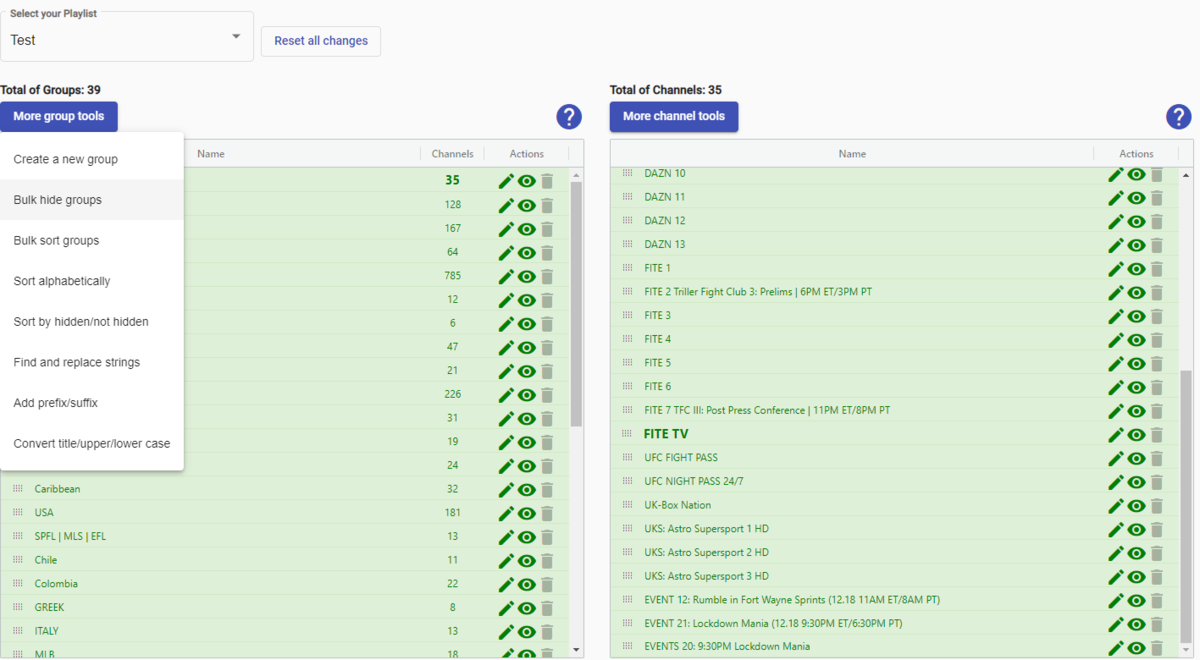
Yes, your missing it. Left side is group management, right side is channel management for group selected. You can do all kinds of things from bulk removal, bulk renaming, sorting, editing, changing graphics, adding lineups they may have that you don't, etc. The docs might be old, don't know, but the UI they have is quite easy to use and allows you to do things quickly. You can end up with a perfect m3u file exactly how you want it. It's something best tried vs reading about it. It will take an hour or two of trying things to fully make sense but then it becomes a powerful tool.
 1 point
 -
@simoncraddock There were issues where depending upon how you stopped watching the HDHR channels, Emby would not release the channel. So eventually the HDHR thought it had no more tuners available. I lost track if that was fixed or not, but that's what this sounds like. If it happens again you can open up your HDHR app and check the tuner status.1 point
-
Brilliant! TY.1 point
-
For hls there's another api endpoint where you requesting a master.m3u8.1 point
-
You cannot request hls segments and hls subtitles with a mp4 file.1 point
-
yes. dunno what made the router burp at home, perhaps a power out. that seemd to be the main issue. getting back in to emby once the router issue was fixed was just getting the user name right.1 point
-
You probably would want to go to the latest beta then: https://github.com/MediaBrowser/Emby.Releases/releases1 point
-
No not the file you just edited, notice the extension .pyo not .py Yeah that is fine1 point
-
New beta version available 6.2.3: delta changelog: fix websocket connection timeout enable permanent ssl verification disable ssl verification for artwork cache disable ssl verification for artwork cache (clean code) lock windowchange on regular ops optimize code fix multiserver sync issue add additional lock for multithreaded syncs simplify code and improvements fix artwork sync performance improvements artwork fixes This version is still not published in Emby's Kodi beta repo due to final tests pending.1 point
-
An update to a newer app version for the FireTV was able to solve the problem. Thanks
 1 point
 -
Lend your support here:1 point
-
Sorry forgot about that topic, will check it out today again.1 point
-
There is nothing wrong technically from doing this but it just makes a lot more work for you to manage it. I do what @FrostByte said and just use one share per volume. For me that share is "Media" and mine looks like this: /volume1/Media/Christmas /volume1/Media/DVR /volume1/Media/HomeMovies /volume1/Media/Movies /volume1/Media/Pictures /volume1/Media/Sports /volume1/Media/TVShows /volume1/Media/VOD Each of those has sub directories of course but I only have one share "Media" to worry about permissions. Or if something went funky I have one place to reset (with changes to everything underneath). My only exceptions are the backup location as Frostbyte mentioned and possibly the transcode directory. I have multiple volumes since I only have 4 internal drives but 8 drives attached from the USB/eSata external bay enclosure plugged into it. Just additional volumes but same thing as above.1 point
-
Download the m3u and allow you to select groups by group title.1 point
-
OK, I have upgrade DSM to 7, it' OK. I have install emby server and it's OK, it' runing. I gave all the permission and ... It' working fine! Thank you for your help and the video!1 point
-
That's a clever workaround.1 point
-
I reinstalled Next PVR then i delete Next PVR then it was removed so its solved thank you1 point
-
I've backed up and snapshot the VM. Upgraded to latest beta and no issue...Admin options are back.1 point
-
One of the benefits of having your libraries as subfolders to the one share is that they will inherit the permissions of your share and should be good to go when created. My guess is that if you create a new share for every library under volume1, you may have to address issues with the folder/file permission also depending on how they were created.1 point
-
I have solved this for now thanks. I deleted the HDHR from Emby, rebooted Emby and added it back in and so far its playing nicely again. If it happens again I'll reach out for help again. Thanks1 point
-
ok ill try to remember but im going to bed and then i wont be home for a while so ill do that when i get back1 point
-
Oh that's MUCH better!! I'd forgotten that there were LIBRARY SPECIFIC settings for subtitles. Thanks!!1 point
-
Just shows what I can interpret! I thought it was an error finding ffmpeg! duur! I really didn't interpret that as a listings error, especially as they were working on the old server. How interesting that neither of the sources was working. Thanks very much or the nudge - once again accurate. I've now fixed the backup server using the emby source, and it look sright now. Once again, thanks for the answer as quick as a flash.1 point
-
W11 with Hyper-V here too. The only advice I would give is if you do go down that route, then do a fresh install - do not try and update from W10.1 point
-
Each time Windows has offered an upgrade since Windows XP I have upgraded as soon as I verified that there was nothing that hurt, much, the ability to use anything that I used regularly. However, this time, I am not even going to try because there are too many reports of changes Microsoft has made or are making or or planing to make that would force changes to the way I do things. I am now over 73 years old and Windows 10 should work fine for at least five year or so and even after that, judging by how long Windows 7 has kept working, Windows 10 should remain working well after that five years and will probably remain working, just without direct support, for another 10-12 years. My plan is to keep Windows 10 on all my devices at least until I am 90 or so and then I may well not care any more. I "like" being fully up to date but only one of my computers can upgrade to Windows 11 according to Microsoft. I will only upgrade if I am forced but I will make sure any new machines I get can run or already are running Windows 11. A friend of mine upgraded to Windows 11 and I had a chance to test it a bit. After that I am even less likely to even try to upgrade to Windows 11. Maybe, over the next few years, this will encourage me to implement Linux on all my computers. There are numerous advantages to Linux and I am fairly comfortable with it and virtually all tools I use either have versions that work under Linux or there is a replacement for Linux that is just as good I will ask in another thread but there are so many "flavors" of Linux that it may be hard to find the "best" one for my use, should I decide to go that way. Also I need to double check that there really is a Linux workaround or tool for all my needs. Things are still WAY up in the air and what I do is not necessarily correct for others. BTW: My friend had an Emby server running fine under Windows 10 and his failed to run after the upgrade but he did a remove and reinstall and Emby started working for him again.1 point
-
Just like all the context menu changes. Task Manager, right click Windows icon instead of taskbar.1 point
-
I moved my server to W11, no issues, other than the stupidity that is W11. How the heck could they get rid of the ease of launching Task Manager.1 point
-
i got it working. thanks for the suggestion. this looks good but too bad it only supports 30 channels right now.1 point
-
What is the original source and how many channels does it have ? The issue could be the 'downmixing' is not mixing the correct channels - maybe leaving out the Centre channel - thus the overall volume appears to be low. ? For remuxing an AC3 to AAC - I've always found an ffmpeg value of 1.3 to 1.4 sufficient to keep the same volume as the original (due to downmix/encoding losses) - anymore than this and you will start 'clipping' the audio, meaning peaks will go above normal parameters and sound bad.1 point
-
That is not only correct but it is also good advice. You do not need a fancy computer or other machine. If you just have a regular computer and you connect external hard drives to it you can backup to your hearts content without ever having to pay for more than the hardware and, currently, hardware is quite cheap. Both my servers and my backups are hardware based and, after backups are complete, I store the drives in a fire proof safe. Online storage is simply unreliable. (Companies go broke all the time and/or change their TOS even more often) There is also the lack of security online. I simply do not trust any company to protect my files from unauthorized access.1 point
-
there isnt one really. and it would be cheaper to back up to a new hard disk and keep it elsewhere1 point
-
It's close to a release, we just have to fix a couple things, and build a language dictionary.1 point
-
Hey! I have credit sequences skipping While doing so, I found a bug. I'm just going to make sure I can track it back to where the problem starts. Then I can post a dll.1 point
-
Confirming Xbox can play the 4K file but before playing the stream with truehd or dts master audio have to change it to ac3 audio:-(. I don’t see any option in the Xbox emby theatre client to select audio options in config like the desktop ET client has1 point
-
Have a hopefully quick HDR question I cant find a direct answer to. I have the option for "Enable HDR tone mapping:" turned on so that on non HDR supported TVs and PC, the colors wont look washed out. And it works. My question is, for black friday, I finally got a HDR 4k tv for the living room. When i play the HDR movies on it, is it showing proper color because of that setting or is it showing the proper color cause it detects a hdr screen? Do i need to turn it off to show proper HDR on the 4k HDR tv? Or is the server smart enough to know.....??1 point
-
@Lukecan you update the API url link to https for Swagger so we don't have to make any changes for localhost. I am currently just updating the dashboard.js.1 point
-
Any news on 4K HDR on Xbox One X? I get no HDR and 4k movies are lagging. I thought 4k hdr should work on Xbox?1 point




























_1.thumb.jpg.d4e6a650cb4552bc437a9e6156024102.jpg)
