Leaderboard




Popular Content
Showing content with the highest reputation on 12/03/21 in all areas
-
I'm not rich but you are probably right. I know there are lots of things the emby team are working on I just seen the cool pics that people here posted and got excited I'm just waiting for Luke to say it's on his to do list maybe for christmas !
 3 points
 -
@AndrewDub2044 I have a different way that I use 90%+ of the time with people that is slightly harder but a lot better once complete. The great part of this solution is that I can remote in and help you if you get stuck or just want a hand. Since you already have the domain what you would do is open a free account at CloudFlare.com. After you sign up they will instruct you to login to your domain register and change the 2 name server entries to use the 2 they give you. What that does is put Cloudflare in control of your dns. It takes 10 minutes to 4 hours to switch. This is not a domain transfer but just a change of name servers. Once Cloudflare has control of your domain things get much easier because everyone goes through their service to get to your server. No one needs to know your IPs as they are not part of your DNS anymore. Cloudflare protects you from all the nasty/crazy stuff that happens but more importantly gives your remote users better "routing" to your server because they are are CDN network. With the configuring setup correctly all your movie, tv shows, music pictures will get cached by them. So what that means is once viewed from your system they won't be pulled again in 30 days. So your Emby system will seem very fast to remote users. Lots of pros here with the only con being a slightly harder setup. Oh, nearly forgot to mention. Cloudflare will give you a cert to use that auto generates. It's a pem format that needs changing formats for Emby but once done you won't touch it again. You won't need to renew it moving forward because the "real cert" checks take place against the forward facing Cloudflare servers exposed to the public (not your server). So if this is something you would like to do, I can assist you. Try and get signed up with them and start the name server change. Send me a PM and let me know it's done and and we'll setup a time hopefully within 2 hours (should be ready by then) to get the rest configured for you. Carlo2 points
-
Hi, I'm a big fan for emby server, and I love to fill my metadata with useful information about the content using Tags; I feel it will be much more powerful if Tags can be auto-completed based on previous tag entries. a drop down list also will do a good job. thanks, DaN2 points
-
absolutely. We'll definitely make a point to be more active here. Sometimes we get caught up running iterations of the plugins we're developing. It would be in our best interest to post here often, as features are getting finalized. It looks as though we have finally gotten some really cool localization working. We were able to get the subtitle or audio streams the client is playing, and we can change our 'Intro Skipped' message text, to the language the user is watching (or reading) the stream in. Very cool stuff. We were able to translate to many languages. It will definitely be something to look for in the next release.2 points
-
Be able to create playlist based on a certain criteria, like genre and or year, in order to create a dynamic playlist that it refreshes automatically when new content is added. This way you can for example, create a tv comedy playlist from the 90's, or a new sci-fi Movies playlist. Some other criteria for rules could be the rating, watched/unwantched, score, tags, language, audio codec, etc The possibilities could be endless1 point
-
It could rotate or something, like in the theater Of coarse it would have to be able to be turned off I suppose for people who don't like the idea.1 point
-
Can we lock the movie order in a playlist? I want to make a MCU movie sequence, but anyone can change the order in it and i need it to be always the same order.1 point
-
Hey, In my network, I have my emby server running (as others do), but when I set up new apps I need to type in the server name, and port - always. This sucks. It would be awesome to have the apps autodiscover this information - and I have three ways of doing this: Use an SRV record in the local DNS zone: SRV records are well known and supported, to help clients discover resources on the network. It would be possible to have a well known name, like: Using this, the app would able to look for _emby._tcp at the local DNS zone (get this from the netcard). In return, the client will discover: The servers name (emby.example.com) The servers port (80) .. thereby saving the user from typing this in. Unlike mDNS, DNS can be configured by a network administrator to support "odd" scenarios, like if a I had a network where I wanted to use a specific Emby server (on the internet, or some other reachable network) - I could configure this in DNS and have the client apps in my network discover this server - even though it wasn't available locally. Use an SRV record in mDNS: mDNS is a DNS system where each participating computer announces itself. Emby Server would be able to join this multicast DNS network, and announce the SRV record from before. Client apps would do the same, and then perform the query in mDNS instead of DNS. The benefit here is that this is likely zero-configuration for an end user. The server will automatically announce itself, and clients can automatically find the server(s) in the network. This and SRV in DNS is also sometimes called "DNS-SD" for "DNS Service Discovery". Create a custom UDP broadcast request and response: Much like multicast DNS, you could send out a custom UDP packet to 255.255.255.255, thereby broadcasting it to the network. The Emby Server could then respond to this, with the server name and port. This will not work well in IPv6 though. Mike.1 point
-
I think i was going to try this feature when it first rolled out in emby. Sounds cool as heck to take a picture and have it show up on the server! But realized it would upload all photos in my gallery to the server. I've got nothing to hide, but having labels that i need to take pictures of in order to blow them up to read and other trivial crap aren't worthy of server space, but phone worthy. So i backed off doing it then. Tonight i figured i would try this out again (years later?) only to remember why i didnt do it in the first place... There is just stuff on my phone that i dont need in the server. But i figured maybe if i went into my photo gallery on my phone that i might be able to select photos to upload. Selecting one of the pictures and choosing share i realized there are many places that i can actually choose, but not emby. It would be great to share a selected picture (instead of the whole phone library). Make the share option in the photo gallery link to whatever it is in the emby android app that knows how to share the whole library? If i turned on camera upload i would then have to go in and manually delete pictures when i was back at the server. And having not played with this feature at all, would it then keep uploading pictures that i want on my phone but deleted from the server when syncing? Anyway, thanks for all you folks do, and this is far from any type of priority on my side! (I searched the topic before posting, so if someone else already has it suggested i apologize in advance)1 point
-
When you sign in to EmbyConnect why does it persist with the "Sign in to EmbyConnect" besides the server list? This always give me the impression I am not actually signed in or something didn't work. It should be "Sign out of EmbyConnect" once logged in, surely? I have no idea if the servers I am looking at are locally configured or presented to me through the EmbyConnect web portal.1 point
-
Ok, finally got this sorted Locations is /volume1/Emby/root/default/Collections "Collections" is an upper case "C" Because I couldn't for the life of me figure out how delete that directory rm: cannot remove ‘[/volume1/Emby/root/default/Collections]’: No such file or directory I simply moved it to a location I can see in File Station to delete there. mv /volume1/Emby/root/default/Collections /volume1/Media/Emby/ Started Emby, deleted Mix Content Collection folder (there were 3 of them) and Collections has been recreated correctly as a singular instance. Thanks for the assistance, got there in the end.1 point
-
I mean this specific type. Thanks though.1 point
-
Luke, I marked your suggestion... as the solution because it was enough of a hint to enable me to "fix" the problem. So, I created the administrator account, then looked at the dashboard, scrolled down to Paths and saw that all four logs are in the /var/lib/emby folder. When I did the fresh install of my Linux OS, I only restored the /home directory. But, since I installed a new drive for the OS, I had the old one handy as a full backup of the original. Mounting that old drive into the system, I was able to locate the /var/lib/emby folder. On the new drive I renamed the emby folder to emby.old and then copied the emby folder from the old drive into the new /var/lib. Not remembering exactly how to restart the service, I just brought the system down, rebooted, and then.... it all (appears) to be fully operational. Thank-you, Keith1 point
-
Can you guys help me figure out some of the Flags for movie versions? I have this so far, but I might be missing some. VideoVersionFlags = new string[] { "Directors Cut", "Final Cut", "Theatrical Version", "Special Edition", "Extended Edition", "Uncut", "Unrated" }; Also, how do they look in the file naming? I know they go inside "[ ]", but are there spaces in the names? Example: "[DirectorsCut]" or "[Directors Cut]" ?1 point
-
@jmantoo @BAlGaInTl Universal closed caption support is coming:1 point
-
Universal closed caption support is coming:1 point
-
I've wanted to address this for a long time, but I had a higher priority issue that I wanted to focus on first, and that is now solved (hurray!), so it's time for my next issue - this one should be very minor by comparison. In the Description field, MOST platforms do not recognize line breaks - but some do, as I've discovered. The web interface, the Android TV interface, and the Apple TV interface all ignore line breaks, but strangely enough the Amazon Fire interface displays them correctly. I realize many people won't care about this, and that many movie/title descriptions are barely a sentence long, but others are several paragraphs, and it can also be helpful to add notes - such as: what is the difference between the director's cut and the theatrical release. This is a lot less effective when everything is displayed as one continuous paragraph - the lack of formatting makes it easy to miss things and just looks jumbled and messy. I'm FAR from being a coder, but I did figure out that putting a < br > (without spaces - a line break code) will force a line break... but not only is this manual work very tedious, but on the few platforms where it displays correctly, the line break code is displayed on the screen. That's better than one big paragraph, but still less than desirable. So, would it be possible to code the interface on all platforms (or, at least, the biggest ones) to respect and properly display line breaks, so that what's in the NFO files is displayed correctly on the screen (and so I don't have to do the manual work-around of hard-coding line-breaks)? Thank you so very much!1 point
-
i have already updated my post. but you are right, that was the issue!1 point
-
Exactly - and this is why I mentioned caution on the Auto upgrade - there is always the possibility of introducing new vulnerabilities - they can come from both poor internal QA (as in the case of your QNAP example) or via supply chain interception such as the SolarWinds hack. My personal view is do not upgrade automatically unless there is good reason to do so - ie if an Critical patch is released to resolve a ZeroDay, then I review, install and monitor. If there is a patch for 'generic enhancements' then I will wait until it has been out there a couple of weeks or may choose to not install it at all using the 'if it ain't broke' policy..1 point
-
br is probably your best bet for now, but yes I agree we should look at improving this to make it easier.1 point
-
Hey guys just wanted to say thank you all SO much for the help. Got it figured out with a custom ddns domain but with a self signed certificate. Might use the google one I bought later. But I have that awesome lock on my browser and its great! ]1 point
-
The new beta Roku app seems to have fixed the hable conversion when a Roku is not attached to an HDR TV. Thankfully won’t have to “attempt playback correction” twice on every play, or worry about family members that don’t understand!! Can’t express how awesome that is.. I found one file out of many it didn’t work on, but there may be an issue with that particular file so I’ll check that first.1 point
-
Either of these two paths should lead you to collections in DSM 6 /var/packages/EmbyServer/target/var/data/collections /volume1/Emby/data/collections1 point
-
After reading through some more Synology posts, turns out it was some of the Scheduled Tasks keepeing it awake1 point
-
@cayars Thanks so much again for remotely connecting and helping me sort this one out. Couldn't have done it without you!!1 point
-
You seem to be having a grumpy day, thanks for taking the time to post.1 point
-
I would hate to have your to-do list, your work is appreciated keep up the great work.1 point
-
Hm, I can confirm that txt message from emby to Kodi are not popping up. This works a while ago. But sadly I don't know which build I was using. It has definitely nothing to do with my network as I'm not changing anything, other than updating emby-next-gen and switching from addon to native mode and vise versa. Emby-Server has of course a fixed IP which is also manually set in emby network settings. For bandwidth control network IPs are also set in the emby server settings. (For the main local network and for separated VPN access) But for me the content in Kodi definitely updates in realtime. (With some seconds delay of course) It must has been something with emby-next-gen or with the emby server update itself. Fire TV Cube, emby-next-gen 6.2.0 (native mode), Kodi 19.3, embuary skin1 point
-
I would suggest looking into NGINX Proxy Manager. It will make your life easier when it comes to getting an SSL certificate / managing it. Comes with additional benefits such as not needing to enter the port in the domain/url that you use.1 point
-
That's not really very helpful in my opinion.1 point
-
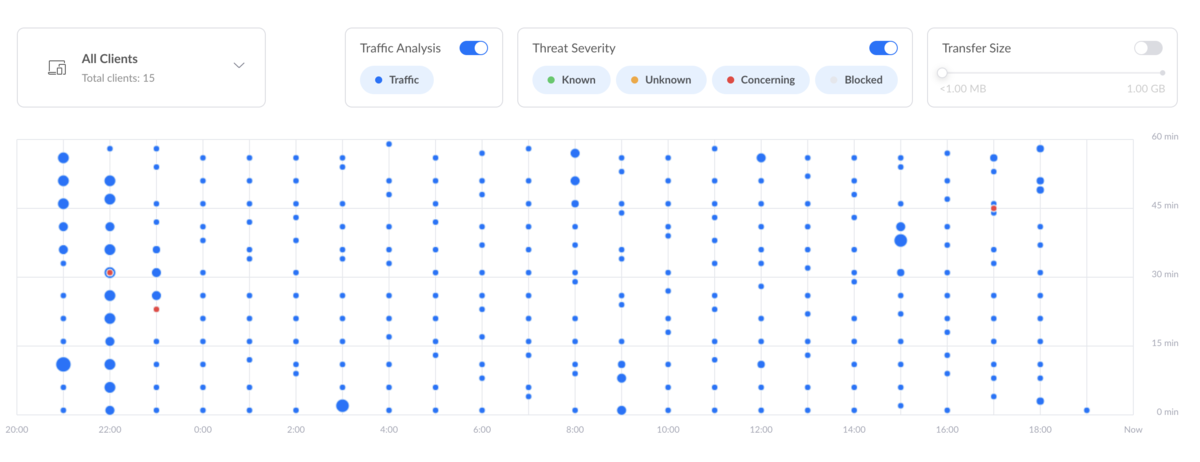
Aww that brings good memories of threat detection in Unifi, i am on the Early access release software and can confirm their latest version of Traffic Inspector (TD) is utter rubbish and tells you nothing, in fact the Whole EA UI has basically taken all the relevant info you would want about whats going on your network and chucked it in the recycle bin and now you get really stupid screens like the attached, that make no sense and are utterly pointless. But to be fair the Dream Machine has been solid and has a pretty decent firewall on it. Can you guess what this means?
 1 point
 -
Actually it's on my to do list. Thanks.1 point
-
Lo asumi al ver la captura de pantalla, de todas formas los browsers no son el mejor benchmark por el tema de codecs su compatibilidad es mas pobre facilmente pueden desencadenar un transcode sin tener relacion con el limite.1 point
-
Seguro que has cambiado el limite en cada aplicacion cliente antes de reproducir? (Cambiarlo en samsungtv, en androidtv, en android mobile, theater, etc.) Si solo lo cambias en el webapp solo tiene efectos en el browser que ejecuta el webapp para el usuario especifico que hizo el cambio. Lo otro que puedes intentar es deshabilitar el transcode para cada usuario específicamente en la configuracion del servidor y hacer la prueba.1 point
-
Just wanted to check in and confirm that it works fine for me. Thanks for the quick fix.1 point
-
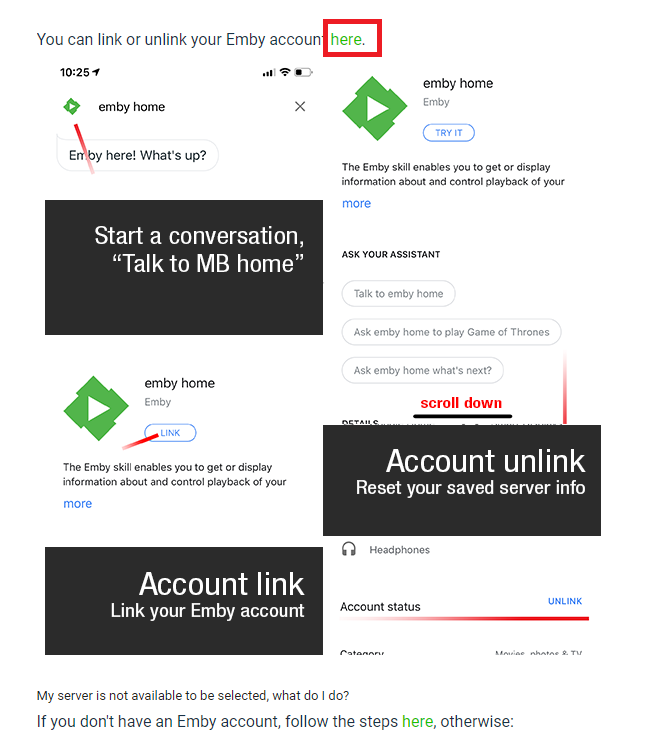
Hi, It looks like you found and added it. Have you tried it at this point? Give it a try with something like "Talk to MB Home". It will either work or complain "I am unable to access your Emby account. Please complete the account linking process gain." If it gives you that error pick back up here: https://support.emby.media/support/solutions/articles/44001161655-google-home#GoogleHomeAccountLinking You should be good to go at that point and just have to learn how to talk to home. Hope that helped.
 1 point
 -
Thanks, problem solved.1 point
-
Hi, please consider add an option to mirror folder, subfolder structure. So if in the phone i have a folder /storage/emulated/0/ Pictures/Folder1/Folder2/photo1.jpg Please let me somehow end with a backup in emby server like this. c:/customPhotoPath/Nexus6/ - Pictures/Folder1/Folder2/photo1.jpg current behavior is putting them all inside "Camera Roll". --------------------- And for single directory non recursive select--------------------- SdCard/WhatsApp/Media/WhatsApp_Images should be mapped included last folder name to something like c:/customPhotoPath/Nexus6/ - WhatsApp_Images/* Thanks.1 point
-
Emby theater desktop, if you setup an external player for iso.1 point
-
New build is up with the fix. Thanks.1 point
-
Same here and only on Xbox Series X. Xbox One X is fine. Series X is a complete disaster right now. Really looking forward to the new app @Luke.1 point
-
.NET core apps, which Emby Server is, run under Rosetta, however, the upcoming .NET 6 will support Rosetta 2 as well as native arm64 targeting. So we'll be playing with that once it is available and stable. Thanks.1 point
-
(Edit: To indicate that this might be thought of as a "Smart Collections" feature, perhaps similar to Smart Playlist functionality.) I'd love to see an Advanced setting, or a Plugin, that enables a List of Rules (which can be manually reordered by the user) that would match whatever pattern is defined in the rules for auto-adding items to a given Collection. These patterns could be set to match the file path (eg, match on "*\Disney\*" to match all videos with a folder "Disney" in their file path, and then add them to this Collection) or to match various item attributes, in particular Tags (eg, match if the video contains the Tag "Disney"). I could live without the following addition, but since there might users who will want to use pattern matching, but also want to be able to manually exclude certain items, perhaps we should also have the following: When a Collection is created there could be a default Final Rule (ie, the Rule which gets applied last, and thus has "final say") which would be "User manually Adds/Removes an item from the Collection." The user could of course move this Rule to not be final (which then would mean that the other pattern matching would take precedence), but whenever it is left as final it would mean that even if an item would normally be added to this Collection because of matching a path pattern (or attribute match), if the user manually removes it from this Collection then that manual action will take precedence (ie, the software would basically be making an internal record to exclude this specific item since the user manually removed it). I'm imagining that the rules would get applied whenever a Library scan is performed, but it doesn't really matter to me how exactly things get triggered as long as it is automatic. Here's an example of how all this would work.... Say I have folders with the following paths: \media\Videos\Shorts\Disney\CD1-Disc01 \media\Videos\Shorts\Disney\CD1-Disc02 \media\Videos\Shorts\Disney\CG-Disc01 \media\Videos\Shorts\Disney\CG-Disc02 And I want to populate the following Collections automatically: Shorts Disney Donald Duck Goofy I would create each of these Collections, and use the following corresponding rules per Collection to determine what each Collection will get auto-populated with: Shorts: Match Path "*\Shorts\*" Match Tag "Shorts" Disney: Match Path "*\Disney\*" Match Tag "Disney" Donald Duck: Match Path "*\CD1-Disc*" Match Tag "Donald Duck" Goofy: Match Path "*\CG-Disc*" Match Tag "Goofy" I know there is the Auto Box Sets plugin, but I'm wanting to add the same item to multiple Collections based on path and other attributes (particularly Tags), which as far as I can tell is way beyond how the Auto Box Sets plugin works (particularly given that many of my Collections are going to be of my own creation as opposed to Collections which have a TMDb collection id). I think that this functionality could be quite useful if implemented well. And perhaps some of the underlying code (eg, for a rules system, etc.) could be modularized/reused for other requested features (eg, maybe Smart Playlists?)? Thanks for your consideration! PS - If this is something you might like to see implemented, be sure to "Like" this top/first post (as well as any subsequent posts in this thread that highlight particular aspects of what you are interested in) -- "Liking" the top/first post helps the Devs to know how much interest there is in a given Feature Request.1 point
-
I suggested this as an added feature for Emby Connect back in June, and I hope there are enough interested people to warrant the effort required required by Emby to make it work. I'm extremely disappointed in Google's decision to eliminate the ability to use Google Home voice commands to play songs from my personally curated, legally purchased, music library. As I understand it, this feature, which worked well with Google Play Music, isn't even supported by the paid version of YouTube Music. As an elderly and cantankerous former engineer and semi-professional musician, I have an extensive library of music of multiple genres spanning at least nine decades. I know the types of music I like (and if I like it I'm inclined to buy it). I resent being inundated with Google Assistant's inane and totally unhelpful suggestions of streaming music that "I might like" because in their opinion it is similar to a song I requested. I have also created numerous backing tracks that I use to practice jazz standards and other songs on my digital keyboard. Voice commands would be extremely useful for selecting and playing these tracks.1 point
-
Throttling will keep transcoding x amount of seconds ahead of playback vs no throttling will transcode then entire file at once.1 point
-
My bad, didn't see the dupe thread. +1 Specifically the option to select which folders to monitor for new images to upload, as well as a manual upload option.1 point
-
Currently when downloading large amounts of music downloads are listed as single items with no real sorting. Please maintain the same sorting style as online browsing1 point
-
That is the issue. There is no universal way that works on all platforms.0 points