Leaderboard




Popular Content
Showing content with the highest reputation on 11/29/21 in all areas
-
A new release of Emby Server is currently rolling out, and this is largely a bug fix maintenance release while we work on new features for future updates. Here is the list of improvements and issues resolved: Fix regression with local network multiple subnet detection Improve cleanup of transcoding processes View the full article4 points
-
If you go to an individual Movie or show, and click on Edit subtitles, there is an option to return only Forced subtitles. This option is not available in subtitle configuration in the Library section. Would be great if this could be added there, so only download forced subtitles for shows/movies. Or better would be to add it as an option of "Forced subtitles for language matching audio language". Seems most of this functionality is already in place, just needs to be linked up. If it helps, I would like to offer a bounty on this option. I can personally add $100 to bounty for it.2 points
-
Yes, so far still good. Thanks for following up.2 points
-
Have you tried putting 00000 into roku? I think I remember that working as a workaround years ago, but have since switched to using a subdomain which is less prone to weird issues like this.2 points
-
Hi. Can you please add an option in the settings to hide the "Media Info" section? When using emby on my phone, it pretty much takes more then half of the page. On top of that, not having it be showing, it would clean up the page. At least gives us that option to hide it. Thanks.1 point
-
Hi, It would be nice to have an option, maybe a checkbox to ether ignore articles or not in the sort title. It is really annoying to edit the metadata and add the sort title on every movie. If a movies real name is "The Punisher" i don't wanna need to change the sort title, because this is the real name. An option would be great. Thanks1 point
-
Switching the Xbox UI to 1080p vs 4k seems to be a temp workaround, i'm also having similar problems with the HDHomeRun TV app and they have acknowledged that to be due to an update pushed by MS. Believe MS have a fix on the latest developer access build so fingers crossed this will be addressed soon for all.1 point
-
Thanks Grim Reaper, I've loaded it up, waiting fo it to process the library, and then I'll have a look. It looks cheaper than Marriage counselling Julian1 point
-
It does Genres too.1 point
-
I don't use dreamhosts but i have Rclone set to pull from my Google Drive . No issues with bandwidth as they are all likely to have good avaliable BW, and media starts up within 3 or 4 secs when using the rclone vfs cache option1 point
-
So far, I haven't come across anything breaking. I just don't have any .mp4 files to test it against. But, when moving existing files (of the same extension) things seem to be still okay. Now I'll check out the whitelist.1 point
-
They won't know what content you have, if that's what you're asking.1 point
-
Okay. I can add this.1 point
-
I found the relevant MetaBrowser options: <OverwiteExistingEpisodes>False</OverwiteExistingEpisodes> <OverwriteOnResolution>True</OverwriteOnResolution> <OverwriteOnWords>True</OverwriteOnWords> <OverwriteWords>PROPER;REPACK</OverwriteWords>1 point
-
Thank you. That appears to work1 point
-
Rescan won't do it, Refresh is needed.1 point
-
Same for me as well. It's generally a bad practice IMHO to link to the share directly as things like #recycle and other system files can get written in the "root". You are far better off creating a directory such as Media, EmbyMedia or similar that you mount to instead. I typically do: /Media/Movies /Media/TVShows /Media/DVR etc When ever possible I try to not include spaces in these names because you have to single quote them from the command line if working with them. Not a big deal, just a personal thing.1 point
-
Yes, that's right.1 point
-
Eh? 172.20 is in the range between 172.16 and 172.31 surely... Paul1 point
-
Aaah, there is something I never even thought of. This might be related to those permission posts I keep seeing? I will look into that. Thanks for the idea Luke, I will report back.1 point
-
It's created by a user named emby, so maybe you just can't see it?1 point
-
Thank you for reporting this. I can see exactly where the problem is happening. I'll get that fixed up today.1 point
-
1 point
-
Hey, First of all, thank you for the fix! Really appreciate it. And, sorry for asking if it is obvious, but should I make a separate post for subtitle appearance not following the defined settings in the android app? Also, should I make a post in the web app section for the background settings too? Much thanks!1 point
-
Overwrite doesn't remove previous files if the extension is different. I just organised a few episodes that were replacing existing episodes. (I hade some 1080p rips to replace some older 720p ones). I noticed that if the file extension is different, then the previous file is not removed. e.g. I had a 6 episode season - two episodes were mkv files and the other four were mp4 files. All the new ones were mkv. After running the organise task, the two mkvs were replaced but the four mp4s were still there along with the new mkvs.1 point
-
Thanks Luke. This helps!1 point
-
I'm not using my Shared folder as a library thus it's not trying to scan the #recycle folders. All my libraries are subfolders to the shared folder ex. /volume1/Shared/#recycle /volume1/Shared/Movies Since recycle bins are shared folder items Emby doesn't touch mine because the recycle bin is up one level.1 point
-
That image is outdated. They have been working on a new version that should hopefully leverage the capabilities of the RP 4, with newer libraries and hopefully smooth playback. (fingers crossed).1 point
-
Server Settings-Users, select your user-remove your Connect username, save, readd Connect username1 point
-
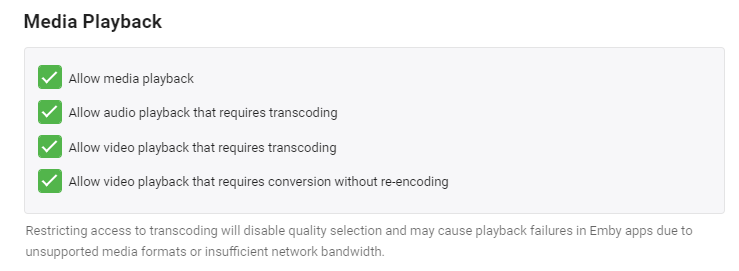
Hi - this is done at a user level, For each user where you do not want transcoding, simply untick the required options and Save.
 1 point
 -
If I got this correctly something like this. html - Darken CSS background image? - Stack Overflow div.focuscontainer.dialog.dialog-fixedSize.dialog-small.formDialog.recordingDialog.opened { background-image: linear-gradient(rgba(0, 0, 0, 0.5), rgba(0, 0, 0, 0.5)), url("https://allhdwallpapers.com/wp-content/uploads/2015/05/Jurassic-World-9.jpg"); background-size: 2440px 1500px; background-position: center; }1 point
-
Info to change that 260-character limit in Windows 10/11. Maximum Path Length Limitation - Win32 apps | Microsoft Docs1 point
-
Thanks for the feedback.1 point
-
Nevermind. I got it. Emby already was an internal user, I kept looking at local users' permissions. Your instructions were perfect, I was just a bit slow today.1 point
-
Awesome work!!1 point
-
I also had the same problem and the file you provided in Dropbox works for me too. I checked and I can also search and change images using fanart.tv in the image editor. Thanks!1 point
-
I understand there are a few people that do not want to follow standard sorting that is used world wide by virtually every cataloging system there is but there really does not need to be an option for it during setup. It would, as Emby has stated before about some things I have asked for, simply introduce a complication that most users would not really understand. There is no reason to make things more complicated for the large majority just to simplify setup for a small minority. Emby has provided an option for users that wish to have their sort act differently and that is quite good enough as far as I believe.1 point
-
you were only directed toward the already existing feature requests so you could lend your support. there's only one person here behaving like a child....1 point
-
ffmpeg will be in your emby system directory : ffmpeg -i "input.mkv" -c:a copy -c:v copy "output.mp4"1 point
-
After doing some more tested with my firewall, it appears that is what is preventing connection.1 point
-
Personally I'd would not even look into zip files. Auto-Organize should only look for valid subtitle extensions... (.srt etc.) If that is developed I am a happy camper1 point
-
Thanks for the feedback.1 point
-
For those running the Emby Server stable release, now you can install directly from Synology Package Center: This is the easiest possible method of installation. Please note the Synology Package Center version of Emby Server may sometimes run a little behind due to the Synology review process. For this reason we'll still be making downloads available on our website for manual installation: https://emby.media/download View the full article1 point
-
If you put your Music library first or second in the order settings list, it'll be there in that spot instead of TV if you want, BTW.1 point
-
aww that is really a shame. The horizontal view looks so much better than the newer vertical view, at least in my opinion. thanks though for the reply.1 point
-
You can already edit the list of ignored articles to allow you to incorrectly alphabetize your titles if you like. Edit the SortRemoveWords values in the SYSTEM.XML file on your Emby server. Soon you can effortlessly have all out movies starting with 'The' down in the Ts until a librarian smacks you firmly with a rolled up dictionary.1 point
-
Hi. How about rolling over the guide data at the top and bottom. When you reach the end of the guide vertically at the bottom the first/top channels come back around. When you go past the top of the guide, the bottom channels begin scrolling down. Can be handy if you have a lot of channels. All platforms of course. Thanks!1 point

















.thumb.jpg.ec998b67a6e64f06b6745cc0a3b0594a.jpg)