
Leaderboard




Popular Content
Showing content with the highest reputation on 11/24/21 in all areas
-
A few people wanted me to document my LONG overdue Alder Lake build - so here is a quick write up. It's not overly exciting - but may give a few ideas on what's involved. I'm restricted to a 550mm deep server chassis - as my rack is wall mounted, thus it's a bit of a tight fit with a full sized ATX board. The old 'server' was a mini ATX case on it's side with all the 5.25" bays removed to accommodate the three 5 x 3.5" HDD Enclosures .. This ran a Intel i5 750 (yes Gen 1) with 12Gb Memory for the last 6 or 7 years, on 24x7 .. so time for an upgrade as it was struggling. Upgrade :- Intel i7 12700K with 64Gb (went with DDR4), 2Tb NVME Case is a servercase.co.uk SC-43550B All HDD bays are stripped out, meaning I can just insert the 3 x enclosures without getting out the Dremel .. Prep the PSU and cables to run under the motherboard (to be as neat as possible, there is no hidden cable tray on a server case .. ) On the Corsair modular PSU, you get nice flat cables which allows you to neatly bend then to right angles .. Mobo main power (90 degree adapter to keep the wires neat..) and 12v power installed (under the mobo) The case did come with a fan wall - but I removed it in the end as I had no need for it - nor did I have any room for it .. These are the main storage pool controllers - three - 4 x SATA3 PCIe x1 - so each have 5Gbps each - plenty of throughput for the disk enclosures (4 per enclosure) I also used 3 of the onboard (intel) controllers for the 5th disk in each enclosure (higher performance) and the other 3 of the onboard - 1 for an SSD (emby Cache) and 2 'spare'. Main OS storage is a 2Tb Samsung NVME sitting under that heatsink next to the 16x PCIe slot. Cabling looks reasonable given each disk is individually cabled (15 hot swap HDD's + 1 SSD, 2 spares) The enclosures are Dual Molex powered, so each one gets it's own run from the modular PSU. Enclosure fans (9W 60mm Nidec 35mm DEEP industrial fans.. hence the finger guards!) blow air OUT the front of the case. CPU cooling is a Dual 120mm Artic setup - temps even under full load are about 70 Degrees, so perfectly good enough. Idle is mid 20's. It's still on the bench atm (haha) but it should go in the rack just fine - I'll have to change the centre drive labels around as I had to put the enclosure in upside down to make the cables reach .. No graphics card as there is zero need for it - QSV in Emby absolutely flies - I'll do a separate thread for this, as to be perfect honest, I'm astonished how quick it is (~1000 fps to an SD transcode!) Any questions, feel free to shout. edit - other random pics I forgot to annotate ..
.jpg.546fbe0f5f21bf094fbca8f8e8bd9c2f.jpg)
.jpg.ed1ade7f808aa548f4545af03b8cec2e.jpg)
.jpg.615413e44158952d56a0d49e29c0c446.jpg)
.jpg.b73d87a8a626535491bb9cda4f224dd5.jpg)
.jpg.221619fccb7a99731a3dd055e267c748.jpg)
.jpg.89e0bc5e57e6c23fe4d61bad11e890ac.jpg)
.jpg.5b0b850117e7d923d4b8078b586f2437.jpg)
.jpg.9ff317a6be12d74859a4f0c0a72d3374.jpg)
.jpg.e05478902edc754388dd705814807592.jpg)
.jpg.99bf152cbb8acd411260f80fa06bf3b0.jpg)
.jpg.ea1760c6605860d6abe7568145509924.jpg)
.jpg.8d8d715194ac5f0b5fdf1b8103ada212.jpg)
.jpg.cfcb3914563ed3359da90b661e04c611.jpg)
.jpg.271c5fc615295ada610bf722e46c28b1.jpg)
.jpg.7ebb8e28dbae38b3349d064b5211db98.jpg)
.jpg.25250ae419bd5c61a1a1fd6113d43fdf.jpg)
.jpg.960cbb54abc2c34ac89d865ec2e3423f.jpg)
.jpg.eea3f6260a6e3651323855f1264d9ce4.jpg)
.jpg.ead2c4eb624c92de6b829c7e5b9db7f2.jpg)
.jpg.f0f2a15a45c71f4bcac309d76e236763.jpg) 2 points
2 points -
The multiple ports heavily depend on the protocol you are using - something like SMB Multichannel (v3) will utilise all of the links in parallel - but using LACP on it's own will not, you'll simply get 4 'paths' of 1Gig - great for 4 x 1 Gig connections(parallel), but you won't ever get 1 x 4Gig over any normal protocol. But yea - for general usage, 1gig is more than enough anyway, I only use a bigger pipe for my backup server sync.2 points
-
My Synology boxes have four 1-gig ports and I have a Cisco switch with LAG support, so that helps... I actually do get 3.6gigs copying from one box to the other, so it's actually better than I expected when I configured this. Since most of the clients are on WiFi or coming in from the outside world, it's more than enough... I do agree though that DAS is a lot faster, of course, but since I don't have the luxury of being able to put a rack anywhere in the apartment nor will my SO allow any really noisy server, NAS boxes it is2 points
-
In Theater(s) and web browser, clicking on a header 'Movies' will present you with all available. As will "See All" in browser and Theater Store, IIRC.2 points
-
Wow, great answers, everyone! This is a goldmine of information for me, exactly what I was looking for. Attached is the current usage, by type. Seems our best path is DAS, not NAS, but it seems like that won't make a huge difference either way. Also, I'll save $600 by skipping the discrete GPU altogether and just seeing how far the 12th Gen i7 can handle everything... amazing tip! Thanks again!
 2 points
 -
I've just been through a similar scenario - build log here - https://emby.media/community/index.php?/topic/103658-alder-lake-build/ You don't need any discreet graphics card as the iGPU on the 12th Gen (UHD770) is a monster when it comes to transcoding. I had it running 8 x 4K remux (~80+Mbit) transcodes (with HDR>SDR ToneMapping ) to 1080p @ 10Mbit/sec (throttle off - ie parallel) and it handled it fine. You don't need massive amounts of RAM - but with the iGPU, the more RAM you have, the more you can assign to transcoding. I have mine set to max 32Gbyte (lol) but each 4K session takes approx 1Gb. Depending on other duties, I would say 32 Gbyte of main system memory is plenty. Standard HDD's are fine for media duties - you bottleneck will be the controllers anyway. Main emby system and cache, defo use an NVME as said above. The key issue with a NAS is the network connecting the devices, at 1gig, it is simply a huge bottleneck vs DAS (Directly Attached SAS, SATA3 or USB3 Storage) at 10gig it starts to make more sense but is extremely costly - and is still not faster than any local PCIe bus (at more than 1x anyway).2 points
-
how many concurrent users do you [estimate you] need to support? do you have a feel for much transcoding you will be doing (in relation to content / client hardware capabilities) what is your current storage config (storage os, raid level, drives)? what backup do you have and can the service comfortably stomach the time to restore in the event of storage failure?2 points
-
Hahahha should have read thru first!!2 points
-
Point of this post was to have a full guide for how to setup Emby on windows server as a an easily consumed service for the people who will use it. This build includes publicly recognized certificates, auto renewal of certificates, standard web ports, auto redirect from http to https, running the server as a service, adding proper security headers, and rewriting server name. This may or may not be what you are looking for, but when I set out to setup my instance, it’s how I wanted it built (as IT/Infrastructure/Network/Security professional for 20 years), and since there was no guide for this, I made one.2 points
-
Hi. The problem is we've never heard of this problem and no one else has reported it so it may never get fixed for you. We'd really appreciate it if you could create a topic with details because I think this must be something specific to your media or environment as that function is used daily by many people without issue. Any details you can provide would be quite helpful because we'd like to solve the problem. Thanks!2 points
-
Not that I begrudge the Emby team making more money, I'm all for that, but if your only use case is photos and music you probably don't need premiere regardless of cost. I use Emby for music since my other media is already there, but if that were my primary need I doubt Emby would be my pick at all. I feel like you're complaining that the M1 tank costs way too much when you're only buying it as a commuter vehicle. I mean sure, 9 million is a lot for a commuter vehicle but maybe that doesn't mean the tank's price isn't fair. I don't mind if there's a sale. I've owned an Emby license since roughly the dawn of time, it doesn't matter to me. I'm just saying the list price is very, very fair for what this program enables.2 points
-
What format was that? If it was xml file then you need the XML metadata plugin.2 points
-
Be able to create playlist based on a certain criteria, like genre and or year, in order to create a dynamic playlist that it refreshes automatically when new content is added. This way you can for example, create a tv comedy playlist from the 90's, or a new sci-fi Movies playlist. Some other criteria for rules could be the rating, watched/unwantched, score, tags, language, audio codec, etc The possibilities could be endless1 point
-
Love the new radiance blue theme Can we get the option to set the default user theme globally in the admin dashboard?1 point
-
Hello As audio is going to be fully driven by tags in the upcoming Emby Server versions, I‘m wondering which tag to choose for the reader(s) from audiobooks...? So which tag Emby is going to use when audiobooks section will be more polished and Emby will introduce a reader database field? Mp3tag doesn’t even provide a “reader” tag or similar, so I’m unsure. I want to make my files future proof for the upcoming releases of Emby server...1 point
-
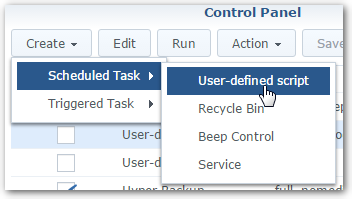
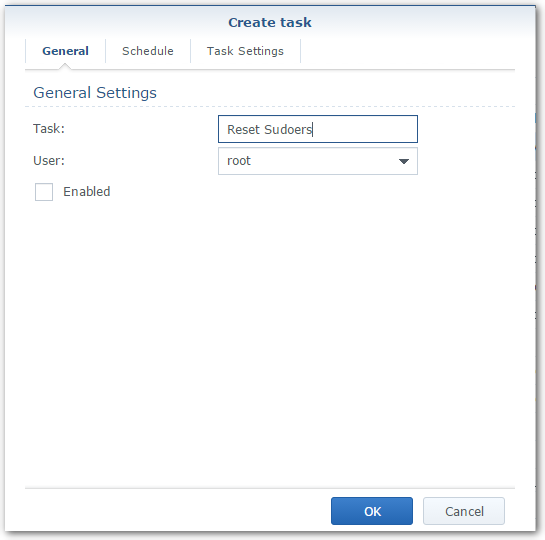
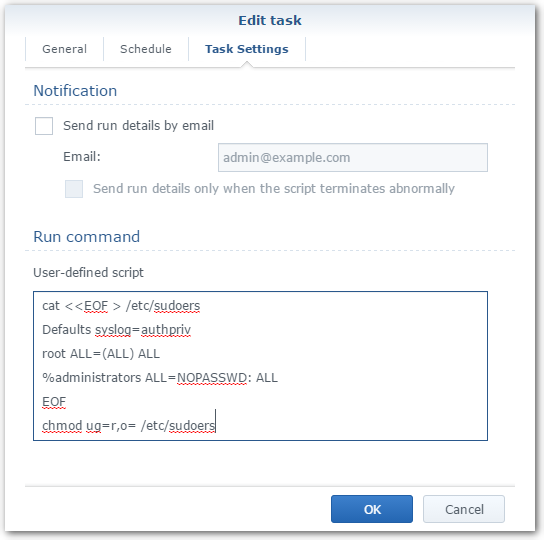
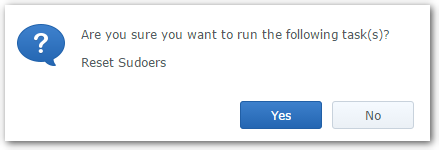
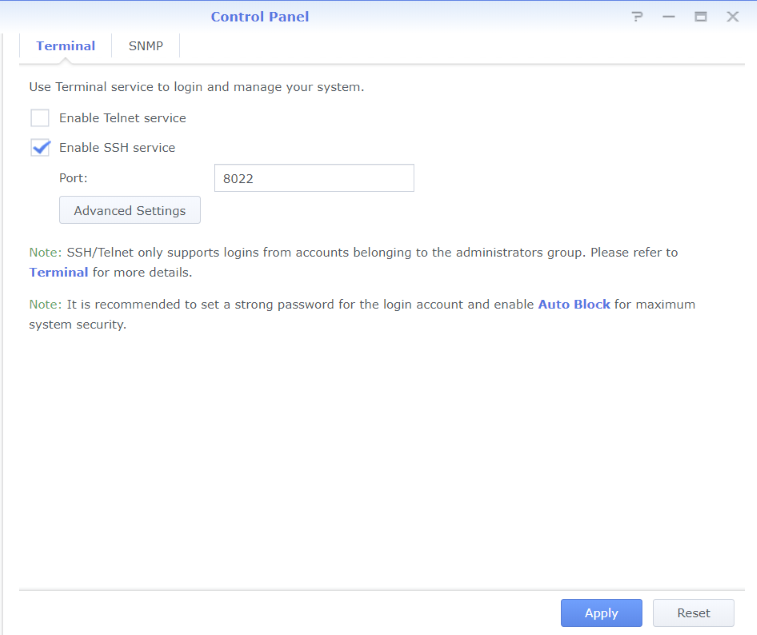
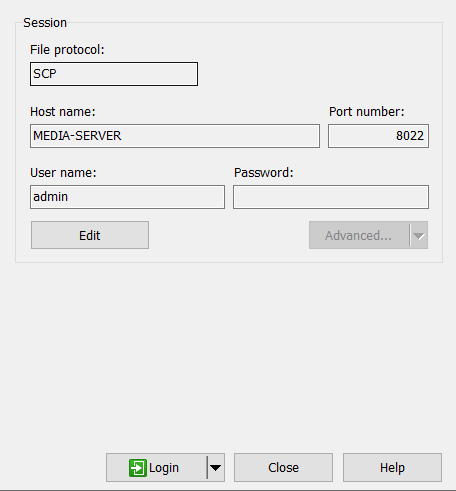
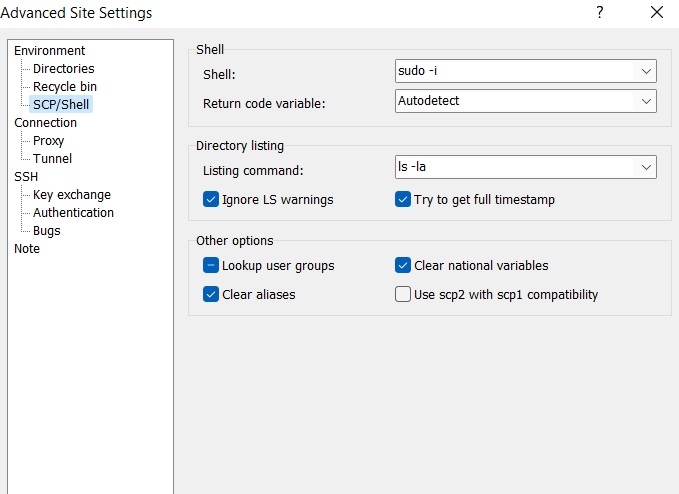
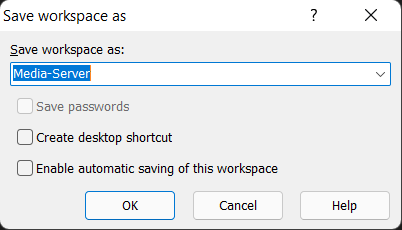
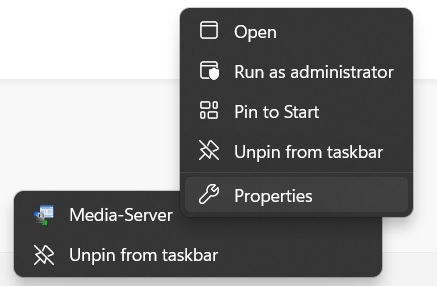
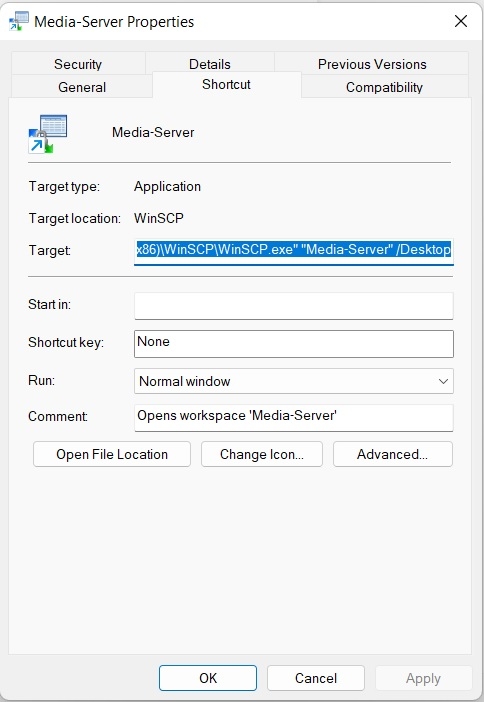
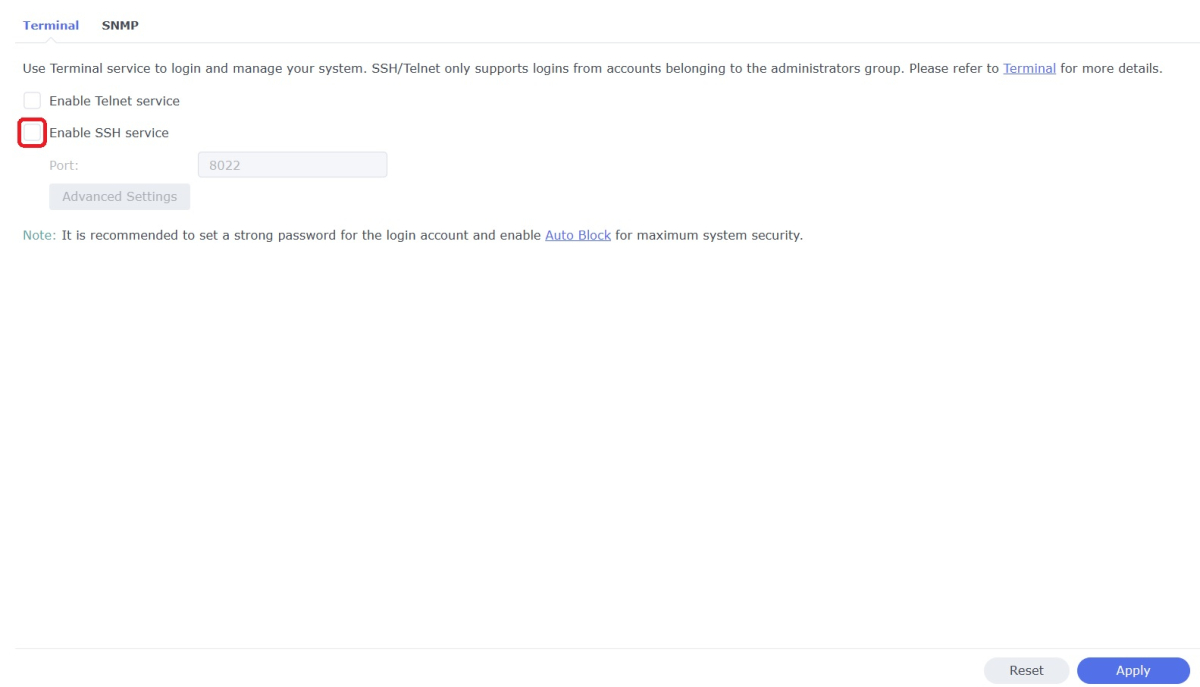
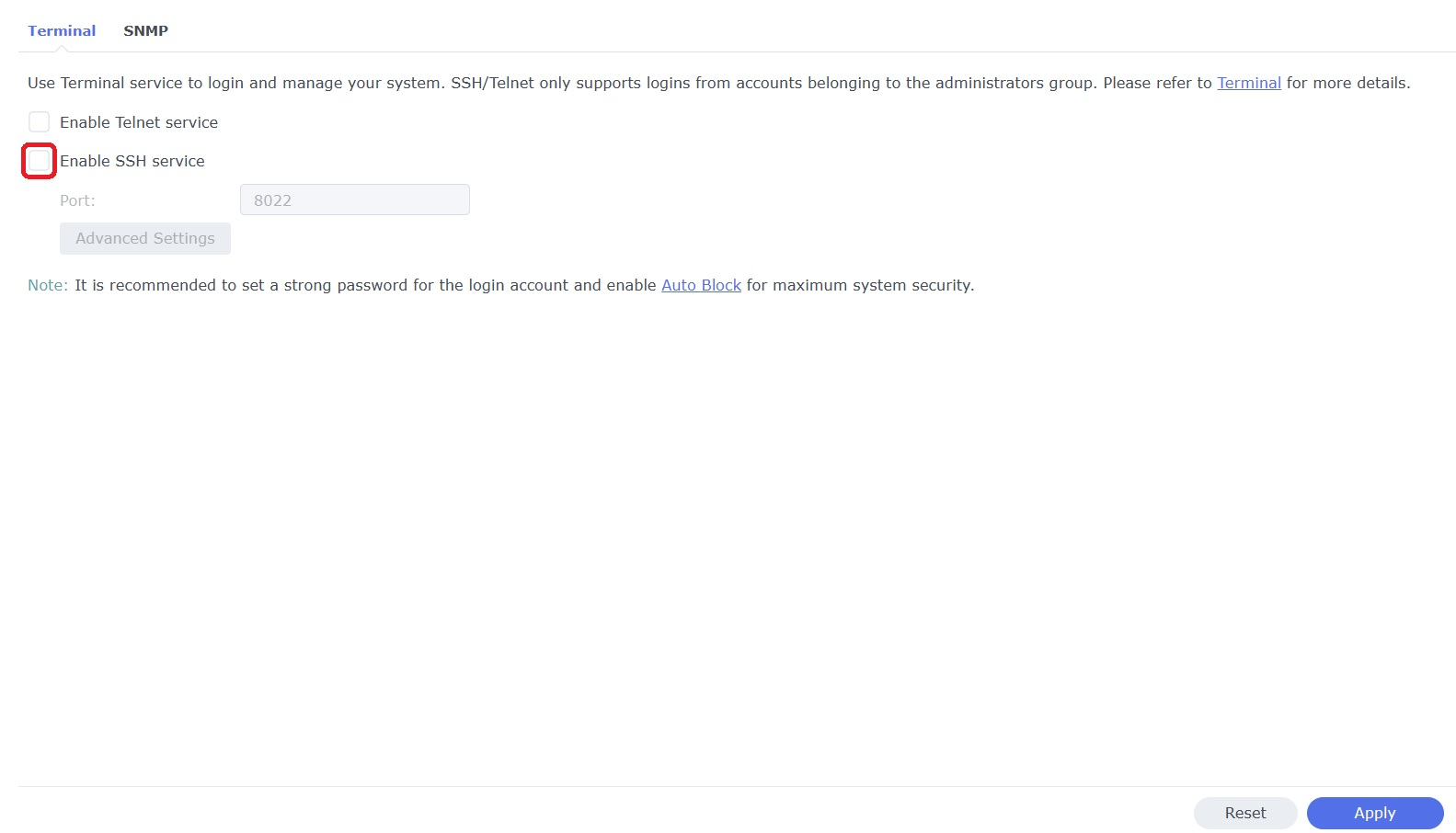
WinSCP is a popular SFTP client and FTP client for Microsoft Windows which can be used as a GUI alternative to Putty or Terminal. The procedures below will allow you to perform tasks as Superuser just like you can with Putty or Terminal. Superuser privileges may be needed for the following: full read/write/ execute privileges creating or installing files or software modifying files and settings deleting users and data If you do not need superuser access with WinSCP and just want to access your NAS using Admin then skip the steps (2, 3, and 6) in blue. 1. Enable SSH on Synology NAS Open DSM Control Panel Click Terminal & SNMP Click Terminal tab Check "Enable SSH service" Click "Apply" 2. Create script to modify sudoers config file on Synology NAS This script modifies the sudoers file which is needed to prevent DSM from prompting administrators only for the Admin password again when switching to superuser during the login process as WinSCP can't handle this prompt. This script is saved to rerun again later because DSM updates tend to overwrite any changes to the sudoers file. Open DSM Control Panel Click Task Scheduler Create a Scheduled Task - User-defined script Click General Tab Set task name "Reset Sudoers" Set user as "root" Uncheck "Enabled" box Click Task Setting tab Copy/paste the following into the Run command box cat <<EOF > /etc/sudoers Defaults syslog=authpriv root ALL=(ALL) ALL %administrators ALL=NOPASSWD: ALL EOF chmod ug=r,o= /etc/sudoers Click OK 3. Run the "Reset Sudoers" script on Synology NAS This step will need to be rerun whenever a DSM update puts your sudoers file back to default Highlight the new script you just created Click Run Click Yes 4. Install WinSCP Download and install WinSCP on Windows machine https://winscp.net/eng/download.php Allow WinSCP to start when done 5. Configure WinSCP to auto logon Create a new session/site: Change Login window using the following File protocol: SCP Host name: enter the NAS host name or IP address Port number: enter the port number you used from step 3 Enter User name: "admin" and password 6. Add switching to super user Click the Advanced... button In the the Advanced Site Settings window do the following: Select SCP/Shell under Environment Shell box: "sudo -i" Click OK to return to the Login window Click Save Click "Login" 7. Create a saved workspace for WinSCP (this step is optional) This will create a Windows shortcut to start WinSCP and automatically login to your session without any prompts Log into your new session you created in Step 5 Click Sessions Click Save Workspace... type a name for your new workspace Click OK 8. Create a shortcut for WinSCP on taskbar (this step is optional) While WinSCP is running Right Click the icon on the taskbar and choose "Pin to taskbar" Right Click on the WinSCP icon on the taskbar again Now Right Click on the WinSCP workspace you used in Step 7 and choose properties Your shortcut should look something like the one below with the exception of the workspace you used above Example Windows shortcut used on target line above "C:\Program Files (x86)\WinSCP\WinSCP.exe" "Media-Server" /Desktop Click OK Click WinSCP icon on taskbar start WinSCP and be logged into your NAS as Superuser without any prompts 9. Disable SSH in DSM (this step is optional) After you're all done using WinSCP it may be a good idea to close this port for security reasons. Additionally, you can also disable your Admin account now if you enabled it to do this. When you need to use WinSCP again just reenable SSH and you're ready. Open DSM Control Panel Click Terminal & SNMP Click Terminal tab Uncheck "Enable SSH service" Click "Apply"
 1 point
 -
BillOatman with the top shelf ideas again. Love it!1 point
-
I would probably say user selector over device myself.1 point
-
Is it possible to filter sessions per user? You could select which users would want the auto intro skip and which don’t. Might be easier than trying to do a per device filter, since there might be a lot of devices.1 point
-
Not sure then as cover.ext is used in all my tests so I don't know of any other variables.1 point
-
Any news about the missing thumbs on Linux? Or do we need to wait for a new Emby beta and pray that will fix it.1 point
-
Opinions differ, but from experience, SSD/NVME for the OS and Emby cache and database, but for the titles itself, 7200RPM spinning disks are more than enough. I'm running my library of 2 different Synology NAS boxes, with 8TB WD Red spinning disks running in RAID 5 and Btrfs. My server is an ageing i7 - 4th gen CPU with 32GB RAM and a nVidia 1660 Superfor encoding. The advantages of a NAS is to have the storage and the server separated. If something goes belly-up, you don't lose everything at once. Also, and this again is my personal opinion, a NAS filesystem, optimised for exactly this, gives better performance than a generic server every could.1 point
-
Wouldnt you need to wait for the playback to get to that StartPositionTicks, then skip to the end position?1 point
-
@shadetreeAnd what filter do you have applied that is hiding items? As if it shows in Library it will show in Collections.1 point
-
Yep - thanks for the pointer @chef I now have got the API to control to send a message to the session, and seek to a given location on the playback ... edit - StartPositionTicks are already written in the Chapter table in the library.db - so just seek to that and Bingo, Intro skipped .. We just need to apply this to the current session (easy enough) and watch for it .. I'll take this into the Private Chat .. Exciting ...1 point
-
I'll have to poke around in swagger and see whats up1 point
-
Okay, thank you. I know my router has an option to add that, not sure if it'll go out and update DNS though. I'll look into it more though, thank you for all the advice.1 point
-
Id like to jump on the bandwagon and give this a test and report on my experience. I have a sizeable database of shows. Is there a link to get the latest builds?1 point
-
Sessions. It is a general command to start playback at a certain amount of ticks. Technically we'd be restarting playback, or possiblly resuming playback at a certain tick length.1 point
-
looks to be fixed in 1.1.385. thanks!1 point
-
Firstly, I think it's a Kodi bug why bookmarks not added to episodes. Actually they are perfectly fine on my linux PC. The are not working on osmc on raspi and on vero4k. To your question... Difference (from Kodi site): Chapters are embedded tags in the video file or video stream: https://discourse.osmc.tv/t/disable-ignore-chapters/72653/4 As you can see in the log (actually this log is a Kodi log in debug mode), chapters extracted by ffmpeg directly. The chapter thumbnails are also extracted by ffmpeg on video playback start. There is no option in Kodi to prevent this ffmpeg "magic". Bookmarks, on the other side are not embedded. They can be set in Kodi's UI and actually are stored in the Kodi DB which means. I can add bookmarks to Kodi but I cannot manipulate chapters in Kodi. Emby can report chapters/bookmarks while sync. Actually there is no difference from Emby side between a bookmark and a chapter (embedded in video file's metadata or external). btw, it makes sense cause actually it doesn't matter where the markers are from. Kodi labels them as chapters and bookmarks, Emby not. The actual problem is, as Kodi extracts chapters ALWAYS and there is no way to skip that, this could result in double markups. So the plugin tries to "detect" what could be a chapter and what's a bookmark. As embedded chapters in video files are most likely coming from a DVD or Bluray or something else (but not auto generated) the are not following a pattern. Autogenerated chapter/bookmarks on Emby have a 5 minutes pattern. 05:00; 10;00; 15:00 etc. This means if a chapter/bookmarks from Emby is modulo 5 minutes (actually there is more in the background, but that's the core of the detection function), the plugin reasonable guesses this is a bookmark (from Kodi's point). An odd number e.g. 03:27 is most likely embedded in the videofile/videostream and Kodi will extract them internally. Therefore the plugin skips it, and is not inserting this markup as a bookmark in Kodi's db.1 point
-
At least it shows we are all on the same page in the dev group.1 point
-
lol - we have a habit of saying the same thing - again1 point
-
I just installed the latest beta of emby next gen and my music library appeared. do you still need the log?1 point
-
Interestingly it would appear it is suppose to fallback to English. Consider implementing a fallback for Summary translations - Talk — The Movie Database (TMDB) (themoviedb.org) But sum what related open ticket. Add support to fallback translation queries on API | Trello1 point
-
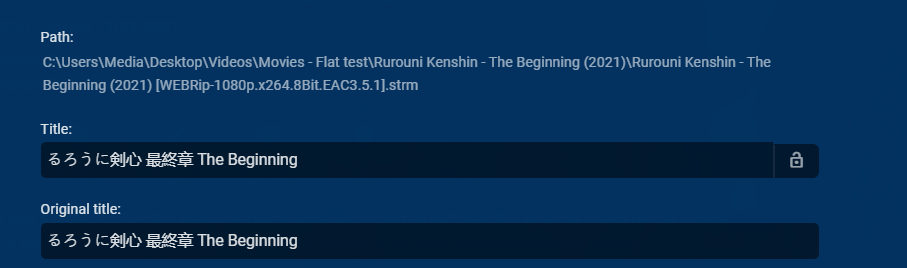
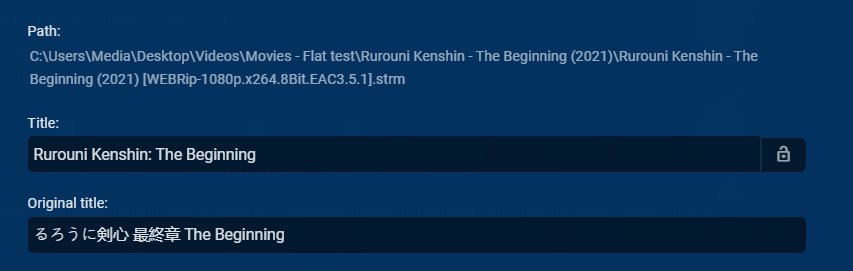
Sorry just noticed I posted there wrong api call for Danish, so this is actually a TMDB issue. So I don't think there is anything @Lukecan do. https://api.themoviedb.org/3/movie/672322?api_key=f6bd687ffa63cd282b6ff2c6877f2669&append_to_response=casts,releases,images,keywords,trailers&language=da&include_image_language=da,null,en "original_title": "るろうに剣心 最終章 The Beginning", "title": "るろうに剣心 最終章 The Beginning",1 point
-
I am experiencing the exact same thing. Any update planned soon? Really annoying. thanks1 point
-
That's great news. You shouldnt have to remove the db. Anything from here on out would be built, or fixed based on that database. Now, I just have to track down that error neik has.1 point
-
Actually moving out then back in will not work unless you delete the nfo files as it will be read again. Identify will not work either in my tests (something with selected language). But testing this I get the same results C:\Users\Media\Desktop\Videos\Movies - Flat test\Rurouni Kenshin - The Beginning (2021)\Rurouni Kenshin - The Beginning (2021) [WEBRip-1080p.x264.8Bit.EAC3.5.1].strm Don't see anything that stands out in api data. Look like "original_title" is written to both files. Import with no language field returned English, Setting Preferred Language to Danish returned Japanese title. Preferred Danish (updated in next post) https://api.themoviedb.org/3/movie/672322?api_key=f6bd687ffa63cd282b6ff2c6877f2669&append_to_response=casts,releases,images,keywords,trailers&language=en&include_image_language=da,null,en Preferred English https://api.themoviedb.org/3/movie/672322?api_key=f6bd687ffa63cd282b6ff2c6877f2669&append_to_response=casts,releases,images,keywords,trailers&language=en&include_image_language=en,null So @Lukewill have to take a look at this.
 1 point
 -
1 point
-
Tell me you haven't heard my point without telling me that you haven't heard my point. I specifically addressed your comments earlier in this thread. Your response entirely ignored my direct point. I explicitly said that I wasn't an Emby user, that I explored Emby but it wasn't currently a good value for my use case. I then cited an area that I was specifically keeping tabs on for future use, with an aside about a very significant bug that I've just noticed still exists. I'm not looking for how to report a bug. I know I can do that. But my entire point, the entire point of this larger thread, is about value. One part of value is how much effort I have to put in to a working product: a click-and-it-works product is worth more than a Github-assemble-and-debug product. A product with through QA that catches and fixes bugs before I ever notice them is worth more than a product I have to report bugs and await fixes for. A product with a user base so active that others are reporting bugs that are fixed before I get around to it is worth more than a product I have to both pay for and put effort in to fixing. Value matters. The only reason a thread like this exists is because people like me don't see enough value in the current offering for our current use case but also see potential if the cost or features improve. Telling me that I can contribute to improving a product I don't yet use is not value adding.1 point
-
ok with you A quicker way is probably just to use the media info in the files themselves to give you what you need - either from tools such as mediainfo/cli, ffmpeg or even emby itself if you just filter by a codec type (maybe HD Audio for example) that always transcodes.1 point
-
Hi. No you cannot. Please see: Is there a limit to Emby Premiere Sorry but that would not be legal and would violate our terms of use. As for this specific request, I really cannot see the need for it when using the system for its intended purpose. Thanks.1 point
-
Ordering collections as well as playlist permissions. Both of those.1 point
-
It would take some work, but they could force the issue. Track what content has been consumed recently and when playing on shuffle don't play anything that has been played recently. There are a lot of different schema's to accomplish this.1 point
-
A very useful plugin.1 point
-
This is absolutely one of the most important feature requests (for me). I currently use Ubooquity to do things, but it's starting to get outdated. I'd love to use a direct Emby implementation.1 point
-
I use the VirtualTV add-on for my random TV watching and I find it plays the same episodes over and over again as well. I would guess that the add-on uses Embys shuffling "brains" as it basically just creates a playlist to simulate its "channel". I can easily notice and episode of say Family Guy (which has hundreds of episodes) play every day for a couple days. Happens all the time.1 point
-
Well you are disabling the ability to get episode images, but go to each TV library (Dashbaord-Library) and enable Show Advanced settings and scroll down to Episode image fetchers and disable each provider. Only applies to new media.1 point
-
I was also wondering how to set up a valid SSL certificate for Emby on my Synology. The instructions in the above link are silent in this regard. I had already obtained an SSL certificate from Let's Encrypt via the DSM interface and had exposed my NAS to the outside world. So the steps I had to go through after that to get Emby to use that certificate are the following: Edit: there are easier steps in the next post. Export the certificate from DSM via Control Panel -> Security -> Certificates -> Export. This sends you a ZIP file containing 3 files. Extract the contents of the ZIP file to a folder on the NAS. This will extract files cert.pem, chain.pem and privkey.pem. SSH into the NAS and convert the 3 files into a .pfx file: cd /volume1/path/to/theextractedfiles sudo openssl pkcs12 -export -out cert.pfx -inkey privkey.pem -in cert.pem -certfile chain.pem -passout pass: The above creates a new cert.pfx file with no password. Next, copy this file to the Emby var/ssl folder - this seemed to be the most appropriate place, since other self-signed certificates are stored there: sudo cp cert.pfx /var/packages/EmbyServer/target/var/ssl/cert.pfx Change the owner of pfx file which was just copied to the embysvr user, grant read/write access to the owner and read access to everyone else - this matches the permissions which were applied to the other certificates already in the ssl folder: cd /var/packages/EmbyServer/target/var/ssl sudo chown embysvr: cert.pfx sudo chmod 644 cert.pfx Now configure Emby to use the certificate via the dashboard under the Advanced tab. I had to specify the full path to the certificate: /var/packages/EmbyServer/target/var/ssl/cert.pfx Restart Emby server. The certificates issued by Let's Encrypt are only valid for three months. DSM is supposed to automatically renew the certificate, but of course this does not include automatically updating the certificate in Emby. So the above process will need to be followed every three months. If Emby could allow for us to select a certificate from the certificate store, in the case of Synology devices this would be the DSM certificate store, the need for the above process could be elimitated, assuming that selecting a certificate from the certificate store could be implemented. The above was just my way of enabling SSL with a certificate issued by a trusted certification authority. If there are easier ways, please do let me know! Edit: Updated instructions to use /var/packages/EmbyServer/target/var/ssl so that they are not volume-specific.1 point















_1.thumb.jpg.d4e6a650cb4552bc437a9e6156024102.jpg)









