Leaderboard




Popular Content
Showing content with the highest reputation on 11/22/21 in all areas
-
A few people wanted me to document my LONG overdue Alder Lake build - so here is a quick write up. It's not overly exciting - but may give a few ideas on what's involved. I'm restricted to a 550mm deep server chassis - as my rack is wall mounted, thus it's a bit of a tight fit with a full sized ATX board. The old 'server' was a mini ATX case on it's side with all the 5.25" bays removed to accommodate the three 5 x 3.5" HDD Enclosures .. This ran a Intel i5 750 (yes Gen 1) with 12Gb Memory for the last 6 or 7 years, on 24x7 .. so time for an upgrade as it was struggling. Upgrade :- Intel i7 12700K with 64Gb (went with DDR4), 2Tb NVME Case is a servercase.co.uk SC-43550B All HDD bays are stripped out, meaning I can just insert the 3 x enclosures without getting out the Dremel .. Prep the PSU and cables to run under the motherboard (to be as neat as possible, there is no hidden cable tray on a server case .. ) On the Corsair modular PSU, you get nice flat cables which allows you to neatly bend then to right angles .. Mobo main power (90 degree adapter to keep the wires neat..) and 12v power installed (under the mobo) The case did come with a fan wall - but I removed it in the end as I had no need for it - nor did I have any room for it .. These are the main storage pool controllers - three - 4 x SATA3 PCIe x1 - so each have 5Gbps each - plenty of throughput for the disk enclosures (4 per enclosure) I also used 3 of the onboard (intel) controllers for the 5th disk in each enclosure (higher performance) and the other 3 of the onboard - 1 for an SSD (emby Cache) and 2 'spare'. Main OS storage is a 2Tb Samsung NVME sitting under that heatsink next to the 16x PCIe slot. Cabling looks reasonable given each disk is individually cabled (15 hot swap HDD's + 1 SSD, 2 spares) The enclosures are Dual Molex powered, so each one gets it's own run from the modular PSU. Enclosure fans (9W 60mm Nidec 35mm DEEP industrial fans.. hence the finger guards!) blow air OUT the front of the case. CPU cooling is a Dual 120mm Artic setup - temps even under full load are about 70 Degrees, so perfectly good enough. Idle is mid 20's. It's still on the bench atm (haha) but it should go in the rack just fine - I'll have to change the centre drive labels around as I had to put the enclosure in upside down to make the cables reach .. No graphics card as there is zero need for it - QSV in Emby absolutely flies - I'll do a separate thread for this, as to be perfect honest, I'm astonished how quick it is (~1000 fps to an SD transcode!) Any questions, feel free to shout. edit - other random pics I forgot to annotate ..
.jpg.546fbe0f5f21bf094fbca8f8e8bd9c2f.jpg)
.jpg.ed1ade7f808aa548f4545af03b8cec2e.jpg)
.jpg.615413e44158952d56a0d49e29c0c446.jpg)
.jpg.b73d87a8a626535491bb9cda4f224dd5.jpg)
.jpg.221619fccb7a99731a3dd055e267c748.jpg)
.jpg.89e0bc5e57e6c23fe4d61bad11e890ac.jpg)
.jpg.5b0b850117e7d923d4b8078b586f2437.jpg)
.jpg.9ff317a6be12d74859a4f0c0a72d3374.jpg)
.jpg.e05478902edc754388dd705814807592.jpg)
.jpg.99bf152cbb8acd411260f80fa06bf3b0.jpg)
.jpg.ea1760c6605860d6abe7568145509924.jpg)
.jpg.8d8d715194ac5f0b5fdf1b8103ada212.jpg)
.jpg.cfcb3914563ed3359da90b661e04c611.jpg)
.jpg.271c5fc615295ada610bf722e46c28b1.jpg)
.jpg.7ebb8e28dbae38b3349d064b5211db98.jpg)
.jpg.25250ae419bd5c61a1a1fd6113d43fdf.jpg)
.jpg.960cbb54abc2c34ac89d865ec2e3423f.jpg)
.jpg.eea3f6260a6e3651323855f1264d9ce4.jpg)
.jpg.ead2c4eb624c92de6b829c7e5b9db7f2.jpg)
.jpg.f0f2a15a45c71f4bcac309d76e236763.jpg) 3 points
3 points -
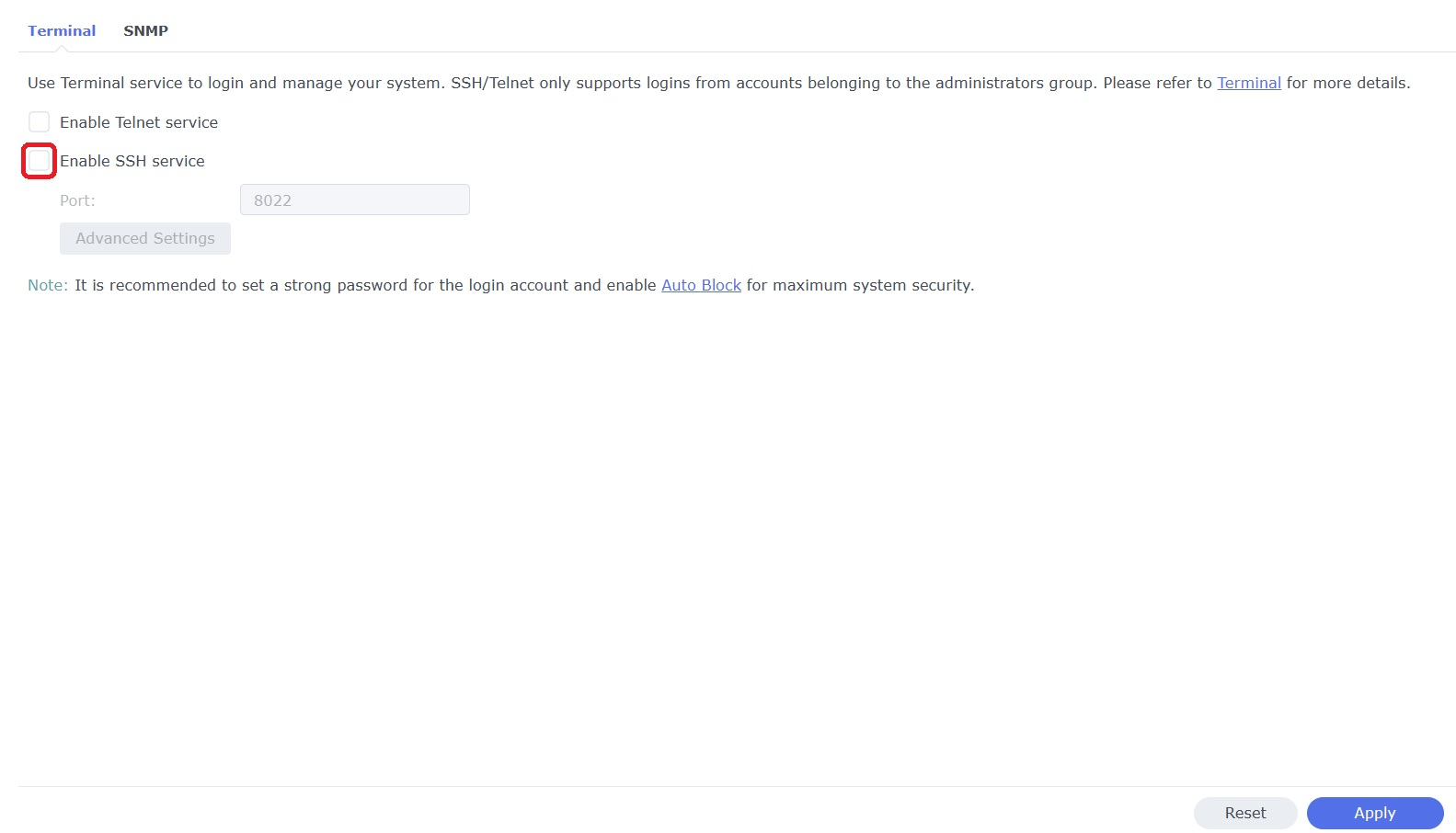
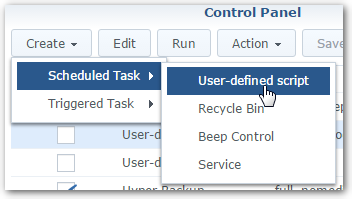
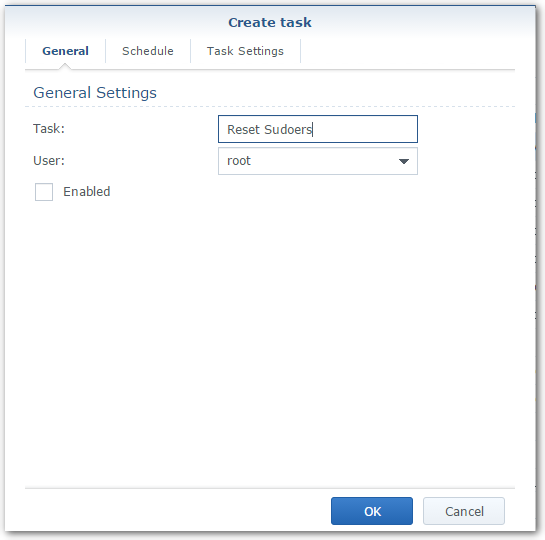
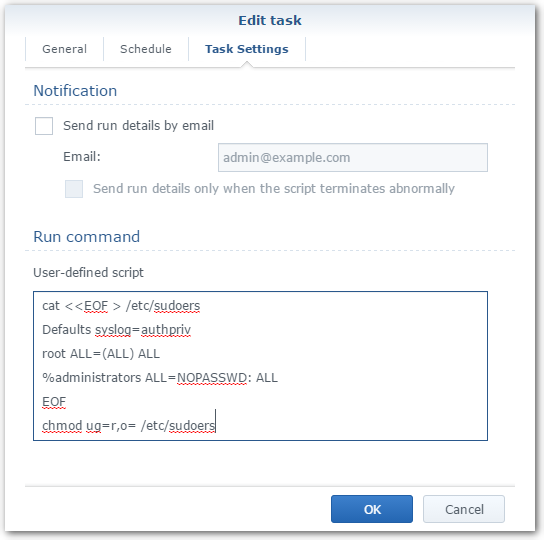
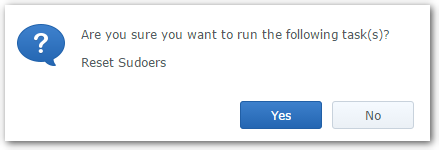
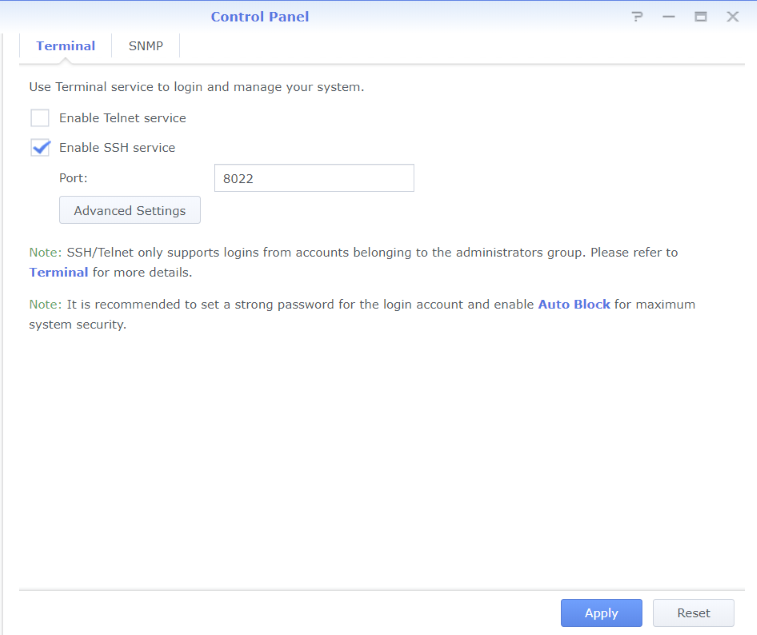
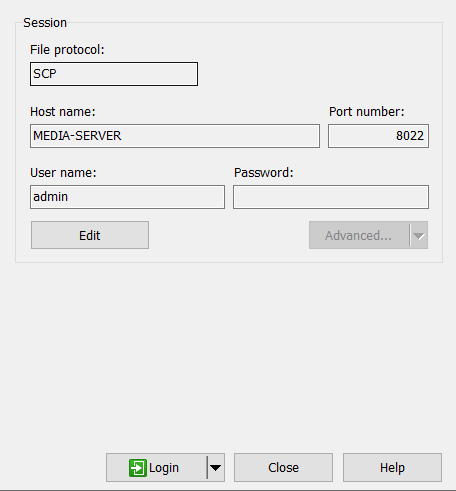
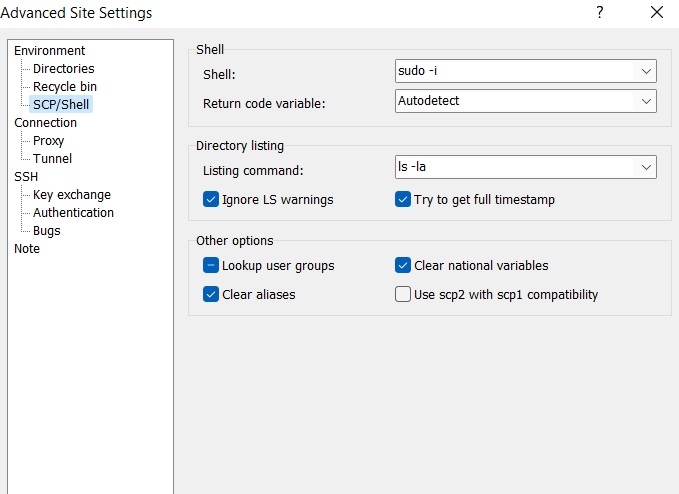
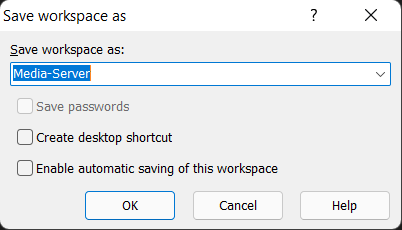
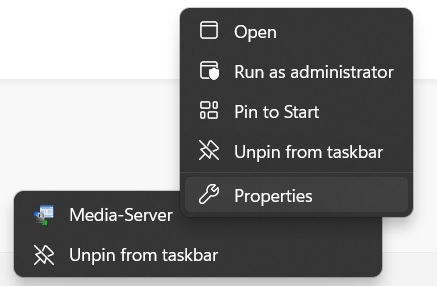
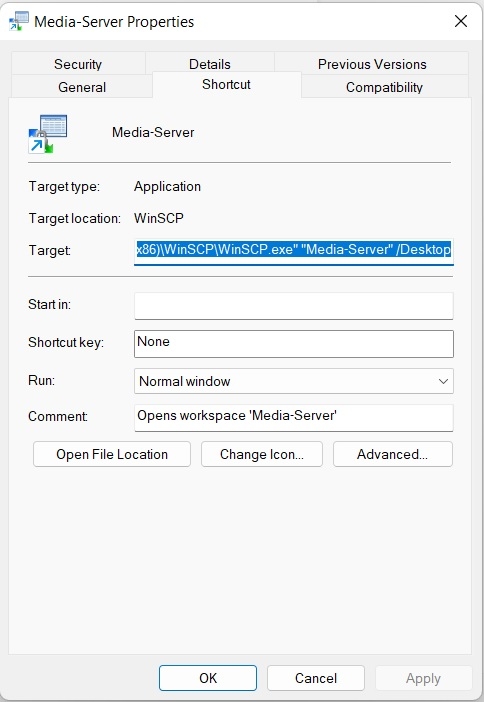
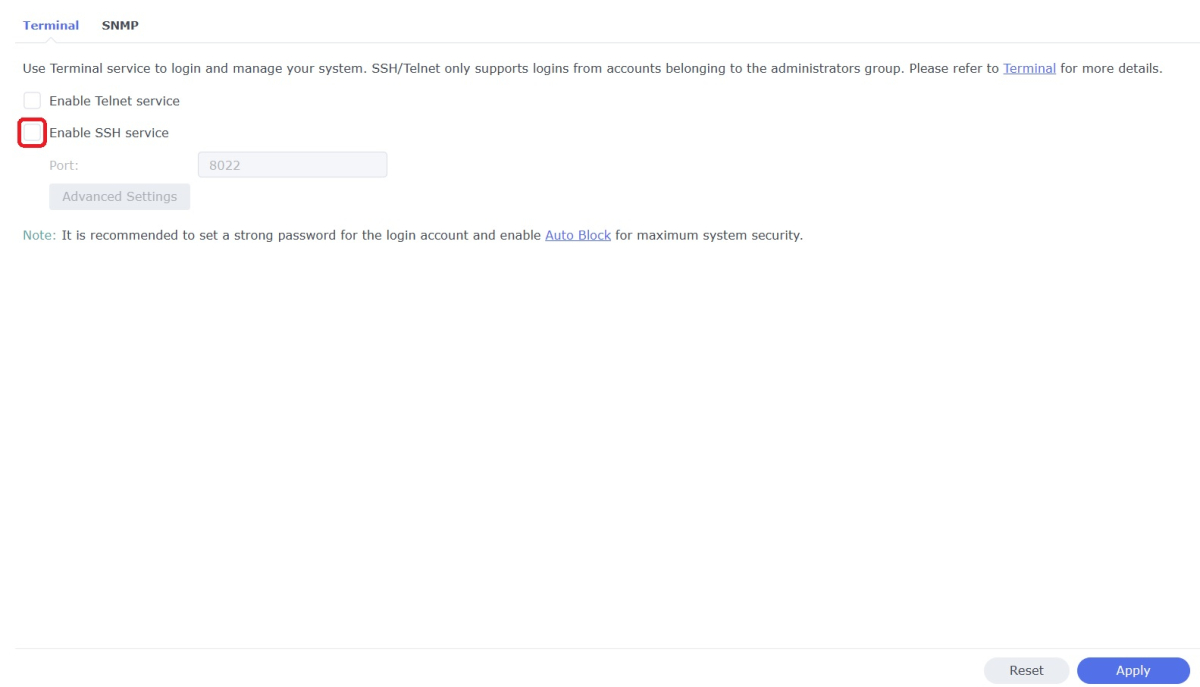
WinSCP is a popular SFTP client and FTP client for Microsoft Windows which can be used as a GUI alternative to Putty or Terminal. The procedures below will allow you to perform tasks as Superuser just like you can with Putty or Terminal. Superuser privileges may be needed for the following: full read/write/ execute privileges creating or installing files or software modifying files and settings deleting users and data If you do not need superuser access with WinSCP and just want to access your NAS using Admin then skip the steps (2, 3, and 6) in blue. 1. Enable SSH on Synology NAS Open DSM Control Panel Click Terminal & SNMP Click Terminal tab Check "Enable SSH service" Click "Apply" 2. Create script to modify sudoers config file on Synology NAS This script modifies the sudoers file which is needed to prevent DSM from prompting administrators only for the Admin password again when switching to superuser during the login process as WinSCP can't handle this prompt. This script is saved to rerun again later because DSM updates tend to overwrite any changes to the sudoers file. Open DSM Control Panel Click Task Scheduler Create a Scheduled Task - User-defined script Click General Tab Set task name "Reset Sudoers" Set user as "root" Uncheck "Enabled" box Click Task Setting tab Copy/paste the following into the Run command box cat <<EOF > /etc/sudoers Defaults syslog=authpriv root ALL=(ALL) ALL %administrators ALL=NOPASSWD: ALL EOF chmod ug=r,o= /etc/sudoers Click OK 3. Run the "Reset Sudoers" script on Synology NAS This step will need to be rerun whenever a DSM update puts your sudoers file back to default Highlight the new script you just created Click Run Click Yes 4. Install WinSCP Download and install WinSCP on Windows machine https://winscp.net/eng/download.php Allow WinSCP to start when done 5. Configure WinSCP to auto logon Create a new session/site: Change Login window using the following File protocol: SCP Host name: enter the NAS host name or IP address Port number: enter the port number you used from step 3 Enter User name: "admin" and password 6. Add switching to super user Click the Advanced... button In the the Advanced Site Settings window do the following: Select SCP/Shell under Environment Shell box: "sudo -i" Click OK to return to the Login window Click Save Click "Login" 7. Create a saved workspace for WinSCP (this step is optional) This will create a Windows shortcut to start WinSCP and automatically login to your session without any prompts Log into your new session you created in Step 5 Click Sessions Click Save Workspace... type a name for your new workspace Click OK 8. Create a shortcut for WinSCP on taskbar (this step is optional) While WinSCP is running Right Click the icon on the taskbar and choose "Pin to taskbar" Right Click on the WinSCP icon on the taskbar again Now Right Click on the WinSCP workspace you used in Step 7 and choose properties Your shortcut should look something like the one below with the exception of the workspace you used above Example Windows shortcut used on target line above "C:\Program Files (x86)\WinSCP\WinSCP.exe" "Media-Server" /Desktop Click OK Click WinSCP icon on taskbar start WinSCP and be logged into your NAS as Superuser without any prompts 9. Disable SSH in DSM (this step is optional) After you're all done using WinSCP it may be a good idea to close this port for security reasons. Additionally, you can also disable your Admin account now if you enabled it to do this. When you need to use WinSCP again just reenable SSH and you're ready. Open DSM Control Panel Click Terminal & SNMP Click Terminal tab Uncheck "Enable SSH service" Click "Apply"
 3 points
 -
I will just wait until Luke and emby team make a proper version I'm a hardcore emby fan but just like any software we get a little bored from time to time and want new options and an updated fresher looking media experience. I'm buying a premier lifetime serial number tomorrow after seeing the other options out there it's a no brainer I'm sticking with emby with or without the banner mod.2 points
-
Nice idea, I like it. We do this on the main page as no doubt you are aware (click the main thumb on the left), but we don't do this on the report. @Cheesegeezer is this something we could accommodate ?2 points
-
Thanks for the reply, and apologies for the delay getting back to you. I reported this specific case as the plugin was claiming it had detected the intro (true on the drop-down, and flagged as found in the log), but the timestamps indicate it hadn't been found, so there may be something strange going on there. With that having been said, I've discovered what has happened, I've accidentally duplicated an episode, so that file is the same as another episode in the season, and first few minutes of those episodes match each other, and the plugin correctly spotted it and flagged it as an intro I've corrected the episode and the detection has worked fine this time. One request, would it be possible on the stats page to be able to link to a season on the episodes page? Just to make fixing and checking misses a little easier? Thanks!2 points
-
Ordering collections as well as playlist permissions. Both of those.2 points
-
I use 'SWAG' reverse proxy container from Linuxserver.io. It was actually very simple to switch from Let's Encrypt to ZeroSSL and that actually worked with the Samsung TV (TV 2016)! Thank you both for the support!2 points
-
Somebody needs to make a 'dual speed' HDD that slows down the spin, thus saving power, but still keeps the disk 'alive'. On access, this will bring the HDD back up to full speed again - this should also rapidly increase the 'start up time' of the HDD and reduce the thermal shock/wear etc to a minimum...2 points
-
That is correct but there could be situations where changes in another area are causing a scan which then keeps your drives from sleeping.2 points
-
Just my 5 cents but I think it would be better to extract the pictures after saving the right start/end time to prevent the high CPU load. Maybe with a resolution of 320x320. The random stopping during the detection progress seems to be fixed.2 points
-
الى الان كل شي على ما يرام.... لا يوجد مشاكل شكرآ لكل مطوري امبي2 points
-
OK, I will add filtering on tag names. That's a good place to start. Vic2 points
-
A new release of Emby Server is currently rolling out, and this is largely a bug fix maintenance release while we work on new features for future updates. Here is the list of improvements and issues resolved: Fixes Fix outgoing SSL errors on some Linux distros Fix android server database errors on deletion Fix android server ffmpeg errors on android 11 Fix android server SSL errors with fanart.tv Fix QuickSync HW overlay with tone mapping Fixes for Apple TV top shelf content Fix cbr books sending wrong mime type Fix transcoding throttling not occurring with Chromecast Fix classic image series extraction Fix music album parsing error when album name is () Fix folder images getting replaced when not saving images in media folders Fix identify feature with music videos Fix episodes with season numbers greater than 200 Fix scaling of wrong-sized graphical subtitles Fix incorrect hw context indication for D3D11VA decoders Fix artists inheriting genres from albums when they shouldn't Fix detection of video stream vs. embedded image Other Improvements Add south African ratings Improve camera upload error handling Improve efficiency of real-time monitor Improve DSD audio support over DLNA Allow for higher audio stream copy bitrate Support subs and subtitles folder case-insensitive Update album/song links with Included In section Set subtitle filename when downloading subtitle files to the browser Add Italian ratings Always record episodes when the option to check existing library is not selected Adjust recording image save behavior for series episodes that are sports Don't convert really large images to webp Support audio description and studio from copyright tag Support wm/year and original year tags Improve same subnet detection Add paths to log file for reference Allow deleting albums and artists Avoid resetting real-time monitor to parent folder when possible Improve series grouping in mixed content Remove rejection of large camera uploads to allow any file size Support .mid audio files Support sort_with embedded sort title for videos Prevent split button on missing episode detail screen View the full article2 points
-
hello when running the emby app that i install via the app store V 1.9.9 the cursor dose not disappear if i play it via the web not an issue only happens via the app1 point
-
A new release of Emby Server is currently rolling out, and this is largely a bug fix maintenance release while we work on new features for future updates. Here is the list of improvements and issues resolved: Fixes Fix outgoing SSL errors on some Linux distros Fix android server database errors on deletion Fix android server ffmpeg errors on android 11 Fix android server SSL errors with fanart.tv Fix QuickSync HW overlay with tone mapping Fixes for Apple TV top shelf content Fix cbr books sending wrong mime type Fix transcoding throttling not occurring with Chromecast Fix classic image series extraction Fix music album parsing error when album name is () Fix folder images getting replaced when not saving images in media folders Fix identify feature with music videos Fix episodes with season numbers greater than 200 Fix scaling of wrong-sized graphical subtitles Fix incorrect hw context indication for D3D11VA decoders Fix artists inheriting genres from albums when they shouldn't Fix detection of video stream vs. embedded image Other Improvements Add south African ratings Improve camera upload error handling Improve efficiency of real-time monitor Improve DSD audio support over DLNA Allow for higher audio stream copy bitrate Support subs and subtitles folder case-insensitive Update album/song links with Included In section Set subtitle filename when downloading subtitle files to the browser Add Italian ratings Always record episodes when the option to check existing library is not selected Adjust recording image save behavior for series episodes that are sports Don't convert really large images to webp Support audio description and studio from copyright tag Support wm/year and original year tags Improve same subnet detection Add paths to log file for reference Allow deleting albums and artists Avoid resetting real-time monitor to parent folder when possible Improve series grouping in mixed content Remove rejection of large camera uploads to allow any file size Support .mid audio files Support sort_with embedded sort title for videos Prevent split button on missing episode detail screen1 point
-
where you have multiple versions of a movie in a folder and recognised as being multi versions you can only retrieve a subtitle track for the "first" one emby lists. example, i have both a 2160p and 720p copy of 3.10 to Yuma. now the 2160p version has a subtitle stream but the 720p version does not. emby sees the movie as having subs and does not automatically download them. if i search manually then only the 2160p version is offered to search against. not expecting this to be fixed soon, i realise its an edge case, but i thought i'd put it out there1 point
-
Thank you all the input. I was able to get some help to solve this using .strm file to link to the actual file.1 point
-
Please post beta issues in Testing section as they are not related to any stable release.1 point
-
Hi, this will be improved in the upcoming Emby Server 4.7 release where even if the audio has to be converted, it won't necessarily cause the video to transcode.1 point
-
After looking more <countrycode> is the field was thinking of. It is is used for Preferred Country not the Country field. So since there are no <language> or <countrycode> tags in the item metadata there in no customization from Library settings. So technically a refresh of a item should correct the issue.1 point
-
Sounds nice. Especially for people who have a low powerd CPU and don't care much about space on the HDD1 point
-
Curious as to how you checked this as there are many different geo ip services and in the past whenever I’ve checked they often all give different locations It will depend on which one Samsung is using as to where they think you are1 point
-
Don't forget the wear and tear on drives from starting/stopping. It's probably the number one killer of drives especially with multiple drives in the case. I don't allow any of my drives to sleep. Today's drives are a lot better then they used to be (look at them wrong and they fail) so maybe it's just an old habit on my part, but I can't stand waiting so it works out.1 point
-
Okay, we can make it an option to cache the images. It will be a toggle in advanced settings.1 point
-
A thing of beauty!1 point
-
Hello Neik... I am looking into how to select on the parameters you mentioned. Thanks for doing the testing. I will improve the filtering asap. Vic1 point
-
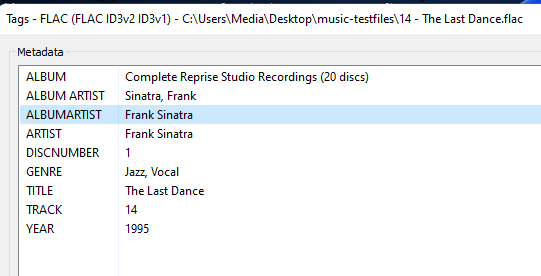
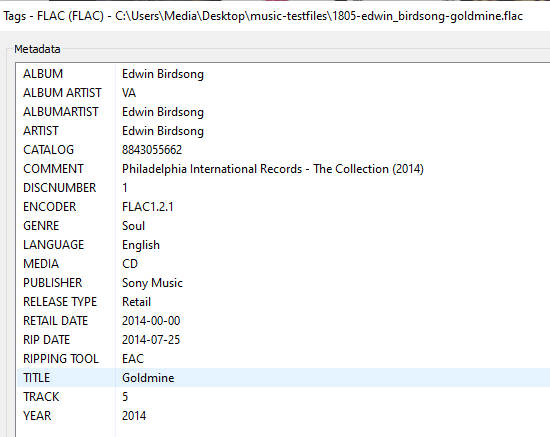
Pretty sure this comes back to same tag priority Album Artist vs AlbumArtist as these are mismatched. Can't find the topic @Lukementioned this but will attach if I find.
 1 point
 -
I also reported this "issue" as I was seeing the same like you on the first detection run. Second run is currently running but the result will be the same I'm afraid as my files are on a network storage and the delay comes from there I guess. Edit: By the time I reported I was told that caching those images would require quite some space, iirc it was like ~40GB for 30000 images and therefore it was denied.1 point
-
That solved the issue, thanks for you help. -> I though "ImageTag" should be unique, but actually the index was the problem.1 point
-
Right but when you request a chapter image, the chapter index is part of the url, therefore making each of them different. Can you get this to happen with a brand new video in the library?1 point
-
Both of those are transcoding due to incompatible subs. Remux or obtain external .srt subs.1 point
-
It depends on how old your installation is as in the beginning the database did not have tokenized paths. So if you have a really old install you will run into issues relocating the install.1 point
-
Thanks for the feedback.1 point
-
Before worrying about or allowing disks to sleep you need to investigate to see just how much energy will be saved and look into the wear and tear of spin up/down cycles and how much starting and stopping will reduce drive life. I have not looked into this for quite a wile but the last time I did it turned out that it actually cost a lot more to allow drives to sleep than it did to just keep them running and the reduced access caused by waiting for drives to spin up caused inconveniences for server access that were, to me, not even near worth the marginal savings of even allowing the whole serving computer to sleep. Things may have changed in the last few years but it still seems counter productive to allow servers, either drives or the whole thing, to sleep. I have 13 external drives connected to my server and, at last test, keeping them on all the time only cost about the same as a 15 watt light bulb (Incandescent) burning all the time. A very tiny cost with the advantage that you never have to worry about access. It is my belief that servers should never sleep and that even fancy WOL settings or other energy "saving" do not mitigate the problems. My neighbors do not even run any computer systems at all, basically they have a house that thinks it is 1960 or so. Their power bills are about where mine are. I run about $5.00 to $10.00 more than theirs. The only time my bill jumps above theirs by a good margin is in the hottest months as I like it cooler and so my air conditioning run a bit more. BTW: My server is simply a top end computer from about 10 years ago and I never shut it off. But you need to make your own choices. I just wanted to indicate that there were other considerations that might effect decisions. BTW: In the fall/winter/early spring I move my server to my main living area so it can help keep the area warm.1 point
-
Yes I can do that. I will start on it later today. Vic1 point
-
Thanks yarafie for all of the info. Give the code below a spin and check if the problem is fixed. Your comments are appreciated. Vic EmbyTagApp01c.html1 point
-
Yes it works as expected, as I have explained when new update is installed it reset the addon to default, then scan without playlist been checked what will be nice if the option to ✔ to playlist is prompted before the sync process started I hope you add this in the next experiencemental1 point
-
UPDATE Yessss, LG problems with Let's Encrypt SSL has been fixed by using ZeroSSL instead. Now, friends using LG televisions can use the Emby app again. Thanks to all who suggested ZeroSSL1 point
-
Work has not been going well lately, eh?1 point
-
Things like RTM, debugging enabled, DLNA, etc did cause my Synology not to go to sleep. I've changed mine so that it's scheduled to sleep/wake at certain times now though so it's always available when I want it during the day1 point
-
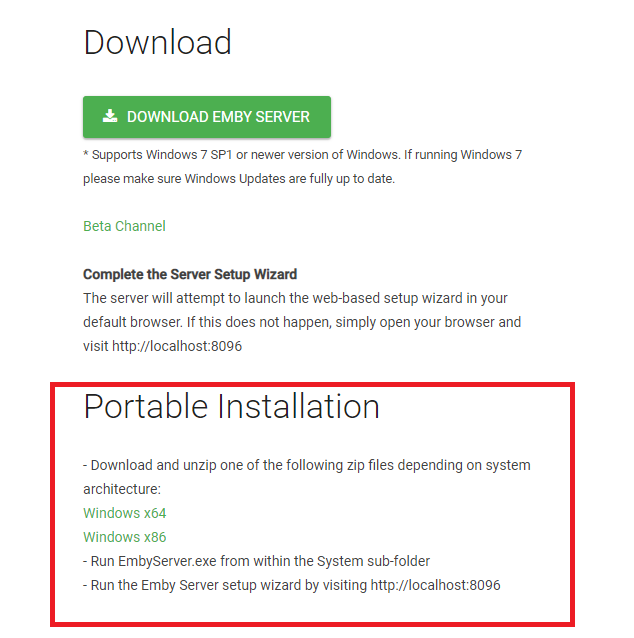
Hi, we do support this already!!! Emby installs differently on each platform based on guidelines or requirements of that OS. On a linux/unix environment it's stored in a way not to require any specific username but to access the location you need to be an admin. It then creates an system "emby" user which the admin has to grant proper proper permissions across all media libraries and owner rights. It's a more involved setup but is typical of that platform. On Windows you can install Emby two different ways depending on which installing you choose to use. You can go the setup.exe route which is the typical type of windows install where it follows windows guidelines and installs for the user logged in. It then runs under that user's access so if they have access to the media, so does Emby Server. If you prefer to have control over where Emby gets installed and want to install it on your E drive off the root you can. You can do this with many windows programs and this is called a portable install. If you look at our download site for Windows you will see both listed there: So on this page you have the traditional installer for the release version. You have the portable version as well as the beta version (also portable). The portable version is actually just a 7Z file (zip format) that contains the system folder. You create a directory where you want to install Emby and then drop the system directory into it. Inside the system folder is the executable file EmbyServer.exe which you can use directly or create a short to it (what ever you want). Want you start EmbyServer.exe for the first time it will create the other directories you are used to seeing along with the data files and config files. When a new version comes out you shutdown Emby, rename the system folder and drop the new one in. Once your sure everything works well you can delete the old system folder or if space isn't a concern, keep a few versions of it handy. I actually rename it to the version it was like Emby 4.6.4 then I also copy the data folder into that as well. Now I also have the system runtime files and the database as it was before I did an upgrade. But anyway, we have supported doing this for a long time.
 1 point
 -
Hi, is something wrong with your F: drive, or is this file no longer there? 19:57:15.086 F:\TV\Brooklyn Nine-Nine\Season 3\Brooklyn Nine-Nine - 3x05 - Halloween III.mkv: No such file or directory1 point
-
This would point to a library path issue, can you post the server log as it many show more information. F:\TV\Brooklyn Nine-Nine\Season 3\Brooklyn Nine-Nine - 3x05 - Halloween III.mkv: No such file or directory1 point
-
Please update to 4.6.6.0 to resolve your platform SSL issues. Fix outgoing SSL errors on some Linux distros1 point
-
The code below fixes a bug in the previous code that added duplicate tags. I also fixed the tagging of channels. In the EPG ctl-click the channel name to add a tag. In the channel display dialog ctl-click the channel name to add tags. The choice between the EPG and the channel dialog is controlled by a check box on the main screen. The default is the EPG. Note that you need to ctl-click channels rather than just clicking as it was before. Give me feedback. I have limited test capability. I also appreciate all suggestions. Vic EmbyTagApp01b.html1 point
-
I propose to the devs, the option of have a new style of enhanced home screen on emby devices. A banner style spotlight. Wouldn't that be a good idea?1 point
-
Emby Installation : Emby Emby is NOT a media streaming service. We provide no content. Emby is a Personal Media Server platform.1 point
-
I have now migrated to windows 10. No problems with migration. All users and activity still in place.1 point
-
@Luke I uunderstand not everyone will have backdrops but I for one would prefer black behind transport controls if no backdrop is present than to have the backdrops that I do have covered by album cover. Again album cover is fine but can it be made smaller and relocated either lower left or right of the screen rather than center? Or better still, a toggle that the user can use to decide where they want it, it's size or whether they want it at all? Just asking. (edited to add...) I personally don't use the meta scrapers but I would bet most people do so wouldn't most of the folks also have backdrop images for artists since the scrapers pretty much automatically download them? Again, I don't use the scrapers but I do put a lot of time (and work) into collecting my own backdrops and it makes it all the more aggravating that I've put in that work and can't really see the labor of my love. My only point is that more options for all users is better than few. Please do consider. Additionally please do consider native implementation of visualizations within the Emby app. In my opinion it would really make the music listening experience head and shoulders above the competition and at the minimum put us back at the level we were/had with Windows Media Center and Media Player. Thanks again1 point
-
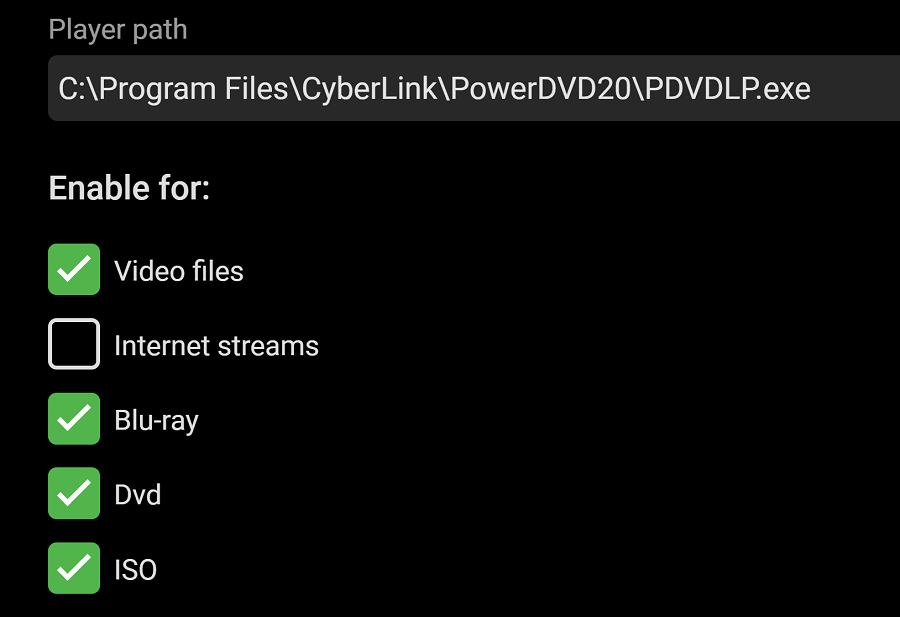
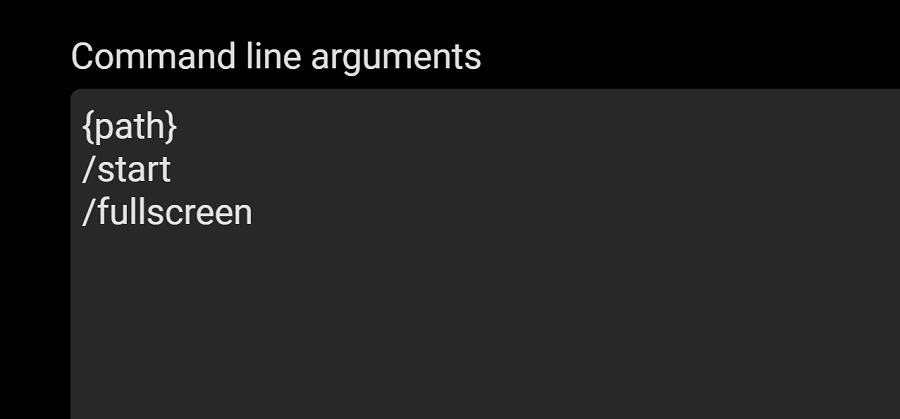
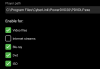
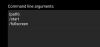
I've been using Powerdvd 18 as an external player in ET for a while now. I just upgraded to Powerdvd 20 and it 'broke' the external player functions. I played around and attached are the settings that worked for me. Now opening a mp4/mkv in ET almost instantly opens the film in Powerdvd. I'm running Windows 10 Pro 1909. NOTE: some people say to put a check in 'run as administrator' box on the .exe. In my case that doesn't work as it does the opposite: it requires an admin password when running the program.
 1 point