Leaderboard




Popular Content
Showing content with the highest reputation on 11/05/21 in all areas
-
Currently, the IntroSkip data is only applied to the Chapters (if you set that option) - for the Intro's to be skipped automatically or using a single button press - requires the Core Development team to integrate the changes. I'm unsure of their intentions, but we are hoping that once we have enough positive feedback on this Beta Plugin - they will add this much needed feature using the plugin data.3 points
-
Just because it wasn't mentioned anywhere (or I might've skipped it): maybe router QoS is playing funky there, if you do have it enabled. Some rule might be interferring.2 points
-
I'm going to work in this today. I need to brush up on some regular expressions, as well as attempt to code it.2 points
-
For me, I will merely state that I didn't really need any of the higher end features but I don't see a problem with paying a one-off fee to help support a product. Particularly if I want to see the longevity of that product stretch out for as long as is reasonable. So many want so much for so little but there is a middle ground that we can all meet on. If the product does what you need and you want to see it live a good life in your ecosystem, support it in any way you can.2 points
-
If that tv show is currently playing then yes I agree it would be nice to be able to just click play there without the extra click.2 points
-
To me this is a deeply stupid and pointless comparison. And sure, I get that we're supposed to be nice but good lord, that's asking a lot sometimes. If you aren't an Emby user then I don't get the point in posting here at all honestly. Emby doesn't compete with Netflix so comparing prices is a waste of time. I have 2000 movies, several hundred TV shows, and a couple thousand albums on disc. Emby compares to buying shelves to hold all those cases. Emby compares to standing in front of several walls of shelves and scanning tiny sideways titles trying to pick something to watch. Emby compares to not being able to effectively benefit from my media collection. Emby's freaking cheap compared to that. If you don't have a significant enough media collection to need a media manager then you don't need ANY product like this.2 points
-
I just want to bring up attention to AV1 as additional target codec for transcoding and comverting video. It's supposed to further reduce bitrates, which can be great in situations with limited bandwidth. Hardware players start to have support, with the Max version of Amazon's 4k FireTV sticks being a very popular and cheap option. Hardware Encoding is coming for sure too. So if/when HEVC gets added for transcoding, AV1 should be kept in mind too. And for conversations, things might actually be already there, since ffmpeg does have a encoder integrated.1 point
-
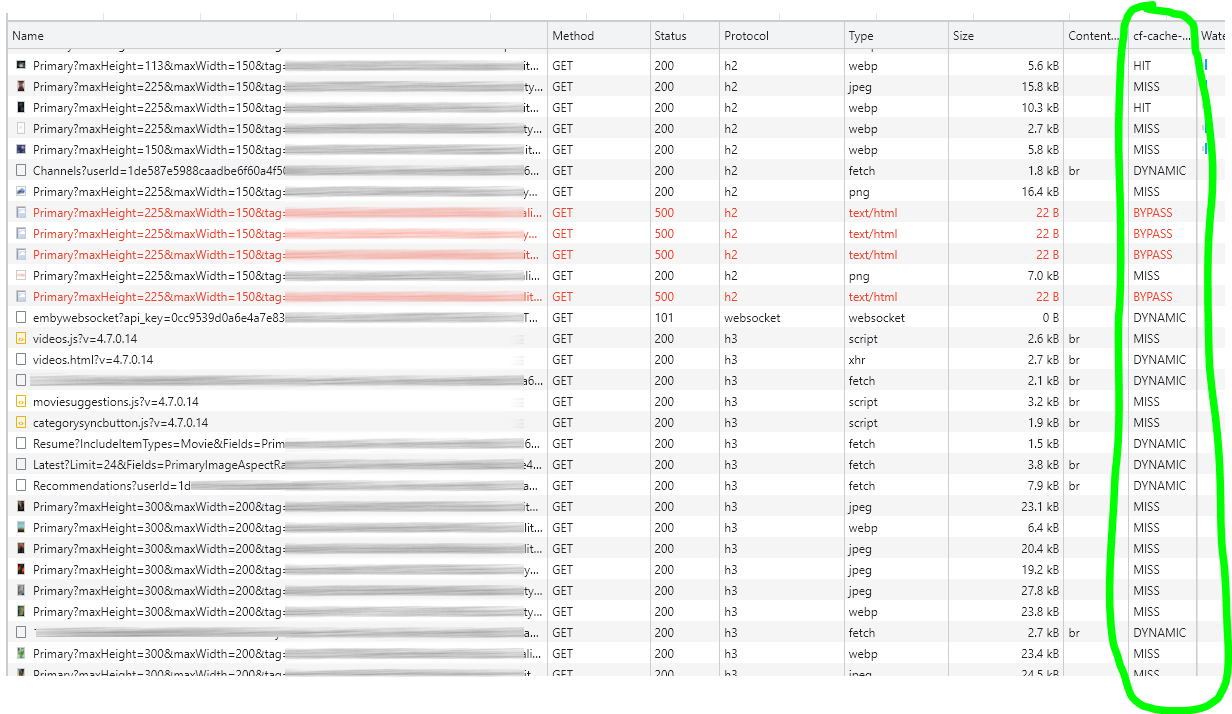
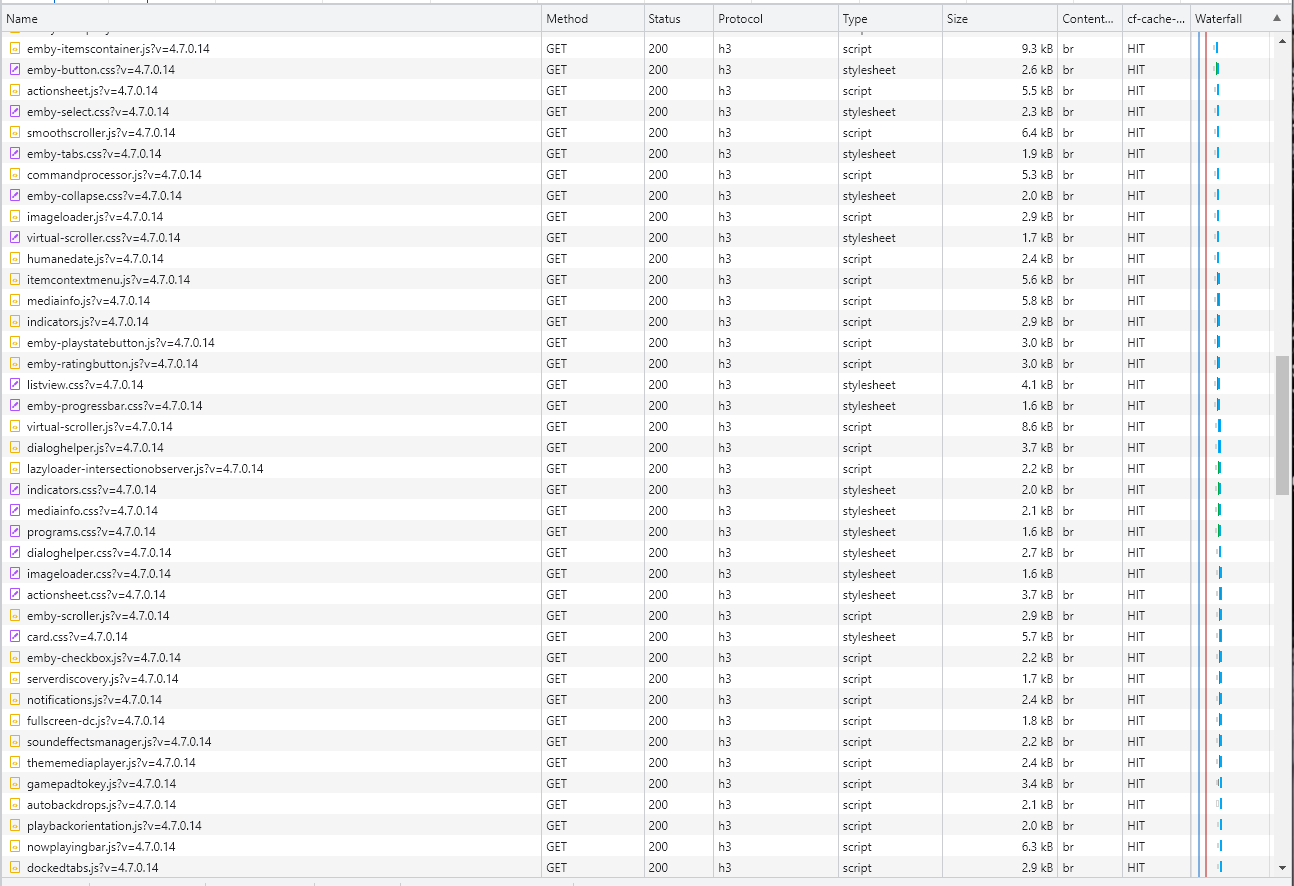
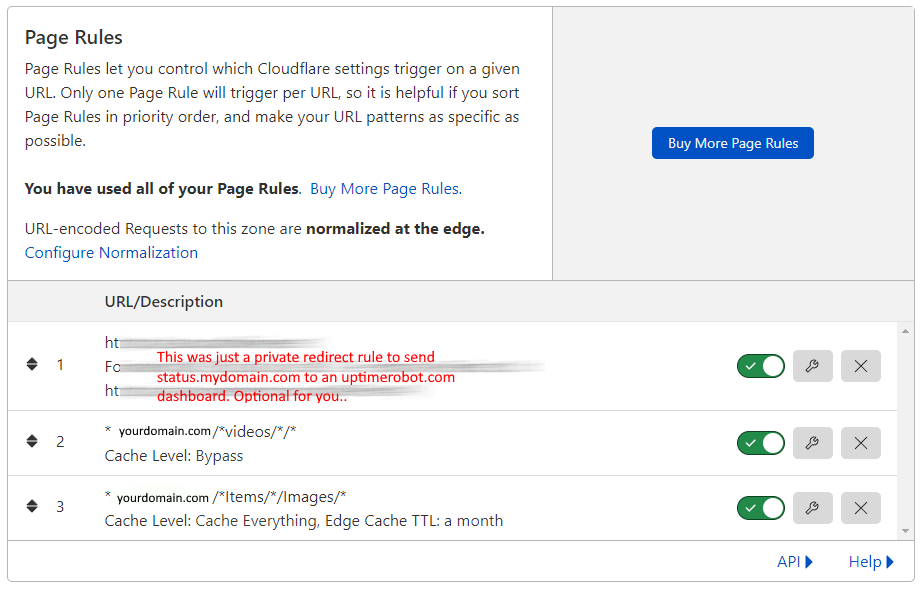
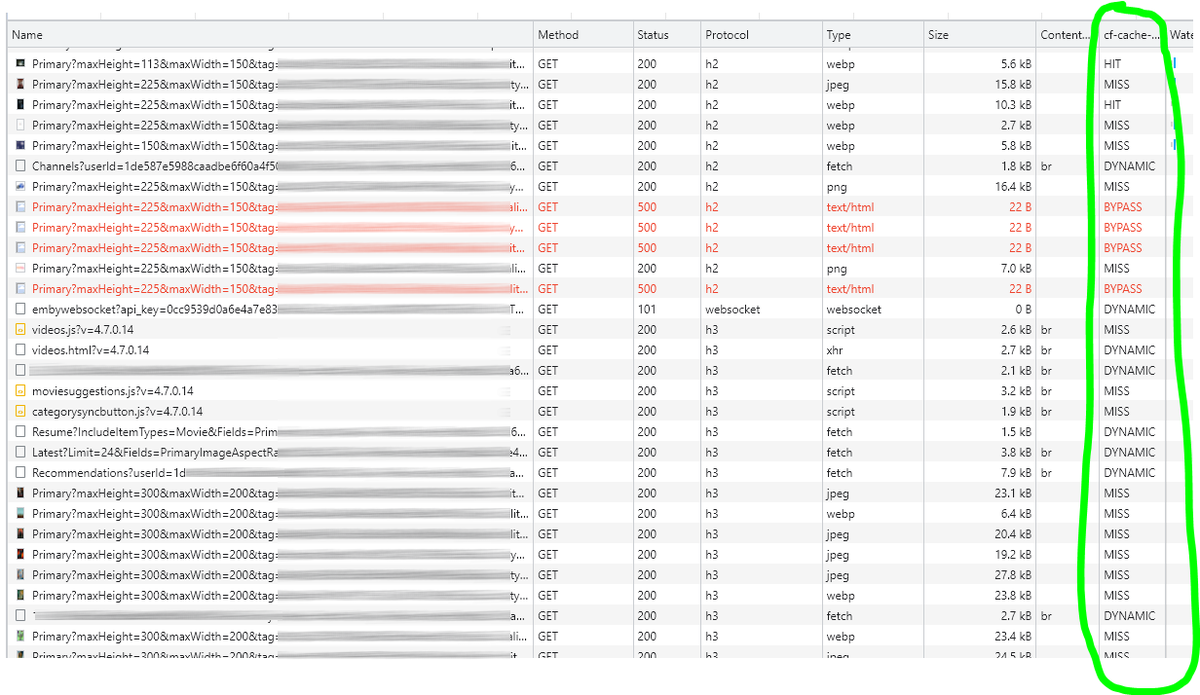
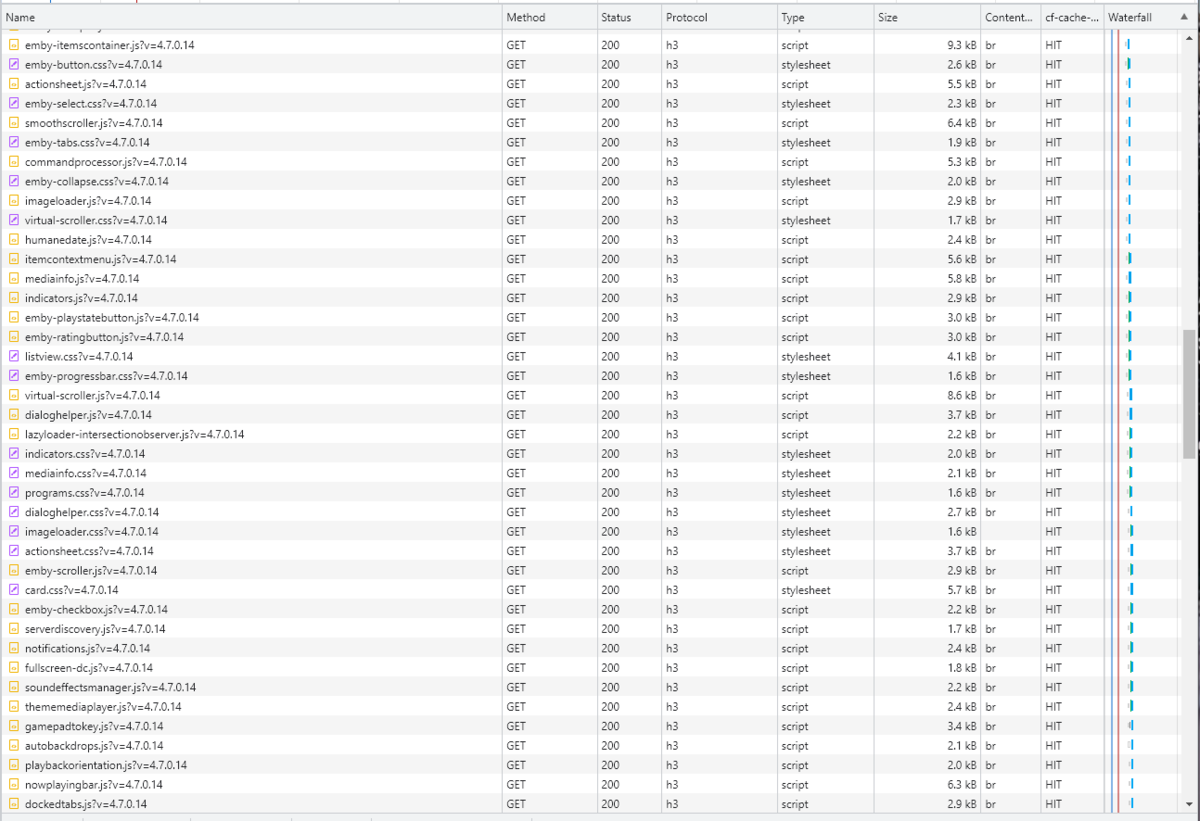
Cloudflare and emby Config Version 1.0.0 Last Update 02-25-2022 Update by Pir8Radio ** UPDATE: I AM HEARING OF EMBY USERS GETTING VIDEO FILES BLOCKED WHEN USING CLOUDFLARE (FREE TIER). IF THIS IS THE CASE, I NO LONGER RECOMMEND USING CLOUDFLARE. Even with the cache bypass rules, your video still passes through their system and is technically against their TOS. Use CloudFlare at your own risk if you choose to continue. I'll update if I get more info. Please post in this thread if you find you have video loading/playing/downloading issues while using cloudflare or have received an email from them about this. MESSAGE FROM CLOUDFLARE: Free, Pro, and Business Plans serving videos or a disproportionate amount of non-HTML content can be in violation of Section 2.8 of the Self-Serve Subscription Agreement (TOS). This will turn into a full Cloudflare how-to. Others are welcome to edit this or PM me with suggestions.. However right now I'm just going to post some recommended settings for people who already have Cloudflare setup. There are a few cloudflare settings that break emby, some break it in obvious ways, some only certain apps in certain situations.. These are the settings I found that work well as of today. I'll try to maintain this post and update the header info should new features come out, or the community discovers better settings than these. As of today, these are the settings available to us in Cloudflare FREE account: First disable the two main things that will break emby, go to the "Speed" tab then "Optimization" sub-tab. DISABLE Auto Minify and Rocket Loader! (screen shots are in the recommended state) Other options on this settings page are optional to enable, I suggest enabling Brotli compression. It's a good thing. Now head over to the "Caching" tab and select the "Configuration" sub-tab. Set your Caching settings as shown below. THIS IS OPTIONAL: Other settings in this settings tab are optional to whatever you like.. I have "Always Online" enabled, its kind of a neat feature that caches as much of your emby server as it can in case your server is down, users will at least see an emby splash screen, that's usually about it.. but its something... kind of useless otherwise.. Handy if you have other websites, it will totally cache normal html websites and users can continue to use your cached site when you have a web server outage. Next head over to the "Rules" tab. Create these two rules: Rule #2 here we will bypass caching 99% of all video. Caching the video will actually slow down the client experience. It screws with the chunks and often times has to fully cache 1 chunk before cloudflare sends it to the client, causing playback delays. Rule #3 here will cache all images on the edge servers for 30 days. We need this rule, because cloudflare only caches known file urls, like picture.jpg or poster.png emby serves up webp images with NO EXTENSION so cloudflare doesn't know to cache these items. But 99% of emby images come from the /items/XXXXXX/images directory so we will just force cache everything that comes from this URL, it should be only images. Keep in mind when you enable this it can take some time to build up cache.. emby serves up different sized images based on browser screen size, apps, etc.. so if you load a page that is minimized to a small window on your desktop emby will serve smaller sized images, if you make your browser full screen, now emby will serve up larger images and those images may load slow the first few times until they get cached too. Go below this screenshot and I'll show you how to check if caching is working. Check to see if Cloudflare Caching is working Well, how do you know Cloudflare is doing its thang'? Use a browser like chrome, or the new Microsoft edge (which is just a rebranded chrome). Open the browser, right click in the browser window and go down to "Inspect" (there is an F key for this too I forget what it is, I should add that here lol). Once the dev window pops up adjust it so you have a good view on the right, click the "Network" tab, hit the reload button on whatever page you are on so some info populates on the right dev screen. You should see something similar to this: Right click on the table header (Name, Method, Status, Protocol) anywhere, just right click the "Name" one. Go down to "Response Headers" then "Manage Header Columns". A little window will pop up hit "Add custom header..." and then add this header: cf-cache-status Now select the little sub tab that says "all" now surf your way to your emby server, and you should see something like the below screenshot. Hit is well..... a hit! this image came from cloudflare and was never requested from your emby server, saving you from sending this image to the client, saving time and bandwidth. MISS is also kind of obvious, it was a miss, either due to never being cached yet (first time Cloudflare has seen this image or document) if you hit refresh a few times, cloudflare will then cache it and it will turn to HIT. BYPASS I'm actually not sure why my server is returning server 500 errors below, this image is being called for by emby clients but the server has no image to serve, but usually you should only see BYPASS on playing video's if your rules above are correct. Or in my case, a server error will not be cached. DYNAMIC this is also a NO HIT response.. this is usually due to Cloudflare knowing this resource changes a lot and doesn't want to cache it so your clients don't get served stale data, or its a video, websocket, or some other format Cloudfare's great automated intelligence deems it should not be cached. That is the basics that will save you a lot of headache and blaming emby for things not working.. There are lots of cool options to enable outside of these basic settings above, ask questions here, send ideas that maybe I have missed that work great for you.. I just wanted to throw this up due to a lot more of you guys using Cloudflare. In the end you should start to see more "HIT" responses... and a noticeably faster loading time for the clients, less bandwidth usage for your emby server, and everyone is happy.. Well..... within reason....

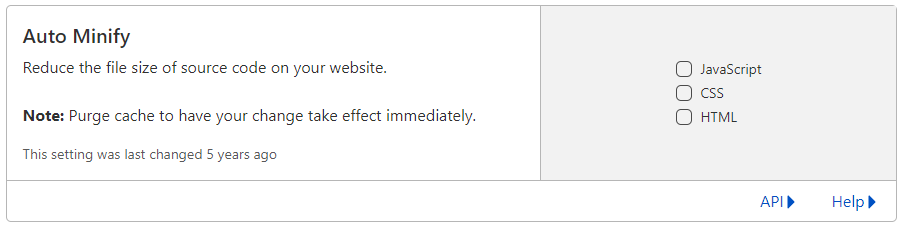

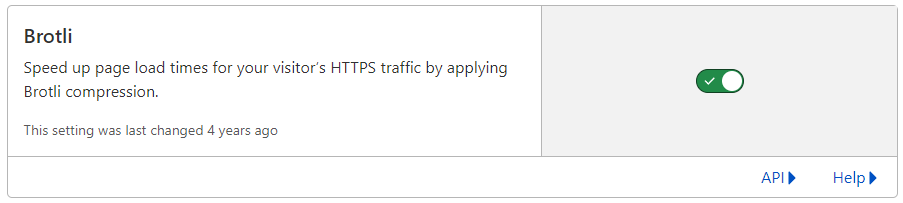
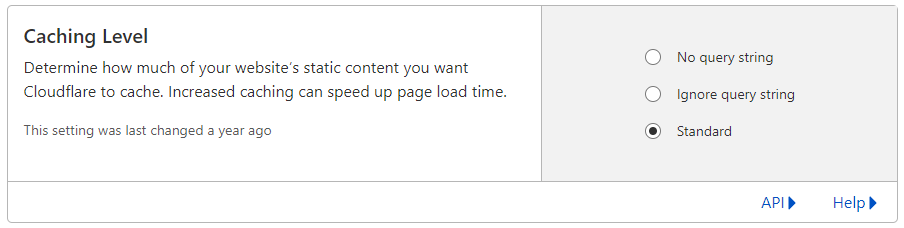
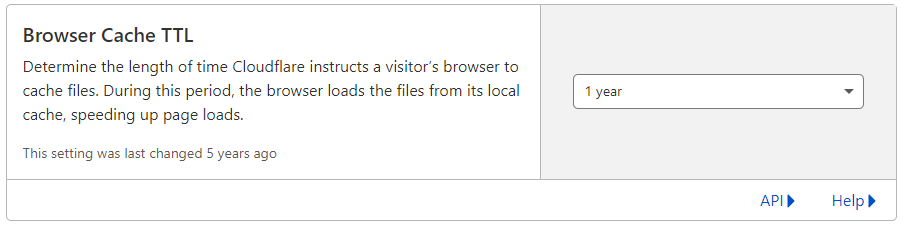


 1 point
 -
I've been dying to know if this has garnered enough interest to be worked on. I found Emby (MediaBrowser 3 at the time) and its bookshelf plugin while I was searching for something that was like Plex for comics. Plex doesn't do this (and probably never will), Kodi doesn't have what I'm looking for either, and ComicRack seems to be dead at the moment. Unfortunately the bookshelf plugin doesn't work the way I had hoped. I was dissappointed to see it only offer a download to the file to which I can open it to the program of my choosing. Even browsing through the books I only had the option of going through folder-like directories and couldn't browse by author like the people section in the other media types. I would love for it to be fully integrated into Emby where I can open and read a comic right on my phone and tablet or even my web browser as I could with my movies and tv shows. Also, I hope to god somone is working on the "Games launching in android" feature you mentioned on your up-for-grabs blog post. That would be awesome!1 point
-
Please add these two filters to Movie filter view: - Decades - Country1 point
-
It appears that any playlist that any user creates is public--all other users can see it. I can appreciate the benefit of a public playlist. I could create a playlist called "Harv's Favorite Horror Films" for example, in case other users are interested in checking out what I like. However, the way most of my users are using playlists is to keep track of things they want to watch in the future. They are typically things that the user has not watched yet, so it's not meant as a recommendation to others, just as a way of them personally keeping track of what they want to watch. Having that kind of playlist be public is of questionable benefit to other users. Additionally, it is not clear when you create a playlist that other users will be able to see it. That has the potential to cause some embarrassment. He hasn't created one yet, but I wouldn't want to see my nephew's "movies to fap to" playlist, for example. If I could make a suggestion, I would suggest associating each playlist with the user who created it, and giving that user the ability to make the playlist private or public. For example, the following two checkboxes could be shown when creating or editing a playlist: Allow other users to see this playlist Allow other users to edit this playlist Initially, both checkboxes would be unchecked. Since another user cannot edit a playlist they cannot see, the second would be allowed to be checked only if the first were also checked. (You could grey it out to make that clear.) Depending on your UI preference, it could also be a drop-down menu. Playlist visibility: (Only me | all users can view | all users can view and edit) Thanks for considering this.1 point
-
Could you please add a Webhook for the New content added notification?1 point
-
I was performing some tests to simulate brute force login and found that emby lacks some pretty basic security measures. If you try to login using an invalid (non existing) username and password, failed login attempt is not displayed in the Dashboard UI alerts. You only get a dashboard alert when a valid username login attempt fails due to a incorrect password. This provides no visibility into brute force attacks. 1. Can you add dashboard alerts for this type of login failure? 2. Can you add these security Notifications and enable by default? For example, I was like to received failed login attempt emails after multiple failed login attempts.1 point
-
Yes this has been reported as a user account issue and will change in 4.7 as that option will no longer exist on that menu. 2x sign out button in menu - General/Windows - Emby Community1 point
-
Sorry for the late reply, but I wanted to try the version for a few days before giving feedback. I didn't experience the double episode problem again, so it appears to be fixed. Thanks!1 point
-
First, I apologize for my irritated post(s). Sometimes I have neither the time nor patience to dig. I know, lame, this is a forum for sharing knowledge not frustration of which I am guilty, more than once. Second, I appreciate the response; you revealed the issue. I should say, my inference: an active internet connection is required more often than current setup to have the emby server not disregard my lifetime membership for the server. That explains it; this is a qnap server of which I am much more guarded. I'll reassess my qnap concerns and emby. While I have the chance: great support from you, Luke and many others. I have learned much, not this until now, sorry, reading many posts. Thank you for the support, and patience. Success to Emby.1 point
-
Yes, that's a good point. Might want to turn off anything security or QOS related for a few minutes to test. Keep track of what you turned off so you can re-enable it again it not the source of the problem.1 point
-
My crypto account balances would disagree..1 point
-
No not yet, probably this weekend depending on my schedule. I'll post here how it went...1 point
-
Tnx i will look this one! you saved time to search1 point
-
@chefWould animated posters work, such as these? Not sure if Emby is supporting these yet, but wondered if your code would load a specific file of it existed?1 point
-
This is happening did to your file naming matching our multi version naming criteria: https://support.emby.media/support/solutions/articles/44001159102-movie-naming1 point
-
When the server has that information, the app will utilize it but, in the case of an active recording, I'm not sure if that's the case. I'll have to check.1 point
-
To be clear here - nobody can inspect the contents of the packet (it's encrypted!) but they can inspect anything in the packet stream which is not such as the source/destination/port/protocol/frequency/nature of the packet etc. They can, as an example, easily tell a netflix stream vs a torrent (but they cannot see inside the stream). So the speedtest is reduced by the amount emby is using (approximately) - that's interesting. I think @cayars touched on this earlier, but if you try a 2nd, parallel session (to another destination, same source(you) - the upload limit is STILL 50Mbit/sec - is that correct ? does each upload(stream) then take 25Mbit/sec ?1 point
-
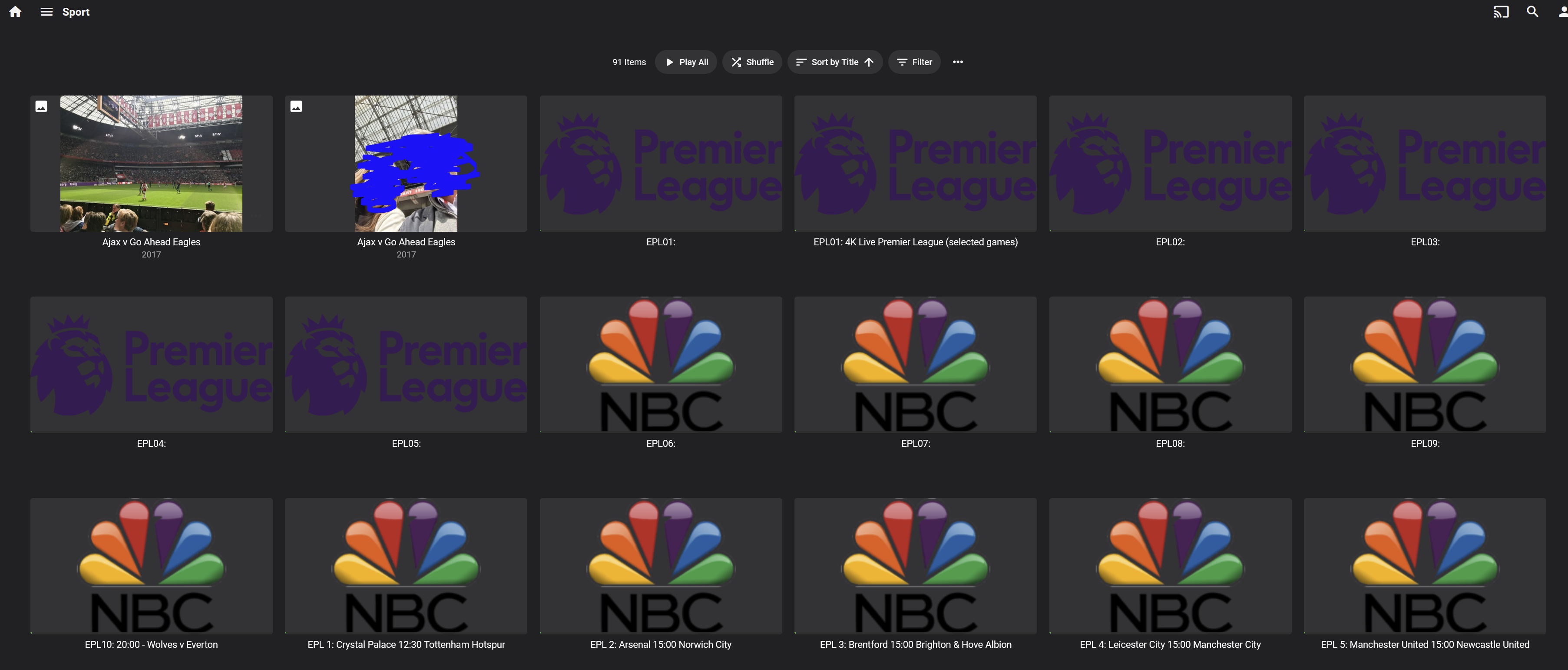
I'm starting to use Emby to watch my movies and concerts DVD and BD rips, but I'm a having a inconsistence with the images showed in the Movie section. If I use Primary as options to show covers it's messy... If I set a bluray cover size It works fine in Android TV, but it shrinks in the App and the Web... If a set a CD cover size it works fine in App and the Web but it stretch in Android TV... I find pretty awful that the default option for a image is to adapt to the space to render (shrinks/strech) instead of just resizing without changing the image aspect ratio.... Not all movies uses the same covers, DVD, BD and VCD have diferents sizes.1 point
-
Although not designed with such purpose in mind, you can surely use TMM even without scraping those and manipulate NFO creation and editing details on single item or do it in batch.1 point
-
Yeah but I also switched to use ; because it seems that as soon there is a space within the artist name, emby is not able to parse the / correctly. Using ; works fine. However, this is not proven and just an observation but I could be wrong1 point
-
The support on this website is second to no one, it's the reason I paid for a lifetime emby membership ! If something is not working you can bet you ass people here will stop at nothing to help you1 point
-
Wow mate, your a coding ninja. Must admit I'm not a big fan of the animation stuff (hopefully it will be optional eventually).1 point
-
Morning @chef, I just wanted to nerve and ask what's the news from the front? Got a whole pack of movies with version and single subtitles just waiting for the test!1 point
-
I did put in a ticket with no-ip last week maybe it actually went somewhere? I'll do some more testing this weekend when I get time on my fire stick 4k1 point
-
thank you for the quick reply asking always helps1 point
-
We do but as mentioned only for existing/valid Emby user on that server. But yes we should see all attempts shown in Alerts no matter if existing/non-existing user to that server.1 point
-
Oh yeah, I forgot to mention. It handles tv shows now too.1 point
-
Many thanks for the info. What I might do is install OMV, Emby and Docker in a VM environment and try the above first to see if it works. Will give it ago in next few weeks when I have more time and will post here if it works or not.1 point
-
It has been reported. Thanks @justinrh for verifying this for us.1 point
-
Thanks Team! Turns out I had to clear cookies in chrome and then it worked as expected!1 point
-
Have you already tried removing each element one by one to see which is causing the error?1 point
-
Hi, one possible way would be to look at recently added episodes which should make it clear what doesn't have proper images. You could then multi-select them and fetch meta-data and replace images only on those items.1 point
-
1 point
-
Hi, it's planned for the future. Thanks.1 point
-
@HansWurst let me know if you want another set of eyes taking a look with you. I'd be happy to remote in and assist.1 point
-
We are working on supporting more languages. Thanks for the feedback.1 point
-
This is doing something different than what you think it might be doing. This works for all playback, not just TV. What this Quality menu choice does is lower the bitrate of anything you are watching. If for example you took your notebook to Burger King and used their WIFI you may not be able to get 10-15Mb connection rate but maybe only 3 or 4 Mb. So this menu allows you to tell the server to force transcode the stream so it can be played over the bandwidth you have available. This is a manual override of the app settings in the playback menu (from the person icon, top right). Any time you play media it remembers your last setting. So anything you've watched previously will get the same settings again. You will likely need to change it for those previously viewed streams. If using any client on your home network and your Emby Server is also on that same network you likely want to set this to the highest setting possible to avoid transcoding. The likely exception might be WIFI clients if you don't have enough bandwidth. But I'd suggest starting out with the highest setting and slowly lower it if needed for bandwidth issue. Hope that helps1 point
-
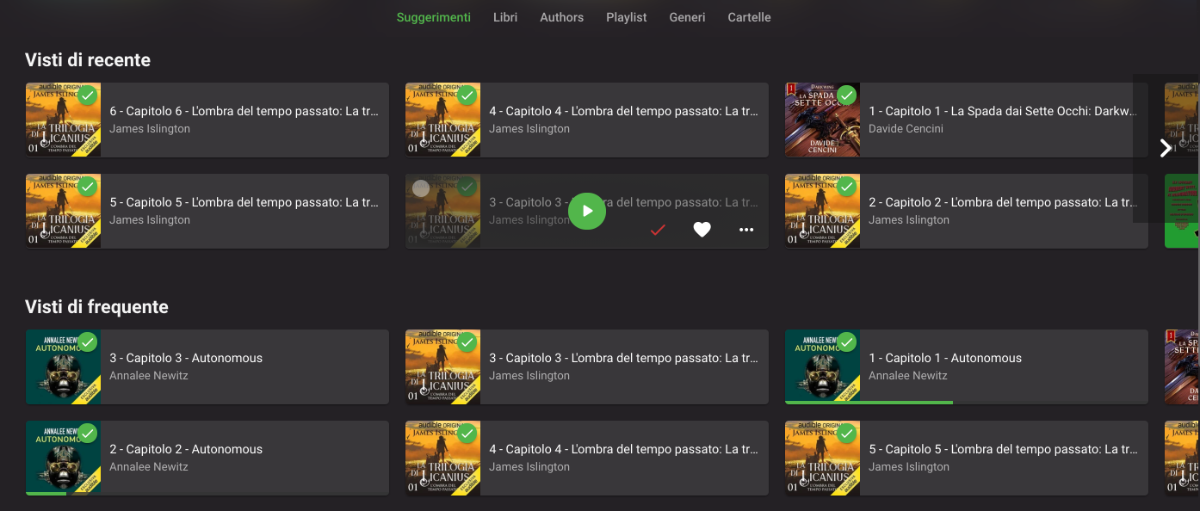
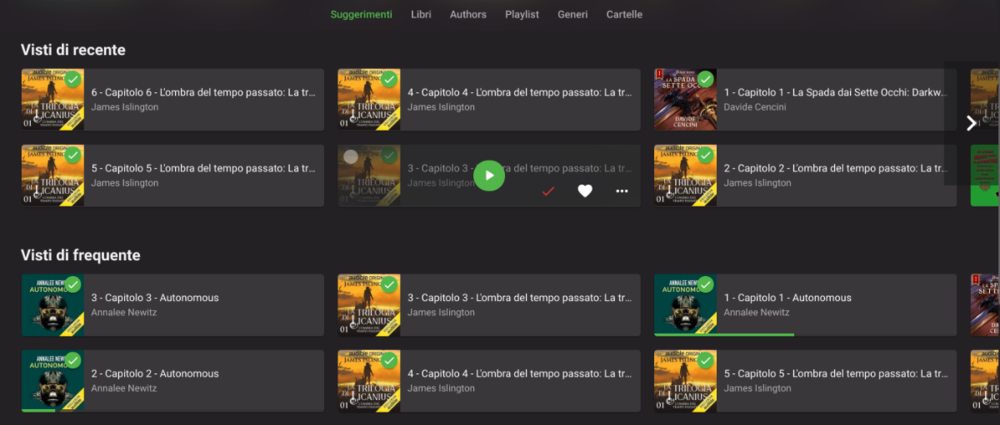
I have my audiobooks as separate mp3 files, one for each chapter, inside a folder for the book, inside a folder for the author. Emby sees them as multiple songs inside an album, which is then considered as a book. This brings 3 problems: In my library, I see multiple chapters of the same book in sections like "Recently seen" or "Continue listening", which brings a lot of clutter to the UI, with 0 benefits (see multiple_chapters.png for a reference) The playlist section in the navigation menu is now filled with books and auto-expands everytime I open the menu. Worsening this mild inconvenience, the playlist thumbnail is the book cover x4 (because all the chapters have the same cover) When I resume listening from the "Continue listening" section, it only resumes the current chapter, so when it ends, the playback stops. I had an additional problem, where a book wouldn't show up in "Continue listening", but I think I solved it by going into "advanced setting" of the audiobook library and selecting 0 and 99 as percentage for "continue listening"; this wouldn't be a problem if the "media" was the book and not the chapter. Since this is just a way to organize an audiobook library, considering books strictly as a single media could be an option in the library setting.
 1 point
 -
Hi, Playlists will get revamped in an upcoming release just as Boxsets/Collections did recently. Emby Server works quite well for Music assuming you have your media tagged correctly. That of course doesn't help those who want a dedicated music only client but right now the focus is on having all content available in each client and not needing separate apps for different things. We know dedicated apps especially for iOS and Android would be welcome and is something we would like to do for a future release.1 point
-
I just discovered digital comics.... I would LOVE this to be added to emby. DEV NOTE... CBR and CBZ files are RAR and ZIP files full of JPEGS. ..and PDFs... are PDFs... thats it. If i were smarter id figure this could be done in a plugin... There are many other requests: could you add a comic/manga media type? - Feature ... - Emby Comics and E-books - Feature Requests - Emby Community Comics/Ebooks - Feature Requests - Emby Community FR: MB Bookshelf - Comics - Feature Requests - Emby ... CBR/CBZ/PDV Online Reader - Feature Requests - Emby ... Comicvine Scraper for Comics - Feature Requests - Emby ... Calibre (famous free book manager) plugin !!! - Feature ...1 point
-
I absolutely agree that movies should not start playing right away within a playlist. Clicking on a movie in a playlist should take you to the movie's info page. Simple.1 point