Leaderboard




Popular Content
Showing content with the highest reputation on 10/25/21 in all areas
-
@all I've uploaded 6.1.5 to Emby Kodi beta repo.3 points
-
I think you got this totally wrong. I DID NOT connect to your sever at all, I just entered the IP. This is like ping. If you afraid of a ping, pull the internet cable immediately. I got hundreds of invalid logins on my mailserver each day. btw, why do you think I asked you for a test account to you server, if I would already have the option? Anyway I stop explaining myself, have a nice day.3 points
-
I'd really like to have 2 Factor Authentication added to the login screen. It's just this (optional) extra layer of security to help secure the server (which, especially if people use camera uploads) contains pretty private data. There are for every type of programming language quite a few libraries available, so implementation on a server shouldn't be too hard to realise1 point
-
As I mention in a related post, I love the additional subfolders for Movie Extras (eg, Shorts, Scenes, Interviews, etc.)! It would be awesome to extend this functionality to TV Series as well. Specifically to add support for many/all of the same folders supported for Movie Extras, eg, extras specials shorts scenes featurettes behind the scenes deleted scenes interviews trailers As well as any additional folders that get added in the future (eg, hopefully Galleries). Support Placement of "Extras" Folders Within Each Season Folder, Plus A Naming Scheme to Link A Particular Extras Folder with a Specific Episode (eg, "\Season 1\E1 - Deleted Scenes\" for episode 1 deleted scenes): I want to clarify that it would be great if these various "extras" folder types could reside within each Season folder. So for example, within a Season 1 folder we could then have an "Extras" folder, a "Deleted Scenes" folder, a "Featurettes" folder, etc. And furthermore, that we could designate a particular folder to refer to a specific episode (eg, "\Season 1\E1 - Deleted Scenes\" for episode 1 deleted scenes). See more below, particularly why I think this would be so useful: https://emby.media/community/index.php?/topic/55915-emby-server-theater-additional-extrasspecial-folder-types-for-tv-series-similar-to-movies/&do=findComment&comment=587195 Thanks for your consideration! PS - If this is something you might like to see implemented, be sure to "Like" this top/first post (as well as any subsequent posts in this thread that highlight particular aspects of what you are interested in) -- "Liking" the top/first post helps the Devs to know how much interest there is in a given Feature Request.1 point
-
My issue is resolved! Putty/SSH allowed me to delete the (3) folders (@appconf/EmbyServer, @appdate/EmbyServer, @apphome/EmbyServer) via the 'rmdir' or 'rm -r' commands, then I made sure that the Synology Firewall was disabled this time around (which is disabled by default which is why most people may not run into the problem I did), and then the Emby Package installed perfectly, it accepted my user/pass without argument, and the path no longer blanked-out. As part of the test, I left ESET NOD32 Antivirus enabled, along with the Windows Firewall. So, these items were not the cause of the initial problem. It had to be the Synology Firewall that I had enabled prior to trying to install Emby the first time around. Thank you for pointing me in the right direction @cayars and for offering the remote support session, sincerely appreciated. In return, I am happy to have been able to save you from having to do so. Thank you as well @FrostByte for taking the time to post as well. Although I did not end-up having to try the Superuser Privilege WinSCP method, I have absolutely archived this as I will most definitely make use of it in the future. So, thank you guys a bunch and all the best.
 1 point
 -
Got ya. Thanks!1 point
-
Thank you. I've changed setting and I'll test it tomorrow. I appreciate your help.1 point
-
You don't want the scan media option but the Configuration Backup task option which should be the top option. Run that one time, then go into the backup plugin and see if your previous backs are available at the bottom of the screen to restore from.1 point
-
Thanks for support i tried all steps in that page and finally I check my connection to emby server !! The firewall on server it's the guilty ! Thanks1 point
-
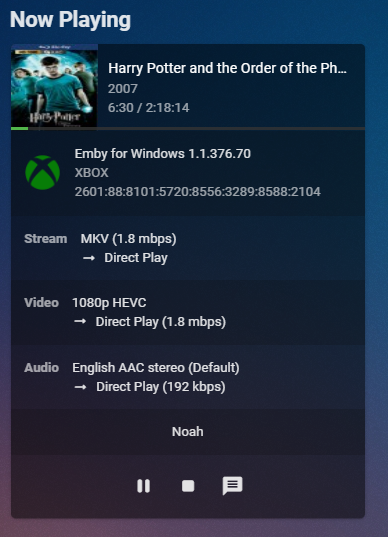
Yes, the new version of this is very clear:
 1 point
 -
Yes that would make sense. Thanks.1 point
-
Has anybody actually posted how 'Auto' technically works ? or done any network packet captures to see what's going on ? For example - Is it sending a fixed payload and timing how long it takes to download to calculate bandwidth, is it factoring in latency ? I do what @cayars has suggested and set all my remote Clients to Max and then use the server side settings to control the bandwidth - this gives the user the best quality without transcoding that I am willing to give them..1 point
-
Well, there are still some issues I'm working on. Nothing serious, but should be fixed.1 point
-
Yeah, though those 'Auto' issues have been reported with somewhat increased frequency lately, from both sides of the aisle.1 point
-
The auto setting is actually probably pretty good as is for mobile devices using cell/mobile data but not the most ideal setting for devices sitting on a network with plenty of available bandwidth to use. It's not a big deal when you understand how it works and get it adjusted right after install.1 point
-
Gotcha, thank you both for taking the time to answer my questions and explain how the Auto setting actually works.1 point
-
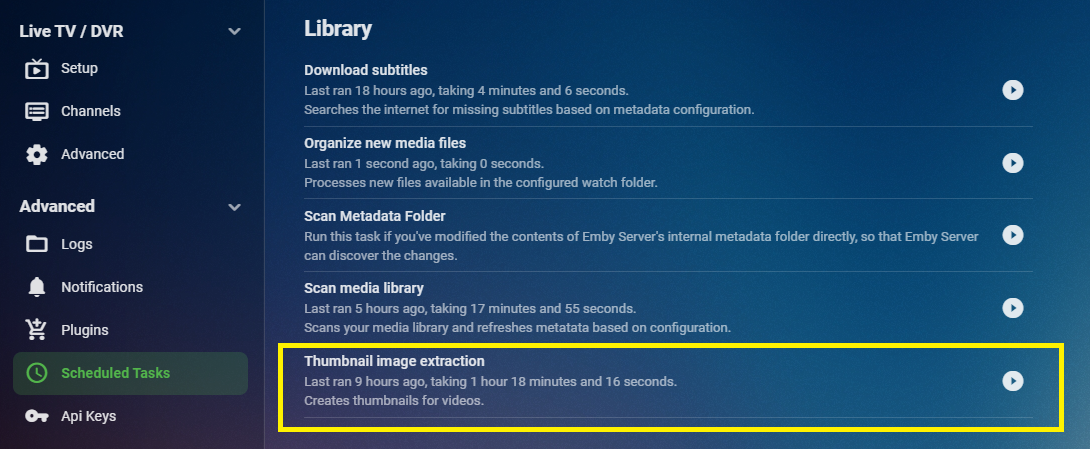
No, he means the far left menu itself.
 1 point
 -
Thanks, was just editing own post. Tbh, I find it strange that MrMC is having issues with those, as it is officially supported Kodi artwork-naming convention? Edit: https://kodi.wiki/view/Movie_artwork Edit2: As it is listed at MrMC as well: https://wiki.mrmc.tv/index.php/Naming_Artwork_files https://forum.mrmc.tv/viewtopic.php?t=54201 point
-
Hi, Yes Emby names then poster.jpg.1 point
-
1 point
-
Left hand sidebar, scroll down.1 point
-
@cayars/ebr: Great idea! Easy to do. (I don't really have to copy the NFO. I can export this at will from My Movies.) @Luke: awesome!1 point
-
I believe part 2 would automatically play nevertheless, once part 1 runs it's course, but still, if you prefer them listed completely separately, you can rename those pt1 and pt2 to distinctive suffixes, i.e. something like First part and Second part or something similar, that should produce desired results?1 point
-
I would change that search to "<mpaa>Rated " -> "<mpaa>" to avoid replacing it in other places (e.g. summary).1 point
-
Hi, thanks for reply. I did another workaround: Create a collection "2017x", attach the home videos to this collectoin and rename "2017x" to "2017" when ready. This works, but I am afraid, I will have to redo this after every library scan. Next time I will remove the "It"-Collectoin as you recommended.1 point
-
Sure thing. NFO files are a life saver in this regard for tracking things you manually change which can't be gotten from a meta-data provider!1 point
-
Hi, no idea why you see this happening and would need screen shots and logs to try and figure this out. But as a simple test could you try something for us. Go into the IT collection and remove both movies from it. (3 dot menu on each movie followed by remove from collection). Do the same for any 2017 or 2019 collections that might be in place. Now without these 3 collections present on your system what happens if you try to add a couple of the 2017 home movies to a new collection you name 2017 Collection? Same with home movies from 2019 creating a new 2019 Collection?1 point
-
Correct - if you don't need to use Parental controls, then the rating issue shouldn't have an impact.1 point
-
Can a mod move this to it's own thread? Before diving in any deeper can you go to your Library menu in Emby and verify the library type used for this TV Show library? Does it show as type "TV shows" or "Mixed Content"?1 point
-
doesn't look so, no. At least I'm able to identify movies in my movie libary on mobile, fine.1 point
-
Dear Cayars, Many thanks for pointing out the .NFO advantages; I've activated them on all my collections and entered them manually: thanx! Regards, Peter1 point
-
6.15 beta is running flawless here.1 point
-
Just to chip in, Do it m8, emby premier lifetime. I did after 4 ish months of running to get the feel. i had a nose at plex and jelly finn, and all i can say is they are not a patch on emby. im old school though media portal and media centre back in the day, stopped years ago. was looking for solution, tried kodi too TBH kodi was good too. but i feel not a patch on emby. although kodi maybe better now too. just my 2ps worth, anytime i post the staff here are very helpful, No regrets & happy inlaws connecting in to stream.1 point
-
@cayars Thank you very much. It works. Sorry for my bad english. Its easyer for me to understand what you wrote, than to write myself. Da auch unter der Diskstation beim Einbinden von Bibliotheken steht: habe ich das auch so versucht. Mein Fehler. Gruß Eddie1 point
-
Try these two: https://www.nvidia.com/Download/driverResults.aspx/180475/en-us https://www.nvidia.com/Download/driverResults.aspx/175539/en-us PS: ffmpeg process taking 44GB is very wrong..1 point
-
Hi, this option simply sets the maximum upper limit. It does not guarantee transcoding will not occur. What you could try is having your users configure their quality settings manually if you find that auto is being too conservative. As a last resort you can always restrict access to transcoding via user permissions, but please be advised this will cause playback failures when it is actually needed.1 point
-
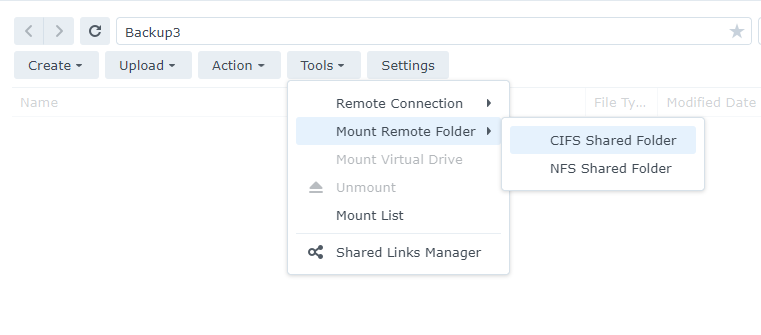
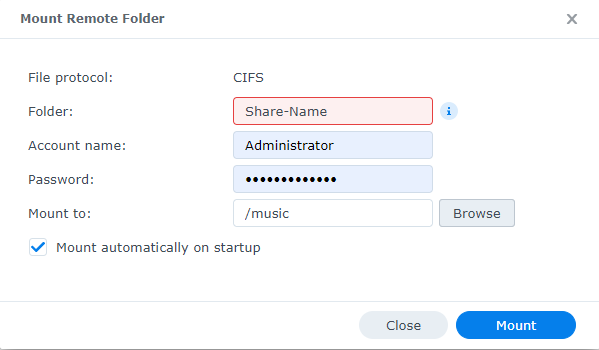
@Eddie6411284 Synology handles network mappings differently than Windows. On Synology you do not use \\Server\Share as you can on Windows as this does not work. On Synology everything needs to reference a local mount. This doesn't mean you can't have info stored on your other NAS or even windows. What you need to do is setup a remote mount point. On your 718+ go to File Station. Create a mount point for your music which could be /volume1/music. On the right side panel click the tools menu, then Mount Remote Folder and choose CIFS Shared Folder like this. Fill the form in using a valid login name and password setup on the DS209 NAS. Click the Mount button and assuming you did everything correct will have mounted this to the 718+ and can now use it like any other local folder. Let us know how you make out, Carlo
 1 point
 -
This is a very odd one - I'll look at it tomorrow as it's late in the UK, but the remote server is defo listening and is replying via any VPN connection I use, but is getting no response (time out) from my own public ISP IP.1 point
-
This is correct, yes.1 point
-
That question was for @ebr, as I suspect he was trying to leverage a problem that has been identified in some LG televisions. Paul1 point
-
ping me your fqdn via pm - (I don't need a login or anything) and I'll see if I can connect via my fireTv stick .. this seems very odd !1 point
-
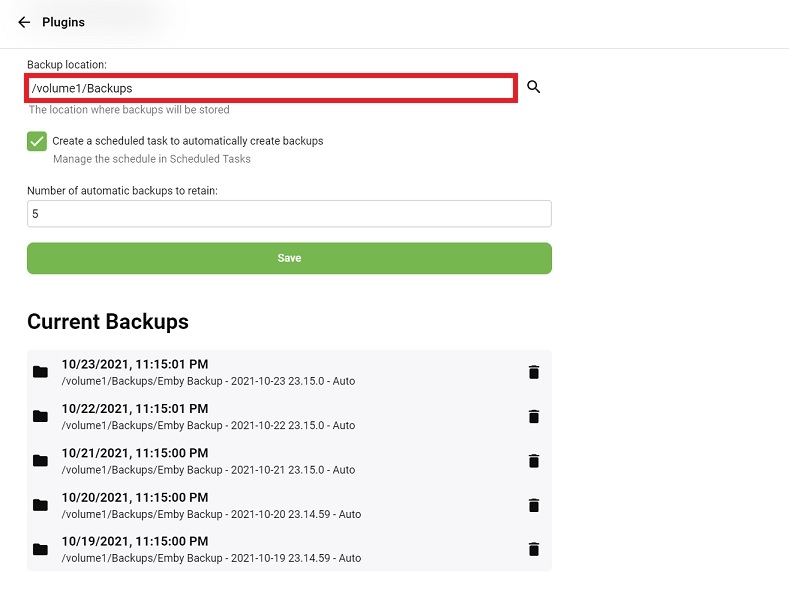
It's been a few years, but this is how I restored from my old Windows Backups The pic of the plugin settings below is how mine is setup From your post above I believe yours should read "/volume1/Emby Server Backups" Move your old Windows backups to that location You might have to run a scan, but your old Windows Backups should then be listed under "Current Backups" Then just click on the Backup you want to restore from.
 1 point
 -
Hahaha, sorry for being such a newb!! Yes, that is exactly what I want I hadn't noticed the Recording library as it was the last library in my list and I hadn't scrolled far enough right or down to see it yet! Thanks for that!1 point
-
Yes they'll show up in docker, but you'll also need to modify the docker run command so that the server will be granted access to the new pets ports that you choose.1 point
-
I understand what you're asking. It should happen automatically with a guide update. That's why I was asking if you refresh the guide does it it pickup the changes to the tuner. Sorry I was not more clear previously on this.1 point
-
They do work similar in nature for a lot of things but just like Ford vs Chevy go about things differently at times. In the case of music we are pulling the data from the tracks directly. This allows you to use many different music specific tagging programs to tag your music anyway you want with as much detail as possible and Emby will use this without pulling in info from 3rd party sites. It takes the guess work out of how/where the data comes from. If data or graphics are missing for example it allows you to know the exact reason (doesn't exist in the tagging). So if you're music is tagged well, Emby will be great for you use. If you haven't tagged your files properly then Emby isn't going to be great for your music. All the power to have a great music library is in your full control this way.1 point
-
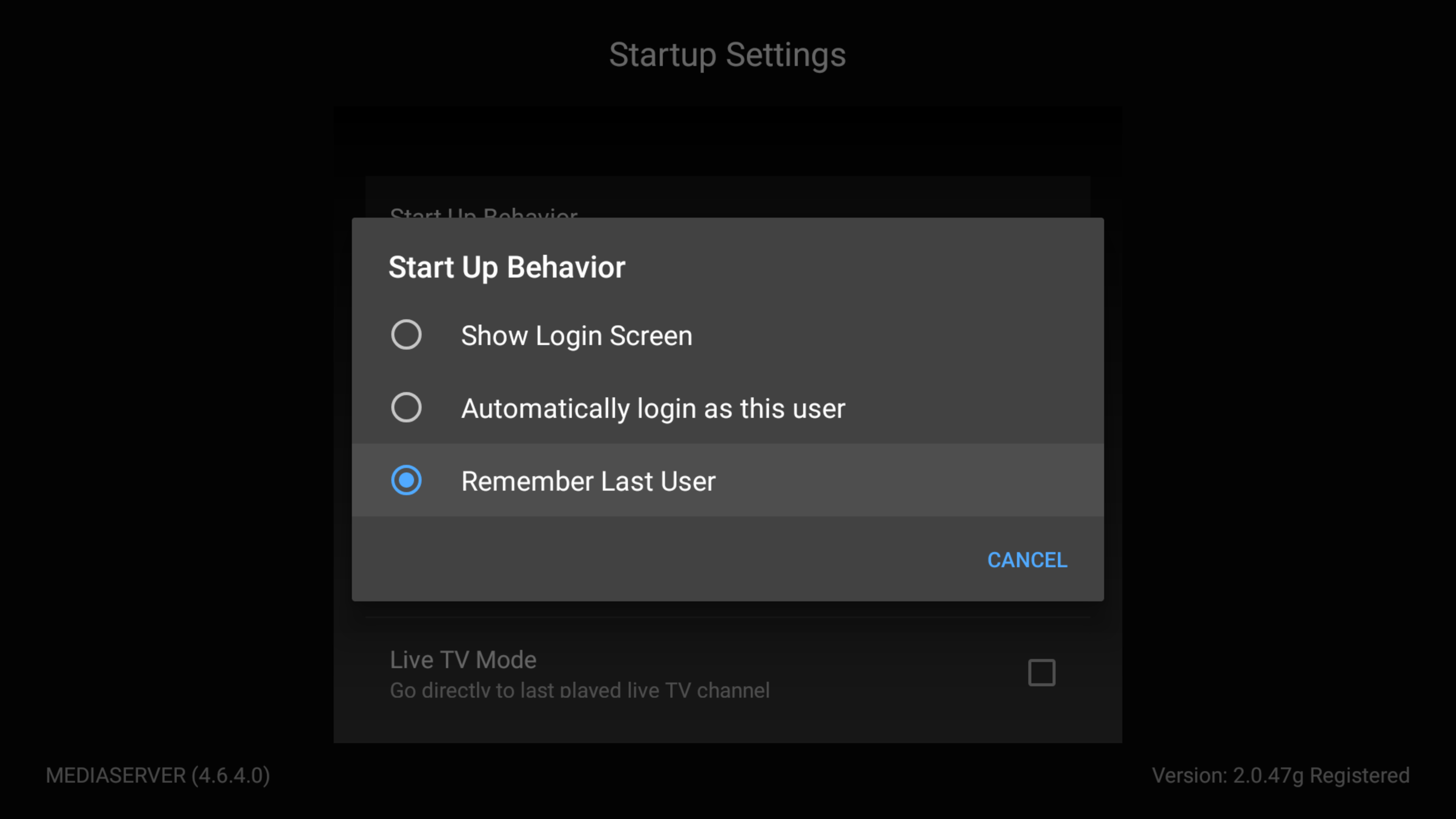
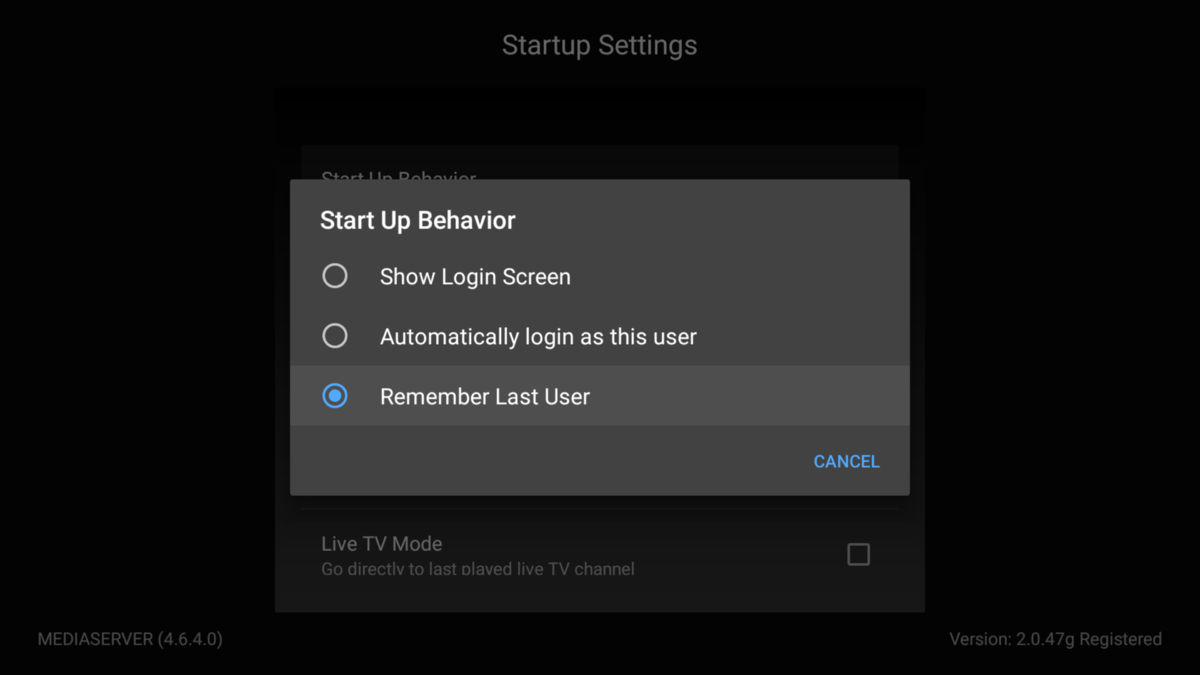
FWIW, I can also second that behaviour, Remember Last User logs me into last sever used. However, if I understood correctly: OP wants default server option, i.e. always logging to the same one, regardless of last session?1 point
-
The setting behaves properly for me. Are you sure you don't have yours set to "login as this user"?
 1 point
 -
If I download a file from Audible, the Narrator is listed in the downloaded file's Composer tag.1 point