Leaderboard




Popular Content
Showing content with the highest reputation on 10/22/21 in all areas
-
So this probably not a fair comparison at this point in the Beta - you are the initial set of Beta Testers and this is not a 'Released' function within Emby. Having said that, in my pretty comprehensive testing thus far - accuracy has been almost perfect for the majority of shows. Emby Introskip does however already have some advantages over Plex, and that is the ability to modify the Intro times should you need to. It will also have another yet to be announced feature that I don't believe even Plex has yet. However, one major advantage Plex has over Emby is the actual integration of the Intro Data into the Clients - this is 'coming' but we need confidence that the Intro data gathered warrants integration into the Core system - this is where you all come in - so thanks for helping to test and validate we are on the correct path.3 points
-
I would love the option to store Emby's database in MySQL - I have a setup that serves around 30 people and I feel that there would be real performance gains by using a proper relational backend over SQLite (I'm presuming). On top of this it would make life easier for me when reporting on watched status a cross users.2 points
-
The author for the plugin agree to add option to disable the "smooth scroll" that act as "home" keyboard press, meaning, jump to the top instead of scroll to the top. When he dose, I will install it back.2 points
-
New version available: Delta changelog: - fix progress updates - remove smb and http from sources.xml - fix node update on library removal - fix translations - add db locks, especially for Android -> thread safety - fix folder remove - change landscape artwork for movie content - update nodes (following Kodi "standard") - fix playposition on remote controlled playback - fix Apple TV node issues - add episode sorting for dynamic content Currently it's not in Kodi repo, I wait for feedback before upload.2 points
-
If you're paying a monthly fee, you're paying it for premiere. There is no xbox app-specific $5/month charge. That isn't a thing. If you have premiere then you've ALREADY PAID for playback on the xbox, regardless of whether you're using the browser or Emby theater..so you have absolutely nothing to complain about. You were paying for premier and it let you use the xbox as a playback device. You are still paying for premiere and it's still letting you sue the xbox as a playback device. There has been no change.2 points
-
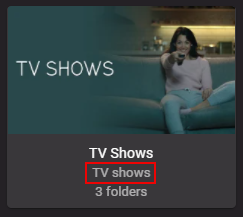
Go into your Library settings and confirm your 'TV Shows' library type is set to 'TV Shows' and not 'Mixed Content'
 2 points
 -
No known issues found. Upgrading is easy while preserving files and apps2 points
-
Hi im also having the same issue on my Apple TV 4k 2021 using emby connect Emby app provides the pin the pin is confirmed on the web browser on another device then the Emby App on Apple TV stays on the pin provided (showing the pin number) forever, I even waited more than 1h just to see if it was a delay issue. I there any real solution for this ??? I have the latest Emby app from the Apple TV app store.THX1 point
-
I thought this might be useful if someone else comes across the same issue. I'm a bit of an edge case since I use docker and I create a pkcs12 cert bundle from certs and keys extracted from traefik, but the issue I had was not related to that. Since Lets Encrypt intermediate expired my emby server has been presenting an expired intermediate, but the `p12` file I'm generating has the correct new intermediate, I narrowed it down to the x509stores in the docker image had cached the intermediates, so since the issuer hadn't actually changed it never refreshed the intermediates and just kept on trucking with the invalid certs. Long story short, if you run docker and have some kind of lets encrypt certificate and you're getting `NET::ERR_CERT_DATE_INVALID` from chrome (Firefox ignores the bad certs, so I think the only affected browser is edge/chrome on macOS) then either remove and recreate the docker container (it uses `/tmp` for home so that will clear it) or docker exec -ti emby-server sh -c 'rm -rf /tmp/.dotnet/corefx/cryptography/x509stores' docker restart emby-server1 point
-
So this ISRG Root X1 should fix the LG TV problem ? Thanks Mook1 point
-
Yes, that page is on my list to change a bit. The directions are still fine however even though it shows an older location. It's quite different on every OS besides windows anyway which is part of what I need to update. There are a couple other KB articles the same way when any mention of the ProgramData" folder comes up (only exists on Windows).1 point
-
We've resolved the issue with the Emby Connect pin and we'll be getting an update out for it. Thanks.1 point
-
In a check just now, starting on my desktop, the web client played BBC1 SD, but hung when subtitles were requested; it also just hung when I tried BBC1 HD at all. Theatre (Store and Desktop) was OK with BBC1 SD, and with HD started it in about 5 seconds - but requesting subtitles made the Desktop version crash (Store version was OK). This time I tried my sticks as well. The Roku (Streaming Stick +) took 18 seconds to start BBC1 whether SD or HD, and both showed subtitles (hooray! - they still didn't last time I tried). The Firestick 4k started BBC1 HD in two seconds!, and showed subtitles too; however, on that device BBC1 SD just hung for ever with a rotating circle (like the web client). On my pads, the Android was the same as the Firestick (no big surprise there, I guess). The iPad is OK with BBC1 SD, but on HD requesting subs makes it hang. The iPad is also very unresponsive when playing live TV - typically it takes five seconds to bring up the subs menu after touching the icon, for instance. So it's still rather a mess, I'd say!1 point
-
1 point
-
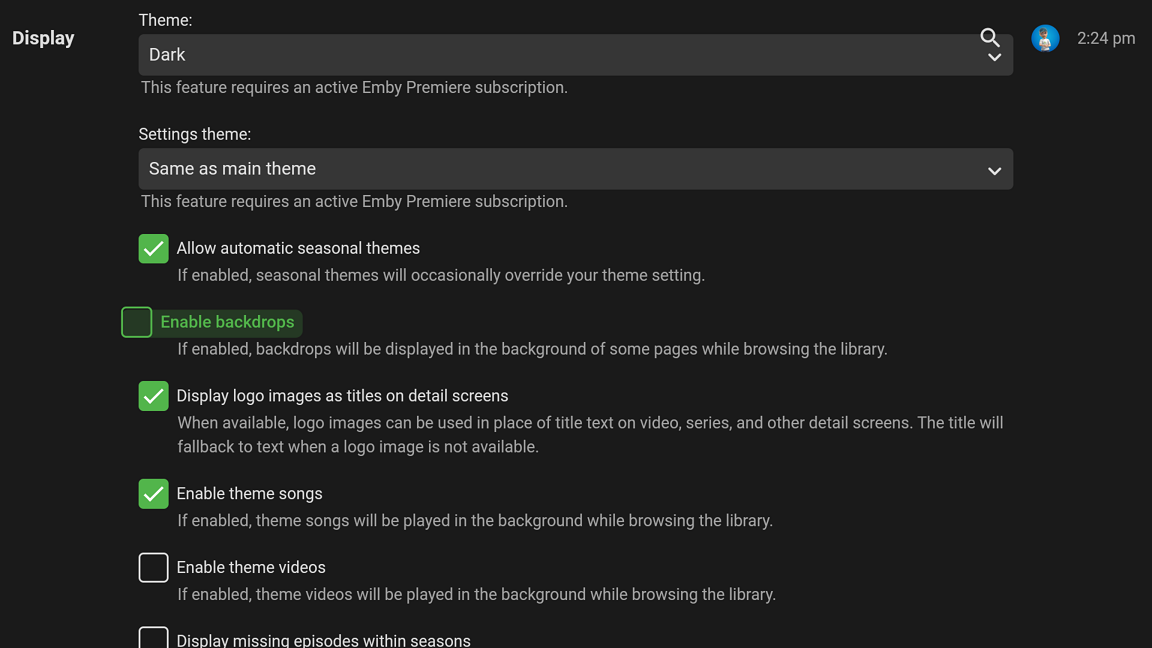
Ahh, but isn't that what the "Enable theme videos" option does at the bottom of my pic? Maybe not. Pretty much the app looks exactly like the one on the Xbox. I would just give it a whirl and see as I only use theme music.1 point
-
Is this what you're looking for? I never use the option myself.
 1 point
 -
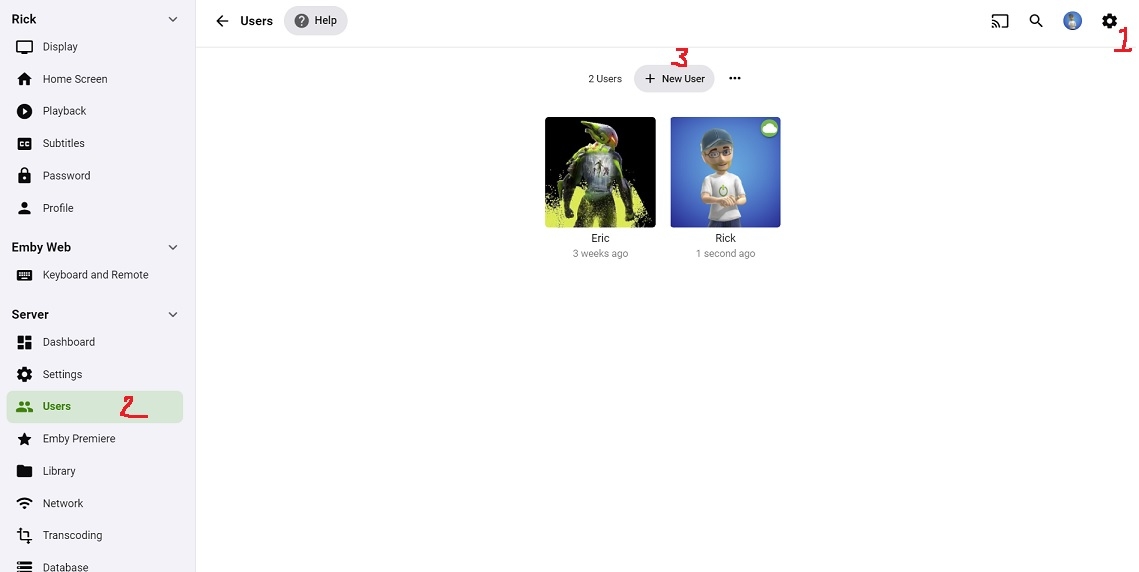
Well I'm still going to post this pic because I spent all that time creating it. From Web server click the Gear icon in the upper right corner Select users Click new user
 1 point
 -
FYI sharing your content with the general public is a violation of our terms of use. We think we have identified this issue and should be able to get a fix out soon. Thanks.1 point
-
@cayars, paths in the above-refrenced KB article need updating.1 point
-
It’s quite a big issue a big deal if guys can’t connect via url means they can’t use the app1 point
-
@gillmacca01 I am on QTS 5.0.0.1828 und Emby 4.6.4.0. I actually have two Qnap servers (both on the same QTS 5 now) On one server I first updated to QTS 5.0.0.1828 and did than install emby. On the other server I had emby 4.6.4.0 up and running under QTS 4.5.4.1800 and did than update QTS to 5.0.0.1828. Both ways worked perfectly for me.1 point
-
Hi, no this is not expected behavior. We need to add queue management support into the plug-in. Thanks.1 point
-
Just want to confirm that landscape artwork for movies is working fine after a database repair.1 point
-
I can fully confirm this. It's working perfect here.1 point
-
Try installing the latest version of the server using the latest version of qts 5.0. For us this is working now without having to make any changes, so it's possible qnap fixed something in qts.1 point
-
Will check it again..1 point
-
hey @chef, this is what I use and it seems to work fine for me on caddy v2 { email name@address.com } # Site Name my.domain.com { encode gzip log { output file D:\caddy_logs\emby_access.log { roll true # Rotate logs, enabled by default roll_size_mb 10 # Set max size 10 MB roll_gzip true # Whether to compress rolled files roll_local_time true # Use localhost time roll_keep 7 # Keep at most 7 log files roll_keep_days 7 # Keep log files for 7 days } } reverse_proxy localhost:8096 tls { issuer acme { preferred_chains { root_common_name "ISRG Root X1" } } } }1 point
-
I have squashed this in an upcoming release. Thank you1 point
-
Mark this solved, there was something wrong with the installation, after i installed again and synced, everything is ok, i now have the option to sort by episode and is selected by default. Thanks a lot for your help!1 point
-
Recently had to switch Emby over to ZeroSSL cause of some outdated Root certificeres on some LG, Samsung TVs and very unknown when they decide to update those devices so LetsEncrypt work again. Have to go over to https://zerossl.com, create account and get your personal API key. Caddyfile example: emby.example.com { tls { issuer zerossl "APIKEY" } etc... etc.. reverse_proxy 127.0.0.1:8096 { } encode gzip zstd }1 point
-
I uninstalled emby next-gen, restarted Kodi, installed again. It is syncing all libraries now, i will check when it has finished and report back to you, I am using Xiaomi Mi-Box S.1 point
-
I confirm that it does not work for me either.1 point
-
There are few topics on this but but have been using since they pushed it to Insiders back in June. Overall have not noticed any performance differences, just a matter of relearning where options have moved to, context menu deficiencies, start menu. But in the end that has nothing to do with Emby.1 point
-
Hi, I have never connected emby to my arr's doing it now! hopefully this will make a difference, thank you!1 point
-
By the way as soon as the Chromium-based webview is available on Xbox, then the app will also be Chromium-based and most of the Xbox-specific issues that we're currently seeing will go away in one fell swoop. The browser is there of course but the webview is not yet there for developers.1 point
-
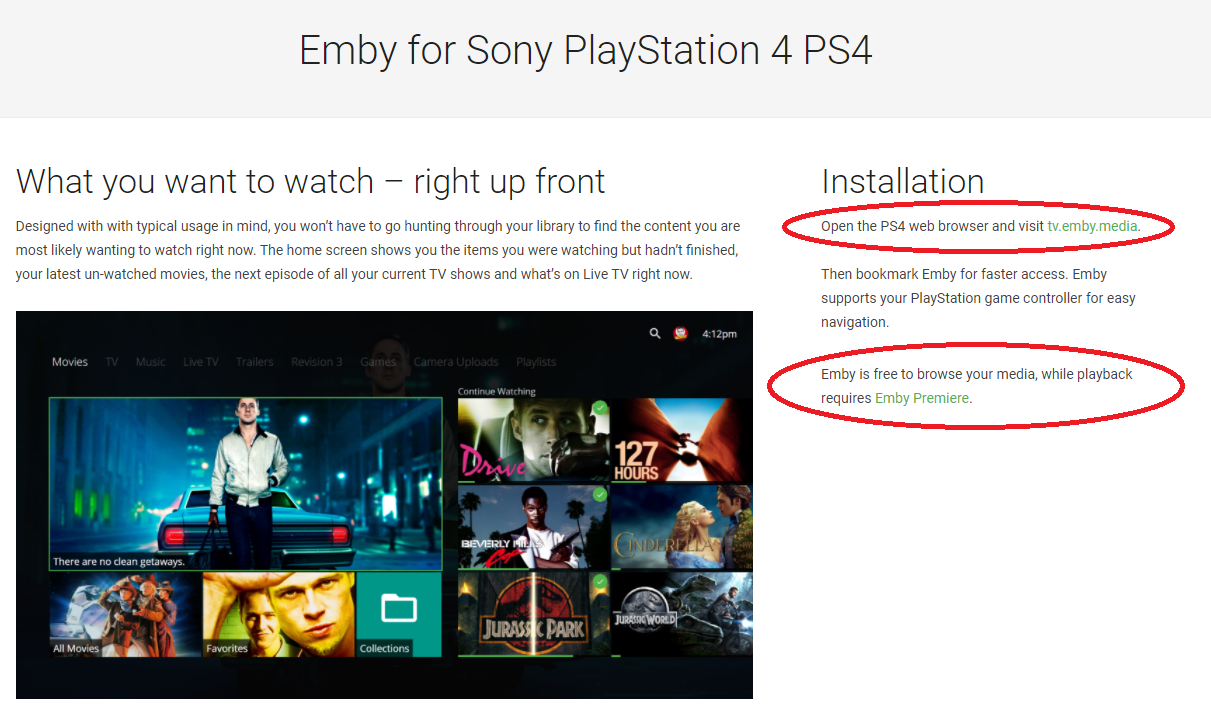
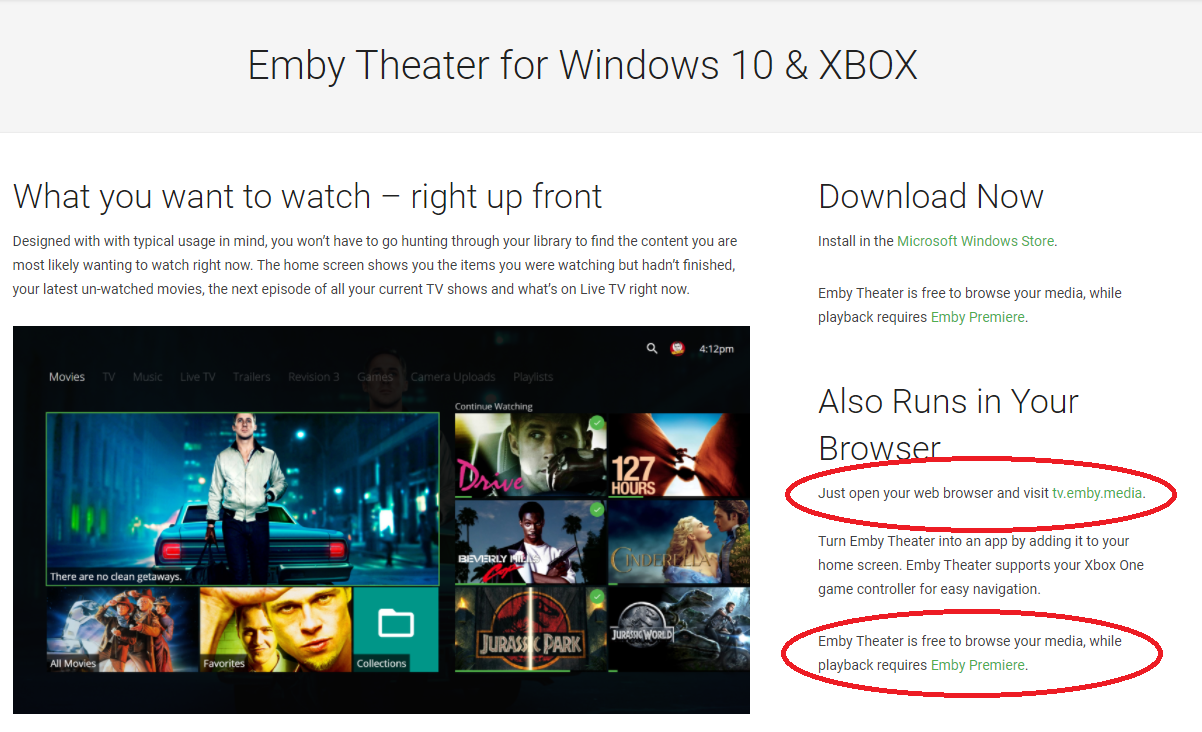
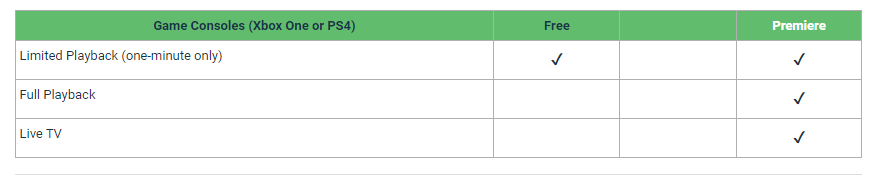
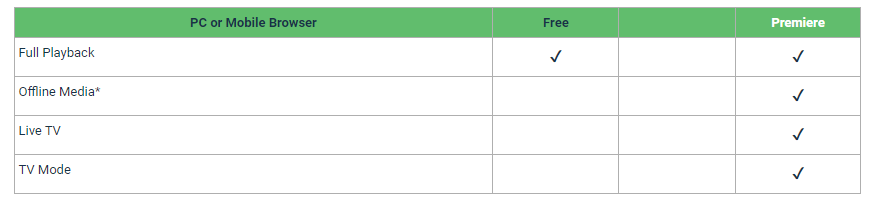
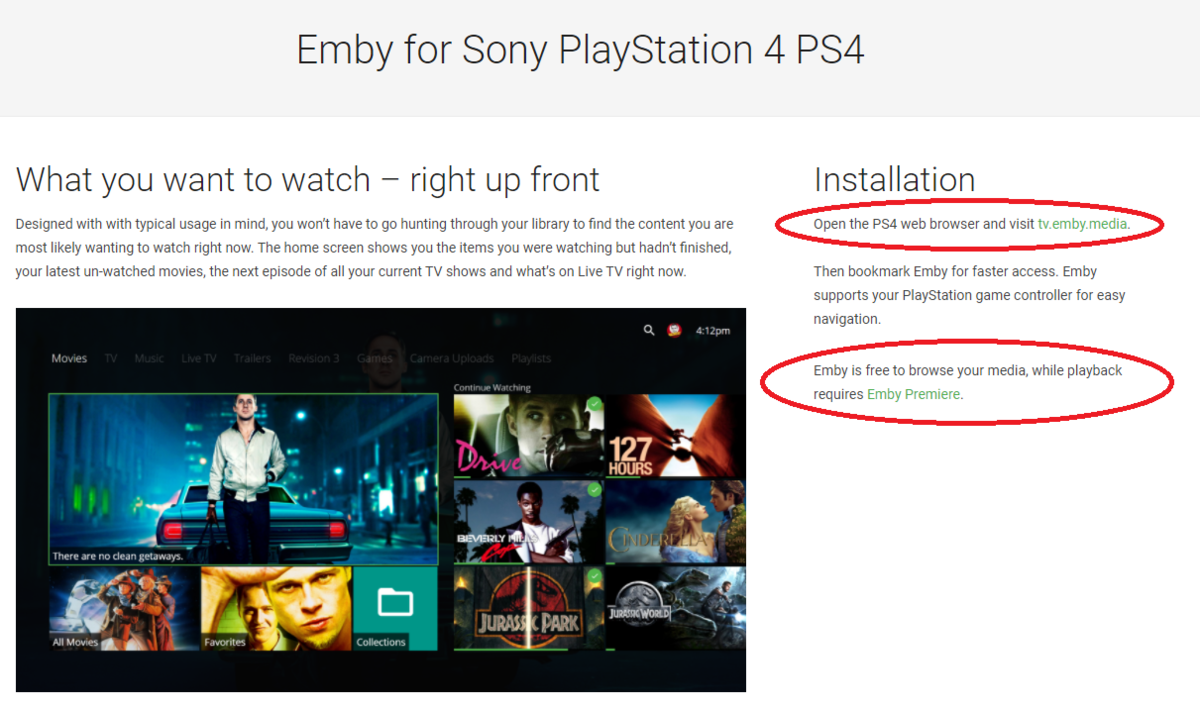
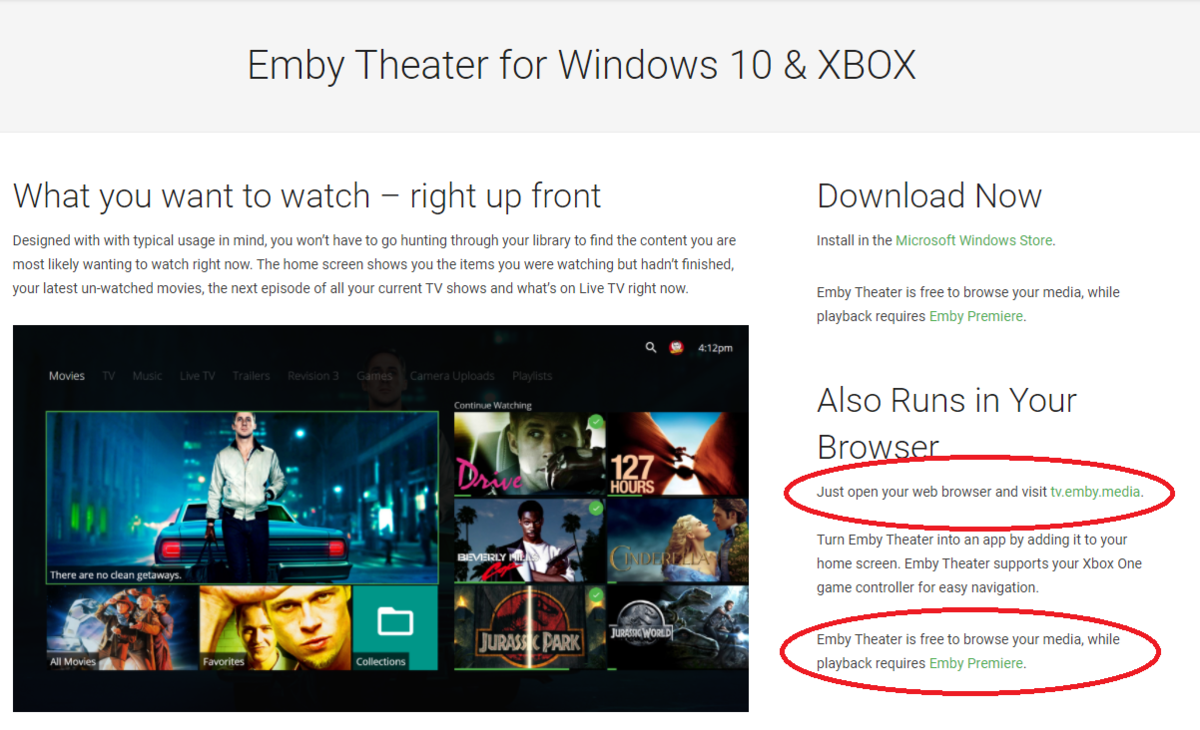
I'm not really sure where the issue is or how we can make it more clear looking at our feature matrix: https://support.emby.media/support/solutions/articles/44001173099-emby-premiere-feature-matrix That clearly states the Xbox One and PS4 require Premiere. That says nothing about the client used on those consoles as it's the console itself that requires Premiere. In the section on browsers it says nothing about any browser running on any platform but specifically says PC or Mobile browser. Neither the Xbox or PS4 is a PC or a Mobile device. If you look at our specific app download pages they are crystal clear as well. For Xbox you can either download an app or use tv.emby.media which is a browser based UI designed for TV user vs desktop. It clearly says you can browse your media, while playback requires Emby Premiere (app or browser). The PS4 is the same as Xbox only it requires use of tv.emby.media as there is no downloadable app for it. The page is very clear that using the the PS4 web browser for playback requires Emby Premiere. We try hard to be clear in our documentation regarding what is free to use and what requires an Unlock or a Premiere License. We are open to making changes to these pages if needed but it's already pretty clearly stated that both PS4 and Xbox require Emby Premiere for full playback.
 1 point
 -
Can't make this guy jealous Gotta have those decimal places. LOL I think aspect ratio could be rounded to 2 decimal places and fps at 1. Would make it a little cleaner looking.
 1 point
 -
Phew, luckily you know that FPS to the 14th decimal. And that Aspect Ratio on 16th decimal surely comes in handy (yes, I counted them ). Can't imagine what would one do without that.1 point
-
Hi Guys, I recently moved from Kodi with MySQL for lack of proper multi user management and server side support, I have to say I'm impressed with Emby. Together with the Kodi Plugin it really takes the solution to a whole new level, count me in among the supporters! One feature I would like to see is the ability to recommend movies or shows to other users: I share my Library with close friends and family but it is a big library so they are always calling me to recommend them a movie to watch. It would be really cool if after watching a movie I can click a Recommend button and choose the users I think would like the movie, then it is displayed on their suggested movies at the top with the name of the user who recommended it... Sorry if there is something like this is already there, I am new to the interface and don't fully know it but could not find such feature... Thanks!1 point
-
How is "search relevance" determined? Because it seems to be pretty random to me. Would it be possible to do what Google and some other search engines do, and allow a quoted string to request an exact match? So searching for Pi would mean "give me everything that begins with Pi" and searching for "PI" would mean "give me only movies with the title PI".1 point
-
Seconding this. Either make this a permanent plugin or bring it inline with emby in the same way TV Shows are already doing1 point
-
Hi developers Still not enough people asking for this!?? Nobody understands why this is not implemented. Thank you1 point
-
Fantastic, that sounds very good! I love this plugin and with this options it will be getting even better and better!1 point
-
I'd think the most robust would be a list of regular expressions to label mappings that are matched in order. For example: \.2160p\..*((DIRECTOR|THEATRICAL|EXTENDED)[^\.]+)\. → 4K \1 \.2160p\. → 4K \.1080p\..*((DIRECTOR|THEATRICAL|EXTENDED)[^\.]+)\. → HD \1 \.1080p\. → HD 1080p \.720p\. → HD 720p \.(576|480)p\. → SD This could also be made into a list of expressions that are matched and all collected into a complete label: \.2160p\. → 4K \.1080p\. → HD 1080p \.720p\. → HD 720p \.(576|480)p\. → SD \.HDR\. → HDR \.((DIRECTOR|THEATRICAL|EXTENDED)[^\.]+)\. → \1 The resulting label could be "HD 1080p HDR EXTENDED", for example.1 point
-
Very good Idea! But I prefer more „labels“, not only 4K and HD. Also the Versionname like „Extended, Directors“ would be nice... Thanks!1 point
-
Hi @@MikePlanet, any chance we could customize the resulting version names? Without Emby-supported suffixes the versions end up either the same ("Title") or it extracts some piece of the filename. Emby has all the info about the file, so it could easily say "4K", "HD" depending on the video quality. It could be an option in the plugin, I could try and help implementing it if you'd like?1 point
-
Really? Do you really think that there ate not enough demand for a feature that should come by default since the early versions just like plex does. There are a lot of us who pay for your software and don’t want to be dependent of 1 or 2 votes to see a good feature implemented. Don’t you think is a good idea? If so , why don’t you just implement it?1 point
-
I would definitely like this feature. I want to use MadVR, the internal player won't communicate with my projector and automatically change lens memories and lamp intensity.1 point
-
i'm sick of telling the same things over and over again i will simply tick this off as "will never happen" and forget it1 point
-
Haha I'm not talking about Kodi - this has nothing to do with Kodi! Emby would use MySQL itself as a database server and then you could query it without writing an API wrapper to do so. Nearly every analytical tool out there supports SQL. Essentially you could query the database with a simple statement like: select media.*, watched.* from media Left join watched on watched.mediaid = media.mediaid Left join users on watched.userid = users.userid Where users.userid = 1 and media.title like '%show%' But mainly it's about the performance gains you'd get over a flat file database. All of your clients would interact with Emby in exactly the same way - they'd have no knowledge of the MySQL server, it would be invisible behind Emby.1 point