
Leaderboard




Popular Content
Showing content with the highest reputation on 10/15/21 in all areas
-
As long as it's all behind a user selectable option.3 points
-
I have uploaded version 3.7.5 which updates additional fields to improve the searching functionality on series and movies in Emby. Thanks to @Luke for helping me identify the required changes https://raw.githubusercontent.com/wiki/sub3/NextPVR/utilities/downloads/LiveTV.Plugins.NextPVR-3.7.5.zip NOTE; The plugin API will change and this must not be used with Emby V4.7 and above Martin2 points
-
SPOLIER ALERT !!!2 points
-
This topic wasn't actually about the chapter thumbs. It was about episode thumbs in "next up" and "more from season x". But, the chapters images probably should also be hidden with any sort of spoiler option, I agree.2 points
-
Thanks not using Emby makes it a bit hard to code. I get it now movies are recorded programs and episodes are recorded programs in their respective views. I was curious about what an episode was. So to close this off yes it works well I can drill down to a like named program (series or movie) and then further to the alternate showings of the specific upcoming episode or movie. Martin2 points
-
Emby for iOS 2.0.9 has been released and now includes Apple Watch support! Enjoy the following features directly on your Apple Watch: Play music on your Apple Watch Control playback of your iOS device from Apple Watch The new release also includes improved CarPlay support, new options for control of subtitle appearance, and more.1 point
-
I have noticed there is no way to configure the path used by Auto-boxset pliuging to create folders to hold created collections. Given this is, by default, under the Data folder within the install folder of Media Browser server, and the fact this is on my SDD drive, it would be great if this folder may be overriden to a custom path (the way other folders may be configured via the Control Panel).1 point
-
Any way to add a song play count like in itunes? Thanks.1 point
-
I would follow this topic. EMBY ATSC3 - Live TV - Emby Community1 point
-
Sorry if this has been asked elsewhere, I couldn't find the answer. In the attached image, I was wondering if there is a way to hide "Live TV" from the "My Media" list. It's a bit redundant since I can add "Live TV" in a Home Screen section. I've seen others ask, I'm not sure if it's a feature yet, but can you turn off the "On Now" section of Live TV? I highlighted in red the two item's I'd like to hide or remove. Thanks for all the help everyone, loving Emby premier so far.
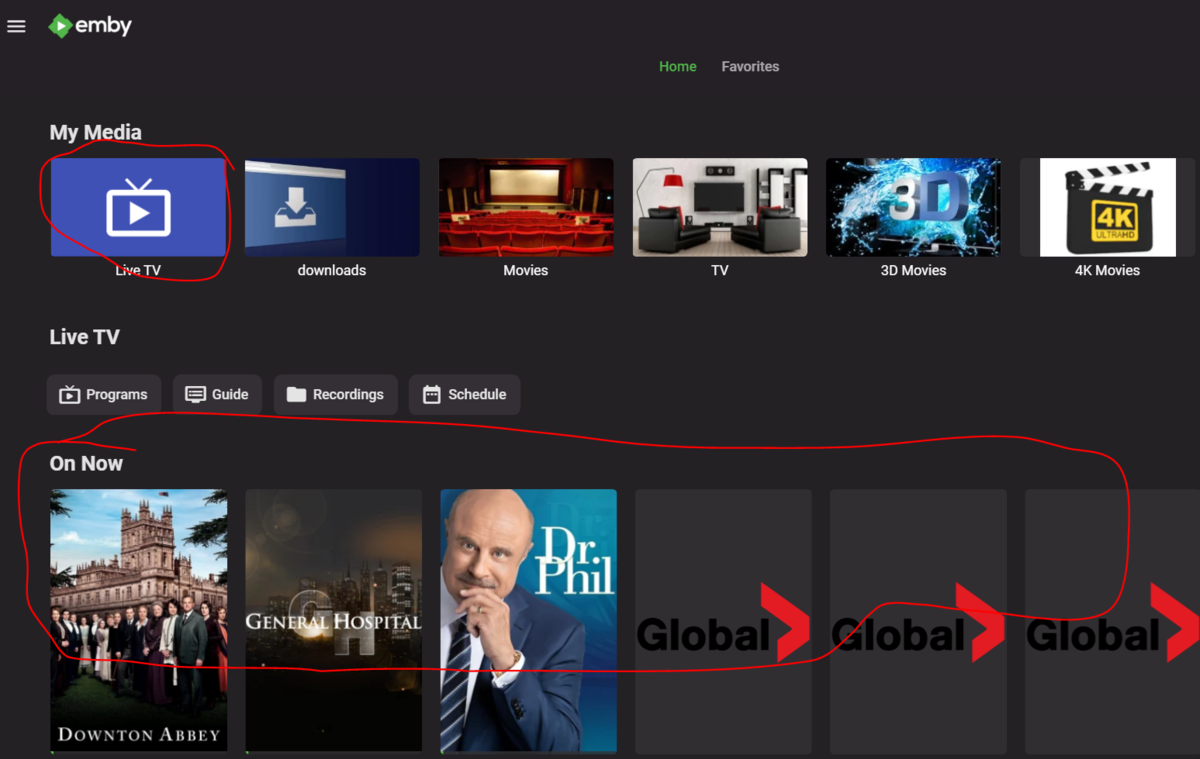 1 point
 -
Use tags. Great community-made bulk-tagging tool (latest version is usually between last posts on the thread):1 point
-
OT: You need to apply the inotify patch to your Synology. Looks like most libraries show this. 2021-10-15 02:14:50.790 Error LibraryMonitor: Error in Directory watcher for: /volume1/video/TV Shows *** Error Report *** Version: 4.6.4.0 Command line: /volume1/@appstore/EmbyServer/system/EmbyServer.dll -programdata /var/packages/EmbyServer/var -ffdetect /var/packages/EmbyServer/target/bin/ffdetect -ffmpeg /var/packages/EmbyServer/target/bin/ffmpeg -ffprobe /var/packages/EmbyServer/target/bin/ffprobe -nolocalportconfig -ignore_vaapi_enabled_flag -pidfile /var/packages/EmbyServer/var/EmbyServer.pid -updatepackage emby-server-synology7_{version}_x86_64.spk Operating system: Linux version 4.4.180+ (root@build15) (gcc version 7.5.0 (GCC) ) #41890 SMP Thu Jul 15 03:43:42 CST 2021 Framework: .NET Core 3.1.13 OS/Process: x64/x64 Runtime: volume1/@appstore/EmbyServer/system/System.Private.CoreLib.dll Processor count: 4 Data path: /var/packages/EmbyServer/var Application path: /volume1/@appstore/EmbyServer/system System.IO.IOException: System.IO.IOException: The configured user limit (8192) on the number of inotify watches has been reached, or the operating system failed to allocate a required resource. Source: TargetSite: No Stack Trace Available This topic or this one1 point
-
Just to confirm, I asked on the SD forums also. https://forum.silicondust.com/forum/viewtopic.php?t=760311 point
-
Hello, I've searched around and cannot appear to find such a solution to this within Emby or on the forums thus far. Similar to how iTunes will count how many times you have listened to a certain song, it would be great if there was some way to track such information within Emby. Personally I quite enjoy seeing how many times I've listened to certain songs / albums over the months and years. Currently I dedicate to listening via iTunes but I'd love to switch to Emby full time if said functionality was on offer. Maybe this is too niche? I'm not sure. Interested to see what others think.1 point
-
I think it syncs up for me. Are you deleting the downloads before you're back online? I have the downloads set to only download episodes I haven't watched, so when I reconnect it syncs played status them grabs the next set of episodes that I have t watched.1 point
-
Great! I appreciate the info1 point
-
Hi All, after some deep testing and driver debugging the culprit was a driver called "Air Display" using "Air Display Microsoft Corporation - WDDM v1.1" driver. Device instance path: PCI\VEN_1337&DEV_BEEF&SUBSYS_FEEDCAFE&REV_00\3&11583659&0&0000 It's on the PCI Express Root, and it's not an add-on card, so maybe part of motherboard? Apparently this driver was installed no too long ago, which probably correlates with when this started happening. The driver was removed, all plugins were re-enabled, Ombi server back on, and all seems stable with TV on/off, as well as RDP open/close, and even remote app like Teamviewer. Topic can be close, thanks for the assistance! Emby continues to be rock solid, and it's 100% my fault!1 point
-
It is using a different player with a different buffering mechanism. A cost of that is your seek/pause buffer is much less.1 point
-
Just to clarify, the next release of the server has improvements to burring in subtitles with transcoding, when hardware transcoding is used. It will not be a miracle worker though, and in general, burning in subtitles is always going to be a resource-intensive process, and text subtitles will always be more efficient.1 point
-
Just for closure. The security edge software supplied with a comcast business router, was the root cause. I had always had it 100% turned off, and relied on my own internal firewall for protection. Somehow, a version about a week ago, got enabled. Then on top of that, for some reason, it is mucking with the SSL challenge/response system. Dont know how, dont know why, dont really care When Its enabled at all, the url fails. When disabled it works perfect. Hopefully if anyone else has the same issue, knowing this will help out a bit. If there is a "fixed" tag, please feel free to mark it as such @cayars1 point
-
4k direct stream question for live TV - Emby Server - Emby Community I have similar questions about Verizon 4K. I have also noticed that some broadcasts are better than others. Even at 1080i, which I also believe is what the prime caps out at I can see a big improvement in PQ. The only issue is that some broadcasts have what look like compression artifacts and others dont.1 point
-
Yes, you can add multiple subdomains as CNAME pointing them to your domain (this one as "A" type proxied by cloudfare), and caddy will receive the incoming connections and redirect through all your services, all the services from those subdomains will get the proxy benefit.1 point
-
Yes, this would be some sort of "spoiler" option. I would think it would hide overviews, thumb images, chapters (what else?) for any unwatched episodes.1 point
-
I have the image enhancer enabled. And after a local database reset everything is fine. Thanks1 point
-
@muzicman0 is correct in everything he said. You still have the IP on the WAN side of your router that your ISP gives you. A VPN connection does not change that at all.. With the VPN turned on your routing packets out your normal WAN IP to the VPN server via a tunnel. From there your packets are dumped on the Internet. If Emby server is running behind a VPN it can pick up this "new" external IP but that doesn't change the fact you still have the same IP on the WAN side of your router/modem. However in order to get Emby to function behind a public firewall like this you have to setup port forwarding for the VPN which not all VPN providers support. Assuming you do setup port forwarding on the VPN connection you now have two IPs that can be scanned. This type of VPN doesn't really help you in any way with security. A much better solution is to setup a free Cloudflare account with your own domain. You can use your own cert or a Cloudflare generated cert. I for example have my setup using port 443 in Emby for the public https port, my domain and the pk#12 cert I converted from the Cloudflare pem cert. Now on my router I ONLY open port 443 to my Emby Server AND and I only allow incoming connections from Cloudflare. So if you don't come from Cloudflare I have no open ports to scan. Better yet is my domain only points to Cloudflare and no entries to my WAN/IP address. Anyone using my domain only sees Cloudflare. Any DDOS or similar attacks on my domain are handled by Cloudflare and I never see the traffic. (I'll be sharing soon) is likely going to be running your Emby Server via Cloudflare with no open ports on your router. This even works if you are behind an ISP CGNAT or taking your mobile server running on a laptop down to the local WIFI hotspot. This is done using a tunnel between your computer (or network) and Cloudflare. More to come soon on this but some of the advantages are: Cloudflare CDN No ports open (increased security) No need for Dynamic DNS set-up Improved latency as it uses Cloudflare smart routing avoiding congested areas of the internet (yep, it can route packets differently based on Internet congestion) Signed SSL at each stage of the process for additional security built in at multiple stages Far less likely to get a man in the middle attack (MITM) if not impossible All the added benefits common to using Cloudflare (DDOS protection, malware protection, GEO blocking, cached images, etc.). Bypass double NAT issues hosting your own server publicly. Bypass ISP blocking WAN port 443 & 80 Impossible to find the origin of the server, no IP is ever shared publicly This should work on Windows, MacOS, Linux and Docker. On windows this can run as a service so as soon as your computer is started your tunnel is up and running. I've got this working everywhere except on docker (test on Synology). I can establish the tunnel just fine but can't get it to auto start. I may need a docker expert to help me with the config as I'm not really a docker person.1 point
-
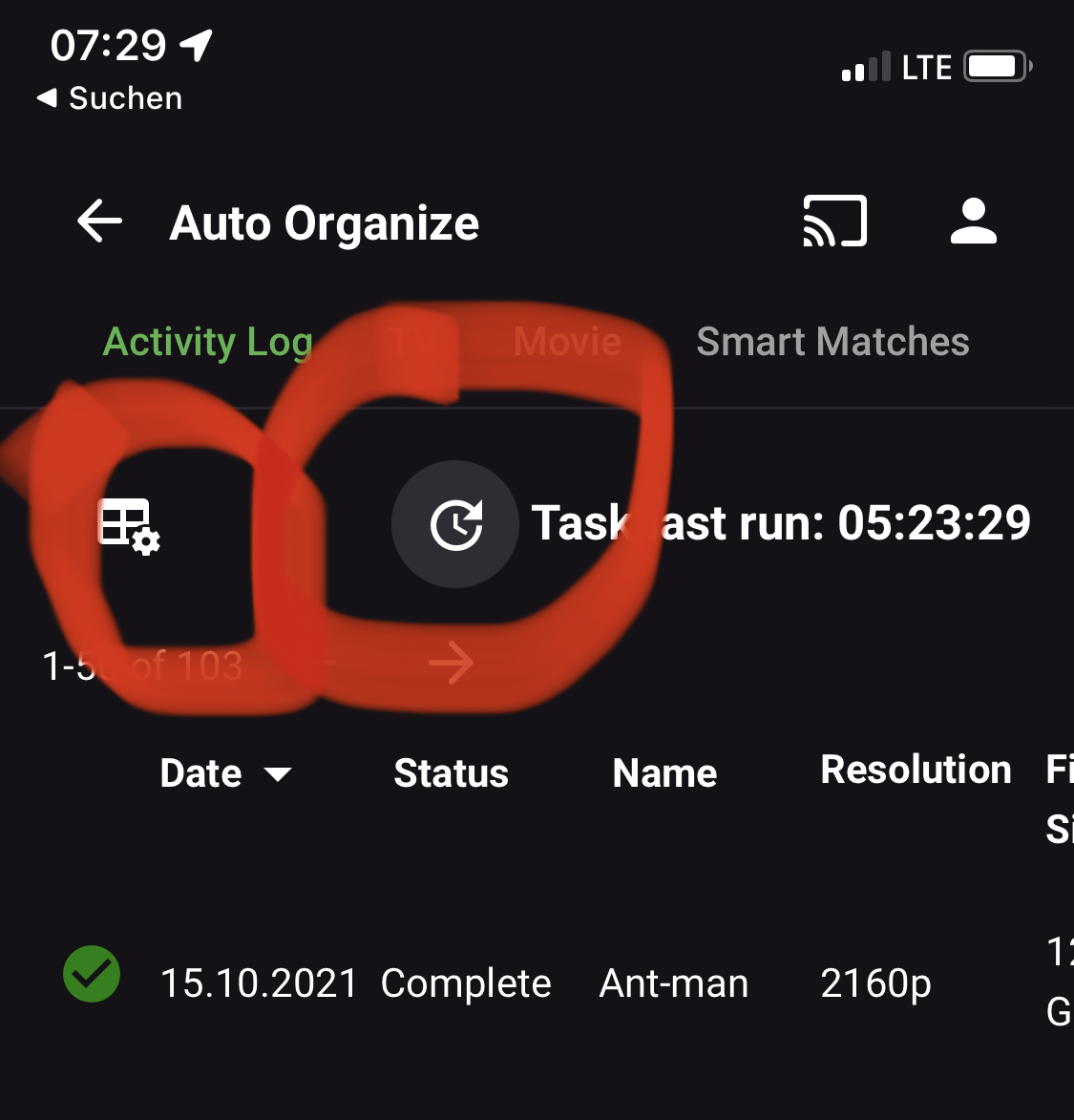
I mean these icons for scanning and clearing the list.
 1 point
 -
Thanks, I got it! I'll work on deleting or migrating the recorded shows tomorrow. Guessing that freeing up the disk space will take care of the problems I've been happening. I'll let you know. Thanks again! Les1 point
-
My two cents, stick it in if possible, then have a setting to enable/disable it in the activity page. I'd like seeing it there if nothing at all. This is awesome work!1 point
-
Actually, WandaVision didn't get scanned. We broke intro Skip at the end of GOT, before we could scan Wanda vision. So that wouldn't have intro data. It's okay! I'm gonna PM you, and we're going to figure out where exactly we are tripping up the episodes, and then You'll have awesome intro data1 point
-
Oh for sure, recaps would be impossible to do automatically. I'm just the kind of OCD that would be willing to enter the timestamps in for each video manually.1 point
-
I just don't know. @kaj your library has some series, season and episodes I'm not sure about: This emby library entry hasn't got a season number attached. 2021-10-15 05:16:56.933 Debug Intro Skip: TV - S: - E:3: Extracting chunks from binary chroma-print. 2021-10-15 05:16:56.935 Debug Intro Skip: TV - S: - E:3: .bin file removed. That would throw intro skip for a loop because everything we do revolves around working within season. Here is another item in your library that is interesting: 2021-10-15 05:14:11.449 Info Intro Skip: FINGERPRINT: Season 1 - S: - E:1 complete - 18 seconds. Is the series called "Season1"? If so it also doesn't have a season number attached to it. Also here in GOT, some of those episodes have no index number either. 2021-10-15 08:07:57.428 Debug Intro Skip: Game of Thrones - Season 5 - E: 9 matched E: 4 - detection took 6892 milliseconds. 2021-10-15 08:08:03.708 Debug Intro Skip: Game of Thrones - Season 5 - E: 9 matched E: 5 - detection took 6279 milliseconds. 2021-10-15 08:08:09.979 Debug Intro Skip: Game of Thrones - Season 5 - E: 9 matched E: - detection took 6271 milliseconds. 2021-10-15 08:08:15.977 Debug Intro Skip: Game of Thrones - Season 5 - E: 9 matched E: - detection took 5997 milliseconds. 2021-10-15 08:08:21.946 Debug Intro Skip: Game of Thrones - Season 5 - E: 9 matched E: - detection took 5969 milliseconds. 2021-10-15 08:08:27.922 Debug Intro Skip: Game of Thrones - Season 5 - E: 9 matched E: - detection took 5976 milliseconds. 2021-10-15 08:08:39.794 Debug Intro Skip: Game of Thrones - Season 5 - E: 1 matched E: - detection took 5965 milliseconds. 2021-10-15 08:08:39.872 Debug Intro Skip: Game of Thrones - Season 5 - E: matched E: 1 - detection took 5959 milliseconds. 2021-10-15 08:08:45.785 Debug Intro Skip: Game of Thrones - Season 5 - E: 1 matched E: - detection took 5990 milliseconds. 2021-10-15 08:08:45.850 Debug Intro Skip: Game of Thrones - Season 5 - E: matched E: - detection took 5977 milliseconds. 2021-10-15 08:08:51.790 Debug Intro Skip: Game of Thrones - Season 5 - E: 1 matched E: - detection took 6004 milliseconds. 2021-10-15 08:08:51.856 Debug Intro Skip: Game of Thrones - Season 5 - E: matched E: - detection took 6005 milliseconds. 2021-10-15 08:08:57.761 Debug Intro Skip: Game of Thrones - Season 5 - E: 1 matched E: - detection took 5971 milliseconds. 2021-10-15 08:08:57.828 Debug Intro Skip: Game of Thrones - Season 5 - E: matched E: - detection took 5972 milliseconds. 2021-10-15 08:09:09.777 Debug Intro Skip: Game of Thrones - Season 5 - E: 2 matched E: - detection took 5983 milliseconds. I'm gonna to have to think about what is happening here, I'll be back soon.1 point
-
Something like this. I just adjusted the 60% to 10%. div.osdContentSection {width: min(10%,75em);}1 point
-
@SwanStream just having done this, I would first watch the video on post one through first as well as reading post one thoroughly. Have a tablet to be able to play and pause when you are ready to go. Take your time. I was on beta on dsm 6 and downloaded the beta (same version) for dsm 7. Just be careful to use putty when it is called for during the video. It blew my mind that i had it done in 30 mins. Much easier than what plex does. I could not make that one work. Permissions is so key in making this all work. Took me some time but I even got sonarr and Sab working perfectly all without having to use docker but again, it is all permissions and totally doable.1 point
-
So the addition of the thumbnails is great because now i can see that all your intros are detected correctly just by looking at the images. They are pretty much all identical, which would suggest that the title sequences have been identified correctly.1 point
-
@mbarylski, well @cayars setup puts mine to shame. I run Emby on Debian Linux using OpenMediaVault with software transcoding... (yeah, I know). Certainly more transcode power would be an improvement, but I really have no issues except when watching large DVR files during recording. I planned to buy a graphics processor but they became scarce and expensive, and I believe the best route now is a CPU upgrade anyway, which will require a new motherboard and probably new memory. It's an easy thing to put off when Emby runs so well for 95% of our use.1 point
-
Cool! I can fix the icons next!1 point
-
Currently, it would be hard to get the recaps. Because we wouldn't really know where they are. Some times it could be story line prior to the intro, sometimes they could be recaps. But outros, yes that is on the Todo list. Infact the actual extraction code has be written and is already there, just not implement yet, using fingerprinting, and I know there was talk of other ways to pinpoint the outro. Thanks for the feedback!1 point
-
Seeing one or two (of 10+) libraries down in the bar seems both redundant (moreso as likely exactly those two are present onscreen) and out-of-place while wasting screen estate, that space should be reserved for additional features and options that are not within easy reach. Above suggestion makes perfect sense, until customization is introduced eventually.1 point
-
Hi luke thanks for the reply yes i found that out about 10 min after posting this all sorted now thank you again1 point
-
Hi, yes it's macOS 10.13+.1 point
-
Really quickly regarding subtitle files. Right now we check the size of a file to decide weather or not not bother with it. We use naming conventions as well, but that's off point. Inorder to sort sub title files we'll have to check the extension and override the file size condition. The question is: do you want subtitles listed in the activity log, or is it better to have an options in the movie/episode config page that just says: "move subtitle files if found"? I think that by putting them in the activity page it will get crowed, however I'm game for anything1 point
-
Hi! First of all thank you TheITJedi for this amazing tutorial. Second, i followed the steps (correctly, i think) until i need to get the certificate. Looks like my machine cant reach the dyndns server. Im using a dual wan setup so i have two public ips and ISP ONT's are in Bridge mode to my main router, ports are open too. I think thats the problem, but i dont know. Any hint on how to resolve this? Im using a fresh install of Windows 10. Thank you! EDIT: I can reach the server from outside of my network using "xxxxxx.xxxxx.xxxx:8096" i can login with my emby account and play material, so my host is accesible, i dont know why it fails when creating the certificate. "Timeout during connect (likely firewall problem)" Well, did some routing rules and now Emby server is using WAN1 and rest of my house is using WAN2, static IP and dyndns working fine so the public ip is not rotating every minute. Tests of Certify The Web gives me an OK to all but when i try to generate the certificate it fails giving me the same error "Timeout during connect (likely firewall problem)". Some screen caps... Any help guys? im getting a bit frustrated... Well, after some research, something is blocking port 80 and port 443. My ISP told me that they doesnt block them... i dont know what i can do to resolve this. SOLVED!1 point
-
As said here: http://emby.media/community/index.php?/topic/27727-Where-are-Chapter-images-stored? Where are Chapter images stored? Really like to see the possibility to have chapter images in in the media folders in a subfolder called e.g. chapters. Same thing like with spare backdrops. Gesendet von meinem HTC One M8 mit Tapatalk1 point
-
Hi, It would be helpful if you add collections to search results. If you have a few hundred collections, it become a chore to find what you are looking for by sorting through them manually. The same argument could be made for Genres, specially with genre cleaner plugin and Emby's ability to handle custom genres. Optional: If polluting the results is an issue then perhaps a search syntax could be added that you can type in the search box to make the results more specific. example; collections: search-query (only returns the results from collection) genres: search-query (only returns the results from genres) custom-media-library: search-query (only return the results from that specific library) Thanks,1 point
-
I'm going to add my support for this feature as well. While Extras may be able to go into Specials for most series, cracks start to show with a series like Doctor Who (1963). This series has multiple DVD releases per season each with a handful of features, and each with a multitude of Extras relating specifically to those episodes. One four-episode story may have ten or more extras, with sometimes close to ten stories in a season. It just becomes completely unmanageable. This is compounded with a DVD release like the TV Movie - a special which is listed as S00E60 on the TV database. As it is already a special, there is no way to associate the extras with the episode in Emby. The solution seems obvious to me. Have each episode in its own folder that acts like a Movie folder: Doctor Who (1963)\Season 00\Doctor Who (1963) S00E60\Doctor Who (1963) S00E60.mkv Doctor Who (1963)\Season 00\Doctor Who (1963) S00E60\Extras\Paul McGann Interview.mkv Now on the episodes information page, the extras will be displayed just as they would be in movies. Additionally, you need to be able to be able to add extras to Seasons: Doctor Who (1963)\Season 01\Extras\Theme Music Video.mkv These could be displayed at the bottom of the season. Something like the mockup attached.
.thumb.png.d6b8bc6ce8e3a6d910fd04ba5b5a5a25.png) 1 point
1 point -
I would also like to see this feature. In addition i would like this to integrate into the LDAP plugin. It should be possible to map a emby user group to an LDAP or Active Directory group. A group that is mapped to an LDAP group should sync with the LDAP group regularly. If a user is added to the LDAP group it should also be added by the Emby group. If a user is removed from the LDAP group, it should also be removed from the Emby group.1 point
-
Personally, I'd be interested in this being a per-Collection setting (eg, "Hide this Collection from main list if it is already included in another Collection" Yes/No), as opposed to a global setting (though I suppose you could have a global default and then override it per-Collection).1 point
-
see below i think this should clear it up yes this is correct Sorry let me update this to be as clear as possible. I hope I can help some one in the future On my router options I have a few boxes I can fill in 1."Custom service name" 2."Service" 3."Protocol" 4."External host" 5"External Port" 6."Internal host" 7."Internal Port" as shown here... So... the way i filled it out the first time was incorrect. I entered the "Remote access IP" that i got from the Emby dashboard into the "external IP" this was just a dumb mistake. see below for the CORRECT way to fill it out IF you have this router or something like it as you can see External host should be blank. I believe this is the correct way to have it AGAIN if anyone sees an issue with this please correct me also... If you come across this in the future please DO NOT take my earlier advice of putting your server into a DMZ I don't know how to delete a post but I would if I could. Hope this helps someone! Thanks for everyone's help1 point
-
What if it just said "Included in a Collection" so this could easily be worked into the UI of all clients, then have a list of collections down below, just like "More Like This" or the cast list? That would probably be easier to work into the UIs for all the different devices without trying to figure you how to write 10 collections in text on the screen somewhere. Would even work nicely on mobile devices like this.1 point
-
Support for nested collections is in beta: https://emby.media/community/index.php?/topic/57471-33110-nested-collections/?hl=nested1 point
























.png.f2500dbaa32d2b8415f7be138d6bfadd.png)


