Leaderboard




Popular Content
Showing content with the highest reputation on 10/10/21 in all areas
-
Hey everyone as promised. Here is the link to the new dll. Please follow the instructions in the download post. You all need to start from fresh for this release. Give @chef lots of love!! he's pulled the rabbit out of the hat with detection. You'll love the UI and intuitive interface. Anyways.... here is the link for the download https://emby.media/community/index.php?/topic/101687-introskip-instructions-beta-releases/&do=findComment&comment=10675012 points
-
I've never once regretted moving over. You can run both systems at once, during the transition. i think you can still use trakit on Plex and Emby to move your users played/watched etc over to Emby. i did when I moved over...2 points
-
You've grown up with watching live tv but on television only runs garbage? You have a big library but don't know what to watch next? Then this for you: "VirtualTV" - my new live tv plugin that allows you to create custom channels based on conditions of your Emby library content. What's missing: Maybe codec conditions Known problems: Needs Emby Premier to work (Playback) Emby's live tv and playback api is very limited, so i've had to make some detours to get things working. The plugin has two general playback modes: "continous" and "playlist" playback. With "continous" mode you can also choose between "live", which bahaves like real live tv or "archive", which plays the videos from the start. In "Continuous" mode multiple videos are queued and concatenated to one big file with the help of ffmpeg. To make this happen every video in the queue has to have some common features (video and audio codec). That's why it often happens that the video also has to be transcoded by ffmpeg. For transcoding the plugin relies on Emby's internal transcoding engine. If there's a problem, not uncommon with hardware acceleration enabled, the plugin also has a problem. Nothing i can do about it. The availability of subtitle tracks is mostly dependant of the Emby user playback settings. In continous playback mode only one (the default) subtitle track can be used and this one has to be burnded into the video (transcoding takes place). In "Playlist" playback mode the videos are pushed as a playlist to the Emby clients. It's like you would play your videos directly from your libraries. This way you get all the features you are used to. Audio and subtitle selection, pause, skipping around and similar things. "Native" playback method was created by the Emby Devs. Similar to Playlist playback it will play the real library videos, but with the big difference that playback is purely initiated by the client app, without any remote command execution. This is why it also works for Roku devices on a WAN network. And although the real videos are played, the whole thing is treated like live TV. This means that channel zapping is possible and no dialogs for playing the next episode are displayed. Unfortunately, the new playback method does not yet support all features. As the name "Archive" suggests, it will currently always start all videos from the beginning. In addition, only very few Emby apps automatically advance to the next video. If you want it to be improved even further, each of you should raise your voice in this thread. To get things started install the plugin via Emby's plugin catalog and restart Emby. Setup your channels with a name and number and choose your playback mode. In the channel conditions you'll have to select an Emby account. This account is used to get library access, respect parental rating, reading watched states and selecting the stream language. At least one textual input field of the conditions has to be filled to get some program data. Fields with an asterisk are either evaluated with an "AND" or "OR" condition among each other. Finally, if you've chosen "Continous Playback" for one of you channels, take a look at the transcoding settings. Save your channel line up and manually trigger a "Guide Refresh". Now have fun! Version History: After a plugin update, always clear your browser cache. If your settings still don't load in the config screen, you have to move the "VirtualTV.xml" out of ...\plugins\configurations and restart Emby. Start from scratch. 2.0.0.0 Unlimited number of channels; New playback method "Native (Archive)"; New security concept for the Export API 2.0.2.0 Performance improvements to Guide Refresh; Preview for Add/Edit Channels; Option to disable Program indicators 2.0.3.0 Fixed missing Playlist sort order for some Content Types; Added support for Seasons with Content Source Collections 2.1.0.0 Selectively enable channels for specific users; Create copies of existing channels; Ordered unwatched episode playback 2.1.5.0 Added option to (auto)enable channels on a specific date range; Bug fixing1 point
-
Similar to this old post, I'm suggesting a tab that would be titled Watchlist and could be placed in between Suggestions and Favorites. The functionality would pretty much be a copy of Favorites, just with a + symbol added next to the heart and other symbols that let you favorite a movie etc. The previous post had mentioned extra functionality such as automatically removing a movie from Watchlist after it has been watched. This would be nice, but is unnecessary because after watching a movie you can simply click the + symbol a second time to remove it from Watchlist. I would imagine this would be very easy to implement as a rebranded copy of Favorites. Adding other features could come later. Edit: added link to old post1 point
-
Please click "Like this" and share it if you want to support this feature. Thank you ! Hello, There is a Kodi addon call "gdrive" from ddurdle who can read videos (original and transcoding version) directly from Google Drive. Why not build on this idea to integrate Google Drive as source directly in Emby Server ? In addition, Emby could generate automatically the STRM files from one or many Drive folders. And transcodings are already available with Drive so no need to transcode with Emby server. What do you think ? ------------- Three reasons why this feature will be useful and awesome: 1. Cloud is the future and today the cost is affordable. I have a Google Drive Unlimited for $50/month (ie $600/year) and I have unlimited space that is secured against crashes. Knowing the cost of hard drive and the cost of power consumption, its a very good deal. 2. Google Drive transcode video file. This provides different stream quality like Youtube (1080p, 720p, 480p and 360p) and the "image quality/compression ratio" is very satisfying. I can play 720p video on my poor 4 Mbits DSL. 3. You don't need to have a big server. Personally, I opted for a little dedicated server (Kimsufi 2G) for the cost and I can leave it run 24/7! Furthermore, me and my friends can watch movies from anywhere! Basics features that should be included: GOOGLE APPS OAUTH2 for activation and permission playing transcoded version (MP4 360p, 480p, 720p & 1080p) directly into Emby's app playing original file (avi, mkv, mp4) directly into Emby's app import embedded subtitles porwerful script module for multiple folder scanning and STRM generating1 point
-
While Emby already has recommendations built in based on previously watched items I find they are not all that helpful. They seem to be based on genre only, for example, because you watched a comedy here are other comedies in your library. I do like how the also directed by/appear in recommendations work though. What would be great is if Emby could incorporate Trakt's recommendations as they are much more sophisticated. Trakt's recommendations are not only based off of what you have previously watched but also what your Trakt friends and other Trakt users have watched. It takes user ratings and trending/popular media into account. Ideally Emby would include full Trakt integration allowing users to rate media after watching, view lists and recommendations, and view upcoming media all from within Emby but for now I think recommendations would be a nice addition. Trakt has the potential to give Emby that community feel and allow users to discover new media, find something to watch, and recommend media to other users. http://docs.trakt.apiary.io/#reference/recommendations1 point
-
For clients that can use 3rd party remotes (ie Android TV) I'd like the ability to use a remote of my choosing and be able to map my remote to functions in Emby. We should be able to keymap all important functions such as EPG popup in video, stats for nerds, RW, FF, jump back 10, 30, 60 seconds, jump forward 10, 30, 60 seconds, etc. We should be able to use the number keys to enter 3 or 4 digit channels for TV channel changes. Basically any function available in the UI should have a key mapping associated with it so we can use it with advanced remotes. The remote is our gateway to using Emby and the more functionality we have to customize this for our use the better and easier it is for us to use. Being able to map your own remote is a long standing tradition with many other system and is a long overdue addition needed in Emby. If you agree, don't forget to like this post.1 point
-
I'd like to request that the Playlist library have a displayed category and, "widget" on the homescreen in the similar fashion that movies, TV shows, music are shown. I create topical/seasonal playlists that I'd like my family members to see displayed from the homescreen with "recently added" carousel style. Currently, to the best of my knowledge, playlists are only accessible via their shortcut in the, "My Media" section. Thanks for your consideration!1 point
-
Please read this post first. I was wondering if it would be possible to add something that would allow you to skip the intro to shows automatically while binge watching. When watching Netflix it does this for some shows, and im not sure if thats a feature of Netflix itself or a Chrome extension i use called "Flix Assist" but it would be a nice feature to have within Emby as well. and possibly even create a custom timed skip for specific shows1 point
-
I thought this might be useful if someone else comes across the same issue. I'm a bit of an edge case since I use docker and I create a pkcs12 cert bundle from certs and keys extracted from traefik, but the issue I had was not related to that. Since Lets Encrypt intermediate expired my emby server has been presenting an expired intermediate, but the `p12` file I'm generating has the correct new intermediate, I narrowed it down to the x509stores in the docker image had cached the intermediates, so since the issuer hadn't actually changed it never refreshed the intermediates and just kept on trucking with the invalid certs. Long story short, if you run docker and have some kind of lets encrypt certificate and you're getting `NET::ERR_CERT_DATE_INVALID` from chrome (Firefox ignores the bad certs, so I think the only affected browser is edge/chrome on macOS) then either remove and recreate the docker container (it uses `/tmp` for home so that will clear it) or docker exec -ti emby-server sh -c 'rm -rf /tmp/.dotnet/corefx/cryptography/x509stores' docker restart emby-server1 point
-
The forum says to search for another request the same as yours, but I'm not seeing an option to search by keyword on the forums? Am I missing something? Either way, I really think there should be the ability to sort by bit-rate. I primarily use emby thru an Nvidia shield and messing with filters and whatnot is a hassle. This was a feature on Plex that I really enjoyed. If I felt like watching a HD movie, it was simple to search thru them. With emby, the easiest solution that I'm seeing is creating a new library specifically for 4k/HDR content, but then I need to download 1080P and 4k versions or drastically increase my storage usage and have duplicate 4k copies in different folders as I want all my movies in a single folder, so I can browse them all regardless of quality/genre, etc.1 point
-
Is it possible to add a bitrate for users that are direct(whatever) something? It's good info, and readily available. Thanks1 point
-
I have added the ability to the custom node creator in EmbyCon to have multiple types. you can set up a custom note that has Movies, Episodes in progress. This is in the latest beta for both Krypton (18) and Matrix (19)1 point
-
They are there automatically this is a screenshot of the browser and if you navigate into your movies Library, there should appear these tabs on top1 point
-
This is just if you have already installed. not applicable to new installs1 point
-
It allows you to play trailers before media just like at the movie theater, along with custom intros/Codec intros. Each client has a option to enable/disable it, but the server Cinema Intros plugin needs to be enabled/configured first.1 point
-
Are we really accepting this as ok, and without any reply from Emby mods/admin? Why is iOS being updated, Carplay and Apple Watch support, when the flagship AppleTV is left with no updates for 5 months, whilst Carplay! gets updates. What is going on here? As a lifetime subscriber, I feel like I've wasted my money and should have gone Plex.1 point
-
Hello, I can help you with the French translation if you need.1 point
-
The R9000 has 512MB flashable space.1 point
-
I found the problem. When you are installing virtualTV on DSM7 you have to put the plugin into /volume1/@appdata/EmbyServer/plugins rather than the old plugin folder. Vic1 point
-
Thanks for the help Cayars... I put the plugin into /volume1/@appdata/EmbyServer/plugins and everything worked OK. Thanks again... Vic1 point
-
I find that when requesting commands from either google or Amazon assistants, it's best to keep the wake word, and command structure simple. For instance, using "Tell", and "Use" to differ between a command, and a request seems to complicated. Probabaly the best advice, is to limit the amount of action keywords the assistant understands during interaction It is best to just use the "Tell" command with specific structures afterwards. "Hey Google, tell emby home to..." 1. "Play music by..." That may have to be delt with in the code. Smart assistants aren't very smart after all... ------- In order to best handle command requests using the Amazon Assistant (which I understand best), I had to create a link between Emby devices in my home, and rooms they reside in. This is handled in a plugin configuration. I realize that this is not how embys skills work, but it did allow me to use fluent speech when requesting play back on certain devices. "Alexa, ask home theater to show the movie Free Guy in the family room." Alexa sees this: "{display.slot} the {media_type.slot} {move_name.slot} in the {room.slot}" Once I have the slot values, I can do a query of emby for the particular BaseItem, and because I have configured the device to a room, I am able to browse to that item on the device. Playback, pause etc. This can also be done to playback music, I'm sure. But, I haven't really attempted it. I can get somewhat involved to integrate this. . Confirmation slots can be used with Alexa, but I am unsure about how google uses them. They are slots that must be filled, and (at least for Alexa) the conversation can continue until all the data is retrieved. What song? Where is it going to play?1 point
-
That is by design and is why the button is where it is (next to the label for those options). I suppose we could make it zero the others out too...1 point
-
Tested. It worked as intended, playback sent to webapp dashboard, and on stop a resume point is made.1 point
-
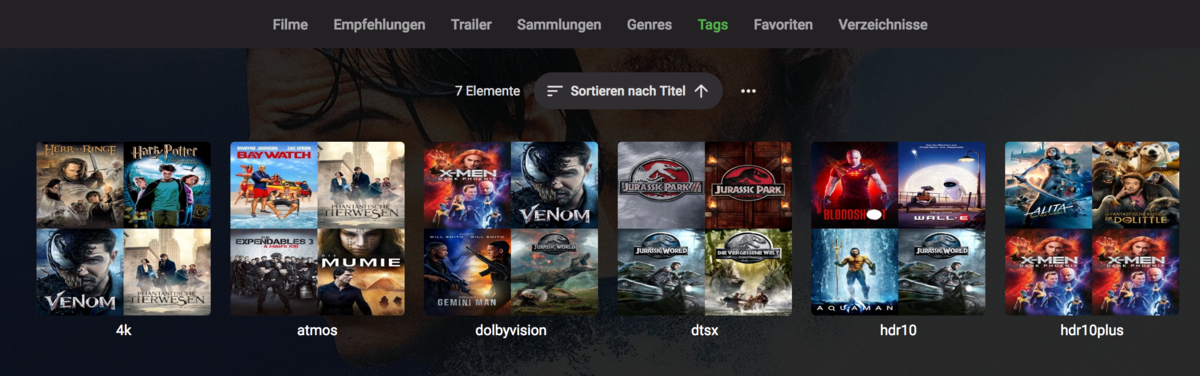
i use TAGS to do this right now. All my 4K movies are tagged with 4k, hdr10, dolbyvision etc. so i can use them to filter for them. Not really in the filters selection but in the TAGS Tab Maybe not exactly a filter like you want, but it does the same for me and could be an idea for you
 1 point
 -
Hi I have Trailer plugin 1.3.0.0 on my Emby and trailers are still the same from few months. There's no updating. Regards.1 point
-
Use both? Not really but I do have servers for both running. However it has been many months (maybe over a year) since I actually used Plex. Plex does nothing that Emby does not that I need and I find using it generally feels "clumsy." In fact I have been really thinking about disabling the Plex server so it does not start with the computer it runs on and retasking or retiring that computer. But another reason to have both is redundancy. I have a backup Emby server "just in case." But that does not cover for something going horribly wrong with the Emby ecosystem. I cannot figure anything that could happen that killed Emby on my network and allowed Plex to still work but this is the world of electronics and anything can and often does happen. I may still stop running my Plex server after a bit more time as the likelihood of Emby failing and making my Emby backup also fail is so low as to not really be possible. Then on top of that there is the Plex forums. If I used Plex more then I would have to use their forums more and that is something that I kind of equate with using the "rack" or the "Iron Maiden" on myself. I am not really into pain that much.1 point
-
Me neither the only thing I miss from Plex is Adaptive streaming but I doubt it works on a NAS for Plex at least that is what the read me docs say. Where Emby it may work on a NAS once Emby gets Adaptive streaming! I just hope Emby gets it soon!1 point
-
Big discussion here EMBY ATSC3 - Live TV - Emby Community1 point
-
I use Emby for all my movies/tv shows. Works better for me and my remote users, both for setup and transcoding, Never have down time because Plex's auth servers are down, devs/forum much more responsive, no junk/bloat included (ie podcasts, ad-sponsored tv, games etc).. Live TV (IPTV) is fab on Emby, as it can use m3u files....cannot use them on Plex I do use Plexamp for my music..it's awesome...i don't want tp spend time curating playlists...Plexamp works fanatically well. Sadly Emby doesn't come anywhere near this for music (yet.....)1 point
-
so its just images you have issues with? not videos? You cool with creating a guest account and pm me the info.. I can usually spot what's going on when accessing as a client. I take it web browser looks good? Just android issues?1 point
-
Have you explored the various library options for each library? Most of these intensive processes allow you to configure when they happen, e.g. when the media is scanned, and/or a periodic scheduled task.1 point
-
If you SSH into your NAS, switch to the root user (sudo su), then you want to put the dll into the /volume1/@appstore/EmbyServer/system/plugins directory. Be careful when using the root user and SSH.1 point
-
I did some testing and it is looking good now. Active recordings appear after a minute or so. All recordings did appear so far. Thanks.1 point
-
Really the only way is checking your server log as Real Time Monitors item changes are only logged. Now if you disable RTM these operations only happen on a scheduled task. So if you are adding/changing/updating media while watching media yes RTM can be problematic.1 point
-
Ah yes of course - sorry, they will need Mac equivalents. Your best bet is to wait a couple of weeks - If I can get @chef onboard (he's a busy guy!) then compared to what we have been working on with Introskip - this is an extremely simple setup so it would only take a couple of days at most to get into a Plugin I would have thought. So watch this space - this hasn't been abandoned, it's just we all have limited time and are already juggling multiple emby 'projects' plus we all have day jobs! Thanks for your interest !1 point
-
I haven't tested it, but as all it's doing is using native emby functions - then I don't see why not. I'll try and get back to this in a couple of weeks - currently all focus is on 'Introskip' atm, but I'm keen to engage the likes of @chef and maybe others as I have no 'Plugin' experience and wouldn't know where to start ..1 point
-
1 point
-
It seems like this could be integrated into Emby such as the Coverart, upload your desired image and the gradient and text could be modified in a plugin. Just a thought.1 point
-
1 point
-
@gillmacca01My version is a different font than the original, I can put one together for you if you dont mind the change in fonts
 1 point
 -
I worked it out and found that offsite storage is too slow and too expensive. My solution is to keep a pool of drives big enough for all my movies that I connect about weekly or monthly to a computer and duplicate all my video and audio files to that pool. Then, after the copying is complete, the backups are placed in a fireproof cabinet. I use StableBits Drivepool for my regular storage and for the backup. I have never, in the last four years since I started using a pool for backup and even for a few years before needed to resurrect the backup. I use DrivePool's redundancy (folder duplication) for all my videos and audios and I have had three disk failures (One at a time) and all I needed to do was remove the bad drive and put a new one in its place and then DrivePool took over and the duplicate files that were lost were all replaced in a few days. It should also be noted that I never lost any viewing ability at all as Drivepool switched, as needed, to the duplicates in the pool. In fact in two of the instances I only knew there had been a failure because DrivePool emailed me informing me that a disk was not accessible. I tested several offsite systems but not one came close to the convenience and reliability of using DrivePool the way I do.1 point
-
If this would mean being forced to always go through their servers like Plex does, this is an absolute no-go for me. Everyone has to make sure their server is secure when exposed to WWW and there are plenty of tutorials on how to get SSL working with Emby. Just my 2cents though...1 point