Leaderboard




Popular Content
Showing content with the highest reputation on 09/27/21 in all areas
-
Is there maybe an overhaul planned for Active Devices Dashboard section, in order to make it somehow more cohesive? I've had 7 streams last night (Transcodes, DirectStreams, DirectPlays), and with my own browser session, it was all over the place, and it just looks... messy. And quite unappealing, tbh. Maybe we could resize that Transcoding sessions to the same size as others with arrow for expanding? Also, color coding stream methods text (DP=green, DS=yellow, T=red) would make it very distinctive and clear at a glance. Additionally, "See all" links to Devices tab - it should not, as that is not what one wants when clicking there, it should link to expanded Active Devices tab, where again we could have it sectioned in line with Home screen sections: Transcodes, DirectStreams, DirectPlays rows. Just some thoughts...3 points
-
Yes, it's the same app that gets submitted to Samsung for inclusion in the store shortly after it's been uploaded for everyone's review. Since Emby doesn't have a contract with Samsung in countries other than US/UK and Ireland as of yet then installing from USB is one way of getting around that. However, Samsung is very strict on USB installs because this method is only meant for internal testing before submitting apps to Samsung for their review. Samsung doesn't want people distributing apps and bypassing them. It could be because Samsung wants to ensure reliability of apps, but they also make money off of companies that distribute apps in their store. Every time the usb app gets compiled there is a check placed within the app that disables itself 30 days from the compiling date. In order to continue to use Emby then you will need to download and install a newer version all together because the old version will no longer work There where a few lower end models in 2015 which were still using the older Orsay OS, but since then all TVs have been Tizen though the version of the Tizen OS changes every year. The link below from the Samsung developers page lists the OS version of every Samsung TV since 2012 Smart TV - Build | Samsung Developers Another option to USB installation is to change your app region to one of the countries that has it in the store, or changing your app region to "Full" if you prefer2 points
-
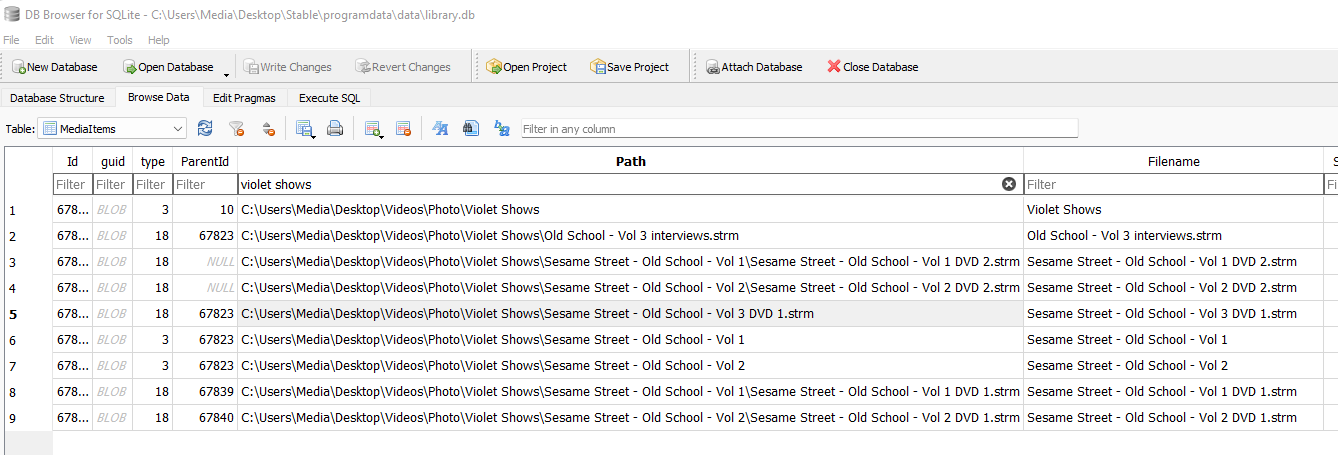
This was resolved with a remote support session after installing WinSCP to gain access to the Synology file system.2 points
-
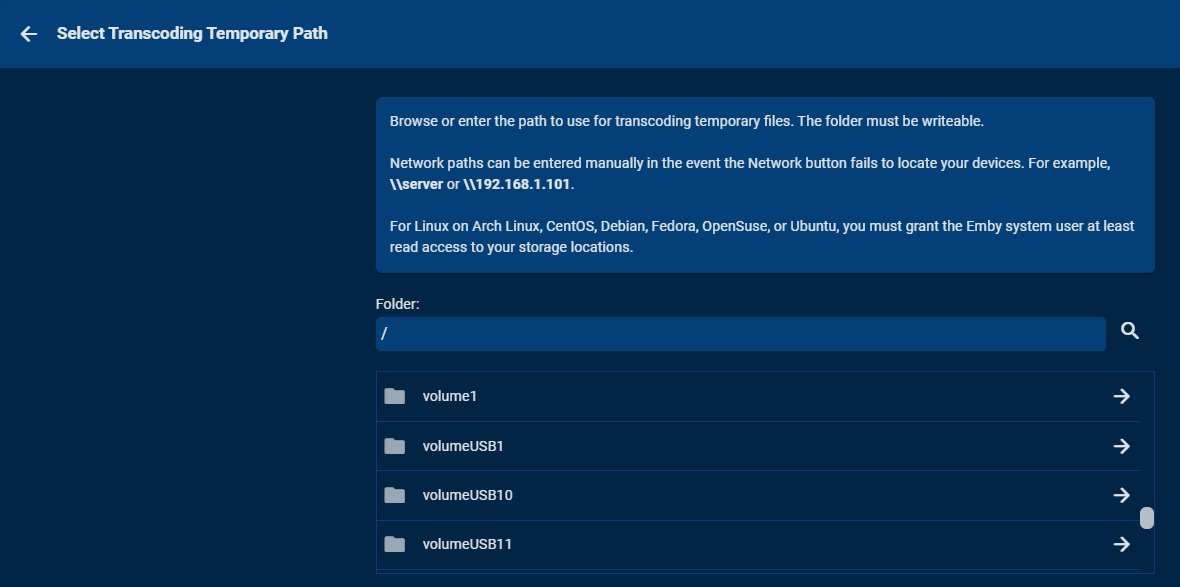
I don't know if this applies to all Synology boxes or not but you can attach an external drive via eSATA or USB3 to the NAS. These show up as External devices. Each drive can be setup as a shared folder. At that point these drives are fully available to Emby to use. I've got 8 bay StarTech cases that do nothing fancy (no disc combining or RAID) but provide 8 drives to Synology this way. In Emby you can use these drives for Transcoding, Cache, Metadata, DVR, etv like this: You can name the USB/eSATA shares anything you want but I use numbers representing the bay they are located in. So you could attach a 2.5 SSD via USB3 or eSATA to the NAS and use it this way without having to give up an internal drive bay. These external drives can even use NTFS formatting and work just fine. They can be read by both Windows and Synology with no problem depending on what box you plug it into. Via DSM you can't create pools using these drives but can access each drive just fine. There are probably two downsides to this as you have no type of RAID protection against a failed disc (backup) and some apps can't make use of this space such as Storage Manager, SAN Manager (iSCSI support) or VM Manager as they will only want to use or manage a storage pool. But by being able to move content from an internal pool to the external drives allows you to free up internal drive space for those apps. You can even use the mount command to take the contents of an external drive and mount it to an internal pool if you want.
 2 points
 -
If it is missing I am guessing the library content type is no longer TV. Please verify the library content type has not changed to Mixed Content via Dashboard-Library. Please let us know and if it has there is a how to topic to change it back if you do not want to remove and re-add the library.2 points
-
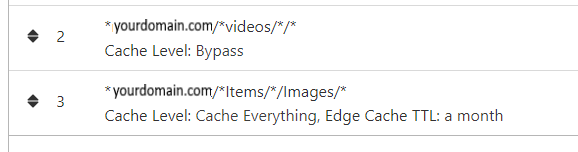
NGINX and emby Config Version 1.0.4 Last Update 1-1-2024 Update by Pir8Radio Why Use NGINX reverse proxy ahead of my application servers like emby? With NGINX or any reverse proxy ahead of an application server you have more control over your setup. You can do things the application servers were not built to handle, have better control over your security and logging, replace lines of code without editing the application server code, better control of caching, etc, etc.... One of the main reasons is so that you don't have to open a new port on your firewall for every application server you host, all you really need to open is 80 & 443 and the internet can reach all of your different servers through one entrance. Will NGINX work on my OS? Most likely, you can find various versions of NGINX for most OS's and they come in different flavors, with options baked in, or just the bare NGINX that you need to compile. See below for download links to get you started. Will NGINX break things on emby? Absolutely if you don't configure it correctly! I HIGHLY suggest when choosing a scheme to setup your domain URL you choose SUB-DOMAIN and NOT sub-directory, more below. Also if you come to the emby forum with things not working, or issues you have and you use a Reverse Proxy, PLEASE make sure that is one of the first things you mention in your forum post. ESPECIALLY if emby works on one platform or client, but not another. So many times people complain "but it works on chrome, so I didn't think it was the reverse proxy". Mention you have a Reverse Proxy please. If the reverse proxy is setup correctly it should be totally transparent to the user and the application server (emby). I'm not going to go into how to purchase and setup a domain name. Lots of how-to's on that out there. Once you have a domain name and its pointed to your IP address, you can go to that domain name and hit your server then continue on.... Sub-Domain vs Sub-Directory: Lets say your domain name is: domain.com there are two main ways you can direct traffic from the internet to your backend application servers like emby. One is sub-directory, something like domain.com/emby or domain.com/other-server This is doable in nginx, but there are some catches and you need to know how your reverse proxy and application server work in detail.. This often breaks different features in emby and other application servers.. To keep with our "Totally Transparent" goal sub-directory doesn't work well, it requires a lot of rewriting and work-arounds to make it work smoothly, if you choose sub-directory you will run into issues you will need to address. The other option is Sub-Domain, this is the cleanest, most transparent, easiest to setup and maintain, it's also what I highly suggest you setup. A sub-domain looks like: emby.domain.com or other-server.domain.com The below config is based on Sub-Domain I will include a sub-directory example as well. NGINX Downloads: Official nginx downloads(LINUX): nginx.org Official nginx downloads(Windows): nginx.org WINDOWS users I suggest this version: nginx-win.ecsds.eu download links are at the bottom of the page. This Windows version has lots of cool features compiled into it already, and is optimized for windows. They keep up with updates, its a FREE (for non-commercial) third party build that I highly recommend. Additional Links: Content Security Policy info (CSP) (For Advanced Users): A CSP WILL break your server if you don't know what you are doing, I suggest reading up, lots of googleing, and understand what a CSP's function is and is not prior to venturing into this area Example NGINX Reverse Proxy Config: 3-29-2020 - ADDED A LINE FOR CLOUDFLARE USERS SO THAT THE X-REAL-IP HEADER IS CORRECTED. THIS ONLY EFFECTS Cloudflare USERS. 4-11-2020 (V1.0.1) - MOVED proxy_buffering off; FROM LOCATION BLOCK TO SERVER BLOCK 12-18-2020 (V1.0.2) - ADDED 301 SERVER SECTION TO FORCE ALL TRAFFIC TO SSL. 9-23-2021 no nginx config change, but cloudflare changed how they cache video files, so emby users that use Cloudflare now need to add a rule like below to make sure video is seekable and playable. 8-18-2022 - added a line for photo sync to cover large uploads of videos and images. (client_max_body_size 1000M;) 1-1-2024 - changed http2 setting per @weblesuggestion in this thread post # 1309363. ** The below "Page Rules" are only needed for Cloudflare CDN users, otherwise ignore. worker_processes auto; error_log logs/error.log; events { worker_connections 8192; } http { include mime.types; default_type application/octet-stream; server_names_hash_bucket_size 64; server_tokens off; ## The below will create a separate log file for your emby server which includes ## userId's and other emby specific info, handy for external log viewers. ## Cloudflare users will want to swap $remote_addr in first line below to $http_CF_Connecting_IP ## to log the real client IP address log_format emby '$remote_addr - $remote_user [$time_local] "$request" ' '$status $body_bytes_sent "$http_referer" ' '"$http_user_agent" "$http_x_forwarded_for" $request_time $server_port "$http_x_emby_authorization"'; log_format default '$remote_addr - $remote_user [$time_local] "$request" ' '$status $body_bytes_sent "$http_referer" ' '"$http_user_agent" "$http_x_forwarded_for" $request_time $server_port'; sendfile off; ## Sendfile not used in a proxy environment. gzip on; ## Compresses the content to the client, speeds up client browsing. gzip_disable "msie6"; gzip_comp_level 6; gzip_min_length 1100; gzip_buffers 16 8k; gzip_proxied any; gzip_types text/plain text/css text/js text/xml text/javascript application/javascript application/x-javascript application/json application/xml application/rss+xml image/svg+xml; proxy_connect_timeout 1h; proxy_send_timeout 1h; proxy_read_timeout 1h; tcp_nodelay on; ## Sends data as fast as it can not buffering large chunks, saves about 200ms per request. ## The below will force all nginx traffic to SSL, make sure all other server blocks only listen on 443 server { listen 80 default_server; server_name _; return 301 https://$host$request_uri; } ## Start of actual server blocks server { listen [::]:443 ssl; ## Listens on port 443 IPv6 ssl enabled listen 443 ssl; ## Listens on port 443 IPv4 ssl enabled http2 on; ## Enables HTTP2 proxy_buffering off; ## Sends data as fast as it can not buffering large chunks. server_name emby.domainname.com; ## enter your service name and domain name here example emby.domainname.com access_log logs/emby.log emby; ## Creates a log file with this name and the log info above. ## SSL SETTINGS ## ssl_session_timeout 30m; ssl_protocols TLSv1.2 TLSv1.1 TLSv1; ssl_certificate ssl/pub.pem; ## Location of your public PEM file. ssl_certificate_key ssl/pvt.pem; ## Location of your private PEM file. ssl_session_cache shared:SSL:10m; location ^~ /swagger { ## Disables access to swagger interface return 404; } location / { proxy_pass http://127.0.0.1:8096; ## Enter the IP and port of the backend emby server here. client_max_body_size 1000M; ## Allows for mobile device large photo uploads. proxy_hide_header X-Powered-By; ## Hides nginx server version from bad guys. proxy_set_header Range $http_range; ## Allows specific chunks of a file to be requested. proxy_set_header If-Range $http_if_range; ## Allows specific chunks of a file to be requested. proxy_set_header X-Real-IP $remote_addr; ## Passes the real client IP to the backend server. #proxy_set_header X-Real-IP $http_CF_Connecting_IP; ## if you use cloudflare un-comment this line and comment out above line. proxy_set_header Host $host; ## Passes the requested domain name to the backend server. proxy_set_header X-Forwarded-For $proxy_add_x_forwarded_for; ## Adds forwarded IP to the list of IPs that were forwarded to the backend server. ## ADDITIONAL SECURITY SETTINGS ## ## Optional settings to improve security ## ## add these after you have completed your testing and ssl setup ## ## NOTICE: For the Strict-Transport-Security setting below, I would recommend ramping up to this value ## ## See https://hstspreload.org/ read through the "Deployment Recommendations" section first! ## add_header 'Referrer-Policy' 'origin-when-cross-origin'; add_header Strict-Transport-Security "max-age=15552000; preload" always; add_header X-Frame-Options "SAMEORIGIN" always; add_header X-Content-Type-Options "nosniff" always; add_header X-XSS-Protection "1; mode=block" always; ## WEBSOCKET SETTINGS ## Used to pass two way real time info to and from emby and the client. proxy_http_version 1.1; proxy_set_header Upgrade $http_upgrade; proxy_set_header Connection $http_connection; } } }

 1 point
 -
I made these simple icons to make the interface easily legible for my parents. I'm posting in case anyone else may have use for them. Basic icons were from the Google fairy. Zip updated Jan 14, 2021. Contains all 255 icons. Flat Icon Set.zip1 point
-
I am switching over from a Win7 box running MBC to Chromecast dongles. With the Win7 box I had a HDMI to Cat6 setup that allowed me to stream to up to 4 displays/TVs simultaneously. It was great while it lasted, but involved stapling cables to the ceiling to run it from room to room - plus it has borked Can there be an option to multi-cast to several receivers at once? i.e. simultaneously play to Chromecast dongles in my office and living room and kitchen simultaneously so i can walk from room to room without stopping and restarting the movie or show all the time? I realize that bandwidth could POTENTIALLY be an issue, but i have a fill gigabit network and a multi-port NAS so that really is the least of my worries... Thank you!1 point
-
As I mention in a related post, I love the additional subfolders for Movie Extras (eg, Shorts, Scenes, Interviews, etc.)! It would be awesome to extend this functionality to TV Series as well. Specifically to add support for many/all of the same folders supported for Movie Extras, eg, extras specials shorts scenes featurettes behind the scenes deleted scenes interviews trailers As well as any additional folders that get added in the future (eg, hopefully Galleries). Support Placement of "Extras" Folders Within Each Season Folder, Plus A Naming Scheme to Link A Particular Extras Folder with a Specific Episode (eg, "\Season 1\E1 - Deleted Scenes\" for episode 1 deleted scenes): I want to clarify that it would be great if these various "extras" folder types could reside within each Season folder. So for example, within a Season 1 folder we could then have an "Extras" folder, a "Deleted Scenes" folder, a "Featurettes" folder, etc. And furthermore, that we could designate a particular folder to refer to a specific episode (eg, "\Season 1\E1 - Deleted Scenes\" for episode 1 deleted scenes). See more below, particularly why I think this would be so useful: https://emby.media/community/index.php?/topic/55915-emby-server-theater-additional-extrasspecial-folder-types-for-tv-series-similar-to-movies/&do=findComment&comment=587195 Thanks for your consideration! PS - If this is something you might like to see implemented, be sure to "Like" this top/first post (as well as any subsequent posts in this thread that highlight particular aspects of what you are interested in) -- "Liking" the top/first post helps the Devs to know how much interest there is in a given Feature Request.1 point
-
Yes the requirement is Album and Album Artist to group but I do not believe the tag is read or written properly to a wav file for ffprobe to read. We discovered this issue in this topic also. https://emby.media/community/index.php?/topic/81364-album-artist-metadata-tag-not-being-read-on-wav-files Don't know if anything can be done. @Luke1 point
-
We generally do mold our nfo support to what they're doing, but so far it hasn't presented an issue just yet.1 point
-
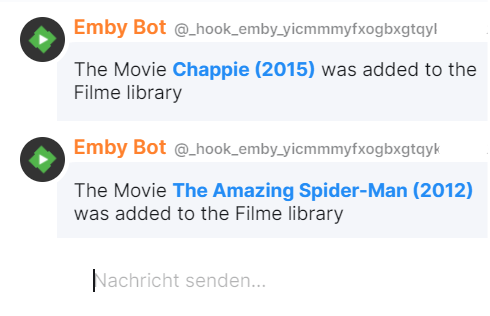
I have build this with a matrix webhook gateway and ScripterX. simplified: ScripterX runs a shell script (see here). Shell script post informations via curl to the webhook gateway address matrix webhook gateway plugin format it and send it to the bot the bot notifies me about new movies. yes this isn't a lean way to notify via matrix but it works. Hope it can be easier in the future. I think the best way would be a easy configurable webhook plugin for all the webhook services out there.
 1 point
 -
Hi. I notice you are on port 80. Is a proxy involved? From the app side, we are getting a 401 which I also see being sent from the server due to: 2021-09-27 21:41:13.482 Error Server: Access token is invalid or expired. Is something possibly stripping headers? Also, looks like you are on a local device but accessing via the remote address.1 point
-
So image is not being saved to the folder. Because these are Folders not actually media, I will have to look but believe there are other topics on this as you have to have the image in the Folder for it to keep the Folder image, otherwise the inherit first item image takes over. @Luke1 point
-
Thank you very much, FrostByte. I'll give this a go after work!1 point
-
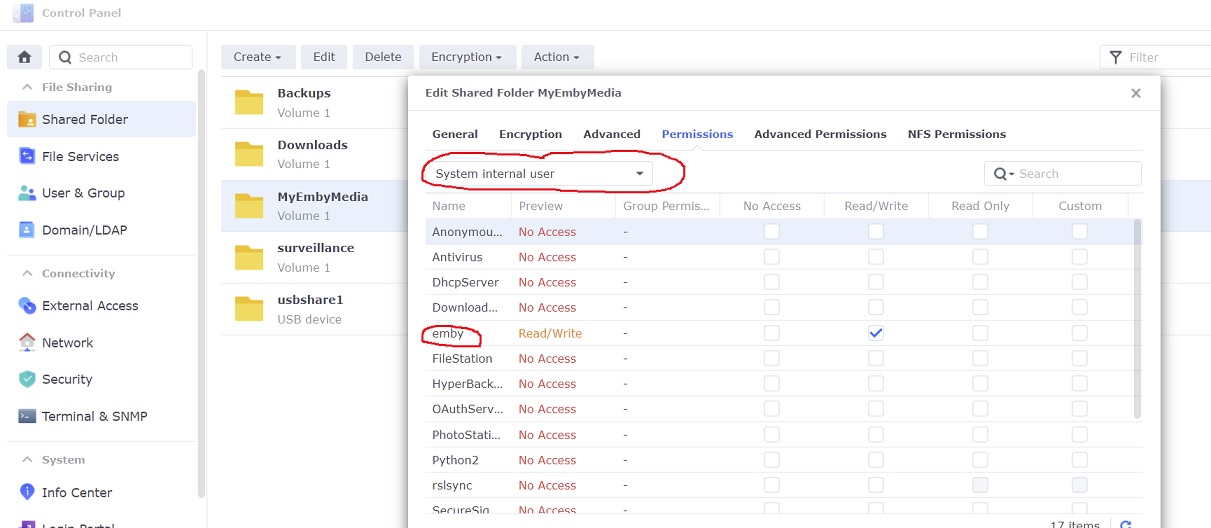
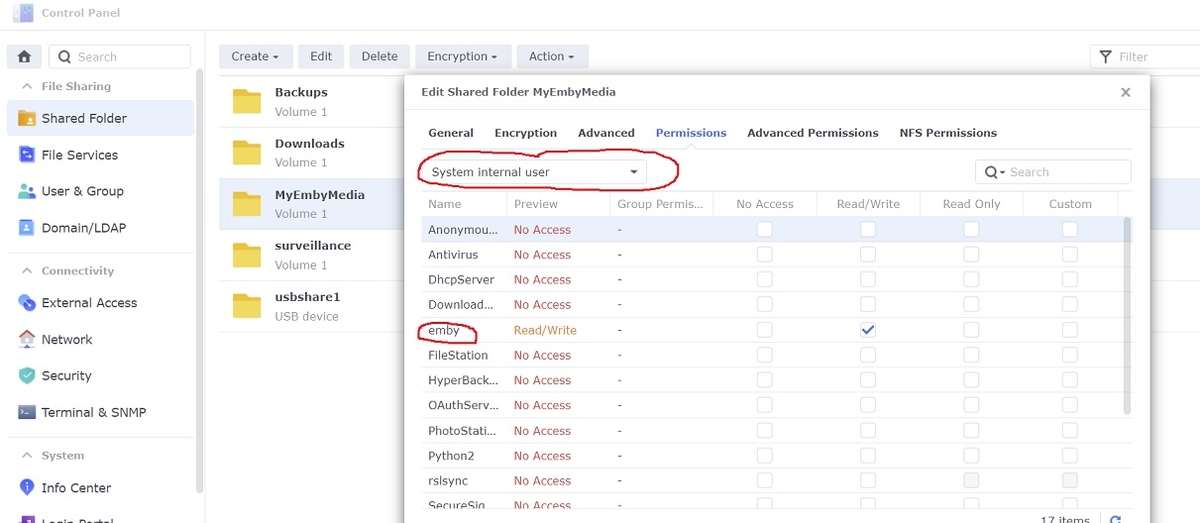
Under DSM 7 Emby no longer uses any Synology "Local users". To set permissions on your shared folders you need to use the new Synology "System internal user" called emby instead by clicking the dropdown box. You may delete or disable any old Synology Local user used by Emby if you wish. Synology DSM users and Emby client users are not the same. Any user you were prompted to create during installation was a Emby client user and not a Synology DSM user used for permissions on your NAS. The DSM 7 user is automatically created for you during install In order to bring everything from your old DSM 6 install to DSM 7 including Emby client users, watch status, database etc follow the instructions in the link below
 1 point
 -
Yes genre is working in 4.0.37 in my tests.1 point
-
Gotcha. Yeah, it's true that even with the original display that I prefer, there are some images with different aspect ratios. I suppose my metadata source (anilist.co) doesn't enforce aspect ratio on their series images. In general, I'd prefer to have more options so I can have a little more control over the display behavior, but I understand that granular control over software is out of style in today's world. All right, well thanks for the info, it makes sense at least. I'll have to either write an adapter layer in my metadata fetcher plugin that enforces aspect ratio, or just fix offending thumbnails manually. It might also be as simple as the new library entries still having the default folder icon? I dunno, I'll mess with stuff. Thanks again. btw im peeping that iconic thing, looks neat1 point
-
The Emby UI tries to adapt to provide the best *overall* presentation based on *all* the images it's currently displaying. In other words, if you have a mix of aspect ratios, and based on your screenshots it looks like you do, Emby will favor one at the expense (stretching, border bars) of others. The solution is to provide Emby with consistent image aspect ratios across your content in a library.1 point
-
They haven't replied but saw it was available for free for 12 months so just ordered that and edited the nameservers and all good.1 point
-
Got it done. I'm gonna wait for the tests to complete on our side before we push the next release. @TKX57 this fix will be in the next release mate.1 point
-
Thanks very much for your help, got the domain back and we are up and running again.1 point
-
yup, i'll get it sorted1 point
-
I agree that point. I'll add that if you use seasons folder, you may have several versions of each episode, a feature that is not available without season folders. eg my Series Folder structure is as follows: Series Fantastique Loki - (2021) - [tmdbid=84958] Saison 1 Loki - S01E01 - 4k hevc AAC.mkv Loki - S01E01 - 1080p h264 opus CRF20.mkv Loki - S01E01 - 1080p vp9 opus 2M.mkv Loki - S01E02 - 4k hevc AAC.mkv Loki - S01E02 - 1080p h264 opus CRF20.mkv Loki - S01E02 - 1080p vp9 opus 2M.mkv With that structure, when I play my file, I can choose wich version I play : - 4k hevc on my smart TV - 1080p h264 opus on my laptop when I'm at home (web browser doesn't support hevc without transcoding) - 1080p vp9 opus on my laptop or phone when I'm outside home (VP9 saves bandwidth)1 point
-
Yes there is.1 point
-
OK i can't reproduce so that might be a good sign that it's resolved for the next release. You may just want to make sure that it's not due to some other reason such as a network blip, space on the device downloading, etc.1 point
-
I've got a couple of things you can try. First on the server go to the devices menu and find this device and remove it. It helps if you rename devices when you see them used without a name ie "Shield TV - Carlo". Try logging in again now of the device. If that doesn't work try removing the server from the device and manually setting it up. Then try logging in again. In either case do you see any activity on the server dashboard related to this device?1 point
-
good morning yarafie... WOW, you are the first to get it working on an android phone. The delays are long because the code is compute intensive. It could be greatly optimized but I have not had the time. Let me know if I can help you further. BTW, the code will only works when you are on your local LAN. Vic1 point
-
Hi. Select "Refresh Metadata" on the library itself.1 point
-
Yes, tested and found an issue, handed it over to Luke who fixed it for 7.4 by way of updating the XmlTV Plugin to 1.0.1.0. That's what's nice about having sections like this as plugins which allow fixes to roll out quickly.1 point
-
Please also attach the server log from that same time. Thanks.1 point
-
At the moment, Emby is set to use the Australian system. The Australian ratings are available in the drop-down when editing metadata. But not all films are rated in Australia. So why not let me use the UK or US ratings in these cases?1 point
-
There are people working on a skip intro plugin Show Intro Skip Option - Page 3 - Tools and Utilities - Emby Community1 point
-
Cheers @GrimReaper I will just change the mapping back to defaults for this in future (I remapped alot of the buttons)1 point
-
@cayars may be able to help. He helped me by remotely connecting to my 918+. Stick with it, the support here is fantastic. I moved from Plex to Emby about three years ago, as I found transcoding, local and remote users much much better with Emby.1 point
-
We'll add support for the shortcut. Thanks.1 point
-
Alright, so disabling Ombi/removing its connection to Emby didn't help. I set Trakt to only go off at 2am and 3am daily, that didn't help. However, uninstalling the Anime plug-in seemed to fix it (90-100% is taking 10-ish minutes instead of 2-3 hours). So, what is going on in the Anime Plugin that it has spun that far out of control? Any ideas?1 point
-
Hi, is this your emby server, or someone else's server?1 point
-
Thank you guys for the fast response on this! This was the answer to both problems.1 point
-
Why reinvent the wheel with another type of metadata saver when all that needs to be done is enable reading of the already written nfo files?!1 point
-
Banned, and this will apply to anyone coming to the community support forum that do not respect other members, we do not allow or want these kind of personals.1 point
-
New version available: 6.0.10 build 59 (ex5) Delta changelog: - add option to reload skin after plugin start -> default = true - improve music nodes abstraction - fix photos - fix homevideo updates1 point
-
Hi. The connection issue you are having is not related to Premiere. @kayars can help you if you provide details.1 point
-
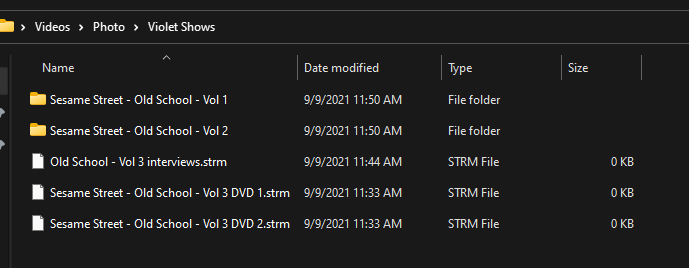
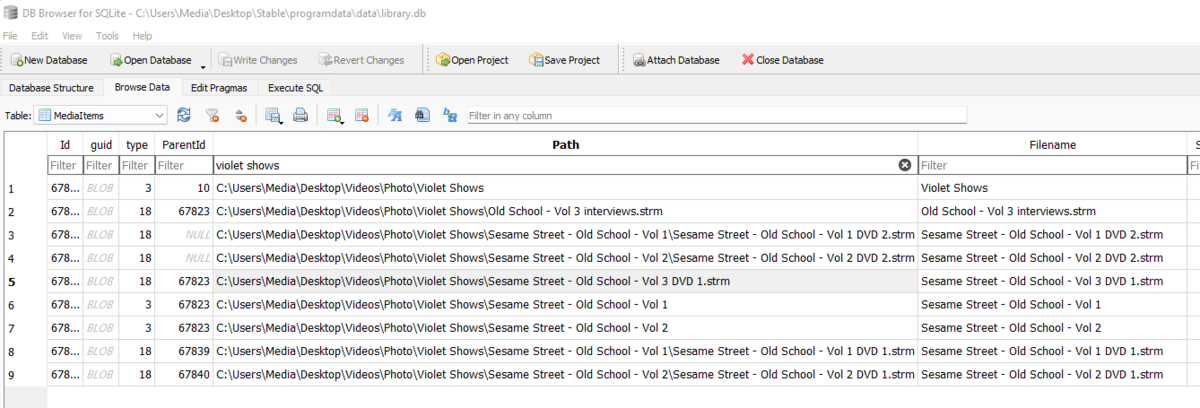
@Lukeit isn't even written to the database. Put them in their own folder and it appears as a additional part.
 1 point
 -
What would be really great is to be able to set the recording path per series as well that would override the default.. This way when you have multiple disc and are OCD about where your content is stored you can specify exactly where the series recording will be put vs just to a library that could save it to the wrong disc or one that is already full.1 point
-
The reason you only see options based on your configuration is to avoid overwhelming you with choices for all countries. But yes, ideally, this should be possible.1 point
-
That will be fantastic! Now I can tell my wife to sit down and sh wait awhile and it will show up.1 point
-
To gauge interest... What if you had the ability to "Forget" a series for the purposes of Next Up display. That is, it would no longer show in Next Up - unless you watched another episode. Sometimes you maybe watch a series for a while and, even though there is more of it or more is made later, maybe it isn't as good as the earlier seasons or maybe you just don't have time for it anymore. So you'd like it to quit showing up in your Next Up list so it is less cluttered and you can focus on the series you are actually watching now. If you start watching it again, the "forget" would be forgotten and it would start to show up in Next Up again.1 point
-
How did you even connect. I keep getting an "Invalid Credentials" error.1 point