Leaderboard




Popular Content
Showing content with the highest reputation on 09/25/21 in all areas
-
New version available: 6.0.10 build 47 (ex5) - fix add/remove multi video - fix tv show removal items - fix tvshow info - remove vote counts (not support by Emby server) - remove useless class abstractions Comments: DB resync is required.2 points
-
Well assuming he would expect to be taken to artists beginning with P then the request is perfectly valid. You can see the sort order applied is still album artists and this is how WMC used to work in the same view2 points
-
Thanks, I ended up keeping it as simple as possible... clean minimal Windows 10 Home (locked down tight with simplewall/windows10debloater) and Emby. A few monitoring utilities, daily backup utility, remote monitoring, that's it. Done. Uses 2-3GB RAM at peak, with 2 transcodes going. Couldn't be happier.2 points
-
Good evening all, I am extremely happy to present to you - Emby Scripter-X version 3.0 (up on the catalog now!) The major change in this version is -- Packages -- ! This gives you the opportunity to develop packages for Scripter X for others to install and use. And very soon, there will be a Packages catalog available that you'll be able to search for, and install community packages, straight from your Emby Administration Console. A package is written in Javascript. A Package requires 3 things - 1) a PackageInfo.json file, 2) a Package.js file, and 3) both these files zipped up together in a .ZIP file. PackageInfo.json provides vital information about your package to ScripterX. It's format is as follows :- { "Id": "scripterx.package.example", "Name": "Example Package", "Description": "An example package for the ScripterX package system.", "Author": "Anthony Musgrove", "Email": "anthony@emby-scripterx.info" } Package.js is the javascript file for your package - where all your code exists. This is the fun bit. Some important things to know about your script: - When your package is initialised by ScripterX (on installation, and on server startup), a function in your Package.js is executed. It is called _package_init(): function _package_init() { //do something here on package startup } - Your script can subscribe to ANY of the ScripterX events, by adding a function with the name _EventName, for example, if you wish to subscribe your package to the onAuthenticationFailed event, you'd simply enter: function _onAuthenticationFailed(context) { //do something here when someone fails to authenticate to emby. } *** Note, the parameter for these functions is context, which is the context of the event call. It contains all the information regarding token values, etc, that you have full access to. For example, to get the username of the attempted failed authentication, you could use :- function _onAuthenticationFailed(context) { var attempted_username = context.Token("%username%").value; } - Same goes for any of the other events, events being: onAuthenticationFailed, onAuthenticationSuccess, onLibraryScanComplete, onMediaItemAdded, onMediaItemRemoved, onMediaItemUpdated, onPlaybackStart, onPlaybackStopped, onScheduledTask, onSessionEnded, onSessionStarted, onCameraImageUploaded, onLiveTVRecordingStart, onLiveTVRecordingEnded, onScheduledTaskStart, onScheduledTaskEnded, onMediaItemAddedComplete, onPlaybackProgress - To log output from your package to the Emby server log, you can utilise the ScripterX.Log functions, they are :- ScripterX.Log.Info("Add an Info log entry to emby server log."); ScripterX.Log.Error("Add an Error log entry to emby server log."); - If you need timers, ScripterX has timers. You can simply create, delete, start, restart or stop a timer by using the following Timers commands : Create a timer that only elapses once, but can be restarted manually after its elapsed, by using .createOnce: ScripterX.Timers.createOnce("myTimer", 5000, "tmrMyTimer_Elapsed", null); or, create a timer that elapses every interval, without having to be restarted, by using .createRepeating: ScripterX.Timers.createRepeating("myRepeatingTimer", 10000, "tmrMyRepeatingTimer_Elapsed", null); - When your timer elapses, it will call the function set in as your callback. For example, when my timer elapses, it will call the following function: function tmrMyTimer_Elapsed(timer_name, timer_interval, objects) { //do something here when my timer elapses, the timer's name is given here too. //timer name is needed to start, stop, restart, delete etc. } - ScripterX supports webhook posts right from your javascript, you can perform a webhook post by using the ScripterX.Web functions, for example, in my _onPlaybackStart function, I want to post to a webhook every time someone starts playing a movie or TV show on my server, I can do this by: function _onPlaybackStart(context) { /* Send a webhook when (someone) plays (something) */ var api_url = "https://myapi.url.com"; var playback_info = {}; playback_info.itemId = context.Token("%item.id%").value; playback_info.itemName = context.Token("%item.name%").value; playback_info.userName = context.Token("%username%").value; playback_info.deviceName = context.Token("%device.name%").value; playback_info.serverName = context.Token("%server.name%").value; playback_info.memo = playback_info.userName + " is playing " + playback_info.itemName + " on device " + playback_info.deviceName + " from server " + playback_info.serverName; ScripterX.Web.Post(api_url, JSON.stringify(playback_info)); } - Once you've created your Package zip file for distribution, you can install it on your Emby server by using the Emby Scripter-X package installer interface, as shown below: - While you're testing your package, you don't have to keep uninstalling and reinstalling your package to test and debug. Simply install your package ONCE, then navigate to your Emby data directory, find ScripterX, then find Packages, then find the folder labelled with your package's assigned installationId. Inside this directory, you'll notice Package.js. Make changes directly to this file, then go back into your Emby administration panel and click the 'Reload' icon next to your package listed in your 'Installed Packages' panel. The reload icon is next to the uninstall/delete icon. If you wish to uninstall a package, simply click the trashbin, then confirm by clicking 'Really Uninstall?' There is MUCH, MUCH more to come, but for now this will get people going. There are other function groups that I am going to implement including Library searching and Item manipulation, User manipulation and searching, among many, many other functionality. Please enjoy, and as always, any comments, feedback, suggestions are MUCH MUCH appreciated. Emby ScripterX (github: https://github.com/AnthonyMusgrove/Emby-ScripterX) Project/Product Website: https://www.emby-scripterx.info/ Version v2.3.4 now up on the Emby Plugin Catalog & GitHub with changes. Events supported: On Authentication Failed, On Authentication Success, On Playback Start, On Playback Stopped, On Session Started, On Session Ended, On Media Item Added, On Media Item Updated, On Media Item Removed, on Scripter-X Scheduled Task, on Library Scan Completed, On Camera Image Uploaded, on Live TV Recording Start, on Live TV Recording Ended, onScheduledTaskStart, onScheduledTaskEnded, onPlaybackProgress, onMediaItemAddedComplete For tokens available, please see GitHub readme, or check out the Actions interface in the plugin - you can find the plugin in the Emby Server Catalog, under 'General'. ChangeLog Changes for 2.3.4: Major core rewrite Added conditions (drag and drop) Rewrote token parser and added contexts Added event onPlaybackProgress (which supports transcoding detection) Added event onMediaItemAddedComplete which is called virtually, after an onMediaItemAdded + Meta Data (or timeout of 40 seconds, whichever comes first) Added IP address tokens for Authentication events Various other modifications and changes Changes for 2.3.1: %item.library.name%, %item.library.type% issue resolved Added confirmation on delete for actions (theme friendly) Remove 'Global Tokens' section in Actions interface (they're listed now for each event) Changes for 2.3.0: Variables are now case-insensitive, refactoring a lot of the interface code (Prototype-to-production), cleaning interface, addressed various GitHub issues. Changes for 2.2.9: Progressively from v2.2.6, functionality to enable or disable events individually, many more tokens (please see GitHub tokens list or the Actions interface), global tokens (server version, uptime, etc), more item tokens (for example, season number, episode number, item meta (imdb id, tmdb id, whatever you wish), season meta, series meta, plus plenty more! Changes for 2.2.5: Aesthetics on Actions Interface (enlarged textboxes for script and interpreter, better alignment of add buttons) Changes for 2.2.4: Progessively from v2.2.0 to v2.2.4, integration with a sortable library, actions user interface customisation and remembering custom order within browser local storage. Changes for 2.2.0: Now theme friendly and compatible, changes with theme selection correctly. Changes for 2.1.9: Redesign Events/Actions interface for less clutter Please ignore the 'Advanced' tab, It won't be there in the next catalog release, its just used for debug at this stage. Changes for 2.1.7, 2.1.6, 2.1.5, 2.1.4: Progressive changes to implement Live TV Recording Events. 'Emby Scripter-X DVR Manager' was implemented in the codebase to handle all Live TV events, tokens and logging. Changes for 2.1.3: Addressed bug with %item.library.*% tokens with respect to onItemRemoved event. (see https://github.com/AnthonyMusgrove/Emby-ScripterX/issues/2 for info!) Changes for 2.1.2: Added new event - onCameraImageUploaded. This event is triggered when a user uploads an image to the Emby Server via the 'Camera Upload' functionality within the various Emby Apps. Tokens supported are as above. Below is an image of the event on the Actions page, along with an image of a sample batch script and output: Changes for 2.1.1: Actions now utilises the entire available interface space; so editing and viewing are much easier. Some input validation added for Interpreter and Script Some cosmetic modifications :- on adding new action, delete/trash button is now changed to 'X' so it indicates 'remove this unsaved action'. Once a new action is saved, the 'X' icon will change to a 'trash/delete' icon, signifying 'delete this action from the server'. Changes for 2.1.0: Bug fix for " in script name, parameters, interpreter. various other bugs, interface bug fixes very stable at this stage. Changes for 2.0.0: Redesign Interfaces, add Actions interface, Community interface (as tabs) Redesign core Allow multiple script actions for each event Changes for 1.0.0.8 - Various updates/changes: Addressed issues with having to supply entire path to interpreter. Implemented better way to detect OS platform (IsWindows() IsLinux() IsOSX()) Powershell.exe, cmd.exe, /bin/bash or a custom executable is now supported Examples now: using powershell.exe as interpreter: -File "D:\embyscripts\ScripterX-test.ps1" -Name %item.name% -ID %item.id% -Type %item.type% -LibName %item.library.name% using cmd.exe as interpreter: /s /c D:\embyscripts\test.bat AuthFail %username% %user.id% %device.id% %device.name% using /bin/bash /home/medius/scripts/test.sh AuthOK %username% Changes for 1.0.0.7: on Library Scan Completed : D:\embyscripts\test.bat Library Scan Complete! Library Scan Complete! Changes for 1.0.0.6: %item.update.reason% : Media Item Updated "1917" "D:\Media\Movies\1917.2019.1080p.BluRay.x264.AAC5.1-[YTS.MX] - Copy.mp4" (Update Reason: MetadataEdit) D:\embyscripts\test.bat Media Item Updated "%item.name%" "%item.path%" (Update Reason: %item.update.reason%) 1.0.0.5 additions: %series.id%, %series.name%, %season.id%, %season.name% : PlaybackStart ItemID: 593 - Name: "Brian: Portrait of a Dog" - Path: "D:\Media\TV\Family Guy\S01\S01E07 - Brian - Portrait Of A Dog.avi" - Username: Anthony - DeviceName: Firefox - ItemType: item type: Episode - LibraryName: TV - LibraryContentType: tvshows (seriesname: Family Guy) (season: Season 1) D:\embyscripts\test.bat PlaybackStart ItemID: %item.id% - Name: "%item.name%" - Path: "%item.path%" - Username: %username% - DeviceName: %device.name% - ItemType: item type: %item.type% - LibraryName: %item.library.name% - LibraryContentType: %item.library.type% (seriesname: %series.name%) (season: %season.name%) README is on Github. Comments/Feedback/Suggestions are GREATLY appreciated. On Scheduled Task: A field now exists to specify a script to run as a scheduled task - you'll now see under 'Scheduled Tasks -> Application' an Emby ScripterX Scheduled Task. No tokens are yet available to this field - need feedback/suggestions/comments on what should be available to specify as parameters/tokens.1 point
-
I made this plugin quickly today because I was having issues with certain client application swamping my device lists. As you can see from the image below: The plugin will list and group all your devices saved in the Emby Database: WOW! 1394 versions of Chrome saved in the Database! Let's remove the old and insignificant ones using this plugin. Okay, now there is only one version of Chrome, which is the Client Session that is being currently run (the plugin skips over any sessions that are currently in use - We don't want to kick anyone off the server inadvertently). This is better, and the Devices page loads instantaneously after doing a little bit of browser cache clearing. Note: See how quickly Chrome tricks Emby into thinking it is a new Device Connection! Holy COW three more just added themselves since the clean up! The console will list the removed device ids in red There is a user dialog which allows for custom threshold limits with regards to what is considered too many devices stored. Fixes: -Plugin is satisfied with the amount of clients logged in the database and didn't know what do. Now it does. -Added User input Threshold limit dialog -Device removal will show in red inside the browser console - these are not errors, it it's to confusing I'll change the color to hot pink. Possible Future Updates: 1. Create a Scheduled task that will be customizable to remove specific clients automatically that are a certain age. 2. User will be able to set the threshold for what is considered "TOO MANY INSTANCES!" (Currently set to 25 instances) 3. Update Plugin UI when Devices are removed from the Database. (There is currently no UI updating - Press the Get Devices List - Button) 4. Make it pretty or something (right now it is utility, and there is no time to make it pretty). DOWNLOAD: DeviceEditor.zip1 point
-
We're still going through the approval process for our DSM6 packages, but for DSM7 the stable release is now available. I'll get the website updated as soon as I can. Thanks everyone.1 point
-
Yes please, thanks.1 point
-
You are my Kevin Costner to my Whitney as I was able to add a folder and hope to be able to build my server back Thanks for the fast reply1 point
-
Ok I just PM you. Thanks1 point
-
Did you do this?1 point
-
The source is largely irrelevant. DVD's from the same season may have different Intro fingerprints - we have tested this ourselves by cut and pasting an Intro from a same season episode. The 'new' episode, then picks up the Intro when the 'Authored' Intro did not - to you and I, it's the same. As we have said before, there is a fine balance on the accuracy of picking up the Intro's - there may be some shows where the accuracy is lower than average - we have seen a few of those (for no 'Audible' reason what-so-ever) but as long as the majority are good (~90%) - then for a first release of emby doing this - you will have to deal with the manual correction of those items.1 point
-
I for one would like to see it go back to separate alphabetical folders. As for those of us that would prefer to rely on our own data rather than calling in images on demand, dealing with a 100,000 or more folders in a single directory is a complete pain for most OS's1 point
-
About A serialization layer for your Emby server's database, allowing information about movies, tv series and episodes to be retrieved in JSON format via GET requests. Project URL <URL redacted> Why? I wanted to build some custom Python scripts to feed my Superset dashboards with relevant information about my Emby library and I could not find all the information I needed using the native API, so I ended up building this "intermediate app" that sits between my scripts/dashboards and my Emby server's database. Due to to database access restrictions, it is a little bit slow, but that's something I'm going to tackle next. Ideas and feedback are welcome! Screenshots 1. Movie endpoint response 2. Genre & studios detail 3. Providers detail: 4. Media streams detail (audio tracks and subtitles included)
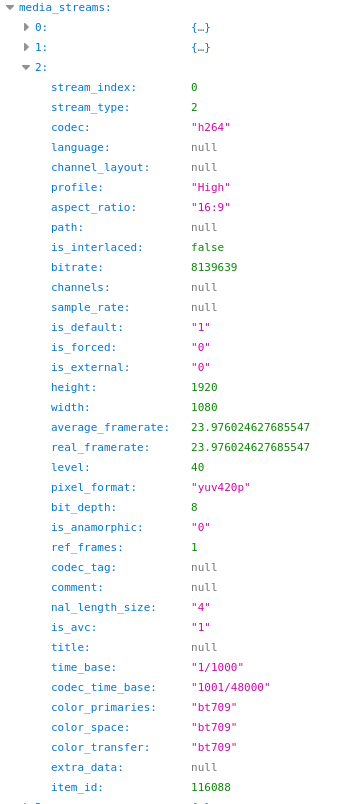
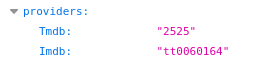
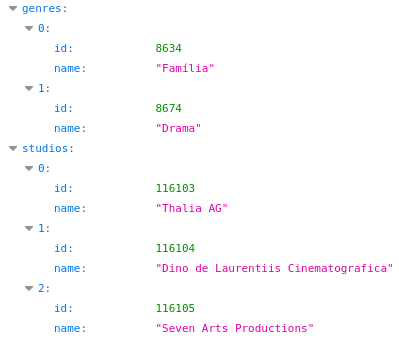
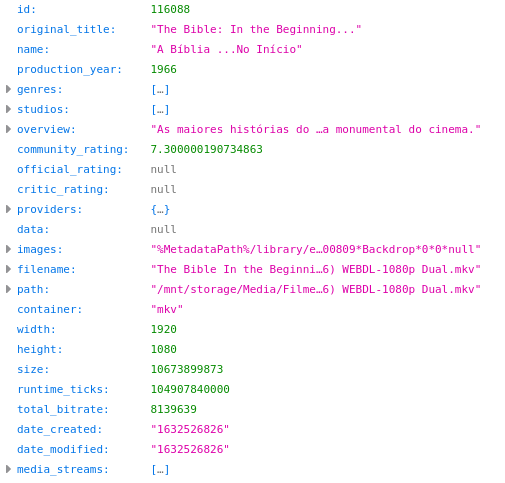 1 point
 -
Pretty sure you are looking for this one. https://emby.media/community/index.php?/topic/101002-people-folder-issues/ But yes alpha folders would be more organized. But biggest issue right now is {name} folder is not cleaned up when {name-tmdbid} folder is made.1 point
-
Still in testing. We have picked up some issues with 'large' library scans (20-30K episodes) plus some chapter issues to resolve. During the limited Beta testing we did, these issues did not materialise, but now we are running on our own 'Production' systems - it appears we have some more issues to solve. To set expectations - The next release is probably going to be early next week as we don't want to issue a release with known issues..1 point
-
thank you very much have a nice day1 point
-
I would wind up my problem with the following conclusions: If a device doesn't support the codec of the media file, it would ask the emby server for transcoding. Transcoding is a resource hungry task and therefore requires good hardware. Even after setting the transcoding thread count to 1 I saw no improvement. And in my case my system is shutting down due to poor performance and poor heat management.1 point
-
If your channels are united kingdom/usa/canada, you can you emby guide data to get your listings - this may have better info that the IPTV provided one (.i.e. season/episode numbers and programme images)1 point
-
Most IPTV providers that offer EPG data, follow this format for the M3U URL: http://SERVER_URL:PORT/get.php?username=YOUR_USERNAME&password=YOUR_PASSWORD&type=m3u_plus&output=ts And this for the EPG URL: http://SERVER_URL:PORT/xmltv.php?username=YOUR_USERNAME&password=YOUR_PASSWORD&type=m3u_plus&output=ts To get your EPG data try duplicating the M3U link, but changing this part of it: http://SERVER_URL:PORT/get.php? To this: http://SERVER_URL:PORT/xmltv.php?1 point
-
Home Screen settings, under Music change "Default screen", that'll be your landing page.1 point
-
Hi. Unless you have a very specific reason or are directed to change something by support, the defaults will be the best choice. Thanks.1 point
-
That was just marked as solution cause I got "test" to disappear. Off to work. (Sorry if asking where you were was inappropriate)1 point
-
I'm in the middle of Indian ocean, anything more precise, like 5 days off Reunion makes little importance. But yes, I do have vampirish inclinations, being awake-wise. If @cayarsdid remotely chimed-in, with scans failing and that was the conclusion, then it is more likely some systemic error which will hardly be solved by troubleshooting it now, better wait for an update and re-try. In the meantime, go to your User settings, Acces tab, untick "Enable access to akl libraries", untick "test" and you won't see it any more, it'll be like it doesn't exist.1 point
-
AlphaPickerRow is specific to Sort order and only applies to TITLE as you are sorting Albums, all other sort orders remove the picker this is the same across all libraries.1 point
-
What may be "improvement" for you, might be "detrimential" for someone else. That does not entitle you nor it does preclude that you'll get all your wishes fulfilled. It doesn't work like that for none of us. And we all have ideas what would make Emby "better". We are also debating viability of a request. I, for one, would surely not appreciate time and resources being devoted to developing this at the expense of number of features that would be vastly more beneficial to the community as a whole.1 point
-
As already discussed there are a lot of reasons for the need to have the NFO file but no valid reason for it not to be there from a functional standpoint. Once a recording is done, the NFO is the sole source of this meta-data known to be correct to Emby. It may never be available again! There is no guarantee there will be another source of meta-data that can replace this. Sure often times most (not all) TV Shows and Movies will match with an online meta-data providers but other things recorded will not have an online meta-data counterpoint for this data. Many shows broadcast use different season/episode numbers so that makes those twice as bad because they will pull the meta-data and it will be wrong for that episode. Sometimes the online sources won't have the information until well after the media is added to Emby. Olympic recordings I think are a good example of this, So if you added just the media file to another library and don't have meta-data refresh turned on you will never get this information populated. If meta-data refresh is set to 30 days you might get it then, but that depends if anyone ever adds this info. If you rename the recordings as part of your process of moving them it may not ever match, etc...now You can manually remove the NFO files and Emby might seem happy but what if you have to reload the database or move to another OS platform or just want to rebuild things as the database is constantly being optimized? You will loose the meta-data for some of these recordings or get the wrong results without the NFO. Now there is an unhappy person who lost all this information and maybe time spent on support for something easily avoided in the first place. So there is no valid reason to remove the NFO files based on everything said. However for those who simply don't want the NFO for their own reasons and willing to accept the loss of meta-data they can easily remove the NFO themselves multiple ways. You can use a simple script in the post processing of the recording which will remove the NFO right after it's recorded so you'll likely never see it. You can run a script on schedule to remove any NFO files in the recording folders, etc. That approach keeps the mass majority of customers safe as the operator has to knowingly remove the NFOs on purpose. So you can do this now if you really want to, but IMHO it doesn't make sense for Emby to provide an option in the GUI that we know can cause you to loose data in the future if the NFO is not present.1 point
-
Hi @Alexa101, if this is your first time setting up Emby for remote connections I suggest you try following this guide: Emby Connectivity Guide1 point
-
RequireTransparency will help the server decide on the final output format that is sent to the client. For instance if transparency is required, then it will have to be either png or webp.1 point
-
GetEnhancedImageSize should be returning your final image size. It gives the server a way to know this information without actually having to go through the image processing.1 point
-
If the client crashes then yes this could be a issue as the server has not received any stop commands. But Luke has mentioned some runaway situations like this should be improved in 4.7.1 point
-
Its built in the beta emby server GUI (Server/Database), but if you don't see it there see this post:1 point
-
Reports basically say the server crashes/becomes unresponsive and other minor issues. The option should be "Are you still Watching" but not familiar with this client or the option location. Enable 'Are You Still Watching?' prompt Prevent playback from continuing indefinitely by periodically prompting for user input.1 point
-
Why do the extra files bother you? Do watch your recordings through Emby or a file explorer?1 point
-
I assume it has something to do with the remove item bug I reported in one of the earlier postings. New version is almost finished and should be fixed. The remove bug also affects relabeled files and probably several more cases.1 point
-
Store updates are generally every 2-3 months.1 point
-
Hello! I don't know how interested people are in this in general, but I'm sure I am not the only one who wants to pull metrics off of Emby. Since I use Prometheus for a lot of other things, I figured why not make this a thing! I actually used to have a separate exporter for this, but this just seems neater. Anyhow, this will create a /metrics endpoint, which means you will just need to point Prometheus to your regular server address (e.g. https://my-emby-server:8920) and it will know what to do. Currently, the metrics produced are: - Emby info: - emby_info{instance="my_emby", version="4.6.4.0", id="41ca63b088f92613efaa969943df0f0d"} - Library counts: - emby_movie_count{instance="my_emby"} - emby_series_count{instance="my_emby"} - emby_episode_count{instance="my_emby"}) - Active sessions: - emby_sessions{instance="my_emby", user="me", type="Episode", state="Playing", name="Cowboy Bebop - S01E12"} - emby_sessions{instance="my_emby", user="me", type="Movie", state="Playing", name="Fire in the Sky"} Have a go if you're so inclined, and let me know if there are any other types of metrics you'd want to include. These are the ones I've found most useful for my own dashboard, but I'm sure I'm missing something. Emby.Metrics.dll1 point
-
That's not feasible for plugin developers. Emby developers aren't even guaranteeing *Emby* will work on a beta version. There's no way for plugin developers to keep up with the pace of change, preserve backwards compatibility, etc. Again, it comes down to people that shouldn't be running betas shouldn't run betas.1 point
-
Tried a reinstall but the auto update is still greyed out0 points