Leaderboard




Popular Content
Showing content with the highest reputation on 09/20/21 in all areas
-
it's a fairly easy process, but as you say time consuming and a PITA. i only had 4 on my main system. So not fussed lol Jeeeeez, my dog has just farted and it smells like 40 acres of muck spreading!!! lol3 points
-
You say you won't see this but in case anyone else does, OP is wrong. It's either their movie naming, a moviedb issue, or both. The top result for 'lincoln' in 2012 from their crappy search function is the movie Abraham Lincoln Vampire Hunter. The movie with an exact title match is second. This is appallingly stupid but that's what TVDB is returning on its search. Luckily there is an identify tool to correct for these errors quite easily. That all said, as long as you name your files properly these kinds of screw ups in themoviedb are relatively uncommon and you won't have to manually recognize films often. Using the second example, Croupier, there was no problem recognizing the file \\SERVER\SHARE\Croupier (1998)\Croupier (1998).mkv. The top moviedb result is the expected movie and the metadata downloads just fine.3 points
-
I'd really like to have 2 Factor Authentication added to the login screen. It's just this (optional) extra layer of security to help secure the server (which, especially if people use camera uploads) contains pretty private data. There are for every type of programming language quite a few libraries available, so implementation on a server shouldn't be too hard to realise1 point
-
ability to be able to add a collection into another collection. ie: Spiderman Collection into a SuperHero Collection. like i could with mediabrowser with shortcuts. TIA1 point
-
I would like to see a plug-in developed which allows for transcoding to be offset. My thoughts are for a transcoding server (high powered pc), running cut-down/transcoding only version of Emby. Then on my main Emby server a plug-in which offsets transcoding to the high powered pc (if available) Originally I had thought of this as being a high availability server https://emby.media/community/index.php?/topic/41443-emby-server-high-availability But thinking about this more, my requirement isn't for high availability but simply to offset the transcoding elsewhere.1 point
-
Don't know how many of you know what PseudoTV is on Kodi but basically it is a plugin that allows you to create an EPG full of your own custom TV channels using your entire media library into one big channel surfing experience on your library. Emby, I believe, would be amazing for this and really make it stand out if something like this was official supported as the only support for something like this is a little plugin on Kodi. Features: Create custom TV channels using smart filters (e.g. 500 random movies that are from 2010 and newer and genre is Horror, 25 random tv episodes that are from Fox network). Allow creation of an unlimited number of channels using these filters and assign them channel numbers Automatically generate an EPG/TV Guide using all of these custom channels and randomly assign the scheduled program at a specific time Allow sorting of the channel shows (random, in order, asc, desc) Allow channels like FX to play both TV shows from FX but also incorporate movies at specific time periods like primetime movies Allow trailers to play in between shows as well as Channel Bumpers/intro videos Allow integration with Live TV using PVR Allow YouTube channels, USTVNOW, Playon perhaps? Ability to add a logo to your custom channels Background updating that would auto generate / update all the channels and shows after a specific period of time And so on1 point
-
Please go here for info, bugs, issues and feature requests Been working on a plugin that bring the big screen experience and is user driven. Introducing Vantage Point Plugin for Emby. It can be downloaded in the Emby Server Plugin Catalogue. the order is pretty much set at the minute, But so far I’m happy with how it works. At the minute these are the following sections Personal Bumper Trivia Section intros, funnies and adds, select upto a max of 50 intros from your selected folder - good to use while your movie guests get drinks, popcorn, hotdogs etc, Personal Bumper Coming Soon Bumper coming attractions, select number of trailers to play from various sources. Courtesy intro - be quiet or mobile phones off. Only 1 is selected Personal Bumper audio codec intro matched to feature presentation audio track, only 1 is selected Feature Presentation Bumper countdown to feature presentation, only one is selected MPAA, BBFC, etc - certification screen which is matched to the MPAA rating tag in the nfo file. Feature Presentation Starts. For Bugs and Issues, please post them in the below thread Vantage Point - Big Screen Experience Intros - Plugins - Emby Community1 point
-
Please read this post first. I was wondering if it would be possible to add something that would allow you to skip the intro to shows automatically while binge watching. When watching Netflix it does this for some shows, and im not sure if thats a feature of Netflix itself or a Chrome extension i use called "Flix Assist" but it would be a nice feature to have within Emby as well. and possibly even create a custom timed skip for specific shows1 point
-
INTRO SKIP PLUGIN Current Status - Beta Release - Awaiting MB Admin to merge this into the Core ADVISORY: It is advisable to test these DEV/Beta releases on a small test library with a few TV shows that have a good amount of content. About 300-500 episodes. DISCLAIMER: The following has been analysed & tested this now: If your audio varies(pitch & loudness) between episodes in a season, the plugin will have difficulty in detection. There is nothing we can do about it, we tried changing the sensitivity of the detection and it yields weird results. THANKS: @chef @samuelqwe @rbjtech @Cheesegeezer for all their hardwork to get this where it is today, especially chef and Sam who did all the hard work with the Fingerprinting and Detection methods. Also to the all the testers for putting up with us. FFMPEG VERSION - Current Release version of Emby Server NOT contain the correct ffmpeg version that facilitates Chromaprint. You will either have to upgrade to the latest beta version 4.7.0.11 minimum or copy over the FFmpeg Binaries from a beta version to your Release version. INTROSKIP WIKI PAGE - PLEASE CLICK HERE FOR INSTRUCTIONS
 1 point
 -
Emby does not use MediaInfo, it uses ffmpeg/ffprobe to get media information. So there are these slight differences. But level 120 is level 4.0 The definition: H265_LevelIdc_10 = 30, H265_LevelIdc_20 = 60, H265_LevelIdc_21 = 63, H265_LevelIdc_30 = 90, H265_LevelIdc_31 = 93, H265_LevelIdc_40 = 120, H265_LevelIdc_41 = 123, H265_LevelIdc_50 = 150, H265_LevelIdc_51 = 153, H265_LevelIdc_52 = 156, H265_LevelIdc_60 = 180, H265_LevelIdc_61 = 183, H265_LevelIdc_62 = 1861 point
-
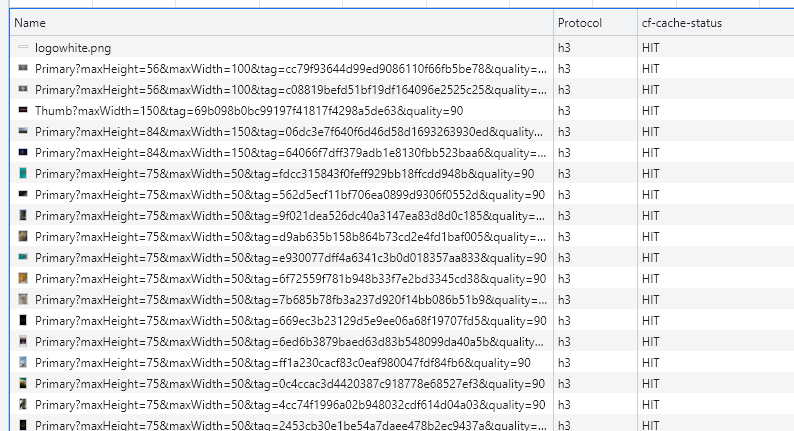
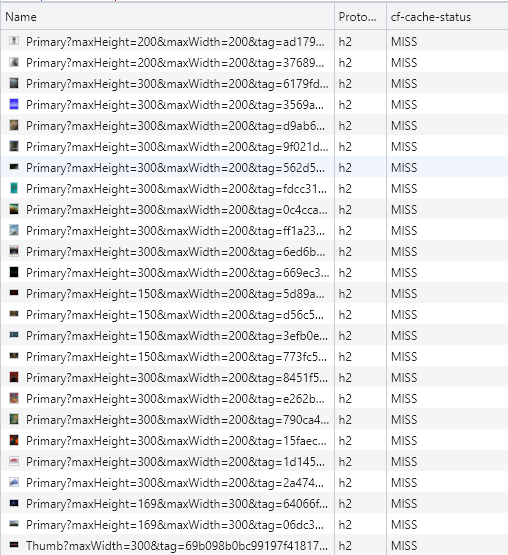
it just basically means you are not caching anything that has a query string.. which is like everything in emby.. lol those of you that changed this value I bet if you load up your emby server in chrome, bring up developer mode, and on the network tab right click the header go down to "response headers" then "manage response headers" then finally the button "Add custom header" add in cf-cache-status this will show you what cloud fare is caching from your emby, bet those of you that made this change have almost no hits. Should look similar to this: You probably see lots of "MISS" if I am correct. but if you are ok with nothing getting cached, no need to worry.. you will just loose out on the speed of serving images from the server closer to the user (speed), and also means more bandwidth from your emby server vs only going out from cloudflare. Here is me testing with my "Standard Cache" CF settings: Unless I am misunderstanding the issue.... we may want to look at a rule to not cache any .ts files. screen-capture.webm
 1 point
 -
Hijacking this thread as I had a different issue posted in the beta forums where direct play file would take up to 50 seconds to start. Another CF user in Australia confirmed the same thing. Proved that developer mode fixes the issue, so something on cloudflare. The same fix that you all put in also fixed that. However - @pir8radiostated this is an incorrect setting as he posted the below - have you guys with this issue seen issues with no query string since you made the change ? Have CF made a change that stuffed up the caching in some way ?It seems that according to @pir8radio, this change may just be a band aid over an undelying issue many of us are having with CF on emby..... @pir8radio wrote this : 'you want query string, (STANDARD SETTING) otherwise cloudflare will cache images and video file chunks that the first person started, and feed them to all users.. for example if size my browser window to really small, all of images will be cached, then I resize my window to full screen, cloudflare will serve me the same smaller images that were cahced, now all pixelated. But with query string it will cache different versions of the same image in the various sizes. For example if you dont cache based on query string and i load the page with a small screen size Cloudflare will take this: "/emby/Items/12737212/Images/Thumb?maxWidth=150&tag=69b098b0bc99197f41817f4298a5de63&quality=90" and ignore the query string and just cached that 150px image as "/emby/Items/12737212/Images/Thumb" then when someone with a big screen size comes along instead of getting this image: "/emby/Items/12737212/Images/Thumb?maxHeight=169&maxWidth=300&tag=69b098b0bc99197f41817f4298a5de63&quality=90" so now that user will get a 150px image instead of a 300px image.'1 point
-
Thanks a million. It works like a breeze now!1 point
-
Oh that proxy solution, yeah that was pretty clever.1 point
-
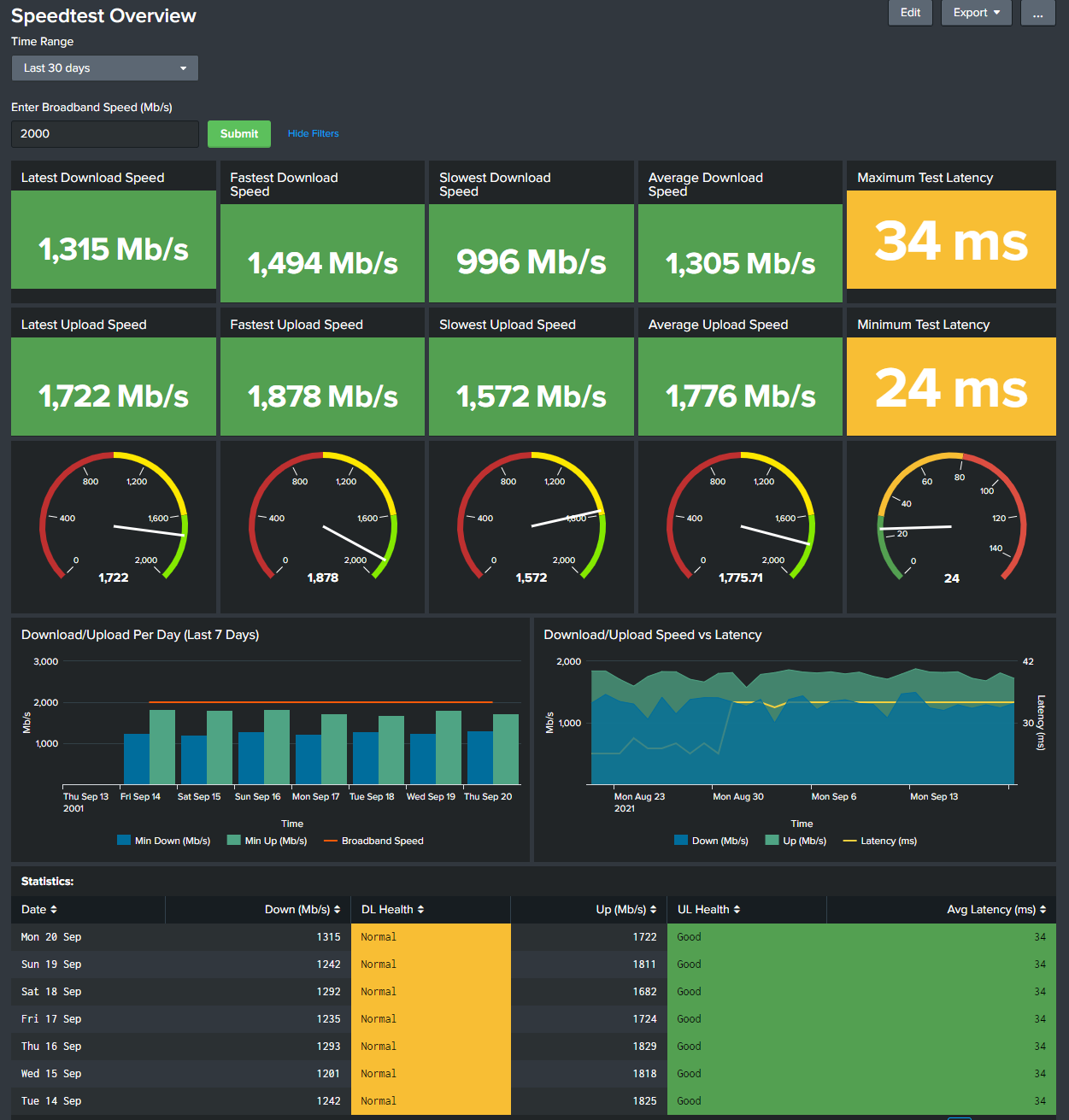
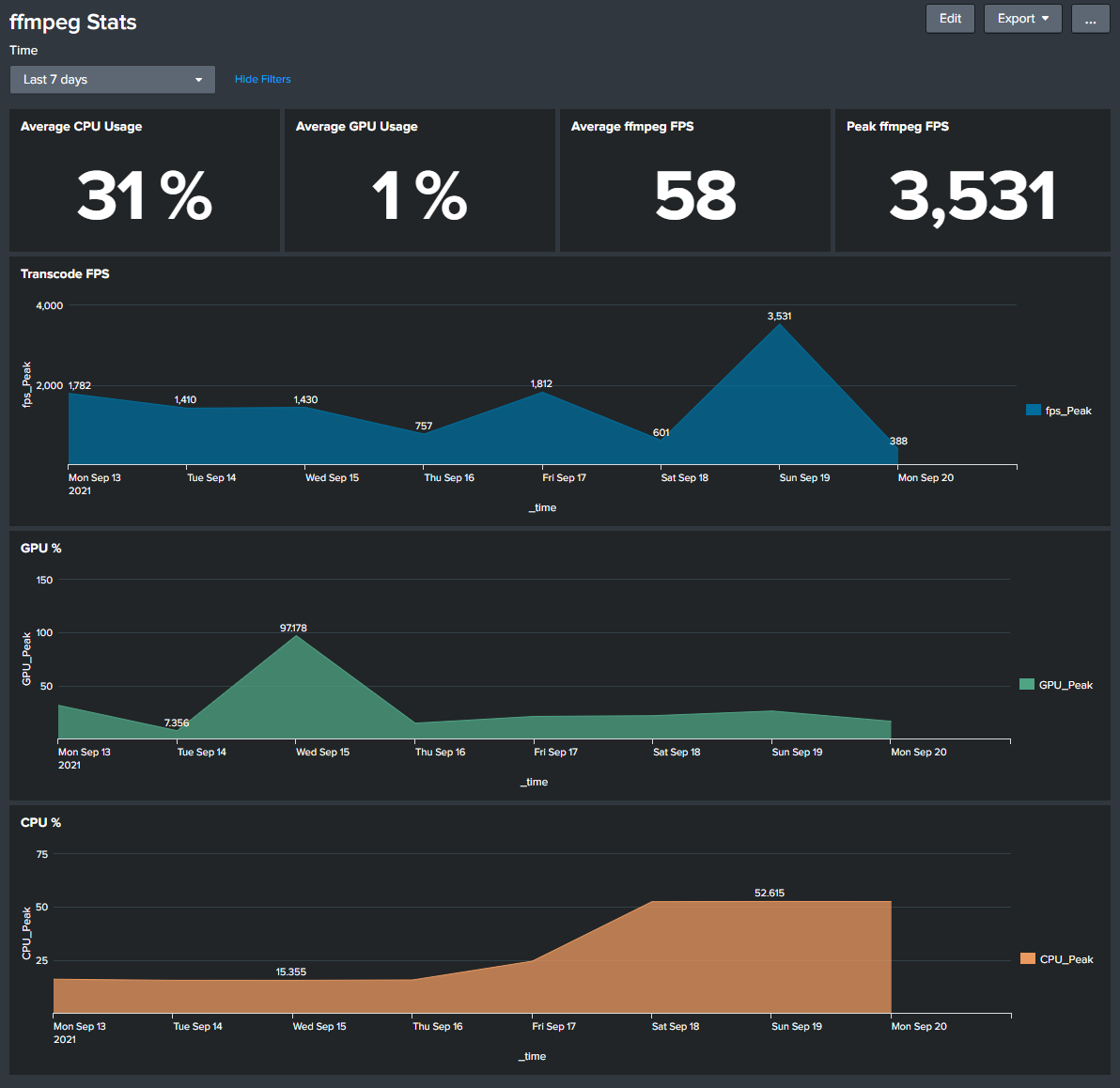
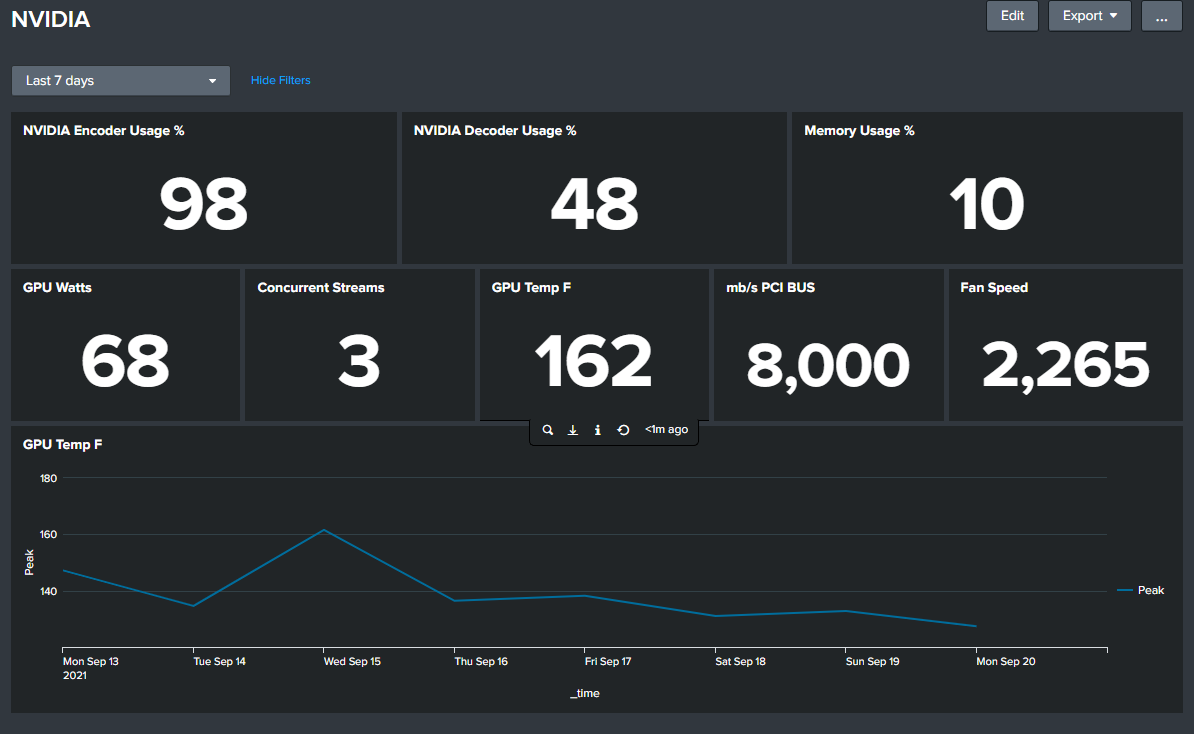
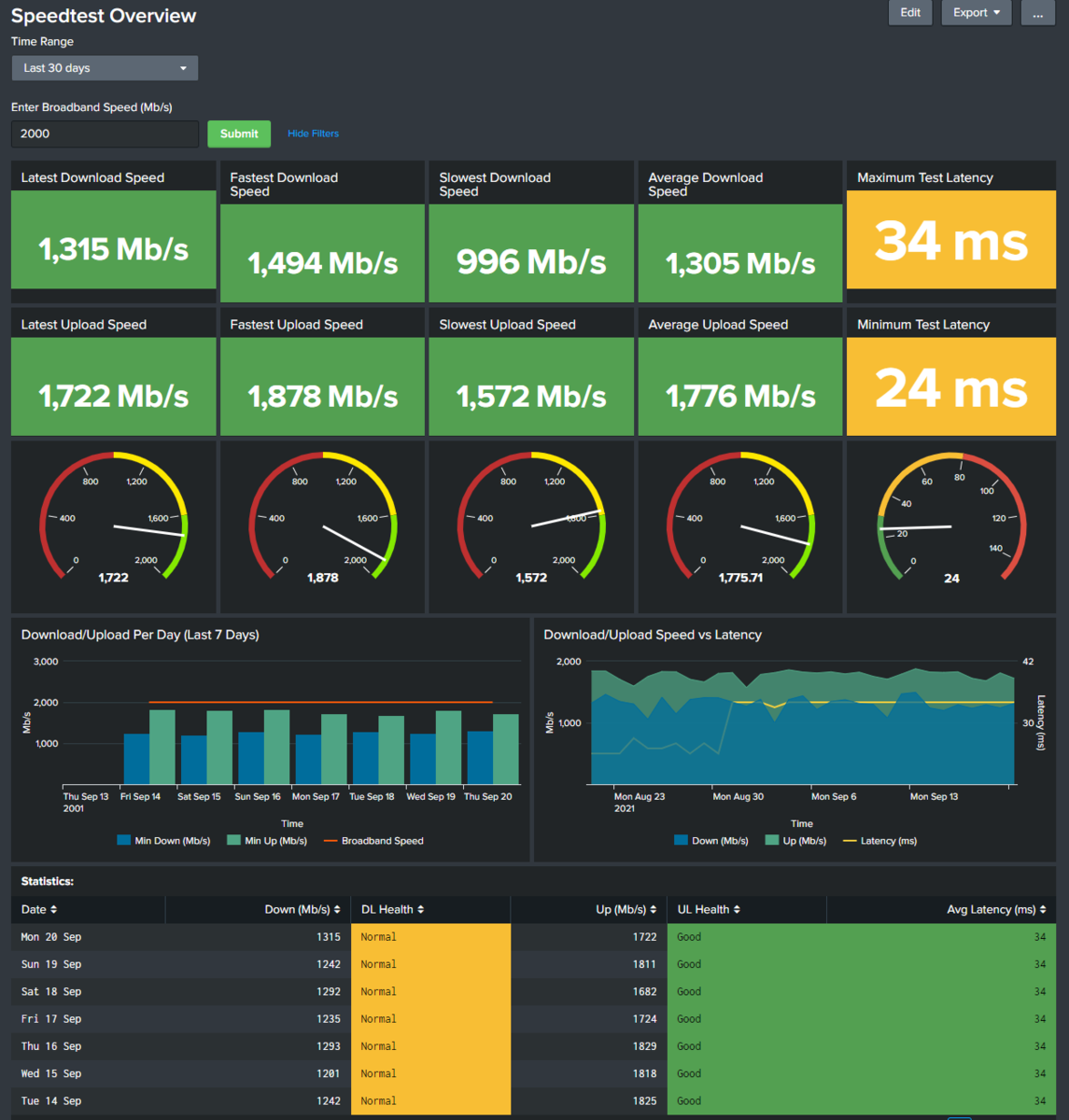
yea so i saw these "Charts" and they are reasonably accurate. for gpu RAM... but i have noticed embys "throttle" function really does help on the transcoding front. gives you some cushion to take on more users... Im now using SPLUNK to do my monitoring.. Someone made me a plugin that writes current streams into the emby log and i grab that. I also log drive, cpu, ram, GPU, and GPU RAM, etc... I log FFMPEG logs and pull numbers from that, and i log the nvidia GPU stuff.. and those two logs look like this: well i log EVERYTHING... on my server.. lol, but splunk is cool because you can tie all of those logs together to get the big picture.. For example a movie starts streaming, i can put graphs up that show Hard drive throughput, internet throughput, CPU, GPU, and RAM, hard drive and iscsi array throughput, as well as errors and users, what type of client they are using.. I a bit anal when it comes to data collection...
 1 point
 -
Yay! Thanks for some clarity. I will get to work on this. (I deleted the user emby when I got started….)1 point
-
When I go to the plugin settings page it just spins and server becomes unstable.1 point
-
With any luck someone will be able to create m3u links from the service so the streams are universal. Of all the services these guys probably have the best chance as it would seem if you get station/network approval and possibly report back views that should work for everyone. At least you would figure they wouldn't be coming after you if they give you approval.1 point
-
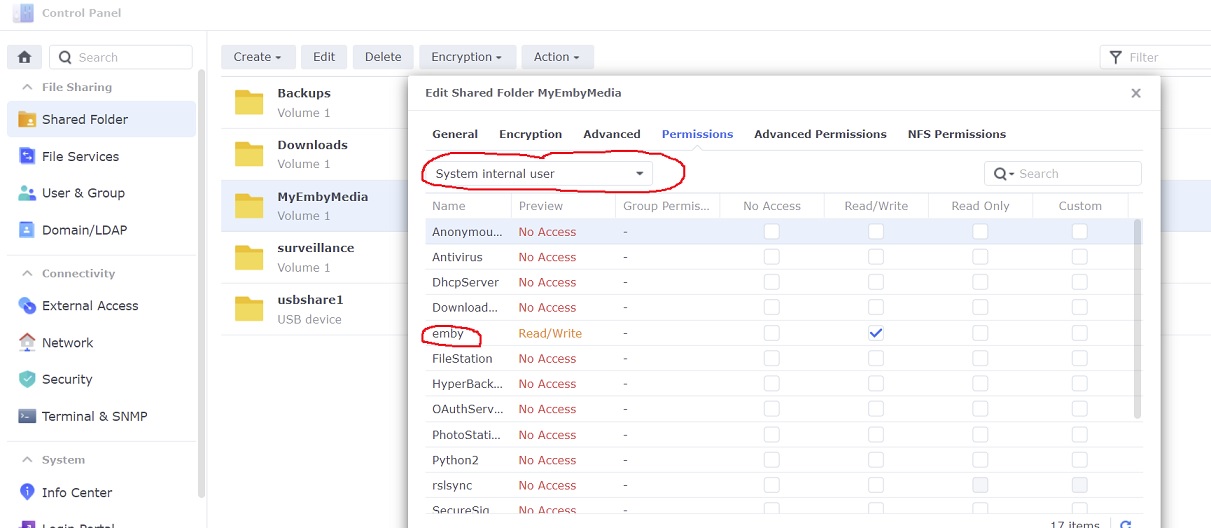
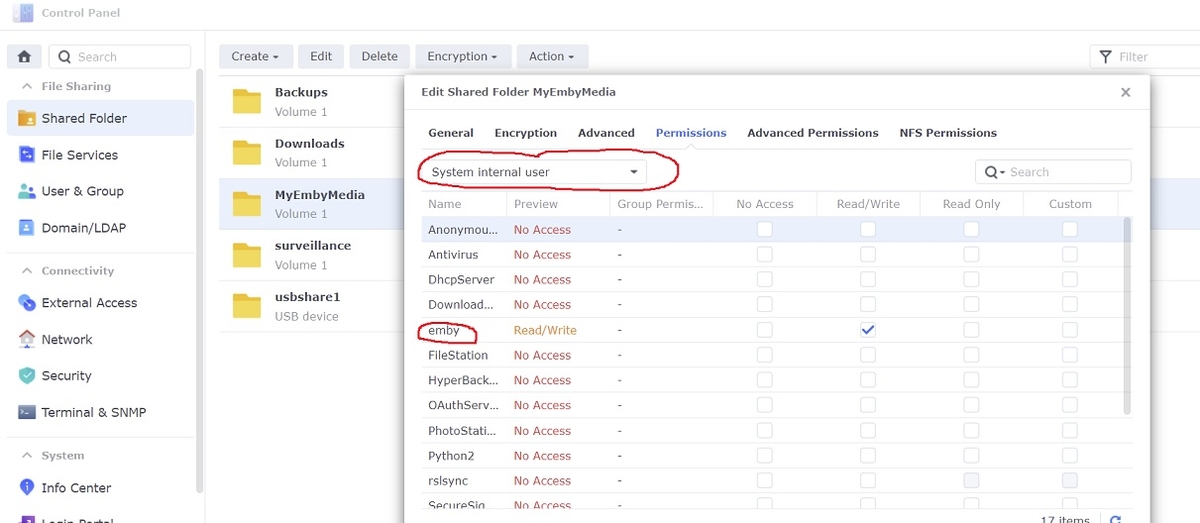
With DSM7 the emby user is now a "system internal user". Just use the dropdown box to change
 1 point
 -
Hi, we have a new app update that is currently in Apple review. Please try that once available and let us know if it helps. Thanks !1 point
-
If the movie is not on themoviedb, you could always add it, along with the IMDB ID1 point
-
Chapters are not synced to Kodi, cause it's part of the video stream. I haven't found an option to set bookmarks on Emby server (manually). Not sure is this is supported. Could be external by Emby server plugin...1 point
-
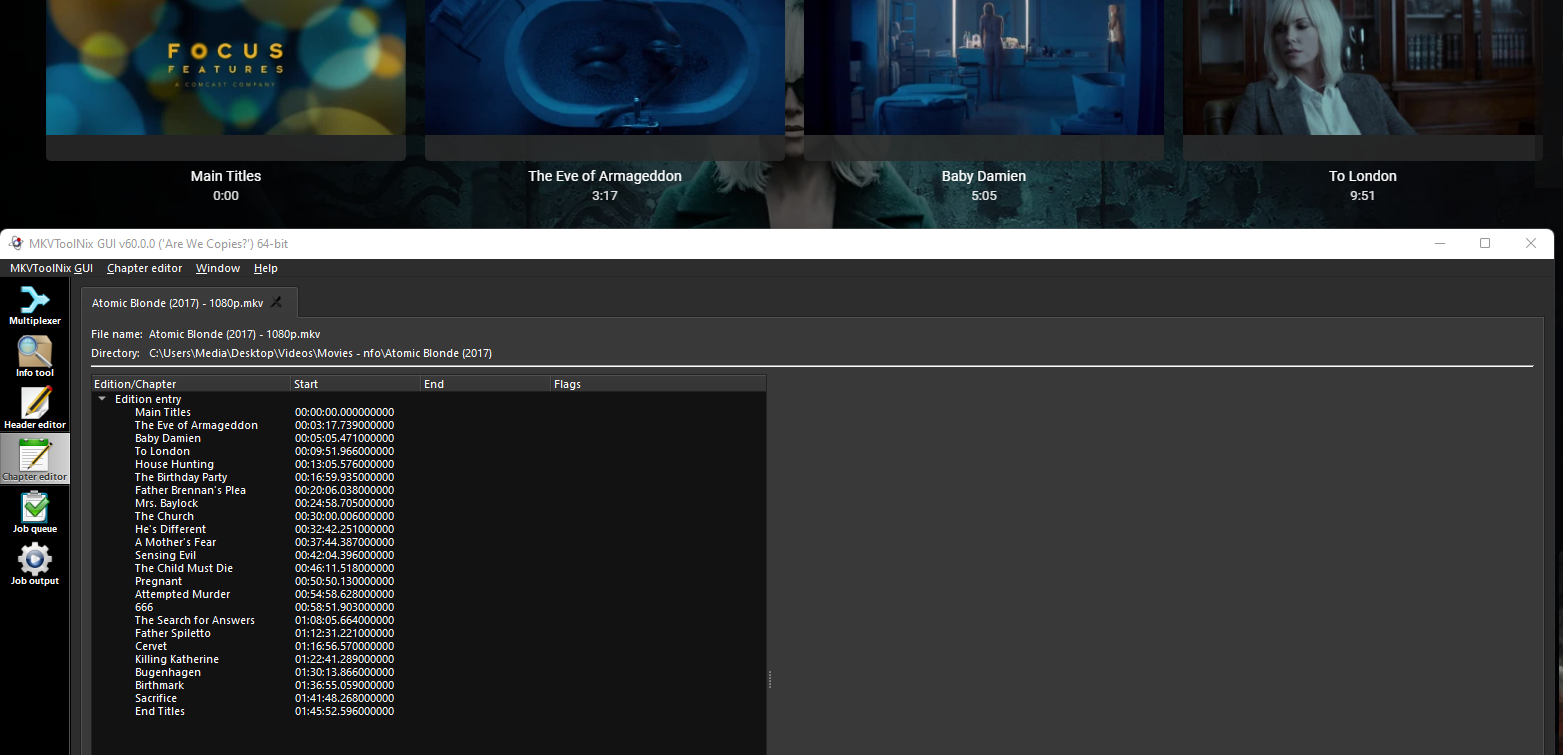
I just ran 3 of the episodes through MKVToolNix, removing the chapters. Emby re-processed them, and the Intro Skip plugin took care of the rest. Need a batch method to go through all of the other episodes now, as doing it manually is a PITA. I wonder if @PenkethBoy has a PS script for this1 point
-
A collection needs at least two items, so you'll need to do this for the other title in the collection as well.1 point
-
Some Roku's are wireless and others are connected via Ethernet. I've seen this happen on both but I am starting to wonder if it's network related. I recently upgraded our home network to an Asus ZenWifi mesh and while it's been a huge improvement overall, I will do some digging to see if for some reason the connection is getting dropped or of there are random lag spikes. I'm also going to let a couple movies play in the background today via Chrome to see if I get can errors. I may also pull out a Firestick and see if I have the same issues on it. Thanks for the help so far and I will report back once I learn more!1 point
-
Nope not at all.1 point
-
Thanks my friend1 point
-
Well loosing out on Windows HEVC playback due to one dollar is well, silly. But you can try this. Paste this line into the Web browser URL line up top. ms-windows-store://pdp/?ProductId=9n4wgh0z6vhq It will want to open the Microsoft Store so let it. If it works you will be able to install the NEVC extensions.1 point
-
Then you might post on Scrpter-X forum section, @Anthony Musgrove is always helpful and willing to assist whenever possible.1 point
-
Let me try to clarify some things. 'Continue watching' isn't an image type. Images in the continue watching row already have the badges they would have anywhere else. Right now, you can add a tag rule to a Show and see that rule's badge on the show image when it appears in the continue watching row. What's causing some confusion is that Emby displays the *Show* image for TV shows in the continue watching row, even though it provides *Episode* level text underneath. Your expectation seems to be that Iconic should show the Episode's badges on the Show's image when in the continue watching row. That can't happen. What might be able to happen and what I'll be looking into at KoteZA's request, is finding a way to determine the resolution of a *Show*. If that's the case, I'll add a Show level rule for resolution. Hope that makes sense.1 point
-
I'm still at fingerprinting my stuff but so far no issues encountered. Well done!1 point
-
From the recent tone mapping thread - the number of 4K > 1080p transcodes is pretty much directly related to the amount of RAM on the GPU. The more RAM it has, the more transcodes it can do but it also relies on the number of 'encoder/decoder' chips the card has - this is not at all related to the number of CUDA cores. As an example - my old GTX 1070 has 8Gb of Memory and 2 x enc/dec chips - from a purely transcoding performance, it is therefore capable of more transcodes that an RTX 2060Ti (with 6 Gb) ... it may even be equal to a 3060Ti (as that has 8Gb I believe). So don't automatically think that because you have the latest and greatest card, you can do more transcodes - because it doesn't work like that.1 point
-
I'm not sure I'm following you, so I'll assume some workflow hoping that's what you're after: 1) For yourself, create tag "Me" and tag all items that you don't wanna see (with the above tool, it should take you a minute or two); make a Block-tag rule and Save and that's it, you will NOT see any of those items, while all the other users will 2) For Anna, ditto, make a tag "Anna", tag desired items and make Block-rule under user Anna; you will still see those, she won't 3) For Bob, likewise 4) For common items you don't want anyone but yourself to see, make tag "Anyone" and add Block-rule to users Anna and Bob, in addition to existing rules. Don't know how else to explain, it is per user rule and applies only to that particular user. Once you change your mind for ANY item, just remove rule/tag from that item.1 point
-
I downloaded it last night and installed it and then let it do it's own thing and I've had no issues so far.1 point
-
We'll take a look at this in the apple tv app. Thanks.1 point
-
Yes that image suggest library content type change. an example of one of my test libraries How to Change the Content Type for a Library - Tutorials and Guides - Emby Community
 1 point
 -
Yes no issues on Bullseye.1 point
-
Lots of users move data around so if path were used, every time users reorganized watch/played status would be lost as path and itemid would be different. With providerid it is a universally known value that would/should never change. But there are dozens of topic on this discussion. Correct it is a plugin created by a community member that never made its way into the catalog. Official Emby methods are auto grouping via single media folder and naming scheme or manually grouping in the UI.1 point
-
https://github.com/Fuchs246/repository.fuchs246/blob/main/repository.fuchs246/repository.fuchs246-1.0.0.zip Here is the repo have fun1 point
-
DONE!! - Thanks Bill1 point
-
I was on DSM7 since Months already and everything was working fine. But last night a few apps had installed updates, and after that emby was not working at all. I found this thread and did every step from the first post. Now I am at least able to see my emby in browser and from media clients, but I am unable to start any media. My nvidia shield is just loading for ever and my Browser says "derzeit sind keine kompatiblen stream verfügbar" which should mean sth like "currently there is no compatible stream available" I also reinstalled emby again , but same as before... So for now I am out of luck and hav no idea how to proceed to get it working again. So maybe someone have a hint for me //Few mins after i posted it here, I found my issue and it was just really stupid. - After several restarts - had not mounted my data Share back1 point
-
I can not ever go back to plex. there are too many things that they're doing on that platform that I don't agree with. Too many to even list here. While I do believe Plex has some better implementations than Emby currently offers, Emby offers better implementations than Plex does in other areas that are important to me. I have a few minor gripes about Emby. My gripes with Plex are much larger. Once the devs here actually get around to implementing these few features, Emby takes the cake imo. While the devs aren't always the quickest to implement upgraded or even newer features, they at least seem to listen to feedback, unlike the team behind Plex.1 point
-
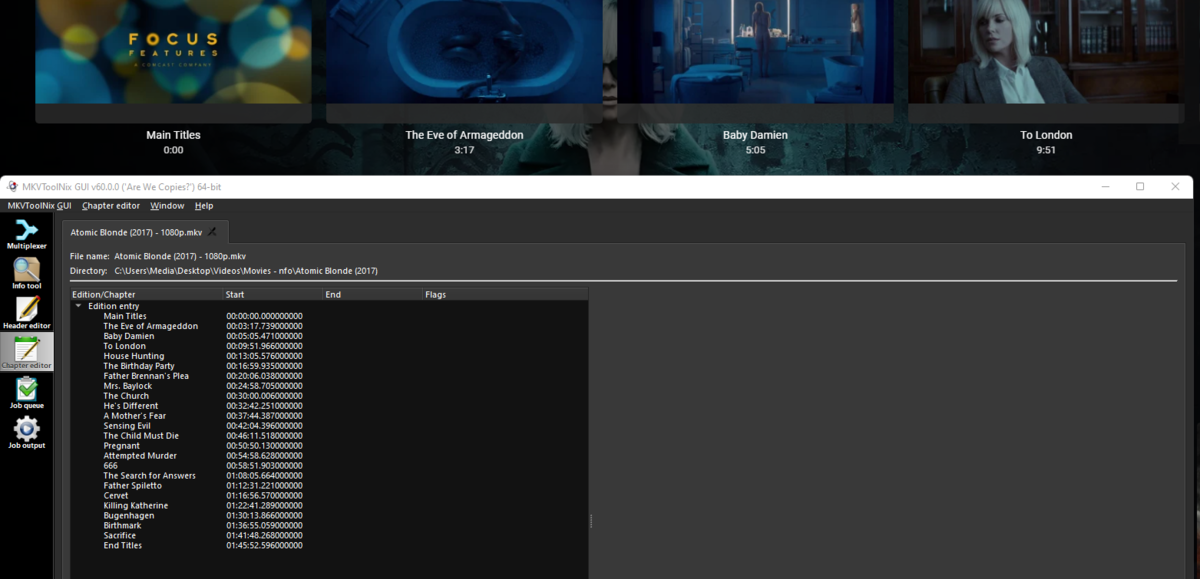
Emby auto generated chapters no, but files with chapter files yes in mkvtoolnix chapter editor.
 1 point
 -
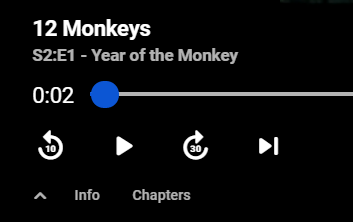
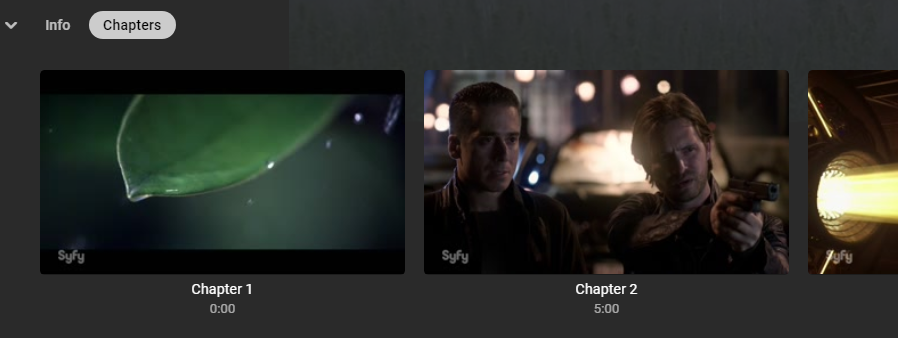
Currently no there is no chapter option in the OSD (not positive if applies to all clients), in the next release 4.7 you will have a OSD menu option to show chapters.
 1 point
 -
so whats your issue if you are using the default ports on the server side? or are you using 80/443 and only default to the backend emby server? There is no way to not enter 443 or 80 since these are non standard ports for emby... If they changed this it would break it for the majority of emby users, they leave the default ports, but it would work for us.. lol i would suggest adding the default ports to your proxy config and use them rather than 80/443 if its an issue.1 point
-
I've been away from Emby discussions for a few weeks (other things in my life!), but being in the UK I can confirm all the issues being discussed here. I have also previously brought up the issue not being mentioned in the current discussion which is that our subtitles in the UK are also different from the US ones, and are often not accessible live through Emby, in some cases hanging the streaming through Emby completely (all reported and logged months back). Recordings are OK, and I have a few times simply played back a minute behind while recording, which usually sorts things out. But that's a pain, not least because recording can't be set to run continuously over program boundaries - for instance, our local news follows our national news as a separate program, so we can't just watch through the whole news using this method. At present I don't use Emby for live broadcasts, as I (my wife, actually) require subtitles, and I classify it as unusable in practice. Paul1 point
-
If you are using Emby for live television you might also want to think about using the nvme for the watching of shows so you can easily skip ahead and back without too much seeking and waiting for it to catch up. Then use some scripts to move your recorded shows that you want to keep onto slower drives. I have done something similar but used Starwind's Ram Disk to create a 50GB RAM Drive for all of the transcoding.1 point
-
Then you should be very concerned now!1 point
-
Yes this is helpful. Can you provide a recorded video that triggers this? Thanks.1 point