Leaderboard




Popular Content
Showing content with the highest reputation on 09/18/21 in all areas
-
Yes, you may need to go over specific path setup. But suspect the problem has already been identified by GR.2 points
-
I have it in multiple setups and have had no issues ever. Just make sure they are same-level folders, no nested folder can be a part of another library.2 points
-
@FrostByte already gave you the correct answer. This is available only on the 2019 Shields. All components in the chain must be DV compatible and you need to setup the Shield properly to use DV in the system menus. Dolby Vision & AI Upscaling are not available on older NVIDIA SHIELD TVs.2 points
-
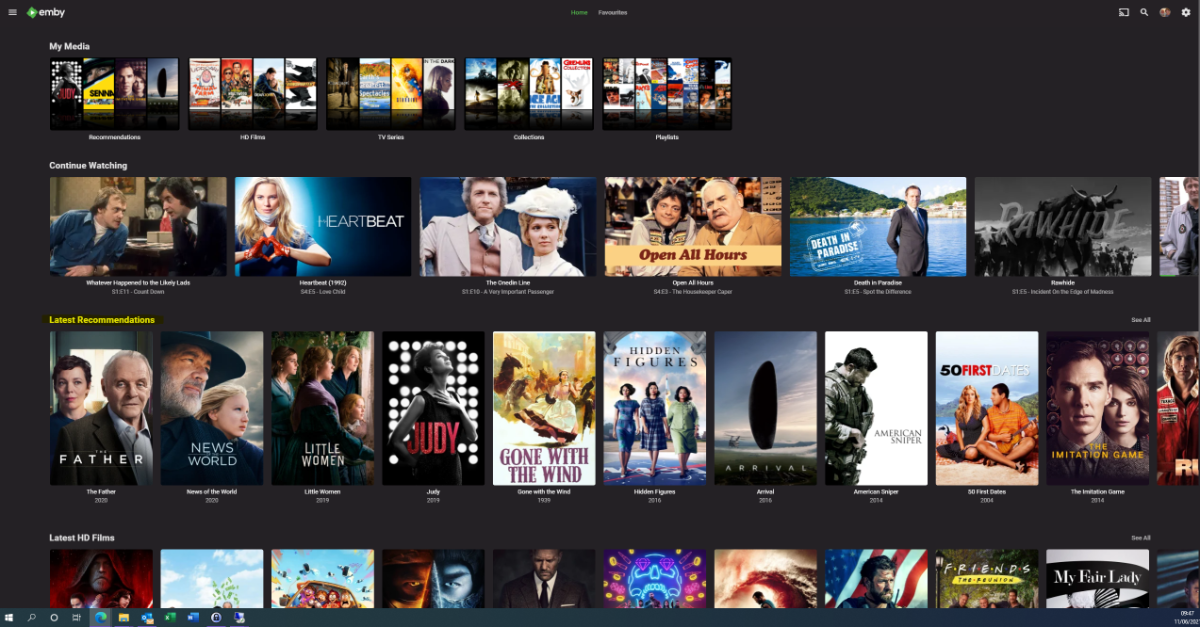
I moved from Plex to Emby and even though I think Emby is superior in its flexibility there are some things I like better with Plex, especially in terms of its looks. This theme is trying to fix that by making it a bit more similar to Plex but with some, in my opinion, improvements. The CSS is attached to this post for anyone interested and below are some screens to show it off Good to know I only use Chrome so I can't guarantee this CSS works as expected in other browsers. If you want the sidebar menu to look like in the screens, make sure to pin the sidebar. Watched badge/banderoll is inverted which means that the badge will not be shown if media have been watched, like in Plex. For desired look, please use the "Dark" theme for both Theme & Settings theme in the display settings. Emby-Stable-style-v3.6.txt





 1 point
 -
I'm a big fan of services such as Rifftrax, and I hate having to manually mux files every time I purchase another release. Much in the same way that external subtitle file support was added, it would be nice to have external audio track support for TV and movies added as well. I wouldn't expect Emby to handle the offset calculations needed to sync the audio. It's not too difficult for me to modify that now.1 point
-
Please click "Like this" and share it if you want to support this feature. Thank you ! Hello, There is a Kodi addon call "gdrive" from ddurdle who can read videos (original and transcoding version) directly from Google Drive. Why not build on this idea to integrate Google Drive as source directly in Emby Server ? In addition, Emby could generate automatically the STRM files from one or many Drive folders. And transcodings are already available with Drive so no need to transcode with Emby server. What do you think ? ------------- Three reasons why this feature will be useful and awesome: 1. Cloud is the future and today the cost is affordable. I have a Google Drive Unlimited for $50/month (ie $600/year) and I have unlimited space that is secured against crashes. Knowing the cost of hard drive and the cost of power consumption, its a very good deal. 2. Google Drive transcode video file. This provides different stream quality like Youtube (1080p, 720p, 480p and 360p) and the "image quality/compression ratio" is very satisfying. I can play 720p video on my poor 4 Mbits DSL. 3. You don't need to have a big server. Personally, I opted for a little dedicated server (Kimsufi 2G) for the cost and I can leave it run 24/7! Furthermore, me and my friends can watch movies from anywhere! Basics features that should be included: GOOGLE APPS OAUTH2 for activation and permission playing transcoded version (MP4 360p, 480p, 720p & 1080p) directly into Emby's app playing original file (avi, mkv, mp4) directly into Emby's app import embedded subtitles porwerful script module for multiple folder scanning and STRM generating1 point
-
We developing a dashboard (web) to watch movies or series together. Our proof of concept was successful and works as we wanted. Proof of concept: We have tested the proof of concept and are now continuing to expand the platform, which is of course linked to Emby. Tested functionality and implemented; Connect users with external dashboard (connect uid's) Link devices to user Make groups / invite other users Sync video with each other or group Resync in group Groupchat Possible ideas Discord connection (chat, sync, profile pictures) Discord auto voicechannel (only users who are in the group) Share this dashboard with the community Dashboard: Join room (select device): Active group session with chat: Will be updated!1 point
-
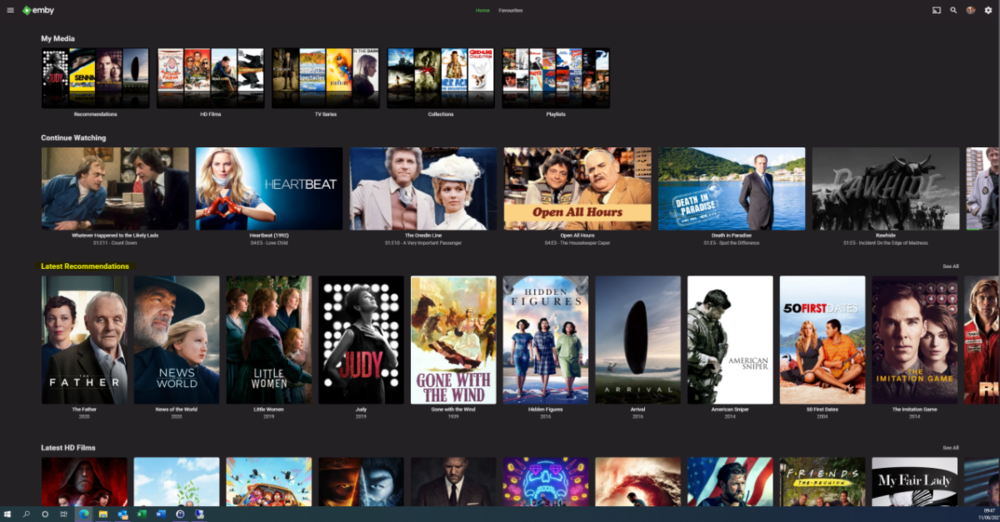
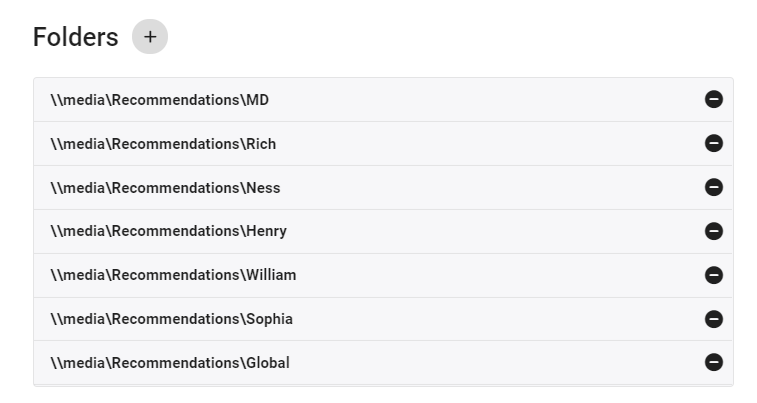
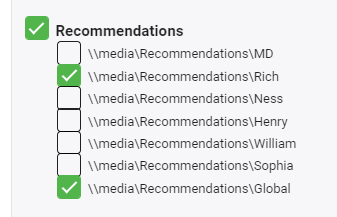
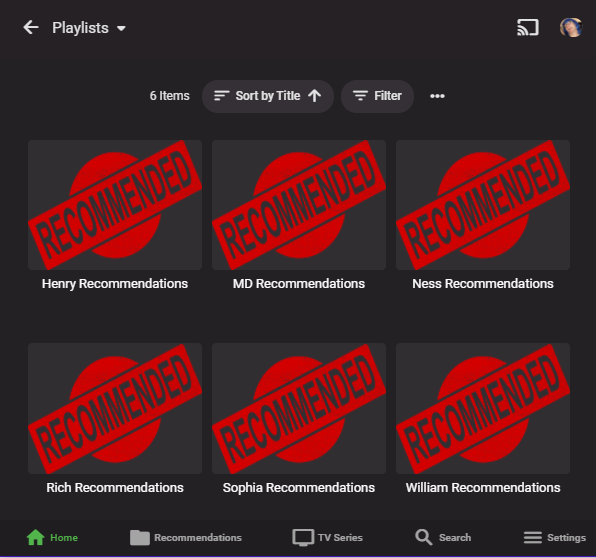
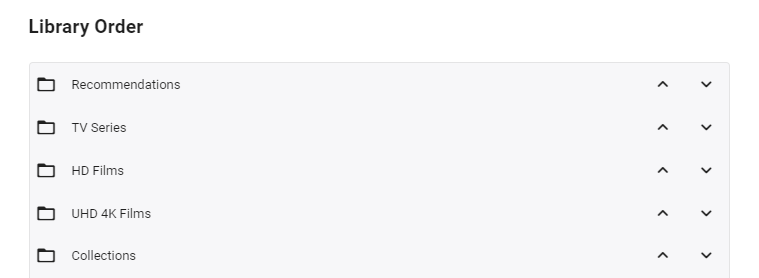
I'm posting here to gauge interest in this potential tool/utility - I use it for my parents and it works really well - but to be useful for the masses, it will need some more time spent on developing the code to make it more universal. However, before doing that, I wanted to see if this is useful as I don't want to waste my time.. What does it do ? It creates a 'Recommendations' library for each user based on items added to a Recommendations playlist. This library is then displayed in the usual 'Latest' list. As items are watched, they disappear off the list. Example (Actual) screen grab - (note 'Recommendations Row') How does it work ? A new library is setup and each user plus a global entry is given their own folder :- In these folders will be links (STRM files) to the real media. These are automatically created on a schedule via a standard playlist file (see below). Individual user based permissions can be applied to these folders - therefore, personalised recommendation lists can be created or globally set if added to the global recommendation playlist. So for this user - they will just see Recommendations for Rich and Global. The Recommendations 'library' needs to go to the top of the list for it to be easily visible :- Note - if there is nothing in the Recommendation library for that user (ie it is empty) - then the Row will not be shown. How do I flag an item as a Recommendation and to whom ? The script pulls the recommendation file locations from the XML playlist - thus you can just use the normal emby playlist functions to add or remove recommendations and add them to the relevant playlist. Anybody can add any entry to any playlist (as playlists are not permissioned), so be wary of that.. If you want everybody to see the Recommendation - then just add it to the Global Recommendation playlist. How often does it update ? Currently my script just runs every night and automatically creates any new entries added to the playlists. Now the initial library and playlist setup is done, this is now fully automated for me - I just add recommendations to the playlist and the following day it appears on those users screens. ... Of course, if emby allowed a playlist to have permissions and allowed it to be shown on the main screen in a row, then there would be no need for these scripts to hack a 'virtual' library... Any thoughts ? Is this worth progressing to make the initial setup more automated ?
 1 point
 -
Hello @@All, I'm new to Emby and quite missing the possibility to sort my audio playlist e.g. by artist ort album. Is there already a feature to do this or is it on the roadmap?1 point
-
i will be watching a show and pause it for whatver reason and when it times out on android like when screen saver comes on and i hit a button to get back to show it will go back to the season selection menu and when i back out and see if it has continue watching its not there. i have to go back to the season and epsiode and it will remember where it left off. but when i do a shuffle of the tv series i dont pay attention to season or episiod so it get hard to find.1 point
-
Yes it can matter. The migration plugin will not only write nfo files under metadata\collections based on the old data\collection xml files, it will also write <set> tags to the media nfo files if they are missing at the time of the migration process.1 point
-
Iconic 2.0 is now available through the catalog. New in 2.0: - Support for per Library configuration - Initial support for TV: Show, Season, Episode - Initial support for Collections - Adds support for Movie Extras - Optimizations to improve image load times @luundblad **Existing 1.x users will need to recreate their configurations in 2.0. [emby-path]/plugins/configurations/Iconic.xml can be used as a reference to more easily recreate 1.x configurations in the 2.x UI.1 point
-
We are Hoping to have a major update for you all tomorrow. i will list out the changes and update the instructions before release. it is still advisable to test this new release on small test system with a few TV shows that have a good amount of content. About 300-500 episodes. hopefully this release with just be house cleaning the niggley bugs out. a huge point to note, and we have tested this now, if your audio varies between episodes in a season, tge plugin will have difficulty in detection. There is nothing we can do about it and we tried changing the sensitivity of the detection and it proves weird results. anyways catch yas all on the flip side1 point
-
Since the combined Continues Watching/Next Up can only track one item from a Series you will never see multiple item or possibly items played out of order. You need both rows Continue Watching and Next Up legacy to see any item with a Continue Watching/Resume point.1 point
-
Whatever way you do it will be wrong. Probably a new tab.1 point
-
@CBers should the click on the image open a new tab, or should it redirect the current tab. I'm thinking it should open a new tab...1 point
-
Hi, you shouldn't need to edit any xml files in 4.6.4 if you have NFO files. The NFO files should have the collection ID written in the NFO file written similar to this <set>collection name</set>. If you have NFO reader enabled for the libraries and have import collections turned on the collections should be built for you.1 point
-
Figures, the cheap camera on my cheap cell phone is, well, cheap oh well, this will go quicker without taking a bunch of pictures anyways hah
 1 point
 -
We'll take a look at that as well. Thanks.1 point
-
Hi, yes we have a plan on how we might be able to do this where we can start playback with our custom player and then auto-switch to the native player if you activate PiP. Thanks.1 point
-
Welp, that's not good. Hold tight! There is a new plugin version that will stop that.1 point
-
on the version you are runnning .... Yes. We are currently testing a performance improvement between us and hope to have a release soon. If we are happy it should reduce the detect time by around 50-70% we think.1 point
-
Hi Luke and team, Are there any updates on the PIP functionality for the iOS app? Kind regards.1 point
-
I will be from now on.1 point
-
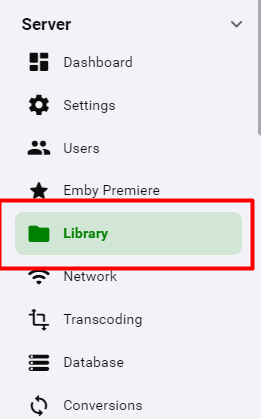
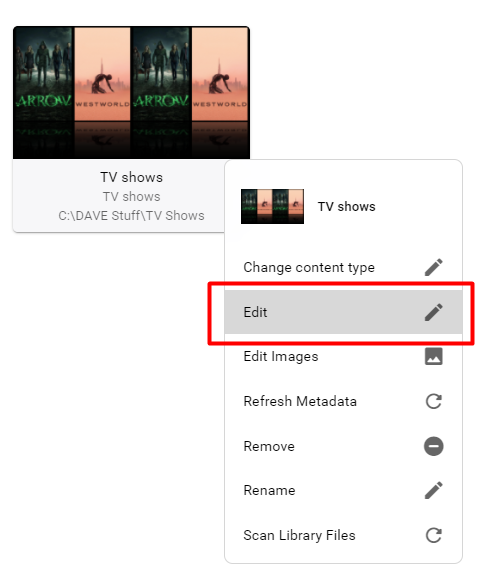
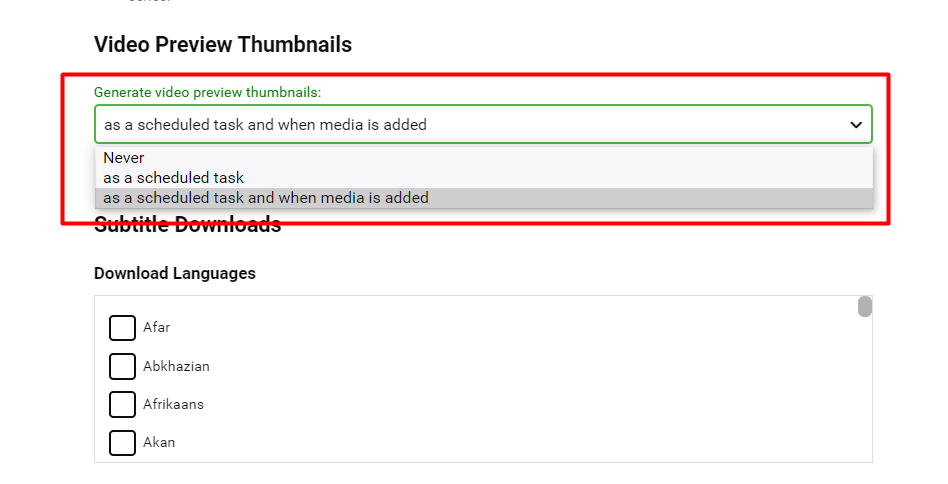
That image extraction comes from the core code. I think that you are missing a setting in the Library Manager. Then scroll down the page until you find the heading "Video Preview Thumbnails" - I bet yours is set to Never
 1 point
 -
Please, add the possibility to sort tracks by artist or title. Could be interesting a smart search like in spotify. Thanks.1 point
-
Well, it was your comment of "something interrupting the stream" that drove me there so I'll say we can both bask in it.1 point
-
We could potentially add an option like we have in the Android TV app that determines if interlaced streams will be de-interlaced on the server or not.1 point
-
Nice, I was going to suggest that next but you stole the glory. LOL1 point
-
ok I found the problem (on my end). I had Adaptive QoS enabled on my router which it what seems to have been interrupting the stream. After disabling QoS the stream transcodes and plays normally. Sorry for trouble on that.1 point
-
Yes, because the first task is to go see what channels you need to get guide data for. So it is a package deal.1 point
-
Let me take a look at that error, because that particular log entry is from an older release of the plugin. It could be something to do with folder permissions? But, the plugin should have permission to save the .bin file where we are trying to place it. I'll be back, we'll sort this out post haste! @Cheesegeezer , @samuelqwe it would seem like the fingerprinting task is having an issue here saving the .bin. The Binary Reader is trying to read the .bin, but it isn't where we expect it to be. I would not have expected this.1 point
-
If you are using Emby for live television you might also want to think about using the nvme for the watching of shows so you can easily skip ahead and back without too much seeking and waiting for it to catch up. Then use some scripts to move your recorded shows that you want to keep onto slower drives. I have done something similar but used Starwind's Ram Disk to create a 50GB RAM Drive for all of the transcoding.1 point
-
Hi everyone, I've been following this topic with great interest. Brilliant work so far by everyone. Just thought I'd share my findings with you. My server runs Ubuntu 20.04 on an Intel Core i5-7600 CPU with 24GB RAM. My library has 173 shows with 25k episodes. I just completed the FP task this morning with 2.0.3.4 which took just over 24 hours. Processing 2 series at once my CPU load sat at around 90%. I found that other scheduled tasks (from other plugins I think) kept stopping the FP task so I deleted all other scheduled tasks to let it run in peace for the first time. I have copied the db file and now I'm running the detect task using 2.0.3.5 and will report back when it finishes.1 point
-
Thanks, understood and no option needed, it was just out of curiosity if maybe there is a mistake.1 point
-
Database resync is mandatory if you are coming from version 6.0.8. And yes, this will wipe the artwork cache as well. I can add an option keeping the artwork, but I don't know it it valid.1 point
-
Any guide refresh will. Can be scheduled or manually run.1 point
-
Just to throw a spanner in the works, playback is perfect on XBox One X on two different TVs. So now the issue remains Emby specific on the Series X only. I will lodge a support request with XBox, and continue just to troubleshoot and see how we go over time. But I am at least able to enjoy Emby again by busting out the previous console, so it takes the sting out of whatever is going on with the Series X.1 point
-
I'm one of those who likes them higher for that reason and currently it's right at the bottom of the image for most movies which is perfect to limit eye movement on a large screen. Another benefit is that there's less blooming which all LCD TVs have when displaying text on a black background. However, other apps have something on the OSD where you can change the height which is nice. On a side note now that things are more consistent with other apps I may go back to using ass subtitles again to do some additional formatting myself.1 point
-
You can and there is already a schedule take to do this every 24 hours by default. You can change this to specific times or to run more often if needed. Go to schedule tasks menu and then click on Refresh Guide task to be able to change the schedule.1 point
-
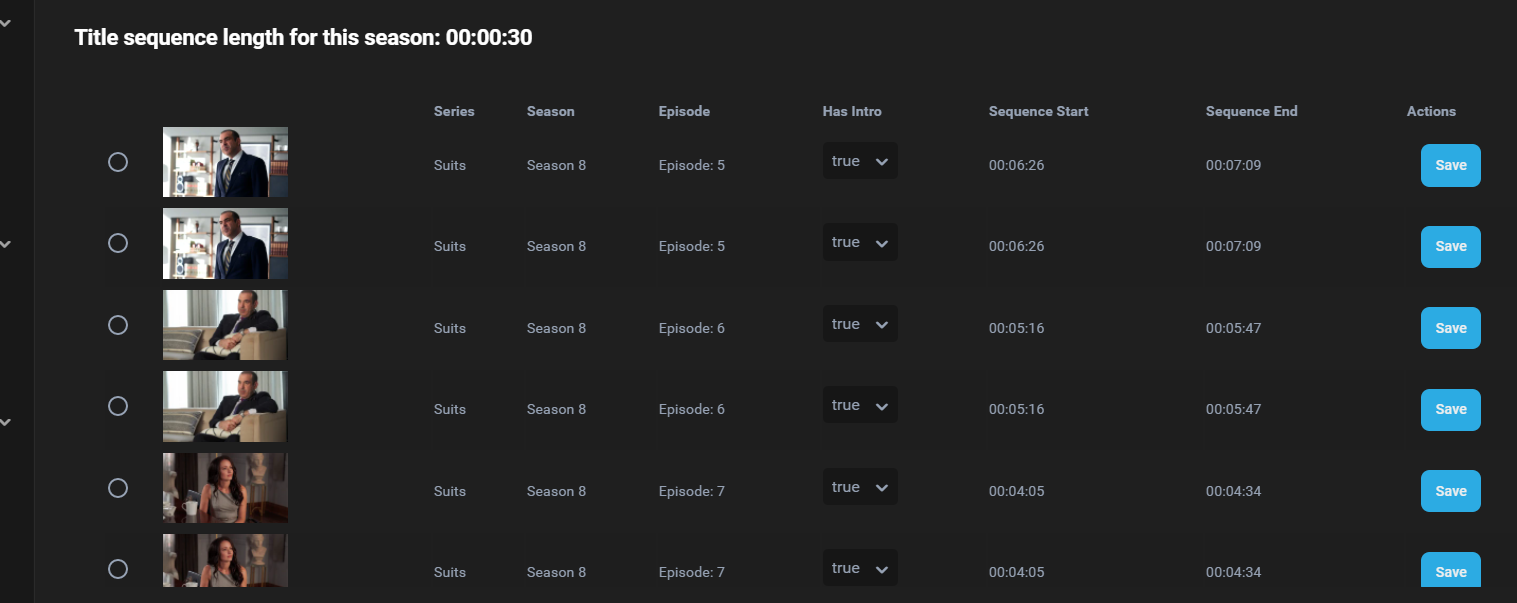
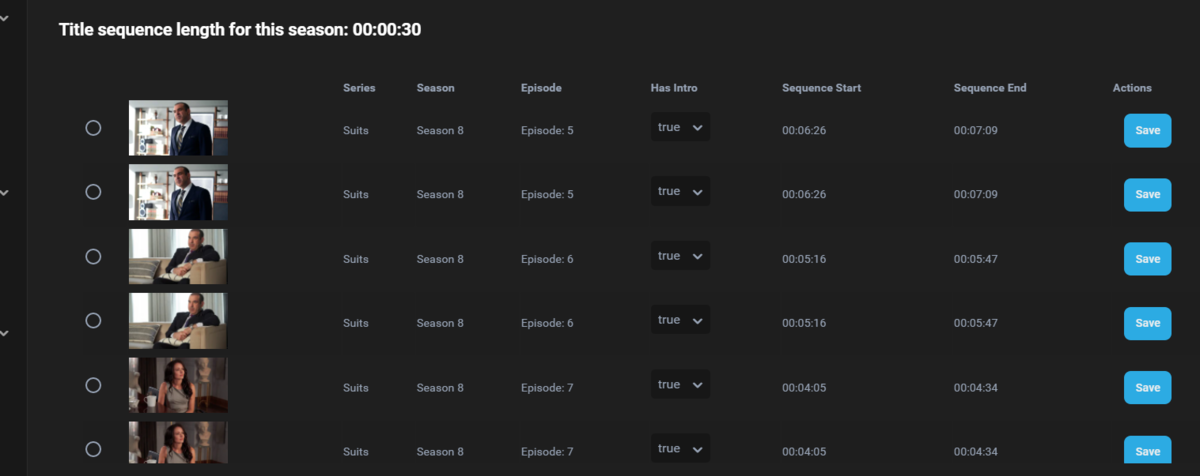
Also this isn't looking correct. Double entries and sequence start is way off. I don't see the double entries for other shows, but I haen't found a single episode with correct sequence start time.
 1 point
 -
Have something paused when the Shield TV screen saver kicks in. When that happens it stops the current stream and drops you back to the menu.1 point
-
The Docker builds should have chromaprint included since Emby 4.6. However, it’s possible that using a third-party Docker container like the ones from LinuxServer and Binhex instead of the official Emby one, could not have the same FFmpeg build. I can’t confirm if that’s the case since I have only ever used the Docker official container. @Markadmin I am on unRAID as well and I am using the official Emby container. In my case, it works perfectly. If you can open a console for your Emby container (click on the icon of the container in unRAID, then Console), then you can run the following command: /bin/ffmpeg -formats Then, see if you can find a line (they’re in alphabetical order so look in the C’s) that says: E chromaprint Chromaprint Because that’s what this plugin requires to function. If you do have the line, then we can try looking further at why it’s not working.1 point
-
+1 for parity between the tvOS and iOS at least. iOS is much nicer, but surely the user base on Apple devices is using Emby in their living room more than their <12" screen. Please!1 point
-
It sounds like they're interested in having Emby help them easily see if they only have 3 movies out of a franchise that has 7 movies. An 'items missing from box set' feature like the 'episodes missing from TV show' option.1 point