Leaderboard




Popular Content
Showing content with the highest reputation on 09/11/21 in all areas
-
Tbh sport events are filed with commercials. and should be regarded as such. Thay do not have a predictable timeline. Anything can happen. Best guess is to use comskip for that, and put it in a separate library. Just my 10 cent.3 points
-
Good morning Mbarylski. I just finished the code for tagging channels. At the moment it only works for VirtualTV. I have not had any other requests. To tag a channel click on LiveTV to bring up the VirtualTV TV guide. Then mouse over the channel names on the left side of the Guide. When you do so, the TAGS for the channel that your mouse is over will display in a red line at the top of the Guide. If you want to tag that channel you just "ctl click" it. You then enter the tag names just like you do for tagging movies and TV shows. I have not done much testing. If you encounter bugs please let me know and I will fix them. Vic emby-tag-tool-23-e.html2 points
-
Yes it can. The Shield TV IMHO is hands down the best device to use for Emby.2 points
-
Must have been a memory issue of some sort. Glad you got it sorted.2 points
-
We have to restrict access to some plugins in the app store apps in order to comply with their policies. We should probably put a note of some sort in that view that it is not the whole list.2 points
-
I believe that's your problem right there DV was added in 2019.2 points
-
The ability to adjust subtitle background color and background opacity will be in Emby Server 4.7 as well as in upcoming app updates. Thanks.2 points
-
This has been posted in the wrong area and that pic is Android TV (notice Exoplayer vs Tizen player). However, ATV acts differently than most apps in that once you turn on SFN it's always on even after stopping a video or exiting the app. @ebr is this intentional that SFN is always on in ATV once turned on? In other apps the SFN flag clears itself after stopping playback. @zeppplay I'm moving this to ATV section of the forum1 point
-
En el reproductor a la extrema derecha tienes una Tuerca, en ese menú hay algo llamado Stats for Nerds, estadisticas para nerds (no estoy seguro como lo ponen en la versión traducida).1 point
-
Please make your request at billingsupport@emby.media1 point
-
I assume you mean the unplayed episode count. The answer is only by watching all unwatched items in the series. There is custom css but only applies to the web client (not the online web client), no other clients/apps.1 point
-
Does the Media file have other Audio tracks other than TrueHD ? Remember there are two 'levels' of Atmos - Tru-HD Atmos and eARC (DD+) Atmos. Both will show as 'Atmos' on your AVR but they are not the same - one is lossless, one is not. As far as I am aware, no app has managed to pass Thu-HD out the LG C9 - Infact from memory, I don't think this is even technically possible as the 'hardware' is missing. It can though pass EAC3/DD+ (with Atmos). So, going back to my original question - if your source has an EAC3/Atmos track - they will play as Atmos on your AVR, Tru-HD will not - and I suspect Plex is aware of this, and is simply playing the EAC3 track instead. Looking at your AVR 'input' by using the AVR remote Info button will show you the full details (if it's anything like my Denon, which I believe Marantz are..) The only way to get Tru-HD/Atmos passed to your AVR is to go direct with the likes of an Nvidia Shield. ie Emby Server > Lan > Shield > AVR > LG C9 - no need for eARC or ARC - you are directly passing video/audio into the AVR, Video (only) is then passed onto the TV.1 point
-
That's a h264 high 10 (bit depth 10bit) file, that format is problematic, I would try converting it to 8bit or replacing the file with a 8bit file. You can try forcing a transcode to play it on the TV, it will be the only way to play that file on your TV.1 point
-
Thank you friend. I had looked for a topic before creating this one, but I hadn't found it. Thanks1 point
-
In theory, it shouldn’t really affect the detection because we’re downsampling the audio and converting it to mono when we fingerprint. We’re trying to eliminate as many variables as possible to make the detection the most accurate it can be.1 point
-
Hi Just to let you know my Emby up and running again, the Arm8 software installed with no problems on the ds220J. Many thanks for the support. However I did struggle with adding the library details for a while when I spotted the solution in one of your postings which was to make sure read/write for Emby was enabled in "System Internal User". It was then just a matter of adding the library paths for the metadata to be collected. I can now settle an watch a movie. Thank you1 point
-
No, not if you disabled permission, it should only be repackaged then. Edit: Your ffmpeg-transcode and ffmpeg-directstream logs should tell you what's happening in each case.1 point
-
I remember LG's WebOS can't share with apps Atmos. I have the same problem so I buy Nvidia Shield Pro. It is so fast compare to LG and no more problem with sound. I recommand you.1 point
-
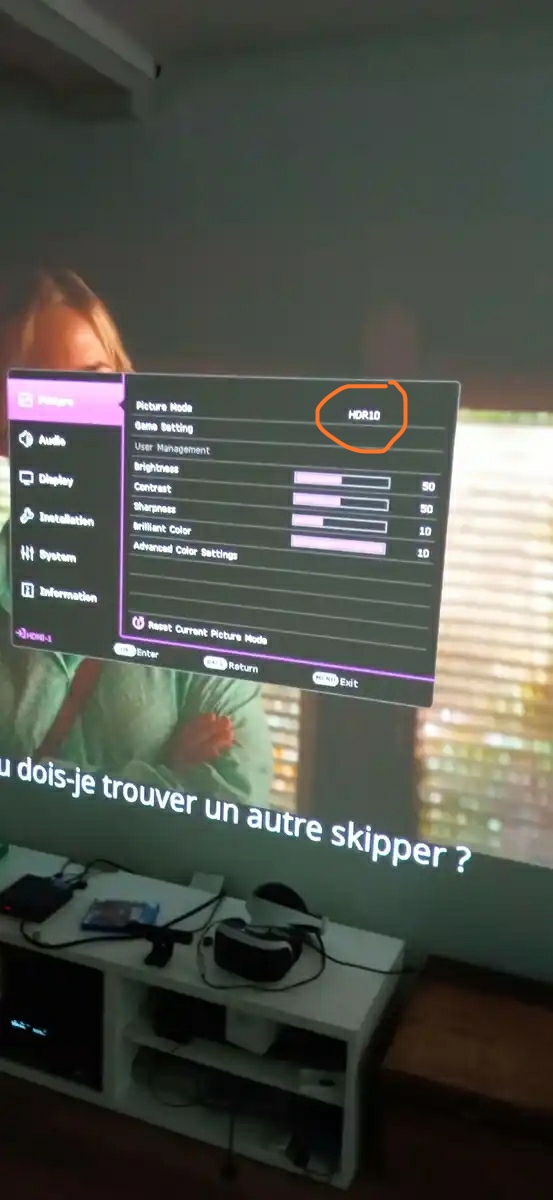
Based on this photo, I'd presume that's what's happening, as these seem like projector settings: Edit: Maybe if HDR could be disabled on the projector, Shield would tonemap as it would interpret it as SDR display? From the maker's website:
 1 point
 -
You solved my problem. Thank you for explaining.1 point
-
Hi, could the problem be you have turned off tone mapping on the Shield? If you direct play a 4K HDR video and don't have tone mapping enabled on the Shield TV then the 4K HDR is what will be given to the projector. In theory even with tone mapping turned enabled on the Shield if the projector is reporting it can do 4K HDR then it won't do the tone mapping and the projector will still get the 4K HDR as is. Are you sure the media being played back is a format the projector can handle? Are you able to play it back on the projector using a different program?1 point
-
From my understanding no as they want to much for access.1 point
-
guess Emby won't be able to try getting an official access to their api?1 point
-
Cause it's "channel" content not a "regular" library. (I'm referencing to the podcast plugin for Emby server) Not sure why changes on channels are not reported via websocket notifications.1 point
-
No idea what you are pressing in that video, but if I had to guess you Cinema mode enabled so other media trailers play before your movie.1 point
-
Had to read it twice to understand but now it makes sense to me. Now I also understand why in the past I could see that an item was synced in the kodi log, then on restart of kodi the same item was synced again. This is the desired behavior and what I see now after a boxset refresh, agw this can be included in the realtime sync in the future.1 point
-
I think I know what's going on. Actually the startup sync is based on timestamp. The timestamp (indicating the last sync) is updated on startup AND on realtime syncs. As the realtime syncs doesn't include the boxset changes, the startup sync didn't trigger that either. -> timestamp updated on realtime sync (not including Boxsets) -> startup sync uses timestamp from last realtime sync and that's why boxset was excluded. I hope my explanation is understandable. The previous approach updated the timestamp only on startup. This is not good, it queries all updates since last Kodi restart and includes lots of unnecessary content (already received via realtime sync). e.g. Kodi restart happen after weeks/month. I had a user who complained about that, startup took minutes due to so many pending syncs on Kodi start. Let's wait if Luke can add the boxsets in realtime updates, otherwise I add two timestamps for Kodi startup sync.1 point
-
Boxsets/Collections are not synced automatically. There is a option "refresh boxsets" under manage libraries. Not sure if autosync is possible, as far as I know this never the case. Even in 4.x1 point
-
I would also love to see this feature added. I also have a gaming setup using several different flight controllers. I can't use Emby Theater with them plugged in - it acts like something is holding down a directional button/axis, even when the controllers aren't in use (but they're plugged in). If there was an option to just disable game controller input, I'd be happy. I also sometimes have this issue with the Web Browser Client as well. On a side note, if you wanted to get fancy with it, you could even make a multiple choice version of this. Allow the option of placing a checkmark by connected devices that you want to "allow", or unchecked to "deny", to control Emby. So you could have options such as: Keyboard & Mouse (Allow) Wireless 360 Gamepad 1 (Allow) Xbox Gamepad 2 (Deny) Flight Yoke (Deny) Throttle Quadrant (Deny) Rudder Peddles (Deny) In the situation listed above, I could control Emby with Keyboard & Mouse, and also with a Wireless 360 Gamepad - But Emby will ignore all other input from other controllers. As even another step, you could make it to where you can pick a device to control Emby, even when it's not in focus. For example, going off of the example above, there could be an option (another checkbox maybe?) labeled "Focus Only", or whatever title might be fitting. Lets say you uncheck this option on the Wireless 360 controller - The Wireless 360 controller would then always control Emby, even if I was playing a game with other controllers at the same time (I like to watch movies on long flights lol), or have a web browser in focus, or any other secondary task. If a device is selected for "allow" and "Focus Only" is enabled (checked), then that device would only work with Emby when it's in focus - this option would most likely be preferred for a keyboard/mouse. TLDR; But really, I'd be totally cool with just a master switch to turn of all game controller devices - I think it's a much needed feature, especially since some game controllers seem to cause undesirable results.1 point
-
I'll check it again, must be a specific case.1 point
-
Intro detection is still going, two days in...almost done though. A handful of my basketball games have had intros detected, which just appear to be random snippets and have absolutely nothing in common with each other. EDIT: Can we get a 'save all' button? Having to save after removing each intro, and then scroll all the way back down, is becoming time-consuming.1 point
-
1 point
-
Thanks for the feedback.1 point
-
That's correct. These newer options offer more control than the older one that you're referring to.1 point
-
1 point
-
Buttons will require development on our side. There's nothing you can do to influence the UI. Also I realize it is convenient, but I don't think chapters is the appropriate storage mechanism. I can review all of this soon and look at what the best possible integration method would be.1 point
-
As for metadata changing languages, I set up a test library set to French/France and can not get any items to change from set language. But do not get RT rating as they no longer exist on OMDB. So it would appear to be a manual process of adding this Rating. @LukeMight be time to add "Metacritic" from OMDB.1 point
-
I am guessing there is a change at OMDB as I have media that I have deleted the current RT rating and will not fetch it again. As the media no longer has a RT rating their And your example of "A Bugs Life" has not RT rating either. @Lukeevery query I have tested no longer has RT rating.1 point
-
Personally I'd prefer not to see this integration. My use-case is that I want Emby to work even if there is no web. For now it's been extremely useful when there are internet outages in the area. In the future I could see my family moving to an area that doesn't have great internet. For me this is where Emby really shines. I love how I can store all of my metadata on the server itself and still enjoy a rich experience without great internet. This is honestly one of the big reasons that I made the move from Plex to Emby in the first place. I can appreciate the convenience of having web-service integration with Emby, but I'm also very cautious of anything that could add an internet requirement to using it. This is exactly the sort of thing that happened with Plex. At first it was just little web videos that were tied in, and now more and more content is being pulled from sources other than your server. Which is fine, and I hope that they do well with the direction that they've chosen. But for me, I want Emby to remain offline-friendly. I still enjoy other streaming services, and I've got no problem pushing two buttons on my remote to open the respective Apps for those services. I'd just prefer to see them left separate from Emby. Emby is about my personal media and that's what makes it such a cool thing. Again, I'm speaking about my personal preference, but in a thread where we're discussing what to add, this sort of perspective needs to be expressed.1 point
-
Should be no as I believe they were getting them from OMDB also.0 points