Leaderboard




Popular Content
Showing content with the highest reputation on 09/06/21 in all areas
-
So we should default to 2 at a time, and allow the user to increase it based on their preferences, and understanding of their own computer. That should be written in the UI.3 points
-
Hi @Cheesegeezer - This is the status from last week (link below) I *think* chef has written the code for #5 (manual skip - add to the chapter points) - but has disabled the code for the time being. My personal view is a conversation with Luke and ebr is the next step to understand how they would want this integrated into the Core code. They may have some basic requirements that we are missing ? I think it may also be a good time to reserve a slot in the 'Beta' schedule to maybe test on just a web browser in an official Beta ? I'm not sure how this scheduling works .. https://emby.media/community/index.php?/topic/48304-show-intro-skip-option/&do=findComment&comment=10636863 points
-
https://libreelec.tv/3 points
-
Hi, that looks like it's being pulled from the media itself which if this is the case then the media would need to be edited to reflect the name you want to see.2 points
-
Thanks for the list. I'll maybe look at 5 6 & 7. @chef is in his groove now for the first 4. We can provisionally code and local test for VideoOSD manipulation, so hopefully @Admin can just fork, pull or modify.2 points
-
The latest beta server should be converting the AC4 to AC3 for you. BTW - that wasn't a fumble (they reversed the call). What a game...2 points
-
I finally bit the bullet and upgraded to DSM 7.0 then followed the migration guide to the letter and everything is working perfectly Thank you to everyone involved2 points
-
Have you tried selecting chapter marks? If you're using the USB/Beta installation you can select these during playback from the On-Screen menu. If you're using the app store version then you should get that feature in the next update. It's not as good as the seeking solution you are after, but a reasonable option until that is implemented.2 points
-
Hey cayars, you answered my questions to my dilemma here thanks2 points
-
Hi Could you add support for opensutitles.com since opensubtiles.org are blocking all users. Thanks. Jonas1 point
-
When users download they are not seen, only in the log it says that a download was started. I would like a section to be created where the downloads and the percentage are listed, also that the download bandwidth can be controlled for each user.1 point
-
It would be nice to be able to specify default options for library creation. I have to add a lot of libraries and on every single library, I have to manually set all the checkbox. This could either be solved by: Globally defined default options for new libraries Template libraries which could be used to clone from1 point
-
Thank you, I really feel great and glad to get an answer to my question very quickly. I hope that one day this could be possible, thanks for great support. I'm using Amazon FireStick 4k.1 point
-
I gotcha. I'll give it a try and see. The KB of subtitle naming isn't detailed about this. I went ahead and tried your suggestion, instead of making posts, and it works. What I notice is what Emby displays is inconsistent with how the file is named. I'm sure it was programmed to spell out English when it sees eng or capitalize Forced when it see forced. Also, with CC the language isn't displayed. Example 1: <movie title>.eng.forced.srt is displayed as English <Forced SRT). Notice 'Forced' is captialized, but not in the file name. Example 2: <movie title>.eng.cc.srt is displayed as Cc (SRT). If cc is changed to CC, then Emby displays CC (SRT). It should default to CC as it does with language names.1 point
-
A page refresh apparently solved the issue, strange... I will keep an eye on it and in case it happens again trying to narrow it down.1 point
-
I have send you a PM with log this morning, I couldn't see anything suspicious in the log but will test with the latest build and report back.1 point
-
chef, I just had the following situation: I wanted to sort a single episode which couldn't be determined automatically and therefore needed manual interaction. Unfortunately though, the plugin doesn't show the episode in the UI so I can't move the episode. I can see in the logs that the plugin sees the episode.1 point
-
@all I think this could be the next beta version. Please report all issues, I also perform continue testing...1 point
-
This approach seems to have addressed my issues. I ended up running it as a service, but with the service logging in as a regular user to address issues with scheduled tasks and recordings which otherwise crop up since my HTPC goes to sleep every night.1 point
-
As above - if you have gone over your 'allowance' per 24hrs, then yes you will get blocked - but from previous experience, emby/the api used to report back a more meaningful error message when you did - and it would just re-try the following day (or via a different WAN IP via a VPN..) VIP will lift the restrictions yes - but I'd suggest wait until tomorrow and see if it still does the same thing. Remember ANY request from any of your other services is all being logged to the same WAN address - so maybe something is spamming it, and using up your allowance ?1 point
-
Going to do some testing when I get the chance.1 point
-
mydomain { tls /path/to/cert /path/to/key reverse_proxy localhost:8096 log { output file /opt/caddy/logs/emby.log format single_field common_log } } This is my caddy config sir. This was working fine. Note that seeking issue is occurring with ≈ > 1000 kbps bitrate files only with direct play. All my media are in direct play friendly format. Same media plays without cloudflare fine. Plays with cloudflare if only transcoded. Can you kindly look into this ?1 point
-
Okay, i am have the same issue if I use Bazarr and Plex, so certainly a Synology/Opensubtitles issue1 point
-
thank you for diagnosing the problem! Is this only via android “tv” applications? Because I can connect on chrome or Firefox just fine. And would you recommend me trying anything else before I try working on my connection with my ISP with your diagnosis? I really appreciate the help on this thread thank you guys.1 point
-
@cayars Yes, all content (shows, series and films) is in the folder /volume1/video and the permissions are all released by Emby. UPDATE: I have set permission in an other setting in my Synology. and now it seems to work. Sorry... but thank you @cayars for the info1 point
-
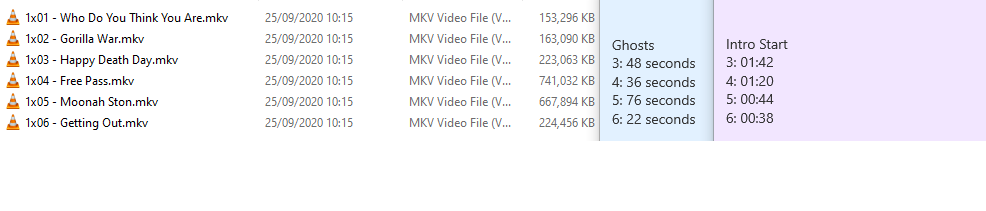
So right now I'm approx halfway through, a couple more observations. I'm definitely hitting some resource constraints somewhere, prime suspect is the CPU rather than disk I/O. At first I thought that some of the encode times might have been based on file size, since my TNG Bluray Rips were taking a long time, but this does not seem to be case, as evidenced below by "Ghosts". The fingerprint time in the case of Ghosts also isn't affected by where the intros are- which leaves resource conflict as the only thing I can think of for the abnormal bumps. I also thought I'd see what happened if I tried to watch an episode as it was being fingerprinted. I can safely say that also doesn't seem to adversely affect speeds. In fact, in my (admittedly small sample size), it increased speeds. Possibly due to disk caching? <<- "Normal" speed. <<- "Abnormal" speed. <<- "Normal" speed. <<- "Normal" speed. <<-- File Streaming at the same time <<- "Normal" speed. <<-- File Streaming at the same time So far so good, and upon reflection it makes sense that larger filesizes don't affect it so much, as the audio stream is likely to be the same whether it's a 720, 1080, or even downmuxed 4k rip.






 1 point
 -
I got some (the more important ones) of TVE channels remapped to ota and some to comcasts cable lineup. Much better.1 point
-
Ok I got the covers to show where the check marks goes, If you have display set to tv rather than auto you will get no option to select. Like I said, I have this fixed for myself, one cover at a time. Whats the real root cause for doubles I cant say, its a pain in the butt of fix though, thanks for your time everyone, much appreciated.1 point
-
Quick Question @chef @rbjtech What is on the "TODO" list. Not sure where to help now I have access to code. Cheers1 point
-
Currently the reset position is not reported at all from plugin to emby server. The plugin can only deal with info reported by Kodi (callbacks). btw, this callback funtion is the same as used for "marked as watched/unwatched". In case of a position reset just item ID is reported, that's it. Based on this limited info it could be any change. The plugin only knows that something has changed for this item. Problem is, I don't know under which circumstances the callback is fired. If I capture every item callback and forward to Emby server as a refesh command, this could easily escalade and overload the plugin or server or just have a performance impact. As mentioend before same callback is used for watched/unwatched but in this case, Kodi sends the info what has changed (additional parameter "playcout" is included in the callback info). So this is straight forward for watched/unwached but not for resume reset playposition. btw, this is also the reason why "add to favorites" is add into emby option menu and you cannot use the native Kodi option for it. Changes in native Kodi favorites are not reported at all to plugins. Callbacks in general are not very well designed in Kodi but that's the way it is.1 point
-
@quickmicI've had issues with the Websockets failing and that the syncing has been somewhat unstable, I've sporadically lost the ability to send test messages from the server etc. Now I've enabled Settings/Services/Control - Allow remote control from applications on other systems and now it's more or less flawless with the sync. Changes applied on the Emby server is reflected very quick on the kodi client and same goes the other way. However.... When I try to zero the resume position on an episode from kodi this happens. 1: Zero set the resume position on the episode from the menu. Episode is removed from the In progress list in Kodi - nothing happens in Emby, I.E it remains at the current progress. 2: Restart Kodi, navigate to emby-next-gen "In Progress Episodes" - folder is empty 3: On the Emby server, resume playback for a couple of seconds on the episode 4: Now the episode becomes visible at step 2, after a skin reload the episode is listed as In Progress but without the progress bar visible. In the Emby log this happens when I mark an episode as watched and unwatched Here I've initiated playback, skipped ahead and stopped. Then I've tried to zero set the resume position from kodi, but nothing is received on the Emby server. After the below timestamps there's no references to POST, DELETE or 233275 so I think nothing is received on the Emby server. I've tried with both Embuary and Estuary and the results are the same. In the kodi log all I see is: CPythonInvoker(190, /storage/.kodi/addons/script.embuary.helper/plugin.py): script successfully run when I try to zero the position. It's not the end of the world, it can easily be done by marking the episode as watched/unwatched to reset the state but it's always nice when workarounds aren't needed.1 point
-
Ok i got it. The TabIndex is wrong thats why i thought it is only a title, if i go down it jumps over the Header "Movies" right to the other movies, only if i click up again it is going to the Header as clickable one. Yeah right, if i click it i see all movies. thanks1 point
-
Do it on Library level, three-dot menu. Edit: Or alternatively, on Multi-select. But you'll have to select each one.1 point
-
When I enable cinema mode the play-back of videos fails. I am using the latest emby-next-gen. embruary skin and emby server versions.1 point
-
Google "rclone encryption" and you'll get a lot of hits for how to do this.1 point
-
It means to be smart how you use Google Drive. Don't use shared accounts or accounts you purchase off the Internet that sound to good to be true. Pay for your own account storage and don't share this with others who may abuse it or bring attention to your account. If using it for storage of your media files be smart how you use it. By that I mean use it for your own family but resist giving out accounts to your server that aren't really needed which will only cause you more transferred bytes than needed. Don't do things like store a compressed HEVC version plus a full bluray rip (can be huge) which will suck up storage that is never really going to be used. Anytime you store massive amount of media on a cloud provider you likely are are on their radar so don't be one of the ones who really push things trying to store hundreds of Terrabytes of media because you think you can. You'll quickly move up to the top 10%, 5% or 1% of users that draw attention to their account for abusing the service. So besides violating Terms of Service type issues be as smart as you can be. If you can encrypt your drive with something like rclone you can stop hash matching algorithms from seeing your media as matching other user accounts hosting torrents and files from them. Things like that can help you survive a lot better and keep you from getting an account banned.1 point
-
For some reason, it put the server name in front. I changed it to this and all good, thanks /volume1/All NAS Data/All NAS Data/Emby Config Backup1 point
-
Right well did you see what happy2play said? It looks like you've misconfigured the backup location.1 point
-
Ah yes, totally missed that. Good catch.1 point
-
That log shows 162 saved episode subtitles. snippet on one series Line 408: 2021-09-05 17:24:03.511 Info SubtitleManager: Saving subtitles to /volume1/MyMedia/TV Shows/Borgen (2010)/Borgen.S01.Season.1.1080p.BluRay.x264-TENEIGHTY [PublicHD]/Borgen.S01E01.1080p.BluRay.x264-TENEIGHTY.en.srt Line 416: 2021-09-05 17:24:35.044 Info SubtitleManager: Saving subtitles to /volume1/MyMedia/TV Shows/Borgen (2010)/Borgen.S01.Season.1.1080p.BluRay.x264-TENEIGHTY [PublicHD]/Borgen.S01E01.1080p.BluRay.x264-TENEIGHTY.1.en.srt Line 426: 2021-09-05 17:24:45.023 Info SubtitleManager: Saving subtitles to /volume1/MyMedia/TV Shows/Borgen (2010)/Borgen.S01.Season.1.1080p.BluRay.x264-TENEIGHTY [PublicHD]/Borgen.S01E01.1080p.BluRay.x264-TENEIGHTY.2.en.srt Line 513: 2021-09-05 17:25:50.605 Info SubtitleManager: Saving subtitles to /volume1/MyMedia/TV Shows/Borgen (2010)/Borgen.S01.Season.1.1080p.BluRay.x264-TENEIGHTY [PublicHD]/Borgen.S01E03.1080p.BluRay.x264-TENEIGHTY.en.srt Line 521: 2021-09-05 17:25:57.346 Info SubtitleManager: Saving subtitles to /volume1/MyMedia/TV Shows/Borgen (2010)/Borgen.S01.Season.1.1080p.BluRay.x264-TENEIGHTY [PublicHD]/Borgen.S01E03.1080p.BluRay.x264-TENEIGHTY.1.en.srt You appear to have a permissions issue on Movies 2K and Documentary (Single) Look a "Error SubtitleManager: Error downloading subtitles from Open Subtitles" as they are "Permission denied"1 point
-
Mine rotate about every 20+ seconds. Have you tested locally to see if they rotate? 4.6 and 4.71 point
-
Most recent test build broke ISO playback again. "Select Source Media" selection dialog appears more than once back to back when selecting item in Kodi. Playback always fails.1 point
-
I would like to try and keep to open and agreed standards where possible to make it fully portable for use with scripts and 3rd party utils. chapter.xml is an agreed and documented standard for MKV and can be used for MP4 as well. So why not just write a <filename>-chapter.xml (or .nfo) alongside the file - holding all the chapter points including the new Intro points ? If people want to mux it back into the MKV, then they can easily do that outside of emby. Write the emby chapter dB as well - as currently emby will not pick up the external chapter file. As mentioned before, once we have this chapter file, then all entries for that episode can be removed from the FP database - as that chapter file has a 1:1 mapping with the media file - the same as it's current nfo file for example.1 point
-
WOW, Tnx...1 point
-
It would - but it has a big 'but' on the version it is using. As an example - for any episode, you may have - 1. Original air episode - likely has a 'previously' in it. 2. Edited air episode - 'previously' removed and not always started at the same I-frame. 3. DVD/BluRay version - will not have a previously in it. So while we can accurately determine the Intro length, we cannot determine when it happens just from a Tvdb ID.. ? What we can do, is verify the accuracy of the Intro length vs an online lookup - and if the Detect results are way off this, then it's likely wrong - and we can flag this. It's an interesting idea for sure, but I'm not convinced it will negate the need for chromeprints from the original source. I've added to this list !1 point
-
I hope I'm not speaking out of place for @chef & @samuelqwe but I believe we are at the following stages for the implementation. Note ETA's are just that, estimates, these guys are not full time Developers for emby, but progress has been rapid since the first proof of concept only a couple of weeks ago. # Item Description Stage Enhancements Needs Core Updates ? ETA 1 FingerPrint(Chroma) Creates a template based on a percentage of the Audio runtime. Ready More efficient use of dB but good enough for release when used with scheduler No Complete 2 Detection Detects the 'repeating Audio' vs other episodes and calculates the IntroStart and IntroEnd Ready Possibly more accuracy but certainly good enough at the moment with 90-95% No Complete 3 Schedule Due to the Detection needing the FP database, a schedule needs to be run to ensure the data is available. In Progress Working now but needs manual config No ~ 1 Week 4 Scaling Depending on library size, these tasks can take days, even weeks - so it's important it's broken into manageable chunks. In Progress No ~ 1 Week 5 Manual Skip The IntroStart/IntroEnd can be added into the existing chapter points without needing Core development work Design No ~ 2 Weeks 6 IntroSkip - Manual Detection of an 'IntroStart/IntroEnd (in emby Chapters?) should bring a 'Skip Intro?' button to the front of the playback screen. Concept Yes ? 7 IntroSkip - Auto Assuming accuracy is good enough, then #6 could also be automatic if given the option. Concept Yes ? Fingers crossed the Core development aspects deliver on this as well but given the interest, I believe this is reasonably high on the list but of course @Luke and @ebr will need to comment on that. edit - @Abobader - That's an interesting view when using Rich Text from an Excel table, I though it would use a scrollbar like it did when I use the editor .. ?1 point
-
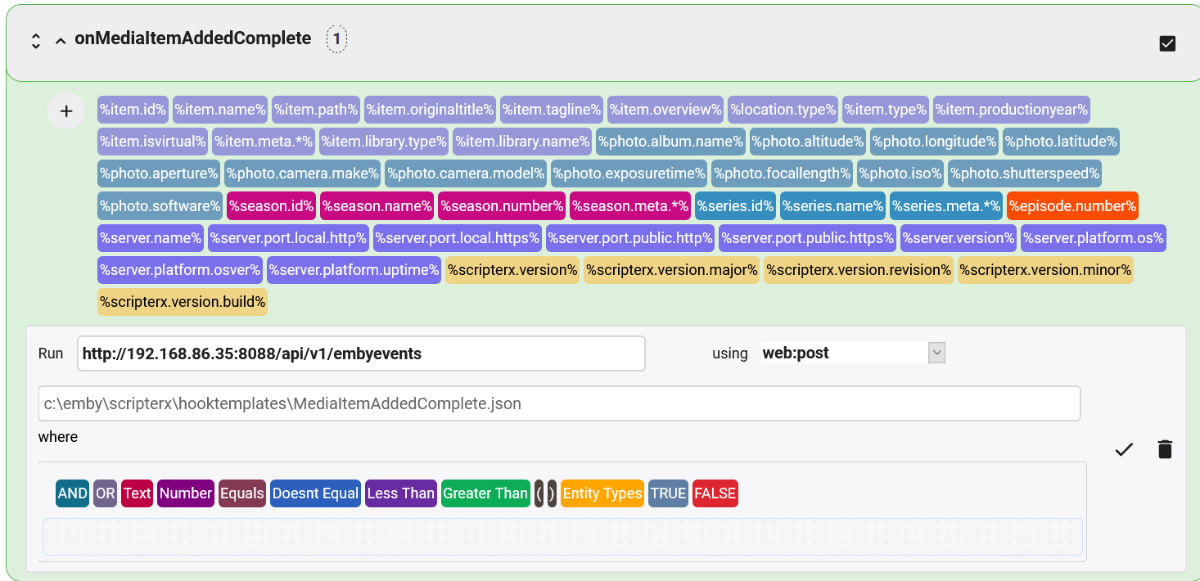
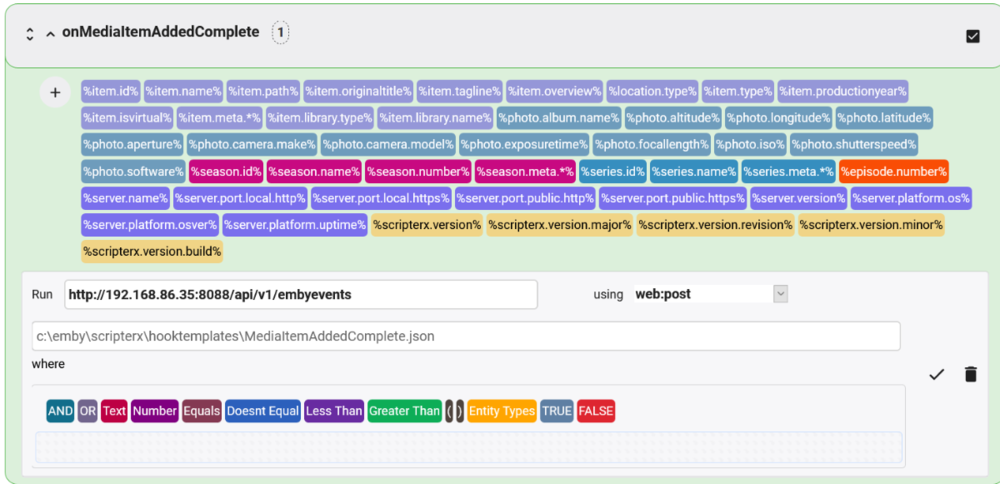
Yes, I see at least one problem, and maybe three. A web post requires a payload template, and you haven't specified one. The template is a text file that contains whatever you want to be posted to your web hook. It has variables in it that correspond to the data Scripter-X knows how to resolve for the event. Here is what mine looks like for onMediaItemAddedComplete (which is more useful than onMediaItemAdded assuming you want to take some action when something is actually done being added and not just when something new is detected but has not finished adding yet): { "Event": "scripterx.mediaitem.added.complete", "item.id": "%item.id%", "item.name": "%item.name%", "item.originaltitle": "%item.originaltitle%", "item.tagline": "%item.tagline%", "item.overview": "%item.overview%", "item.type": "%item.type%", "item.productionyear": "%item.productionyear%", "item.isvirtual": "%item.isvirtual%", "item.library.type": "%item.library.type%", "item.library.name": "%item.library.name%", "season.id": "%season.id%", "season.name": "%season.name%", "season.number": "%season.number%", "series.id": "%series.id%", "series.name": "%series.name%", "episode.number": "%episode.number%", "embyServer": { "id": "%server.id%", "name": "%server.name%", "version": "%server.version%", "platform": { "os": "%server.platform.os%", "osVersion": "%server.platform.osver%", "upTime": "%server.platform.uptime%" } }, "scripterx": { "version": { "full": "%scripterx.version%", "major": "%scripterx.version.major%", "minor": "%scripterx.version.minor%", "build": "%scripterx.version.build%", "revision": "%scripterx.version.revision%" } } } I saved that file as MediaItemAddedComplete.json on my Emby server and then when I configured Scripter-X for that event I specified the full path to that template file in the field immediately below the run field. Potential problem #2: Notice that I don't use a where clause. That's because I want to use this same config for all onMediaItemAddedComplete events. You only need a where clause if you want to filter the events based on something in a variable. For example, if I wanted to have different templates or call a different web hook depending on whether it is a movie or a TV episode being added, I would use a where clause for that. I see that you have a where clause, and that it doesn't make much sense. I assume you were trying to use it to specify what you want to be posted, but you need to use a payload template for that, as described above. Potential problem #3: You specifically mentioned the onMediaItemAdded event, but your screenshot shows that you configured the onPlaybackStart event. I will assume that this isn't a problem and that you are actually configuring both events and happened to post a screenshot of onPlaybackStart rather than onMediaItemAdded. I hope this helps!
 1 point
 -
I personally don't have a single TV show without chapters, but that's not a huge sample size. Is there a reason why we can't get a next chapter button on the player, for both movies and TV episodes?1 point
-
Since items are tracked by providerids (TMDB, TVDB, IMDB) and reside in separate folders, Emby will display as many versions as you have in Continue Watching. There is currently no way to distinguish media by quality for watched or Resume. If Multi-versioning is used it will only display one item.1 point