Leaderboard




Popular Content
Showing content with the highest reputation on 08/30/21 in all areas
-
My request is to be able to chose to add items to the home screen. Specifically in my case, I am thinking of playlists and collections. Here's some reasons I'd like to see this: The home screen is the first piece of the user interface a person will see when they pull up Emby. I often places movies in bulk into my media library. This sometimes means people never see the new movie I've made available. Happens a lot, actually. While all movies are searchable or can be found by sorting, I believe the interface would benefit from having the customization option. I have created a "Justin Recommends" collection and would LOVE to be able to put that on the home screen. By keeping this optional, no one is forced to use it. If you don't have a use-case, then it's just a feature. If you look at things like Netflix, many movies and shows get "featured" and by doing that, a lot of people end up watching that wouldn't otherwise (imagine if The Tiger King was just another buried documentary you had to hunt for, no one would have heard of it). I appreciate your time. If you've considered this before and decided against for reasons other than difficulty implementing the feature, I'd ask you to reconsider. I believe that being able to customize our servers helps us personalize and tailor them to our audience and our needs, and that helps promote a feeling of ownership. I also truly believe that this small change could lead to some powerful results. In my case, I know that it would be of huge benefit to accomplishing what I would like to do with my Emby server. Thank you.3 points
-
Update update: I've removed the beta attachment because 2.0 is now available through the catalog. Thanks to everyone who helped with the testing. Update: I've attached a new build with bug fixes for: The config UI wasn't updating the display of the Library active state after initial page load Badges could sometimes be sized incorrectly due to a bug in the aspect ratio compensation Thanks to @MangoMC for spotting these. ---------------------------------------- Here's a beta for Iconic 2.0, for anyone who'd like to test and/or get a taste of the new features. The 2.0 release *will not* be compatible with existing Iconic 1.x configuration files, so it's important to back up your [emby-path]/plugins/configurations/Iconic.xml file if you will want to revert to 1.0 and/or use it as a reference to more easily recreate your existing configuration in the 2.0 UI. The reason for the incompatibility and big version jump is purely a technical requirement of implementing the new feature set. All existing Iconic 1.0 registrations will apply to Iconic 2.0. On to the new features, which hopefully make the extra upgrade work worth it. First, Iconic configurations now apply per Library. This means you can create badge styles and rules independently for each of your Libraries. You can also activate/deactivate Iconic per library. Second, Iconic now has *initial* support for TV Libraries. - Series and Seasons support Tags rules while Episodes support MediaStream, Tags, FileName, and MultiVersion rules. Third, Iconic now has *initial* support for Collection (Boxset) Libraries with the Tags rule. Lastly, Movie Library support has been expanded to support applying MediaStream, Tags, Filename, and Collection/Playlist rules to Extras associated with that movie. As for this beta release, everything is working for me, but this is a big expansion of functionality and UI complexity, so there's a decent chance many bugs and surprises are lurking just around the corner. I appreciate your help and patience in tracking them down.3 points
-
Say I have a custom collection of 56 Christmas movies. During the Holiday Season, I would like to show this on the main page as a Library. Now, I could make a drive folder called "Christmas" and put these movies in that folder. However, now we're getting away from using metadata for organization and moving back to using folders for organization. Something you've spent the last few years trying to get away from. So each collection should have a toggle to show it as a library on the Home Page. Then people can make collections for Christmas, Halloween, Summer Romance, Summer Slasher Films, whatever and show them on the front page where they are easily accessible. Don't want to show it anymore, switch the toggle off.2 points
-
My locast2plex stopped working yesterday too. I upgraded to the latest release and made sure to use the developer client id, but still a no go and it was erroring with "internal Server Error" and "invalid login credentials" or something to that effect. I installed the latest locast2tuner and all is good in the world again.2 points
-
Oh boy, every plugin I have ever written seem to all break at the same time. My Alexa plugin went haywire and needed to be completely reworked yesterday, the auto organize upgrades started acting weird, and I had to go through it line by line to locate troublesome code. I have fixed them now. Holy mackerel! That took forever. Now back to this monster!2 points
-
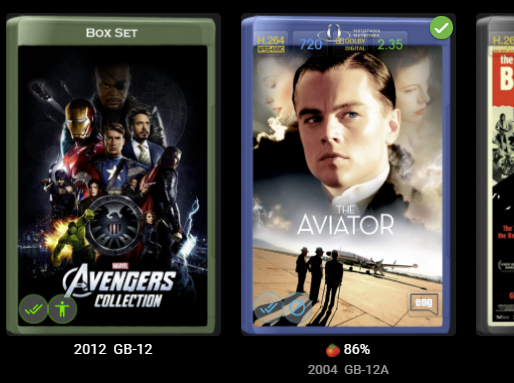
Hi roaku - Thanks for the update - this seems like some major improvements to what was already a great plugin. It is all looking good from my initial testing of the version 2.0 - Not done huge numbers of rules yet but so far so good. Initial testing ... Existing functionality upgrade to new version - all good no issues having backed up old config. This helped as a reference for the initial setup of new version. reproduced current setup on two different movie libraries - all good including TAG, File name, Collection and multi-version rules. New Functionality modified rules on different movie libraries to change icon colour and setup - all good so far with the correct differences being applied. added tag rule to Movie extra's - all worked fine. added tag rules to collection library - successfully applied the rules no problem on both Movie, TV and Music Collection types added tag rules to tv shows - all works as expected. added tag rules to tv seasons -all works fine added tag rules to shows - all works fine Observations if you have lots of rules setting up on multiple libraries with the same rules can take a bit of time if using the UI (I edited the xml but is obviously prone to errors)- an option to copy a ruleset from one library to another would be useful -although only for initial setup. I've only done basic testing particularly on the TV side of things as I don't have many tags configured but will now look at what icons would be good to display now the functionality is available. One idea that comes to mind for the future if it is possible is to be able to read the standard attribute Status for an Series so their can be a rule for the broadcast status - like Ended, Continuing - currently this is not displayed in the web UI so an icon would be great. One slight anomaly comes about from the collection rules when used with the option 'Group Items by Collection' is ticked ... If you use different colours for the item library and Collection library then the badges show a colour difference in the same view. In the screenshot of the 'Movies' Library - the badge colour for Movies is blue. The Collection library is Green. so when viewing the Movies library I see a mixed colour palette from the two rulesets. Not sure it is an issue in general and not a problem for me but just so you are aware... Will do some more testing particularly with the TV side of things. Thanks again for some great enhancements and continued work.
 2 points
 -
Well your Cowboy Bebop is Hi-10P, which the server may be trying to direct play, as it does not know how to handle this codec. Nothing will play Hi-10P in hardware and it is also what a previous user was having problems with in regards to subs. I would suggest you dump your Cowboy Bebop for a non Hi-10P encode. I would recommend 981203 as it's the only version that is not edited, and is as close to the original broadcast version as possible.2 points
-
OK that sounds like it could work then.2 points
-
Based on the title, it sounds like you're trying to get Emby into Kodi. Have you tried the Emby for Kodi plugin? It's been a long time since I used LibreELEC but when I did, the Kodi plugin worked perfect. Now as far as accessing the files, your SMB share settings look OK. But SMB is designed primarily for windows. If you're trying to access the files on a Linux system, you should probably setup a NFS share instead under the Unix Shares section. Also, this may sound stupid, under the services section make sure you've enabled SMB/NFS. TrueNAS will let you configure the shares even if they're disabled. Lastly, there's some quirks with SMB in TrueNAS with some devices. You may need to go into Network -> Global Configuration and enable NetBIOS and WS-Discovery. This enables SMB1 which some devices require. I remember having to do this to get the share discovered by an NVIDIA Shield. Hope this at least gets you pointed in the right direction.2 points
-
Hi, I would like to have an option to choose H265 instead of H264 in the Transcode option. It will be smaller for all bad bandwidth (2~5Mbit ADSL), but will have a great quality. Mobile phone can benefit of it greatly too with the 4G and the limitation of download.1 point
-
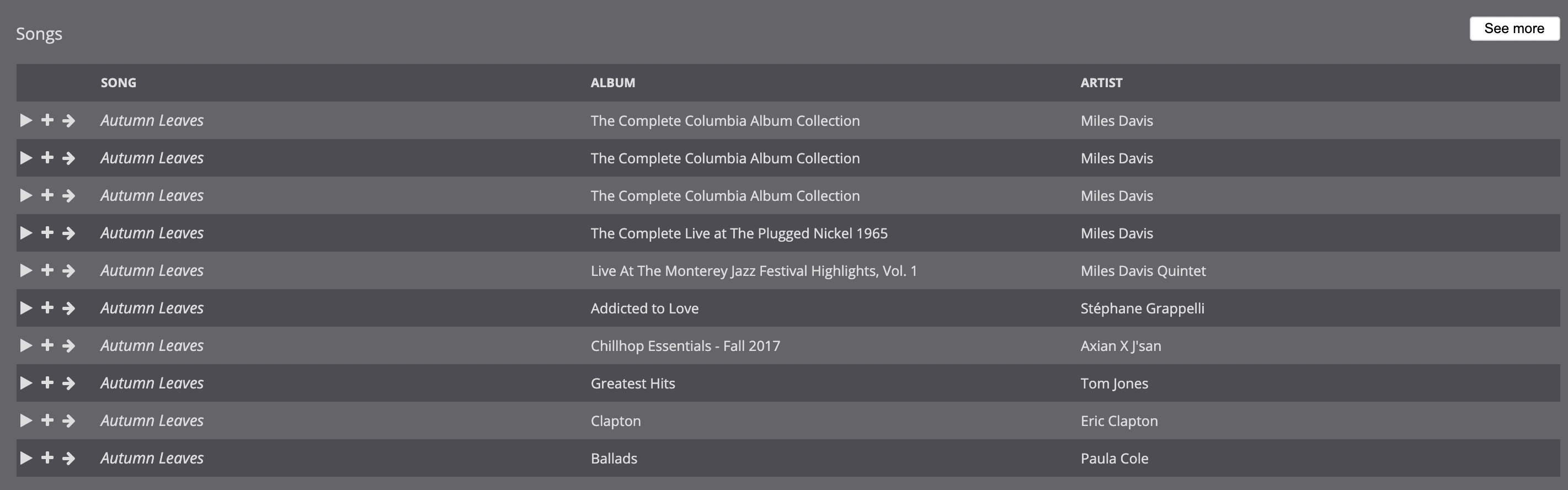
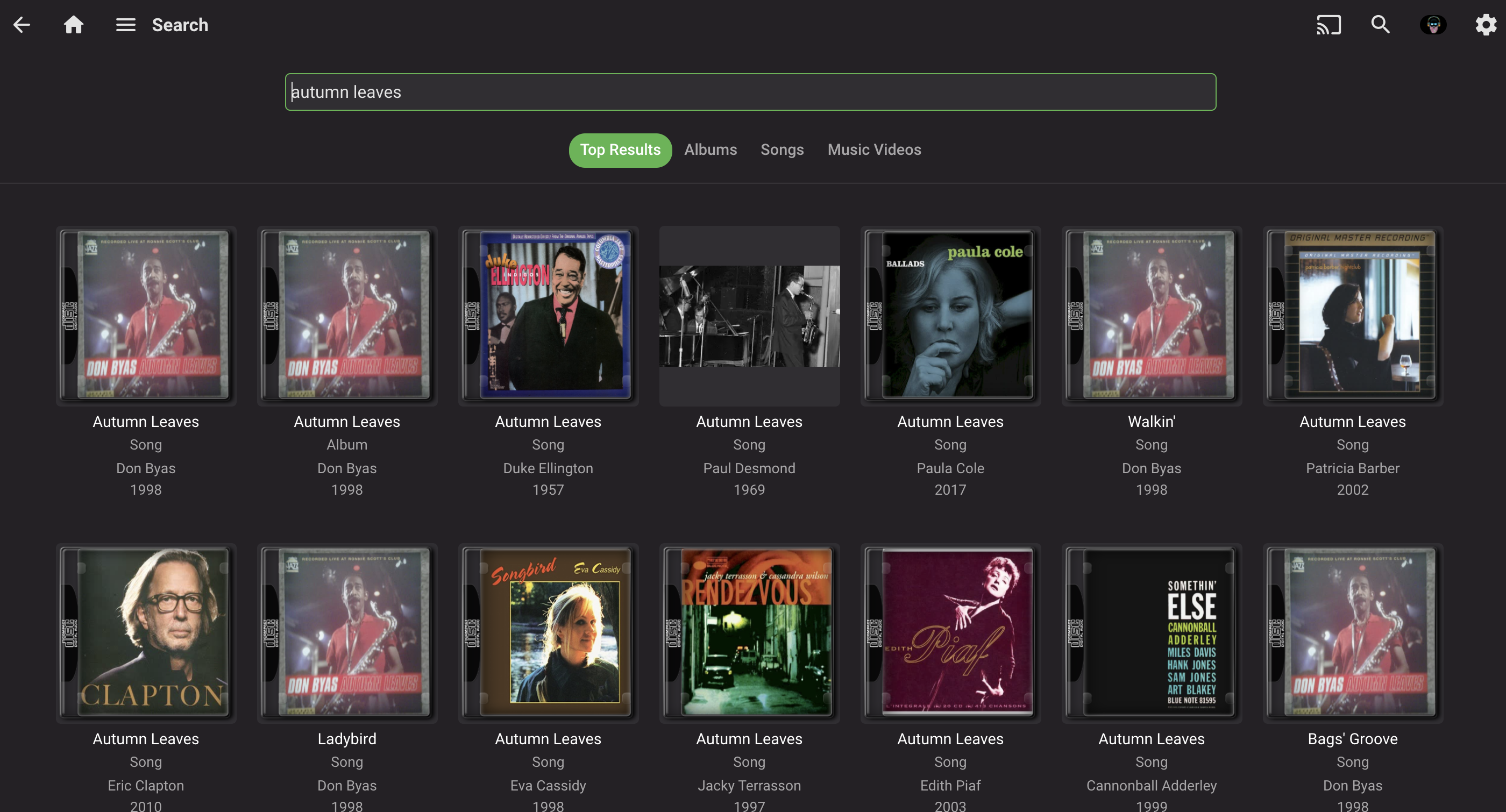
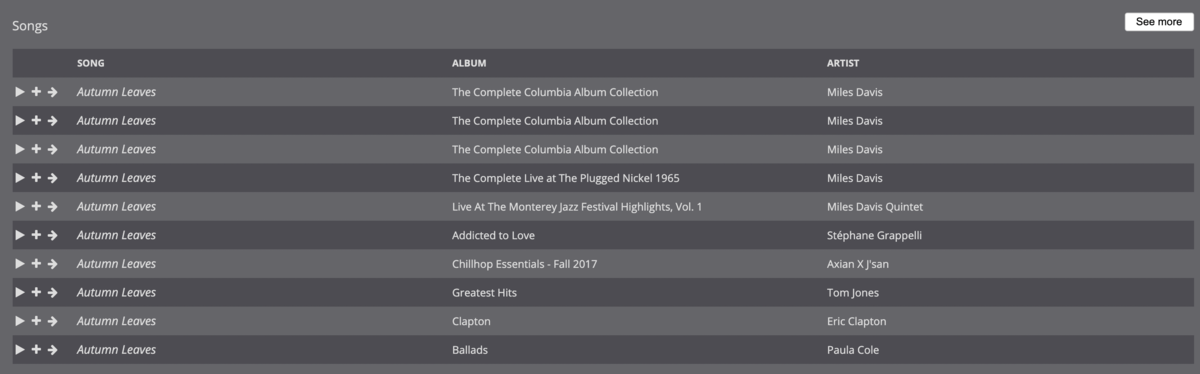
I'm trying to transition off of Subsonic because it is getting long in the tooth, and Emby is the logical choice, since I already use it for videos. While I know that music in Emby is very much a work in progress, one area I find it lacking—in comparison to Subsonic—is search, both in terms of performance and functionality: Compared to Subsonic, Emby's search is significantly slower. I actually created a separate user account in Emby that only has access to music in order to make it usable because when videos were included, it would take 10-20 seconds to search. For just music, searches take about 5-10 seconds, where Subsonic is, effectively instantaneous. The search results seem to be limited to either artist or song. When I try to combine the two, often I get no results. For example, I have a lot of jazz and many artists cover jazz standards, such as "Autumn Leaves." If I'm interested, say, in any recordings by Miles Davis, and type in "davis autumn leaves," Subsonic immediately returns the correct results (see first screenshot). When enter the same search query into Emby, I get no results. If I type in "miles autumn leaves," "autumn leaves davis," or "autumn leaves miles," similarly, I get no results in Emby, but the same results are returned in Subsonic. It's only when I just input "autumn leaves" that I get any results, which is not particularly useful as I have 50+ recordings of "Autumn Leaves." It also takes, consistently, 5-10 seconds to return these results. Again, Subsonic, running on the same server, provides instantaneous results. NOTE: 99% of my music is tagged, almost all of it with MusicBrainz. Some more esoteric recordings, bootlegs, and live performances are not always tagged. A couple of other nice features to have would be: a list view in search, instead of showing album art; I suspect this would also speed up the search results the option to include bitrate/format in the format; this would be useful for a variety of scenarios (finding lower bitrate versions of songs, creating playlists, etc.) Thanks you for your consideration!

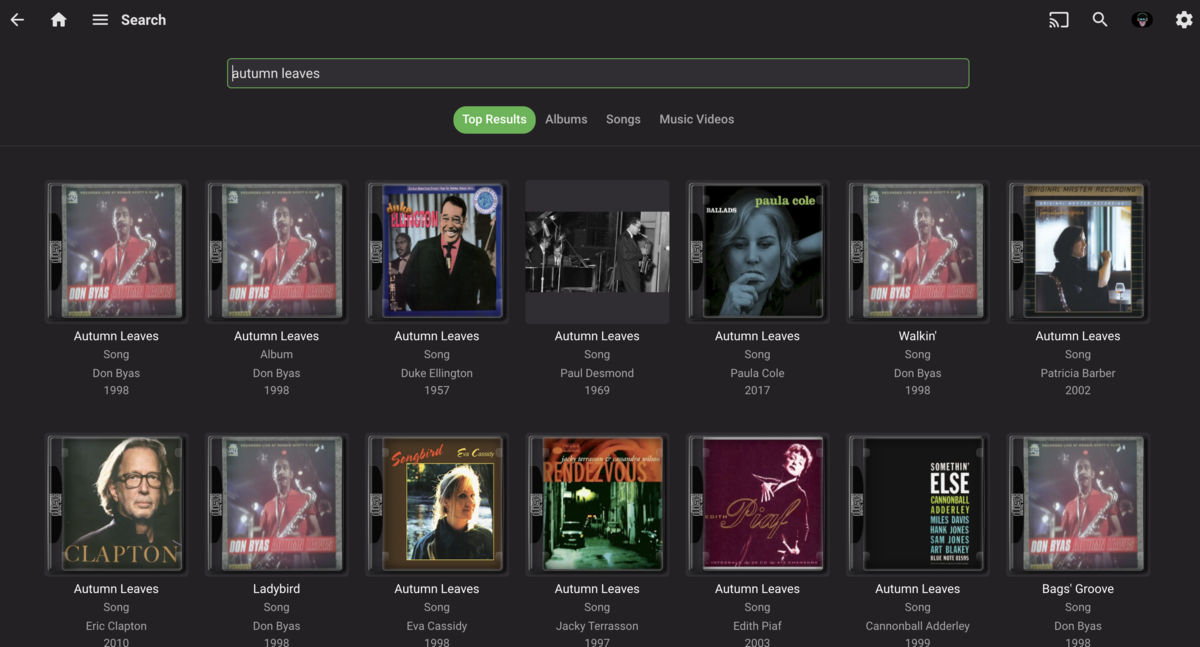

 1 point
 -
It would be cool if when playing music, the title of the browser tab updated to the current artist and song playing. Spotify shows this as (Title)-(Artist) and youtube displays as (Title). When nothing plays or when the album finishes it could revert back to "Emby"1 point
-
Yes but for some reason you will need to reset it and allow all children of the DVR folder to inherit.1 point
-
True there is a point where it doesn't work as year seasons have worked from the begin as I have many series in this format. But at the same time that is what the provider has also so there is really no guess work on Emby's part. But I would agree with that proper SxxxExx name it should be parsed properly.1 point
-
Sorry that is a post from 2017 when the AutoBoxSets was used. Now it is a per library setting and item metadata driven. So if you have verified the "Import collection information from metadata downloaders" option is disabled per library and Collections are still being made, that means your item metadata contains the <set> node and you have to remove/clear that node in order for a Collection to not be made for that item. There is another topic about the <set> node not being cleared when removing from Collection or Deleting Collection.1 point
-
Tone mapping was on, subscription was off (I didn't even realise it had stopped!) - all fixed1 point
-
I tried restarting my server and then refreshing metadata on the titles that weren't grouping into collections, and that seems to have solved the issue.1 point
-
Sure, as I said, go for it, it's a valid request, although to me it just seemed like a Folder view with contents brought one level up listed as section per each folder. Didn't quite get that one on Mixed-content library view, what's missing there?1 point
-
Finally found some time to run this on a new Beta using my main Media libraries - the normal id scan is going to take a couple of hours (about half way through) but once complete, then I'm going to run the IntroSkip and do some analysis on the results - but given the size and complexity of the task on my ancient i5, I expect this will be 3-4 days away, maybe more ..1 point
-
Sending you a PM.1 point
-
I was utilizing the "enter" button, in the center of the 4-way. I'll try another button.1 point
-
I'll try those when I get back in front of the clients later. Thanks guys. Just weird that it's working fine on all clients other than android based ones. I appreciate the quick help!!1 point
-
We can look at this. Thanks.1 point
-
Oh my gosh, last.fm just pollutes the log. I can't read it on my phone, I need notepad... One minute.1 point
-
Hi, Try this. Remove the Emby Connect username from the local account and save it. Then add the Emby Connect username back and save again. If that works you will want to do this for all users.1 point
-
Hello Dreamz2k, ** This is an auto reply ** Please wait for someone from staff support or our members to reply to you. It's recommended to provide more info, as it explain in this thread: Thank you. Emby Team1 point
-
1200px-Audio_Book_Icon_1.svg.png (1200×1205) (wikimedia.org)1 point
-
Do you store NFOs with your media?1 point
-
I see this was posted awhile ago is there any updates at all about when/if this will be implemented1 point
-
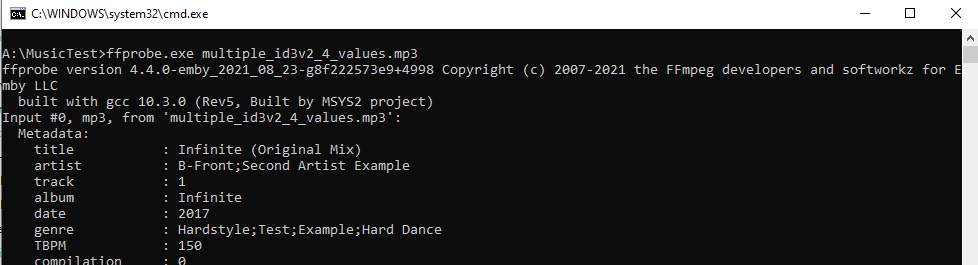
test file works fine for me... thats dedication maintaining your own version to fix the issue....great stuff... the other projects relying on ffprobe will be jealous
 1 point
 -
Hi I would really appreciate it if in the next update you can make it so we can select a collection for this lets say the the DC universe collection and add to the main view on home screen with the other libraries such as TV and movie libraries as we unfortunately know sub categories isn't really a thing on emby could we at least have the option to add a selected collection library and add to the home screen instead of the folder named collections or with out having to save to favourites so its more seemless Many thanks fingers crossed1 point
-
Theme music was supported in the old collection system but not in the new one.1 point
-
Yes it's something we can look at in future updates. Thanks1 point
-
Collections are stored under your install-dir\programdata\metadata\collections, but AFAIK theme music won't work there. It's a nice idea, though.1 point
-
If I download a file from Audible, the Narrator is listed in the downloaded file's Composer tag.1 point