Leaderboard




Popular Content
Showing content with the highest reputation on 08/24/21 in all areas
-
Besides what @GrimReaper mentioned this link might help as well. https://support.emby.media/support/solutions/articles/44001173099-emby-premiere-feature-matrix3 points
-
Browsers don't count against your Premiere device limit.3 points
-
Yes, the apps for DSM 6 & DSM 7 are currently being reviewed by Synology. It's in their hands right now.3 points
-
So for video files we can have multiple versions of a single movie or TV show by having an extra bit at the end of the file name. Could the same be done for music? Some of my devices can handle .flac and others can not. Because of this I want to have .mp3 versions for some devices but not have separate CDs listed for each version.2 points
-
I followed the instructions, worked like a charme! Thank You!2 points
-
The settings was: Saved image max: 1200x1200 Display: 1200x7** Now: Original image size saving. Display: 1200x12002 points
-
I like Filebot only because I'm so used to it. No other reason. Any tools that renames well is great in my book. That makes it easier for me to help people if they have a problem.2 points
-
It is not. If you look at the photo, Season 1 Episodes 1 and 2 are marked as episodes 80 and 81, due to above.
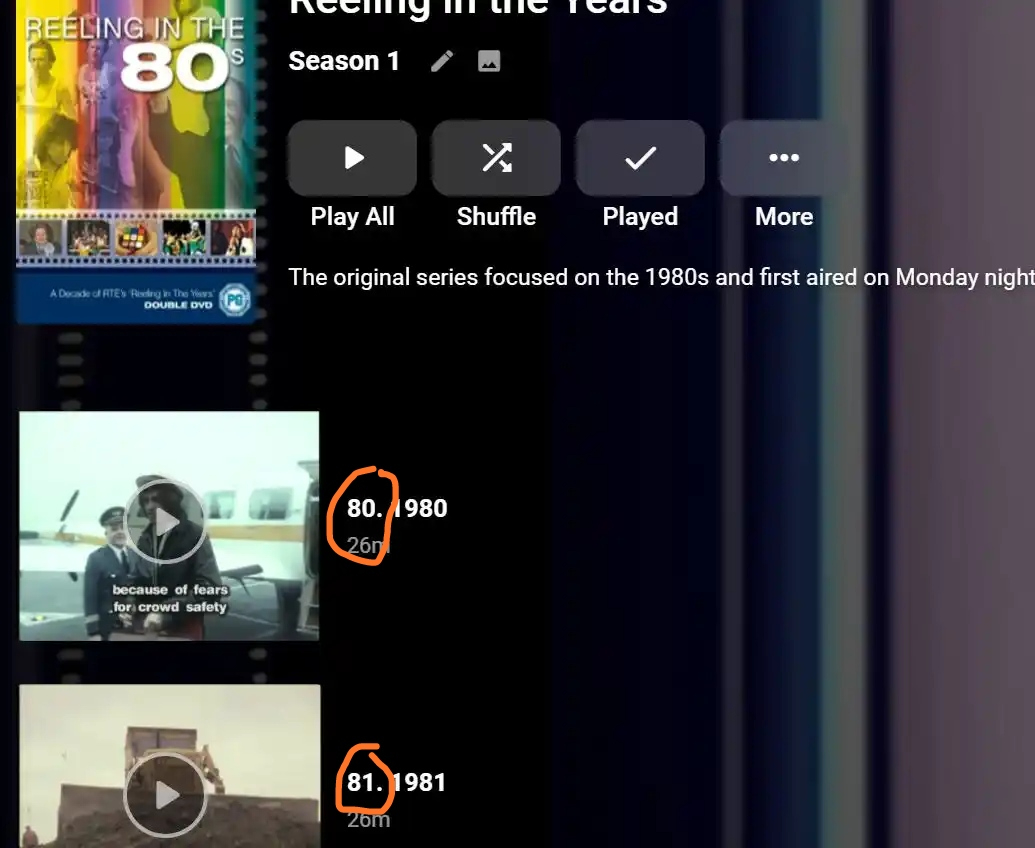 2 points
 -
Hi, just curious but have you looked at our Auto Organize plugin? This may do what you want plus a lot more.2 points
-
Stay tuned. Our packaging developer is actively working on Theater packages for all of the same platforms that we have the server on. Hopefully we'll have something in the next couple weeks.2 points
-
DSM7 Upgrade for Emby.mkvEDIT: The instructions assume default Synology install volume of /volume1. If your location is different use that instead! This is based on the release version of Emby which at the time of writing/video creation was 4.6.3. The video will become dated so just use the latest DSM 6 Emby version from the website https://emby.media/synology-server.html. If you happen to be running a beta version update to the latest beta version before the DSM 7 update. The idea is to do any updates on DSM 6 first before installing DSM 7. Since the creation of the video Emby Server is now availing in the Emby Package store (release version) so you can install Emby on DSM 7 now from that. ----------------------------------------------------------------------------------------------------------------------------- Attached is a quick video of upgrading DSM 6 to DSM 7 with Emby Updates. The video will show only browser items and not the PUTTY/SSH commands but everything done in browser is recorded. The SSH commands are included below. I converted this to MKV/H.265 to make it small enough to download and view offline. DMS7 Upgrade for Emby.mkv21.57 MB · 78 downloads Instructions used were: Download and have ready DSM 7 package for update. https://www.synology.com/en-us/DSM70 (I will be downloading both a virtualDSM 7 & for 920+) Download and have ready Emby Server 4.6.3 for both DSM 6 & DSM 7 https://emby.media/download.html - update Emby Server to current release of 4.6.3. - restart Emby Server and verify your on the latest release version. - uninstall Emby - update DSM to v7 - install Emby 4.6.3 (or same version that was running above (dsm7 version) - You can now install the DSM 7 version directly from the Synology Package store! (still on our website too) - stop Emby - remove emby_pkg user and video group - enable admin account if needed - enable ssh in Synology settings (Terminal & SSH menu) Not shown in video: - connect with Putty to Synology, login with admin user and get root rights with: sudo -i - copy files from old Emby share to new data location: cp -rv /volume1/Emby/* /volume1/@appdata/EmbyServer - adjust owner from copied files: chown -R emby:emby /volume1/@appdata/EmbyServer - close putty Shown again in video: - From Control Panel go to Shared Folder and edit each share that is used by Emby Server. Click the share, then EDIT, go to permission tab, select System internal user from drop down, grant emby user read/write access. - start Emby Notes: You can now disable the default admin account as well as SSH. You may also want to rename /volume1/Emby to /volume1/Emby6 as well. This will help make sure you don't have anything referencing the old directory. If you don't notice any issues in a week or two you can delete this old folder/share to free up space. DSM7 Upgrade for Emby.mkvDSM7 Upgrade for Emby.mkv1 point
-
I've been dying to know if this has garnered enough interest to be worked on. I found Emby (MediaBrowser 3 at the time) and its bookshelf plugin while I was searching for something that was like Plex for comics. Plex doesn't do this (and probably never will), Kodi doesn't have what I'm looking for either, and ComicRack seems to be dead at the moment. Unfortunately the bookshelf plugin doesn't work the way I had hoped. I was dissappointed to see it only offer a download to the file to which I can open it to the program of my choosing. Even browsing through the books I only had the option of going through folder-like directories and couldn't browse by author like the people section in the other media types. I would love for it to be fully integrated into Emby where I can open and read a comic right on my phone and tablet or even my web browser as I could with my movies and tv shows. Also, I hope to god somone is working on the "Games launching in android" feature you mentioned on your up-for-grabs blog post. That would be awesome!1 point
-
I mentioned it in another thread, but thought I'd put it here since this looks like a new section--just for posterity. Would like to have a bulk meta data editor function. For example, if I have 750 videos whose producing studio is the same, I want to select those videos and apply the name of the studio to those videos. Similarly, if there is a custom tag I want to apply to a subset of those movies, I want to be able to select them in bulk and apply the tag to those videos (instead of selecting them one by one).1 point
-
Is this doable by some sort of plugin ? Maybe add your imdb credentials and then be able to rate movies here and have them on imdb as well (not talking about sorting here, just rating stuff)1 point
-
My Emby server is only configured for local access. When launching the Android app, it always tries to reconnect with the local server, which is great when I'm on the local network. But because this is a blocking action for the app, it also means that when my device is *not* on the local network, I have to wait for the request to timeout before I can get to the downloads screen and start using Emby. Is there any trick to immediately access the downloads or select server screen on launch?1 point
-
Be able to create playlist based on a certain criteria, like genre and or year, in order to create a dynamic playlist that it refreshes automatically when new content is added. This way you can for example, create a tv comedy playlist from the 90's, or a new sci-fi Movies playlist. Some other criteria for rules could be the rating, watched/unwantched, score, tags, language, audio codec, etc The possibilities could be endless1 point
-
I've installed Emby Server on my PC and set up the libraries. I'm able to login to the emby account on the android phones connected to the same wifi as the PC. I want to be able to access my content when I'm out, but whenever I type the remote access IP into any browser or try to use the Emby App to connect, I get "This site can't be reached. ERR_CONNECTION_TIMED_OUT" on Chrome, and "Connection Failure. We're unable to connect to the selected server right now." on the Android app. This happens both on my home network and on other networks. How do I resolve this issue? I'm a tech noob so please be patient. embyserver-63738657905.txt1 point
-
I love listening to my music using my android phone with Emby android app, but currently the app lacks support for internal equalizers, my phone has one and I would like to take advantage of it.1 point
-
hey what I'm really missing is support for audiobooks. Simply saving the resume point for those mp3s would be absolutely enough, no need to fetch metadata etc.1 point
-
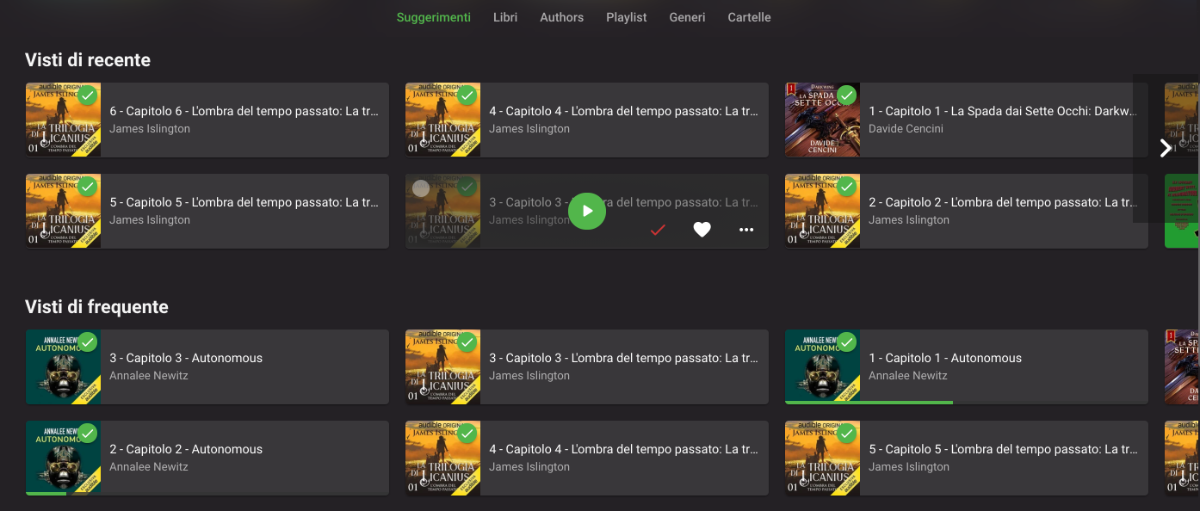
I have my audiobooks as separate mp3 files, one for each chapter, inside a folder for the book, inside a folder for the author. Emby sees them as multiple songs inside an album, which is then considered as a book. This brings 3 problems: In my library, I see multiple chapters of the same book in sections like "Recently seen" or "Continue listening", which brings a lot of clutter to the UI, with 0 benefits (see multiple_chapters.png for a reference) The playlist section in the navigation menu is now filled with books and auto-expands everytime I open the menu. Worsening this mild inconvenience, the playlist thumbnail is the book cover x4 (because all the chapters have the same cover) When I resume listening from the "Continue listening" section, it only resumes the current chapter, so when it ends, the playback stops. I had an additional problem, where a book wouldn't show up in "Continue listening", but I think I solved it by going into "advanced setting" of the audiobook library and selecting 0 and 99 as percentage for "continue listening"; this wouldn't be a problem if the "media" was the book and not the chapter. Since this is just a way to organize an audiobook library, considering books strictly as a single media could be an option in the library setting.
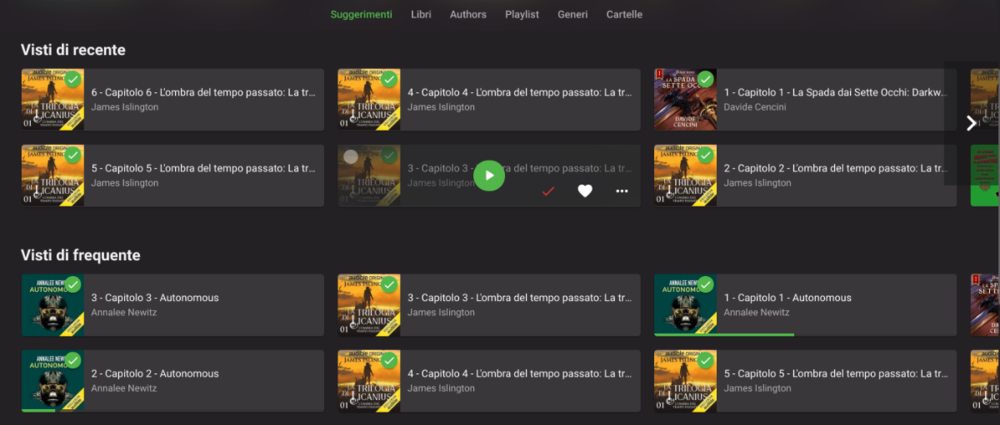 1 point
 -
Is it possible to add a bitrate for users that are direct(whatever) something? It's good info, and readily available. Thanks1 point
-
Hello. On this page (all i think) https://emby.media/premiere.html In the footer, the copyright information is old: © 2015-2020 Emby LLC1 point
-
I have this issue too, since last tuesday, on an brand new chromecast with android tv only. Infrastructure Drive with stable "emby for android tv" (2.0.33g) and "emby server" (4.6.4.0). Nginx Reverse Proxy with letsencrypt SSL certificates Ubuntu Server 12 other clients works great as usual Last changes inside the infrastructure: (known so far) changed the certificate algorithm from RSA (4096 bit) to ECDSA (256 bit). I will collect more informations...1 point
-
I'm not a Emby developer but I am a software developer. In general, these types of requests come in and are added to a list, and given a ranking (priority) by someone or a group of people. Developers take things off of the top of the list as they finish one off. Other things may get added to the list that are considered more desirable and/or of more benefit to the majority of the users. There are a finite (and I think fairly small) number of full time Emby developers so the list gets processed as fast as it can. But low priority things tend to suffer greatly in that environment. If it were me ranking things, this would be at or near the absolute bottom. You can accomplish the same thing easily by simply selecting a different stream of the same channel if the first one doesn't work, right? Although a cute feature, I'd struggle to give it priority over things like ATSC3 or 4K improvements for example. But that's just me, and I have no say in what gets worked on.1 point
-
I was afraid someone would key into that lol. It was my fault, I miss-clicked "play from beginning".1 point
-
Movie downloaded. Tried deleting it within the menu on the Downloads section, and it immediately started to re-download. Went to the movie on the general section, pressed "Remove download", does nothing whatsoever. So basically what I did was delete from Downloads again, and pause the download through Android's notification bubble. Not the best solution out there, but at least it'll keep the wasted space to a minimum without having to delete it entirely from Emby. Also it would be helpful to distinguish the "Delete" buttons a bit better ("Delete from server" vs "Delete from this device", or at least a better clarification in the confirmation pop-up), as sometimes it's not easy to distinguish if I'm in the Download section or the general online one. Hopefully the revamp with the fix comes soon1 point
-
Thank you @cayars!! that was all it was1 point
-
We hope so but we don't know yet. This is a new proprietary format from Dolby.1 point
-
Not specifically related to you question but are you saying Emby is not recording your Resume point for this media? As Emby should pick up where you left off.1 point
-
Hey friend, I asked VPS support to check for possible problems with the drive and the network card. After analysis by VPS support, no network card problems were found, but VPS attacks were identified. The VPS firewall has been enabled and we are monitoring to see if the crashes will continue. So far, thanks for the help. When I have news, I'll be back in contact1 point
-
DSM 7 doesn't use those permissions. You need to modify the system internal emby user and give it read/write access to the share.1 point
-
The Shield is using hardware that officially supports AC4, but maybe because the codec was still being finalized when 2019 Shield released, Nvidia needs to release an update?1 point
-
With that procedure I am able to reproduce. Thanks.1 point
-
I got it! I know how to properly update the database. Why didn't I think of this before! var config = Plugin.Instance.Configuration; if(config.Version < CurrentVersion) { Repository.CreateColumn("Processed", "TEXT"); Plugin.Instance.Configuration.Version = CurrentVersion; Plugin.Instance.UpdateConfiguration(config); Plugin.Instance.SaveConfiguration(); } 1. In the plugin configuration xml we save a version number. 2. Check it and add the table column as needed. 3. Increment the Version number. 4. Reload the Repo with the new values I will test this.1 point
-
Cool, thanks for sharing.1 point
-
Yes, I do it and see my emby NAS right. I do it in my browser and it's OK. I open my app and do it again and.... It's OK!!! I did: Hard reset of my router Reset of my PC and disable PC emby Reset my smartphone And now, everything is right, Thank you @cayars with your patient and thanks for your suggestions. Best regards and see you in forums1 point
-
I use Notepad++ and just do a find and replace.1 point
-
Hi, I've deleted those videos. I'm re-downloading them now.1 point
-
OK, so you're using the anime plugin. I'd suggest you check in the plugins forum. I'd love to help but I don't like that plugin at all. The data it pulls is not something I want near my media collection.1 point
-
Oh, he does fancy it a lot, it is I ("It is I, Leclerc!") who's inclined towards alternate solutions. Personal preference only, FileBot is a great tool.1 point
-
One is the number of items in a specific view and the other is system wide. There could be episodes in some other library (like recordings).1 point
-
There is an endpoint created "EpisodeTitleSeqeunce". You can request that and send in the episode InternalId. This will return an object. First you would check "HasSequence" to be true. Then look at "TitleSequenceStart" to know when to show a button, and "TitleSequenceEnd" to know where in the stream the button should skip to. Not all episode have sequences. This is because the sequence is under 10 seconds, and we ignore them, or they change their intros per episode and we can't find them. The plugin table is editable. So if we collect improper data, then it can be altered. Currently our results are about 80-90% reliable.1 point
-
My point being though that there was no need to do that step twice. @cayars own instructions don't have that step twice. So he should remove that link and add graphics to his own instructions if he wishes1 point
-
Got it! Will do tomorrow and let you know how it's going!1 point
-
OK I have this working, and I see type 34 records in the database. Is there are way to not show them in the channel list they seem out of place there when there is a filter option. Some people have lots of channel groups and I like to filter to small groups but have the channels list is now channel groups. Edit ignore that there was a group by option I must have setting when I didn't realize that the channel list must be downloaded during the EPG scan. Martin1 point
-
Hi. For now, you could use strm files. Strm Files1 point
-
Dude! I love it! Let's code this monster!1 point
-
Thanks @chef It's a pretty simple concept tbh - I use an XML parser to extract the file path\location out of a normal playlist.xml file (stored in ..\programdata\data\playlists) and dump it to a .txt file which is just a list of unc filepath/names. This is then used as the input for the strm file creation (link to the real file) and it copies the necessary metadata along with it into the pre-created 'User Recommended' subfolder as part of the 'Recommendations' library. So you just permission up the relevant subfolder for that user - add the Recommendations library' to the top of their library list - and bingo, out pops user created recommendations based on whatever was in that playlist. The beauty is the STRM files match the watched status of the real file - so as they are watched, they drop off the recommendation list It probably should also remove it from the playlist, but doesn't currently. The script to create the strm files runs on a windows schedule. recommendations.zip My early (poor) proof of concept code plus xml.exe is in the attached zip if you want to see if you can rescue it into something workable lol - I am no developer haha. In sequence - the xml_to_txt file parses the playlists, then pl_to_strm creates the files in the correct library. Emby does the rest. I'm not sure if smart playlists or this functionality is on the Horizon but this sure would make a good plugin in the interim but I don't have the skills to do this - thus resorting to batch files .. If you like the idea and want to run with it for a proper plugin - then you certainly have my blessing.1 point
-
I'm currently on Fedora 34, and I've tried all sorts of things to get Emby Theater to work, among other things converting the deb file and compiling the program from scratch. But I haven't been able to make it work. Any chance you could publish a flatpak, or an app image for that matter, so we can use Emby Theater on just about any distro, not just Ubuntu or Pi? Or could you at least give detailed instructions for compiling the program on current distros? Apart from that, great work! R.1 point
-
To gauge interest... What if you had the ability to "Forget" a series for the purposes of Next Up display. That is, it would no longer show in Next Up - unless you watched another episode. Sometimes you maybe watch a series for a while and, even though there is more of it or more is made later, maybe it isn't as good as the earlier seasons or maybe you just don't have time for it anymore. So you'd like it to quit showing up in your Next Up list so it is less cluttered and you can focus on the series you are actually watching now. If you start watching it again, the "forget" would be forgotten and it would start to show up in Next Up again.1 point






















.thumb.jpg.38c63fff6d2e7e2b382b29ddfe9f8578.jpg)