Leaderboard




Popular Content
Showing content with the highest reputation on 08/22/21 in all areas
-
Emby's interface on Apple TV Date, and no evolution of design conference to Android box. Will there be a version 2.0 on Apple TV? Because this box also deserves a more modern evolution like the Team Plex I use Emby since a year because I can find it intuitive now with the evolutions of Plex, Squire and infuse applications, I find it less attractive. Your team is Great but think of the apple user who would like their favorite app to modernize on their box THANKS4 points
-
Cool - That's useful Info - Your results are very similar to mine2 points
-
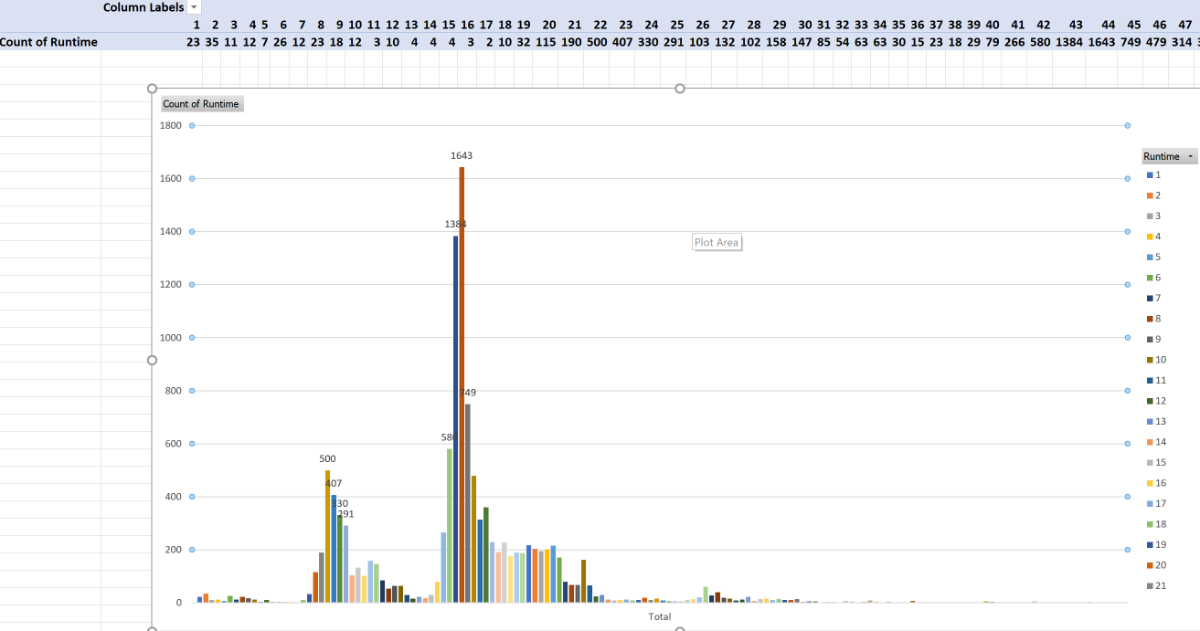
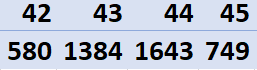
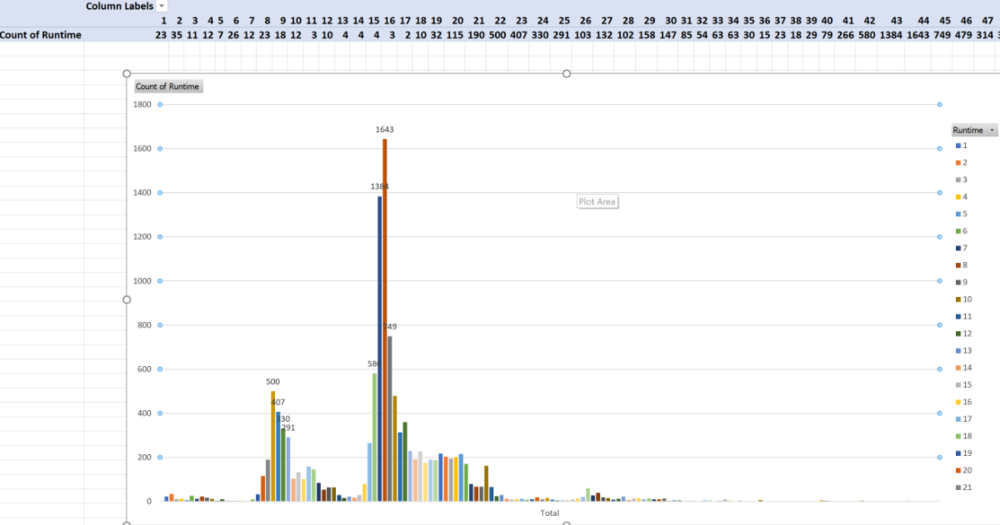
I finally got a chance to create the pivot table and cluster bar graph. Here are my results. I have no anime either and have basically two clusters.

 2 points
 -
Hi, it is resolved for the upcoming release which we will be putting out soon hopefully. Thanks.2 points
-
Yes! That seems to have worked! Thanks everyone!2 points
-
Why not just remove that episode from your series folder, scan, put it back, scan? It should effectively reset all its db entries.2 points
-
The Apple TV has to follow Apple's UI design guidelines and QA rules. I think you mean functionality inside the app to match what the Android version has? The Apple TV shows so much promise, its 85% there. Frame rate match, de-interlacing properly and a few other annoyances need addressing though.2 points
-
I'll try to keep this feature request short and simple. When the Emby server needs to transcode audio to make it compatible for the Emby client, it will use a hardcoded value for the bitrate that cannot be changed. For example, if the audio gets transcoded to Dolby Digital AC-3, it will always use a bitrate of 384 kb/s. This value cannot be changed, even though Dolby Digital AC-3 allows a maximum bitrate of 640 kb/s. Although 384 kb/s is a decent compromise between quality and data, it is very compressed and the quality is far from being transparent. The same thing applies to every other audio codec the Emby server may transcode to, such as AAC. So the request is simple, allow users to specify the bitrate that should be used for transcoding audio. Thanks, Charlie1 point
-
I am testing with the 4k version here, though I did experience the issue on the older version as well. I did not do the same thorough testing I've done on this end to confirm that it was limited to movies and not TV series with the older Fire Stick. Unfortunately none of that hardware is available to me now or for the next several weeks. I mean, in a way I've solved the problem at hand and am now able to use Emby where I am now, so it's not a catastrophe if the troubleshooting ends here at least for now, until I get back to the other location. I'll pick this thread up next month to post my experience when I get there. Thanks so much to all of you who have taken the time to help figure this out with me. It's hard to be perfect on every platform, but much more often than not I'm thrilled with what Emby can do, so I can be patient with stuff like this. Much obliged.1 point
-
Bonjour à tous, pour ceux qui ont des TV Samsung, voici le Tuto pour ne pas toujours avoir de remettre la clef USB ... Le seul défaut vous ne pourrez pas avoir les appli Françaises (My TF1 ou autre par exemple ...) Testé sur Samsung Qled 7 (1) et 3TV Samsung version AU Je pense que ce tuto évite aussi le message, mais @Luke confirmera peut être ? 1- Restaurer votre TV Samsung (oui je sais ça peut être galère ...) 2- Paramètre / général / Réinitialiser (Il vous demande votre code PIN en général 0000 ,mas vous avez pu le modifier ...) 3- Votre TV se rallume 4- Choississez France 5- Continuez jusqu'à accepter les conditions générales, mais ne les acceptez pas ! Faîtes Mute, Volume+, Chaîne+, Mute 6- Choisissez le store US, ou Anglais Désormais vous aurez Emby via le store US :)1 point
-
Because you're trying to install the DSM 6 package on DSM 7. Make sure to go here to find the correct package to install: https://emby.media/download1 point
-
I added all of the ones from wikipedia.1 point
-
Not really Luke. He's asking when the new LiveTV is due to be released....in any form....beta or final. We all have the same question. It has been promised since last year. I'd like to know too since all the problems I am having with emby should be solved by it's release.1 point
-
Never mind. It’s working fine today. Weird. No idea why it wasn’t working last night.1 point
-
Thanks for the feedback !1 point
-
Thanks. I updated today, shutdown Emby, installed the package manually and restarted and it retained my config. Thanks1 point
-
Yep it started out ok when it was small but now it's so many files I'm scared to change it lol! Didn't mean to suggest any more work for you chef but I will keep following to see if it's even worth you to upgrade the plugin in the future.1 point
-
For me the best way is to use strm files WITHOUT mounting google drive at all as a local drive. I am just using rclone's serve command. No need to install winfsp, no additional drives added to my pc, no way to get 24hour banned and it works even on Android with RCX if somebody wants to setup an Emby server in Android. rclone serve http gdrive: https://rclone.org/commands/rclone_serve_http/ And each strm file links to a http file, rclone's serve creates direct http links from google drive links and they work great in Emby. Also my google drive links are all private. All my strm files have links like that http://127.0.0.1:8080/mymovie/mymovie.mkv1 point
-
I have solved the problem using: Edge with no flag configs but i had to download HEVC Extension version 31823 download link: https://www.free-codecs.com/hevc_video_extension_download.htm It has to be that version because later versions make the videos stutter ALOT With this i can watch on edge browser without transcoding Thank you for all the help. good job on the great emby software. Keep up the good work1 point
-
Just updated and so far so good. One thing that was noted in 4.6.3.0 release notes was that Synology was reporting Emby as not started when in fact it was and it looks like by applying 4.6.4.0 that has been solved. Thanks for the follow-up and the awesome support the team at Emby and the community in general here provides, it is top notch.1 point
-
That looks like the correct folder.1 point
-
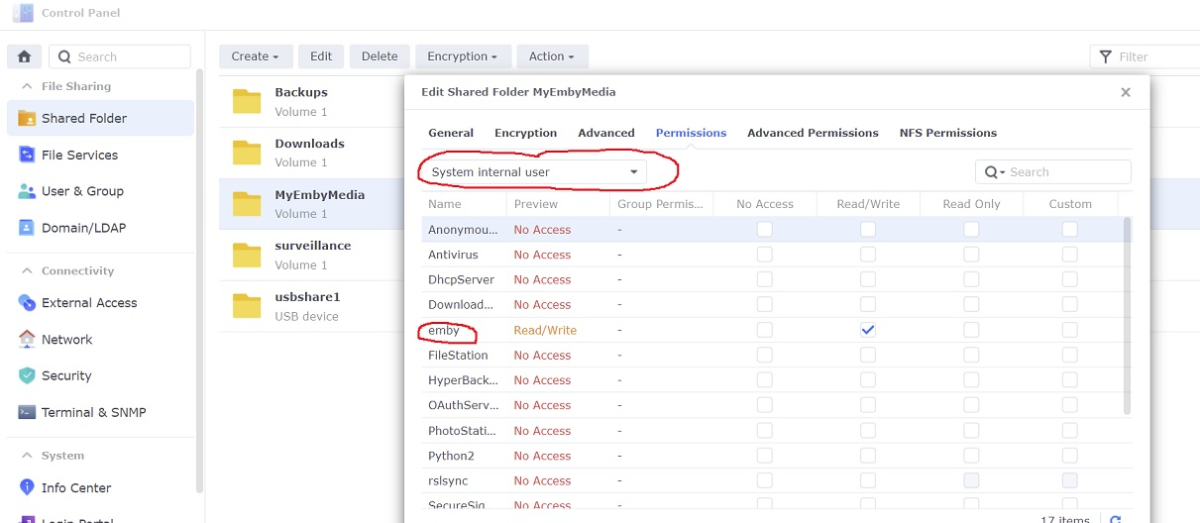
The new Emby userid is now a system internal user. Go to your shared media folder and use the drop down to change permissions
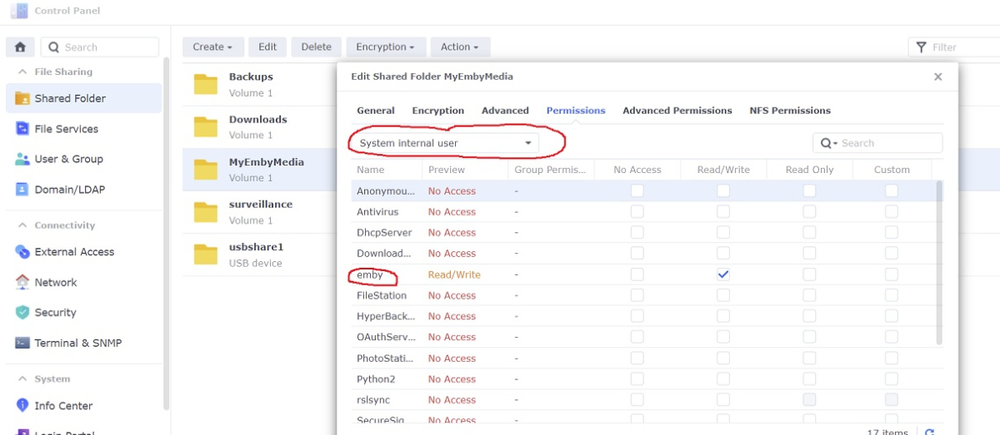 1 point
 -
@cayarsThe other user instructions with the pictures is different and repeats the copy command in the Final step. That probably could be redone to match yours with the pictures. No need to do that twice if done at the right point So, since Mick_K has his media there also it copied everything twice .1 point
-
Try renaming the folder to "The Office (US) (2005)".1 point
-
That is not a good place to have media. My suggestion to you would be to create a shared folder specific for media. On my Synology this is call "Media". Under Media share I have my different libs. So for example: /Media/Movies /Media/TV Shows /Media/Music /Media/Home Videos etc Having you media setup like this also allows use of File Station as well as mounting this share in Windows for easy access to it.1 point
-
Did you give this a go yet?1 point
-
Sorry for delay in replying, I seem to have missed this thread. The Emby Theatre (Store) app and LG app have two Emby logos on app startup. One is a rectangular square (like an Outlook email splash screen) and the other is just the Emby logo with a spinning wheel below it. I think Emby should just keep the latter as two logos at app start up looks odd.1 point
-
Agreed1 point
-
Yes, it was helpful.1 point
-
I checked in my log files, that does indeed appear to be the problem. Never mind I'll try again when the plugin gets an update. Thanks1 point
-
Yep, in PAL 50hz countries, that would then play back fine as TVs intended for use in that territory would be 50hz. 25 frames is doubled to 50, a clean multiple. Colour space is generally accepted in broadcast circles as bt709 for SD now instead of legacy bt470bg (601) before HD days. This should steal a march on quality over Plex as they didn't do proper de-interlace last time I used their app.1 point
-
I would guess your structure will not work as your subs folder has no association with the flat media structure of Vikings. Now if your structure in per movie item folders is would work. D:/drama/Viking (2016)/ Viking (2016).mp4 /subs/Viking (2016).srt Now if you want to maintain your flat structure you would have to have the subs along side the actual media so no subs folder. But have not tested this.1 point
-
This will be improved in emby server 4.7. thanks guys.1 point
-
On the website it is no longer listed as beta, so you need to use the correct one for your DSM version: https://emby.media/download1 point
-
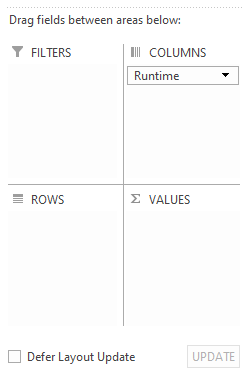
Sorry @rbjtech, this is where you've lost me. PivotCharts/Tables always melt my brain. I don't have the option to do both colums *and* count of, only one or the other (and then the count is obviously of the wrong thing). Any idea what step I'm missing? I've also attached my report as that might be easier than explaining excel! ReportExport.xls
 1 point
 -
Muchas gracias @chef Espero deseoso que Emby agregue dichas características. Saludos...1 point
-
I didn't have it installed already. This run of fingerprinting started about 8 or 9 hours ago and is set at 20 minutes. I'll have to either kill it and start over or I'll have to wait..
 1 point
 -
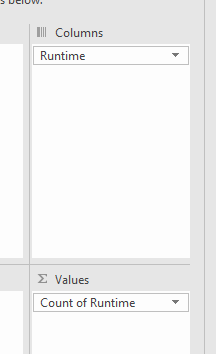
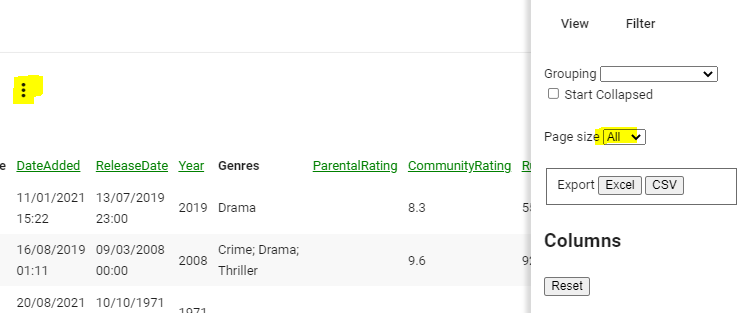
Emby Reports plugin, select Episodes.. Export the data to Excel - you can do all of it, or just select the RunTime .. In Excel - select Runtime column and then create a PivotTable and sum using 'Count', finally select the Pivot output and click on Recommend Graphs to show the graph.
 1 point
 -
Still doing it, just checked this morning and it recorded a few minutes on some and some others worked fine. But, I do notice something The recordings that mess up all use the epg from the stream and the ones that record properly are all using embys epg. I'm going to record only channels using embys epg for the next 3 days and see what happens.1 point
-
Looks brilliant, thanks @cayars!1 point
-
Essentially just run through the first two episodes, then the next two, and so on. 1 and 2, then 3 and 4, then 5 and 6, then 7 and 8, etc. We basically just want to avoid rescanning an episode that was already scanned, in order to save time. So let’s say we compare 1 and 2 together, and we find an intro for those two episodes, we can then move on to 3 and 4.1 point
-
Hi, yes I see the issue. It will be resolved for the next release. In the meantime, try sending a post to that endpoint instead of get.1 point
-
While I much like the Emby server, the Plex client for Apple TV is much better than the Emby one.1 point
-
+1 for custom bitrate and choosing which audio format. I like DD+ for TV. This should apply to music also though. The Shield seems to convert lossless WMA to 128bit AAC. I would prefer mp3 and something a little higher than 128 bits1 point
-
I echo the request. Custom bitrate would be a great feature. Or a convert to dd+1 point
-
Giving this a bump. In my opinion 384 kb/s bitrate is too low for DD 5.1 and needs to be defaulted to 640 kb/s.1 point
-
Exactly! It sounds awful on a decent 5.1 setup. Really hoping to see this added someday.1 point
-
I would also wish some kind of setting for the audio bitrate (or just transcode to 640kbps AC3 if the user didn't select a low bitrate in the client). AC3 isn't a very efficient/good CODEC and ffmpeg isn't very good at encoding AC3. So 384kbps doesn't result in great quality for 5.1 channel sound. Plex transcodes multichannel sound to 640kbps AC3 (at least for LAN bandwidth). Would be great if Emby could also use the highest allowed bitrate.1 point
-
I don't know if this was suggested before or if it even exists somewhere. As the title suggests, I want to import my movie ratings into my Emby instance. IMDB already has a feature available to export your own rating data into a csv, which is great. Importing the csv into a spreadsheet is nice and all but what happens when you introduce a plugin to import your data into your Emby Profile? I'll tell you my idea: Not only Emby will include your rating as part of the movie metadata, but the plugin will give you an option to download metadata of all rated movies. and then give you a filter option to filter your views by movies with existing media in your library or just mere hollow metadata with no media. The plugin will capture the date my rating took place as well, as the IMDB export contains this info as well. The plugin will allow importing data multiple times and will give options to overwrite existing ratings or only importing new ratings. This can be made by linking IMDB IDs and theMovieDB IDs. A plugin like this would be really cool for people who maintained their watch history and want to see the fruit of their labor in beloved Emby. Of course I'm not a seasoned programer, so my contribution stops with these lines unless you want a cheering fan. I'm hoping that the idea finds approval and is picked up by some fabulous developer and put it into action. I'm eager to here the thought of the good folks of this community.1 point