Leaderboard




Popular Content
Showing content with the highest reputation on 08/21/21 in all areas
-
This is still in a proof of concept stage. Once we (well, chef really) can get the plugin reliably detecting intros, we'll have to wait for Luke to add the actual skip functionality in (or expose it to plugins).3 points
-
New version 0.9.9.5 in the starting post: Export API: Support for Emby for Kodi Next Gen addon streaming urls Option to export also real live tv channels Channels: Fixed Mixed Content channel building2 points
-
Feature request for Auto Box Sets & the Emby server to show missing collection items / placeholder images for what we don't have that is part of a collection. http://emby.media/community/index.php?/topic/22732-auto-box-sets-show-missing-collection-items/ Thanks, hoping to see it worked out.1 point
-
I would guess your structure will not work as your subs folder has no association with the flat media structure of Vikings. Now if your structure in per movie item folders is would work. D:/drama/Viking (2016)/ Viking (2016).mp4 /subs/Viking (2016).srt Now if you want to maintain your flat structure you would have to have the subs along side the actual media so no subs folder. But have not tested this.1 point
-
I wish I could help out more but I don't code. But I am more then willing to test and share results or any other simple task I could help with.1 point
-
Hi! I'm very interested in this plugin - thank you so much for creating it! I installed it and it detected the intros but no option to skip comes up when I play a video?1 point
-
If you scroll up, you'll see them listed under Windows Processes. They are the running services you can see on the Services tab.1 point
-
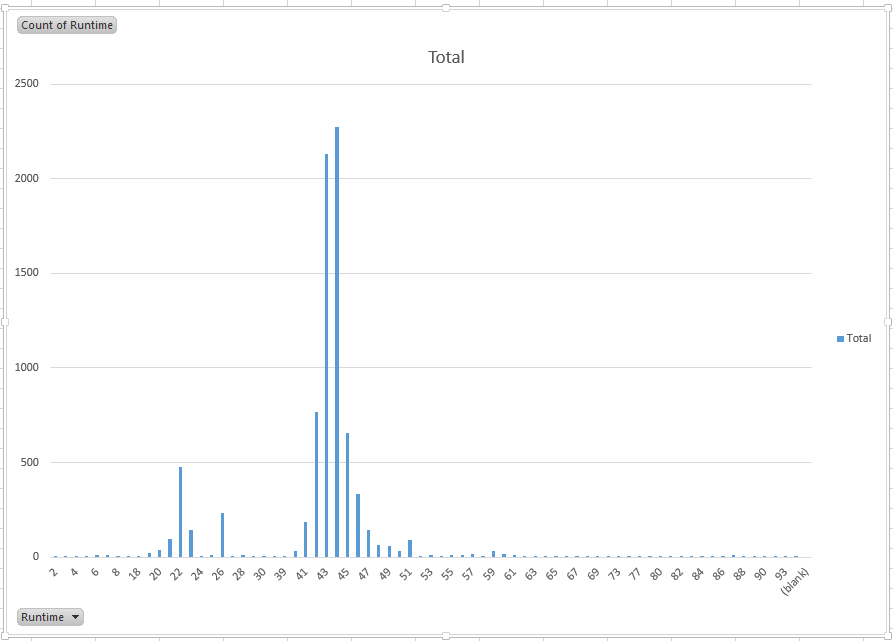
@rbjtech- cheers, I did think it processed a bit too quickly the first time . I have a much more sensible looking chart / table now. Only ~8000 total entries in mine, but here's the stats (report with numbers also attached): Weirdly enough I'm getting some funny runtimes (2 minute episodes?) when I pivot-table this, so guess I've got a few bad entries. EmbyReportsRuntimes.xlsx
 1 point
 -
I believe that it is in the works actually. Let's see what happens, and I'll add the code to handle SRT if we don't see something. I wrote the code, but I don't think it was as good as the other fella working on it.1 point
-
I suppose I should kill the current scan and give this a whirl..1 point
-
Added "AudioFingerprintDurationMatchException" - This gets thrown if the encoding durations don't match between two episodes of the same season in Title Sequence scan. Removed the encoding duration options from UI - Encoding durations are now calculated based the on the average runtime of episodes in the season and are extended based on 14 minute intervals of runtime. (This will probably change to a percentage of the average runtime - that could be configured by the user). Fine tuning/editable table values in the UI (Has Sequence - bool, Start time , End Time values can be tuned and saved to the data base) IntroSkip_v2.rar The changes to the duration calculation in the fingerprinting task may re-encode some seasons again.1 point
-
Hi. The device doesn't support Chinese and it doesn't appear the font we're using supports it either so we'll have to look into this. Thanks.1 point
-
Hi. Edit the options for the series recording and you will find options like record only new episodes and don't record items already in my library. Let us know if this answers your questions.1 point
-
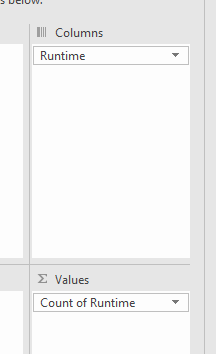
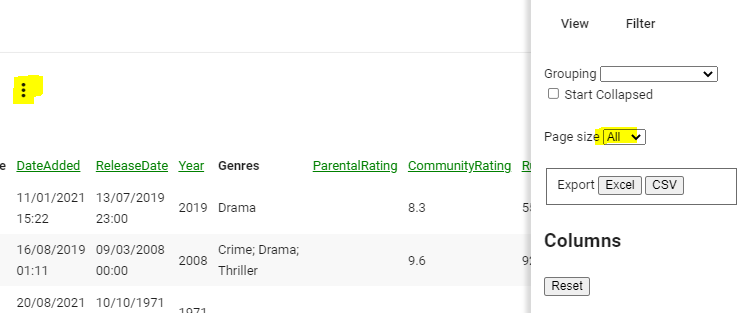
Emby Reports plugin, select Episodes.. Export the data to Excel - you can do all of it, or just select the RunTime .. In Excel - select Runtime column and then create a PivotTable and sum using 'Count', finally select the Pivot output and click on Recommend Graphs to show the graph.
 1 point
 -
@Kdbtech1only need to do the steps for at locked database. But @dachandler7needs to look at the steps for Recovering or Resetting the database as the log show "Corrupt: database disk image is malformed".1 point
-
@dachandler7 I think you may want to go through the same steps as well: https://support.emby.media/support/solutions/articles/44002210894-corrupt-database Please let us know if this helps. Thanks.1 point
-
Yea I think when you uncheck that option about not recording episodes already in the library, then we should just go ahead and record everything .I'll look at making that change.1 point
-
Yes People changes over the years has been chaotic. But \metadata\people\name-providerid is the current method. You could look at the Migration plugin to consolidate, but in the end you may still end up with bloat as emby converts name folders to name-providerid folder as the name folder is not cleaned up.1 point
-
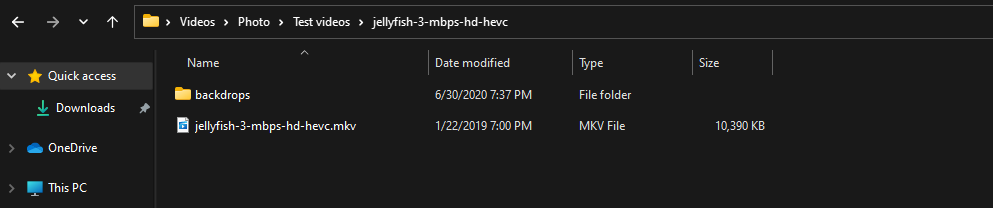
Theme backdrops do not apply to folders, so a test folder with media in it will not pick up "backdrops", if the item is in its own same named folder the "backdrops" will be used. Will not work as the folder does not apply to the item. But if the item is in its own folder it does.

 1 point
 -
Yes that type of option is something we can look at adding. Thanks for the feedback.1 point
-
HI, yes you can use the plugin to migrate between the two.1 point
-
Noticing that Favorite Movies is not being synced. Also you mention the newest build has the following feature: “- add option to shows "manage libraries" in plugin menu” where do we find this exactly? When I bring up the context menu all I see is the usual items including “Emby Options”. Should it be in there? Right now mine is blank.1 point
-
Hey up, if by that you mean Emby for Android TV 1.8.10g, first thing you should try is update to current version (2.0.33 stable, 2.0.38 beta) as you are way behind.1 point
-
HDHR app DOES record AND playback the HEVC streams with the AC-4 audio codec............1 point
-
Took a while but I found some images and put these together so no worries and thanks in advance for any help

 1 point
 -
Hi there, can you please show a screenshot example? Thanks.1 point
-
I made a few of my own, mainly just to change the font.



 1 point
 -
Thanks for the feedback.1 point
-
1 point
-
Server-side options to control this are possible for the future. Thanks for the feedback.1 point
-
@chef, will give it a go and let you know if anything comes up Thanks so much for all your efforts1 point
-
OK, so let's clarify. The fans that I used are NF-F12 industrialPPC-3000 PWM. They are not standard PC fans. The fans that came with the Supermicro chassis are, Nidec V80E12BHA5-57. The air flow of the Noctua fans is 186.7 m³/h The air flow of the Nidec's is 124.02 m³/h (73 CFM). I am using 3 fans and the chassis came with 7. Noctua: 3 x 186.7 = 560.1 Nidec: 7 x 124.02 = 868.14 Of course we expect more air flow when you use more than twice the number of fans. In the original chassis design, there needs to be more air flow and static pressure because not only do the fans need to pull air through the drives, but the original design needed to push air over the passively cooled Xeons in a 2U space (it's a 4U chassis split top and bottom, with the CPUs on top), through the air shroud. So with side vents, the fans have to work much harder to maintain enough static pressure to achieve the necessary air flow through the front drive bays. With what I have done (no passively cooled CPUs), I only need to maintain enough static pressure and air flow for the front drives. My CPU has it's own fan. I'm not using a server mb or CPU. (100 / 868.14) x 560.1 = 64.51% So, using the 3 Noctua fans, I only lose 35.49% air flow. I sealed the side vents to increase the negative air pressure potential. This means that the higher air pressure potential of the Nidec fans is no longer required. Using a standard 120mm PC fan would not provide as much static pressure as the Noctua fans I have chosen to use. I also wanted to make sure that the back drive bays would get decent air flow pushed toward them. So I added two 80mm fans (these always run at 100%) behind the 120mm fans, to direct more air toward the back drive bays. These two fans also assist the 120mm fans in creating a little more negative air pressure for the front drives. The 80mm fan's air flow is 55.5 m³/h (2 x 55.5) + (3 x 186.7) = 671.1 (100 / 868.14) x 671.1 = 77.3% So I'm actually only losing 22.7% air flow, with all fans running at 100% In the final solution, it appears to work much better. Most of the time, the 120mm fans run at 62 - 68%, which keeps the drives between 35 - 41C. We've been having 90F (32C) weather, and I don't have air conditioning. To my delight, the fans didn't get above 80% and the drive temps were mid 40s. This is due to the fan curve I made. I could make it more aggressive, but it doesn't appear to be necessary at this point. The S.M.A.R.T. on the drives hasn't reported any warnings. It's been running for a long time, and is stable and quiet.1 point
-
Ah yes @vdatanet discovered that as well. Thanks for the feedback !1 point
-
Just figured out what the issue is. With the latest updates to iOS, you need to make sure the Local Network is selected under Settings on the iOS device.1 point
-
Feature Request: A Global server broadcast message to all active clients: 1. Triggered on server reboot request (server restarting for updates.. will be back up shortly) 2. Manual global broadcast (server going down for maintenance.. will be back in 30min) Automatic notice to be optional setting.1 point